

2021.3:My Oh My
Home Assistant Core 2021.3 来了!还有让人眼前一亮的 My Home Assistant!
我对这次发布超级兴奋!整整 13 个全新集成!而 Z-Wave JS 也在以近乎疯狂的速度持续前进;感谢所有一起投入其中的人!🎉
对我来说,这次发布的重点有两个:My Home Assistant,以及一系列围绕服务调用打造的全新 UI 功能。它们具体是什么,下面会详细介绍,但两者都有一个共同点:让事情变得更简单。
那么,尽情享受这次发布吧!
../Frenck
- My Home Assistant
- 服务调用的新 UI
- 建议区域
- 风扇 speeds: 100%
- Z-Wave JS 更新
- Flexible & variable automation 触发器
- Supervisor 面板中的翻译
- 其他值得注意的变化
- 新集成
- 新平台
- 现已支持通过 UI 设置的集成
- 发布 2021.3.1 - March 5
- 发布 2021.3.2 - March 5
- 发布 2021.3.3 - March 8
- 发布 2021.3.4 - March 12
- If you need help...
- Backward-incompatible changes
- Farewell to the following
- All changes
My Home Assistant
今天,我们向你介绍:
为了更好地帮助你,我们经常希望把你直接带到自己 Home Assistant 实例中的某个特定页面。但每个 Home Assistant 实例的地址都不同。你的地址可能是 http://homeassistant.local:8123,也可能完全不是这样。
My Home Assistant 让文档、论坛、聊天、博客,或者任何其他网站,都能在不知道你实例 URL 的前提下,直接链接到你 Home Assistant 实例中的特定页面。
它最棒的地方在于:所有数据都保存在你本地浏览器里,而 My Home Assistant 只会把你重定向到能显示实例信息或帮助你开始某个操作的页面。
通过 My Home Assistant 打开的链接,永远不会主动修改你的实例。
长话短说!借助它,我们可以做很多非常有帮助的事情。比如,下面这些按钮就能把你直接带到自己实例中的对应页面:
而且我们还能为很多界面创建按钮或链接,甚至可以帮助你开始添加集成的配置、导入蓝图、跳转到插件页面等等,能做的事情还有很多!
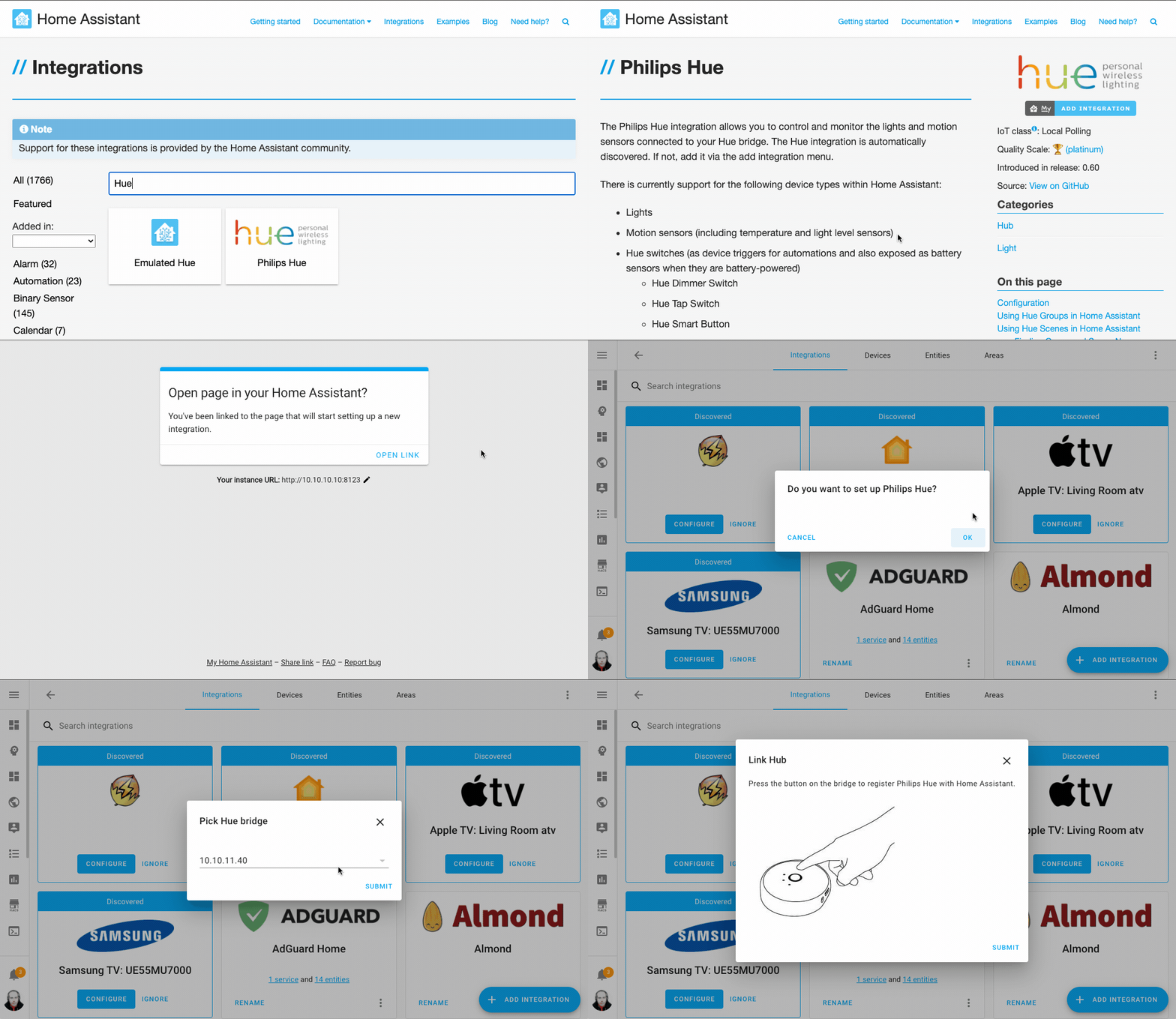 Setting up a new 集成 on your instance, from the 文档 using My Home Assistant.
此外,我们还加入了一个链接/徽章生成器,这样你就可以自己创建链接,例如把它加到 Blueprint Exchange 中的某个蓝图里。
https://my.home-assistant.io/create-link/
最后,我们的移动应用也即将支持 My Home Assistant!Android 预计会在今天通过更新提供支持,iOS 版本也会很快跟进。
服务调用的新 UI
这次发布为服务调用带来了全新的用户界面!
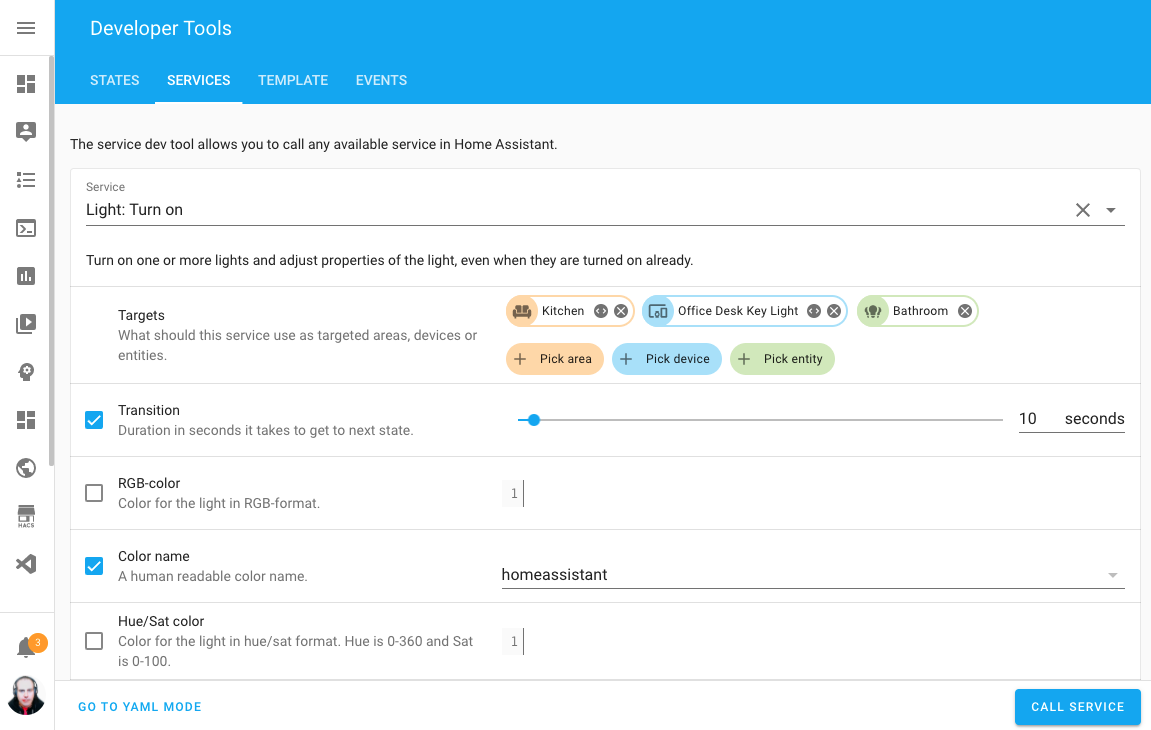 Screenshot of the new UI in the 服务 tab of the 开发者工具.
这个界面看起来也许会有些眼熟,因为它使用了和前不久推出的蓝图相同的 UI 组件。 这套崭新的界面现在已经出现在多个位置:
目前还不是所有服务调用都已经切换到这个漂亮的新界面,因为各个集成的服务描述还需要逐步适配。 不过,常用服务已经都完成迁移了。如果你还是喜欢写 YAML?没问题,经典的 YAML 模式也依然保留!
建议区域
区域在 Home Assistant 中正变得越来越有用,而这次发布又进一步推动了它的实际应用!
最近,我们不仅可以把设备分配到区域,也可以把实体分配到区域。而现在,集成甚至可以主动建议区域了!
这意味着,如果某个集成知道设备所在的区域、房间或位置,而该设备当前还没有归属区域, 它就可以主动给出建议。比如 Hue 集成现在就能根据设备所在的 Hue 分组来建议区域。
从这次发布开始,以下集成已经支持建议区域:
- Bond
- Hue
- Hunter Douglas PowerView
- Lutron Caséta
- Netatmo
- Nexia
- NuHeat
- Roku
- Sonos
- Tado
- Universal 设备 ISY994
风扇 speeds: 100%
风扇模型迎来了一次全面升级!现在风扇使用百分比速度,而不再是原来的 low、mid、high、off。这让 Home Assistant 能更好地兼容更多风扇品牌,以及 HomeKit 之类的第三方助手。
不用担心,一切都做了向后兼容处理。
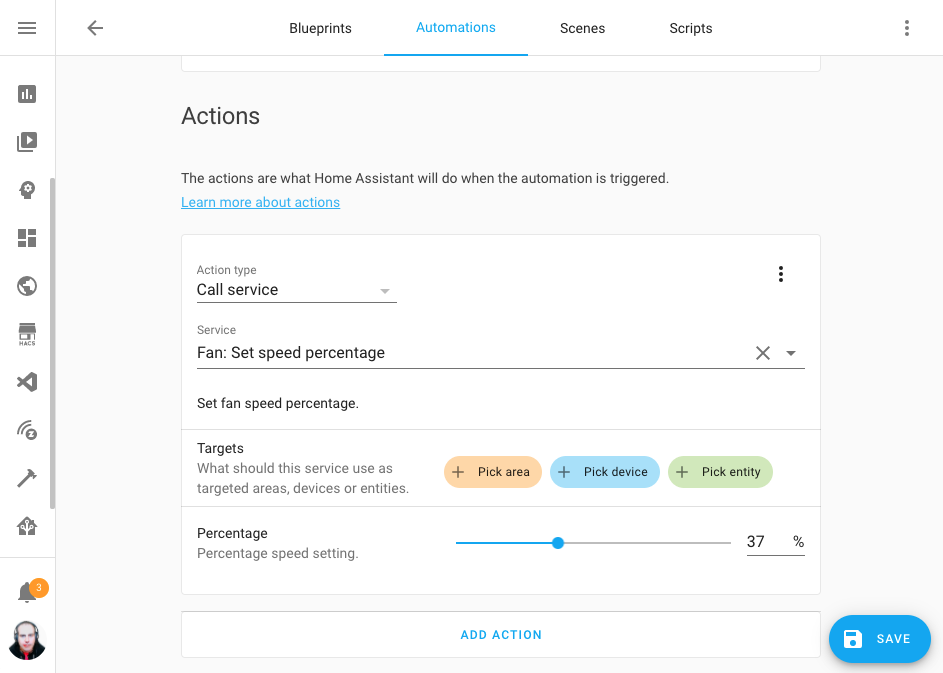 Screenshot of 自动化 editor, showing the % 风扇 speeds!
你有没有注意到上面的截图里,自动化编辑器现在更宽了? 我们调整了布局,让你在创建自动化时能拥有更大的操作空间。
Z-Wave JS 更新
这次发布中,Z-Wave JS 团队同样非常忙碌。新增了好几个新功能,也修复了许多 Bug。下面是简要总结。
我们在 Z-Wave JS 服务器中引入了协议架构版本机制,让旧客户端也能连接并与较新的服务器通信,从而避免未来出现兼容性问题!
Home Assistant 核心 2021.3.0 will require Z-Wave JS server 版本 1.1.0. If you're using the official Home Assistant add-on, the 集成 will automatically 更新 the add-on if an older add-on and server 版本 is encountered. Magic! If you're not using the Home Assistant add-on to run the server you will need to 更新 the server before updating Home Assistant 核心.
You can now automate and change the 配置 设置 of your 设备 with
the zwave_js.set_config_parameter
服务 and create 自动化 using the new zwave_js.refresh_value
服务, to 更新 a 设备 that doesn't automatically refresh itself.
But there is more!
- Garage doors (barrier) and similar 遮盖 can now be controlled.
- Some heating valves and similar 设备 that can be set to multiple different
values will now show up as
number实体.
Flexible & variable 自动化 触发器
现在,我们已经支持在自动化触发器中使用变量和(受限的)模板了!比如在为基于 MQTT 的自动化编写蓝图时,这会非常有用。
正如前面简要提到的,触发器模板和变量可用的模板语法会更受限制;更多信息请参阅 受限模板 文档。
Supervisor 面板中的翻译
除非你住在北欧,不然这个标题大概看不太懂。它是挪威语,意思是“Supervisor 面板中的翻译”。没错!我们现在已经为 Supervisor 面板加入了翻译支持。🎉
如果你想帮助把这些内容翻译成自己的母语,欢迎加入前端团队在 Localize 上的翻译工作。
但我们并没有止步于此!现在,插件也可以为前端中显示的配置选项和网络描述提供 翻译文件。
这还不够?你还想要更多?那就继续!
- The communication between the 前端 and the 后端 now relies on WebSockets, which allows the Supervisor to notify the 前端 about changes.
- For add-on authors, you can now use YAML instead of JSON for your add-ons 配置 files.
- New 更新 dialog that will ask you to take a snapshot before you 升级 核心/add-ons.
- Better hardware support to 遮盖 more 设备.
- Passwords and secrets in add-on configurations are checked against known breaches with https://haveibeenpwned.com/
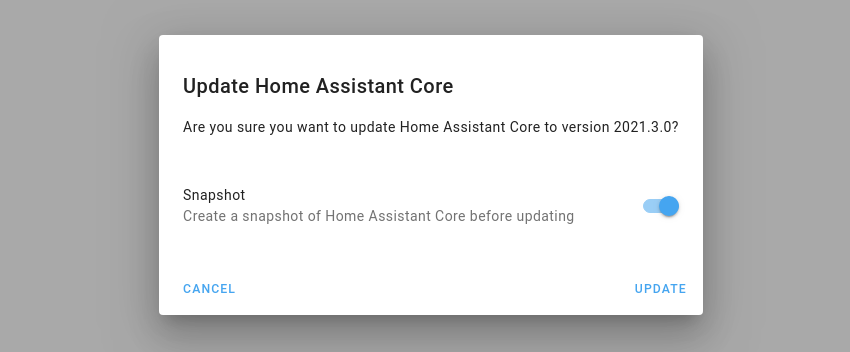 Screenshot of the new 更新 dialog that asks for creating a snapshot.
其他值得注意的变化
这次发布还有更多精彩内容;下面是一些其他值得关注的变化:
- Shelly now supports battery-operated 设备, thanks to @thecode!
- You can now use the color
homeassistantas acolor_namein your 灯光 服务 calls, just because we can 😎 - @emontnemery, added support for using
aliasto virtually any step in 脚本/自动化. This is really helpful when debugging and documents your sequences as well, as it annotates each step. - @emontnemery didn't stop there, he also added support for enabling/disabling 集成 配置 entries! So you can, e.g., temporarily disable a whole 集成.
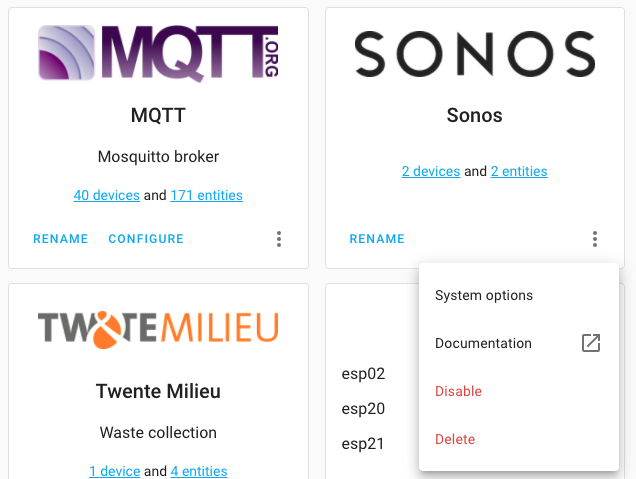 Screenshot of disabling an 集成 entry.
- Thanks to @Nixon506E, you can now set a transition time when activate Hue 场景.
- In the tab of the 开发者工具, there is now a small copy to clipboard button with each 实体. Thanks, @KTibow!
- @postlund added support for repeat, shuffle and volume stepping to the media player 集成 of the Apple TV 集成.
- @larena1 reduced the amount of rendering history charts cause, so that will speed things up! Thanks!
- We now have a select selector! Great for adding dropdown choices to Blueprints, thanks @EPMatt!
- @raman325 extended the Universal Media Player with a lot of new capabilities.
- When adding a new 集成, the UI will now show discovered 设备 for that 集成 as well! Thanks, @bramkragten!
- We updated CodeMirror to the latest 版本, which provided the YAML code editors in our UI. It should now be better, faster and has improved support for mobile 设备.
新集成
我们欢迎以下新集成加入这次发布:
- AEMET OpenData, added by @Noltari
- ClimaCell, added by @raman325
- FAA Delays, added by @ntilley905
- Honeywell Lyric, added by @timmo001
- KMTronic, added by @dgomes
- Litter-Robot, added by @natekspencer
- Mazda Connected 服务, added by @bdr99
- Mullvad VPN, added by @meichthys
- My Home Assistant, add by @bramkragten
- Rituals Perfume Genie, added by @milanmeu
- SmartTub, added by @mdz
- Subaru, adde by @G-Two
新平台
以下集成新增了平台支持:
- Aurora has now support for 传感器, added by @djtimca
- KNX added support for 风扇, added by @crazyfx1
- Templates can now be used to create weather 实体, added by @dgomes
- VeSync now support their dimmer 开关, added by @decompil3d
- WiLight support 遮盖 now, added by @leofig-rj
现已支持通过 UI 设置的集成
以下集成现已可通过 Home Assistant UI 进行设置:
- ASUSWRT, done by @ollo69
- Keenetic NDMS2 Routers, done by @foxel
- LiteJet, done by @joncar
- MySensors, done by @functionpointer
- Nuki, done by @pree
- Philips TV, done by @elupus
- Xiaomi Miio (partially), done by @starkillerOG
发布 2021.3.1 - March 5
- Fix Xiaomi Miio 设置 of 开关 实体 for lumi.acpartner.v3 (@starkillerOG - #47345) (xiaomi_miio docs)
- Make zwave_js add-on manager more flexible (@MartinHjelmare - #47356) (zwave_js docs)
- Catch ConditionError in generic_thermostat 温控 (@amelchio - #47359) (generic_thermostat docs)
- Fix zwave_js manual reconfiguration of add-on managed entry (@MartinHjelmare - #47364) (zwave_js docs)
- Don't raise on known non-matching 状态 in numeric 状态 条件 (@frenck - #47378)
- Fix access of missing zwave_js 温控 unit value (@MartinHjelmare - #47380) (zwave_js docs)
- 更新 前端 to 20210302.4 (@bramkragten - #47383) (前端 docs)
- Revert "Speed-up wemo discovery (#46821)" (@esev - #47392) (wemo docs)
- Fix RFLink TCP KeepAlive 错误 日志 (@cpainchaud - #47395) (rflink docs)
- Map silent as a preset mode for 风扇 backcompat (@bdraco - #47396) (风扇 docs)
- Fix measurement unit (Closes: #47390) (@syssi - #47398) (xiaomi_miio docs)
- Fix Climacell timezone issue with daily forecasts (@raman325 - #47402) (climacell docs)
- Fix AirVisual exception when config entry contains old 集成 type (@bachya - #47405) (airvisual docs)
- Don't convert Climacell forecast temperatures to celsius because platform does it automatically (@raman325 - #47406) (climacell docs)
- Bump zwave-js-server-python to 0.21.0 (@raman325 - #47408) (zwave_js docs)
- Fix older Roborock models (@frenck - #47412) (xiaomi_miio docs)
- Only create snapshot if add-on 更新 will be done (@MartinHjelmare - #47424) (zwave_js docs)
发布 2021.3.2 - March 5
- 更新 pyotgw to 1.1b1 (@mvn23 - #47446) (opentherm_gw docs)
- Fix issue at Netatmo startup (@cgtobi - #47452) (netatmo docs)
- Fix Hue 场景 overriding Hue default transition times (@frenck - #47454) (hue docs)
- Bump 版本 with fix for v1 (@elupus - #47458) (philips_js docs)
- 更新 前端 to 20210302.5 (@bramkragten - #47462) (前端 docs)
- Use conn_made callback in MySensors (@functionpointer - #47463) (mysensors docs)
- Bump zwave-js-server-python to 0.21.1 (@raman325 - #47464) (zwave_js docs)
- Raise 错误 instead of crashing when template passed to call 服务 target (@balloob - #47467) (websocket_api docs)
- 更新 zwave_js.refresh_value 服务 description (@raman325 - #47469) (zwave_js docs)
- Bump amcrest package 版本 to 1.7.1 (@pnbruckner - #47483) (amcrest docs)
发布 2021.3.3 - March 8
- Adjust litterrobot tests and code to match guidelines (@natekspencer - #47060) (litterrobot docs)
- Bump HAP-python to 3.4.0 (@bdraco - #47476) (homekit docs)
- Fix Sonos polling mode (@amelchio - #47498) (sonos docs)
- Fix mysensors notify platform (@MartinHjelmare - #47517) (mysensors docs)
- Fix AsusWRT wrong api call (@ollo69 - #47522) (asuswrt docs)
- Bump pymysensors to 0.21.0 (@MartinHjelmare - #47530) (mysensors docs)
- Fix mysensors 设备 tracker (@MartinHjelmare - #47536) (mysensors docs)
- Fix mysensors unload clean up (@MartinHjelmare - #47541) (mysensors docs)
- Correct weather 实体 forecast time (@dgomes - #47565)
- Allow running and restarting with both ozw and zwave active (@ronytomen - #47566) (ozw docs) (zwave docs)
- Add fallback zwave_js 实体 name using node ID (@raman325 - #47582) (zwave_js docs)
- Ensure bond 设备 recover when WiFi disconnects and reconnects (@bdraco - #47591) (bond docs)
- 更新 前端 to 20210302.6 (@bramkragten - #47592) (前端 docs)
- Fix 打开 without speed in homekit controller (@bdraco - #47597) (homekit_controller docs)
- Ensure template 风扇 value_template always determines on 状态 (@bdraco - #47598) (template docs)
- Fix insteon 风扇 speeds (@bdraco - #47603) (insteon docs)
- Fix turning off 场景 in homekit (@bdraco - #47604) (homekit docs)
- Fix Shelly logbook exception when missing COAP (@thecode - #47620) (shelly docs)
- 更新 zwave_js supported features list to be static (@raman325 - #47623) (zwave_js docs)
发布 2021.3.4 - March 12
- Write SimpliSafe 报警 control 面板 状态 after arming/disarming (@bachya - #47649) (simplisafe docs)
- 遮盖 Tilt Position Bugfix (@mtl010957 - #47682) (MQTT docs)
- Fix zwave_js target_temp_low (@firstof9 - #47762) (zwave_js docs)
- Adjust insteon 风扇 speed range to valid upper bound (@bdraco - #47765) (insteon docs)
- Bump plexapi to 4.4.1 (@jjlawren - #47766) (plex docs)
- Ensure homekit reset accessory 服务 can target any 实体 (@bdraco - #47787) (homekit docs)
- Fix Netatmo event handling (@cgtobi - #47792) (netatmo docs)
If you need help...
如果你需要帮助,欢迎前往我们非常活跃的 论坛,或加入我们的 Discord 聊天。
如果这次发布带来了问题,请到我们的 问题追踪器 提交反馈,并确保完整填写 issue 模板中的所有字段。
Backward-incompatible changes
Below is a listing of the breaking change for this 发布, per subject or 集成. Click on one of those to read more about the breaking change for that specific item.
Custom 集成 now require a version key in their manifest file, this
also means that all custom 集成 now require a manifest file.
If you are using a legacy custom 集成 like custom_components/awesome.py
this now needs to move to custom_components/awesome/__init__.py so you can
add custom_components/awesome/manifest.json to it.
更多信息 about 集成, manifests have a look here: https://开发者.home-assistant.io/docs/creating_integration_manifest
For now, this will create a 警告 on startup. But this will eventually be blocked from loading if it's missing a 版本 in the manifest.
If you see these 警告, please report the issue with the author of that custom 集成.
The 风扇 实体 model has changed to split named speeds into percentages in the range from 0 (off)-100 and preset modes.
Why change?
This change allowed us to expand the number of supported speeds to accommodate additional 风扇 models in Home Assistant.
We had 3 风扇 speeds and that worked great as long as the 风扇 had no more than 3 speeds.
Over time we received a number of requests to add 风扇 with 4, 5, or even more speeds and preset modes. This put us in the difficult position of having to reject this support because the underlying 风扇 model didn’t support it.
Percentages were chosen because they can represent up to 100 speeds which should accommodate all 风扇. Additionally, it’s a lot easier to ask your voice assistant to set the 风扇 to 20% then remember that medium-low is actually low-medium or have to learn and remember how to say the speeds for every 风扇 model you want to control.
What to change?
Calls in 自动化 and 脚本 to fan.set_speed should be replaced:
- Calls that set a speed should use
fan.set_percentage. - Calls that set a preset mode should use
fan.set_preset_mode.
The following speeds existed in 核心 集成 and will now be automatically
identified as preset modes: auto, smart, interval, idle, and favorite.
Both of the new calls are backward compatible.
Calls in 自动化 and 脚本 to fan.turn_on that use the speed 属性
should be switched to use the percentage or preset_mode 属性 once the
underlying 集成 has been updated to support it.
All 核心 风扇 have been updated to ensure that calls to the fan.turn_on
服务 map percentage or preset_mode to speed for backwards compatibility.
Template 风扇 have been updated for the new 实体 model that uses a percentage for the speed.
The following 配置 options have been deprecated: speed_template, set_speed, and speeds.
The replacement options are percentage_template and set_percentage. There
is no replacement for speeds since the percentage is always from 1-100 along
with 0 for off.
(@bdraco - #45478) (template docs)
Hyperion has fully transitioned to 配置 via UI. YAML 配置 has been removed. Existing YAML 配置 has already been imported automatically in the previous releases and can now safely be removed from your 配置 files.
(@dermotduffy - #45690) (hyperion docs)
The Nuki 集成 is now configurable via the UI. The YAML 配置 is now deprecated.
You existing YAML 配置 will be automatically imported on 升级 and can be safely removed from your YAML 配置 after upgrading.
For CalDAV custom calendars, now only matching events are shown in the calendar 前端, instead of all events for this calendar.
Although, this is technically a bugfix, if you didn't notice it before, it might now surprise you.
(@inytar - #45701) (caldav docs)
All CPU-related 传感器 were named with "Load" which is not correct because there is a difference between CPU load average and CPU utilization.
Units have been corrected.
Any 自动化 that consumes this data may need to be updated.
If discovery is used the 实体 will get a new entity_id derived from the
hostname of the soundbar. This means the entity_id can not be changed anymore
since there is currently no way to get a unique_id from the 设备.
(@bernimoses - #42044) (lg_soundbar docs)
MySensors has fully transitioned to 配置 via UI. Existing YAML 配置 is automatically migrated and imported, and can now safely be removed from your 配置 files after upgrading.
No changes to YAML are applied after the migration has happened. If you need to change anything, use the 前端.
(@functionpointer - #45421) (mysensors docs)
MQTT 遮盖 value_template is deprecated to use for extracting position,
support will be removed in Home Assistant 核心 2021.6.
Instead of using value_template, position_template should be used.
MQTT 遮盖 tilt_invert_state is deprecated, instead tilt_min and tilt_max
should be used. Support for tilt_invert_state will be removed in Home
Assistant 核心 2021.6.
(@thecode - #46059) (MQTT docs)
Removes the internal stream components record 服务.
This 服务 is meant to be used internally only by camera so this is not
expected to be a problem in practice as you should be using camera.record
instead.
(@allenporter - #45431) (摄像头 docs) (generic docs) (nest docs) (stream docs)
The HTTP base_url URL setting was marked deprecated in Home Assistant 核心
0.110 and replaced by the new internal & external URL 设置 that are
available in the UI.
This 发布 removes the fallback logic to the old base_url setting. If you
still have an base_url configured in the HTTP section of your YAML
配置, please remove it.
The MQTT 灯光 with template schema will now send a float instead of an int
with the transition key.
灯光 that require an int instead of a float can 恢复 the original
functionality by using the following in the template for specifying the
transition:
(@kangaroomadman - #46385) (MQTT docs)
配置 via YAML is now deprecated and you existing YAML 配置 will be automatically imported into the UI on first run. If your TV is not running on first start, you will need to complete the 配置 from 集成 screen once your TV us online.
The previous turn_on_action will not be imported, and must be re-创建 as a
设备 触发器 自动化.
(@elupus - #45784) (philips_js docs)
The legacy 设备 tracker DeviceScanner was replaced with the new 设备
tracker implementation ScannerEntity.
You should remove references to platform asuswrt in device_tracker section
in your YAML 配置 and 更新 person 设备 tracker with the new 实体.
The YAML key dnsmasq, interface and require_ip now are managed as
集成 options. The values present in YAML are imported in the options
the first time that the 集成 is loaded.
All 传感器 are initially 创建 as disabled and can be enabled from ASUSWRT 设备 配置 instead of using YAML 配置.
(@ollo69 - #46468) (asuswrt docs)
Keenetic NDMS2 Routers are now configured and managed from the UI. Existing YAML 配置 will be automatically imported and can be safely removed after upgrading.
The upgraded platform also adds:
- 实体 and 设备 manageable from UI.
- 二元sensor for router connection status.
- Support for monitoring multiple interfaces.
(@foxel - #38353) (keenetic_ndms2 docs)
If an 自动化 触发器 template already renders as true on Home Assistant
核心 startup, it will no longer 触发器 at startup. This bug fix prevents
unintended 触发器 of 自动化 as startup, but might cause a different
behavior than before.
(@amelchio - #46423) (template docs)
脚本 and 自动化 are now more careful about reporting problems with
条件. For example, a state 条件 that references an unavailable
实体 will 日志 a message 警告 about the problem. Depending on the
circumstances when such 错误 happen, the flow of the 自动化
(i.e., stop/continue) might end up different from before.
(@amelchio - #46838) (自动化 docs) (homeassistant docs)
Xiaomi Miio 开关, and 吸尘器 platforms should now be set up using the UI, please remove the old YAML 配置 from your 配置 file.
They are now automatically discovered, if not, click 配置 in the 侧边栏, then click 集成 and then click the + icon in the lower right and find Xiaomi Miio.
Or click:
Select the option “Connect to a Xiaomi Miio 设备” and click submit, follow the 设置 instructions.
(@starkillerOG - #46179 #46669) (xiaomi_miio docs)
HomeKit pairings and accessory IDs from Home Assistant 核心 版本 0.109 and earlier are no longer migrated on 升级.
Users upgrading directly to 2021.3 from 0.109 and older should 升级 to 2021.2 first if they wish to preserve HomeKit 配置 and avoid re-pairing the bridge.
This change does not affect upgrades from 0.110 and later.
(@bdraco - #46616) (homekit docs)
Requests for closing/opening 遮盖 fully from Google Assistant will now use
close/open 服务 instead of set_postion 服务. This a a revert of an
unexpected breaking change.
(@elupus - #46602) (google_assistant docs)
Habitica has fully transitioned to 配置 via UI. Existing YAML 配置 is automatically migrated and imported, and can now safely be removed from your 配置 files after upgrading.
(@leikoilja - #38910) (habitica docs)
SSDP searches now binds to 0.0.0.0 instead of each interface separately.
Everything was still discovered in testing on a server with multiple interfaces.
(@bdraco - #46554) (ssdp docs)
Minimum required zwave-js-server 版本 is now 1.1.0. You need to run this server 版本 at mimimum for the 集成 to work.
(@marcelveldt - #46983) (zwave_js docs)
Support for bond 设备 with up and down 灯光 has been added. Previously, if the 设备 had two 灯光, only a single 灯光 实体 would be 创建 that would not function properly. The functional 灯光 实体 will need to be manually removed.
(@bdraco - #46233) (bond docs)
Weather 实体: Renamed expose_sensors to create_sensors to prevent
confusion with the KNX expose_sensor function.
To support user equipment that requires the entry of a usercode in addition to username and password, now all users must 配置 a usercode.
This can be done by updating the 集成 in the User Interface via 配置 > integrations.
The use of YAML 配置 is no longer supported.
(@austinmroczek - #39199) (totalconnect docs)
Polling interval of 15 seconds causes high load on Tado servers and does not provide enough value to warrant it. Tado plans to introduce a rate limit to prevent such misuse of the API, therefore the polling interval needs to be increased to make sure the 集成 works well in the future.
(@macrosak - #46915) (tado docs)
LiteJet is now configured via the UI. Existing YAML configurations will automatically be imported and can be removed after completing the 升级.
LiteJet's include_switches YAML option has been removed. 开关 can be
enabled via the 集成's 实体 list in the UI.
LiteJet's exclude_names YAML option has been removed. Undesired 实体 can
be disabled via the 集成's 实体 list in the UI.
(@joncar - #44409) (litejet docs)
The nest FAN_ON mode now sets the 设备 timer to use the max duration of
12 hours, rather than the default of 15 minutes. If you would like the 风扇 to
关闭 sooner may use an 自动化 with timer to set FAN_OFF sooner.
(@allenporter - #46489) (nest docs)
The methods of storing secrets in credstash and keyring have been removed.
They have been deprecated and a 警告 has been printed since
Home Assistant 核心 2020.12.
Hue groups are now disabled by default because they do not have a unique ID. Existing configurations that have previously saved Hue options are not affected.
To enable Hue groups:
- Browse to your Home Assistant instance
- In the 侧边栏 click on
- From the 配置 menu select
- Find the entry for the Hue Bridge
- Select Options and change the setting
Farewell to the following
The following 集成 are no longer available as of this 发布:
- CoinMarketCap has been removed, the used API has been out of 服务 for a long time already. (@frenck - #46615)
- Crime Reports has been removed, as the API is no longer available. (@frenck - #46312)
- Nuimo was in a non working 状态 for a long time now. (@rngtng - #45600)
- Synology has been removed, the Synology DSM 集成 provides a full replacement. (@thecode - #46482)
- xFinity Was previously marked deprecated. It relies on web scraping to function, which is no longer allowed. (@thecode - #46484)
All changes
- Bump 版本 to 2021.3.0dev0 (@frenck - #45617)
- Clean tcp tests (@oxygen0211 - #41673) (tcp docs)
- Separate 风扇 speeds into percentages and presets modes (@bdraco - #45407) (风扇 docs) (breaking-change)
- 更新 ozw to use new 风扇 实体 model (@bdraco - #45577) (ozw docs)
- 更新 lutron_caseta manufacturer string (@bdraco - #45637) (lutron_caseta docs)
- 更新 wemo to use new 风扇 实体 model (@bdraco - #45582) (wemo docs)
- 更新 smartthings to use new 风扇 实体 model (@bdraco - #45592) (smartthings docs)
- 更新 zwave_js to use new 风扇 实体 model (@bdraco - #45543) (zwave_js docs)
- 更新 bond to use new 风扇 实体 model (@bdraco - #45534) (bond docs)
- 更新 isy994 to use new 风扇 实体 model (@bdraco - #45536) (isy994 docs)
- 更新 zwave to use new 风扇 实体 model (@bdraco - #45541) (zwave docs)
- Add support for percentage speeds and preset modes to template 风扇 (@bdraco - #45478) (template docs) (breaking-change)
- 更新 homekit_controller to use new 风扇 实体 model (@bdraco - #45547) (homekit_controller docs)
- Support blocking trusted network from new ip (@elupus - #44630) (auth docs) (http docs) (websocket_api docs)
- 升级 beautifulsoup4 to 4.9.3 (@fabaff - #45619) (scrape docs)
- 更新 homekit to use new 风扇 实体 model (@bdraco - #45549) (homekit docs)
- Bump gios library (@bieniu - #45639) (gios docs)
- 更新 lutron_caseta to use new 风扇 实体 model (@bdraco - #45540) (lutron_caseta docs)
- Unregister webhook if it can't be established successfully (@cgtobi - #42791) (netatmo docs)
- 更新 vesync to use new 风扇 实体 model (@bdraco - #45585) (vesync docs)
- Add first set of tests to devolo Home Control 集成 (@Shutgun - #42527) (devolo_home_control docs)
- 更新 comfoconnect to use new 风扇 实体 model (@bdraco - #45593) (comfoconnect docs)
- 更新 esphome to use new 风扇 实体 model (@bdraco - #45590) (esphome docs)
- Add reauthentication flow to fritzbox 集成 (@jloehr - #45587) (fritzbox docs)
- Replace strange "dict logic" in AirVisual pollutant level 传感器 (2 of 2) (@bachya - #44903) (airvisual docs)
- Add last_lost_timestamp 属性 to Tile (@bachya - #45681) (tile docs)
- Use new fixtures in devolo Home Control tests (@Shutgun - #45669) (devolo_home_control docs)
- Add vicare heat pump 传感器 (@crazyfx1 - #41413) (vicare docs)
- Stop Tile 设置 on invalid auth (@bachya - #45683) (tile docs)
- Remove YAML support from Hyperion 集成 (@dermotduffy - #45690) (hyperion docs) (breaking-change)
- Fix formatting IntEnum as hex in 3.8.x (@teharris1 - #45686) (insteon docs)
- 更新 bootstrap 脚本 (@balloob - #45692)
- Use pure rgb and allow to set only brightness for fibaro (@aizerin - #45673) (fibaro docs)
- Refactoring upnp component (@StevenLooman - #43646) (upnp docs)
- Bump crpytography to 3.3.1 (@balloob - #45691)
- Add config flow for nuki (@pree - #45664) (nuki docs) (breaking-change)
- Address late review comments for upnp (@StevenLooman - #45696) (upnp docs)
- Add override duration for genius hub 开关 (@GeoffAtHome - #45558) (geniushub docs)
- Only show matching caldav events in calendar (@inytar - #45701) (caldav docs) (breaking-change)
- Add patch method to rest 开关 component (@o-l-o - #45663) (rest docs)
- Improve HomeKit Accessory Mode UX (@bdraco - #45402) (homekit docs)
- Updates to dev 容器 (@balloob - #45706)
- Use a fully mocked credential (@elupus - #45707)
- Allow new UniFi flows to 更新 existing entries if host and site match (@Kane610 - #45668) (unifi docs)
- Add unit of measurement and icon for sleep score (@KTibow - #45705) (withings docs)
- During tests we can run with lowest rounds (@elupus - #45710)
- Added Romanian voice to Google Cloud TTS (@cristian-vescan - #45704) (google_cloud docs)
- Add reboot_gateway 服务 to Velux (@pawlizio - #43198) (velux docs)
- Fix ozw init tests (@MartinHjelmare - #45718) (ozw docs)
- Set default position value for 遮盖 动作 (@spacegaier - #45670) (遮盖 docs)
- Remove ggravlingen from codeowners (@ggravlingen - #45723)
- Advanced testing for Nuki config flow (@pree - #45721) (nuki docs)
- 升级 youtube_dl to 版本 2021.01.24.1 (@chpego - #45724) (media_extractor docs)
- Do not cache 前端 files during dev (@balloob - #45698) (前端 docs)
- Fix feedback from UVC (@rfleming71 - #45630) (uvc docs)
- Implement person significant change (@ntilley905 - #45713) (person docs)
- Add significant change support to 门锁 (@bachya - #45726) (门锁 docs)
- Add significant change support to binary_sensor (@bachya - #45677) (binary_sensor docs)
- Use DataUpdateCoordinator for solaredge (@bdraco - #45734) (solaredge docs)
- IHC 服务 functions support for multiple IHC controllers (@dingusdk - #44626) (ihc docs)
- 升级 pysonos to 0.0.40 (@amelchio - #45743) (sonos docs)
- Use fixed due date only for comparison in todoist (@Guliver - #43300) (todoist docs)
- Add initial GitHub Issue Form (@frenck - #45752)
- 升级 mypy to 0.800 (@scop - #45485)
- 更新 dyson for the new 风扇 实体 model (@bdraco - #45762) (dyson docs)
- Bump ROVA package requirement (@kochen - #45755) (rova docs)
- 更新 insteon to use new 风扇 实体 model (@bdraco - #45767) (insteon docs)
- Honeywell Lyric 集成 (@timmo001 - #39695) (lyric docs) (new-集成)
- Add WLED unload entry result correctly (@frenck - #45783) (wled docs)
- 升级 pre-commit to 2.10.0 (@frenck - #45777)
- Fix polling and 更新 of 摄像头 状态 for synology_dsm (@mib1185 - #43683) (synology_dsm docs)
- Resolve homekit 遮盖 adjustment slowness (@bdraco - #45730) (homekit docs)
- 更新 homekit for new async library changes (@bdraco - #45731) (homekit docs)
- Move homekit accessory creation to async (@bdraco - #45788) (homekit docs)
- Change via_hub to via_device (@iMicknl - #45804) (roon docs) (somfy docs)
- Remove misleading "for" from custom 集成 警告 message (@scop - #45811)
- Add izone control zone (@sgryphon - #43984) (izone docs)
- Remove Nuimo 集成 (@rngtng - #45600) (nuimo_controller docs) (breaking-change)
- Increase test coverage for stream worker (@allenporter - #44161) (stream docs)
- Code quality improvements to UniFi 集成 (@Kane610 - #45794) (unifi docs)
- Add support for Keg and Airlock to Plaato using polling API (@JohNan - #34760) (plaato docs)
- Correct synology_dsm CPU 传感器's naming and measurement unit (@mib1185 - #45500) (breaking-change)
- Bump brother library to 版本 0.2.0 (@bieniu - #45832) (brother docs)
- Add ability to 配置 AirVisual with city/状态/country in UI (@bachya - #44116) (airvisual docs)
- Allow Influxdb CA path in verify_ssl (@alexpilotti - #45270) (influxdb docs)
- 升级 colorlog to 4.7.2 (@fabaff - #45840)
- 升级 TwitterAPI to 2.6.5 (@fabaff - #45842) (twitter docs)
- Lyric Code Improvements (@timmo001 - #45819) (lyric docs)
- Add 传感器 to Lyric 集成 (@timmo001 - #45791) (lyric docs) (new-platform)
- 升级 sqlalchemy to 1.3.23 (@fabaff - #45845) (recorder docs) (sql docs)
- Fix environment_canada high/low temperature display in evenings. (@michaeldavie - #45855) (environment_canada docs)
- Add Insteon 实体 in event loop (@teharris1 - #45829) (insteon docs)
- Ensure homekit never picks a port that another config entry uses (@bdraco - #45433) (homekit docs)
- 更新 alexa/const.py to reflect docs (@kriansa - #45806) (alexa docs)
- Add 风扇 speed percentage support to google assistant (@bdraco - #45835) (google_assistant docs)
- 升级 jinja2 to >=2.11.3 (@fabaff - #45843)
- 升级 pytz to >=2021.1 (@fabaff - #45839)
- 升级 watchdog to 1.0.2 (@fabaff - #45848) (folder_watcher docs)
- 升级 emoji to 1.2.0 (@fabaff - #45847) (mobile_app docs)
- Bump Freebox to 0.0.9 (@Quentame - #45837) (freebox docs)
- Add transitiontime to hue 场景 服务 (@Nixon506E - #45785) (hue docs)
- Add support for Shelly battery operated 设备 (@thecode - #45406) (shelly docs)
- Homeconnect remote 状态 (@badguy99 - #45610) (home_connect docs)
- Fix duplicate lg_soundbar 实体 and disable polling (@bernimoses - #42044) (lg_soundbar docs) (breaking-change)
- Add Mazda Connected 服务 集成 (@bdr99 - #45768) (mazda docs) (new-集成)
- add api to refresh topology (@dmulcahey - #44840) (zha docs)
- Use 核心 constants for command_line auth provider (@tkdrob - #45907)
- Fix typo in Roomba strings (@spacegaier - #45928) (roomba docs)
- Consistent spelling of IT abbreviations / protocol / format names (@spacegaier - #45913)
- Enable emulated_hue setting XY color and transition time by client (@denes44 - #45844) (emulated_hue docs)
- Fix onvif ConnectionResetError (@olijouve - #45899) (onvif docs)
- Add 警告 to custom 集成 without 版本 (@ludeeus - #45919) (breaking-change)
- Use bootstrap in devcontainer (@ludeeus - #45968)
- Fix exception in Shelly sleeping 设备 that 开关 to polling (@thecode - #45930) (shelly docs)
- Allow manual 配置 of ignored singleton config entries (@emontnemery - #45161)
- 更新 yarnpkg GPG key (@ludeeus - #45973)
- Use 核心 constants for alert (@tkdrob - #45935) (alert docs)
- Use 核心 constants for alexa (@tkdrob - #45937) (alexa docs)
- Use 核心 constants for amazon polly (@tkdrob - #45938) (amazon_polly docs)
- Throw 错误 in hassfest when 集成 is missing 版本 (@ludeeus - #45976)
- Use 核心 constants for asuswrt (@tkdrob - #46015) (asuswrt docs)
- Use 核心 constants for aws (@tkdrob - #46017) (aws docs)
- 升级 slixmpp to 1.7.0 (@fabaff - #46019) (xmpp docs)
- 升级 praw to 7.1.2 (@fabaff - #46012) (reddit docs)
- Fix homekit options not being prefilled (@bdraco - #45926) (homekit docs)
- Use 核心 constants for 自动化 (@tkdrob - #46016) (自动化 docs)
- Use 核心 constants for delijn (@tkdrob - #46027) (delijn docs)
- User 核心 constants for deutsche_bahn (@tkdrob - #46028) (deutsche_bahn docs)
- Standardize AirVisual helper method in config flow (@bachya - #45999) (airvisual docs)
- Use 核心 constants for doods (@tkdrob - #46043) (doods docs)
- Centralize some Airly constants (@yuvalabou - #45985) (airly docs)
- Force Vera refresh after starting subscription (@pavoni - #46001) (vera docs)
- Use 核心 constants for bmw_connected_drive (@tkdrob - #46042) (bmw_connected_drive docs)
- Use 核心 constants for bluetooth_tracker (@tkdrob - #46041) (bluetooth_tracker docs)
- Fix demo number 实体 (@kukulich - #45991) (demo docs)
- Improve UniFi tests (@Kane610 - #45871) (unifi docs)
- Address Plaato post merge review (@JohNan - #46024) (plaato docs)
- Add unique id to UniFi config entries using the unique id of the site it is controlling (@Kane610 - #45737) (unifi docs)
- MySensors config flow (@functionpointer - #45421) (mysensors docs) (breaking-change)
- Activate manual ZHA config flow when no comports detected (@frenck - #46077) (zha docs)
- Add 传感器 platform for Aurora 集成 (@djtimca - #43148) (aurora docs) (new-platform)
- Fix race in 脚本 wait for 触发器 step (@emontnemery - #46055)
- Bump aioharmony from 0.2.6 to 0.2.7 (@ehendrix23 - #46075) (harmony docs)
- Use better names for zwave_js platforms that are self describing (@raman325 - #46083) (zwave_js docs)
- Exclude disabled rfxtrx 实体 from async_entries_for_device (@emontnemery - #46102) (rfxtrx docs)
- Fix backwards compatiblity with 风扇 更新 to new model (@bdraco - #45951) (风扇 docs)
- Don't defer formatting of 日志 messages (@emontnemery - #44873) (logger docs)
- Convert old deCONZ groups unique ids (@Kane610 - #46093) (deconz docs)
- Add new features to Apple TV media player (@postlund - #45828) (apple_tv docs)
- Simplify UniFi entry 配置 data (@Kane610 - #45759) (unifi docs)
- xknx 0.16.3 (@farmio - #46128) (knx docs)
- Use 核心 constants for envisalink (@tkdrob - #46136) (envisalink docs)
- Use 核心 constants for ffmpeg_motion (@tkdrob - #46137) (ffmpeg_motion docs)
- Use 核心 constants for emulated_hue (@tkdrob - #46092) (emulated_hue docs)
- Remove unused config_flows (@tkdrob - #46188) (aws docs) (daikin docs) (MQTT docs) (tellduslive docs) (tradfri docs) (zwave docs)
- Use 核心 constants for fixer (@tkdrob - #46173) (fixer docs)
- Use 核心 constants for file 集成 (@tkdrob - #46171) (file docs)
- 升级 praw to 7.1.3 (@fabaff - #46073) (reddit docs)
- Add media_player 设备 触发器 (@emontnemery - #45430) (media_player docs)
- Increase skybell scan time to reduce timeouts (@adamoutler - #46169) (skybell docs)
- Use 核心 constants for efergy (@tkdrob - #46090) (efergy docs)
- Bump 动作/cache from v2 to v2.1.4 (@dependabot - #46197)
- Bump 动作/stale from v3.0.15 to v3.0.16 (@dependabot - #46196)
- Fix dyson 服务 name in 服务.yaml (@boralyl - #46176) (dyson docs)
- Mark 实体 as unavailable when they are removed but are still registered (@balloob - #45528)
- Raise ConditionError for numeric_state 错误 (@amelchio - #45923) (自动化 docs) (bayesian docs) (homeassistant docs)
- Support templating MQTT 触发器 (@emontnemery - #45614) (自动化 docs) (MQTT docs)
- Bump python-verisure to 版本 1.7.2 (@persandstrom - #46177) (verisure docs)
- Remove unneeded from_state from 设备 触发器 (@emontnemery - #45152)
- Use 核心 constants for flux (@tkdrob - #46201) (flux docs)
- Use 核心 constants for 前端 component (@tkdrob - #46203) (前端 docs)
- Use 核心 constants for google_assistant (@tkdrob - #46204) (google_assistant docs)
- 升级 praw to 7.1.4 (@fabaff - #46202) (reddit docs)
- Use 核心 constants for fleetgo (@tkdrob - #46200) (fleetgo docs)
- Various type hint improvements (@scop - #46144)
- Use 核心 constants for google (@tkdrob - #46210) (google docs)
- Pass variables to numeric 状态 触发器 templates (@emontnemery - #46209) (homeassistant docs)
- Pass variables to 状态 触发器 templates (@emontnemery - #46208) (homeassistant docs)
- Add select selector for blueprints (@EPMatt - #45803)
- Support templates in event 触发器 (@emontnemery - #46207) (homeassistant docs)
- Use caplog fixture for 日志 capturing (@amelchio - #46214) (自动化 docs) (homeassistant docs)
- Add my component (@bramkragten - #46058) (default_config docs) (my docs) (new-集成)
- Fix sync oath2 scaffold template (@MartinHjelmare - #46219)
- 升级 pre-commit to 2.10.1 (@frenck - #46211)
- Add 实体 specific force_update for DSMR (@yurnih - #46111) (dsmr docs)
- Fix BT Smarthub 设备 tracker (@hencoappel - #44813) (bt_smarthub docs)
- Add unavailable to Vera (@pavoni - #46064) (vera docs)
- Enhance MQTT 遮盖 platform (@thecode - #46059) (MQTT docs) (breaking-change)
- Call 设置 during devcontainer create (@balloob - #46224)
- Centralize keepalive logic in Stream class (@allenporter - #45850) (stream docs)
- 更新 前端 to 20210208.0 (@bramkragten - #46225) (前端 docs)
- Add noltari to Tado code owners (@Noltari - #46216)
- Allow discovery info accessible from CORS enabled domains (@balloob - #46226) (api docs)
- Downgrade and improve lutron caseta LIP 错误 message (@bdraco - #46236) (lutron_caseta docs)
- Use 核心 constants for group component (@tkdrob - #46239) (group docs)
- Use 核心 constants for helpers (@tkdrob - #46240)
- Use 核心 constants for greeneye_monitor (@tkdrob - #46238) (greeneye_monitor docs)
- Use 核心 constants for hikvision (@tkdrob - #46247) (hikvision docs)
- Test that variables are passed to wait_for_trigger 脚本 动作 (@emontnemery - #46221)
- Cleanup bond identifiers and 设备 info (@bdraco - #46192) (bond docs)
- Add support for generic 灯光 to bond (@bdraco - #46193) (bond docs)
- Add DHCP discovery support to Nuki 集成 (@pree - #46032) (nuki docs)
- Change the API boundary between 摄像头 and stream with initial improvement for nest expiring stream urls (@allenporter - #45431) (摄像头 docs) (generic docs) (nest docs) (stream docs) (breaking-change)
- Move 摄像头 timeouts to constants (@allenporter - #46262) (摄像头 docs)
- Improve deCONZ tests by using aioclient_mock rather than patching web requests (@Kane610 - #45927) (deconz docs)
- Allow to 设置 of a previously discovered sleeping Shelly 设备 (@bieniu - #46124) (shelly docs)
- Add BPUP (push updates) support to bond (@bdraco - #45550) (bond docs)
- Raise ConditionError for 状态 错误 (@amelchio - #46244)
- Use 核心 constants for homematic (@tkdrob - #46248) (homematic docs)
- Use 核心 constants for image_processing (@tkdrob - #46269) (image_processing docs)
- Use 核心 constants for elkm1 (@tkdrob - #46091) (elkm1 docs)
- Remove unnecessary constant from ihc (@tkdrob - #46268) (ihc docs)
- bump pysmappee (@bsmappee - #46270) (smappee docs)
- Remove unnecessary variable definition in firmata (@tkdrob - #46172) (firmata docs)
- Use 核心 constants for here_travel_time (@tkdrob - #46246) (here_travel_time docs)
- Convert Hive to Async (@KJonline - #46117) (hive docs)
- Fix bug in test found by manual 日志 inspection (@allenporter - #46309) (stream docs)
- 更新 nest stream URLs expiration (@allenporter - #46311) (nest docs) (stream docs)
- Add 风扇 platform to knx (@crazyfx1 - #46161) (knx docs) (new-platform)
- Fix race in EntityRegistry.async_device_modified (@emontnemery - #46319)
- Bump pyav 版本 to 8.03 (@uvjustin - #46315) (stream docs)
- Fix typo (@emontnemery - #46321)
- Revert multiple interfaces (@thecode - #46300) (shelly docs)
- Add target to 服务 call API (@bramkragten - #45898) (api docs) (websocket_api docs)
- Fix deprecated asyncio.wait use with coroutines (@scop - #44981)
- Remove base_url fallback (@frenck - #46316) (http docs) (breaking-change)
- Use 核心 constants for joaoapps_join (@tkdrob - #46291) (joaoapps_join docs)
- Use 核心 constants for 传感器 集成 (@tkdrob - #46290) ([集成 docs])
- Hide volume control for cast 设备 with fixed volume (@emontnemery - #46328) (cast docs)
- Remove defunct Crime Reports 集成 (@frenck - #46312) (crimereports docs) (breaking-change)
- Use 核心 constants for konnected (@tkdrob - #46322) (konnected docs)
- Replace StrictVersion with AwesomeVersion (@ludeeus - #46331) (updater docs)
- Replace LooseVersion with AwesomeVersion (@ludeeus - #46330)
- Replace parse_version with AwesomeVersion (@ludeeus - #46329) (blueprint docs) (hyperion docs)
- Add WiLight 遮盖 (@leofig-rj - #46065) (wilight docs) (new-platform)
- Bump hatasmota to 0.2.8 (@emontnemery - #46340) (tasmota docs)
- Keep 1 extra segment around after playlist removal (@uvjustin - #46310) (stream docs)
- Remove unnecessary variables from logbook (@tkdrob - #46350) (logbook docs)
- 更新 wilight for new 风扇 实体 model (@bdraco - #45869) (wilight docs)
- 更新 wilight tests for new 风扇 实体 model (@leofig-rj - #46358) (wilight docs)
- Use 核心 constants for logi_circle (@tkdrob - #46359) (logi_circle docs)
- Use 核心 constants for local_file (@tkdrob - #46349) (local_file docs)
- Use 核心 constants for lcn (@tkdrob - #46348) (lcn docs)
- 更新 WiLight 遮盖 风扇 灯光 (@leofig-rj - #46366) (wilight docs)
- Use activity ids for unique_id for Harmony 开关 (@mkeesey - #46139) (harmony docs)
- Use 核心 constants for Lovelace (@tkdrob - #46368) (Lovelace docs)
- Some code cleanups for ESPHome (@tkdrob - #46367) (esphome docs)
- Fix explict return in tesla config flow (@bdraco - #46377) (tesla docs)
- Use 核心 constants for microsoft (@tkdrob - #46369) (microsoft docs)
- Raise ConditionError for template 错误 (@amelchio - #46245)
- Clean up kira 集成 (@tkdrob - #46292) (kira docs)
- Use 核心 constants for MQTT (@tkdrob - #46389) (MQTT docs)
- Use 核心 constants for modbus (@tkdrob - #46388) (modbus docs)
- Clean up kira 集成 constants (@tkdrob - #46390) (kira docs)
- Allow MQTT template 灯光 floating point transition (@kangaroomadman - #46385) (MQTT docs) (breaking-change)
- Raise ConditionError for time 错误 (@amelchio - #46250)
- Wait for registries to load at startup (@emontnemery - #46265)
- Use 核心 constants for nissan_leaf (@tkdrob - #46401) (nissan_leaf docs)
- Use 核心 constants for nmap_tracker (@tkdrob - #46402) (nmap_tracker docs)
- Improve knx 风扇 implementation (@crazyfx1 - #46404) (knx docs)
- Use 核心 constants for ohmconnect (@tkdrob - #46413) (ohmconnect docs)
- Migrate mobile_app to RestoreEntity (@emontnemery - #46391) (mobile_app docs)
- Add generic_thermostat unique ID parameter (@Antoni-Czaplicki - #46399) (generic_thermostat docs)
- Add config flow to philips_js (@elupus - #45784) (philips_js docs) (breaking-change)
- 安装 libpcap-dev for devcontainer (@chriss158 - #46106)
- Correct 错误 found on post merge review in philips_js (@elupus - #46428) (philips_js docs)
- Use 核心 constants for recollect_waste (@tkdrob - #46416) (recollect_waste docs)
- Postponed evaluation of annotations in 核心 (@frenck - #46434)
- Use 核心 constants for plugwise (@tkdrob - #46414) (plugwise docs)
- Improve MQTT timeout print (@emontnemery - #46398) (MQTT docs)
- Use 核心 constants for rpi_gpio (@tkdrob - #46442) (rpi_gpio docs)
- Enhance platform discovery for zwave_js (@marcelveldt - #46355) (zwave_js docs)
- Fix cmus remote disconnections (@kingo55 - #40284) (cmus docs)
- Add apple tv remote delay command (@WizBangCrash - #46301) (apple_tv docs)
- Enable TCP KEEPALIVE to RFLink for dead connection detection (@cpainchaud - #46438) (rflink docs)
- Use 核心 constants for roomba (@tkdrob - #46441) (roomba docs)
- Allow Modbus "old" config or discovery_info as 配置 (@janiversen - #46445) (modbus docs)
- Make some Area and EntityRegistry member functions callbacks (@emontnemery - #46433) (config docs)
- 升级 sentry-sdk to 0.20.1 (@frenck - #46456) (sentry docs)
- Bump brother library to 版本 0.2.1 (@bieniu - #46421) (brother docs)
- Postponed evaluation of annotations for 集成 (@frenck - #46455)
- Fix homekit migration not being awaited (@bdraco - #46460) (homekit docs)
- Use 核心 constants for somfy (@tkdrob - #46466) (somfy docs)
- Use 核心 constants for rflink (@tkdrob - #46440) (rflink docs)
- Use 核心 constants for dynalite (@tkdrob - #46044) (dynalite docs)
- Use 核心 constants for homeassistant 触发器 (@tkdrob - #46472) (homeassistant docs)
- Remove unnecessary gethostbyname() from Shelly 集成 (@bieniu - #46483) (shelly docs)
- Use 核心 constants for starline (@tkdrob - #46471) (starline docs)
- Use 核心 constants for simplepush (@tkdrob - #46465) (simplepush docs)
- Bump dsmr_parser to 0.28, 配置 keep_alive_interval (@RobBie1221 - #46464) (dsmr docs)
- None optional hass typing in FlowHandler (@frenck - #46462)
- Remove deprecated Synology 集成 (@thecode - #46482) (synology docs) (breaking-change)
- Remove deprecated xfinity 集成 (@thecode - #46484) (xfinity docs) (breaking-change)
- Add Asuswrt Config Flow and Scanner 实体 (@ollo69 - #46468) (asuswrt docs) (breaking-change)
- 更新 HAP-python to 3.3.0 for homekit (@bdraco - #46497) (homekit docs)
- Add AEMET OpenData 集成 (@Noltari - #45074) (aemet docs) (new-集成)
- Improve Elgato code quality (@frenck - #46505) (elgato docs)
- Use 核心 constants for sma (@tkdrob - #46501) (sma docs)
- Use 核心 constants for rpi_rf (@tkdrob - #46500) (rpi_rf docs)
- Use 核心 constants for rmvtransport (@tkdrob - #46502) (rmvtransport docs)
- 更新 tuya for new 风扇 实体 model (@bdraco - #45870) (tuya docs)
- Fix missing 条件 in nws (@MatthewFlamm - #46513) (nws docs)
- Use 核心 constants for temper (@tkdrob - #46508) (temper docs)
- Use 核心 constants for switcher_kis (@tkdrob - #46507) (switcher_kis docs)
- Use 核心 constants for thethingsnetwork (@tkdrob - #46520) (thethingsnetwork docs)
- Use 核心 constants for trend (@tkdrob - #46521) (trend docs)
- Add hive hub 360 传感器 (@KJonline - #46320) (hive docs)
- Clean up template (@tkdrob - #46509) (template docs)
- Add keenetic_ndms2 config flow (@foxel - #38353) (keenetic_ndms2 docs) (breaking-change)
- Add barrier 遮盖 to zwave_js 集成 (@kpine - #46379) (zwave_js docs)
- Improve nest defense against broken event loop on shutdown (@allenporter - #46494) (nest docs)
- Cleanup unused loggers (@tkdrob - #46510)
- Don't allow recursive secrets loading (@palfrey - #41812)
- Add myself to RFLink codeowners (@javicalle - #46511) (rflink docs)
- 更新 modbus test harness (@janiversen - #44892) (modbus docs)
- Do not 触发器 when template is true at startup (@amelchio - #46423) (template docs) (breaking-change)
- Add support for pre-filtering events to the event bus (@bdraco - #46371) (recorder docs)
- Use 核心 constants for vasttrafik (@tkdrob - #46539) (vasttrafik docs)
- Fix variable name from 脚本 refactoring (@bdraco - #46503)
- Use 核心 constants for uvc (@tkdrob - #46538) (uvc docs)
- Use 核心 constants for volvooncall (@tkdrob - #46543) (volvooncall docs)
- Use 核心 constants for wemo (@tkdrob - #46544) (wemo docs)
- Fix typing on tuya 风扇 percentage (@bdraco - #46541) (tuya docs)
- Add additional supported feature support to universal media player (@raman325 - #44711) (universal docs)
- Use 核心 constants for wemo and whois (@tkdrob - #46548) (wemo docs) (whois docs)
- Allow users to set 设备 class for universal media player (@raman325 - #46550) (universal docs)
- Add additional stream HLS payload tests (@allenporter - #46517) (stream docs)
- Remove @home-assistant/核心 from MQTT codeowners (@emontnemery - #46562) (MQTT docs)
- Bump hatasmota to 0.2.9 (@emontnemery - #46561) (tasmota docs)
- Convert better from byte value to percentage in futurenow (@spike411 - #45042) (futurenow docs)
- 日志 ffmpeg 错误 for homekit 摄像头 (@bdraco - #46545) (homekit docs)
- Use httpx in generic 摄像头 (@uvjustin - #46576) (generic docs)
- MQTT 遮盖 Bugfixes (@thecode - #46479) (MQTT docs)
- Limit fronius 错误 messages on failed connection (@nielstron - #45824) (fronius docs)
- Refactor stream worker responsibilities for segmenting into a separate class (@allenporter - #46563) (stream docs)
- Add config flow to Xiaomi Miio 开关 (@starkillerOG - #46179) (xiaomi_miio docs) (breaking-change)
- 升级 blinkpy to 0.17.0 (@fronzbot - #46581) (blink docs)
- Use shared clientsession for sense (@bdraco - #46419) (sense docs)
- 升级 sentry-sdk to 0.20.2 (@frenck - #46590) (sentry docs)
- Use 核心 constants for xiaomi_aqara (@tkdrob - #46551) (xiaomi_aqara docs)
- Bump tuyaha to 0.0.10 and fix set temperature issues (@ollo69 - #45732) (tuya docs)
- Add device_class 属性 to ESPHome 传感器 实体 (@marecabo - #46595) (esphome docs)
- Remove support for migrating pre-config entry homekit (@bdraco - #46616) (homekit docs) (breaking-change)
- Add target to 服务.yaml (@bramkragten - #46410) (灯光 docs) (sonos docs)
- Use explicit open/close for 遮盖 (@elupus - #46602) (google_assistant docs) (breaking-change)
- Remove defunct CoinMarketCap 集成 (@frenck - #46615) (coinmarketcap docs)
- Bump python-vlc-telnet to 2.0.1 (@dmcc - #46608) (vlc_telnet docs)
- Use 核心 constants for yeelight (@tkdrob - #46552) (yeelight docs)
- Use 更新 coordinator for Xioami Miio subdevices (@starkillerOG - #46251) (xiaomi_miio docs)
- Fix vlc_telnet 状态 更新 (@MartinHjelmare - #46628) (vlc_telnet docs)
- Remove unnecessary constants from universal (@tkdrob - #46537) (universal docs)
- Separate HLS logic out of 核心 StreamOutput to prepare for discontinuity (@allenporter - #46610) (摄像头 docs) (stream docs)
- Do not provide icon if 设备 class is set in ESPHome config (@marecabo - #46650) (esphome docs)
- Fix exception in stream idle callback (@allenporter - #46642) (stream docs)
- Fix KeyError in comfoconnect percentage (@esev - #46654) (comfoconnect docs)
- Fix 版本 of pip in tox (@scop - #46656)
- Fix stream keepalive on startup (@allenporter - #46640) (摄像头 docs)
- Add SmartTub 集成 (@mdz - #37775) (smarttub docs) (new-集成)
- Fix media_pause in vlc_telnet (@dmcc - #46675) (vlc_telnet docs)
- Fix Cloud Google/Alexa check (@balloob - #46681) (cloud docs)
- Add back block_until_done calls removed in PR 46610 (@allenporter - #46680) (stream docs)
- Add 传感器 to fetch Habitica tasks (@leikoilja - #38910) (habitica docs) (breaking-change)
- Remove exception handling for AttributeError in wemo (@esev - #46674) (wemo docs)
- Fix multiple motion blinds gateways (@starkillerOG - #46622) (motion_blinds docs)
- Home connect use consts (@badguy99 - #46659) (home_connect docs)
- Fix flaky stream tests due to race in idle timeout callback (@allenporter - #46687) (stream docs)
- Fix Tuya Option Flow tests (@ollo69 - #46651) (tuya docs)
- Clean up xbee (@tkdrob - #46549) (xbee docs)
- Increase async_timeout for wemo 更新 polling (@esev - #46649) (wemo docs)
- Remove calls to wemo.reconnect_with_device (@esev - #46646) (wemo docs)
- Bump RMVtransport to v0.3.0 (@cgtobi - #46691) (rmvtransport docs)
- Discover HRT4-ZW / SRT321 SetPoint in zwave_js (@gsemet - #46625) (zwave_js docs)
- 更新 zha to use new 风扇 实体 model (@bdraco - #45758) (zha docs)
- Centralize wemo exception handling (@esev - #46705) (wemo docs)
- Perform wemo 状态 更新 quickly after a timeout (@esev - #46702) (wemo docs)
- Bump pylutron 0.2.7 (@uvjustin - #46717) (lutron docs)
- 开关 ssdp to be async by using async_upnp_client for scanning (@bdraco - #46554) (ssdp docs) (breaking-change)
- Add selectors to Input * 服务 definitions (@frenck - #46652) (input_boolean docs) (input_datetime docs) (input_number docs) (input_select docs) (input_text docs)
- Add selectors to Alert 服务 definitions (@frenck - #46627) (alert docs)
- Add selectors to 摄像头 服务 definitions (@frenck - #46630) (摄像头 docs)
- Add selectors to 开关 服务 definitions (@frenck - #46635) (开关 docs)
- Add selectors to Downloader 服务 definitions (@frenck - #46638) (downloader docs)
- Add selectors to 风扇 服务 definitions (@frenck - #46639) (风扇 docs)
- Add selectors to 遮盖 服务 definitions (@frenck - #46634) (遮盖 docs)
- Add selectors to 自动化 服务 definitions (@frenck - #46629) (自动化 docs)
- Add selectors to 温控 服务 definitions (@frenck - #46632) (温控 docs)
- Add selectors to 报警 Control 面板 服务 definitions (@frenck - #46626) (alarm_control_panel docs)
- 升级 and constrain httplib2>=0.19.0 (@frenck - #46725) (google docs) (remember_the_milk docs)
- ubus: 开关 to pypi library (@Noltari - #46690) (ubus docs)
- Add selectors to Counter 服务 definitions (@frenck - #46633) (counter docs)
- Add advanced 服务 parameter flag (@frenck - #46727) (灯光 docs)
- Add discontinuity support to HLS streams and fix nest expiring stream urls (@allenporter - #46683) (stream docs)
- Add selectors to 场景 服务 definitions (@frenck - #46729) (场景 docs)
- Fix missing color 开关 specific 设备 class for Z-Wave JS driver >6.3 (@jcam - #46718) (zwave_js docs)
- Add selectors to Netatmo 服务 (@cgtobi - #46574) (netatmo docs)
- Add selectors to 吸尘器 服务 definitions (@frenck - #46728) (吸尘器 docs)
- Add selectors to 脚本 服务 definitions (@frenck - #46730) (脚本 docs)
- Add advanced selectors to 灯光 服务 definitions (@frenck - #46732) (灯光 docs)
- Add selectors to WLED 服务 definitions (@frenck - #46731) (wled docs)
- Add advanced selectors to 温控 服务 definitions (@frenck - #46736) (温控 docs)
- Add selectors to Z-Wave JS 服务 definitions (@frenck - #46737) (zwave_js docs)
- Add selectors to Logger, System 日志 & Logbook 服务 definitions (@frenck - #46740) (logbook docs) (logger docs) (system_log docs)
- Add selectors to MQTT 服务 definitions (@frenck - #46738) (MQTT docs)
- Add selectors to Color Extractor 服务 definitions (@frenck - #46742) (color_extractor docs)
- Add selectors to 门锁 服务 definitions (@frenck - #46743) (门锁 docs)
- Add selectors to Timer 服务 definitions (@frenck - #46744) (timer docs)
- Skip repeated segment in stream recorder (@uvjustin - #46701) (stream docs)
- Fix typo in Tesla Powerwall strings (@spacegaier - #46752) (powerwall docs)
- Add selectors to Hue 服务 definitions (@frenck - #46747) (hue docs)
- Add selectors to Media Player 服务 definitions (@frenck - #46739) (media_player docs)
- Add selectors to Toon 服务 definitions (@frenck - #46750) (toon docs)
- Add selectors to Browser, Recorder, Shopping List 服务 definitions (@frenck - #46749) (browser docs) (recorder docs) (shopping_list docs)
- Add selectors to Conversation, Image Processing and Number 服务 definitions (@frenck - #46746) (conversation docs) (image_processing docs) (number docs)
- Minor 服务 definition tweaks (@frenck - #46741) (cloud docs) (cloudflare docs) (command_line docs) (keyboard docs) (Lovelace docs) (rest docs) (universal docs)
- Added Slovenian language (sl-si) to Microsoft TTS (@AdmiralStipe - #46720) (microsoft docs)
- Add selectors to HomeKit 服务 definitions (@frenck - #46745) (homekit docs)
- Add selectors to Twente Milieu 服务 definitions (@frenck - #46748) (twentemilieu docs)
- Ensure pre-commit's hassfest 触发器 on 服务 file changes (@frenck - #46753)
- Add selectors to Home Assistant 服务 definitions (@frenck - #46733) (homeassistant docs)
- 升级 sentry-sdk to 0.20.3 (@frenck - #46754) (sentry docs)
- Allow LIFX bulbs to fade color even when off (@emichael - #46596) (lifx docs)
- Add @esev as codeowner for wemo (@esev - #46756) (wemo docs)
- 升级 cryptography to 3.3.2 (@frenck - #46759)
- Address late smarttub review (@mdz - #46703) (smarttub docs)
- Fix flip-flopped substitutions in Custom 版本 Type 警告 message. (@shbatm - #46768)
- Implement percentage step sizes for 风扇 (@bdraco - #46512) (风扇 docs)
- Fix backwards compatibility with vesync 风扇 (@bdraco - #45950) (vesync docs)
- Bump 动作/stale from v3.0.16 to v3.0.17 (@dependabot - #46777)
- Raise ConditionError for zone 错误 (@amelchio - #46253)
- Raise ConditionError for and/or/not 错误 (@amelchio - #46767) (自动化 docs)
- Bump RMVtransport to 0.3.1 (@cgtobi - #46780) (rmvtransport docs)
- Add Home Assistant color (@frenck - #46751) (灯光 docs)
- Allow multiple recipients for XMPP (@oetken - #45328) (xmpp docs)
- 更新 GitHub Issue Form template (@deniseyu - #46791)
- Add zwave_js thermostat 风扇 mode and 风扇 状态 support (@raman325 - #46793) (zwave_js docs)
- Format zwave_js dump as json (@raman325 - #46792) (zwave_js docs)
- Bump pywemo to 0.6.2 (@esev - #46797) (wemo docs)
- Implement suggested_area in the 设备 registry (@bdraco - #45940)
- Cleanup inconsistencies in zha 风扇 and make it a bit more dry (@bdraco - #46714) (zha docs)
- Add support for using a single endpoint for rest data (@bdraco - #46711) (rest docs)
- Add device_entities template function/filter (@emontnemery - #46406)
- Add suggested area support to nuheat (@bdraco - #46801) (nuheat docs)
- Fix typing of 风扇 speed count and steps (@bdraco - #46790)
- Implement suggested area for netatmo (@bdraco - #46802) (netatmo docs)
- Add suggested area to nexia (@bdraco - #46776) (nexia docs)
- Add suggested area to hunterdouglas_powerview (@bdraco - #46774) (hunterdouglas_powerview docs)
- Ensure recorder shuts down cleanly on 重启 before startup is finished (@bdraco - #46604) (recorder docs)
- Ensure HomeAssistant can still 重启 when a library file is missing (@bdraco - #46664)
- Implement suggested area in lutron_caseta (@bdraco - #45941) (lutron_caseta docs)
- Implement percentage step sizes in HomeKit (@bdraco - #46722) (homekit docs)
- 更新 smarty to use new 风扇 实体 model (@bdraco - #45879) (smarty docs)
- 更新 alexa for new 风扇 model (@bdraco - #45836) (alexa docs)
- Implement suggested areas in bond (@bdraco - #45942) (bond docs)
- Recover and 重启 the recorder if the sqlite database encounters corruption while running (@bdraco - #46612) (recorder docs)
- Add suggested area support to Sonos (@bdraco - #46794) (sonos docs)
- Run homekit 服务 calls in async since the server is now async (@bdraco - #45859) (homekit docs)
- Do not 触发器 when numeric_state is true at startup (@amelchio - #46424) (homeassistant docs)
- Bump zwave-js-server-python to 0.18.0 (@raman325 - #46787) (zwave_js docs) (breaking-change)
- Rollback stream StreamOutput refactoring in PR#46610 (@allenporter - #46684) (摄像头 docs) (stream docs)
- 升级 TwitterAPI to 2.6.6 (@fabaff - #46812) (twitter docs)
- 更新 rokuecp to 0.8.0 (@ctalkington - #46799) (roku docs)
- Add support for bond up and down 灯光 (@bdraco - #46233) (bond docs) (breaking-change)
- Add rtsp transport options to generic 摄像头 (@uvjustin - #46623) (generic docs)
- change 日志 level to info (@mib1185 - #46823) (nut docs)
- 更新 xknx to 0.17.0 (@farmio - #46809) (knx docs) (breaking-change)
- Detect iBlinds v2.0 开关 value as a 遮盖 not 灯光 (@kpine - #46807) (zwave_js docs)
- Implement suggested area in roku (@ctalkington - #46819) (roku docs)
- Explicitly create_task for asyncio.wait (@amelchio - #46325) (脚本 docs)
- Validate icon and device_class of ESPHome 传感器 实体 (@marecabo - #46709) (esphome docs)
- Enable KNX routing optional local_ip (@farmio - #46133) (knx docs)
- knx-read-服务 (@farmio - #46670) (knx docs)
- Add open/close tilt support to KNX 遮盖 (@crazyfx1 - #46583) (knx docs)
- Bump pywemo to 0.6.3 (@esev - #46825) (wemo docs)
- Disable 更新 polling for Wemo when 设备 can push updates (@esev - #46806) (wemo docs)
- Fix habitica entry unload clean up (@MartinHjelmare - #46798) (habitica docs)
- Speed-up wemo discovery (@esev - #46821) (wemo docs)
- Add Rituals Perfume Genie 集成 (@milanmeu - #46218) (rituals_perfume_genie docs) (new-集成)
- Bump zigpy-znp from 0.3.0 to 0.4.0 (@puddly - #46828) (zha docs)
- Add smarttub 传感器 platform and 状态 传感器 (@mdz - #46775) (smarttub docs) (new-platform)
- Fix Insteon config flow with add X10 and 设备 override (@teharris1 - #45854) (insteon docs)
- Allow upnp ignore SSDP-discoveries (@StevenLooman - #46592) (upnp docs)
- Add new Subaru 集成 (@G-Two - #35760) (subaru docs) (new-集成)
- Add support for "alias" in 脚本 steps 设备, device_condition, and 条件 (@emontnemery - #46647)
- Add support for disabling config entries (@emontnemery - #46779) (config docs)
- Add support for preset modes in homekit 风扇 (@bdraco - #45962) (homekit docs)
- Cleanup recorder tests (@bdraco - #46836) (recorder docs)
- Refine printing of ConditionError (@amelchio - #46838) (自动化 docs) (homeassistant docs) (breaking-change)
- Fix unmocked I/O in rituals_perfume_genie config flow test (@bdraco - #46862) (rituals_perfume_genie docs)
- 日志 zwave_js connection 错误 (@cgarwood - #46867) (zwave_js docs)
- Clean up denonavr constants (@tkdrob - #46883) (denonavr docs)
- Clean up acer_projector constants (@tkdrob - #46880) (acer_projector docs)
- Add more 传感器 to SmartTub 集成 (@mdz - #46839) (smarttub docs)
- Add weather platform to template domain (@dgomes - #45031) (template docs) (new-platform)
- Add support for SmartTub heat modes (@mdz - #46876) (smarttub docs)
- Add 开关 platform and pump 实体 to SmartTub (@mdz - #46842) (smarttub docs) (new-platform)
- Add support for VeSync dimmer 开关 (@decompil3d - #44713) (vesync docs) (new-platform)
- 日志 the name of 自动化 with 条件 错误 (@amelchio - #46854) (自动化 docs)
- Add support for SmartTub filtration cycles (@mdz - #46868) (smarttub docs)
- Add KNX 服务 exposure_register (@farmio - #45257) (knx docs)
- Add 灯光 platform to SmartTub (@mdz - #46886) (smarttub docs) (new-platform)
- Add KMTronic 集成 (@dgomes - #41682) (kmtronic docs) (new-集成)
- Add UV 传感器 to SmartTub (@mdz - #46888) (smarttub docs)
- Expose locked 属性 in deCONZ 温控 platform (@jwnmulder - #46814) (deconz docs)
- Handle ConditionError with multiple entity_id for 状态/numeric_state (@amelchio - #46855)
- Add usercode support to totalconnect (@austinmroczek - #39199) (totalconnect docs) (breaking-change)
- 升级 mypy to 0.812 (@frenck - #46898)
- Add Xiaomi Miio 吸尘器 config flow (@starkillerOG - #46669) (xiaomi_miio docs) (breaking-change)
- Bump samsungtvws from 1.4.0 to 1.6.0 (@kukulich - #46878) (samsungtv docs)
- Add device_class to Shelly 遮盖 domain (@chemelli74 - #46894) (shelly docs)
- Cleanup of possibily confusing comment in esphome (@frenck - #46903) (esphome docs)
- Add 二元sensor to SmartTub for online status (@mdz - #46889) (smarttub docs) (new-platform)
- Clean up constants (@tkdrob - #46885)
- Add name to 服务 (@frenck - #46905) (灯光 docs)
- Add 服务 names to Netatmo 服务 (@cgtobi - #46909) (netatmo docs)
- add name and target filter to zwave_js 门锁 服务.yaml (@raman325 - #46914) (zwave_js docs)
- Increase tado API polling interval to 5 minutes (@macrosak - #46915) (tado docs) (breaking-change)
- Add name and target filter to vizio 实体 服务 (@raman325 - #46916) (vizio docs)
- Add litterrobot 集成 (@natekspencer - #45886) (litterrobot docs) (new-集成)
- Test zwave_js GE 12730 风扇 controller 设备-specific discovery (@kpine - #46840) (zwave_js docs)
- Clean up Mitemp_bt constants (@tkdrob - #46881) (acer_projector docs) (mitemp_bt docs)
- Description tweaks for 自动化 服务 (@spacegaier - #46926) (自动化 docs)
- 更新 前端 to 20210222.0 (@bramkragten - #46928) (前端 docs)
- Add get_config_parameters websocket command to zwave_js (@cgarwood - #46463) (zwave_js docs)
- Add missing required=true to code slot field in zwave_js.set_lock_usercode 服务 (@raman325 - #46931) (zwave_js docs)
- Add zwave_js/get_log_config and zwave_js/update_log_config WS API commands (@raman325 - #46601) (zwave_js docs)
- Add zwave_js set_config_parameter WS API command (@raman325 - #46910) (zwave_js docs)
- 恢复 stream recorder functionality and add discontinuity support (@uvjustin - #46772) (stream docs)
- Add suggested area to tado (@bdraco - #46932) (tado docs)
- 更新 tasmota to use new 风扇 实体 model (@bdraco - #45877) (tasmota docs)
- Add suggested area support to isy994 (@bdraco - #46927) (isy994 docs)
- Fix smaty 风扇 typing (@bdraco - #46941) (smarty docs)
- Clean up constants (@tkdrob - #46924)
- Add zwave_js constant for add-on slug (@MartinHjelmare - #46950) (zwave_js docs)
- Bump accuweather to 0.1.0 (@bieniu - #46951) (accuweather docs)
- Add 服务 names to previously enriched 服务 (@frenck - #46929)
- Add description to tts and notify 服务 (@bramkragten - #46764) (media_player docs) (tts docs)
- 更新 homeassistant 服务.yaml (@bramkragten - #46952) (homeassistant docs)
- Return 状态 list from zwave_js get_config_parameters websocket if available (@cgarwood - #46954) (zwave_js docs)
- Add stop tilt support to KNX (@spacegaier - #46947) (knx docs)
- Catch more zwave_js 错误 (@MartinHjelmare - #46957) (zwave_js docs)
- Add zwave_js.set_config_parameter 服务 (@raman325 - #46673) (zwave_js docs)
- Add missing target to increase_speed/decrease_speed 服务 (@bdraco - #46939) (风扇 docs)
- LiteJet is now configured using config_flow (@joncar - #44409) (litejet docs) (breaking-change)
- Bump pymyq to fix myq in 核心 (@bdraco - #46962) (myq docs)
- Fix Plex handling of clips (@jjlawren - #46667) (plex docs)
- Improve zwave_js config flow (@MartinHjelmare - #46906) (zwave_js docs)
- Fix Shelly mireds and color_temp return type (@chemelli74 - #46112) (shelly docs)
- Avoid having to ask for the bond token when possible during config (@bdraco - #46845) (bond docs)
- Fix KNX 服务.yaml (@farmio - #46897) (knx docs)
- Implement additional DataUpdateCoordinator to harmonize the data 更新 handling of Synology DSM (@mib1185 - #46113) (synology_dsm docs)
- Add more shopping list 服务 (@MHV33 - #45591) (shopping_list docs)
- Use 核心 constants for dht (@tkdrob - #46029) (dht docs)
- Fix Plex showing removed shared users (@jjlawren - #46971) (plex docs)
- Fix typo in fireservicerota strings (@milanmeu - #46973) (fireservicerota docs)
- Add zwave_js.refresh_value 服务 (@raman325 - #46944) (zwave_js docs)
- deep copy zwave_js 状态 in test fixtures so tests are more isolated (@raman325 - #46976) (zwave_js docs)
- Automatically create HomeKit accessory mode entries (@bdraco - #46473) (homekit docs)
- 更新 xknx to 0.17.1 (@farmio - #46974) (knx docs)
- Extend zwave_js discovery scheme for 灯光 (@marcelveldt - #46907) (zwave_js docs)
- Add 开关 and 传感器 to Litter-Robot (@natekspencer - #46942) (litterrobot docs) (new-platform)
- Make FAN_ON use the max duration rather than 15 min default (@allenporter - #46489) (nest docs) (breaking-change)
- Handle 设备 IP change in upnp (@StevenLooman - #46859) (upnp docs)
- Add template support to 服务 targets (@frenck - #46977)
- Validate KNX addresses (@farmio - #46933) (knx docs)
- Add ClimaCell weather 集成 (@raman325 - #36547) (climacell docs) (new-集成)
- Save mysensors gateway type in config entry (@MartinHjelmare - #46981) (mysensors docs)
- Mullvad VPN (@meichthys - #44189) (mullvad docs) (new-集成)
- Improve mysensors config flow (@MartinHjelmare - #46984) (mysensors docs)
- Fix TTS 服务 name (@bramkragten - #46988) (tts docs)
- Mullvad 集成 improvements (@frenck - #46987) (mullvad docs)
- Catch AuthRequired exception in confirm discovery step for Shelly config flow (@bieniu - #46135) (shelly docs)
- 恢复 Tado 二元sensor 属性 (@Noltari - #46069) (tado docs)
- Add enable and disable 服务 for recorder (@adrian-vlad - #45778) (recorder docs)
- Migrate zwave_js 实体 to use new unique ID format (@raman325 - #46979) (zwave_js docs)
- Fix zwave_js config flow server 版本 timeout (@MartinHjelmare - #46990) (zwave_js docs)
- Set awesomeversion to 21.2.3 (@fabaff - #46989)
- Add addon selector (@ludeeus - #46789)
- Climacell fixes: Use common keys for strings, fix temp_low measurement, add windy 条件 (@raman325 - #46991) (climacell docs)
- Use location common key reference in totalconnect (@milanmeu - #46995) (totalconnect docs)
- Add Netatmo 设备 触发器 (@cgtobi - #45387) (netatmo docs)
- Remove recursive key reference (@milanmeu - #46999) (syncthru docs)
- Add number platform to Z-Wave JS (@marcelveldt - #46956) (zwave_js docs)
- 设置 config entry even if vizio 设备 is unreachable (@raman325 - #46864) (vizio docs)
- Support value_template in MQTT 触发器 (@emontnemery - #46891) (MQTT docs)
- Add Sonos media browser image proxy (@cgtobi - #46902) (sonos docs)
- Use Plex server URL as config entry title (@jjlawren - #47010) (plex docs)
- Bump plexapi to 4.4.0 (@jjlawren - #47007) (plex docs)
- Add FAA Delays 集成 (@ntilley905 - #41347) (faadelays docs) (new-集成)
- Add missing tilt icon to Shelly tilt 传感器 (@chemelli74 - #46993) (shelly docs)
- 更新 前端 to 20210224.0 (@bramkragten - #47013) (前端 docs)
- Change Z-Wave JS discovery logic to adopt changes to DeviceClass (@marcelveldt - #46983) (zwave_js docs) (breaking-change)
- Ensure doorbird events are re-registered when changing options (@bdraco - #46860) (doorbird docs) (beta fix)
- Use dispatch instead of eventbus for supervisor events (@ludeeus - #46986) (hassio docs) (beta fix)
- Bump python-garminconnect to 0.1.19 to fix broken api (@cyberjunky - #47020) (garmin_connect docs) (beta fix)
- Fix missing Shelly external input (@chemelli74 - #47028) (shelly docs) (beta fix)
- Fix zwave_js unique ID migration logic (@raman325 - #47031) (zwave_js docs) (beta fix)
- Remove deprecated credstash + keyring (@balloob - #47033) (breaking-change) (beta fix)
- Updated 前端 to 20210225.0 (@bramkragten - #47059) (前端 docs) (beta fix)
- Revert CORS changes for my Home Assistant (@bramkragten - #47064) (api docs) (http docs) (beta fix)
- Ensure hue options show the defaults when the config options have not yet been saved (@bdraco - #47067) (hue docs) (breaking-change) (beta fix)
- catch ValueError when unique ID 更新 fails because its taken and remove the duplicate 实体 (@raman325 - #47072) (zwave_js docs) (beta fix)
- Bump Z-Wave JS Server Python to 0.20.0 (@balloob - #47076) (zwave_js docs) (beta fix)
- Add support for v6 features to philips js 集成 (@elupus - #46422) (philips_js docs) (beta fix)
- Add support for Shelly SHBTN-2 设备 触发器 (@CurrentThread - #46644) (shelly docs) (beta fix)
- Add suggested area to hue (@bdraco - #47056) (hue docs) (beta fix)
- Bump bimmer_connected to 0.7.15 and fix bugs (@rikroe - #47066) (bmw_connected_drive docs) (beta fix)
- 升级 aiohttp to 3.7.4 (@balloob - #47077) (beta fix)
- Bump pychromecast to 8.1.2 (@emontnemery - #47085) (cast docs) (beta fix)
- Fix Z-Wave JS discovery schema for thermostat 设备 (@marcelveldt - #47087) (zwave_js docs) (beta fix)
- Bump aioshelly to 0.6.1 (@chemelli74 - #47088) (shelly docs) (beta fix)
- Add new machine generic-x86-64 to build matrix (@agners - #47095) (beta fix)
- Bump google-nest-sdm to v0.2.12 to improve API call 错误 messages (@allenporter - #47108) (nest docs) (beta fix)
- Use async_capture_events to avoid running in executor (@balloob - #47111) (beta fix)
- Fix Shelly RGBW (@thecode - #47116) (shelly docs) (beta fix)
- Handle lutron_caseta 风扇 speed being none (@bdraco - #47120) (lutron_caseta docs) (beta fix)
- Provide a human readable exception for the percentage util (@bdraco - #47121) (beta fix)
- 更新 前端 to 20210226.0 (@bramkragten - #47123) (前端 docs) (beta fix)
- Fix the updater schema (@balloob - #47128) (updater docs) (beta fix)
- Fix MQTT 触发器 where wanted payload may be parsed as an integer (@emontnemery - #47162) (MQTT docs) (beta fix)
- Bump builder to get generic-x86-64 nightly builds (@agners - #47164) (beta fix)
- Bump ZHA quirks to 0.0.54 (@dmulcahey - #47172) (zha docs) (beta fix)
- 更新 HAP-python to 3.3.1 (@bdraco - #47180) (homekit docs) (beta fix)
- 更新 AlarmDecoder dependency (@ajschmidt8 - #46841) (alarmdecoder docs) (beta fix)
- Fix Xiaomi Miio discovery (@starkillerOG - #47134) (xiaomi_miio docs) (beta fix)
- Bump simplisafe-python to 9.6.7 (@bachya - #47206) (simplisafe docs) (beta fix)
- Increment the homekit config 版本 when restarting (@bdraco - #47209) (homekit docs) (beta fix)
- Bump HAP-python to 3.3.2 to fix unavailable 条件 on 重启 (@bdraco - #47213) (homekit docs) (beta fix)
- Fix generic-x86-64 build (@agners - #47214) (beta fix)
- 更新 color logic for zwave_js 灯光 platform (@marcelveldt - #47110) (zwave_js docs) (beta fix)
- Fix number of reported issues by github 集成 (@maxwroc - #47203) (github docs) (beta fix)
- Fix race when disabling config entries (@emontnemery - #47210) (beta fix)
- Fix harmony failing to 开关 activities when a 开关 is in progress (@bdraco - #47212) (harmony docs) (beta fix)
- Fix duplicate template handling in Persistent 通知 (@frenck - #47217) (persistent_notification docs) (beta fix)
- Fix Xiaomi Miio flow unique_id for non discovery flows (@starkillerOG - #47222) (xiaomi_miio docs) (beta fix)
- Fix Shelly Polling (@thecode - #47224) (shelly docs) (beta fix)
- Pass variables to initial evaluation of template 触发器 (@emontnemery - #47236) (template docs) (beta fix)
- Bump simplisafe-python to 9.6.8 (@bachya - #47241) (simplisafe docs) (beta fix)
- Fix lutron caseta 风扇 handling of speed off (@bdraco - #47244) (lutron_caseta docs) (beta fix)
- Add suggested area for zwave_js 设备 (@raman325 - #47250) (zwave_js docs) (beta fix)
- 更新 前端 to 20210301.0 (@bramkragten - #47252) (前端 docs) (beta fix)
- Revert "Fix the updater schema (#47128)" (@balloob - #47254) (updater docs) (beta fix)
- Limit 日志 spam by ConfigEntryNotReady (@chemelli74 - #47201) (beta fix)
- 升级 pillow to 8.1.1 (@frenck - #47223) (doods docs) (image docs) (proxy docs) (qrcode docs) (seven_segments docs) (sighthound docs) (tensorflow docs) (beta fix)
- Add zwave_js add-on manager (@MartinHjelmare - #47251) (hassio docs) (zwave_js docs) (beta fix)
- Fix Alexa doorbells (@balloob - #47257) (alexa docs) (beta fix)
- Add raw values to zwave_js value 通知 event (@raman325 - #47258) (zwave_js docs) (beta fix)
- Make MQTT number respect retain setting (@emontnemery - #47270) (beta fix)
- Bump simplisafe-python to 9.6.9 (@bachya - #47273) (simplisafe docs) (beta fix)
- Fix issue when setting boost preset for a turned off Netatmo thermostat (@cgtobi - #47275) (netatmo docs) (beta fix)
- 更新 前端 to 20210302.0 (@bramkragten - #47278) (前端 docs) (beta fix)
- 更新 ZHA dependencies (@Adminiuga - #47282) (zha docs) (beta fix)
- Convert climacell forecast timestamp to isoformat so that UI shows the right times (@raman325 - #47286) (climacell docs) (beta fix)
- Bump zwave-js-server-python to 0.20.1 (@raman325 - #47289) (zwave_js docs) (beta fix)
- Correct climacell 设备 info (@raman325 - #47292) (climacell docs) (beta fix)
- 更新 前端 to 20210302.3 (@bramkragten - #47310) (前端 docs) (beta fix)
- Improve behaviour when disabling or enabling config entries (@emontnemery - #47301) (beta fix)
- Simplify 开关 灯光 (@balloob - #47317) (开关 docs) (beta fix)