

2021.2:Z-Wave... JS!
亲爱的读者:
通常我会写一小段开场,回顾这个月的发布,也顺便加入一点自己的感受。但这一次,我一时之间真的不知道该怎么开口……
当然,这次加入了非常棒的 DHCP 发现功能!还有一些超实用的新蓝图选择器,以及大量 UI 微调!但说真的……
你听说 Z-Wave JS 了吗?!
这个月,一大群开发者突然集结,硬是在短时间内做出了一个全新的、完整的、快速的、流畅的、漂亮的 Z-Wave 集成!🤯
所以,真的非常感谢大家!这份成就几乎难以用语言形容;你们太强了 ❤️
祝你享受这次发布!
../Frenck
- Erik Montnemery 加入 Nabu Casa
- 停止支持 Python 3.7,支持 Python 3.9
- Z-Wave JS
- Z-Wave JS 当前状态
- 感谢所有人
- 旧版 Z-Wave 集成怎么办?
- OpenZWave Beta 集成怎么办?
- 自动生成的仪表板不再显示徽章
- DHCP 发现
- 新的蓝图选择器
- Cloud 文本转语音设置
- 其他值得注意的变化
- 新集成
- 新平台
- 现已支持通过 UI 设置的集成
- 发布 2021.2.1 - February 5
- 发布 2021.2.2 - February 9
- 发布 2021.2.3 - February 11
- 如果你需要帮助……
- Backward-incompatible changes
- Farewell to the following
- All changes
Erik Montnemery 加入 Nabu Casa
今天,我们很自豪地宣布 Erik Montnemery 已加入 Nabu Casa,开始全职参与 Home Assistant 项目。
你可能更熟悉他的 GitHub 名字 @emontnemery,或者他参与维护的一些集成,比如 Cast、Tasmota 和 MQTT。
很高兴你加入我们,Erik,欢迎!
停止支持 Python 3.7,支持 Python 3.9
我们已经移除了对 Python 3.7 的支持,因此运行 Home Assistant Core 所需的最低 Python 版本现在提升到了 Python 3.8。自 Home Assistant Core 0.116.0 起,Python 3.7 就已经被标记为弃用。
只有在你直接在 Python 环境中运行 Home Assistant Core 时,这件事才需要你关心。如果你使用的是 Home Assistant OS、Supervised 或容器安装方式,就不用担心,因为 Home Assistant 项目会为你处理这些细节。
与此同时,也欢迎 Python 3.9!从这次发布开始,Python 3.9 已经获得完整支持并通过测试。
Z-Wave JS
这次发布带来了 Z-Wave JS 集成!
这是 Home Assistant 中一个全新的 Z-Wave 集成,由一群超棒的人在短短一个月内打造出来,而且完成度非常高!
越来越多的人开始担心 Home Assistant 中 Z-Wave 的未来;与此同时,Z-Wave JS 项目正在迅速成长,并围绕它聚集起了一个庞大的社区。长话短说:Home Assistant 和 Z-Wave JS 携手合作了!而且还有大量贡献者一同加入!
这个新集成基于与 OpenZWave 集成相同的核心原则:它与 Home Assistant 解耦。 Z-Wave JS 集成不再使用 MQTT,而是通过 WebSocket 连接到一个 Z-Wave JS 服务器。
这意味着,要使用这个新集成,你需要运行一个位于 Z-Wave USB 棒与 Home Assistant 之间的 Z-Wave JS 服务器。运行 Z-Wave JS 服务器有多种方式,可以通过 Docker、 手动部署,也可以直接使用 Home Assistant 插件。
如果你使用的是带 Supervisor 的安装方式,这个插件甚至会自动为你完成设置。
Z-Wave JS 当前状态
新的 Z-Wave JS 集成已经相当完整。从一开始,它就支持以下平台:二元传感器、 温控、遮盖、风扇、灯光、门锁、传感器和开关,连场景也支持!
除此之外,它还快得惊人!⚡️
虽然它发展得非常快,但毕竟还是一个新集成,仍有不少内容正在持续完善中。 当然,毫无疑问也会存在一些 Bug。不过这些问题都会被逐步修复与处理。 如果你遇到问题,请务必在我们的问题追踪器中反馈。
还有哪些内容待完成?可以查看我们的 Z-Wave JS 集成路线图 了解详情。
感谢所有人
多亏了下面这些人的努力,Z-Wave JS 集成才能在短短一个月内正式问世!
- @AlCalzone
- @balloob
- @bramkragten
- @cgarwood
- @firstof9
- @itewk
- @jcam
- @kpine
- @marcelveldt
- @MartinHjelmare
- @Michsior14
- @Petro31
- @pvizeli
- @raman325
- @robertsLando
没错,这真的是一大群人!能在这么短时间内凝聚起来并完成这一切,实在太惊人了!
旧版 Z-Wave 集成怎么办?
旧的 zwave 集成基于 OpenZWave 1.4,而这个版本已经非常老旧,
上游也早已不再更新。这也意味着,我们很难在未来继续维持它的正常可用状态。
因此,从今天开始,旧版 Z-Wave 已被标记为 弃用。
如果你刚开始使用 Home Assistant 和 Z-Wave,我们已经不再推荐使用 zwave 集成。
对于现有用户,我们建议迁移到 Z-Wave JS 集成。
不过也别慌,zwave 目前只是弃用,并没有被移除。我们暂时也没有计划移除它,
除非它未来已经无法继续适配最新版本的 Python。
OpenZWave Beta 集成怎么办?
一年多以前,Home Assistant 开始投入开发 OpenZWave 集成。 它基于 OpenZWave 1.6 与 OZW 守护进程,并使用 MQTT 作为传输方式。 这个项目原本很有前景,我们也为它投入了大量时间与精力。
但遗憾的是,OpenZWave 项目本身逐渐陷入停滞,因为上游的大部分开发工作都由同一个人承担: Justin Hammond(Fishwaldo)。
不少人都对 OpenZWave 活跃度下降表示担忧。 Justin 也曾在我们的论坛上回应过他生活中的近况,而读完后会让人很难过, 因为有太多人在个人层面上对他造成了负面影响。
Is OZW Dead - No. I’ll tinker with it, I’ll make changes as time allows, but it will be at my own pace, to scratch my own itches now.
坦白说,OpenZWave 是一个已经走过 11 年的项目,在这个世界上被大量系统所使用 (不只是 Home Assistant),而且拥有极其出色的历史积累。所以:
Thank you Justin for all you have done in all those years!
原本在开发 OZW 集成的团队,如今已经把重心转向新的 Z-Wave JS 集成。 我们认为 OpenZWave 集成大概率不会结束 Beta 阶段,因此建议 Home Assistant 用户迁移到 Z-Wave JS 集成。
自动生成的仪表板不再显示徽章
If you are using an auto generated Lovelace 仪表盘, you probably always had a ton of badges on the top of your 仪表盘. If there are just a few it works, but as more start to appear, it soon becomes cluttered.
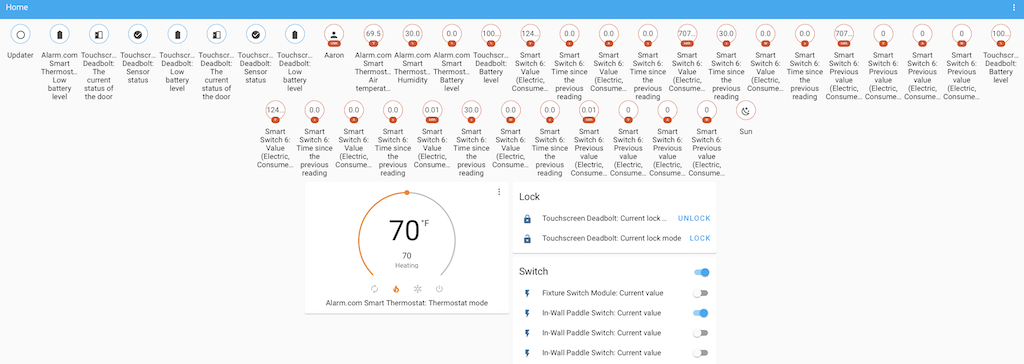 Screenshot of the old badges clutter that is now gone!
We decided to no longer use badges in the auto generated Lovelace 仪表盘. Instead, every 实体 is neatly grouped by 区域 or domain in an 实体 卡片.
If you liked the badges, you can always take control of your 仪表盘 and add them.
DHCP 发现
Home Assistant now listens on your network for 设备 that request a IP address. Based on those intercepted messages, Home Assistant can now discover 集成 for you to use with the discovered 设备.
This really powerful addition has been made by @bdraco, and many 集成 have quickly enriched their 集成 to use this new discovery method.
So as of this 发布, your Home Assistant might actually find some new 设备 it can use! Thanks @bdraco!
新的蓝图选择器
For our 蓝图 fanatics, some new goodies to the 蓝图 has been added this 发布. Thanks to @thomasloven, we now have two new selectors:
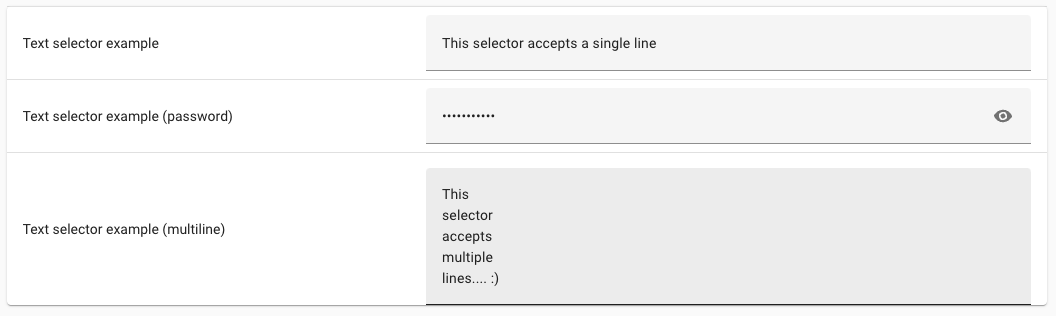 Screenshot of the text selectors.
- An object selector: Shows an YAML editor in the UI.
- An text selector: Show a single line text input or text 区域 for longer messages in the UI.
- 蓝图 descriptions now support Markdown.
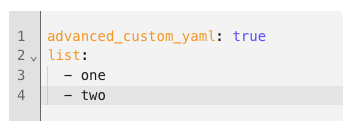 Screenshot of the object selector, giving a YAML input field.
Cloud 文本转语音设置
Nabu Casa has been offering an amazing text-to-speech 服务 for a while now, yet it was hard to find, and even harder to 设置 and use.
To fix this, a new 设置 UI has been added where you can select the default language and gender to use for the text-to-speech 服务, so you no longer have to attach that to every 服务 call. You can find it in the Home Assistant Cloud 面板.
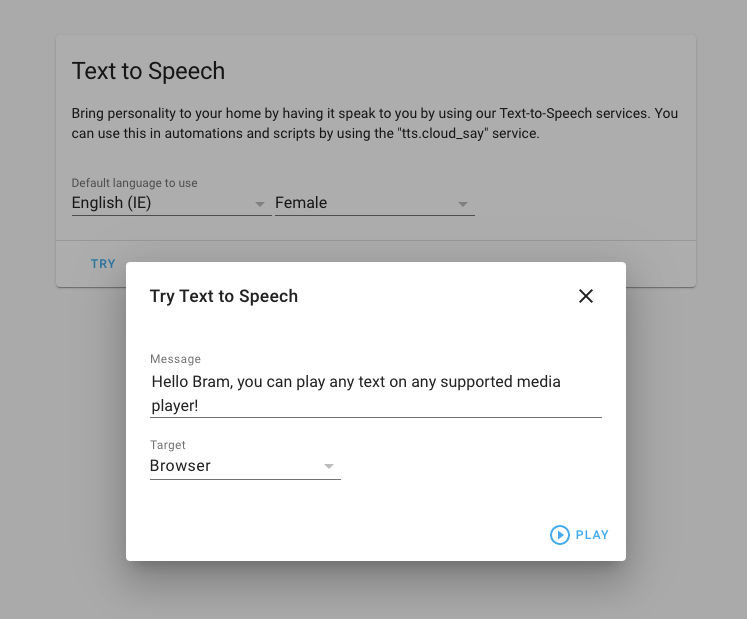 Screenshot of Cloud TTS options.
We also added the ability to try the chosen 设置 right in your browser. Click the try 按钮, enter some text and click play to hear the text being spoken.
其他值得注意的变化
这次发布虽然没有特别重磅的新功能,但依然包含了不少值得一提的调整与优化。
- We now give you a clearer reason why your Lovelace 卡片 配置 is not supported in the UI editor thanks to @spacegaier.
- Shelly RGB 设备 are now fully supported!! Nice @chemelli74!
- @dmulcahey Added filtering and zoom to node to the ZHA network visualization. Very useful to find you Zigbee network issues.
- The deCONZ 集成 added support for logging basic event in the logbook. Nicely done @Kane610.
- The Tasmota 集成 is out of beta! Awesome @emontnemery!
- @spacegaier Added support for themes on the media 卡片.
- The items in the shopping list 卡片 can be ordered using drag & drop! Thanks @ShaneQi!
- Newly ignored discovered 集成 now show a name of the item ignored. This makes it easier to undo that later.
- @balloob made a new framework that can detect significant changes in 实体, allowing to reduce the amount of 更新 we need to send to both Google Assistant and Alexa!
- Setting up Lutron Caseta was quite a pain, but not anymore! @bdraco added one-touch pairing to the 集成 set up!
- If you use 灯光 profiles, @Adminiuga is your man. All parameters of a 灯光 profile can now be optional and default profiles are always applied.
- Dropdown 助手 (
input_select) got some new 服务 capabilities added by @l-mb. They can now cycle through the options, and 服务 calls to jump to the first or last item have been added as well. - If you have a Foscam 摄像头, @joe248 added a 服务 to move to PTZ presets.
新集成
我们欢迎以下新集成加入这次发布:
- AirNow, added by @asymworks
- DHCP Discovery, added by @bdraco
- Huisbaasje, added by @denniss17
- Ondilo ICO, added by @JeromeHXP
- Z-Wave JS, added by @cgarwood, @MartinHjelmare, @marcelveldt, @raman325, @firstof9, @balloob
新平台
以下集成新增了平台支持:
- Logitech Harmony Hub now adds 开关 for activities, added by @mkeesey
- WiLight now supports 风扇, added by @leofig-rj
- Hyperion now has all kinds of advanced control 开关, added by @dermotduffy
现已支持通过 UI 设置的集成
以下集成现已可通过 Home Assistant UI 进行设置:
- Somfy MyLink, done by @bdraco
- Foscam, done by @skgsergio
发布 2021.2.1 - February 5
- Convert ozw 温控 values to correct units (@Chrisgozd - #45369) (ozw docs)
- Add support for iCloud 2FA (@nzapponi - #45818) (icloud docs)
- Don't 日志 missing mpd artwork inappropriately (@mweinelt - #45908) (mpd docs)
- Fix 实体 device_info property in Harmony 集成 (@bieniu - #45964) (harmony docs)
- Fix Local Media in Media Browser (@DeadEnded - #45987) (media_source docs)
- Bump zwave-js-server-python to 0.17.1 (@MartinHjelmare - #45988) (zwave_js docs)
- Bump awesomeversion from 21.2.0 to 21.2.2 (@ludeeus - #45993)
- Do not listen for dhcp packets if the filter cannot be 设置 (@bdraco - #46006) (dhcp docs)
- Bump zwave-js-server-python to 0.17.2 (@MartinHjelmare - #46010) (zwave_js docs)
- dhcp does not need promisc mode. Disable it in scapy (@bdraco - #46018) (dhcp docs)
- Revert aioshelly (@balloob - #46038) (shelly docs)
- Prevent fritzbox callmonitor phonebook_id 0 from being ignored (@obelix05 - #45990) (fritzbox_callmonitor docs)
- 升级 holidays to 0.10.5.2 (@fabaff - #46013) (workday docs)
发布 2021.2.2 - February 9
- Fix zwave_js 遮盖 control for Up/Down and Open/Close (@natekspencer - #45965) (zwave_js docs)
- Fix foscam to work again with non-admin accounts and make RTSP port configurable again (@skgsergio - #45975) (foscam docs)
- Fix downloader path validation on subdir (@gadgetchnnel - #46061) (downloader docs)
- Fix deprecated method isAlive() (@cdce8p - #46062) (zwave docs)
- Improve deCONZ logbook to be more robust in different situations (@Kane610 - #46063) (deconz docs)
- Fix zwave_js 通知 CC 传感器 and 二元sensor (@raman325 - #46072) (zwave_js docs)
- Fix incorrect current temperature for homekit 热水器 (@bdraco - #46076) (homekit docs)
- Use async_update_entry rather than updating config_entry.data directly in Axis (@Kane610 - #46078) (axis docs)
- Handle missing value in all platforms of zwave_js (@marcelveldt - #46081) (zwave_js docs)
- 更新 discovery scheme for zwave_js 灯光 platform (@marcelveldt - #46082) (zwave_js docs)
- 更新 zwave_js discovery scheme for boolean 传感器 in the 报警 CC (@marcelveldt - #46085) (zwave_js docs)
- Fix Google translate TTS by bumping gTTS from 2.2.1 to 2.2.2 (@hmmbob - #46110) (google_translate docs)
- Revert "Convert ozw 温控 values to correct units (#45369)" (@dshokouhi - #46163) (ozw docs)
- Enable KNX auto_reconnect for auto-discovered connections (@farmio - #46178) (knx docs)
- Ensure creating an index that already exists is forgiving for postgresql (@bdraco - #46185) (recorder docs)
- Fix Tado Power and Link 二元sensor (@Noltari - #46235) (tado docs)
- Handle empty mylink response at startup (@bdraco - #46241) (somfy_mylink docs)
发布 2021.2.3 - February 11
- Fix SNMP engine memory leak in Brother 集成 (@bieniu - #46272) (brother docs)
- Use oauthv3 for Tesla (@alandtse - #45766) (tesla docs) (breaking-change)
- Bump pymyq to 3.0.1 (@ehendrix23 - #46079) (myq docs)
- Revert transmission to check torrent lists by name rather than object (@JPHutchins - #46190) (transmission docs)
- 更新 powerwall for new 认证 requirements (@bdraco - #46254) (powerwall docs)
- Fix Lutron 集成 Protocol reconnect logic (@bdraco - #46264) (lutron_caseta docs)
- Bump roonapi to 0.0.32 (@pavoni - #46286) (roon docs)
- Add guards for missing value in binary_sensor platform of zwave_js 集成 (@marcelveldt - #46293) (zwave_js docs)
- Add reauth support for tesla (@bdraco - #46307) (tesla docs)
- Add
already_in_progressstring to roku config flow (@bramkragten - #46333) (roku docs) - 恢复 Google/Alexa extra significant change checks (@balloob - #46335) (alexa docs) (google_assistant docs)
- Fix Shelly relay 设备 set to 灯光 appliance type (@thecode - #46181) (shelly docs)
如果你需要帮助……
如果你需要帮助,欢迎前往我们非常活跃的 论坛,或加入我们的 Discord 聊天。
如果这次发布带来了问题,请到我们的 问题追踪器 提交反馈,并确保完整填写 issue 模板中的所有字段。
向后不兼容的变更
下面列出了本次发布中的破坏性变更,并按主题或集成分类。 点击其中任一项,即可阅读该项目对应的破坏性变更详情。
Python 3.7 支持
Support for Python 3.7 has been dropped, after being deprecated since Home Assistant 0.116.
This is only a concern if you are running Home Assistant 核心 directly on Python. You can check the Python 版本 Home Assistant uses by going to the information screen in 配置 -> Info.
If you run Home Assistant OS, 受监管模式 or 容器, you don’t have to worry about this, as the Home Assistant project takes care of this for you. As a Matter of fact, if you use one of those methods, you are already running Python 3.8.
Z-Wave 集成
The old zwave 集成 is now considered legacy and deprecated. This
集成 is still based on OpenZwave 1.4, which has been out of active
maintenance for quite some time now.
Alternatively, you can move to one of the other Z-Wave solutions Home Assistant offers:
-
OpenZWave (currently not maintained)
-
Z-Wave JS (introduced in this 发布, recommended)
PTVSD 调试器
The PTVSD extension has deprecated a couple of releases back and is now removed. The debugpy 集成 is a full replacement for 此integrations.
Tado 集成
Tado's primary functionality has fully transitioned to 配置 via UI.
YAML 配置 has been removed except for device_tracker. Existing YAML
配置 has already been imported automatically in the previous releases
and can now safely be removed from your 配置 files.
The device_tracker platform continues to use YAML, and will be updated at a
later date when the 设备 tracker platform is modernized.
Tado 区域 传感器 have been replaced by their corresponding binary_sensors.
Therefore, you'll have to 更新 Lovelace 面板, 脚本 and 自动化
referring to the following 传感器 by their corresponding 二元sensor
(replace sensor with binary_sensor):
sensor.ZONE_early_startis replaced bybinary_sensor.ZONE_early_startsensor.ZONE_linkis replaced bybinary_sensor.ZONE_linksensor.ZONE_open_windowis replaced bybinary_sensor.ZONE_open_windowsensor.ZONE_overlayis replaced bybinary_sensor.ZONE_overlaysensor.ZONE_poweris replaced bybinary_sensor.ZONE_power
The following 状态 属性 have been removed:
sensor.ZONE_overlay: terminationsensor.ZONE_open_window: open_window_attr
KNX 集成
Some knx_events changed the name of event_data fields:
addressrenamed todestination- Added
source - Added
direction - Added
telegramtype
Additionally:
fire_eventin the knx 配置 is deprecated.fire_event_filterin the knx 配置 is renamed toevent_filter.
RainMachine 集成
RainMachine 服务 now require an entity_id, an area_id, or
a device_id parameter to be provided. You need to check your 自动化
to make sure all RainMachine 服务 calls have those.
(@bachya - #44139) (rainmachine docs)
ecobee 集成
The current 状态 of the ecobee 集成 always behaves as if the selected hold duration is Until next scheduled activity.
With this change the following 设置 are now respected:
- 2 hours
- 4 hours
- Until I change it
If you rely on the previous behavior may need to 更新 your 自动化 to account for the support for the new 设置.
(@jamincollins - #40520) (ecobee docs)
August 集成
August has fully transitioned to 配置 via UI. YAML 配置 will be removed in an upcoming 版本. Existing YAML 配置 has already been imported automatically in the previous releases and can now safely be removed from your 配置 files.
(@bdraco - #45039) (august docs)
Roomba 集成
Roomba has fully transitioned to 配置 via UI. YAML 配置 is no longer supported. Existing YAML 配置 has already been imported automatically in the previous releases and can now safely be removed from your 配置 files.
(@bdraco - #45037) (roomba docs)
Plex 集成
The plex.play_on_sonos 服务 has been removed and functionality moved
to the built-in media_player.play_media 服务.
Existing 服务 payloads can be used as-is after prepending the
media_content_id with plex://.
Lutron 集成
The Lutron Integration ID 属性 changed to lutron_integration_id,
so any 自动化, 模板 传感器, etc. using that 属性 will need to
be updated accordingly.
DoorBird 集成
DoorBird has fully transitioned to 配置 via UI. YAML 配置 will be removed in an upcoming 版本. Existing YAML 配置 has already been imported automatically in the previous releases and can now safely be removed from your 配置 files.
(@bdraco - #45139) (doorbird docs)
Logitech Harmony Hub 集成
Harmony has fully transitioned to 配置 via UI. YAML 配置 has been removed. Existing YAML 配置 has already been imported automatically in the previous releases and can now safely be removed from your 配置 files.
(@bdraco - #45140) (harmony docs)
Mikrotik 集成
Mikrotik now uses the device_tracker standard 属性 for ip and mac.
The mac_address and ip_address 属性 have been removed.
(@bdraco - #45255) (mikrotik docs)
RoonLabs 音乐播放器
This PR changes how the play_media call works for roon players.
The previous implementation was very limited - but anyone using it in
自动化 will need to change their calls to the new structure.
Please refer to the 集成 文档 更多信息.
Network UPS Tools(NUT)
Network UPS Tools (NUT) has fully transitioned to 配置 via UI. YAML 配置 has been removed. Existing YAML 配置 has already been imported automatically in the previous releases and can now safely be removed from your 配置 files.
Dyson 集成
The speed of the Dyson Pure Cool Link 风扇 is now one of low, medium,
and high instead of the original auto and integer 1 to 10.
In order to set the 风扇 speed more precisely and 开关 auto mode, you
should use the 服务 dyson.set_speed and dyson.set_auto_mode.
(@shenxn - #45331) (dyson docs)
Viessmann ViCare 集成
The current power 传感器 has been removed since it was not provided by the Viessmann API anymore.
(@oischinger - #45301) (vicare docs)
MyQ 集成
MyQ has fully transitioned to 配置 via UI. YAML 配置 has been removed. Existing YAML 配置 has already been imported automatically in the previous releases and can now safely be removed from your 配置 files.
Nexia 集成
Nexia has fully transitioned to 配置 via UI. YAML 配置 has been removed. Existing YAML 配置 has already been imported automatically in the previous releases and can now safely be removed from your 配置 files.
(@bdraco - #45379) (nexia docs)
Hunter Douglas PowerView 集成
Hunter Douglas PowerView has fully transitioned to 配置 via UI. YAML 配置 has been removed. Existing YAML 配置 has already been imported automatically in the previous releases and can now safely be removed from your 配置 files.
Rachio 集成
Rachio has fully transitioned to 配置 via UI. YAML 配置 has been removed. Existing YAML 配置 has already been imported automatically in the previous releases and can now safely be removed from your 配置 files.
(@bdraco - #45383) (rachio docs)
Tesla Powerwall 集成
Tesla Powerwall has fully transitioned to 配置 via UI. YAML 配置 has been removed. Existing YAML 配置 has already been imported automatically in the previous releases and can now safely be removed from your 配置 files.
(@bdraco - #45381) (powerwall docs)
灯光配置文件
Nominally a breaking change. A default profile for the 灯光, now is always applied, so controlling a 灯光 from UI would set all the parameters defined in the profile.
For example, if the default profile for a particular 灯光 is set to:
- Color: Green
- Brightness: 255
- Transition: 5
And the current 灯光 status is: Color - red, brightness - 20 and in UI you change the brightness to 100 with the intention to only change the brightness, then the default profile would also apply the color and transition.
(@Adminiuga - #45450) (灯光 docs)
MQTT 集成
MQTT allowed passing an arbitrary speed that was not in the speed_list.
With the conversion to percentages in upcoming releases, this aberration from the spec could not be converted to a percentage. Since it does not conform to the 实体 model, it is not possible to preserve this exception.
NuHeat 集成
NuHeat has fully transitioned to 配置 via UI. YAML 配置 has been removed. Existing YAML 配置 has already been imported automatically in the previous releases and can now safely be removed from your 配置 files.
(@bdraco - #45380) (nuheat docs)
Rheem EcoNET 热水设备
EcoNET has swirtched over to EcoNET's new API.
热水器 will no longer report current tank temperature. The add/remove vacation 服务 are also removed, alternatively, you can use away mode now.
(@w1ll1am23 - #44427) (econet docs)
意图
The method for matching 实体 in intents has changed slightly to prefer shorter matches before ordering.
This means some intents and/or 实体 names may need to be adjusted to maintain consistency in some edge cases. For most uses, this should only improve the quality of matches.
Obihai 集成
The last_caller_info 传感器 now has the leading '' (quotes and space) removed
as those were not needed and were randomly provided by the Obihai 设备.
So previously the 状态 would be '' 8185551212 now it is 8185551212
(@dshokouhi - #44768)
告别以下内容
以下集成已被移除:
所有变更
点击查看所有变更!
- Bumped 版本 to 2021.2.0dev0 (@frenck - #44647)
- 升级 sendgrid to 6.4.8 (@fabaff - #44646) (sendgrid docs)
- Add yeelight 服务 to enable disable music mode (@zewelor - #44533) (yeelight docs)
- 升级 colorlog to 4.6.2 (@fabaff - #44652)
- Add AirNow 集成 (@asymworks - #40091) (airnow docs) (传感器 docs) (new-集成)
- 升级 vsure to 1.6.1 (@frenck - #44657) (verisure docs)
- 设备 自动化 config 错误 message improvements (@scop - #44656) (deconz docs) (传感器 docs)
- 升级 feedparser to 6.0.2 (@frenck - #44683) (feedreader docs)
- 升级 pubnubsub-handler to 1.0.9 (@mkeesey - #44542) (wink docs)
- 升级 codespell to 2.0.0 (@scop - #44695) (homematicip_cloud docs) (rflink docs)
- Bump elkm1-lib to 0.8.10 (@gwww - #44714) (elkm1 docs)
- 升级 pytz to >=2020.5 (@fabaff - #44702)
- Bump upb-lib to 0.4.12 (@gwww - #44721) (upb docs)
- 升级 sqlalchemy to 1.3.22 (@fabaff - #44698) (recorder docs) (sql docs)
- Add 设备 info to Météo-France (@oncleben31 - #44457) (meteo_france docs)
- Add Chinese (Hong Kong) to Google Cloud TTS (@hung2kgithub - #44689) (google_cloud docs)
- Use the async_call context in result of call_service (@jcronq - #44458) (websocket_api docs)
- 升级 slixmpp to 1.6.0 (@fabaff - #44693) (xmpp docs)
- 升级 pyowm to 3.1.1 (@fabaff - #44706) (openweathermap docs)
- Do not 恢复 unavailable 状态 for august 门锁 (@bdraco - #44722) (august docs)
- Add Python 3.9 to CI (@frenck - #41373)
- Updated certifi to >=2020.12.5 (@fabaff - #44701)
- Increase test coverage for Nest SDM 集成 (@allenporter - #44718) (nest docs)
- Drop Python 3.7 support (@frenck - #43805) (breaking-change)
- 升级 alpha-vantage to 2.3.1 (@fabaff - #44705) (alpha_vantage docs)
- 升级 volkszaehler to 0.2.1 (@fabaff - #44703) (volkszaehler docs)
- Add turn_on and turn_off to gree 温控 component (@cmroche - #43207) (gree docs)
- Fix Gree 温控 打开/off (@frenck - #44731) (gree docs)
- Fix AccuWeather 条件 mapping (@firstof9 - #44710) (accuweather docs)
- 更新 pyhomematic to 0.1.71 (@danielperna84 - #44732) (homematic docs)
- 升级 sentry-sdk to 0.19.5 (@frenck - #44738) (sentry docs)
- 升级 debugpy to 1.2.1 (@frenck - #44737) (debugpy docs)
- 升级 pre-commit to 2.9.3 (@frenck - #44740)
- Bump locationsharinglib to 4.1.5 (@MartinHjelmare - #44742) (google_maps docs)
- Drop asynctest (@frenck - #44746) (abode docs) (accuweather docs) (acmeda docs) (adguard docs) (advantage_air docs)
- Remove deprecated PTVSD 集成 (@frenck - #44748) (breaking-change)
- Resolve nest pub/sub subscriber token refresh issues (@allenporter - #44686) (nest docs)
- 更新 surepy to v0.4.0 (@insertjokehere - #44556) (surepetcare docs)
- Add tado 区域 二元sensor (@Noltari - #44576) (tado docs) (breaking-change)
- Support google assistant stopping for assumed 状态 遮盖 (@elupus - #44266) (google_assistant docs)
- Fix Soma 集成 重载 (@badguy99 - #44750) (soma docs)
- Add RFXtrx Rfy venetian blinds tilt control (@dzukero - #44309) (rfxtrx docs)
- Add 服务 to 门锁/unlock Sure Petcare pet flaps (@insertjokehere - #44557) (surepetcare docs)
- Reconnect mochad 灯光 on on/off command (@migube - #44507) (mochad docs)
- 更新 xknx to 0.16.0 (@farmio - #44749) (knx docs) (breaking-change)
- Bump PyTado to 0.10.0 (@Noltari - #44770) (tado docs)
- Bump dessant/门锁-threads from v2.0.1 to v2.0.3 (@dependabot] - #44806)
- 更新 to denonavr 版本 0.9.10 (@scarface-4711 - #44791) (denonavr docs)
- Bumo pyroon 版本 to 0.0.30 (@pavoni - #44800) (roon docs)
- Bump pyobihai (@dshokouhi - #44768) (obihai docs)
- Drop remaining Python < 3.8 support (@scop - #44743) (plex docs) (webostv docs)
- Fix race when handling MQTT discovery messages (@emontnemery - #44730) (MQTT docs)
- Change WHITELIST to ALLOWLIST for websockets (@KTibow - #44766) (websocket_api docs)
- Add more 调试 details to running timeouts (@pvizeli - #43644)
- Cleanup timeouts values for Shelly (@chemelli74 - #44790) (shelly docs)
- Add myself to codeowners for Shelly (@chemelli74 - #44814) (shelly docs)
- Try to fix flaky Risco test (@OnFreund - #44788) (risco docs)
- Add 设备 entry id to events (@elupus - #44407) (rfxtrx docs)
- Fix 风扇 support in nest 温控 by adding HVAC_MODE_FAN_ONLY support (@allenporter - #44203) (nest docs)
- Add Ondilo ico 集成 (@JeromeHXP - #44728) (ondilo_ico docs) (new-集成)
- Adjust system info for Lovelace with multiple 仪表盘 (@ludeeus - #44796) (Lovelace docs)
- Updated Ondilo translation files to remove title (@JeromeHXP - #44824) (ondilo_ico docs)
- Move RainMachine 服务 to 实体 服务 (@bachya - #44139) (rainmachine docs) (breaking-change)
- Add logbook and 设备 触发器 platforms to Shelly (@thecode - #44020) (shelly docs)
- Add nearest method to get data for Airly 集成 (@bieniu - #44288) (airly docs)
- Generate 开关 for harmony activities automatically (@mkeesey - #42331) (harmony docs) (new-platform)
- Bump caldav 版本 to 0.7.1 (@chpego - #44815) (caldav docs)
- Complete 设备 and 实体 registry type hints (@scop - #44406)
- Propose an 集成 quality for nest SDM 集成 (@allenporter - #44755) (nest docs)
- Bump codecov/codecov-动作 from v1.1.1 to v1.2.0 (@dependabot] - #44836)
- Bump 动作/upload-artifact from v2.2.1 to v2.2.2 (@dependabot] - #44835)
- Add support for reordering Shopping List Items via Drag and Drop (@ShaneQi - #41585) (shopping_list docs)
- Add Vicare set mode 服务 (@oischinger - #44563)
- Better general/fallback 错误 message and traceback for unknown config 错误 (@scop - #44655)
- Patch Shelly test setting up entry (@balloob - #44842) (shelly docs)
- Fix opentherm_gw firmware 版本 in 设备 registry (@mvn23 - #44756) (opentherm_gw docs)
- Avoid Ps4 doing I/O during tests (@balloob - #44845) (ps4 docs) (shelly docs)
- Add MQTT Number (@dgomes - #44739) (MQTT docs)
- Support dynamic Google Cast groups (@emontnemery - #44484) (cast docs)
- Address late review of ondilo_ico (@JeromeHXP - #44837) (ondilo_ico docs)
- Improve MQTT number test coverage (@emontnemery - #44870) (MQTT docs)
- Bump pychromecast to 7.7.2 (@emontnemery - #44871) (cast docs)
- Bump codecov/codecov-动作 from v1.2.0 to v1.2.1 (@dependabot] - #44869)
- Generate nest 图像 thumbnails from events (@allenporter - #44638) (nest docs)
- Fix notion bridge id 更新 设备 registry identifier usage (@scop - #44872) (notion docs)
- Revert "Revert "Bump pypck to 0.7.8"" (@frenck - #44885) (lcn docs)
- Bump pydaikin 版本 to 2.4.1 (@emufan - #44888) (daikin docs)
- Make DeviceRegistry.async_get_device connections arg optional (@scop - #44897)
- Homekit has two types (@balloob - #44879) (zeroconf docs)
- Rewrite Plex tests to use mocked payloads (@jjlawren - #44044) (plex docs)
- Improve 设备 registry type hints (@scop - #44919)
- Correct Plugwise 传感器 scaling (@bouwew - #44344) (plugwise docs)
- 更新 nexia to 0.9.5 (@bdraco - #44924) (nexia docs)
- Implement support for additional ecobee hold modes (@jamincollins - #40520) (ecobee docs) (breaking-change)
- Use parent_id to find cause of logbook events with new contexts (@chishm - #44416) (logbook docs)
- 升级 discord.py to 1.6.0 (@fabaff - #44941) (discord docs)
- 升级 youtube_dl to 2021.01.03 (@fabaff - #44942) (media_extractor docs)
- Fix media renderers without volume control (@ocampana - #44874) (dlna_dmr docs)
- Prefix versions in system health (@ludeeus - #44921) (hassio docs) (homeassistant docs)
- Add torrent id to Transmission events (@JPHutchins - #44187) (transmission docs)
- Fix Netatmo 温控 boost for valves (@cgtobi - #44957) (netatmo docs)
- Add MQTT Number (non optimistic) (@dgomes - #44883) (MQTT docs)
- Remove 脚本/test (@scop - #44967)
- 助手 type hint improvements (@scop - #44964)
- Move MQTT 实体 助手 to separate file (@emontnemery - #44838) (MQTT docs)
- Deduplicate MQTT 实体 discovery code (@emontnemery - #44970) (MQTT docs)
- Add pressure forecast to HA 天气 实体 model (@bchastain - #44965) (天气 docs)
- Add zwave to ozw migration (@MartinHjelmare - #39081) (ozw docs) (zwave docs)
- Add MQTT base 实体 (@emontnemery - #44971) (MQTT docs)
- 升级 requests to 2.25.1 (@BKPepe - #44989)
- Improve nest client 错误 handling using newest library (@allenporter - #44998) (nest docs)
- Add stop support to openzwave (MQTT) 遮盖 (@clook - #44622) (ozw docs)
- Improve unifi performance with many 设备 (@bdraco - #45006) (unifi docs)
- Add config flow for somfy_mylink (@bdraco - #44977) (somfy_mylink docs)
- Warn 用户 when their HomeKit 配置 may be unstable (@bdraco - #44999) (homekit docs)
- Include current 版本 in updater 日志 output (@spacegaier - #45022) (updater docs)
- Use the 摄像头 UUID as the 实体 unique id (@rfleming71 - #44937) (uvc docs)
- Add zwave_js 集成 (@cgarwood - #45020) (zwave_js docs) (new-集成)
- Shutdown asyncio http server within 10 seconds (@agners - #45033) (http docs)
- Increase timeout to avoid killing the 核心 during shutdown (@agners - #45029)
- Remove empty schema (@balloob - #45044)
- Remove safe mode from HomeKit (@bdraco - #45028) (homekit docs)
- Bump zwave-js-server-python to 0.7.0 (@cgarwood - #45045) (zwave_js docs)
- Repair flaky and broken stream tests in test_hls.py, and turn back on (@allenporter - #45025) (stream docs)
- Fix 吸尘器 that do not support start with homekit (@bdraco - #45030) (homekit docs)
- Mark YAML support for August deprecated (@bdraco - #45039) (august docs) (breaking-change)
- 更新 roomba config flow to walk 用户 through pairing (@bdraco - #45037) (roomba docs) (breaking-change)
- Add availability_mode "all" and "any" to MQTT 实体 (@emontnemery - #44987) (MQTT docs)
- Add zwave_js init module tests (@MartinHjelmare - #45048) (zwave_js docs)
- Add 100% tests coverage for Shelly 遮盖 and 开关 platforms (@thecode - #45001) (shelly docs)
- Add Shelly RGB 设备 management (@chemelli74 - #43993) (shelly docs)
- Drop awarecan from codeowners (@balloob - #45049) (aws docs) (nest docs)
- Cleanups for somfy_mylink (@bdraco - #45026) (somfy_mylink docs)
- Fix tests for input_datetime (@spacegaier - #45055) (input_datetime docs)
- Default
input_datetimeto current date (@spacegaier - #45052) (input_datetime docs) - Add 开关 platform to zwave_js (@cgarwood - #45046) (zwave_js docs) (new-platform)
- Add name to ignored entries (@balloob - #45051) (config docs)
- Fix docstring in zwave_js 开关 test (@cgarwood - #45076) (zwave_js docs)
- Bump Z-Wave JS to 0.7.1 (@balloob - #45080) (zwave_js docs)
- Cloud: Add web socket API to pick default TTS language (@balloob - #45064) (cloud docs)
- Clear cached nest event 图像 after expiration (@allenporter - #44956) (nest docs)
- Roomba cleanups (@bdraco - #45097) (roomba docs)
- Allow any parameter of a 灯光 profile as an optional parameter (@Adminiuga - #44079) (灯光 docs)
- Add 设备 class 属性 to tado humidity 传感器 状态 (@ErnstEeldert - #45084) (tado docs)
- Follow Axis library changes and improve tests (@Kane610 - #44126) (axis docs)
- Soma: fix battery drain issue caused by excess 更新 requests (@badguy99 - #45104) (soma docs)
- Add additional roku model to discovery (@bdraco - #45103) (roku docs)
- Do not try to connect to disabled ESPHome 设备. (@jesserockz - #45092) (esphome docs)
- Move Plex->Sonos playback to built-in 服务 (@jjlawren - #45066) (plex docs) (sonos docs) (breaking-change)
- Correct zwave_js value changed callback signature (@MartinHjelmare - #45110) (zwave_js docs)
- Add config_flow and stream selection to foscam (@skgsergio - #41429) (foscam docs)
- Allow input_number entity_id as for numeric_state 触发器 thresholds (@Adminiuga - #45091) (homeassistant docs)
- Add zwave_js 灯光 platform tests (@MartinHjelmare - #45107) (zwave_js docs)
- Filter some Alexa reports that are duplicate (@balloob - #45093) (alexa docs)
- Expose selected Netatmo schedule (@cgtobi - #45077) (netatmo docs)
- Add start torrent and stop torrent 服务 for transmission 集成 (@royto - #43920) (transmission docs)
- Change 属性 key for Lutron 遮盖 to lutron_integration_id (@TimothyLeeAdams - #45114) (lutron docs) (breaking-change)
- Starline OBD information (@Anonym-tsk - #37608) (starline docs)
- Add energy and power 传感器 tests & fix device_class (@Petro31 - #45122) (zwave_js docs)
- Add support for discovery via DHCP (@bdraco - #45087) (new-集成)
- Remove from_state from 报警 设备 触发器 (@emontnemery - #45127) (alarm_control_panel docs)
- Get A/V info for Onkyo receivers (@OnFreund - #34477) (onkyo docs)
- Mark YAML support for DoorBird deprecated (@bdraco - #45139) (doorbird docs) (breaking-change)
- Remove YAML support from harmony (@bdraco - #45140) (harmony docs) (breaking-change)
- Rework Proxmoxve to use a DataUpdateCoordinator (@Corbeno - #45068) (proxmoxve docs)
- Migrate to maxcube-api 0.3.0 版本 (@unaiur - #45126) (maxcube docs)
- Add pressure to OWM forecast data (@bchastain - #43843) (openweathermap docs) (天气 docs)
- Remove beta tag from Tasmota 集成 (@emontnemery - #45153) (tasmota docs)
- Downgrade dhcp 日志 message 错误 message when running without CAP_NET_RAW (@bdraco - #45157) (dhcp docs)
- Fix zwave_js adding not fully interviewed nodes (@marcelveldt - #45162) (zwave_js docs)
- Bump Z-Wave JS Server Python to 0.9.0 (@balloob - #45181) (zwave_js docs)
- Auto-create friendly name for persistent 通知 (@spacegaier - #42427) (persistent_notification docs)
- Only add Netatmo 温控 schedule 属性 if not None (@cgtobi - #45176) (netatmo docs)
- Add binary_sensor platform to zwave_js (@marcelveldt - #45081) (zwave_js docs) (new-platform)
- Add WebSocket API Foundation for zwave_js (@cgarwood - #45151) (zwave_js docs)
- Remove 服务 and config schemas from foscam (@skgsergio - #45154) (foscam docs)
- Bump zwave-js-server-python to 0.10.0 (@MartinHjelmare - #45189) (zwave_js docs)
- Improve dhcp discovery for somfy_mylink to handle multiple 设备 (@bdraco - #45166) (somfy_mylink docs)
- Fix Typo in Onkyo A/V info (@OnFreund - #45194) (onkyo docs)
- Fix exception when trying to 配置 an ignored somfy mylink (@bdraco - #45198) (somfy_mylink docs)
- Normalise unique ID in Axis 集成 (@Kane610 - #45203) (axis docs)
- Discover 设备 from device_trackers with router sources (@bdraco - #45160) (device_tracker docs) (dhcp docs) (unifi docs)
- Add support for discovering individual roombas (@bdraco - #45200) (roomba docs)
- Add DHCP discovery support to Axis 集成 (@Kane610 - #45167) (axis docs)
- Handle older Izone controller (@Swamp-Ig - #45218) (izone docs)
- Add dhcp discovery to squeezebox (@bdraco - #45210) (squeezebox docs)
- Add DHCP discovery to Toon (@frenck - #45222) (toon docs)
- Add 门锁 platform to zwave_js (@raman325 - #45175) (zwave_js docs) (new-platform)
- Move switcher_kis 服务 to 实体 服务 (@thecode - #45204) (switcher_kis docs)
- Prettier Zeroconf discovery name for Axis 设备 (@Kane610 - #45216) (axis docs)
- Bump zwave-js-server-python to 0.11.0 (@MartinHjelmare - #45231) (zwave_js docs)
- Create shortcuts for config entry parameters in Axis 设备 (@Kane610 - #45233) (axis docs)
- Add Homekit discovery for iZone (@Swamp-Ig - #45223) (izone docs)
- Bump pycomfoconnect to 0.4 (@chmielowiec - #45201) (comfoconnect docs)
- 开关 somfy to zeroconf discovery (@bdraco - #45158) (somfy docs)
- Bump mychevy 版本 to 2.1.0 (@sdague - #44810) (mychevy docs)
- Fix the use of muted volume if not previously set in mpd (@kstaniek - #45018) (mpd docs)
- Bump google-nest-sdm to 0.2.9 (@allenporter - #45244) (nest docs)
- Re-add support for input_number as source of filter 集成 (@dgomes - #45245) (filter docs)
- Add dhcp discovery properties to mikrotik (@bdraco - #45205) (mikrotik docs)
- Prefill the ip address for powerwall discovery (@bdraco - #45209) (powerwall docs)
- Use dispatcher for unifi heartbeat tracking (@bdraco - #45211) (unifi docs)
- Use standard 设备 tracker 属性 for "ip" and "mac" in Mikrotik (@bdraco - #45255) (mikrotik docs) (breaking-change)
- Improve dyson code (@shenxn - #45172) (dyson docs)
- Make DHCP discovery ignore self assigned ip addresses (@bdraco - #45256) (dhcp docs)
- Add preheater current power to comfoconnect (@hsmade - #44083) (comfoconnect docs)
- Add 设备 classes to Dyson 传感器 (@shenxn - #45264) (dyson docs)
- 更新 Tibber library, pyTibber==0.16.1 (@Danielhiversen - #45263) (tibber docs)
- Bump pypck to 0.7.9 (@alengwenus - #45267) (lcn docs)
- more graceful shutdown in the 在场 of a proxy_stream (@jlvaillant - #45246)
- 更新 gogogate2 to be async (@bdraco - #42066) (gogogate2 docs)
- Improve Roon media player play_media (@pavoni - #45221) (roon docs) (breaking-change)
- Add 温控 platform to zwave_js (@raman325 - #45177) (zwave_js docs) (new-platform)
- Sanitize 用户-agent in wrong_login message (@gregod - #45251) (http docs)
- Fix 错误 with Axis 灯光 events without representation in 灯光 control (@Kane610 - #45277) (axis docs)
- Remove YAML support from nut (@bdraco - #45276) (nut docs) (breaking-change)
- Rewrite dyson 吸尘器 test (@shenxn - #45265) (dyson docs)
- Pyroon discovery (@pavoni - #44811) (roon docs)
- Add add & remove node commands to zwave_js websocket api (@cgarwood - #45232) (zwave_js docs) (new-集成)
- 更新 xknx to 0.16.1 (@farmio - #45247) (knx docs)
- Allow 通知 服务 to 更新 existing targets (@alandtse - #45283) (通知 docs)
- Generics and other type hint improvements (@scop - #45250)
- Bump hatasmota to 0.2.5 (@emontnemery - #45297) (tasmota docs)
- Use methods available to verify link local address (@Kane610 - #45309) (dhcp docs)
- Rewrite dyson 风扇 test (@shenxn - #45295) (dyson docs)
- Disable pytest enabled in vscode default 设置 (@balloob - #45317)
- Include config entry id in zwave_js signal names (@kpine - #45282) (zwave_js docs)
- Add node_status websocket API command to zwave_js (@cgarwood - #45325) (zwave_js docs)
- Replace outdated / closed URL for reporting HA startup blocks (@spacegaier - #45334)
- Move 设备 tracker scanner 属性 to ScannerEntity (@MartinHjelmare - #45312) (device_tracker docs)
- 开关 dhcp to use async sniff for faster shutdown (@bdraco - #45339) (dhcp docs)
- bump libs for zha (@dmulcahey - #45345) (zha docs)
- 更新 .pre-commit-config.yaml to prevent loops between isort and black (@mduran80 - #45321)
- Add permanent_hold 属性 to Honeywell 温控 (@cgarwood - #45341) (honeywell docs)
- Repair stream test_recorder.py and mark not flaky (@allenporter - #45054) (stream docs)
- Add empty 密码 support to pi-hole (@shenxn - #37958) (pi_hole docs)
- Add default URL to zwave_js config flow (@cgarwood - #45366) (zwave_js docs)
- Remove yeelight init dispatcher on unloading (@shenxn - #45359) (yeelight docs)
- Increase 更新 interval in AccuWeather 集成 (@bieniu - #44984) (accuweather docs)
- Replace strange "dict logic" in AirVisual pollutant level 传感器 (1 of 2) (@bachya - #44868) (airvisual docs)
- Introduce reauthentication flow to UniFi 集成 (@Kane610 - #45360) (unifi docs)
- Wait for all 触发器 when one fails to attach (@bdraco - #45361) (自动化 docs)
- Change Dyson PureCoolLink 风扇 speeds to adhere the standard (@shenxn - #45331) (dyson docs) (breaking-change)
- Fix test_wait_template_with_utcnow (@bdraco - #45356)
- 开关 frequently used unifi controller properties to 属性 (@bdraco - #45365) (unifi docs)
- Prevent isort from modifying files formatted with black and causing pipeline to fail (@mduran80 - #45371)
- Add DemoCover with only tilt controls (@iMicknl - #45228) (demo docs)
- Bump pyVicare to 0.2.5 (@oischinger - #45301) (vicare docs) (breaking-change)
- Fix memory leak in dhcp 集成 (@bdraco - #45378) (dhcp docs)
- Fix yeelight brightness in music mode (@shenxn - #45358) (yeelight docs)
- Remove YAML support from myq (@bdraco - #45375) (myq docs) (breaking-change)
- Bump required hyperion-py 版本 (@dermotduffy - #45385) (hyperion docs)
- Format SNMP 传感器 data which are not strings/counters (@RomRider - #44823) (snmp docs)
- Revert "更新 .pre-commit-config.yaml to prevent loops between isort and black" (@frenck - #45391)
- Revert "更新 azure-pipelines-ci.yml to enable black mode in isort" (@frenck - #45390)
- Separate Plex/Sonos cross-集成 tests (@jjlawren - #45370) (plex docs) (sonos docs)
- Don't 更新 systemmonitor static boot time timestamp (@Ebbe - #45165) (systemmonitor docs)
- Introduce reauthentication flow to Axis 集成 (@Kane610 - #45307) (axis docs)
- Treat Huawei LTE response 错误 code -1 as apparently unsupported (@scop - #45304) (huawei_lte docs)
- Add SSDP discovery to unifi (@bdraco - #45364) (unifi docs)
- Rewrite dyson 传感器 test (@shenxn - #45382) (dyson docs)
- Remove YAML support from nexia (@bdraco - #45379) (nexia docs) (breaking-change)
- Remove YAML support from hunterdouglas_powerview (@bdraco - #45376) (hunterdouglas_powerview docs) (breaking-change)
- Remove YAML support from rachio (@bdraco - #45383) (rachio docs) (breaking-change)
- Stop update_coordinator schedule refresh when HA is stopping (@thecode - #45338)
- Bump hatasmota to 0.2.6 (@emontnemery - #45403) (tasmota docs)
- Remove YAML support from powerwall (@bdraco - #45381) (powerwall docs) (breaking-change)
- Fix zwave_js 温控 实体 temperature unit (@raman325 - #45377) (zwave_js docs)
- 升级 TwitterAPI to 2.6.3 (@fabaff - #45415) (twitter docs)
- 升级 pylast to 4.1.0 (@fabaff - #45413) (lastfm docs)
- Bump hass-nabucasa 0.41.0 (@pvizeli - #45422) (cloud docs)
- 升级 sendgrid to 6.5.0 (@fabaff - #45412) (sendgrid docs)
- Slightly improve 错误 message in case of duplicate 实体 IDs (@spacegaier - #45424) (config docs)
- Add KNX 服务 event_register (@farmio - #45248) (knx docs) (breaking-change)
- Rewrite dyson init test (@shenxn - #45409) (dyson docs)
- Add 遮盖 platform to zwave js (@firstof9 - #45193) (zwave_js docs) (new-platform)
- Clarify ConfigEntryNotReady 日志 (@chemelli74 - #45425)
- Bump zwave-js-server-python to 0.12.0 (@cgarwood - #45438) (zwave_js docs)
- Basic logbook support for deCONZ events (@Kane610 - #45400) (deconz docs)
- Fix hs_color crashing when activating 场景 in deCONZ on color_temp 灯光 (@Kane610 - #45159) (deconz docs)
- Introduce reauth flow to deCONZ (@Kane610 - #45443) (deconz docs)
- Base deCONZ group supported features on the sum of all its 灯光 (@Kane610 - #45440) (deconz docs)
- Add zwave-js 风扇 platform (@firstof9 - #45439) (zwave_js docs) (new-platform)
- Option to select what video source Axis 摄像头 should use (@Kane610 - #45268) (axis docs)
- Add a one touch pairing config flow for lutron caseta (@bdraco - #45136) (lutron_caseta docs)
- Always apply default 灯光 profiles, unless a profile is given (@Adminiuga - #45450) (灯光 docs) (breaking-change)
- Disconnect Hyperion client in 错误 条件 (@dermotduffy - #45411) (hyperion docs)
- 升级 aiolifx to 0.6.9 (@amelchio - #45448) (lifx docs)
- Remove the ability for MQTT to set speeds that are not in the speed_list (@bdraco - #45445) (MQTT docs) (breaking-change)
- Step Axis 集成 to platinum score on 集成 Quality Scale (@Kane610 - #45442) (axis docs)
- Remove YAML support from nuheat (@bdraco - #45380) (nuheat docs) (breaking-change)
- Subscribe only to valid MQTT discovery topics (@emontnemery - #45456) (MQTT docs)
- Fix flaky SRP_Energy test (@balloob - #45471) (srp_energy docs)
- Truncate MQTT payload in 调试 messages to 8kB (@emontnemery - #45465) (MQTT docs)
- Rewrite dyson air quality tests (@shenxn - #45466) (dyson docs)
- Add SSDP discovery support to Axis 集成 (@Kane610 - #45474) (axis docs)
- Add support for zwave_js 门锁 服务 (@raman325 - #45451) (zwave_js docs)
- Remove YAML support from tado (@bdraco - #45384) (tado docs) (breaking-change)
- 升级 youtube_dl to 版本 2021.01.16 (@BKPepe - #45484) (media_extractor docs)
- Improve Axis tests following late review in SSDP PR (@Kane610 - #45489) (axis docs)
- Rewrite dyson 温控 tests (@shenxn - #45493) (dyson docs)
- Bump pyWeMo to 0.6.1 (@esev - #45501) (wemo docs)
- Fix for radiotherm component stall (@vinnyfuria - #45482) (radiotherm docs)
- 更新 xknx to 0.16.2 (@farmio - #45511) (knx docs)
- Use 图像 proxy in volumio media browser (@OnFreund - #43819) (volumio docs)
- Bump 动作/stale from v3.0.14 to v3.0.15 (@dependabot] - #45516)
- Bump Z-Wave JS Server Python to 0.13 (@balloob - #45524) (zwave_js docs)
- Better wait for Z-Wave to be initialized (@balloob - #45520) (zwave_js docs)
- Bump dependency for HomematicIP Cloud to 0.13.1 (@SukramJ - #45475) (homematicip_cloud docs)
- Fix Tado fallback modes (overlay) (@Savjee - #44665) (tado docs)
- Add 版本 to hassfest for custom 集成 (@ludeeus - #45523)
- Add WiLight 风扇 (@leofig-rj - #39541) (wilight docs) (new-platform)
- Add zwave_js ZWavePropertyBinarySensory (@itewk - #45504) (zwave_js docs)
- Fix Roon play_media (@pavoni - #45532) (roon docs)
- Tibber, fix spreading requests (@Danielhiversen - #45533) (tibber docs)
- Improve zwave_js 灯光 targetvalue vs currentValue selection (@marcelveldt - #45477) (zwave_js docs)
- Increase stalebot operations per run (@frenck - #45548)
- Clean up unnecessary method from Netatmo code (@cgtobi - #45546) (netatmo docs)
- Improve Slack 通知 component (@cdce8p - #45479) (slack docs)
- Fix Vera race 条件 on start (@pavoni - #45535) (vera docs)
- Add better message to deCONZ event logbook when information is available (@Kane610 - #45545) (deconz docs)
- Add tado 服务 set temperature offset (@north3221 - #45014) (tado docs)
- 升级 econet to use new API (@w1ll1am23 - #44427) (econet docs) (breaking-change)
- Add an HTTP view to dump the Z-Wave JS 状态 (@balloob - #45452) (http docs) (zwave_js docs)
- Fix Hyperion brightness setting (@starkillerOG - #45335) (hyperion docs)
- Set hyperion icon to lightbulb when off (@starkillerOG - #45351) (hyperion docs)
- Add support for Discord embed in messages (@popboxgun - #44986) (discord docs)
- Bump python-velbus 版本 to 2.1.2 (@Cereal2nd - #45553) (velbus docs)
- Add "significant change" base (@balloob - #45555) (binary_sensor docs) (传感器 docs)
- 升级 shodan to 1.25.0 (@fabaff - #45560) (shodan docs)
- Limit data sending to Alexa to significant changes (@balloob - #45563) (alexa docs)
- Changes to filename and path validation (@ludeeus - #45529) (downloader docs) (Lovelace docs) (media_source docs) (python_script docs)
- Added command 模板 for the MQTT 温控 component. (@radovanbauer - #44976) (MQTT docs)
- Don't parse previous messages when UniFi connection 状态 change to available (@Kane610 - #45544) (unifi docs)
- Bump plexapi to 4.3.0 (@jjlawren - #45567) (plex docs)
- 更新 ZHA dependencies (@Adminiuga - #45569) (zha docs)
- 升级 pillow to 8.1.0 (@frenck - #45574)
- Fix zwave_js Color 开关 设备 Type discovery for RGB dimmers (@kpine - #45571) (zwave_js docs)
- Bump httplib2 in google and remember_the_milk (@bdraco - #45578) (google docs) (remember_the_milk docs)
- 升级 pytest to 6.2.2 (@frenck - #45572)
- 升级 coverage to 5.4 (@frenck - #45570)
- Tweak stale policies (@frenck - #45568)
- Add support for homekit_controller secondary 实体 like power usage (@Jc2k - #44013) (homekit_controller docs)
- Add gen3 Hue 遥控器 to deCONZ 设备 触发器 (@Kane610 - #45581) (deconz docs)
- Remove hyperion entry from registry only when instances are fully removed (@dermotduffy - #44488) (hyperion docs)
- Add significant change filtering to Google (@balloob - #45566) (google_assistant docs) (传感器 docs) (开关 docs)
- Add 设备 metadata for Google Assistant (@deiger - #45507) (google_assistant docs)
- 灯光 significant changes + 传感器 tweaks (@balloob - #45583) (灯光 docs) (传感器 docs)
- Do not reset ble tracker adapter to read battery (@guillempages - #44229) (bluetooth_le_tracker docs)
- Extend add_update_listener support to bound methods (@jpcornil-git - #44238)
- Remove tuya/温控 precision property override (@ollo69 - #44148) (tuya docs)
- Add support for EDS0068 onewire 传感器 (@sampod - #44029) (onewire docs)
- Round Mold Indicator 属性 (@yuvalabou - #43622) (mold_indicator docs)
- Add tilt functionality to Velux 遮盖 (@pawlizio - #43669) (velux docs)
- Avoid proxied Roku 图像 during internal requests (@ctalkington - #43547) (roku docs)
- Add reminder support to todoist.new_task 服务 (@matejdro - #44142) (todoist docs)
- Add support for Pico and Shade 遥控器 to Lutron Caseta (@bdraco - #45315) (lutron_caseta docs)
- Refactor slack tests (@cdce8p - #45561) (slack docs)
- Add zwave_js 插件 config flow support (@MartinHjelmare - #45552) (zwave_js docs)
- Add temperature step size for generic_thermostat (@spacegaier - #41972) (generic_thermostat docs)
- Add selectors for text and arbitrary objects (@thomasloven - #45112)
- Add advanced Hyperion 实体 (@dermotduffy - #45410) (hyperion docs) (new-platform)
- Optimized 状态 handling of Panasonic Viera TVs (@thegnuu - #42913) (panasonic_viera docs)
- Implement 遥控器.delete_command in the Broadlink 集成 (@felipediel - #44041) (broadlink docs)
- Add check and remove temporary fix for lg soundbar eq and source list (@bernimoses - #38798) (lg_soundbar docs)
- Explicitly return None in Velux 遮盖 (@frenck - #45596) (velux docs)
- Rewrite hddtemp unittest tests to pytest (@adriansuwala - #42513) (hddtemp docs)
- Esphome 风扇 direction (@blejdfist - #44495) (esphome docs)
- 摄像头 Status and Motion record status (@rfleming71 - #44936) (uvc docs)
- Fix home connect 灯光 setting color (@josiasmontag - #45470) (home_connect docs)
- Bump zwave-js-server-python to 0.14.1 (@MartinHjelmare - #45598) (zwave_js docs)
- New methods for input_select component (@l-mb - #42968) (input_select docs)
- Re-architect Tile 集成 with new pytile (@bachya - #43071) (tile docs)
- Prefer shorter keys for intent matching (@CtrlZvi - #43672) (breaking-change)
- Make sure generated slugs are not empty (@Tho85 - #43153)
- Remove unwanted brightness check in zwave_js 灯光 (@marcelveldt - #45597) (zwave_js docs)
- Change 更新 interval tests in AccuWeather 集成 (@bieniu - #45562) (accuweather docs)
- Add 设备 动作 for Number (@Shulyaka - #44240) (number docs)
- Add total energy, preheater and RMOT 传感器 to comfoconnect (@chmielowiec - #45373) (comfoconnect docs)
- Fix exception when last Shelly 设备 is removed (@thecode - #45476) (shelly docs)
- Convert 媒体播放器 unittest tests to pytest style (@linebp - #41950) (媒体播放器 docs)
- Add schema 错误 handling to websocket_api (@cdce8p - #45602) (websocket_api docs)
- Add 服务 to move 摄像头 to PTZ preset (@joe248 - #43083) (foscam docs)
- Add Huisbaasje 集成 (@denniss17 - #42716) (huisbaasje docs) (new-集成)
- Migrate RMV to use httpx (@cgtobi - #42560) (rmvtransport docs)
- Add config flow to fritzbox_callmonitor (@springstan - #40736) (fritzbox_callmonitor docs)
- 恢复 the 设备 id after deleting and re-adding an 集成 (@bdraco - #45348)
- Bump motionblinds to 0.4.8 (@starkillerOG - #45609) (motion_blinds docs)
- 更新 前端 to 20210127.1 (@bramkragten - #45612) (前端 docs)
- Add mobile_app 通知 ClientError handling (@cdce8p - #45480) (mobile_app docs)
- Fix Notion 二元sensor bug due to API changes (@bachya - #45616) (notion docs)
- Allow Plex playback using provided playqueue ID (@jjlawren - #45580) (plex docs) (beta fix)
- Add additional 错误 handling for 自动化 脚本 run (@cdce8p - #45613) (自动化 docs) (beta fix)
- Include relative path in tts get url (@balloob - #45623) (tts docs) (beta fix)
- 升级 pyyaml to 5.4.1 (CVE-2020-14343) (@fabaff - #45624) (beta fix)
- Bump hatasmota to 0.2.7 (@emontnemery - #45625) (tasmota docs) (beta fix)
- Ensure history LazyState 状态 value is always a string (@bdraco - #45644) (history docs) (beta fix)
- 更新 httpcore to prevent unhandled exception on dropped connection (@bdraco - #45667) (beta fix)
- Fix removing nodes in zwave_js 集成 (@marcelveldt - #45676) (zwave_js docs) (beta fix)
- 更新 前端 to 20210127.3 (@bramkragten - #45679) (前端 docs) (beta fix)
- SSDP response decode: replace invalid utf-8 characters (@vzahradnik - #42681) (ssdp docs) (beta fix)
- 更新 Docker base 图像 2021.01.1 (@pvizeli - #45697) (beta fix)
- Bump pysmappee to 0.2.16 (@bsmappee - #45699) (smappee docs) (beta fix)
- Fix MQTT check in ozw (@MartinHjelmare - #45709) (ozw docs) (beta fix)
- Updated 前端 to 20210127.5 (@bramkragten - #45714) (前端 docs) (beta fix)
- Bump simplisafe-python to 9.6.4 (@bachya - #45716) (simplisafe docs) (beta fix)
- Fix exception when a unifi config entry is ignored (@bdraco - #45735) (unifi docs) (beta fix)
- Bump awesomeversion from 21.1.3 to 21.1.6 (@ludeeus - #45738) (beta fix)
- 更新 前端 to 20210127.6 (@bramkragten - #45760) (前端 docs) (beta fix)
- Add timeout to lutron_caseta to prevent it blocking startup (@bdraco - #45769) (lutron_caseta docs) (beta fix)
- Bump pychromecast to 8.0.0 (@emontnemery - #45776) (cast docs) (beta fix)
- Ensure lutron_caseta is only discovered once (@bdraco - #45792) (lutron_caseta docs) (beta fix)
- Prevent AttributError for uninitilized KNX ClimateMode (@farmio - #45793) (knx docs) (beta fix)
- Bump pyatv to 0.7.6 (@postlund - #45799) (apple_tv docs) (beta fix)
- Bump zwave-js-server-python to 0.14.2 (@marcelveldt - #45800) (zwave_js docs) (beta fix)
- Add stop_cover 服务 for zwave_js (@firstof9 - #45805) (zwave_js docs) (beta fix)
- Fix shutdown deadlock with run_callback_threadsafe (@bdraco - #45807) (beta fix)
- Search all endpoints for value in zwave_js (@raman325 - #45809) (zwave_js docs) (beta fix)
- Add zwave_js 二元sensor property name for 通知 CC (@raman325 - #45810) (zwave_js docs) (beta fix)
- Fix missing async for lutron_caseta timeout (@bdraco - #45812) (lutron_caseta docs) (beta fix)
- Bump zwave-js-server-python to 0.15.0 (@MartinHjelmare - #45813) (zwave_js docs) (beta fix)
- Bump awesomeversion from 21.1.6 to 21.2.0 (@ludeeus - #45821) (beta fix)
- Improve MQTT JSON 灯光 to allow non-ambiguous 状态 (@emontnemery - #45522) (MQTT docs) (beta fix)
- Add value 通知 events to zwave_js 集成 (@marcelveldt - #45814) (zwave_js docs) (beta fix)
- Add 通知 events to zwave_js 集成 (@raman325 - #45827) (zwave_js docs) (beta fix)
- Fix 传感器 discovery for zwave_js 集成 (@marcelveldt - #45834) (zwave_js docs) (beta fix)
- Disable Osramlightify, upstream package is missing (@frenck - #45775) (osramlightify docs) (breaking-change) (beta fix)
- Enable Osramlightify again (@tfriedel - #45849) (osramlightify docs) (beta fix)
- Remove zwave_js 设备 that the controller is no longer connected to on initialization (@raman325 - #45853) (zwave_js docs) (beta fix)
- Add current humidity to zwave_js 温控 platform (@raman325 - #45857) (zwave_js docs) (beta fix)
- 更新 zwave_js discovery schema for 灯光 platform (@marcelveldt - #45861) (zwave_js docs) (beta fix)
- Fix zwave_js 传感器 设备 class 属性 错误 (@MartinHjelmare - #45863) (zwave_js docs) (beta fix)
- Fix zwave_js 设备 remove test (@MartinHjelmare - #45864) (zwave_js docs) (beta fix)
- Guard for missing value (@marcelveldt - #45867) (zwave_js docs) (beta fix)
- Use new zwave_js client (@MartinHjelmare - #45872) (zwave_js docs) (beta fix)
- 更新 前端 to 20210127.7 (@bramkragten - #45874) (前端 docs) (beta fix)
- Bump plexapi to 3.4.1 (@jjlawren - #45878) (plex docs) (beta fix)
- 更新 Docker base 图像 2021.02.0 (@pvizeli - #45889) (beta fix)
- 升级 Z-Wave JS Python to 0.17.0 (@balloob - #45895) (zwave_js docs) (beta fix)
- Mark Z-Wave as deprecated (@balloob - #45896) (zwave docs) (beta fix)
- Remove v4 multilevel transitional currentValue workaround in zwave_js (@jcam - #45884) (zwave_js docs) (beta fix)
- Add support for 温控 setpoint thermostats to zwave_js (@cgtobi - #45890) (zwave_js docs) (beta fix)
- 更新 discovery scheme for Meter CC in zwave_js 集成 (@marcelveldt - #45897) (zwave_js docs) (beta fix)
- Add 集成 name to the deprecation 警告 (@ludeeus - #45901) (beta fix)