

2020.12:用蓝图实现自动化!
欢迎来到 Home Assistant 核心 2020.12!
你现在看到的是我们的新版本编号方案。从现在开始,Home Assistant 核心将采用日历版本号,也就是由年份、月份和补丁号组成,用于表示错误修复版本。这也意味着我们的发布时间表发生了变化。Home Assistant 核心今后将在每个月的第一个星期三发布!
由于许多内容会在 Home Assistant Conference 上公布,这篇发布说明在接下来几天还会继续补充和调整更多内容。
对我来说,这是令人兴奋的一年!也感谢每一个为这个了不起项目做出贡献的人,无论你是以什么方式参与、贡献了什么内容。你们每一个人都很棒!❤️
随着假期季到来,也是时候稍微放慢脚步,和家人共度时光了。再过几周,新的一年就会开始;让我们一起把它变成美好的一年吧!
节日快乐,注意安全,也请在今年最后一次地:尽情享受这个版本!
../Frenck
- Blueprints
- New neural voices for Nabu Casa Cloud TTS
- Assign areas to entities and readable area IDs
- Temporarily disable devices
- Other noteworthy changes
- New integrations
- New Platforms
- integrations now available to set up from the UI
- 发布 2020.12.1 - December 16
- 发布 2020.12.2 - December 30
- If you need help...
- Backward-incompatible changes
- Farewell to the following
- All changes
蓝图
来和 Home Assistant 2020.12 的重磅新功能打个招呼吧:蓝图!
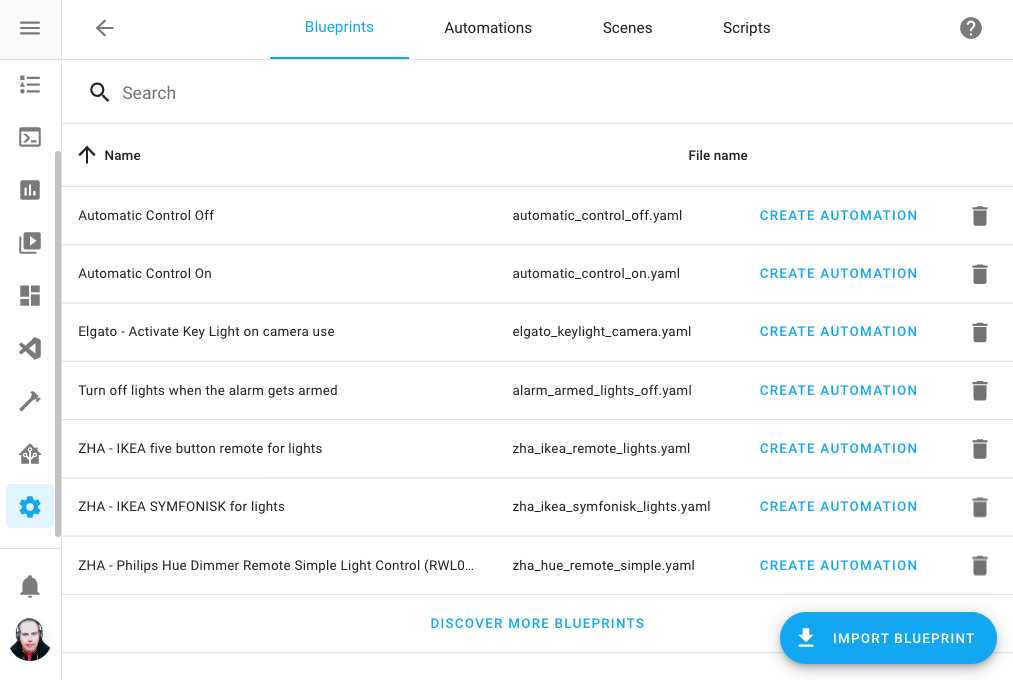 Screenshot of the 蓝图 配置 面板.
自动化蓝图是一种预先创建好的自动化,并带有可由用户设置的选项。这让自动化的逻辑和输入可以彼此分离。听起来也许有点抽象,但实际上,它会让自动化更容易复用,也更容易使用。
想象一下这样一个蓝图:它能根据运动来控制灯光,并允许你配置用哪个运动传感器来触发、控制哪一盏灯。
现在,你可以基于同一个蓝图创建两个自动化; 它们各自拥有独立配置、彼此完全独立运行, 但又共享同一套自动化逻辑。
分享蓝图
蓝图非常适合拿来和社区分享你的自动化与想法。
我们创建了一个 Blueprint Exchange 论坛分类,你可以在那里发布自己创建的蓝图,供其他人使用!
我们相信,蓝图真正的力量就在于分享。 现在,即使别人使用的是 UI 编辑器,你也依然可以把复杂自动化分享给他们直接使用。
例如,你可以分享一个针对特定 Zigbee 遥控器的蓝图,把所有按钮映射到灯光控制; 也可以分享一个在发现电池没电时发送通知的蓝图; 或者一个当你拿起 Android 手机时自动静音音乐的蓝图。
关于可以分享的创意和自动化蓝图,真的几乎没有上限!
使用蓝图
长话短说,听起来很激动人心,但它到底意味着什么?
你可以把论坛帖子或 GitHub 上的 URL 复制进 UI 来导入蓝图。 随后,只要填写所需输入项,就能基于这些蓝图创建自动化。
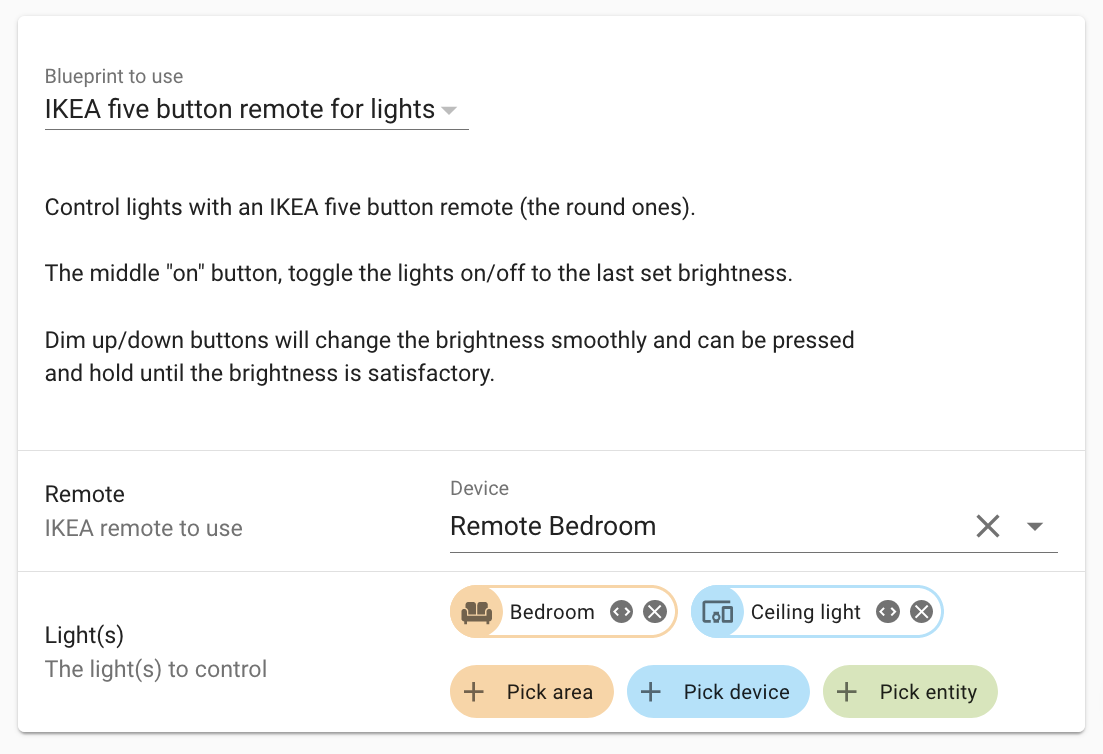 Screenshot of a 蓝图.
部署蓝图真的非常简单,而且还能部署多次! 蓝图在 UI 和 YAML 中都可以完整使用。
创建蓝图
我们准备了一份非常不错的教程,教你如何制作蓝图。
从本质上说,蓝图就是一个自动化,只是额外加入了一些蓝图元数据。 你几乎可以把任何现有自动化都转换成蓝图!
最后一步,别忘了把你新创建的蓝图分享到社区中的 Blueprint Exchange,帮助并启发其他人。
Nabu Casa Cloud TTS 的全新神经语音
If you have a Nabu Casa Home Assistant Cloud subscription, this 发布 brings in some really nice goodness for you. The text-to-speech 服务 offered by Nabu Casa has been extended and now supports a lot of new voices in many different languages.
This is a great alternative to, for example, the Google TTS 集成. The resulting audio is absolutely stunning and the neural voices sound supernatural.
This 服务 is automatically enabled when you are signed in to your
Nabu Casa cloud account and can be called using the tts.cloud_say
服务 in your 自动化.
For example:
为实体分配区域,以及更易读的区域 ID
区域 have been around for a bit already. But, not everything supports 区域 yet. And using it in for example YAML-based 自动化, is not really an easy task to do.
Today that changes, as this 发布 works towards making 区域 more useful by making them more accessible and more universal.
The first change: individual 实体 can now be assigned to 区域.
Previously this was limited to 设备 only. This also works for 实体 without a 设备 (for example, 实体 provided by 助手). 设备 provide 实体, and thus it is now possible to override the 区域 with a single 实体 for a 设备 as well. For example, your in-wall mounted 开关 controls a 灯光 in another 房间.
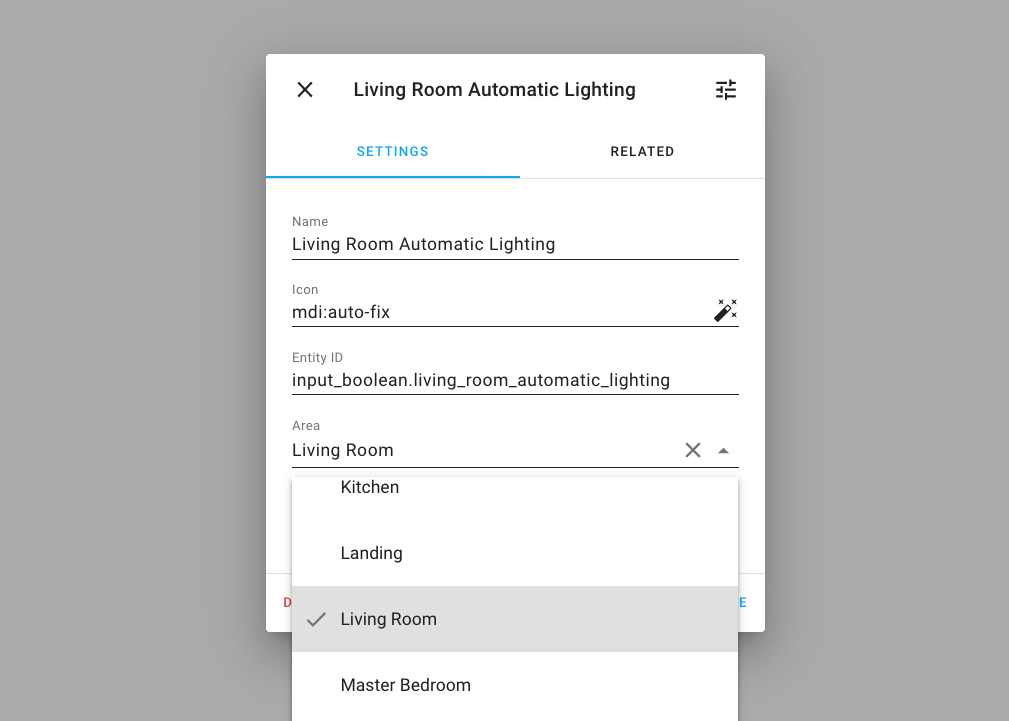 Screenshot of assigning a 实体 to an 区域.
Second improvement: The ID of a newly 创建 区域 will now be based on the name of the 区域 instead of a random string.
This makes it easier to use 区域 in 服务 calls, as you can now use 区域 identifiers that actually make sense for a human! In a YAML 自动化 or 脚本 it will look like this:
To find the 区域 ID for the 区域 you want to target, go to the 配置 面板, and edit the 区域 you want to target. In 区域 edit dialog, the ID is shown.
临时禁用设备
Do you have your Christmas tree set up in Home Assistant? After the Holidays are over, you store all those decorations for the next season. But what about those 设备 in Home Assistant?
Thanks to @emontnemery, you can now disable 设备 in Home Assistant. So, next year, when you unpack all decorations, enable them again and you're ready to go for another Holiday season!
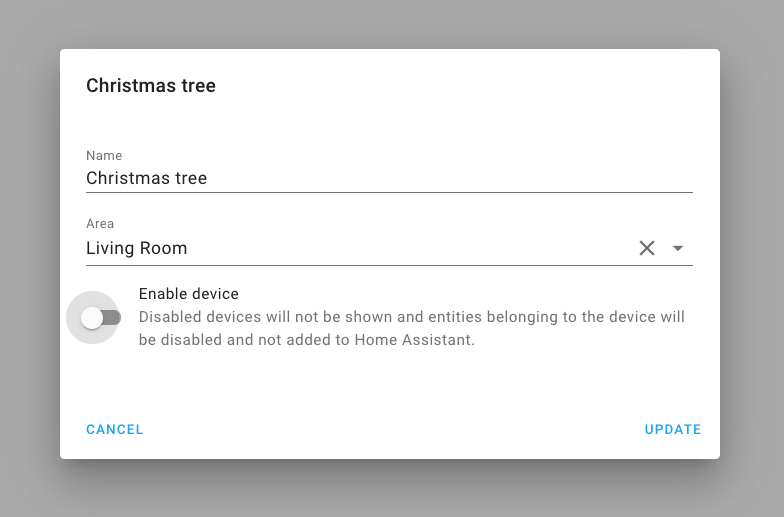 Screenshot of disabling a 设备.
Of course, besides seasonal things, it can also be helpful if you have a broken 设备 or temporarily taking down any other 设备.
其他值得注意的变化
- The Apple TV 集成 now supports tvOS 版本 13 and above and can be 设置 from the UI, thanks @postlund!
- @thecode has been busy with the Shelly 集成 and added support for inputs, so you can now use the Shelly i3 and Shelly's in detached 状态.
- Thanks to @adrum, the HomeKit controller 集成 now has support for (de)加湿器.
- deCONZ now supports tilt on 遮盖, and preset and 风扇 for 温控 设备, thanks @Kane610!
- @frenck added support for setting the repeat mode to the Spotify 集成.
- The Nest 集成 now supports 摄像头 and doorbell events, thanks @allenporter!
- Changes made to your KNX 集成's YAML 配置, can now be reloaded without restarting Home Assistant. Thanks @spacegaier!
- The number formatting in the 前端 is more consistent, thanks to @joshmcrty!
- @dmulcahey has been improving the 用户 experience of ZHA. The feedback when pairing a new Zigbee 设备 in the 前端 is improved, discovered 设备 are shown earlier with their progress, and the ZHA 配置 面板 now has a Zigbee network visualization tab! This allows you to see your network and find connection issues.
- The rest 集成 can now handle request parameters, nicely done @boxcee!
- Learn new RF commands using a Broadlink 遥控器! Thanks, @felipediel!
- @mLupine extended templated 二元sensor and these now support templating
the
delay_onanddelay_off!
新集成
We welcome the following new 集成 this 发布:
- FireServiceRota, added by @cyberjunky
- Kuler Sky, added by @emlove
- Motion Blinds, added by @starkillerOG
- SRP Energy, added by @briglx
- Twinkly, added by @dr1rrb
新平台
The following 集成 got support for a new platform:
- HomeKit Controller now has initial support for 摄像头, added by @Jc2k
- @emontnemery has added support for 风扇 and 遮盖 to the Tasmota 集成
- MQTT added support for 场景, added by @kiall
现在可通过 UI 设置的集成
The following 集成 are now available via the Home Assistant UI:
- Aurora, done by @djtimca
- Recollect Waste, done by @bachya
发布 2020.12.1 - December 16
- Bump envoy_reader 版本 to 0.17.3 (@gtdiehl - #44205) (enphase_envoy docs)
- Bump dsmr-parser to 0.25 (@RobBie1221 - #44223) (dsmr docs)
- Fix unhandled KeyError in Recollect Waste (@bachya - #44224) (recollect_waste docs)
- Bump hatasmota to 0.1.6 (@emontnemery - #44226) (tasmota docs)
- Remove Home Assistant Cast 用户 when removing entry (@emontnemery - #44228) (cast docs)
- Default smartenergy multiplier and divisor (@dmulcahey - #44257) (zha docs)
- Fix setting timestamp on input_datetime (@balloob - #44274) (input_datetime docs)
- Fix Shelly 设备 missing properties field (@thecode - #44279) (shelly docs)
发布 2020.12.2 - December 30
- Bump HAP-python to 3.1.0 (@bdraco - #44176) (homekit docs)
- 更新 denonavr to 0.9.8 (@scarface-4711 - #44194) (denonavr docs)
- Bump pyroon to 0.0.28 (@pavoni - #44302) (roon docs)
- Fix velux homekit 遮盖 not enumerated correctly (@Jc2k - #44318) (homekit_controller docs)
- Bump pyMyQ to 版本 2.0.12 (@ehendrix23 - #44328) (myq docs)
- 更新 pytradfri to 7.0.5 (@rubenbe - #44347)
- Bump pyiqvia to 0.3.1 (@bachya - #44358) (iqvia docs)
- Fix bug in unloading RainMachine options listener (@bachya - #44359) (rainmachine docs)
- Fix Volumio pause with missing track type (@OnFreund - #44447) (volumio docs)
- Fix falsey comparisons in NWS 天气 (@MatthewFlamm - #44486) (nws docs)
- Bump pydeconz to 版本 77 (@Kane610 - #44514) (deconz docs)
- Fix Tasmota 设备 触发器 (@emontnemery - #44574) (tasmota docs)
- Fix 模板 触发器 from time events (@bdraco - #44603) (模板 docs)
- Bump env_canada to 0.2.5 (@michaeldavie - #44631) (environment_canada docs)
- Bump pycarwings2 to 2.10 (@filcole - #44634) (nissan_leaf docs)
如果你需要帮助……
...don't hesitate to use our very active forums or join us for a little chat.
Experiencing issues introduced by this 发布? Please report them in our issue tracker. Make sure to fill in all fields of the issue 模板.
不向后兼容的变更
Below is a listing of the breaking change for this 发布, per subject or 集成. Click on one of those to read more about the breaking change for that specific item.
Aurora
Configuring Aurora 传感器 via YAML has been removed (it was non-functional already). The Aurora 集成 can now be configured via the UI.
(@djtimca - #43045) (aurora docs)
证书过期
In order to optimize stability and performance of Home Assistant, time based 传感器 should use only absolute time values (store the date of the event) and not relative time values (seconds from event), so the value doesn't change each second.
The Certificate Expiry 集成 has both of them, so to adhere to Home Assistant architectural design rules, the offending relative time 传感器 is now removed.
If your 配置 was based on the relative time 传感器, please 开关 to the other one.
Solar-日志
Per ADR-0010, this 发布 deprecates YAML 配置 for the Solar-日志 集成. If you already use the Solar-日志 集成 you do not need to take 动作, as your 配置 has already been imported into the UI.
(@Ernst79 - #43484) (solarlog docs)
LCN
The logic operation 传感器 状态 are renamed from (not, or, and) to
(none, some, all).
The renaming is more consistent with the LCN naming convention. When using the 状态 in an 自动化 ensure they are correctly renamed.
(@alengwenus - #43710) (lcn docs)
运行时间
In order to optimize stability and performance of Home Assistant, 传感器 should use only absolute time values (store the date of the event) and not relative time values (seconds from event) so the value doesn't change each second.
The Uptime 集成 is one leftover, so to adhere to Home Assistant architectural design rules, the 传感器 is now changed to a timestamp.
As a side effect of this change, the unit_of_measurement option of this
集成 is now deprecated and can be removed from your 配置 if
you used that.
Please review your 自动化 and Lovelace 配置 to reflect this change.
(@chemelli74 - #43623) (uptime docs)
Keyring & Credstash
Support for storing secrets in Credstash and Keyring is deprecated and will be removed in March 2021.
Apple TV
The Apple TV 集成 has been completely rewritten. Support for YAML is removed, so old 配置 must be removed and 设备 re-added via the 集成 page.
Furthermore, the old 服务 apple_tv.apple_tv_authenticate and
apple_tv.apple_tv_scan are deprecated and replaced by the configration flow.
(@postlund - #31952) (apple_tv docs)
Telegram 机器人
The telegram bot 集成 now allows/accepts messages when either the allowed group (Chat ID) OR the 用户 ID of the sender matches.
This is a different behavior compared to before as before both Group (Chat ID) AND 用户 ID needed to be allowed. This allows members of a group to talk to the bot, even if they are not specifically listed as a 用户.
If you use Telegram groups, make sure you adjust your 配置 accordingly.
(@wicol - #43241) (telegram_bot docs)
告别以下内容
The following 集成 have been removed:
- Salt Fiber Box (@MartinHjelmare - #43452)
- Ubee Router (@frenck - #43809)
- Yessssms (@flowolf - #43200)
These 集成 where using webscraping, which is no longer allowed.
所有变更
点击查看所有变更!
- Add initial rest query params (@boxcee - #42198) (pvoutput docs) (rest docs) (scrape docs)
- Simplify distance conversion (@springstan - #43107)
- Add Shelly support for REST 传感器 (@chemelli74 - #40429) (shelly docs)
- Fix Aurora 集成 including externalizing API to PyPi and adding config_flow (@djtimca - #43045) (aurora docs) (breaking-change)
- Add save and delete WS commands to 蓝图 (@bramkragten - #42907) (蓝图 docs)
- Add Shelly totalWorkTime as Lamp life (Shelly Air) (@chemelli74 - #43112) (shelly docs)
- Add a config flow for Recollect Waste (@bachya - #43063) (recollect_waste docs)
- Add support for multiple event 触发器 in 自动化 (@frenck - #43097) (homeassistant docs)
- Fix aurora config flow tests (@MartinHjelmare - #43128) (aurora docs)
- Add 重载 support to KNX (@spacegaier - #42429) (knx docs)
- Revert "shelly_naming" rebase 错误 (@thecode - #43134) (shelly docs)
- Add VSCode 调试 launch conf (@balloob - #43130)
- Add support for learning RF commands with Broadlink 遥控器 (@felipediel - #39671) (broadlink docs) (遥控器 docs)
- Shelly: minor improvements (@chemelli74 - #43138) (shelly docs)
- Mock time_date 传感器 tests (@amelchio - #43141) (time_date docs)
- Fix beat calculation (@amelchio - #43142) (time_date docs)
- Further improve MFI tests (@balloob - #43167)
- Remove relative time 传感器 from cert_expiry (@chemelli74 - #42338) (cert_expiry docs) (breaking-change)
- Fix time_date timestamp offsets (@amelchio - #43165) (time_date docs)
- Improve 实体 domain validator (@balloob - #43164)
- Fix time_date interval for DST (@amelchio - #43166) (time_date docs)
- Add test to access current request in websocket API (@balloob - #43133) (websocket_api docs)
- Add 日志 message server startup (@balloob - #43177) (http docs)
- 升级 sentry-sdk to 0.19.3 (@frenck - #43176) (sentry docs)
- Rewrite google_wifi unittest tests to pytest style (@Danielinte - #42030) (google_wifi docs)
- Copy default vscode 设置 during bootstrap (@MartinHjelmare - #43180)
- 更新 ozw get_config_parameter websocket response (@cgarwood - #43058) (ozw docs)
- Hide cancelled trips from being displayed in vasttrafik 集成 (@ttuffin - #43184) (vasttrafik docs)
- Fix 自动化 in packages (@balloob - #43202) (自动化 docs)
- Add support for selectors in 服务.yaml (@balloob - #43162) (蓝图 docs) (sonos docs)
- 更新 fitbit battery status (@czechmark - #42980) (fitbit docs)
- Add quarter-hour period feature for utility_meter component (@thomasdelaet - #41999) (utility_meter docs)
- Add initial 摄像头 support to homekit_controller (@Jc2k - #43100) (homekit_controller docs) (new-platform)
- Add support for Broadlink BG1 设备 (@b4dpxl - #42314) (broadlink docs)
- Add HomeKit 加湿器/dehumidifier (@adrum - #42311) (homekit_controller docs)
- 升级 youtube_dl to 版本 2020.11.12 (@BKPepe - #43231) (media_extractor docs)
- 开关 ios to dispatching instead of polling (@bdraco - #43233) (ios docs)
- Bump pyheos to 0.7.2 (@andrewsayre - #43239) (heos docs)
- Bypass the slow 更新 警告 for group updates (@bdraco - #43209) (group docs)
- Eliminate doorbird 开关 polling (@bdraco - #43215) (doorbird docs)
- Bump pysmartthings and pysmartapp (@andrewsayre - #43240) (smartthings docs)
- Refactor ZHA 灯光 initialization (@Adminiuga - #43149) (zha docs)
- Remove yessssms 集成 (@flowolf - #43200)
- Set should_poll for 区域 实体 (@bdraco - #43212) (区域 docs)
- Support gas meter capability for smartthings (@javache - #41310) (smartthings docs)
- Add dsmr_reader telegram timestamp and 设备 classes (@tim427 - #42909) (dsmr_reader docs)
- Convert most esphome 状态 updates to callbacks (@bdraco - #43246) (esphome docs)
- Add tests for browse media 图像 proxy (@ctalkington - #43076) (媒体播放器 docs)
- Apply suggestions from #42697 to synology_dsm (@mib1185 - #43197) (synology_dsm docs)
- Avoid creating battery 传感器 if Shelly 设备 is external powered (@chemelli74 - #43243) (shelly docs)
- Rewrite ecobee unittest tests to pytest (@adriansuwala - #42584) (ecobee docs)
- Bump python-miio and construct 版本 (@syssi - #43267) (eddystone_temperature docs) (eq3btsmart docs) (xiaomi_miio docs)
- Xiaomi 设备 Tracker - Move "Refreshing 设备 list" to 调试 (@GuyKh - #43276) (xiaomi docs)
- Bump 动作/upload-artifact from v2.2.0 to v2.2.1 (dependabot - #43272)
- Bump Pywemo to 0.5.3 (@pavoni - #43263) (wemo docs)
- Automatically clean up executor as part of closing loop (@balloob - #43284)
- Convert 核心 tests to async (@balloob - #43287)
- Bump PyEssent to 0.14 (@TheLastProject - #43282) (essent docs)
- Refactor how 实体 are 创建 for homekit_controller 服务 (@Jc2k - #43242) (homekit_controller docs)
- Add 通知 binary_sensor to Plugwise 集成 (@CoMPaTech - #41473) (plugwise docs)
- 更新 directv to 0.4.0 (@ctalkington - #43302) (directv docs) (directv docs)
- Improvement to allow parsing of station ID in vasttrafik 集成. Addresses #34851 (@ttuffin - #43136) (vasttrafik docs)
- Bump codecov/codecov-动作 from v1.0.14 to v1.0.15 (dependabot - #43304)
- Add progress translation key to hassfest (@MartinHjelmare - #43311)
- 更新 cloud 集成 to 0.38.0 (@klaasnicolaas - #43314) (cloud docs)
- Add an option to 模板 delay_on/off in 模板 二元sensor (@mLupine - #43259) (模板 docs)
- Fix kodi 媒体播放器 unavailable at start (@mvn23 - #41714) (kodi docs)
- Improve Google Assistant 遮盖 assumed 状态 handling (@elupus - #43255) (google_assistant docs)
- Add TV channel name to smartthings 集成 (@Alex-Klein - #41729) (smartthings docs)
- Tweak OZW 灯光 discovery (@firstof9 - #43325) (ozw docs)
- Refactor ZHA tests to allow 属性 reads during 设备 initialization (@Adminiuga - #43357) (zha docs)
- 更新 Zha dependencies (@Adminiuga - #43373) (zha docs)
- Refactor ZHA 传感器 initialization (@Adminiuga - #43339) (zha docs)
- 更新 denonavr to 0.9.6 (@scarface-4711 - #43370) (denonavr docs)
- Add shelly 已安装 firmware info (@chemelli74 - #43221) (shelly docs)
- Support for Shelly Binary Input 传感器 (@thecode - #43313) (shelly docs)
- Reword numeric_state 触发器 (@amelchio - #43367) (homeassistant docs)
- Raise in base implementation of FanEntity.oscillate (@emontnemery - #43354) (风扇 docs)
- Improve nest SDM 集成 错误 handling (@allenporter - #43271) (nest docs)
- 更新 ovoenergy to v1.1.11 (@timmo001 - #43391) (ovo_energy docs)
- Fix selector to return the selector type (@bramkragten - #43395)
- Add twinkly 集成 (@dr1rrb - #42103) (twinkly docs) (new-集成)
- Add new air-加湿器 设备 CA4 with miot protocol (@Toxblh - #39398) (xiaomi_miio docs)
- Check config to use config platforms (@balloob - #43407)
- 更新 pymyq to 2.0.10 (@ehendrix23 - #43413) (myq docs)
- 更新 python-awair to 0.2.1 (@ahayworth - #43415) (awair docs)
- Add Srp energy component (@briglx - #41091) (srp_energy docs) (new-集成)
- 更新 Alexa supported languages (@100ferhas - #43139) (alexa docs)
- Support openRelativePercent for google assistant 遮盖 (@elupus - #43336) (google_assistant docs)
- Add support for checking minimum HA 版本 (@balloob - #43350) (蓝图 docs)
- Provide HA username via auth WS (@spacegaier - #43283) (config docs)
- Verify that we register 蓝图 on 自动化 设置 (@balloob - #43434) (自动化 docs) (蓝图 docs)
- 更新 dsmr_parser to 0.23 (@RobBie1221 - #43403) (dsmr docs)
- 升级 Beewi Smartclim component to 0.0.10 (@alemuro - #43441) (beewi_smartclim docs)
- Fix empty local_ip config flow (@spacegaier - #43333) (local_ip docs)
- Use 天气 属性 条件 constants (@springstan - #39945)
- Move Flo logger to a package logger (@bachya - #43449) (flo docs)
- Move Ambient PWS logger to a package logger (@bachya - #43448) (ambient_station docs)
- Move legacy 设备 tracker 设置 to legacy module (@MartinHjelmare - #43447) (device_tracker docs)
- Remove salt 集成 for webscraping (@MartinHjelmare - #43452) (breaking-change)
- Move Notion logger to a package logger (@bachya - #43450) (notion docs)
- Add ONVIF PTZ Stop support (@scop - #39734) (onvif docs)
- Remove zigpy monkey patching (@Adminiuga - #43456) (zha docs)
- Change Plugwise 集成 to plugwise module (@CoMPaTech - #43036) (plugwise docs)
- Avoid arbitrarily reducing ZHA 温控 temperature information (@FrnchFrgg - #43442) (zha docs)
- Bump acmeda dependency aiopulse to 0.4.2 (@atmurray - #43217) (acmeda docs)
- Fix ConnectTimeout during wolflink start (@adamkrol93 - #43418) (wolflink docs)
- Add reauth support for OVO Energy (@timmo001 - #38882) (ovo_energy docs)
- 升级 debugpy to 1.2.0 (@frenck - #43328) (debugpy docs)
- Add repeat mode support to Spotify (@frenck - #43247) (spotify docs)
- Fix Luftdaten.info data retrieval (@FlavorFx - #43471) (luftdaten docs)
- Support for multiple 状态 in history_stats (@iprak - #43416) (history_stats docs)
- 升级 discord.py to 1.5.1 (@LordBoos - #43473)
- Bump rpi-bad-power to 0.1.0 (@shenxn - #43476) (rpi_power docs)
- Deprecate YAML config for Solar-日志 (@Ernst79 - #43484) (solarlog docs) (breaking-change)
- Add updated British Voices (@CrashWorksLLC - #43496) (watson_tts docs)
- Clean up Solar-日志 review comments (@frenck - #43503) (solarlog docs)
- Optimize Sonos queue position (@amelchio - #43514) (sonos docs)
- Re-organize OpenUV constants (@bachya - #43453) (openuv docs)
- Bump envoy 版本 to 0.17.0 (@gtdiehl - #43498) (enphase_envoy docs)
- Optimize Sonos favorites updates (@amelchio - #43516) (sonos docs)
- Add seek support to plex media players (@shocklateboy92 - #43420) (plex docs)
- Clean up RainMachine config entry (@bachya - #43508) (rainmachine docs)
- Add vendor effects to Yeelight 集成 (@danielrheinbay - #42711) (yeelight docs)
- Optimize Sonos current playing 状态 (@amelchio - #43517) (sonos docs)
- Make Brother uptime 传感器 disabled by default (@bieniu - #43478) (brother docs)
- Add 设备 id to deconz_event (@Kane610 - #43552) (deconz docs)
- Bump 动作/stale from v3.0.13 to v3.0.14 (dependabot - #43551)
- 更新 Blinkpy to fix non-updating blink mini 摄像头 (@fronzbot - #43549) (blink docs)
- Optimize reading of Sonos source mode (@amelchio - #43541) (sonos docs)
- Mill Heater: Add support for Energy consumption (@Danielhiversen - #43523) (mill docs)
- Track deCONZ lib changes to 灯光 based 设备 (@Kane610 - #43366) (deconz docs)
- 更新 solax to 0.2.5 (@squishykid - #43564) (solax docs)
- 升级 sentry-sdk to 0.19.4 (@frenck - #43504) (sentry docs)
- 更新 denonavr to 0.9.7 (@scarface-4711 - #43546) (denonavr docs)
- Fix RTS 遮盖 with set position available (@tetienne - #43555) (somfy docs)
- Add codeowner to Enphase Envoy manifest (@gtdiehl - #43402) (enphase_envoy docs)
- Add Webhook to default config (@frenck - #43521) (default_config docs)
- Cannot use vcgencmd in HassOS (@denics - #42710) (sensehat docs)
- Add Motion Blinds 集成 (@starkillerOG - #42989) (motion_blinds docs) (new-集成)
- Use references in config flow for solaredge (@Cereal2nd - #43511) (solaredge docs)
- Bump 版本 to 0.119.0dev0 (@frenck - #43485)
- Decrease asuswrt connects per 传感器 (@JJdeVries - #43383) (asuswrt docs)
- Fix 警告 generated by surpetcare test (@balloob - #43598) (surepetcare docs)
- Fix conversion of 遮盖 position between HASS and deCONZ (@Kane610 - #43602) (deconz docs)
- 更新 nest library and 开关 events to async (@allenporter - #43583) (nest docs)
- Add unknown_authorize_url_generation to base strings for config flows (@springstan - #42484) (nest docs) (point docs) (tellduslive docs) (toon docs)
- Bump hatasmota to 0.1.1 (@emontnemery - #43608) (tasmota docs)
- Fix Meraki API Auth (@koolsb - #43578) (meraki docs)
- 升级 foobot_async to 1.0.0 (@balloob - #43611) (foobot docs)
- Add tilt support to deCONZ 遮盖 (@Kane610 - #43607) (deconz docs)
- 更新 xknx to 0.15.4 (@farmio - #43536) (knx docs)
- Add nest SDM API 摄像头/doorbell events (@allenporter - #42700) (nest docs)
- Bump pyhs100 dependency to fix hs220 discoverability issues (@rytilahti - #43619) (tplink docs)
- Bump ha-ffmpeg to 3.0.2 (@balloob - #43597)
- Add default config if not there (@balloob - #43321)
- Support for Shelly Input Events (@thecode - #43479) (shelly docs)
- Add Shelly UNI ADC 传感器 (@chemelli74 - #43490) (shelly docs)
- Add FireServiceRota/BrandweerRooster 集成 (@cyberjunky - #38206) (fireservicerota docs) (new-集成)
- Fix flapping derivative tests where time would move between 状态 changes (@elupus - #43579) (derivative docs)
- Add Tasmota 风扇 (@emontnemery - #43353) (tasmota docs) (new-platform)
- Add Tasmota 遮盖 (@emontnemery - #43368) (tasmota docs) (new-platform)
- Add more selectors (@bramkragten - #43639) (input_number docs)
- Add default to inputs (@bramkragten - #43636) (蓝图 docs)
- Add location to summary 传感器 属性 (@ofalvai - #43641) (seventeentrack docs)
- Suggest folder when importing 蓝图 and store source_url (@balloob - #43650) (蓝图 docs)
- Add Duty binary_sensor platform to FireServiceRota 集成 (@cyberjunky - #43638) (fireservicerota docs) (new-platform)
- Add 区域 selector, remove date selector (@bramkragten - #43658)
- Allow importing gist (@balloob - #43659) (蓝图 docs)
- Support disabling 设备 (@emontnemery - #43293) (config docs)
- Add Roomba support for automatic emptying of bin (@jasperslits - #43594) (roomba docs)
- Make input_datetime better handle timezones (@balloob - #43396) (input_datetime docs)
- Fix check config (@balloob - #43663) (蓝图 docs)
- Fix MQTT threading bug (@emontnemery - #43667) (MQTT docs)
- 升级 pre-commit to 2.9.2 (@frenck - #43655)
- Small cleanup of Tasmota (@emontnemery - #43642) (tasmota docs)
- Updated 前端 to 20201126.0 (@bramkragten - #43682) (前端 docs)
- Met.no: Fix for zero temp entries (@thimic - #43684) (met docs)
- OAuth2 to use current request header (@balloob - #43668) (toon docs)
- Exclude disabled 实体 from async_entries_for_device (@emontnemery - #43665) (deconz docs) (MQTT docs) (tasmota docs) (tuya docs) (unifi docs) (zha docs)
- Add option to deactivate a 用户 (@spacegaier - #43463) (config docs)
- Bugfix schedule assigned to wrong day of week (@zxdavb - #43676) (evohome docs)
- Code quality improvement for evohome (@zxdavb - #43678) (evohome docs)
- Fix Shelly uptime 传感器 (@thecode - #43651) (shelly docs)
- Convert API 集成 to async 设置 (@balloob - #43685) (api docs)
- Eliminate evohome unhandled exceptions when client API call fails (@zxdavb - #43681) (evohome docs)
- Maybe fix flaky test (@balloob - #43690) (shelly docs)
- Stub finding custom 集成 in tests (@balloob - #43692)
- Add Abode MFA support (@shred86 - #43572) (abode docs)
- Use run_job for 服务 助手 (@balloob - #43696) (input_boolean docs) (input_datetime docs)
- Use utcnow from date util for http.ban (@balloob - #43686) (http docs)
- Await callbacks to keep cleaner stacktraces (@balloob - #43693) (MQTT docs)
- 更新 xknx to 0.15.6 (@farmio - #43645) (knx docs)
- Add system health check to Spotify (@frenck - #43249) (spotify docs)
- Fix exception upon 门锁 initialization on V2 SimpliSafe systems (@bachya - #43705) (simplisafe docs)
- Bump RFLink to v0.0.55 (@javicalle - #43704) (rflink docs)
- Proxy Plex media browser 图像 (@jjlawren - #43111) (plex docs)
- Bump up ZHA dependencies (@Adminiuga - #43707) (zha docs)
- Add support to control cooling in deCONZ 温控 platform (@Kane610 - #43720) (deconz docs)
- 蓝图 config to override 蓝图 (@balloob - #43724) (蓝图 docs)
- Ensure MariaDB/MySQL can be purged and handle 状态 being deleted out from under the recorder (@moinmoin-sh - #43610) (recorder docs)
- Bump Brother library to 版本 0.1.20 (@bieniu - #43628) (brother docs)
- Bump hatasmota to 0.1.2 (@emontnemery - #43719) (tasmota docs)
- Make threshold 二元sensor faster (@balloob - #43695) (threshold docs)
- Add Response 开关 platform to FireServiceRota 集成 (@cyberjunky - #43700) (fireservicerota docs) (new-platform)
- Add additional events to enhance the ZHA 设备 pairing experience (@dmulcahey - #43729) (zha docs)
- Add a 服务 target (@balloob - #43725)
- Create tables with a charset that can hold all expected data under mysql (@bdraco - #43732) (recorder docs)
- Allow configuring the delay in the motion 灯光 蓝图 (@balloob - #43737) (自动化 docs)
- Add support for multiple tags and 设备 in tag 触发器 (@frenck - #43098) (tag docs)
- Remove temporary variable by only retrieving needed value (@springstan - #42522)
- Bump pypck to v0.7.6 (@alengwenus - #43710) (lcn docs) (breaking-change)
- Use the correct property for full init event (@dmulcahey - #43745) (zha docs)
- ZHA: remove unused 'from_cache' argument from 'async_get_state' and add 'async_update' (@basnijholt - #42413) (zha docs)
- Address FireServiceRota late code review (@cyberjunky - #43741) (fireservicerota docs)
- Always keep the current recorder run when purging (@bdraco - #43733) (recorder docs)
- Add nest 设备 触发器 for 摄像头 and doorbell events (@allenporter - #43548) (nest docs)
- Report correct 天气 条件 at night for OpenWeatherMap (@springstan - #42982) (openweathermap docs)
- Support asking 遮盖 to stop using google assistant (@elupus - #43537) (google_assistant docs)
- Fix updating of Tesla 开关 after command (@alandtse - #43754) (tesla docs)
- Allow specifying device_id as target (@balloob - #43767)
- Add system health check to IPMA (@dgomes - #43762) (ipma docs)
- Add 设备 information to solarlog 集成 (@Ernst79 - #43680) (solarlog docs)
- Add hyperion config options flow (@dermotduffy - #43673) (hyperion docs)
- Add show progress to ozw config flow (@MartinHjelmare - #43310) (ozw docs)
- Add 认证 support to bsblan (@liudger - #42306) (bsblan docs)
- Increase Supervisor 插件 助手 timeout (@MartinHjelmare - #43778) (hassio docs)
- Add support for 设备 class in target selector (@balloob - #43768)
- Fix MQTT birth message deadlock (@emontnemery - #43790) (MQTT docs)
- Warn when referencing missing 设备/区域 (@balloob - #43787)
- Add 门锁.open 服务 to nello (@pattyland - #42141) (nello docs) (nello docs)
- Migrate foscam to use 实体 platform 实体 服务 (@balloob - #43775) (foscam docs)
- Use 实体 platform for Neato (@balloob - #43772) (neato docs)
- 升级 elgato to 1.0.0 (@frenck - #43792) (elgato docs)
- Bump aiorecollect to 0.2.2 (@bachya - #43796) (recollect_waste docs)
- Base 区域 IDs on initial name (@balloob - #43804)
- Remove unused stuff from ZHA registries (@abmantis - #43786) (zha docs)
- Remove Ubee Router 集成 (ADR-0004) (@frenck - #43809) (breaking-change)
- Fix config validation tests for upcoming beta (@frenck - #43811)
- Remove invalidation 版本 from Airvisual (@frenck - #43810) (airvisual docs)
- Move uptime from relative time to absolute time (@chemelli74 - #43623) (uptime docs) (breaking-change)
- Add 设备 动作 to mobile app to 通知 (@balloob - #43814) (mobile_app docs) (通知 docs)
- Use !input instead of !placeholder (@balloob - #43820) (自动化 docs) (蓝图 docs)
- Fix wrong temperature setting in LCN 温控 (@alengwenus - #43818) (lcn docs)
- Make simple deCONZ thermostats work (@Kane610 - #43781) (deconz docs)
- Another try to get rid of Shelly flaky test (@balloob - #43821) (shelly docs)
- Add Analog cluster for Lumi plugs (@Adminiuga - #43817) (zha docs)
- Add ozw scene_instance to scene_activated (@firstof9 - #43829) (ozw docs)
- Support more edl21 设备 and 传感器 (@mtdcr - #43603) (edl21 docs)
- 更新 区域 and target selectors add sequence selector (@bramkragten - #43831) (自动化 docs)
- Bump libpurecool to 0.6.4 (@etheralm - #43779) (dyson docs)
- Add test for is_internal_request (@ctalkington - #43841)
- 升级 TwitterAPI to 2.6.2.1 (@fabaff - #43833) (twitter docs)
- Correct 服务 not found exception message (@frenck - #43846)
- 升级 pylast to 4.0.0 (@fabaff - #43830) (lastfm docs)
- Bump pypck to 0.7.7 (@alengwenus - #43824) (lcn docs)
- Use 灯光 打开 服务 (@balloob - #43847) (自动化 docs)
- Do not warn for weak referenced 实体 (@balloob - #43848) (homeassistant docs)
- Migrate 通知-leaving-区域 to use mobile app 设备 动作 (@balloob - #43832) (自动化 docs) (mobile_app docs)
- Add new number 实体 集成 (@Shulyaka - #42735) (demo docs) (number docs) (new-集成)
- Make "invalid 密码" 错误 message clearer (@spacegaier - #43853) (config docs)
- Guard for when refreshing token fails (@balloob - #43855) (spotify docs)
- Cleanup unique_id on onewire 集成 (@epenet - #43783) (onewire docs)
- Fix using execute on the notify_leaving_zone (@balloob - #43858) (自动化 docs)
- deCONZ improve options updating 实体 (@Kane610 - #42320) (deconz docs)
- Deprecate the use of keyring and credstash (@balloob - #43854) (breaking-change)
- Refactor Apple TV 集成 (@postlund - #31952) (apple_tv docs) (breaking-change)
- Add preset support to deCONZ 温控 platform (@Kane610 - #43722) (deconz docs)
- Bump androidtv to 0.0.56 (@JeffLIrion - #43859)
- Add 风扇 support to deCONZ 温控 platform (@Kane610 - #43721) (deconz docs)
- Use Plex websocket payloads to reduce overhead (@jjlawren - #42332) (plex docs)
- Bump Synology DSM to 1.0.1 (@Quentame - #43860) (synology_dsm docs)
- Allow members of allowed groups to talk to telegram_bot (@wicol - #43241) (telegram_bot docs) (breaking-change)
- Add support for system health to Airly integrarion (@bieniu - #43220) (airly docs)
- Add support for system health to AccuWeather 集成 (@bieniu - #43277) (accuweather docs)
- Automatically select "Solid" effect in Hyperion (@dermotduffy - #43799) (hyperion docs)
- Add support for MQTT 场景 (@kiall - #42639) (MQTT docs) (new-platform)
- Add ozw 插件 discovery and MQTT client (@MartinHjelmare - #43838) (hassio docs) (ozw docs)
- Add telegram_bot.send_voice 服务 (@dvv - #43433) (telegram_bot docs)
- Updated 前端 to 20201202.0 (@bramkragten - #43862) (前端 docs)
- Improve custom datatype parsing in Modbus 传感器 and 温控 (@vzahradnik - #42354) (modbus docs)
- Improve handling of disabled 设备 (@emontnemery - #43864) (config docs)
- Add Kuler Sky 蓝牙 楼层 lamp 集成 (@emlove - #42372) (kulersky docs) (beta fix) (new-集成)
- Fix intesishome passing coroutine to HassJob (@tehbrd - #43837) (intesishome docs) (beta fix)
- Fix Slack "invalid_blocks_format" bug (@bachya - #43875) (slack docs) (beta fix)
- Bump auroranoaa library to 0.0.2 (@djtimca - #43898) (aurora docs) (beta fix)
- 蓝图: descriptions + descriptive 错误 (@balloob - #43899) (自动化 docs) (蓝图 docs) (beta fix)
- Unsubscribe ozw stop listener on entry unload (@MartinHjelmare - #43900) (ozw docs) (beta fix)
- Kulersky cleanups (@emlove - #43901) (kulersky docs) (beta fix)
- Updated 前端 to 20201203.0 (@bramkragten - #43907) (前端 docs) (beta fix)
- Bump hatasmota to 0.1.4 (@emontnemery - #43912) (tasmota docs) (beta fix)
- Always send ozw network key to 插件 config (@MartinHjelmare - #43938) (ozw docs) (beta fix)
- Handle stale ozw discovery flow (@MartinHjelmare - #43939) (ozw docs) (beta fix)
- Return unique id of Blink 二元sensor (@brg468 - #43942) (blink docs) (beta fix)
- Updated 前端 to 20201204.0 (@bramkragten - #43945) (前端 docs) (beta fix)
- Fix 设备 refresh 服务 can always add 设备 (@Kane610 - #43950) (deconz docs) (beta fix)
- Fix Ecobee set humidity (@treylok - #43954) (beta fix)
- Prevent firing Shelly input events at startup (@thecode - #43986) (shelly docs) (beta fix)
- 更新 ring to 0.6.2 (@balloob - #43995) (ring docs) (beta fix)
- Fix Solaredge 集成 in case the data is not complete (@Cereal2nd - #43557) (solaredge docs) (beta fix)
- 更新 generic_thermostat current_temperature on startup (@NigelRook - #43951) (generic_thermostat docs) (beta fix)
- Retry tuya 设置 on auth rate limiting (@AlexSzlavik - #44001) (tuya docs) (beta fix)
- Bump pymyq to 2.0.11 (@imbrianj - #44003) (myq docs) (beta fix)
- Fix unit of measurement for asuswrt 传感器 (@JJdeVries - #44009) (asuswrt docs) (beta fix)
- Hide HomeKit 设备 from discovery that are known to be problematic (@Jc2k - #44014) (homekit_controller docs) (beta fix)
- Add T8400 to ignore list (@FuzzyMistborn - #44017) (homekit_controller docs) (beta fix)
- Fix how homekit_controller enumerates Hue 遥控器 (@Jc2k - #44019) (homekit_controller docs) (beta fix)
- Bump simplisafe-python to 9.6.1 (@bachya - #44030) (simplisafe docs) (beta fix)
- 更新 pyarlo to 0.2.4 (@TakesTheBiscuit - #44034) (arlo docs) (beta fix)
- Add the missing ATTR_ENABLED 属性 to Brother 集成 list of 传感器 (@bieniu - #44036) (brother docs) (beta fix)
- 更新 ZHA dependencies (@Adminiuga - #44039) (zha docs) (beta fix)
- Bump simplisafe-python to 9.6.2 (@bachya - #44040) (simplisafe docs) (beta fix)
- Fix extracting 实体 and 设备 IDs from 脚本 (@balloob - #44048) (自动化 docs) (beta fix)
- Bump pyatv to 0.7.5 (@postlund - #44051) (apple_tv docs) (beta fix)
- Exclude coordinator when looking up group members 实体 IDs (@Adminiuga - #44058) (zha docs) (beta fix)
- Some 灯光 only support hs, like the lidl christmas 灯光 (@Kane610 - #44059) (deconz docs) (beta fix)
- Fix ignored Axis config entries doesn't break set up of new entries (@Kane610 - #44062) (axis docs) (beta fix)
- Fix yeelight unavailbility (@zewelor - #44061) (yeelight docs) (beta fix)
- Fix transmission torrent filtering and sorting (@JPHutchins - #44069) (transmission docs) (beta fix)
- Bump hass-nabucasa to 0.39.0 (@balloob - #44097) (cloud docs) (beta fix)
- Fix importing 蓝图 from forums with HTML 实体 (@balloob - #44098) (蓝图 docs) (beta fix)
- Fix importing 蓝图 from community (@bramkragten - #44104) (蓝图 docs) (beta fix)
- 更新 前端 to 20201210.0 (@bramkragten - #44105) (前端 docs) (beta fix)
- Support more 错误 to better do retries in UniFi (@Kane610 - #44108) (unifi docs) (beta fix)
- Fix Met.no forecast precipitation (@brg468 - #44106) (met docs) (beta fix)
- Fix inability to erase SimpliSafe code (@bachya - #44137) (simplisafe docs) (beta fix)
- Fix upnp first discovered 设备 is used (@StevenLooman - #44151) (upnp docs) (beta fix)
- Updated 前端 to 20201212.0 (@bramkragten - #44154) (前端 docs) (beta fix)
- Remove invalidation_version from deprecated (@balloob - #44156) (beta fix)
- Bump zeroconf to 0.28.7 to fix Thread safety (@bdraco - #44160) (zeroconf docs) (beta fix)
- Bump the ZHA quirks lib to 0.0.49 (@dmulcahey - #44173) (zha docs) (beta fix)
- Remove deprecated CONF_ALLOW_UNLOCK, CONF_API_KEY from Google Assistant (@hmmbob - #44087) (google_assistant docs) (beta fix)