

0.118:Grid 与日志簿卡片、快速导航,以及模板原生类型
Home Assistant 核心 0.118 来了!
这是 2020 年倒数第二个版本,意味着这一年已经慢慢走到尾声。
这也意味着,今年只剩最后一个版本了……而且我们打算用一场大爆发来为这一年收尾!另外,我们也宣布了 Home Assistant Conference。我真的非常期待!今年最后一次重大发布会在 12 月 13 日的大会期间到来。
回到 0.118!这次发布带来了一些很棒的新内容:可以用 Quick Bar 在各处导航(哦,我真的太喜欢这个功能了)、几张新的 Lovelace 卡片、模板中的原生类型现在默认启用,以及 Nest 恒温器支持回归了!🎉
总的来说,这是一个很不错的版本,而更令人兴奋的还在后面。
../Frenck
目录
- Table of contents
- Home Assistant Conference
- Grid 卡片
- Quick Bar navigation
- Native types support for templates
- Logbook 卡片
- Header & Footer Editor
- Supervisor Network configuration
- Home Assistant OS
- Other noteworthy changes
- New integrations
- New Platforms
- integrations now available to set up from the UI
- 发布 0.118.1 - November 19
- 发布 0.118.2 - November 20
- 发布 0.118.3 - November 23
- 发布 0.118.4 - November 26
- 发布 0.118.5 - December 5
- If you need help...
- Backward-incompatible changes
- Farewell to the following
- All changes
Home Assistant 大会
激动人心的消息!Home Assistant 今年将举办一场线上大会!
这是一场用来庆祝我们的社区、分享想法、历史与作品,同时纪念重要里程碑的活动! 大会将在 12 月 13 日(星期日)举行。
Home Assistant 创始人 Paulus Schoutsen 将带来开场与闭幕主题演讲, 其他 Home Assistant 开发者也会一同参与。 中间则安排了三条不同主题的演讲线路(大众用户、进阶用户和开发者),总计 16 场分享。
欢迎查看大会日程,了解演讲主题和讲者名单。
Home Assistant Conference 将在线上会议平台 Hopin 举办。 参与门票价格为 1 美元,用于覆盖平台成本。
大会也会提供免费的 YouTube 直播,不过直播内容仅限主题演讲和“大众用户”线路。 你将无法参与聊天互动,也少了那种真正在线参会的感觉,所以我们还是推荐你购买门票!
如需获取最新信息,请查看我们的 Home Assistant Conference 专题页面。

补充:我们都讨厌广告!但我们也想展示我们的用户!
对于没有持续关注发布说明的朋友,我们在配置面板中加入了一条关于大会的公告。它本来就设定为在大会结束后自动消失;如果你想更早关掉它,直接点 x 就行!
我们也理解,这确实会让人担心未来是否会出现广告,而且这次实现方式本可以更好。事实上,在 beta 期间围绕这件事的一些讨论里(没错,有时还挺激烈),大家提出了不少很好的想法和示例,指向一个更像“社区新闻”集成的方案。这样的集成未来可以汇聚社区活动、新闻和项目亮点,并像其他集成一样自由启用或禁用。目前则先用这个横幅,下一次发布它就会被移除。
Grid 卡片
Ever since the start of Lovelace, 用户 have been making grids. However, this was not easy as it involved fiddling by combining horizontal and vertical stacks — a confusing and frustrating experience.
@balloob to the rescue! This 发布 adds a new Grid 卡片. You won't have to write a complicated YAML soup combining both horizontal and vertical stacks.
The Grid 卡片 offers straight forward options to mimic these 设置 and adds an option to force each 卡片 to be square to boot.
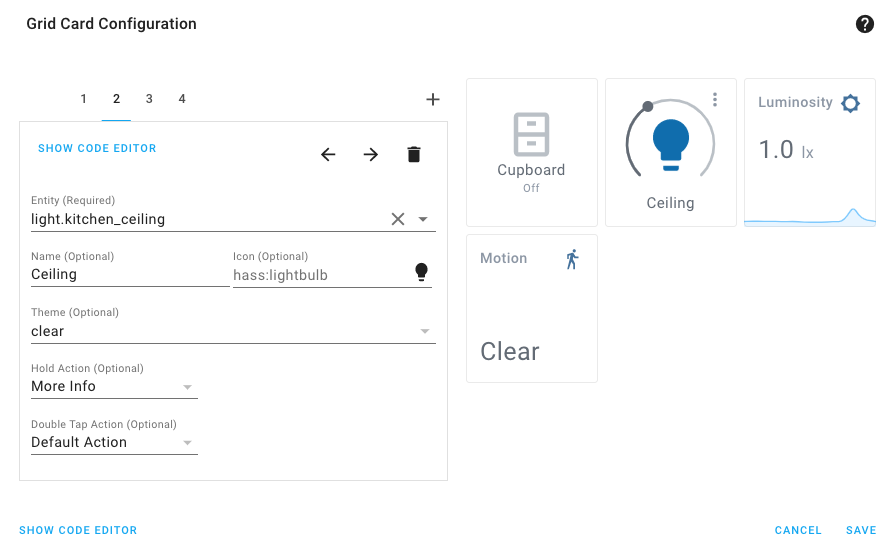 Screenshot of Grid 卡片.
*Note that the square option won't work with all 卡片.
Quick Bar 导航
The Quickbar, which was introduced in Home Assistant 0.117, really took off! We are happy to see you like it.
If you haven't tried the new Quick Bar yet... you should! It is a quick and
easy way to get to 实体 or run commands. From anywhere in Home
Assistant; press e for 实体 or c for commands.
This 发布, support for navigating Home Assistant via the Quick Bar was added. You can now jump to any place, from any place. Amazing job @donkawechico
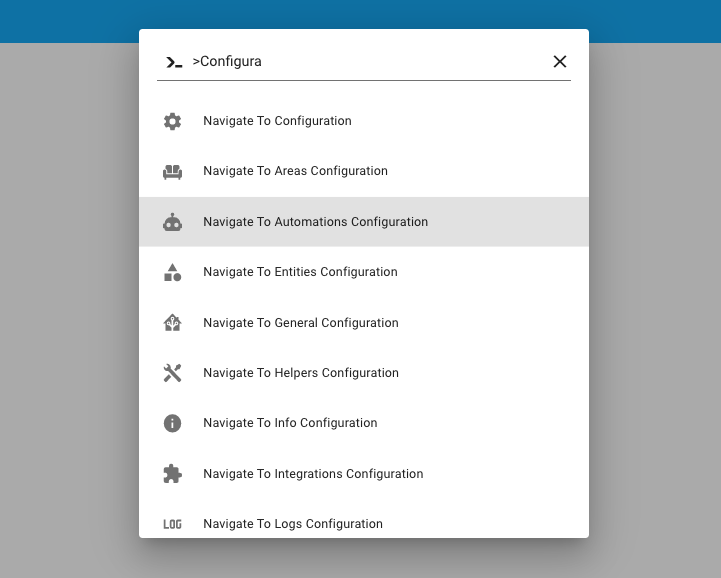 Screenshot of navigating around using the Quick Bar.
模板原生类型支持
Announced in 0.117, but now by default enabled. Native 模板 types allow 模板 to result in not just strings (text), but also other types.
Ever tried to make a list of 实体 or set an RGB color via a 模板? If so, you probably would have learned, that it is not that simple. In Home Assistant, the result of a 模板 always has been a piece of text (a string), even if you made a list.
This is an extremely powerful change to our 模板 engine, that allows for more advanced future additions and can significantly reduce the complexity of existing 模板 in your set up.
It should be mostly compatible with your existing 模板; However, be sure to check the backward-incompatible changes section for known possible breaking scenarios.
日志簿卡片
Another new Lovelace 卡片 this 发布. @zsarnett added the Logbook 卡片.
This 卡片 allows you to show the 日志 of one (or more) 实体 on a Lovelace 仪表盘. This can be really helpful if you want to monitor, for example, the motion events of a 传感器 or a 摄像头.
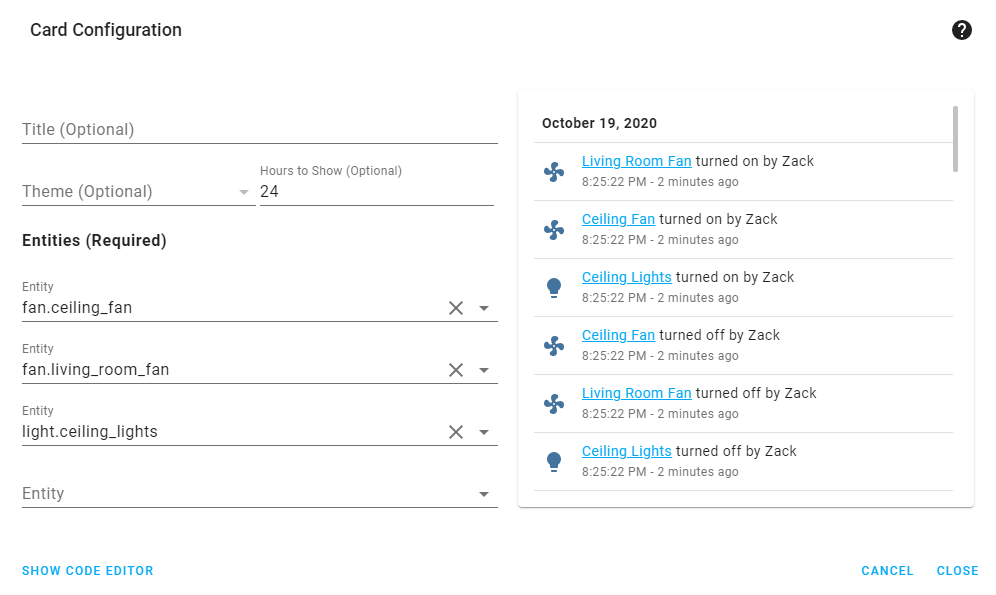 Screenshot of the new Logbook 卡片.
页眉和页脚编辑器
实体 卡片 in Lovelace have support for customizing the header and footer of that 卡片. This is really useful for adding a nice 图像, a couple of 按钮 or a graph to the 卡片.
Up until now, you needed some YAML magic to achieve that. Thanks to @zsarnett we now have a Header & Footer editor available in the UI making this feature much easier to use.
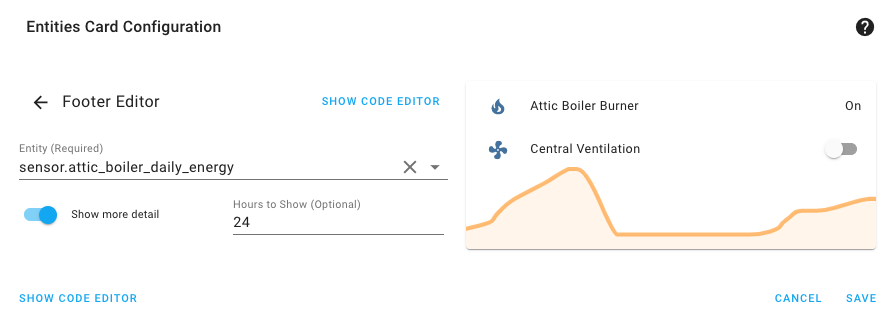 Screenshot of the new Header/Footer editor.
Supervisor 网络配置
Expected to be available soon, a new Supervisor 版本 which includes a new network layer with added support for wireless networks, multiple network interfaces and even VLANs.
This should 遮盖 most of the feature requests we had around networking.
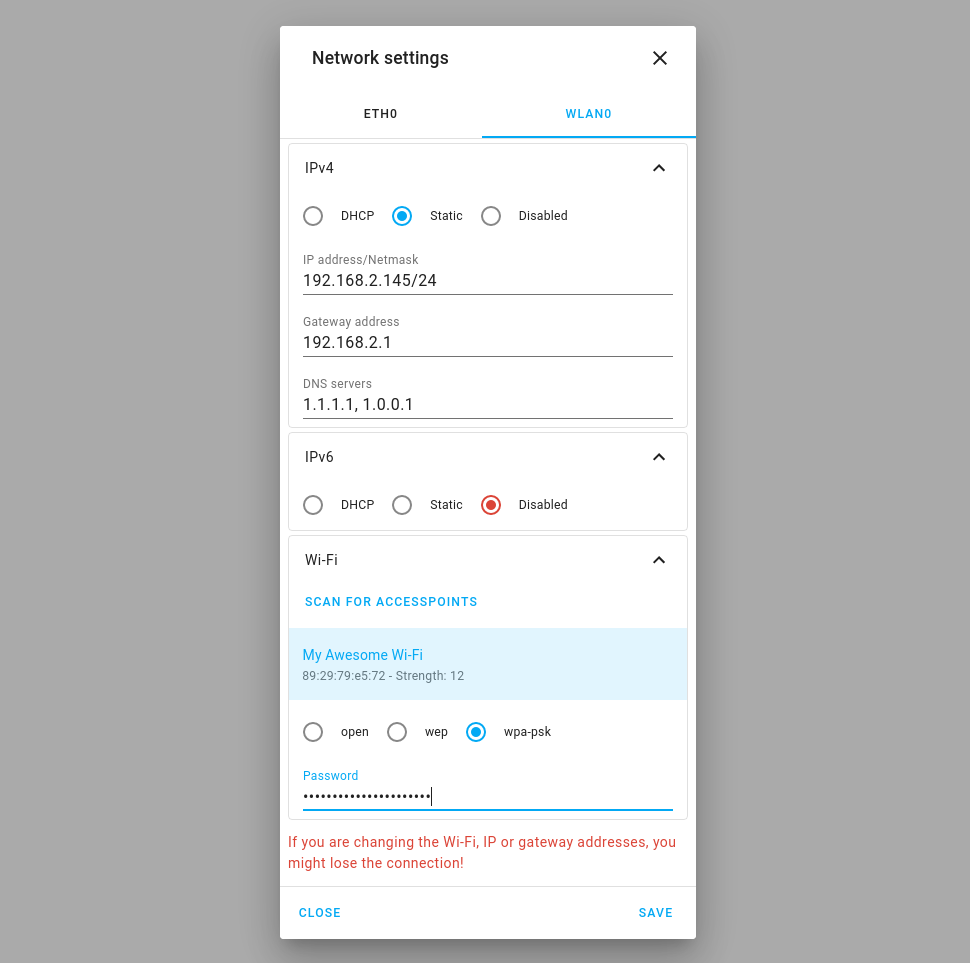 New Supervisor Network 配置 UI
The next step is that we use all the information from our new network 后端 to simplify some 插件. Also, updates for Snapshot/恢复 of these network 设置 are planned.
Home Assistant OS
The last few days, two new Home Assistant OS releases have been published.
While 4.17 continues to make small improvements in the 4.x 发布 series, the latest pre-发布 5.5 comes closer to our goals to declare 5.x 发布 series stable. In particular, this pre-发布 includes the Linux 5.4 kernel for all Raspberry Pis! We also intend to declare 64-bit the recommended 安装 method for 树莓派 4.
发布 5.5 is also the first 发布 to support Hardkernel's ODROID-C4, a very cost-effective single board computer featuring the Amlogic S905X3 SoC and 4GB of DDR4 memory (thanks @ubergeek801). Testers welcome!
其他值得注意的变化
- The new Nest SDM 集成 now supports thermostats! Thanks, @allenporter!
- 实体 pickers in the UI will now show the full name of the 实体. Thanks, @spacegaier!
- The Roon media player now supports media browsing but also has support for grouping and transferring between different players. Thanks @pavoni
- @cnorick added a 按钮 to duplicate 脚本 from the UI.
- The Shelly 集成 now has real-time status updates, which has been implemented by @thecode!
- @apop880 prepared the WLED 集成 for Christmas by adding a 服务 for loading WLED presets.
- Date pickers in 实体 卡片 have been replaced with a modern, good looking 版本. Thanks, @thomasloven!
- @joshmcrty Made numbers shown in the 前端 formatted in a way that matches your language 设置.
- @spacegaier has been busy improving the 前端, making it more accessible to people
with disabilities. In this case, ARIA (Accessible Rich Internet Applications)
labels have been added, so screen readers can use our
+按钮. Thanks!
新集成
We welcome the following new 集成 this 发布:
- Color Extractor, added by @GenericStudent
新平台
The following 集成 got support for a new platform:
现在可通过 UI 设置的集成
The following 集成 are now available via the Home Assistant UI:
发布 0.118.1 - November 19
- Bump wolf_smartset to 0.1.8 and handle server fetch 错误 (@adamkrol93 - #43351) (wolflink docs)
- Bump hatasmota to 0.0.32 (@emontnemery - #43360) (tasmota docs)
- Fix homekit bridges when no name was provided (@bdraco - #43364) (homekit docs)
- Bump pyvizio to 0.1.57 (@raman325 - #43374) (vizio docs)
- Add back system_health_info to the base of Lovelace (@ludeeus - #43382) (Lovelace docs)
发布 0.118.2 - November 20
- Increase Advantage Air retry limit for older systems (@Bre77 - #43417) (advantage_air docs)
- Fix time 触发器 based on 实体 ignoring 实体 if initially in the past (@balloob - #43431) (homeassistant docs)
发布 0.118.3 - November 23
- Fix bug related to possibly missing task ID in Notion API data (@bachya - #43330) (notion docs)
- Fix unhandled exception when IQVIA API fails to return data (@bachya - #43359) (iqvia docs)
- Ensure Plex content_id in play_on_sonos 服务 is a string (@frenck - #43483) (plex docs)
- Gracefully handle no uuid in kodi discovery (@OnFreund - #43494) (kodi docs)
- Bump sleepyq to 0.8.1 (@ahertz - #43505) (sleepiq docs)
- 升级 Docker base 图像 to 2020.11.1 (@frenck - #43538)
- 升级 Docker base 图像 to 2020.11.2 (@frenck - #43560)
发布 0.118.4 - November 26
- Make MQTT 温控 return PRESET_NONE when no preset is set (@emontnemery - #43257) (MQTT docs)
- 更新 zigpy-zigate to 0.7.3 (@doudz - #43427) (zha docs)
- Fix duplicate check on onewire config flow (@epenet - #43590) (onewire docs)
- Bump avea to 1.5.1 (@pattyland - #43618) (avea docs)
- Disable parsing scientific/complex number notation in 模板 type (@balloob - #43170)
- Tweak 模板 digit detection (@balloob - #43621)
- Fix deadlock if an 集成 from stage_1 fails (@pvizeli - #43657)
发布 0.118.5 - December 5
- Bump pyatmo to v4.2.1 (@cgtobi - #43713) (netatmo docs)
- Increase timeout for snapshot upload (@ludeeus - #43851) (hassio docs)
- Implement new Google TTS API via dedicated library (@marvin-w - #43863) (google_translate docs)
- Pin pip < 20.3 (@MartinHjelmare - #43771)
如果你需要帮助……
...don't hesitate to use our very active forums or join us for a little chat.
Experiencing issues introduced by this 发布? Please report them in our issue tracker. Make sure to fill in all fields of the issue 模板.
不向后兼容的变更
Below is a listing of the breaking change for this 发布, per subject or 集成. Click on one of those to read more about the breaking change for that specific item.
PTVSD
The ptvsd 集成 has been marked as deprecated and will be removed in
Home Assistant 核心 0.120. A full-featured replacement is available with the
debugpy 集成, which is now considered stable.
Flu Near You
Per ADR-0010, this PR deprecates YAML 配置 for Flu Near You until 0.119.
Existing YAML 配置 has already been imported automatically in the previous releases and can now safely be removed from your 配置 files.
(@bachya - #42535) (flunearyou docs)
DirecTV
DirecTV has fully transitioned to 配置 via UI. YAML 配置 is no longer supported. Existing YAML 配置 has already been imported automatically in the previous releases and can now safely be removed from your 配置 files.
(@ctalkington - #41961) (directv docs)
Roku
Roku has fully transitioned to 配置 via UI. YAML 配置 is no longer supported. Existing YAML 配置 has already been imported automatically in the previous releases and can now safely be removed from your 配置 files.
(@ctalkington - #41960) (roku docs)
模板 - 移除 extract_entities
This breaking change is for custom component 开发者 only!
The template.helpers.extract_entities has been removed as it has not been
used in 核心, been deprecated, and thrown 警告 since the new 模板 system
tracking was introduced.
homeassistant.helpers.event.async_track_template_result should be used instead.
OpenWeatherMap
OpenWeatherMap has fully transitioned to 配置 via UI. YAML 配置 is no longer supported. Existing YAML 配置 has already been imported automatically in the previous releases and can now safely be removed from your 配置 files.
Additionally, previously the OpenWeatherMap 集成 used Pa as their unit
of measurement for air pressure. However, air pressure is measured and reported
as hPa so the unit of measurement has been changed to hPa. This could be a
breaking change for using such 实体 in, for example, influxdb.
(@nzapponi - #39839) (@randyxxl - #42801) (openweathermap docs)
Shelly
Shelly 设备 configured with new (fw >= 1.9) property "appliance_type" can now be added to the 灯光 domain instead of the 开关 domain.
(@chemelli74 - #42508) (shelly docs)
Epson
The Epson 集成 is now configured via the UI. Existing YAML 配置 if automatically imported on 升级 and can be safely removed afterward.
The SSL option has been remove, as there is no signs that anybody used it with success.
(@pszafer - #39697) (epson docs)
全球灾害警报与协调系统 (GDACS)
The 集成 will not consider bounding box geometries anymore when calculating the distance to an event from the feed. In practice it has turned out that these bounding boxes are way too large around the event to make them useful for the purpose of notifying 用户 about these events.
Any existing 配置 will continue to work and does not need to be 修改. However, please consider changing the radius defined for your 集成 to match your expectations, especially if your main concern are widespread and moving events such as tropical cyclones.
(@exxamalte - #42957) (gdacs docs)
模板
This feature was introduced as an opt-in beta feature in Home Assistant 核心 0.117, and is now enabled by default.
A 模板 would always result in a string (text). This made it hard to use things like lists, or numbers as a result of a 模板. For example, returning a list of 实体 or an RGB/HS/XY color.
This change may impact your existing 模板, as 模板 now can return other types; For example, string, float, integer, boolean, lists or dictionaries.
The following 模板 can be impacted by this:
- 实体 with templated 属性. 属性 keep their native Python type, thus if the 属性 is used/processed in a 模板 again later, the type might be different.
- 模板 working with lists or mappings (dictionaries). Previously, such collection would be returned as a text, for example [1, 2, 3, 4, 5]. We’ve seen examples where such results are decoded using text processing again (e.g., by splitting the result on a, to get the separate values). The additional processing is no longer needed, as the returned value will be a collection now.
- Note: The 实体 状态 in Home Assistant is always a text (string). Even with native types being supported in 模板 now if a result is stored as an 实体 状态, they will be converted to a string.
In case this new feature causes a problem for you, you can enable the old-style 模板 rendering again, by setting the following 配置:
Please note, this option is a temporary/transitional option, that will be removed in the future. Adjusting your 模板 to the new situation is therefore advised.
犹太历
实体 for 此integrations now use a "timestamp" 设备 class. Therefore, the timetamp 属性 have been removed.
Sisyphus
This 发布 contains updates to improve stability and support newer Sisyphus table firmwares. There is a small chance that older firmwares will have issues with this 发布; if you have trouble with the Sisyphus 集成 after this 更新, make sure your table is running at least firmware 1.10.73.
(@jkeljo - #42995) (sisyphus docs)
Neurio energy
As of July 26, 2020, due to an API change; You now must provide a sensor_id
for the Neurio 传感器 to work; otherwise, an 错误 returns that the request
is unauthorized.
AirVisual
Per ADR-0010, this PR deprecates YAML 配置 for AirVisual until 0.119. If you already use the AirVisual 集成, you do not need to take 动作, as your 配置 has already been imported into the UI.
(@bachya - #42581) (airvisual docs)
Notion
Per ADR-0010, this 发布 deprecates YAML 配置 for Notion until 0.119.
Existing YAML 配置 will be imported automatically when upgrading and can be safely removed from your 配置 files afterward.
(@bachya - #43026) (notion docs)
FRITZ!
The default value for 密码 was set to "admin" in the
fritz and fritzbox_callmonitor 集成. This has been corrected and
moved to be the default value for the 配置 option of username.
Tile
Per ADR-0010, this 发布 deprecates YAML 配置 for Tile until 0.119.
Existing YAML 配置 will be imported automatically when upgrading and can be safely removed from your 配置 files afterward.
KNX
The parameter context_timeout is now optional for 二元sensor and will
default to None. If you've previously not specified this parameter you'll have
to adjust your 配置 and add it like this:
This prevents 用户 that do not use this feature from waiting one second until 自动化 are triggered.
The parameter reset_after for 二元sensor expects seconds now instead of
milliseconds to streamline the different 配置 options.
(context_timeout also uses seconds).
The parameter ignore_internal_state for 二元sensor now defaults to False
as most 用户 do not use this feature. It defaulted to True before.
If you have validation 错误 of your 配置 after the 更新 and you
are using the operation_modes parameter for your 温控 设备, please add
all erroneous entries to the new controller_modes parameter.
告别以下内容
- The iAlarm 集成 has been removed. It was using webscraping to gather its data, which is not allowed. (@frenck - #43010)
所有变更
点击查看所有变更!
- Bump 版本 to 0.118.0dev0 (@frenck - #42178)
- Enable co-existence of two IPMA 天气 实体 for the same location (@dgomes - #40354) (ipma docs)
- Rewrite london_air tests in pytest style (@ronanmu - #41165) (london_air docs)
- Improve Axis tests (@Kane610 - #42183) (axis docs)
- 版本 bump pyforked daapd and add 错误 string for forbidden (@uvjustin - #42156) (forked_daapd docs)
- Add more builtins to safe list (python_script) (@jaydesl - #42146) (python_script docs)
- Rest test style (@oxygen0211 - #42032) (rest docs)
- Remove not used legacy 遥控器 test 助手 (@CurrentThread - #42144) (遥控器 docs)
- Bump PAHO MQTT to 1.5.1 (@emontnemery - #42099) (MQTT docs)
- Convert nx584 tests to pytest (@taiyeoguns - #42094) (nx584 docs)
- 升级 shodan to 1.24.0 (@frenck - #42199) (shodan docs)
- Improve the readability of the config flow code (@balloob - #42169)
- Add media browser support to roon media player (@pavoni - #42061) (roon docs)
- Rewrite mochad unittest to pytest style (@tim-werner - #42164) (mochad docs)
- Bump pypck to v0.7.4 (@alengwenus - #42206) (lcn docs)
- Handle multiple 设置 of devolo Home Control (@Shutgun - #41752) (devolo_home_control docs)
- Always use shared zeroconf in cast config flow (@emontnemery - #42210) (cast docs)
- Correct docstring in Skybell (@tkdrob - #42218) (skybell docs)
- Remove remnants of configurable RainMachine scan interval (@bachya - #42239) (rainmachine docs)
- Rewrite group unittest to pytest style (@tim-werner - #42159) (group docs)
- Bump 版本 bsblan library to 0.4.0 (@liudger - #42220) (bsblan docs)
- Improve cast 集成 tests (@emontnemery - #42229) (cast docs)
- Stub 灯光 profiles (@balloob - #42232)
- Add support for homekit garage obstruction 传感器 (@bdraco - #42243) (homekit docs) (homekit_controller docs)
- Tidy Roon media_browser following recently merged PR (@pavoni - #42276) (roon docs)
- Add next 报警 time 传感器 to Garmin (@schachar - #40420) (garmin_connect docs)
- Add config flow for One wire (@epenet - #39321) (onewire docs) (new-platform)
- Bump PyXiaomiGateway 版本 to 0.13.4 (@syssi - #42262) (xiaomi_aqara docs)
- Add wired 设备 to Homematic IP Cloud (@SukramJ - #41232) (homematicip_cloud docs)
- Add unique_id and device_info to DSMR 实体 (@RobBie1221 - #42279) (dsmr docs)
- Bump dist to focal in Travis CI (@scop - #42286)
- Fix block till done in create entry config flow tests (@balloob - #42290)
- Add onewire test for more 设备 (@epenet - #42037) (onewire docs)
- Add 区域 id to 实体 registry (@Kane610 - #42221) (config docs)
- Add unit of measurement to Netatmo 传感器 (@cgtobi - #42208) (netatmo docs)
- Add device_class information to onewire 传感器 (@epenet - #42308) (onewire docs)
- Fix nest to stop doing asyncio in a property (@allenporter - #42312) (nest docs)
- Minimize sense writes to the 状态 machine (@bdraco - #42310) (sense docs)
- Send pro-active IAS Enroll Response (@walthowd - #42282) (zha docs)
- Clean up ElkM1 lib (@gwww - #42319) (elkm1 docs)
- Remove ChristianKuehnel from codeowners (@ChristianKuehnel - #42335) (miflora docs) (plant docs)
- Bump pyeight to 0.1.5 (@mezz64 - #42323) (eight_sleep docs)
- Add WLED preset 服务 (@apop880 - #42217) (wled docs)
- Fix unmocked https in the test suite (@bdraco - #42316) (airvisual docs)
- Refactor august to use self.async_on_remove (@bdraco - #42333) (august docs)
- 升级 to aiohttp 3.7.1 (@bdraco - #42305)
- Fix 错误 strings for PTZ operations (@bwarden - #42231) (onvif docs)
- Bump python velbus to 2.0.47 (@Cereal2nd - #42349) (velbus docs)
- Remove split 设备 from HMIPC (@SukramJ - #42348) (homematicip_cloud docs)
- Add device_info to onewire 传感器 (@epenet - #42309) (onewire docs)
- Expose more Websocket API constants (@balloob - #42263) (websocket_api docs)
- Use common strings in opentherm_gw config flow (@wouterbaake - #42211) (opentherm_gw docs)
- Use common strings in luftdaten config flow (@springstan - #42376) (luftdaten docs)
- Add location to base strings for config flows (@springstan - #42374) (ipma docs) (met docs) (pi_hole docs) (smartthings docs)
- Use string-灯光 icon for zerproc (@emlove - #42379) (zerproc docs)
- Create init.py in AlarmDecoder tests (@Olen - #42388) (alarmdecoder docs)
- Convert logbook tests to pytest (@taiyeoguns - #42289) (logbook docs)
- Cleanup 日志 style and tests for ElkM1 (@gwww - #42353) (elkm1 docs)
- Deprecate ptvsd 集成 (@frenck - #42351) (breaking-change)
- 升级 debugpy to 1.0.0 (@frenck - #40929) (debugpy docs)
- Rewrite pilight/test_init.py tests to pytest style test functions (@erogleva - #42366) (pilight docs)
- Add a test for 模板 实体 that reuse the 模板 (@bdraco - #42404) (模板 docs)
- Implement PlatformNotReady on onewire 集成 (@epenet - #42395) (onewire docs)
- 恢复 somfy 状态 in optimistic mode on 重启 (@bdraco - #42426) (somfy docs)
- Set 设备 class for lutron_caseta 遮盖 (@bdraco - #42436) (lutron_caseta docs)
- Add mode to base strings for config flows (@springstan - #42373) (homekit docs) (ipma docs) (openweathermap docs)
- Add elevation to base strings for config flows (@springstan - #42377) (met docs) (openuv docs)
- Discover onewire 设备 at startup (@epenet - #42410) (onewire docs)
- Convert somfy to use DataUpdateCoordinator (@bdraco - #42434) (somfy docs)
- Use async functions for Somfy (@balloob - #42448) (somfy docs)
- Move onewire 实体 classes to separate module (@epenet - #42445) (onewire docs)
- Fix yeelight connection issue (@shenxn - #40251) (yeelight docs)
- Add Nest cam support for the SDM API (@allenporter - #42325) (nest docs)
- Bump fritzconnection from 1.2.0 to 1.3.4 (@chemelli74 - #40508) (fritz docs)
- Use common strings in openuv config flow (@springstan - #42480) (openuv docs)
- Add platform 服务 to Roon media player to allow grouping, ungrouping and transfer between players (@pavoni - #42133) (roon docs)
- Set the translations cache under the 门锁 (@bdraco - #42470)
- Add color_extractor 服务 (@GenericStudent - #42129) (color_extractor docs) (new-集成)
- Remove zxdavb from honeywell codeowners (@zxdavb - #42491) (honeywell docs)
- Fix somfy 设备 recreation on 更新 (@bdraco - #42462) (somfy docs)
- Start homekit bridges with asyncio.gather (@bdraco - #42498) (homekit docs)
- 更新 tuyaha to 0.0.8 and adapt code (@ollo69 - #41375) (tuya docs)
- Bump python-velbus to 2.1.1 (@Cereal2nd - #42414) (velbus docs)
- 升级 debugpy to 1.1.0 (@frenck - #42506) (debugpy docs)
- Bump avea to 1.5 (@pattyland - #42495) (avea docs)
- Use common strings in Dexcom config flow (@scheric - #41767) (dexcom docs)
- Use dict.values() when appropriate (@springstan - #42509) (apns docs) (netio docs) (scsgate docs) (wirelesstag docs)
- Use common strings in life360 config flow (@springstan - #42375) (life360 docs)
- Ensure the oauth2 token is refreshed before it is expired (@bdraco - #42487)
- Tidy after adding group 服务 to roon media player (@pavoni - #42512) (roon docs)
- Implement minor Colorfix alterations (@GenericStudent - #42521) (color_extractor docs)
- Remove unnecessary instances of dict.keys() (@springstan - #42518)
- Remove listener on async_unload_entry in devolo Home Control (@Shutgun - #42520) (devolo_home_control docs)
- Add 更新 available 二元sensor to synology_dsm (@mib1185 - #42378) (synology_dsm docs)
- Recollect waste multi day (@dcnoren - #41853) (recollect_waste docs)
- Add options flow to RainMachine (@bachya - #42241) (rainmachine docs)
- Cleanup RainMachine (@bachya - #42544) (rainmachine docs)
- Deprecate YAML config for Flu Near You (0.119 removal) (@bachya - #42535) (flunearyou docs) (breaking-change)
- Add guppy3 memory profile to Profiler 集成 (@hunterjm - #42435) (profiler docs)
- Remove YAML config for directv (@ctalkington - #41961) (directv docs) (directv docs) (breaking-change)
- Remove YAML config for roku (@ctalkington - #41960) (roku docs) (breaking-change)
- Use common strings in twilio config flow (@springstan - #42477) (twilio docs)
- Gather all collection listeners and changes at the same time (@bdraco - #42497)
- Add telegram_sent event (@NikoM87 - #41159) (telegram_bot docs)
- Fix flapping event 模板 test (@bdraco - #42614)
- Remove legacy 模板 extract_entities (@bdraco - #42601) (breaking-change)
- Fix inexact 版本 of pylacrosse (@onkelbeh - #42610) (lacrosse docs)
- Properly unload listener for AirVisual config entry updates (@bachya - #42583) (airvisual docs)
- Reduce complexity of storage writes (@bdraco - #42576)
- Defer esphome persistent storage writes until after startup (@bdraco - #42600) (esphome docs)
- Rewrite mfi unittest tests to pytest (@adriansuwala - #42510) (mfi docs)
- Purge unused constants from 模板 助手 (@bdraco - #42618)
- Add missing config flow translation key to 脚本 scaffold (@allenporter - #42621)
- Add WS command to remove a Tasmota 设备 (@emontnemery - #42266) (tasmota docs)
- Fix typo in Flunearyou config flow (@SNoof85 - #42617) (flunearyou docs)
- Bump hatasmota to 0.0.26 (@effelle - #42613) (tasmota docs)
- Use list literal without using dict.keys() (@springstan - #42573)
- Revert "Bump hatasmota to 0.0.26 (#42613)" (@emontnemery - #42641) (tasmota docs)
- Fix on/off 按钮 (@felipediel - #42443) (broadlink docs)
- Bump hatasmota to 0.0.26 (@emontnemery - #42644) (tasmota docs)
- Bump ElkM1 library to 0.8.7 (@gwww - #42645) (elkm1 docs)
- Small cleanup to IQVIA DataUpdateCoordinator logic (@bachya - #42642) (iqvia docs)
- Add hassio 服务 descriptions (@Petro31 - #42597) (hassio docs)
- Remove redundant mock_storage fixture from mqtt_statestream tests (@adriansuwala - #42652) (mqtt_statestream docs)
- Allow saving zero precision option in Opentherm_gw (@springstan - #42593) (opentherm_gw docs)
- Add @mib1185 as codeowner to synology_dsm (@mib1185 - #42671) (synology_dsm docs)
- Bump roonapi to 0.0.25 (@pavoni - #42680) (roon docs)
- Cleanup local imports on onewire 集成 (@epenet - #42689) (onewire docs)
- Optimise onewire 传感器 更新 method (@epenet - #42690) (onewire docs)
- Bump 版本 to 0.16.2 (@gtdiehl - #42696) (enphase_envoy docs)
- Run tox verbosely in Travis CI (@scop - #42706)
- Remove classes in nx584 tests (@taiyeoguns - #42628) (nx584 docs)
- Fix typo exceeded, change to exceed, in HomeKit (@lindsaymarkward - #42705) (homekit docs)
- Remove homekit 遮盖 precision workarounds (@bdraco - #42647) (homekit docs)
- 升级 youtube_dl to 版本 2020.11.01.1 (@BKPepe - #42714) (media_extractor docs)
- adding support for hardkernel odroid-c4 (@ubergeek801 - #42719) (new-集成)
- Refactor ZHA 灯光 状态 restoration after a 重启 (@Adminiuga - #42726) (zha docs)
- Add support for manual updating a data coordinator (@balloob - #42746)
- Base 图像 2020.10.1 (@pvizeli - #42666)
- Add verify_ssl option for connection 设置 to synology_dsm (@mib1185 - #42539) (synology_dsm docs)
- Provide a more useful 错误 message in evohome (@zxdavb - #42734) (evohome docs)
- Bump plexapi to 4.2.0 (@jjlawren - #42727) (plex docs)
- Use own CoAP lib and support for multicast updates (@thecode - #42718) (shelly docs)
- Drop usage of asynctests (@balloob - #42756) (onewire docs)
- 升级 pre-commit to 2.8.2 (@frenck - #42757)
- Fix existing synology_dsm config entries cannot be 设置 (@mib1185 - #42769) (synology_dsm docs)
- Add DPI Restriction 开关 to UniFi 集成 (@hunterjm - #42499) (unifi docs)
- Remove unnecessary onewire variable (@epenet - #42704) (onewire docs)
- Add 图像 support to nest SDM api (@allenporter - #42556) (nest docs)
- Fix shelly import (@balloob - #42783) (shelly docs)
- Catch unhandled exception in websocket_api (@SigmaPic - #42693) (websocket_api docs)
- Bump uEagle to 0.0.2 (@jcalbert - #42780) (rainforest_eagle docs)
- Migrate system health to use integration_platform (@balloob - #42785) (Lovelace docs) (system_health docs)
- 升级 sentry-sdk to 0.19.2 (@frenck - #42786) (sentry docs)
- 更新 definition of onewire 设备 specifications (@epenet - #42460) (onewire docs)
- Add support for OpenWeatherMap One Call API (@nzapponi - #39839) (openweathermap docs) (breaking-change)
- Default some 实体 to disabled (@epenet - #42797) (onewire docs)
- Fix nest subscriber by upgrading google_pubsub to newer library 版本 (@allenporter - #42501) (google_pubsub docs)
- Fix Webhook when doorbird not yet 设置 (@bdraco - #42657)
- Split build 发布 base + machine build (@pvizeli - #42827)
- Avoid the same task ending up multiple times in the ssdp asyncio.gather (@bdraco - #42815) (ssdp docs)
- Tweak Rachio 集成 strings (@adamjernst - #42843) (rachio docs)
- Properly unload listener for SimpliSafe config entry updates (@bachya - #42579) (simplisafe docs)
- Fix circular import of config_validation and 模板 (@palfrey - #41802)
- Tweak Shelly message to be clearer (@adamjernst - #42862) (shelly docs)
- Fix evohome coroutine not allowed to be passed to HassJob (@zxdavb - #42730) (evohome docs)
- clarify range of max and min for intensity (@jsloyer - #42853) (wled docs)
- Add hdmi input 属性 to AndroidTV (@DiederikvandenB - #42571) (androidtv docs)
- Distinguish Shutters and Awnings in Google Assistant (@edomat - #42782) (google_assistant docs)
- Add unique_id property to ARWN 传感器 (@sdague - #42570) (arwn docs)
- Bump androidtv to 0.0.54 (@JeffLIrion - #42861) (androidtv docs)
- Move to Launch Library 2 (@ludeeus - #42723) (launch_library docs)
- Fix async_track_utc_time_change firing too early (@amelchio - #42176)
- Cleanup onewire tests (@epenet - #42864) (onewire docs)
- Handle overriding of default apps for Android TV (@JeffLIrion - #41893) (androidtv docs)
- Tweak wording of Rachio options (@adamjernst - #42849) (rachio docs)
- Handle Shelly 灯光 domain for relay 开关 ( fw >=1.9 ) (@chemelli74 - #42508) (shelly docs) (breaking-change)
- Bump pyvlx to 0.2.18 (@sbyx - #42895) (velux docs)
- Fix memory leak in websocket_api (@bdraco - #42894) (websocket_api docs)
- Add nest 温控 support for SDM API (@allenporter - #42702) (nest docs)
- Add Spanish US voice to amazon polly (@manuel-jrs - #42891) (amazon_polly docs)
- Migrate RainMachine to DataUpdateCoordinator (@bachya - #42530) (rainmachine docs)
- 升级 hadolint to 0.18.2 (@frenck - #42087)
- Cloud: Recover when internet is not available yet (@balloob - #42877) (cloud docs)
- Handle offline gateways in devolo Home Control (@Shutgun - #42897) (devolo_home_control docs)
- Fix dimming for ISY994 Z-Wave 设备 using percent instead of 8-bit brightness values (@shbatm - #42915) (isy994 docs)
- Allow ZHA coordinator binding/unbinding (@Adminiuga - #42854) (zha docs)
- 升级 Tibber library to 0.16.0 (@Danielhiversen - #42929) (tibber docs)
- Change fritzbox title for better product family distinction (@AlexSchmitz222 - #42432) (fritzbox docs)
- 升级 pytest to 6.1.2 (@frenck - #40662)
- Generate random MQTT client ID (@emontnemery - #42934) (MQTT docs)
- Ensure instances of async_add_entities can be garbage collected (@bdraco - #42919)
- Ensure storage task loads are always garbage collected (@bdraco - #42917)
- Bump aioshelly to 0.5.1 (@chemelli74 - #42940) (shelly docs)
- Add config flow to epson and fix timeouts (@pszafer - #39697) (epson docs) (breaking-change)
- Change air pressure unit to hPa in OpenWeatherMap (@randyxxl - #42801) (openweathermap docs) (breaking-change)
- Only call utcnow once during a 状态 changed event (@bdraco - #42941)
- Add binary_sensor platform to onewire 集成 (@epenet - #42832) (onewire docs) (new-platform)
- Migrate Flu Near You to DataUpdateCoordinator (@bachya - #42594) (flunearyou docs)
- Add icons for OBiTALK status and reboot 传感器 (@absurdist81 - #42883) (obihai docs)
- Use common strings in locative config flow (@springstan - #42481) (locative docs)
- Add not internet accessible to base strings for config flows (@springstan - #42478)
- Bump aio_georss_gdacs to v0.4 (@exxamalte - #42957) (gdacs docs) (breaking-change)
- 升级 colorlog to 4.5.0 (@frenck - #42965)
- Disable legacy 模板 by default (@frenck - #42967) (breaking-change)
- Bump hatasmota from 0.0.27 (@emontnemery - #42802) (tasmota docs)
- Add test for register 配置 for modbus 开关 (@janiversen - #42604) (modbus docs)
- Add support for Stretch product to Plugwise 集成 (@CoMPaTech - #40108) (plugwise docs)
- Correct link to 前端 repo (@springstan - #42972) (前端 docs)
- Add support for Broadlink SP4 series and the latest SP mini 3 设备 (@felipediel - #41522) (broadlink docs)
- Remove 调试 prints from utcnow test (@bdraco - #42977)
- Add onewire 开关 (@epenet - #42962) (onewire docs) (new-platform)
- Add zone_entity_id to Risco events (@OnFreund - #39678) (risco docs)
- Remove empty dependencies from manifest (@springstan - #42973)
- Increase 更新 timeouts used in Shelly 集成 (@thecode - #42937) (shelly docs)
- Fix Spotify scopes evaluation (@OGKevin - #42819) (spotify docs)
- Fix yeelight 二元sensor unique ID (@shenxn - #42562) (yeelight docs)
- Correct logging and add test case for sharkiq (@ajmarks - #41863) (sharkiq docs)
- On HA 重启 parse last_reset as a datetime object (@dgomes - #42939) (utility_meter docs)
- Adds feature to get also longitude and latitude of the triggerd entry… (@SteveBrandt - #42990) (opensky docs)
- Allow options flows to be aborted (@raman325 - #41875)
- Make Jewish 日历 use DEVICE_CLASS_TIMSTAMP and remove timestamp 属性 (@yuvalabou - #41397) (jewish_calendar docs) (breaking-change)
- 升级 sisyphus-control dependency to 3.0 (@jkeljo - #42995) (sisyphus docs) (breaking-change)
- Use strings instead of f-strings for constants (@springstan - #40619)
- Fix Neurio 传感器 by making the 传感器 ID required (@czechmark - #42728) (neurio_energy docs) (breaking-change)
- Fix flaky epson CI (@balloob - #42999) (epson docs)
- 更新 nest SDM 温控 simplifying support for eco mode (@allenporter - #42955) (nest docs)
- Add more units to distance conversion util (@springstan - #40181)
- Fix enigma2 off 状态 (@reaper7 - #42407) (enigma2 docs)
- Replace 门锁 bot with GitHub 动作 (@frenck - #43001)
- Replace stale bot with GitHub 动作 (@frenck - #42994)
- Add 设备 触发器 support for 设备 trackers (@mdonoughe - #42324) (device_tracker docs) (区域 docs)
- 更新 devolo-home-control-api to 0.16.0 (@Shutgun - #42944)
- Force color or white mode exclusivity for MQTT 灯光 (@emontnemery - #42887) (MQTT docs) (breaking-change)
- Remove temporary variable from supported_features (@springstan - #42685)
- Add ozw config flow 插件 management (@MartinHjelmare - #42421) (hassio docs) (ozw docs)
- Deprecate YAML config for AirVisual (0.119 removal) (@bachya - #42581) (airvisual docs) (breaking-change)
- 重载 sonarr config entry on options 更新 (@ctalkington - #41958) (sonarr docs)
- Support datetime 传感器 in time 触发器 (@balloob - #42899) (homeassistant docs)
- Remove iAlarm 集成 (ADR-0004) (@frenck - #43010) (breaking-change)
- Add data entry flow show progress step (@MartinHjelmare - #42419)
- Obtain 区域 实体 id in Risco 传感器 through 实体 registry (@OnFreund - #43007) (risco docs)
- Fix vasttrafik 传感器 displaying incorrect departure times (@ttuffin - #43011) (vasttrafik docs)
- Extend WS API result when enabling an 实体 (@emontnemery - #42667) (config docs)
- Add 服务 to 日志 and dump objects to the profiler to help track down memory leaks (@bdraco - #42951) (profiler docs)
- Add missing 设备 class strings (二元sensor) (@oncleben31 - #42326) (binary_sensor docs)
- Make all translations cacheable (@bdraco - #42892)
- Fix volume calculation of Onkyo MediaPlayer (@ZzetT - #42236) (onkyo docs)
- Remove stale fixture from MQTT-statestream tests (@dmonego - #42233) (mqtt_statestream docs)
- Remove Tuya 温控 ext. temperature 实体 option (@ollo69 - #42546) (tuya docs)
- Expose Dyson PureCool filter life remaining percentage (@Flameeyes - #42765) (dyson docs)
- Add support for additional SimpliSafe 传感器 (@bachya - #43017) (simplisafe docs)
- 更新 inheritance for onewire 实体 (@epenet - #43019) (onewire docs)
- Bump python-openzwave-MQTT to 1.3.2 (@cgarwood - #43020) (ozw docs)
- Migrate Recollect Waste 集成 to use aiorecollect library (@bachya - #43022) (recollect_waste docs)
- Increase timeout for 设置 of rfxtrx (@RobBie1221 - #43003) (rfxtrx docs)
- Deprecate YAML config for Notion (0.119 removal) (@bachya - #43026) (notion docs) (breaking-change)
- Streamline Notion CoordinatorEntity (@bachya - #43027) (notion docs)
- Bump pymfy to 0.9.1 (@tetienne - #43021) (somfy docs)
- Bump aioasuswrt 版本 to handle telnet asus routers (@JJdeVries - #43031) (asuswrt docs)
- Address review feedback for Epson (@pszafer - #43012) (epson docs)
- Catch correct 错误 when Spotify has a request 错误 (@balloob - #43032) (spotify docs)
- Set an appropriate SCAN_INTERVAL for Broadlink A1 传感器 (@felipediel - #41309) (broadlink docs)
- Clean up yaml 配置 for all fritz 集成 (@springstan - #39995) (fritz docs) (fritzbox_callmonitor docs) (fritzbox_netmonitor docs) (breaking-change)
- Add function to remove holidays from workday 传感器 (@epleypa - #41988) (workday docs)
- Change instructions for unlocking Broadlink 设备 (@felipediel - #42023) (broadlink docs)
- Rewrite the pilight/test_sensor.py tests to use async pytest functions (@erogleva - #42418) (pilight docs)
- Include device_id in ZHA event (@balloob - #43037) (zha docs)
- Add set and check repeat mode to mpd component (@9R - #42808) (mpd docs)
- Add available 状态 for Epson 集成 (@pszafer - #43038) (epson docs)
- Correct handling of existing MQTT subscriptions (@emontnemery - #43056) (MQTT docs)
- 更新 zigpy-zigate to 0.7.0 (@doudz - #43043) (zha docs)
- Fix mfi test (@balloob - #43060) (mfi docs)
- Remove setting 日志 level of dsmr_parser inside dsmr 集成 (@RobBie1221 - #43059) (dsmr docs)
- Improve 恢复 of deleted 设备 (@emontnemery - #42703)
- Add system health streaming updates (@balloob - #42831) (cloud docs) (Lovelace docs) (system_health docs)
- 更新 nest sdm 摄像头 to refresh in background (@allenporter - #42865) (nest docs)
- Add proxy support for browse media 图像 (@rajlaud - #42193) (squeezebox docs)
- System health improvement (@balloob - #43066) (cloud docs) (homeassistant docs) (Lovelace docs) (system_health docs)
- Fix mfi test (@balloob - #43067) (mfi docs)
- Fix API change with Notion batteries (@bachya - #43073) (notion docs)
- Streamline Tile CoordinatorEntity (@bachya - #43065) (tile docs)
- Limit concurrency of async_get_integration to avoid creating extra threads (@bdraco - #43085)
- Cleanup and naming schema fixes for Shelly (@thecode - #42987) (shelly docs)
- 升级 pylutron-caseta to 0.7.2 (@mdonoughe - #43075) (lutron_caseta docs)
- 更新 bravia-tv to 1.0.8 (@dcnielsen90 - #43069) (braviatv docs)
- Add MIN_TIME_BETWEEN_UPDATES to dsmr 集成 (@RobBie1221 - #43057) (dsmr docs)
- Remove YAML config for Tile (@bachya - #43064) (tile docs) (breaking-change)
- Remove Octoprint 日志 spam when printer endpoint status code is 409 (@rrada - #42985) (octoprint docs)
- Remove brand names from translations (@balloob - #43092)
- Chunk translation clean 脚本 to avoid too long url 错误 (@balloob - #43090)
- Bump hatasmota to 0.0.29 (@emontnemery - #43013) (tasmota docs)
- Add watchdog to reset nest subscriber (@allenporter - #43034) (nest docs)
- Use internal url for Squeezebox if possible (@balloob - #43089) (squeezebox docs)
- Show media progress in sisyphus (@jkeljo - #42996) (sisyphus docs)
- 更新 前端 to 20201111.0 (@bramkragten - #43101) (前端 docs)
- Modify wait timeout in stream (@uvjustin - #42794) (stream docs)
- Bump up ZHA dependencies (@Adminiuga - #43104) (zha docs)
- Add reboot and shutdown 服务 to synology_dsm (@mib1185 - #42697) (synology_dsm docs)
- Bump greeclimate to 0.9.6 (@cmroche - #43106) (gree docs)
- 更新 xknx to 0.15.3 (@marvin-w - #42026) (knx docs) (breaking-change) (beta fix)
- Move setup_url_for_address to pyWeMo library (@joshuaboniface - #42722) (wemo docs) (beta fix)
- Bump dependency for HomematicIP Cloud (@SukramJ - #43018) (homematicip_cloud docs) (beta fix)
- Use media player 图像 proxy for roku media browser (@ctalkington - #43070) (roku docs) (beta fix)
- Add system health section for the Supervisor (@ludeeus - #43074) (hassio docs) (homeassistant docs) (beta fix)
- Bump pycsspeechtts to 1.0.4 (@hmmbob - #43105) (microsoft docs) (beta fix)
- Fix incorrect Notion battery 状态 calculation (@bachya - #43108) (notion docs) (beta fix)
- Make Appliance Type Case-insensitive (@thecode - #43114) (shelly docs) (beta fix)
- Streamline SimpliSafe 错误 (@bachya - #43117) (simplisafe docs) (beta fix)
- Fix bug preventing Notion 实体 from updating their bridge (@bachya - #43122) (notion docs) (beta fix)
- Added missing system health translation for "Views" (@spacegaier - #43126) (Lovelace docs) (beta fix)
- Add missing 'hassio' translation string (@ludeeus - #43127) (homeassistant docs) (beta fix)
- Bump hatasmota to 0.0.30 (@emontnemery - #43140) (tasmota docs) (beta fix)
- Fix playing of Spotify URIs on Sonos (@amelchio - #43154) (sonos docs) (beta fix)
- Guard against empty ssdp locations (@bdraco - #43156) (ssdp docs) (beta fix)
- 更新 zigpy_zigate to v0.7.1 (@doudz - #43159) (zha docs) (beta fix)
- Prevent spider from doing I/O in the event loop (@balloob - #43182) (beta fix)
- Revert opensky flight latitude and longitude (@balloob - #43185) (opensky docs) (beta fix)
- Catch the right nest stream refresh exception 错误 (@allenporter - #43189) (nest docs) (beta fix)
- Revert "Remove YAML config for Tile (#43064)" (@bachya - #43199) (tile docs) (beta fix)
- Fix typo in lw12wifi shoud_poll (@bdraco - #43213) (lw12wifi docs) (beta fix)
- Bump elkm1-lib to 0.8.8 (@gwww - #43230) (elkm1 docs) (beta fix)
- Remove OpenCV dependecy from Environment Canada (@michaeldavie - #43235) (environment_canada docs) (beta fix)
- Remove pts adjustments in stream (@uvjustin - #42399) (stream docs) (beta fix)
- Bump hass-nabucasa to 0.37.2 (@MartinHjelmare - #43146) (cloud docs) (beta fix)
- 更新 greeclimate to 0.10.2 (@cmroche - #43206) (gree docs) (beta fix)
- 更新 greeclimate to 0.10.3 (@cmroche - #43248) (gree docs) (beta fix)
- Bump env_canada to 0.2.4, fix config validation (@michaeldavie - #43251) (environment_canada docs) (beta fix)
- 更新 zigpy-zigate to 0.7.2 (@doudz - #43252) (zha docs) (beta fix)
- Bump pyvera to 0.3.11 (@pavoni - #43262) (vera docs) (beta fix)
- Bump requests to 2.25.0 (@spacegaier - #43279) (beta fix)
- 更新 pytradfri to 7.0.3 (@balloob - #43289) (tradfri docs) (beta fix)
- Fix Enigma2 available 实体 property (@reaper7 - #43292) (beta fix)
- 更新 pytradfri to 7.0.4 (@balloob - #43297) (tradfri docs) (beta fix)
- Updated 前端 to 20201111.1 (@bramkragten - #43298) (前端 docs) (beta fix)
- Bump bimmer_connected to 0.7.13 (@rikroe - #43294) (bmw_connected_drive docs) (beta fix)
- Bump aioguardian to 1.0.4 (@bachya - #43299) (guardian docs) (beta fix)
- Abort vizio discovery flow without unique ID (@raman325 - #43303) (vizio docs) (beta fix)
- Bump hatasmota to 0.0.31 (@emontnemery - #43319) (tasmota docs) (beta fix)
- Updated 前端 to 20201111.2 (@bramkragten - #43334) (前端 docs) (beta fix)