

0.116:实体卡片行编辑器、恢复快照与性能指标
Home Assistant 核心 0.116 来了!
最近怎么样?那个内容爆棚的 0.115 生日版发布,你都消化完了吗?
说实话,我还没有。0.115 的内容实在太多了,对我来说那次发布甚至像是昨天才刚发生。😅
所以这一次,是一个体量更合适、更容易消化的版本,带来了一些比较小而实用的内容。包含大量修复、UI 微调和改进;希望这会是一次顺畅的升级!
这次最大的变化来自 Supervisor。 @ludeeus 拼命敲键盘,为引导流程加入了上传和恢复快照的能力。这是一个获得大量支持票数的 WTH 项目。作为额外惊喜,他还在 Supervisor UI 中加入了性能指标。干得漂亮!
一如既往,祝你享受这个版本!
../Frenck
- entities 卡片 editor
- User and person management combined
- 恢复 snapshots
- Performance metrics in the Supervisor UI
- H.265 stream support for Android
- automation editor has now weekday support
- Python 3.7 deprecated
- Other noteworthy changes
- New integrations
- New Platforms
- integrations now available to set up from the UI
- 发布 0.116.1 - October 8
- 发布 0.116.2 - October 9
- 发布 0.116.3 - October 15
- 发布 0.116.4 - October 15
- If you need help...
- Backward-incompatible changes
- All changes
实体卡片编辑器
你现在可以直接编辑实体卡片中的每一行实体了。 这意味着你不仅能设置实体 ID,还能设置名称、图标和次要信息。
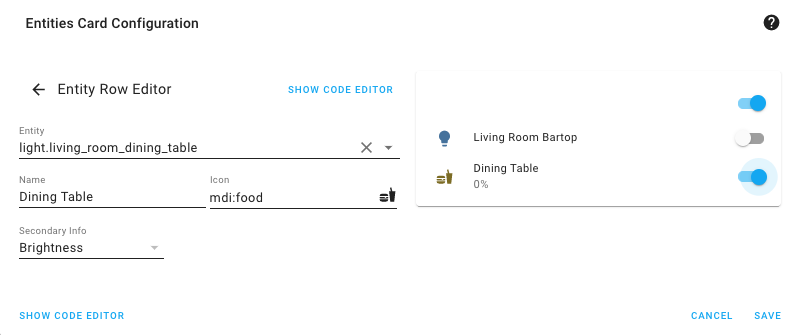 You can now edit the 实体 row; adjust the name, icon and secondary info.
另外,使用特殊行时也不再强制要求你切换到 YAML 编辑器了; 你仍然可以继续使用 UI 编辑器来编辑这些特殊行。 未来我们还会为这些特殊行补上专门的 UI 编辑器。
合并用户与人员管理
我们把用户界面和人员界面合并了,这意味着“用户”配置面板现在只会对启用了高级模式的用户显示。
现在,在人员详情对话框中有一个开关,可以直接控制这个人是否拥有 Home Assistant 的访问权限。 打开后,你就可以为这个人设置用户名和密码;关闭后,对应的用户就会被移除。
这样一来,在 Home Assistant 中管理人员就更简单了:所有相关内容都集中在一个地方。
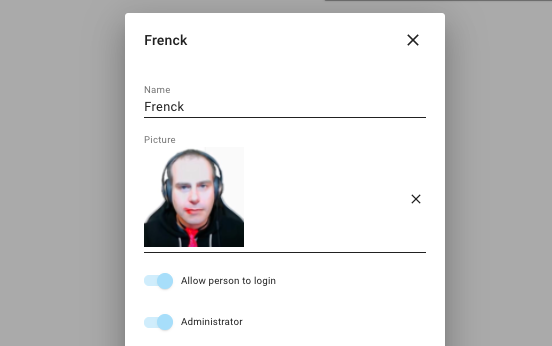 The person edit dialog now has a 切换 to allow a person to 日志 in.
恢复快照
你现在可以直接通过 UI 上传快照并进行恢复了。 你可以在 Supervisor UI 的快照面板中完成这件事, 也可以在初始引导过程中完成!
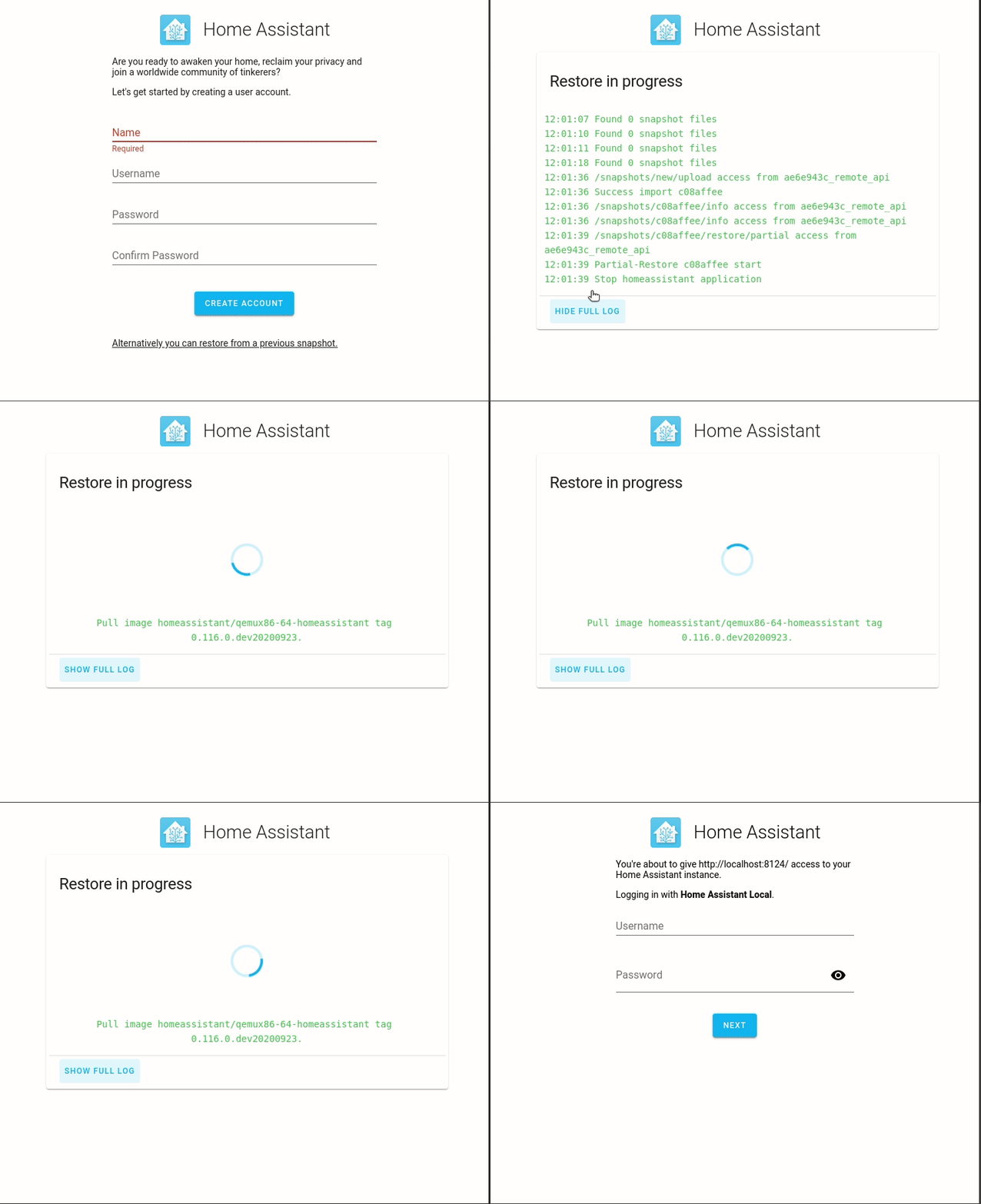 Screen recording of restoring a snapshot during onboarding.
这意味着你不再需要先设置好 Home Assistant、再安装并配置 Samba 插件,然后才能恢复快照。 现在你只需要在引导流程的第一步选择快照,它就会被直接恢复。
迁移到另一套系统因此变得轻松多了!
Supervisor UI 中的性能指标
The Supervisor now shows performance metrics in its UI, so you'll have a better idea of how much resources are used. Thanks @ludeeus!
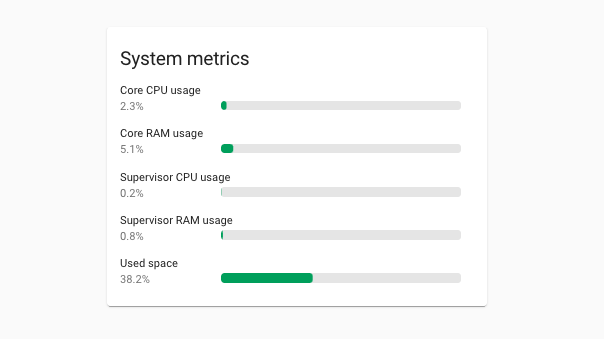 Supervisor UI now shows performance metrics.
Android 的 H.265 流支持
@uvjustin added support for H.265 streaming in the Android app, it will use a native video player that is shown on top of the Home Assistant UI. This player will only work in the more info dialog, and can not be used In Lovelace 卡片.
自动化编辑器现已支持星期选择
@misiu added a nice feature to the 自动化 editor. Using a time 条件 in the UI, now has the ability to select the weekdays the 条件 should test against.
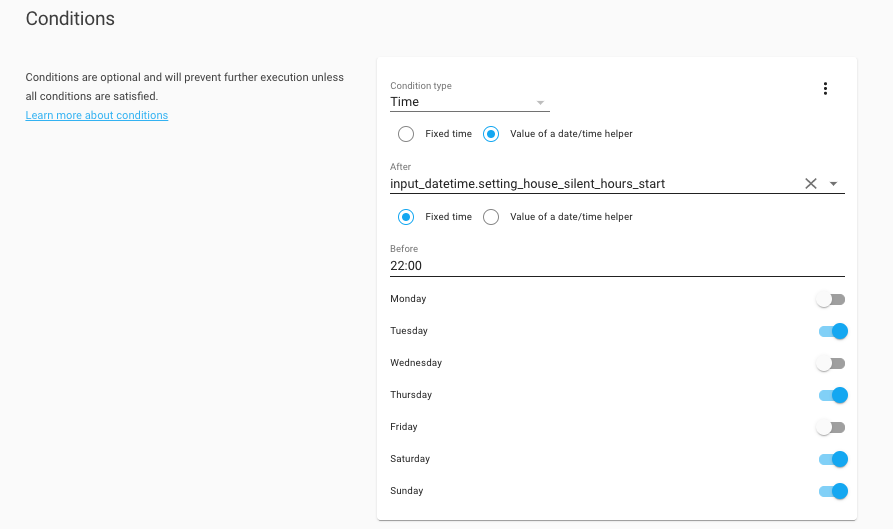 You can now select the days to match in time 条件.
Python 3.7 已弃用
Python 3.9 has been released on 5 October. This means that Python 3.7 support is now deprecated and will be removed after two months (which will be effective in 0.118).
This is only a concern if you are running Home Assistant 核心 directly on Python. You can check the Python 版本 Home Assistant uses by going to the information screen under 设置 > System > Repairs > System information in the three dots menu (top right).
If you run Home Assistant OS, 受监管模式 or 容器, you don't have to worry about this, as the Home Assistant project takes care of this for you. As a Matter of fact, if you use one of those methods, you are already running Python 3.8.
We are currently working on ensuring Python 3.9 is fully supported and tested.
其他值得注意的变化
- MQTT now supports tag scanning, thanks to @emontnemery.
- The Hyperion 集成 had a large overhaul by @dermotduffy, ensuring 此integrations now actually works!
- @Misiu ensured the OpenWeatherMap 集成 supports all languages it can provide.
- The utility meter now supports a bi-weekly cycle, thanks to @hareeshmu.
- @timkoers added uptime 传感器 for network clients to the UniFi 集成.
- The Shelly 集成 now shows power and energy 传感器 for roller mode 设备, thanks to @firstof9.
- You can now filter history by using glob matching filters. For example, you
can now exclude
sensor.*_temperaturefrom being recorded. Thanks @bdraco! - deCONZ has a new option; You can now disable the automatic addition of new 设备. Furthermore, @Kane610 also added a 服务 to clean up up orphaned 设备. Thanks!
新集成
We welcome the following new 集成 this 发布:
- 树莓派 Power Supply Checker, added by @shenxn
- Zodiac, added by @JulienTant
- Hayward OmniLogic, added by @Oliver84
- GoalZero, added by @tkdrob
新平台
The following 集成 got support for a new platform:
- Synology DSM now supports 摄像头, added by @shenxn
- Synology DSM now has a 开关 to control home mode in Surveillance Station @Quentame
- HVV Departures added 二元sensor to show elevator statuses. Added by @vigonotion
- Support for 遮盖 was added to Modbus, by @vzahradnik
- Firmata to support analog input and PWM/analog output Added by @DaAwesomeP
- NZBGet now has a 开关 to control downloads, added by @ctalkington
现在可通过 UI 设置的集成
The following 集成 are now available via the Home Assistant UI:
- AlarmDecoder, done by @ajschmidt8
- Canary, done by @ctalkington
发布 0.116.1 - October 8
- 更新 Pyhiveapi Library 版本 (@KJonline - #40804) (hive docs)
- Ensure recorder commit can retry after encountering invalid data (@bdraco - #41426) (recorder docs)
- Downgrade Paho MQTT to 1.5.0 (@balloob - #41479) (MQTT docs)
- Bump pyatmo 版本 to 4.1.0 (@cgtobi - #41487) (netatmo docs)
- Fix async_unload_entry for devolo Home Control (@Shutgun - #41488) (devolo_home_control docs)
- 更新 前端 to 20201001.2 (@bramkragten - #41491) (前端 docs)
- Add missing on 状态 to media player groups (@bdraco - #41496)
发布 0.116.2 - October 9
- Fix Netatmo non specified 传感器 types (@cgtobi - #41517) (netatmo docs)
- 更新 Arris TG2492LG dependency 版本 (@vanbalken - #41465) (arris_tg2492lg docs)
- Fix omnilogic temperature 传感器 with metric setting (@djtimca - #41509) (omnilogic docs)
- 恢复 group support to plant 实体 (@bdraco - #41519) (group docs) (plant docs)
- Bump yeelight to 0.5.4 (@shenxn - #41524) (yeelight docs)
- Fix description reference in PoolSense config flow (@bieniu - #41535) (poolsense docs)
- Fix missing 天气 传感器 (@cgtobi - #41540) (netatmo docs)
发布 0.116.3 - October 15
- Add delete to hassio API (@ludeeus - #41500) (hassio docs) (new-集成)
- Fix disabled Synology DSM 摄像头 (@Quentame - #41686) (synology_dsm docs)
- Fix KEF LSX becoming unavailable (@basnijholt - #41700) (kef docs)
- Ensure all 模板 错误 are caught and the websocket api reports them (@bdraco - #41719) (websocket_api docs)
- Offload dockermachines into 核心 (@pvizeli - #41756)
- Fix issues with metric conversion and single pump type for filter pumps in Omnilogic 集成 (@djtimca - #41777) (omnilogic docs)
- Fix SimpliSafe re-auth flow (@bachya - #41805) (simplisafe docs)
- Shelly: fix for RGB 设备 (@chemelli74 - #41841) (shelly docs)
- Permit event trackers to accept an empty list of 实体 or domains (@bdraco - #41857)
- Reduce polling for Netatmo 天气 station 传感器 (@cgtobi - #41858) (netatmo docs)
发布 0.116.4 - October 15
- Bump ONVIF and pin Zeep (@hunterjm - #41907) (onvif docs)
- Cap AVC profile level at 4.1 in stream master playlist (@uvjustin - #41592) (stream docs)
如果你需要帮助……
...don't hesitate to use our very active forums or join us for a little chat.
Experiencing issues introduced by this 发布? Please report them in our issue tracker. Make sure to fill in all fields of the issue 模板.
不向后兼容的变更
Below is a listing of the breaking change for this 发布, per subject or 集成. Click on one of those to read more about the breaking change for that specific item.
自定义 Lovelace 卡片
This 发布 contains backward-incompatible changes for custom 卡片 开发者, check the 开发者 博客 更多信息.
If you have a custom 卡片 that stopped working this 发布, please report this with the custom 卡片 author.
AlarmDecoder
YAML support for AlarmDecoder has been removed in favor of UI 配置.
Additionally, the panel_display option has been removed and the 报警 display
传感器 will always be 创建 with AlarmDecoder now. Please see the updated
AlarmDecoder 文档 for instructions on how to
set up AlarmDecoder via the UI.
自动化
状态 条件 with 属性 specified: When testing against a non-string 属性 value, you now need to specify the value in your 配置 in the same type as it is in the 属性 (instead of as a string).
Canary
Canary is now available for 配置 via the UI. This also means it's no longer configured in YAML. Existing 配置 should be automatically transitioned to 配置 via UI. You can safely remove you Canary YAML 配置 after ugprading. YAML support will be fully removed in Home Assistant 0.118.0.
(@ctalkington - #40055) (canary docs)
HomeKit Controller、Plant、SmartThings、Xiaomi
Some 集成 (homekit_controller, plant, smartthings
and xiaomi_miio) previously used lux as their unit of measurement for
实体 that covered illuminance. Now, these 实体 use lx as their unit
of measurement to be consistent with other 集成.
This could be a breaking change for using such 实体 in,
for example, influxdb.
(@springstan - #40171)
Hyperion
Fixes the Hyperion 集成 to work with the current Hyperion-NG 发布. Refactors to rely on the hyperion-py client.
The default_color, hdmi_priority and effect_list parameters no longer have
any effect. Instead, 用户 should use 灯光 profiles
as default color.
The effect_list is now automatically populated.
The hdmi_priority parameter no longer make sense with Hyperion-NG and will
be removed in a future 发布.
(@dermotduffy - #39738) (hyperion docs)
KNX
We changed the way how we handle 二元sensor in the underlying library. It
is no longer possible to support 自动化 based on the binary_sensor
schema. Instead, you can use the new counter 状态 属性 for any given
KNX 二元sensor.
Before this change:
After this change:
If you intend to use the counter feature (counter > 1) make sure you also
enable ignore_internal_state (default: true) for your binary_sensor and
set the new context_timeout 属性 to the time in between you want it to
react to your 传感器 clicks (defaults to 1 - which should be fine).
Otherwise, the counter will not work correctly.
日志簿
Message and domain are now removed from the logbook state_changed events.
These are now handled by the 前端 as we move closer to making the logbook localized.
(@bdraco - #40070) (logbook docs)
Material Design 图标
The Material Design Icons are updated to v5.6.55, the mdi:scooter icon is
replaced by a new icon, the old icon is available as mdi:human-scooter
Pilight
灯光 using the Pilight 集成 will now 打开 to the last used brightness instead of its maximum brightness.
If you want to retain you 灯光 turning on to its maximum brightness you can
set the default intensity in the light_profiles.csv file.
The steps to set this up:
- In the your main
configfolder (where you'll findconfiguration.yaml) create a new file calledlight_profiles.csv. - For each of 灯光 add an line with its 实体 id and the brightness
you want, as a value from
0to255.
Example:
(@daniel-jong - #39549) (pilight docs)
Synology
The Synology 集成 is now deprecated. You should now use the Synology DSM instead. Support for 摄像头 has been added to the Synology DSM 集成 making it a full replacement.
(@shenxn - #39958) (synology docs)
系统监视器
Not really a breaking change, since the overall logic did not change. Arguments that were previously mandatory for 传感器 of 此integrations are still mandatory and optional arguments remain optional.
However, we now enforce those mandatory arguments to be present, since otherwise 此integrations creates 实体 that cannot do anything, e.g., the 传感器 for IPv4 addresses cannot do anything if no network interface is specified from which to take the IP.
If the 集成 fails to load, check the 日志 to see which arguments are missing in your 配置. The 文档 also has been updated to clearly show which arguments are mandatory.
TekSavvy
The TekSavvy 集成 has been removed. The API that was used by this 集成 is no longer available.
通用设备 ISY994 / LCN
The Kelvin unit no longer includes the degree sign in accordance with
scientific standards. If you use the isy994 and lcn 集成 you may
need to 更新 自动化 or data collectors that depend on the unit of
measurement.
(@RichieFrame - #40574) (isy994 docs)
VeSync
The auto 风扇 mode for the 风扇 platform has been removed. The auto mode isn't supported by the 实体 model in Home Assistant and was initially added overlooking our 实体 model.
If you have 自动化 or 脚本 targeting the VeSync 风扇 实体 should review these and 更新 as needed.
ZHA
The ieee_address parameter was renamed to ieee for zha.permit
and zha.remove 服务.
This makes all 服务 to use consistently named parameters.
(@Adminiuga - #40652) (zha docs)
所有变更
点击查看所有变更!
- Add missing EDL21 OBIS codes (@DAMEK86 - #39714) (edl21 docs)
- Bump 版本 to 0.116.0dev0 (@frenck - #39768)
- Bump Synology DSM to 0.9.0 (@Quentame - #39819) (synology_dsm docs)
- Add systemmonitor check for mandatory "arg" of 传感器 (@spacegaier - #39687) (systemmonitor docs) (breaking-change)
- Allow setting of hvac_mode when setting temperature in ozw (@firstof9 - #39853) (ozw docs)
- Prompt 用户 to reauthenticate AirVisual when API key expires (@bachya - #38341) (airvisual docs)
- 升级 sentry-sdk to 0.17.4 (@frenck - #39868) (sentry docs)
- Bump pyTibber to 0.15.2 (@soldag - #39870) (tibber docs)
- 升级 isort to 5.5.2 (@frenck - #39879)
- Use entity_class 'safety' in synology_dsm storage 传感器 (@Mariusthvdb - #39757) (synology_dsm docs)
- Optimize requirements check with stdlib (@balloob - #39871)
- Remove stale 调试 from WLED tests (@frenck - #39882) (wled docs)
- Add Carbon Monoxide 二元sensor to Homekit Controller (@RogerSelwyn - #39889) (homekit_controller docs)
- Increase 模板 test coverage. (@bdraco - #39908)
- Add zeroconf discovery to homekit (@bdraco - #39907) (homekit docs)
- 升级 numpy to 1.19.2 (@frenck - #39912) (iqvia docs) (opencv docs) (tensorflow docs) (trend docs)
- Add 摄像头 support to synology_dsm (@shenxn - #39838) (synology_dsm docs) (new-platform)
- Add async_track_state_removed_domain to allow tracking when a 状态 is removed from a domain (@bdraco - #39859)
- 设备 自动化 触发器 for stateless HomeKit accessories (@Jc2k - #39090) (homekit_controller docs)
- Activate hassfest requirements CI check (@MartinHjelmare - #39940)
- Use STATE_UNKNOWN constant in dlink and ecobee (@springstan - #39948) (dlink docs) (ecobee docs)
- Add 模板 filter timedelta_seconds to create a timedelta from seconds (@jschlyter - #39608)
- Remove unchecked return value in synology_dsm (@shenxn - #39929) (synology_dsm docs)
- Use sound, vibration and safety 设备 class constants in various 集成 (@springstan - #39952) (concord232 docs) (ffmpeg_noise docs) (meteoalarm docs) (mysensors docs) (nest docs) (smartthings docs) (wink docs)
- Improve tests for Broadlink 设备 (@felipediel - #39898) (broadlink docs)
- Use DEVICE_CLASS_WINDOW constant in various 集成 (@springstan - #39949) (brunt docs) (deconz docs) (fibaro docs) (fritzbox docs) (maxcube docs) (notion docs) (somfy_mylink docs)
- 升级 codecov to 2.1.9 (@frenck - #39960)
- 升级 pytest-cov to 2.10.1 (@frenck - #39964)
- 升级 pytest-sugar to 0.9.4 (@frenck - #39966)
- 升级 mypy to 0.782 (@frenck - #39967)
- Use DEVICE_CLASS_DOOR and DEVICE_CLASS_SMOKE in various 集成 (@springstan - #39950) (concord232 docs) (fibaro docs) (notion docs) (satel_integra docs) (spc docs) (tahoma docs) (wink docs)
- 升级 youtube_dl to 版本 2020.09.06 (@BKPepe - #39969) (media_extractor docs)
- Use opening and occupancy 设备 class in various 集成 (@springstan - #39965)
- 升级 pytest-timeout to 1.4.2 (@frenck - #39983)
- 升级 responses to 0.12.0 (@frenck - #39986)
- Use connectivity 设备 class constant in various 集成 (@springstan - #39972)
- Use problem, 在场 and plug 设备 class constants in various 集成 (@springstan - #39973) (bmw_connected_drive docs) (opentherm_gw docs) (smappee docs) (smartthings docs) (smarty docs)
- Shelly: Power and Energy 传感器 in roller mode (@chemelli74 - #39709) (shelly docs)
- Use DEVICE_CLASS_MOTION in various 集成 (@springstan - #39962)
- Add timeout config option to Synology DSM (@Quentame - #40000) (synology_dsm docs)
- Fix xiaomi_aqara duplicated battery 传感器 (@shenxn - #39961) (xiaomi_aqara docs)
- Cleanup and reduce duplicate code from recent 模板 changes (@bdraco - #40012)
- Use moisture and moving 设备 class in various 集成 (@springstan - #39963)
- Revert 'Use STATE_UNKNOWN constant in dlink and ecobee' (@springstan - #40022) (dlink docs) (ecobee docs)
- Improve canary tests (@ctalkington - #39956) (canary docs)
- Add Config Flow to AlarmDecoder (@ajschmidt8 - #37998) (alarmdecoder docs) (breaking-change)
- 更新 phrasing and pin validation for homekit_controller (@bdraco - #40006) (homekit_controller docs)
- Add canary alarm_control_panel tests (@ctalkington - #40029) (canary docs)
- Refactor zeroconf 设置 to be async (@bdraco - #39955) (zeroconf docs)
- Mark Azure DevOps 设备 as a 服务 (@timmo001 - #40044) (azure_devops docs)
- Add unique_id to canary alarm_control_panel (@ctalkington - #40041) (canary docs)
- Add 设备 class to canary 传感器 (@ctalkington - #40050) (canary docs)
- Fix intermittently failing dyson test (@bdraco - #40051) (dyson docs)
- 升级 coverage to 5.3.0 (@frenck - #40056)
- Fix vizio async mock fixtures on Python 3.8.0 and .1 (@scop - #39926) (vizio docs)
- Don't try to create /test dir in 摄像头 tests (@scop - #39914) (摄像头 docs)
- Make recorder block_till_done reliable (@bdraco - #40043) (recorder docs)
- Make system_log test reliable (@bdraco - #40049) (system_log docs)
- Add more SSDP discovery data and constants (@scop - #39984) (ssdp docs)
- Add temperature and uptime to Synology DSM (@thomasgermain - #39419) (synology_dsm docs)
- Improve reproduce_state for media players (@rajlaud - #38266) (媒体播放器 docs)
- Deprecate the synology 集成 (@shenxn - #39958) (synology docs) (breaking-change)
- Add rpi_power 集成 (@shenxn - #35527) (rpi_power docs) (new-集成)
- Extract the icon and 状态 for logbook 状态 changed events (@bdraco - #40039) (logbook docs)
- Add unique_id to canary 摄像头 (@ctalkington - #40054) (canary docs)
- Reduce listener cancelation code in 模板 tracker (@bdraco - #40040)
- Fix homekit 错误 when the bridge has been ignored. (@bdraco - #40082) (homekit docs)
- Add support for multiple vera controller hubs (@vangorra - #33613) (vera docs)
- 升级 pytest to 6.0.2 (@frenck - #39959)
- 升级 sentry-sdk to 0.17.5 (@frenck - #40092) (sentry docs)
- Fix hvv_departures config flow patches (@MartinHjelmare - #40095) (hvv_departures docs)
- 升级 pytest-xdist to 2.1.0 (@frenck - #40057)
- Add bimonthly period feature for utility_meter component (@hareeshmu - #39931) (utility_meter docs)
- 升级 youtube_dl to 版本 2020.09.14 (@BKPepe - #40104) (media_extractor docs)
- Use http status constants more, add HTTP_ACCEPTED and HTTP_BAD_GATEWAY (@springstan - #39993)
- Add and use volume cubic constants (@springstan - #40106) (airvisual docs) (comfoconnect docs) (isy994 docs) (mysensors docs) (zha docs)
- Expose angle and xy 属性 in deCONZ event if present (@klada - #39822) (deconz docs)
- Extract Netatmo test data (@cgtobi - #40094) (netatmo docs)
- Clean dyson 温控 tests (@MartinHjelmare - #40110) (dyson docs)
- Use AREA_SQUARE_METERS constant in all 集成 (@springstan - #40107) (ambient_station docs) (bloomsky docs) (isy994 docs) (smartthings docs) (zamg docs)
- Add and use currency constants (@springstan - #40113) (dsmr_reader docs) (growatt_server docs) (isy994 docs) (pvpc_hourly_pricing docs) (tankerkoenig docs)
- AlarmDecoder config flow fixes (@ajschmidt8 - #40037) (alarmdecoder docs)
- 升级 sentry-sdk to 0.17.6 (@frenck - #40133) (sentry docs)
- Remove unsupported 状态 from security systems in HomeKit (@nzapponi - #40060) (homekit docs)
- Prompt to reauth when the august 密码 is changed or token expires (@bdraco - #40103) (august docs)
- Clean up vera typings (@vangorra - #40143) (vera docs)
- Fix static/class async mocks on Python 3.8.0 and .1 (@scop - #40147) (forked_daapd docs) (shelly docs) (simplisafe docs)
- Add config support to zoneminder 集成 (@vangorra - #37060) (zoneminder docs) (breaking-change)
- Fix typo in strings for wolflink (@SNoof85 - #40164) (wolflink docs)
- Do not default Pilight 灯光 to max brightness (@daniel-jong - #39549) (pilight docs) (breaking-change)
- Use async_on_remove for vizio listeners (@raman325 - #40185) (vizio docs)
- Add cgtobi to sonos code owners (@cgtobi - #40204) (sonos docs)
- Add cgtobi to kodi code owners (@cgtobi - #40202) (kodi docs)
- Fix shelly 传感器 names (@Misiu - #39854) (shelly docs)
- Catch TypeError in strptime() 模板 助手 (@spacegaier - #40226)
- Use default values in advanced options in devolo home control (@2Fake - #40216) (devolo_home_control docs)
- Add UniFi Uptime 传感器 (@timkoers - #40058) (unifi docs)
- 更新 velbus to 2.0.45 (@Cereal2nd - #40256) (velbus docs)
- Add Influxdb precision option (@twdkeule - #38454) (influxdb docs)
- Make tplink SmartStrip communication more robust (@gjbadros - #40281) (tplink docs)
- Add config flow to canary (@ctalkington - #40055) (canary docs) (breaking-change)
- Use pressure constants in code base (@springstan - #40262)
- Add missing 集成 quality scale to 图像 集成 (@frenck - #40289) (图像 docs)
- Add missing 集成 quality scale to tags 集成 (@frenck - #40291) (tag docs)
- Add port to plugwise (@CoMPaTech - #40017) (plugwise docs)
- Add 设备 info to canary 摄像头 and 传感器 (@ctalkington - #40053) (canary docs)
- Add kodi browse media for channels (@imduffy15 - #40277) (kodi docs)
- Use percentage constant in more 集成 (@springstan - #40165) (growatt_server docs) (numato docs) (nut docs)
- Add and use currency cent constant (@springstan - #40261) (griddy docs) (isy994 docs) (nsw_fuel_station docs)
- Add binary_sensor for cloud connectivity to HomematicIP Cloud (@SukramJ - #39675) (homematicip_cloud docs)
- 更新 roku media browser classes (@ctalkington - #40285) (roku docs)
- Complete 助手.服务 type hints (@scop - #40193)
- Rebuilt Splunk using custom library (@Bre77 - #40123) (splunk docs)
- Use content type text plain constant (@springstan - #40313) (prometheus docs) (rest docs) (rest_command docs)
- 更新 xknx to 0.14.2 (@marvin-w - #40304) (knx docs) (breaking-change)
- Apply code review for canary config flow (@ctalkington - #40355) (canary docs)
- Add reauth source constant for config entries (@ctalkington - #40352)
- Add supervisor 安装 插件 助手 (@MartinHjelmare - #40138)
- 升级 youtube_dl to 版本 2020.09.20 (@BKPepe - #40395) (media_extractor docs)
- Remove myself as Luci code owner (@fbradyirl - #40398) (luci docs)
- Fix supervisor get 插件 info (@MartinHjelmare - #40412)
- Add zodiac 集成 (@JulienTant - #38935) (zodiac docs) (new-集成)
- 更新 voluptuous to 0.12.0 (@spacegaier - #40401)
- 更新 Solax Library to 0.2.4 (@squishykid - #40330) (solax docs)
- Use centralized KnxEntity for all KNX platforms (@marvin-w - #40381) (knx docs)
- bump pynws to 1.3.0 (@MatthewFlamm - #40386) (nws docs)
- Add supervisor 插件 卸载 助手 (@MartinHjelmare - #40413)
- Use more 状态 属性 name constants (@scop - #40428)
- Improve timeout 错误 handling for Splunk (@Bre77 - #40384) (splunk docs)
- Add 调试 logging to Bond fireplace 实体 (@prystupa - #40318) (bond docs)
- Add PLAY and PAUSE to webos 按钮 服务 description (@basnijholt - #40353) (webostv docs)
- Firmata analog input, PWM/analog output, deprecate arduino (@DaAwesomeP - #40369) (arduino docs) (firmata docs) (new-platform)
- Bump pywemo to 0.5.0 (@sqldiablo - #40439) (wemo docs)
- 更新 xknx to 0.14.3 (@marvin-w - #40430) (knx docs)
- Serialize websocket event message once (@bdraco - #40453) (websocket_api docs)
- Add support for selecting multiple 实体 ids from logbook (@bdraco - #40075) (logbook docs)
- Defer 模板 tracking 设置 until 模板 实体 start (@bdraco - #40388) (模板 docs)
- Add binary_sensor for elevator 状态 to hvv_departures (@vigonotion - #36822) (hvv_departures docs) (new-platform)
- deCONZ - move event handling (@Kane610 - #40424) (deconz docs)
- Add and use length millimeters constant (@springstan - #40116)
- 更新 xknx to 版本 0.14.4 (@marvin-w - #40472) (knx docs)
- Improve DOODS folder handling and add process time 属性 (@lamiskin - #40344) (doods docs)
- Support learning different command types with 遥控器 (@felipediel - #39670) (遥控器 docs)
- Refactor Plex tests using fixtures (@jjlawren - #40260) (plex docs)
- Use content type multipart constant (@springstan - #40314) (摄像头 docs) (ffmpeg docs)
- Revert "Support learning different command types with 遥控器" (@frenck - #40486) (遥控器 docs)
- 升级 sentry-sdk to 0.17.7 (@frenck - #40492) (sentry docs)
- 升级 isort to 5.5.3 (@frenck - #40493)
- Add supervisor 助手 to start 插件 (@MartinHjelmare - #40495)
- Add supervisor 插件 stop 助手 (@MartinHjelmare - #40501)
- Support all available languages in voicerss 集成 (@nagyrobi - #40502) (voicerss docs)
- Add all supported languages to OpenWeatherMap (@Misiu - #40448) (openweathermap docs)
- Adjust safe_theme for better readability (@spacegaier - #40223) (前端 docs)
- Use content type json constant (@springstan - #40312)
- Add and use 灯光 lux constant in entire code base (@springstan - #40171) (breaking-change)
- Correct label in MQTT config flow (@springstan - #40507) (MQTT docs)
- Bump plexapi to 4.1.1 (@jjlawren - #40512) (plex docs)
- 更新 sonarr to 0.3.0 (@ctalkington - #40515) (sonarr docs)
- Fix Bond 错误 logging format (@prystupa - #40519) (bond docs)
- 升级 sentry-sdk to 0.17.8 (@frenck - #40531) (sentry docs)
- Add more Huawei LTE 传感器 metadata (@scop - #39988) (huawei_lte docs)
- 更新 constant name for onewire (@epenet - #40530) (onewire docs)
- Ensure consitstency of file docstring for 1-wire (@epenet - #40528) (onewire docs)
- Ensure the title is consistent (@epenet - #40528) (onewire docs)
- Improve devolo Home Control code quality (@Shutgun - #40480) (devolo_home_control docs)
- Add Huawei LTE SMS storage full and unread 传感器 (@scop - #40021) (huawei_lte docs)
- Fix/Refactor Hyperion 集成 (@dermotduffy - #39738) (hyperion docs) (breaking-change)
- Bump pyairvisual to 5.0.2 (@bachya - #40554) (airvisual docs)
- Bump simplisafe-python to 9.3.3 (@bachya - #40560) (simplisafe docs)
- Improve handling of sources without a name in Denon (@asimonen - #40514) (denon docs)
- Add @darkfox as Rejseplanen code owner (@DarkFox - #40329)
- Add modifications for snapshot uploads (@ludeeus - #40503)
- 升级 Tibber library to 0.15.3 (@Danielhiversen - #40570) (tibber docs)
- Use HA constants for Rfxtrx units (@elupus - #40562) (rfxtrx docs)
- 升级 tqdm to 4.49.0 (@frenck - #40573)
- Remove auto from the 风扇 speed modes for VeSync (@TheGardenMonkey - #40559) (vesync docs) (breaking-change)
- Add Omnilogic 集成 (@Oliver84 - #40474) (omnilogic docs) (new-集成)
- Rewrite 灯光 component tests to async pytest tests (@frenck - #40589) (灯光 docs)
- Improve tracking of existing 实体 in deconz (@Kane610 - #40265) (deconz docs)
- 更新 schema for zha.set_zigbee_cluster_attribute 服务 (@Adminiuga - #40600) (zha docs)
- Add 设备 info to gogogate2 (@bdraco - #40538) (gogogate2 docs)
- 升级 spotipy to 2.16.0 (@frenck - #40606) (spotify docs)
- Throttle ebusd 传感器 instead of the whole component (@danielkucera - #40610) (ebusd docs)
- Bump pychromecast to 7.4.1 (@emontnemery - #40587) (cast docs)
- Add 安装 type to discovery endpoint (@ludeeus - #40585) (api docs)
- Allow non-authenticated calls to snapshots during onboarding (@ludeeus - #40582)
- 日志 the 遥控器 ip address for incoming websocket connections when 调试 is on (@bdraco - #40581) (websocket_api docs)
- Add bare hostname as valid known hostname in get_url 助手 (@frenck - #40510)
- Use direct 服务 calls in 灯光 platform tests (@frenck - #40604) (灯光 docs)
- Use common strings for somfy config flow (@RobBie1221 - #40594) (somfy docs)
- Use common strings for monoprice config flow (@RobBie1221 - #40592) (monoprice docs)
- Use common strings for Freebox config flow (@SNoof85 - #40590) (freebox docs)
- Bump python-broadlink to 0.15.0 (@felipediel - #39228) (broadlink docs)
- Add Modbus 遮盖 (@vzahradnik - #33642) (modbus docs) (new-platform)
- Improve performance of counting and iterating 状态 in 模板 (@bdraco - #40250)
- Use direct 服务 calls in tests instead of 自动化 common (@frenck - #40623)
- Reduce the number of 模板 re-renders when we are only counting 状态 (@bdraco - #40272)
- Ensure all jinja2 错误 are trapped and displayed in the 开发者工具 (@bdraco - #40624) (websocket_api docs)
- Add support for homekit windows (@Julius2342 - #40635) (homekit docs)
- Handle Shelly channel names (if available) (@chemelli74 - #40119) (shelly docs)
- deCONZ fix comments from #40265 (@Kane610 - #40640) (deconz docs)
- Fix solaredge 服务 data KeyError (@Cereal2nd - #40653) (solaredge docs)
- Resolve 前端 服务.yaml Minor Oversight (@Brahmah - #40659) (前端 docs)
- Rewrite 核心 event tests to pytest tests (@frenck - #40664)
- Bump python-velbus to 2.0.46 (@Cereal2nd - #40663) (velbus docs)
- Add 认证 support to Nightscout (@marciogranzotto - #40602) (nightscout docs)
- Use common strings for oauth config flows (@MBlokhuijzen - #40608) (almond docs) (home_connect docs) (smappee docs) (somfy docs) (spotify docs) (withings docs)
- Remove pre-0.102 Huawei LTE 设置 noop 警告 (@scop - #40654) (huawei_lte docs)
- Add 集成 for Goal Zero Yeti Power Stations (@tkdrob - #39231) (goalzero docs) (new-集成)
- Bump dwdwfsapi to v1.0.3 (@stephan192 - #40644) (dwd_weather_warnings docs)
- 更新 wolf_smartset to 0.1.6 (@adamkrol93 - #40668) (wolflink docs)
- Increase the timeout during config entry 设置 in Shelly 集成 (@bieniu - #40684) (shelly docs)
- 升级 zigpy-znp from 0.1.1 to 0.2.0 (@puddly - #40674) (zha docs)
- Fix issue with HobbyBoard moisture meter (@epenet - #40680) (onewire docs)
- Move onewire constants to separate file (@epenet - #40550) (onewire docs)
- Add onewire humidity 传感器 connected via DS2438 (@epenet - #39780) (onewire docs)
- Add tests for modbus 二元sensor (@janiversen - #40367) (modbus docs)
- Bump up zha dependency (@Adminiuga - #40689) (zha docs)
- Re-enable hdmi_cec component (@newAM - #40671) (hdmi_cec docs)
- Allow non-authenticated calls to supervisor 日志 during onboarding (@ludeeus - #40617)
- Improve config flow descriptions in Shelly 集成 (@bieniu - #40396) (shelly docs)
- Bump snapcast dependency to 2.1.1 (@mafrosis - #40561) (snapcast docs)
- Abort execution of 模板 renders that overwhelm the system (@bdraco - #40647) (websocket_api docs)
- Add 实体 glob matching support to history (@bdraco - #40387) (history docs)
- Remove degree from Kelvin unit (@RichieFrame - #40574) (isy994 docs) (lcn docs) (breaking-change)
- Fix Android TV 'async_get_media_image' (@JeffLIrion - #40672) (androidtv docs)
- Add rpi_power during onboarding on RPi (@MartinHjelmare - #40076) (onboarding docs) (rpi_power docs)
- Add support to reauthorize expired Plex tokens (@jjlawren - #40469) (plex docs)
- Improve performance of accessing 模板 状态 (@bdraco - #40323)
- Improve devolo Home Control code quality (@Shutgun - #40708) (devolo_home_control docs)
- Bump pypck to v0.7.2 (@alengwenus - #40716) (lcn docs)
- Use NamedTuple for Huawei LTE 传感器 metadata (@scop - #40655) (huawei_lte docs)
- Fix support for Aqara WXKG06LM (@fabricepipart - #40694) (deconz docs) (xiaomi_aqara docs)
- Fix name of the Vallox 集成 in the manifest (@frenck - #40727) (vallox docs)
- Add MQTT tag scanner (@emontnemery - #40709) (MQTT docs)
- 更新 islamic_prayer_times with common strings (@Brahmah - #40712) (islamic_prayer_times docs)
- Bump up ZHA dependency (@Adminiuga - #40734) (zha docs)
- Refactor permit 服务 to allow joining using 安装 codes (@Adminiuga - #40652) (zha docs) (breaking-change)
- Add 开关 to control downloads for nzbget (@ctalkington - #40673) (nzbget docs) (new-platform)
- Add ability to reauth sonarr (@ctalkington - #40306) (sonarr docs)
- Add deconz option to disable automatic addition of new 设备 (@Kane610 - #40545) (deconz docs)
- 更新 pyatag to 0.3.4.4 (@MatsNl - #40720) (atag docs)
- Add 模板 遮盖 opening and closing 状态 (@TheNr1Guest - #40677) (模板 docs)
- 升级 paho-MQTT to 1.5.1 (@frenck - #40703) (MQTT docs) (shiftr docs)
- Add Neighbors & Endpoint Names to zha/设备 reply (@Samantha-uk - #40748) (zha docs)
- Bump ZHA quirks lib to 0.0.45 (@dmulcahey - #40769) (zha docs)
- Normalise headers in onewire 集成 (@epenet - #40774) (onewire docs)
- 更新 xknx to 0.15.0 (@marvin-w - #40649) (knx docs)
- Use direct 服务 calls in flux tests instead of 开关 common (@frenck - #40704) (flux docs)
- 更新 devolo-home-control-api to 0.15.0 (@Shutgun - #40764) (devolo_home_control docs)
- Code cleanups for async_track_template_result (@bdraco - #40737)
- Add unique_id to the 灯光 开关 (@tetienne - #40603) (开关 docs)
- Fix logbook with empty filter and remove unused code (@bdraco - #40565) (logbook docs) (recorder docs)
- 设置 recorder model relationships to avoid calling flush (@bdraco - #40467) (recorder docs)
- Remove TekSavvy Component, no longer available (@mikeodr - #40762) (breaking-change)
- Improve command_line 开关 tests (@frenck - #40749) (command_line docs)
- Use common strings for velbus config flow (@Cereal2nd - #40660) (velbus docs)
- 升级 sentry-sdk to 0.18.0 (@frenck - #40784) (sentry docs)
- Refactor group to extend domains that can be grouped (@bdraco - #40607) (group docs)
- Disable hourly 传感器 by default in NWS (@MatthewFlamm - #40566) (nws docs)
- Fix and clean tox.ini (@MartinHjelmare - #40789)
- Fix DWD namings (@creichel - #40791) (dwd_weather_warnings docs)
- Tibber, combine two fetches into one fetch (@Danielhiversen - #40787) (tibber docs)
- Create MQTTMatcher once per subscription instead of each message (@bdraco - #40345) (MQTT docs)
- Use the Home Assistant Cast app to play media on Chromecast (@bramkragten - #40782) (cast docs)
- Improve deCONZ 状态 updates (@Kane610 - #40601) (deconz docs)
- 开关 group to use None for the 状态 unknown case (@bdraco - #40792) (group docs)
- 日志 timestamp overflow in stream (@uvjustin - #39844) (stream docs)
- Return target duration of 1 when no segments (@uvjustin - #40518) (stream docs)
- Add Surveillance Station home mode 开关 for Synology DSM (@Quentame - #40490) (synology_dsm docs) (new-platform)
- Remove message and domain from logbook state_changed events (@bdraco - #40070) (logbook docs) (breaking-change)
- 更新 前端 to 20200930.0 (@bramkragten - #40794) (前端 docs)
- Include config flow modules in coverage (@Danielhiversen - #40798)
- Add deCONZ 服务 to clean up orphaned 设备 and 实体 entries (@Kane610 - #40629) (deconz docs)
- Discover additional ozw thermostats lacking mode support (@firstof9 - #40799) (ozw docs)
- Seperate 状态 change tracking from async_track_template_result into async_track_state_change_filtered (@bdraco - #40803) (beta fix)
- Implement 模板 rate_limit directive (@bdraco - #40667) (breaking-change) (beta fix)
- Accept new Plex websocket callback payloads (@jjlawren - #40773) (plex docs) (beta fix)
- Fix Netatmo 温控 错误 when no boiler status is set (@cgtobi - #40815) (netatmo docs) (beta fix)
- Bump simplisafe-python to 9.4.1 (@bachya - #40819) (simplisafe docs) (beta fix)
- Bump up zha dependencies (@Adminiuga - #40914) (zha docs) (beta fix)
- Revert using own cast app for media (@bramkragten - #40937) (cast docs) (beta fix)
- 更新 前端 to 20201001.0 (@bramkragten - #40974) (前端 docs) (beta fix)
- Prevent sqlalchemy from refetching the old_state_id as it will never change (@bdraco - #40982) (recorder docs) (beta fix)
- Plex websocket callback async cleanup (@jjlawren - #40992) (plex docs) (beta fix)
- Prevent 模板 loop detection from triggering when all 模板 are self referencing (@bdraco - #41013) (模板 docs) (beta fix)
- Better parsing of the ZHA 设备 profile id (@Adminiuga - #41024) (zha docs) (beta fix)
- Change Swap free mandatory arg (@Mariusthvdb - #41025) (systemmonitor docs) (beta fix)
- Ensure 灯光 added after group is 创建 have the correct 状态 (@bdraco - #41034) (group docs) (beta fix)
- Bump aioshelly to 0.3.4 (@balloob - #41065) (shelly docs) (beta fix)
- Add full command details to exception 调试 日志 (@Samantha-uk - #41070) (zha docs) (beta fix)
- Fix SmartHab import flow (@outadoc - #41093) (smarthab docs) (beta fix)
- Fix referenced 实体 extraction when 服务 call 实体 contains a 模板 (@frenck - #41107) (beta fix)
- Bump up ZHA dependency (@Adminiuga - #41109) (zha docs) (beta fix)
- Treat optional input as optional in ZoneMinder config flow (@rohankapoorcom - #41156) (zoneminder docs) (beta fix)
- Handle Shelly channel names (if available) for emeters 设备 (@chemelli74 - #40820) (shelly docs) (beta fix)
- Simplify 模板 tracking and make it easier to follow (@bdraco - #41030) (beta fix)
- Fix TTS handling of non-ID3 metadata tags (@blueshiftlabs - #41191) (tts docs) (beta fix)
- Remove deprecation invalidation 版本 from cast 集成 (@frenck - #41197) (cast docs) (beta fix)
- Remove manual rate_limit control directive from 模板 (@bdraco - #41225) (beta fix)
- Bump apprise 版本 to avoid sync in async issues (@raman325 - #41253) (apprise docs) (beta fix)
- Allow any value when triggering on 状态 属性 (@balloob - #41261) (homeassistant docs) (breaking-change) (beta fix)
- Add extended validation for 脚本 repeat/choose (@balloob - #41265) (beta fix)
- Updated 前端 to 20201001.1 (@bramkragten - #41273) (前端 docs) (beta fix)
- 更新 pysmartthings (@andrewsayre - #41294) (smartthings docs) (beta fix)
- Exclude media_dirs from YAML config check (@bramkragten - #41299) (beta fix)
- Prevent collecting 状态 already referenced by domain or all (@bdraco - #41308) (beta fix)
- Don't set upnp config_entry.unique_id from 设置 entry (@StevenLooman - #40988) (upnp docs) (beta fix)
- Fix TTS ID3 Tag capability check (@frenck - #41343) (tts docs) (beta fix)
- Resolve memory leak in recorder (@bdraco - #41349) (recorder docs) (beta fix)
- Set longer timeout during synology_dsm config flow (@Quentame - #41364) (synology_dsm docs) (beta fix)
- Add additionalAttributes to Alexa discovery payload (@balloob - #41370) (alexa docs) (beta fix)
- Bump up zha dependency to 0.26.0 (@Adminiuga - #41371) (zha docs) (beta fix)
- Fix elkm1 changed by (@gwww - #41378) (elkm1 docs) (beta fix)
- Reduce Somfy polling (@balloob - #41389) (somfy docs) (beta fix)
- Revert zoneminder config flow (@MartinHjelmare - #41395) (zoneminder docs) (beta fix)
- Warn when using Python 3.7 (@balloob - #41400) (beta fix)