

0.114:深色模式、Open Z-Wave 进展,以及更多自动化和脚本更新
哇,这个发布周期过得真快;现在已经来到 0.114 了!
就我个人而言,我甚至还没来得及把上个版本新增的自动化功能都用起来呢。😅
自从 2018 年 Lovelace UI 以测试版形式推出以来,呼声最高的功能之一,大概就是深色模式了。这一点也不奇怪,毕竟如今几乎所有软件都在加入深色模式。
这个版本加入了深色模式!@bramkragten 还更进一步,为默认主题的主色和强调色加入了取色器。我一直很期待这个功能,因为它让你无需专门创建主题,也能轻松调整一点界面风格。
这无疑是本次发布最显眼的功能,因为你一升级就能立刻看到它。
与此同时,测试版 Open Z-Wave 集成在贡献、反馈、修复和改进方面都在加速推进。我已经在用了,而且非常喜欢。我的 Z-Wave 网络从来没有这么稳定过。如果你还没试过,我强烈推荐你尝试一下。社区里还有一篇很不错的指南,介绍了如何在不完全切换的情况下进行测试。
除了下面列出的重点内容,0.114 看起来也许会显得有点“空”,但其实并不是这样。这个版本塞满了各种小改进和修复。这次的“所有变更”部分绝对值得看看。
祝你享受这个版本。
../Frenck
深色模式和主题颜色取色器
我们现在已经正式支持深色模式了。🎉
我们会检测你的设备是否开启了深色模式;如果是,默认主题也会自动切换为深色。你也可以在个人资料中覆盖这种深浅主题的自动切换行为。
此外,你现在还可以为默认主题选择主色和强调色。我们会自动计算其他相关颜色,确保整体协调且易于阅读。
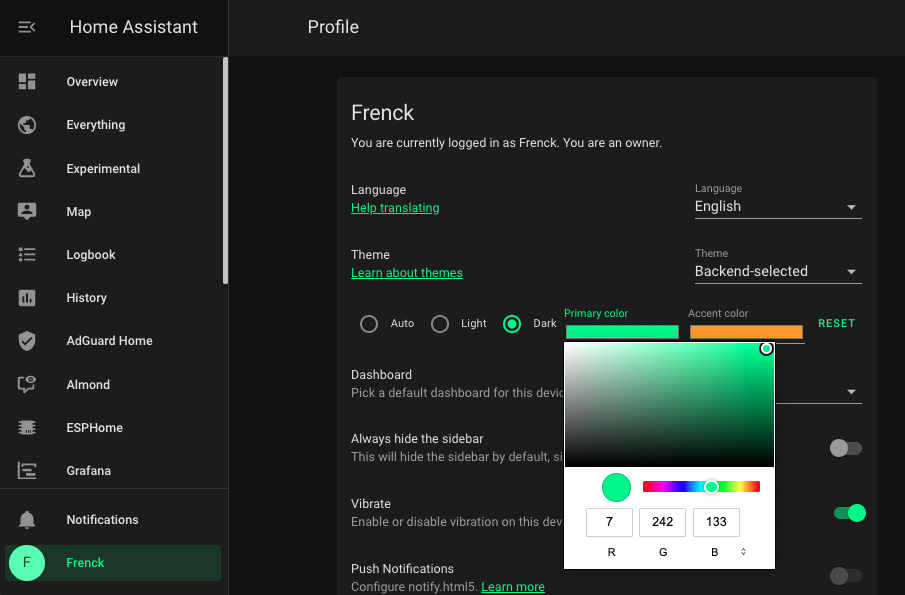 Screenshot of the new dark mode and theme 设置.
所以,如果你升级到 Home Assistant 0.114、使用的是默认主题,并且你的设备启用了深色模式,那么升级后默认看到的就会是深色主题。
另外,选择颜色时,请确保你挑选的主色在浅色和深色背景下都清晰可读。目前这仍是本地设置,需要在每一台设备上分别应用。
对于自定义主题,set_theme 服务调用新增了一个选项:mode: 'dark';
这允许你设置一个会在设备处于深色模式时使用的主题。
最后,使用 set_theme 服务时,相关设置现在会在重启后保留。所以如果你原本有一个在启动时调用 set_theme 的自动化,现在已经不再需要它了。😉
自动化和脚本更新
在 Home Assistant 0.113 中,我们为自动化和脚本加入了大量新功能。本次发布修复了一些后来发现并反馈的问题,同时也继续加入了几项小而实用的新能力。
首先,现在你可以在 UI 中创建自动化或脚本时使用 repeat 和 choose 动作了。
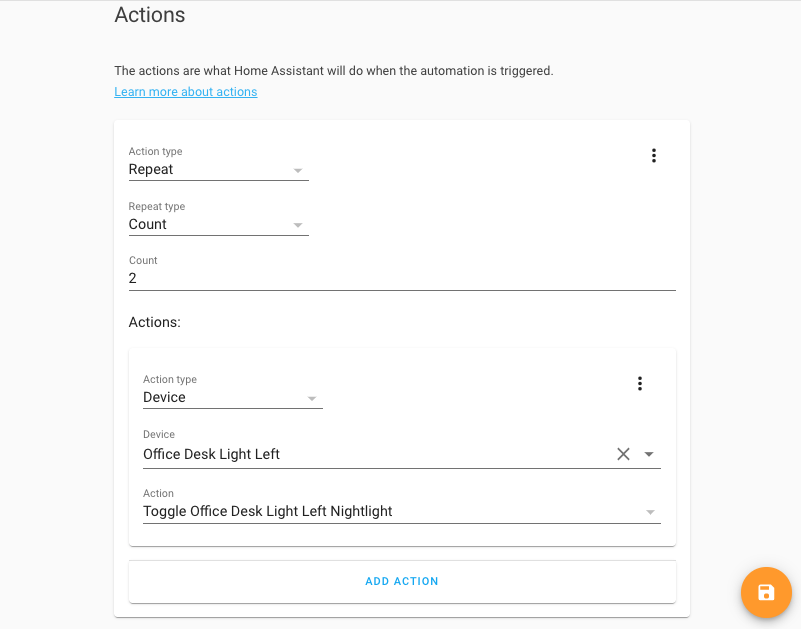 Screenshot of the new 自动化 features available in the UI.
亚秒级精度现在已经扩展到所有与时间相关的写法中。例如,你现在可以使用 2.5 秒、小时或分钟,也可以在完整时间格式中使用它,比如 23:59:59.999。
automation.turn_off 服务现在接受一个 stop_actions 数据参数。默认情况下,关闭一个自动化时,当前正在运行的动作也会被停止。这个新选项允许你关闭自动化,同时选择是否让已经开始执行的动作继续运行。
最后,time 触发器还加入了一个小捷径:现在它可以接受多个时间值了。
Open Z-Wave(测试版)
Open Z-Wave(测试版)集成进展顺利,也有越来越多人加入协作!感谢 @firstof9、@RobBie1221 和 @tradiuz 在这个版本周期中一起投入并提供帮助。
Open Z-Wave 的 UI 中新增了一些额外信息。现在你可以直接在设备页面看到设备信息,比如 Z-Wave 节点 ID 以及其他相关细节。
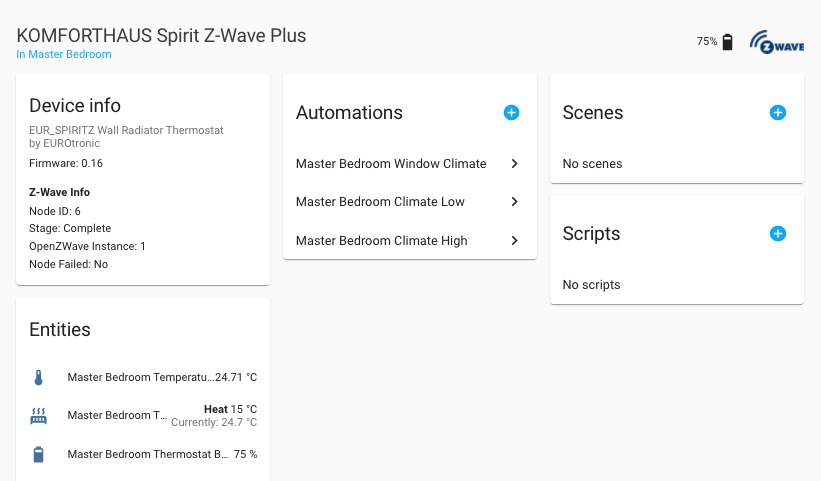 Screenshot of Z-Wave 设备 information available in the UI.
此外,灯光现在加入了 RGB 颜色支持,同时也修复了色温和调光相关的问题。💡
最后,还减少了不必要的设备轮询。
又一轮性能提升
我们有没有说过,@bdraco 在提升 Home Assistant 性能与稳定性这件事上简直停不下来?他的列车还在持续前进!
0.114 也不例外,这次同样带来了许多性能与稳定性方面的小改进。
这些内容可能稍微技术一些,不过这里有一份简短概览:
- 内部的设备注册表与实体注册表现在都建立了索引,因此速度更快了。
- 启动时设置分组的效率更高了。
- 重新加载 YAML 配置或检查配置的速度也更快了。
- Home Assistant 中的每个事件都会附带一个上下文(每个触发器、自动化等都记录了“由什么、由谁触发”)。这些上下文现在创建得更快,也就让整体更快了。
- 时间模式触发器现在会直接调度到事件循环中,效率高得多。
- 系统日志的处理现在被移出了主程序循环,因此不会干扰 Home Assistant 为你执行的其他工作。
最后,如果 Home Assistant 的 recorder 数据库(SQLite)因任何原因被检测到损坏,旧数据库会被移走,并创建一个全新的数据库,以避免启动时出现问题。
说实话,上面列的甚至都还不完整。😅 感谢 @bdraco!
分享诊断信息和崩溃报告
随 Home Assistant 0.114 一同发布的 Supervisor 231,在系统面板中加入了一个新选项,可匿名与我们分享诊断信息和崩溃报告。这将帮助我们发现并修复问题。
这些共享信息仅 Home Assistant 核心团队可访问,不会分享给其他人。数据中不包含任何私人或敏感信息,而且你可以随时在设置中关闭此功能。
当然,这个选项默认是关闭的。所以,如果你愿意帮助这个项目,可以考虑在 Supervisor 面板中启用它。
这项服务由 Sentry.io 赞助提供——非常感谢!
其他值得注意的变化
- 你现在可以从设备页面把 Lovelace 卡片移动到其他仪表盘中,也可以把卡片添加到不只是主仪表盘的地方。
- 新增了对安全区域边距的支持;例如,带刘海屏的 iPhone 现在可以真正铺满整个屏幕,同时又保留足够的边距给顶部刘海和底部 Home 滑动手势。
- HomeKit 现在支持门铃了(感谢 @adrum),而且 @bdraco 还加入了多路摄像头流支持。
- 如果你使用 灯光 配置文件,现在它们支持默认过渡时间了,感谢 @donkawechico。
- @agners 为 Home Assistant 的Web 服务器加入了 IPv4 与 IPv6(双栈)支持,让它可以同时运行在两种协议上。
新集成
本次发布新增了 6 个集成:
- AccuWeather, added by @bieniu
- Azure DevOps, added by @timmo001
- Control4, added by @lawtancool
- Firmata, added by @DaAwesomeP
- OVO Energy, added by @timmo001
- Wolflink, added by @adamkrol93
新平台
以下集成新增了平台支持:
- Pi-hole now provides a 开关 to 打开/off the 服务, added by @shenxn
- devolo Home Control added support for 灯光 设备,added by @2Fake
现在可通过 UI 设置的集成
以下集成现在可以直接通过 Home Assistant UI 进行设置:
- Volumio, done by @OnFreund
- HLK-SW16, done by @jameshilliard
- Itho Daalderop Spider, done by @peternijssen
如果你需要帮助……
如果这个版本带来了问题,请到我们的 issue tracker 提交报告,并尽量完整填写 issue 模板中的所有字段。
不向后兼容的变更
Below is a listing of the breaking change for this 发布, per subject or 集成. Click on one of those to read more about the breaking change for that specific item.
Recorder
The default sqlite database (home-assistant_v2.db) is now validated on startup
and if corruption is detected, the database is renamed to
home-assistant_v2.db.corrupt.{ISOTIME} and startup proceeds with a fresh
database.
(@bdraco - #37949) (recorder docs)
Google Assistant
A sync will be required for source selection to work after this 更新. The keyword to select source will also have changed from "Set mode on TV to.." to "Set input on TV to.."
Blink
Due to the new 2FA endpoint, the YAML 配置 is no longer supported.
In addition, due to some API changes, if you are upgrading from a previous 版本, you will need to navigate to the 集成 page at startup and re-配置 Blink.
Your username and 密码 will be imported, but you need to submit a 2FA token (emailed to you by Blink) in order to continue setting up the 集成.
(@fronzbot - #38027) (blink docs)
TensorFlow
TensorFlow has been upgraded to TensorFlow 2.
TensorFlow 1 object detection models are not compatible with TensorFlow 2, therefore you'll will need to walk through the 设置 文档 again and choose a new model from the Model Zoo.
(@hunterjm - #38384) (tensorflow docs)
Pi-hole
A 开关 has been added to the Pi-hole 集成. Because of the 开关 being
added, the pi_hole.enable 服务 is removed.
The pi_hole.disable 服务 remains in order to support disabling the 服务
for a given amount of time, but now it relies on the 开关 实体 id instead
of the name set by the 用户, so the name field is removed.
With this change, a 开关 实体 switch.pi_hole will be added if you
set up the 集成 with an API key and default name (Pi-hole).
Now, you can use switch.turn_on and switch.turn_off to enable and disable
the Pi-hole 服务 permanently. To disable the 服务 for a given time,
use pi_hole.disable with entity_id: switch.pi_hole and duration: 00:00:15.
To target all Pi-hole 服务, use entity_id: all.
(@shenxn - #35605) (pi_hole docs)
Volumio
The Volumio 集成 is now configured through the UI. If you previously had it in 配置.yaml, please remove it and 配置 through the 集成 面板.
(@OnFreund - #38252) (discovery docs) (volumio docs)
Honeywell Total Connect Comfort (evohome)
The hvac_action() property has been removed from Evohome 区域 as this data
was inaccurate - the algorithm used to provide this data was not
reliable, and there is no reasonable hope for a satisfactory alternative.
You will have no indication if a 区域 is actively calling for heat
(CURRENT_HVAC_*), nor if the heat source is currently active. However,
you will continue to have the hvac_mode() property, which will indicate if the
heating is enabled, or not (HVAC_MODE_*).
This will be most obvious by the absence of this information in the UI.
There is no intervention required for this breaking change.
(@zxdavb - #38244) (evohome docs)
Flume
The unique id is being updated for existing 传感器. You will need to clean up the stale 实体 from the 实体 registry via the GUI.
(@ChrisMandich - #38138) (flume docs)
Météo-France
The meteo_france 集成 moved from a web scraping architecture to a
API-based architecture. With this major refactor the following change could
break:
- The
thunder chance实体 is no longer available (no longer in the API results). - The
next rain实体 状态 is now a datetime instead of a delay. next rain属性 have been simplified.weather_alert:only one 实体 创建 by department. Was by city in the previous 版本 and could create duplicates.weather alert属性 have been simplified.weatherplatform is showing the current day forecast in the first position of daily forecast (instead of tomorrow forecast).
Bond
When you have multiple Bond hubs, each with its own set of 设备, those 设备 have IDs that the Bond 集成 uses to generate unique 实体 IDs in Home Assistant. Unfortunately, those IDs are only unique within the hub. So it is possible that unique IDs generated for 实体 from different hubs will not be unique and collide.
This has been fixed by prefixing 设备 ID with a hub ID and the resulting ID is now truly unique. After restarting you will see each bond 实体 twice. One which is live with the new unique ID. The second which is disabled with old unique ID.
How to make it work:
- Remove the disabled 实体 (note its friendly ID, e.g.,
cover.shades) - Optionally rename the generated friendly ID on the live 实体, so that your
自动化 continue to work. For example, your live 实体 will have ID
cover.shades_2. Rename it tocover.shades.
Hi-Link HLK-SW16
The hlk-sw16 实体 ids will change upon 更新 and the old 实体 will need to be removed manually.
Slack
The Slack attachments framework was deprecated in 0.108.0 and is now officially removed. The blocks framework should be used instead.
(@bachya - #38139) (slack docs)
IQVIA
Per ADR-0010, IQVIA can no longer be configured via YAML and must be configured
from the UI. Existing IQVIA 用户 have already had their 集成 imported
and only need to remove IQVIA-related items from configuration.yaml.
(@bachya - #38141) (iqvia docs)
Shell 命令
Processes spawned from the shell_command 集成 (the command executes)
now timeout after 60 seconds instead of running forever.
(@bdraco - #38491) (shell_command docs)
命令行
The command_line 遮盖, 通知 and 开关 platforms, now timeout after 15
seconds (by default) instead of blocking forever.
(@bdraco - #38497) (command_line docs)
时间模式监听器
If time abruptly moves forward or backward, time pattern listeners will only be adjusted after they were previously scheduled to fire.
This avoids the need for every time pattern listener to check for this every second.
自动化 `turn_off` 服务
This change is actually not a breaking change, but it is making up for the fact that a previous change was that was not marked as such.
It turns out there are valid use cases where an 自动化 needs to be turned off, so that it will not 触发器, but where previous runs may still be active that should be allowed to complete. For example, an 自动化 that performs a reasonably lengthy procedure that should not be aborted midstream, otherwise it would leave the system in an undesirable 状态. Or a queued 自动化 that needs to handle all previous events, some of which may not be complete when the 自动化 is turned off.
To accommodate for these use cases, this 发布 introduces adds an optional
parameter to the automation.turn_off 服务, namely stop_actions, which
defaults to true. It controls whether or not active runs should be stopped when
the 自动化 is turned off.
(@pnbruckner - #38436)
告别以下内容
- The Linky 集成 has been removed. Enedis has discontinued its Linky API (to get electric consumption). (@Quentame - #38565)
发布 0.114.1 - August 15
- 更新 meteo_france based on code review (@Quentame - #38789) (meteo_france docs)
- Catch upnp timeout 错误 (@balloob - #38794) (upnp docs)
- Handle unhandled exceptions related to unavailable SimpliSafe features (@bachya - #38812) (simplisafe docs)
- Make executor max_workers consistent between python versions (@bdraco - #38821)
- Fix creation of unrequired 传感器 in OVO energy (@RogerSelwyn - #38835) (ovo_energy docs)
- Bump pywemo to 0.4.46 (@esev - #38845) (wemo docs)
- Fix OVO Energy 传感器 (@timmo001 - #38849) (ovo_energy docs)
- Fix ozw dimming transition (@firstof9 - #38850) (ozw docs)
- Ensure 服务 browser does not collapse on bad dns names (@bdraco - #38851) (zeroconf docs)
- 更新 ovoenergy package to v1.1.7 (@timmo001 - #38875) (ovo_energy docs)
- Adjust slow add 实体 timeouts to handle slowest known case (@bdraco - #38876)
发布 0.114.2 - August 17
- Fix 'Not Available' message for Onkyo 集成 (@tizzen33 - #38554) (onkyo docs)
- Better timeout handling in samsungtv 集成 (@escoand - #38759) (samsungtv docs)
- Fix ozw pure rgb dimmer 灯光 (@MartinHjelmare - #38877) (ozw docs)
- Fix the CONF_LOOP check to use the config (@automaton82 - #38890) (environment_canada docs)
- Fix 错误 in meteo_france for overseas France cities (@oncleben31 - #38895) (meteo_france docs)
- Fix Netatmo 温控 boost/heat event handling (@cgtobi - #38923) (netatmo docs)
- Fix HC3 compatibility further (@pbalogh77 - #38931) (fibaro docs)
- Accommodate systems with very large databases and slow disk/cpu (@bdraco - #38947) (recorder docs)
发布 0.114.3 - August 20
- 更新 zeroconf to fix ServiceBrowser leak on cancelation (@bdraco - #38933) (zeroconf docs)
- Bump netdisco to 2.8.2 to accomodate new zeroconf exception (@bdraco - #38949) (discovery docs) (ssdp docs)
- Fix Control4 灯光 设置 issues (@lawtancool - #38952) (control4 docs)
- Bump pychromecast to 7.2.1 (@emontnemery - #39018) (cast docs)
- Fix emulated hue on/off 设备 compatibility with alexa (@bdraco - #39063) (emulated_hue docs)
- 更新 met.no library (@Danielhiversen - #39076) (met docs) (norway_air docs)
发布 0.114.4 - August 26
- Fix TTS languange characters (@pvizeli - #39211) (tts docs)
- Fix time pattern listener firing a few microseconds early (@bdraco - #39281)
所有变更
点击查看所有变更!
- Remove support for legacy logbook events 创建 before 0.112 (@bdraco - #37822) (logbook docs) (breaking-change)
- Refactor bond tests (@prystupa - #37868) (bond docs)
- Feature/izone temperature precision (@sgryphon - #37669) (izone docs)
- Add
ignore_attributesoption to influxdb (@mdegat01 - #37747) (influxdb docs) - Improve bond startup performance (@prystupa - #37900) (bond docs)
- Add Firmata 集成 (attempt 2) (@DaAwesomeP - #35591) (firmata docs) (new-集成)
- Add RGB 灯光 support to ozw (@firstof9 - #37636) (ozw docs)
- Apply feedback on bond 集成 (@prystupa - #37921) (bond docs)
- Increase test line coverage of homeassistant/助手/event.py to 100% (@bdraco - #37927)
- Cleanup logbook tests to prevent failure on race 条件 (@bdraco - #37928) (logbook docs)
- Improve 设置 脚本 portability (@mweinelt - #37935)
- 开关 back to create task for Neato (@dshokouhi - #37913) (neato docs)
- prometheus: Reduce loglevel of failed float conversion to 调试 (@mweinelt - #37936) (prometheus docs)
- Add 加湿器 intents (@Shulyaka - #37335) (加湿器 docs)
- Add 加湿器 设备 条件 (@Shulyaka - #36962) (加湿器 docs)
- Fix Yandex transport 集成, add signature to requests (@devbis - #37365) (yandex_transport docs)
- Mock out I/O in the default_config test (@bdraco - #37897) (default_config docs)
- Add 加湿器 设备 触发器 (@Shulyaka - #36887) (加湿器 docs)
- Index entity_registry_updated listeners (@bdraco - #37940)
- Automatically recover when the sqlite3 database is malformed or corrupted (@bdraco - #37949) (recorder docs) (breaking-change)
- Add 开关 to pi_hole 集成 (@shenxn - #35605) (pi_hole docs) (breaking-change) (new-platform)
- Bump zeroconf to 0.28.0 (@bdraco - #37951) (zeroconf docs)
- Make 传感器 and binary_sensor inherit from base class (@elupus - #37946) (rfxtrx docs)
- Add support for InputSelector trait (@elupus - #35753) (google_assistant docs) (breaking-change)
- Adds median to min_max component (@knudsvik - #36686) (min_max docs)
- Add Control4 集成 (@lawtancool - #37632) (control4 docs) (new-集成)
- 更新 comment about parallel updates to match the 文档 (@dmulcahey - #37964)
- Close androidtv ADB socket connection when Home Assistant stops (@JeffLIrion - #37973) (androidtv docs)
- Bumpy pyobihai to make last reboot 更新 as needed (@dshokouhi - #37914) (obihai docs)
- Index the 实体 registry (@bdraco - #37994)
- Index the 设备 registry (@bdraco - #37990)
- Don't advertise 开关 设备 as dimmable 灯光 (@jyavenard - #37978) (emulated_hue docs)
- Disable polling for ozw 实体 (@RobBie1221 - #38005) (ozw docs)
- Force updates for ozw 传感器 (@RobBie1221 - #38003) (ozw docs)
- Add Wolflink 集成 (@adamkrol93 - #34104) (wolflink docs) (new-集成)
- Bump codecov/codecov-动作 from v1.0.10 to v1.0.11 (dependabot - #38006)
- Cleanup async_accept_signal in ZHA (@dmulcahey - #38009) (zha docs)
- Fix ozw color temp (@tradiuz - #38012) (ozw docs)
- Add scrape 传感器 name to 日志 (@rsnodgrass - #38020) (scrape docs)
- Use event loop scheduling for tracking time patterns (@bdraco - #38021) (breaking-change)
- Move data on import in rfxtrx 集成 into ConfigEntry (@RobBie1221 - #38022) (rfxtrx docs)
- Bump 动作/设置-python from v2 to v2.1.1 (dependabot - #38034)
- Fix wolflink datetime import (@scop - #38028) (wolflink docs)
- 更新 tests that track time to account for microsecond precision (@bdraco - #38044) (自动化 docs)
- Implement unload entry for rfxtrx 集成 (@RobBie1221 - #38037) (rfxtrx docs)
- Make sure command 实体 恢复 from 状态 (@elupus - #38038) (rfxtrx docs)
- Avoid using implementation internal to 触发器 events (@elupus - #38041) (rfxtrx docs)
- Ensure we do not start discovered flows until after the started event has fired (@bdraco - #38047) (discovery docs) (ssdp docs) (zeroconf docs)
- Support default transition in 灯光 profiles (@donkawechico - #36747) (灯光 docs)
- Speed up group 设置 (@bdraco - #38048) (group docs)
- Allow float values in time periods (@pnbruckner - #38023)
- 更新 Home Assistant base 图像 (@pvizeli - #38063)
- Various type hint improvements (@scop - #37952)
- 更新 自动化 logger to include object_id like 脚本 (@pnbruckner - #37948) (自动化 docs)
- Change sky_hub to async and fix exception spamming (@RogerSelwyn - #37129) (sky_hub docs)
- Bump 版本 to 0.114.0dev0 (@frenck - #38071)
- 升级 aiohttp to 3.6.2 (@frenck - #38082)
- Fix ozw 灯光 color values check (@MartinHjelmare - #38067) (ozw docs)
- Refactor bond 集成 to be completely async (@prystupa - #38066) (bond docs)
- Centralize bond 更新 状态 logic (@prystupa - #38093) (bond docs)
- Avoid generating a Context() object every second (@bdraco - #38085)
- Use postgresql style uuid generation (uuid_generate_v1mc) for Context uuids (@bdraco - #38089)
- Clean up fido tests (@balloob - #38098) (fido docs)
- Bump codecov/codecov-动作 from v1.0.11 to v1.0.12 (dependabot - #38102)
- Add 'alarm_event_occurred' property from AlarmDecoder (@melyux - #38055) (alarmdecoder docs)
- Add homematic IPKeyBlindMulti 设备 (@sMauldaeschle - #38059) (homematic docs)
- Add set_central_heating_ovrd 服务 to opentherm_gw (@mvn23 - #34425) (opentherm_gw docs)
- Fix 状态 自动化 触发器 (#38014) (@azogue - #38032) (自动化 docs)
- Fix updates of Rssi for control 设备 in rfxtrx (@RobBie1221 - #38131) (rfxtrx docs)
- 升级 bond-api to 0.1.7 (@prystupa - #38121) (bond docs)
- Write device_id to ConfigEntry of rfxtrx 集成 (@RobBie1221 - #38064) (rfxtrx docs)
- Add test (@emontnemery - #37890) (MQTT docs)
- Asyncify rfxtrx startup and event handling (@elupus - #38155) (rfxtrx docs)
- Support unavailable 状态 in 模板 风扇 (@thomasdelaet - #38114) (模板 docs)
- convert_until isn't returning anything (@Misiu - #38157) (evohome docs)
- Bump python-slugify to 4.0.1 (@fronzbot - #38140)
- 升级 coverage to 5.2.1 (@frenck - #38158)
- Support rfxtrx smoke detectors, motion 传感器 as binary_sensors (@elupus - #38000) (rfxtrx docs)
- Gracefully handle bond API 错误 and timeouts through available 状态 (@prystupa - #38137) (bond docs)
- Prevent unnecessary updates of 区域 component (@Danielhiversen - #38167) (区域 docs)
- Prevent unnecessary updates of sun component (@Danielhiversen - #38169) (sun docs)
- Add AccuWeather 集成 (@bieniu - #37166) (accuweather docs) (new-集成)
- Added 2020 版本 Aqara double wall 开关 (@markuskorbel - #38164) (deconz docs)
- Ensure all track time change tests mock a specific start time (@bdraco - #38178)
- Enable Homekit 遥控器 support for 设备 without play/pause (@nickw444 - #37180) (homekit docs)
- Prevent unnecessary updates of met component (@Danielhiversen - #38168) (met docs)
- Support multiple 摄像头 streams in HomeKit (@bdraco - #37968) (homekit docs)
- Rfxtrx fixup config entry creation (@elupus - #38185) (rfxtrx docs)
- Removing gogogate2 emulated 遮盖 transitional 状态. (@vangorra - #38199) (gogogate2 docs)
- Volvo on call updates (@bratanon - #38142) (volvooncall docs)
- Make rfxtrx RfyDevices have sun 自动化 开关 (@elupus - #38210) (rfxtrx docs) (beta fix)
- Add Azure DevOps 集成 (@timmo001 - #33765) (azure_devops docs) (new-集成)
- Mark event tests to run as callbacks (@bdraco - #38212)
- Attempt to fix islamic prayer times tests (@bdraco - #38220) (islamic_prayer_times docs)
- 更新 logbook to use async_add_executor_job (@bdraco - #38217) (logbook docs)
- Fix libav 安装 in Travis CI (@scop - #38221)
- Refactor bond unit tests to reduce boilerplate (@prystupa - #38177) (bond docs)
- Add 更新 available 二元sensor to Tesla (@alandtse - #37991) (tesla docs)
- fix issue #34559 (@zxdavb - #38241) (evohome docs)
- Implement resilient startup for bond 集成 with ConfigEntryNotReady support (@prystupa - #38253) (bond docs)
- Add changes from comments after merging AccuWeather (@bieniu - #38227) (accuweather docs)
- 更新 holidays to 0.10.3 (@MikeTsenatek - #38246) (workday docs)
- Add config flow to Volumio (@OnFreund - #38252) (discovery docs) (volumio docs) (breaking-change)
- Change devolo Home Control 实体 naming (@2Fake - #38275) (devolo_home_control docs)
- Corrected typo (@jcallaghan - #38278) (tado docs)
- Remove evohome hvac_action as it is inaccurate (@zxdavb - #38244) (evohome docs) (breaking-change)
- Prevent harmony from resetting 状态 with multiple turn ons (@bdraco - #38183) (harmony docs)
- Delint recent change to evohome (@zxdavb - #38294) (evohome docs)
- 设置 rfxtrx event listener directly (@elupus - #38298) (rfxtrx docs)
- Clean up commands generation for rfxtrx (@elupus - #38236) (rfxtrx docs)
- 恢复 rfxtrx 状态 to off when delay off is in effect (@elupus - #38239) (rfxtrx docs)
- Bond - Make assumed 状态 conditional (@marciogranzotto - #38209) (bond docs)
- Apply changes from bond code review (@prystupa - #38303) (bond docs)
- Add 调试 logging for bond (@prystupa - #38304) (bond docs)
- Fix ozw dimming duration (@firstof9 - #38254) (ozw docs)
- 更新 PyFlume 版本, support for multiple 状态 属性 (@ChrisMandich - #38138) (flume docs) (breaking-change)
- Fix lg_soundbar callback (@mjg59 - #38259) (lg_soundbar docs)
- Bump 动作/upload-artifact from 2.1.0 to v2.1.1 (dependabot - #38315)
- Add myself to xiaomi miio codeowners (@starkillerOG - #38350) (xiaomi_miio docs)
- 升级 youtube_dl to 版本 2020.07.28 (@BKPepe - #38328) (media_extractor docs)
- Temporary 门锁 pip to 20.1.1 to avoid build issue (@frenck - #38358) (beta fix)
- Add wheels job for building 核心 wheels (@frenck - #38359)
- Add jobs names to Wheels builds (@frenck - #38363)
- 更新 run-in-env.sh (@ehendrix23 - #36577)
- Bump aioambient to 1.2.0 (@bachya - #38364) (ambient_station docs)
- Bump simplisafe-python to 9.2.2 (@bachya - #38365) (simplisafe docs)
- Bump ElkM1 library 版本. (@gwww - #38368) (elkm1 docs)
- Add basic websocket api for OZW (@cgarwood - #38265) (ozw docs)
- Add support for multiple time 触发器 in 自动化 (@frenck - #37975) (自动化 docs)
- Add support for dimmable bond 灯光 (@marciogranzotto - #38203) (bond docs)
- Bump wirelesstagpy to 0.4.1 (@sergeymaysak - #38387) (wirelesstag docs)
- Fix bond 风扇 without defined max_speed (@prystupa - #38382) (bond docs)
- Clean up Volumio code (@OnFreund - #38400) (volumio docs)
- 更新 coordinator improvements (@scop - #38366)
- Improve tests for Airly 集成 (@bieniu - #38357) (airly docs)
- Generate bond config entry ID from the hub metadata (@prystupa - #38354) (bond docs)
- Add battery 传感器 to xiaomi_aqara (@shenxn - #38004) (xiaomi_aqara docs)
- Fix variable 错误 during stream close (@bdraco - #38417) (stream docs)
- Simplify generate_entity_id (@bdraco - #38418)
- Abort bond hub config flow if hub is already registered (@prystupa - #38416) (bond docs)
- Support 'stop' 动作 for 遮盖 in 设备 自动化 (@prystupa - #38219) (遮盖 docs)
- Add identifiers to 设备 registry api output (@cgarwood - #38427) (config docs)
- Remove unused SmartThings capability subscriptions (@andrewsayre - #38128) (smartthings docs)
- Add support for HomeKit doorbell (@adrum - #38419) (homekit docs)
- 恢复 the ability to tell when a harmony activity is starting (@bdraco - #38335) (harmony docs)
- 更新 aioazuredevops to v1.3.5 (@timmo001 - #38441) (azure_devops docs)
- 更新 bond-api to 0.1.8 (@prystupa - #38442) (bond docs)
- Add support to 温控 设备 in Google Assistant 风扇 Trait (@marciogranzotto - #38337) (google_assistant docs)
- Add unique ids for "buienradar" platforms 天气 and 摄像头 (@RobBie1221 - #37761) (buienradar docs)
- Improve logging when a unique id conflict is detected (@bdraco - #38434)
- Add zeroconf discovery for bond 集成 (@prystupa - #38448) (bond docs)
- Increase test coverage for rfxtrx 集成 (@RobBie1221 - #38435)
- Add node neighbors to ozw websocket api (@firstof9 - #38447) (ozw docs)
- Refactor Météo-France to use API instead of web scraping (@oncleben31 - #37737) (meteo_france docs) (breaking-change)
- Add optional unique_id 属性 to the 模板 platforms (@michaelarnauts - #38011) (模板 docs)
- Allow 自动化 to be turned off without stopping 动作 (@pnbruckner - #38436) (自动化 docs) (脚本 docs) (breaking-change)
- Optimize directv config flow tests. (@ctalkington - #38460) (directv docs) (directv docs)
- 更新 pyskyqhu to 0.1.1 (@RogerSelwyn - #38461) (sky_hub docs)
- Add 传感器 platform for AccuWeather 集成 (@bieniu - #38312) (accuweather docs) (new-platform)
- Add bed 传感器 availability for withings (@vangorra - #37906) (withings docs)
- Add platform tests to yeelight (@shenxn - #37745) (yeelight docs)
- Add homematic IPWKeyBlindMulti 设备 (@weissm - #38345) (homematic docs)
- Avoid shutdown delays when emulated_hue is enabled (@bdraco - #38472) (emulated_hue docs)
- 更新 numato-gpio to 0.8.0 (@clssn - #38415) (numato docs)
- Optimize ipp tests (@ctalkington - #38485) (ipp docs)
- Ensure bond unique ids are unique across hubs (@prystupa - #38496) (bond docs) (breaking-change)
- Provide a unique 实体 ID for lgsoundbar (@mjg59 - #38494) (lg_soundbar docs)
- Add config flow to HLK-SW16 (@jameshilliard - #37190) (hlk_sw16 docs) (breaking-change)
- Bump 动作/upload-artifact from v2.1.1 to v2.1.2 (dependabot - #38505)
- Fix lookup by Plex media key when playing on Sonos (@jjlawren - #38119) (plex docs)
- Clean up Plex clip handling (@jjlawren - #38500) (plex docs)
- Fix harmony activity starting initial 状态 (@bdraco - #38439) (harmony docs)
- Bump hass-nabucasa to avoid the performance penalty loading ecdsa (@bdraco - #38056)
- Fix flapping chained task logging test (@bdraco - #38492)
- Fix Lutron Caseta 设备 loading when missing serials (@ShaneQi - #38255) (lutron_caseta docs)
- 更新 前端 to 20200803.0 (@bramkragten - #38514) (前端 docs)
- 日志 the 版本 reported by Bond hub upon startup to facilitate troub… (@prystupa - #38508) (bond docs)
- Fix missing .name at entity_id in 服务 example (@Cooper-Dale - #38515) (摄像头 docs)
- Remove deprecated Slack attachments framework (@bachya - #38139) (slack docs) (breaking-change)
- Remove YAML 配置 support for IQVIA (@bachya - #38141) (iqvia docs) (breaking-change)
- Fix run-in-env.sh sh options (@scop - #38520)
- Reduce time to 重载 yaml and check 配置 (@bdraco - #38469)
- Cache emulated hue 状态 属性 between get and put calls to avoid unexpected alexa 错误 (@jyavenard - #38451) (emulated_hue docs)
- Bump pyaehw4a1 to 0.3.9 (@bannhead - #38347) (hisense_aehw4a1 docs)
- 更新 pyhomematic to 0.1.68 (@danielperna84 - #38530) (homematic docs)
- Fix Fibaro component failure to load with HC3 (@pbalogh77 - #38528) (fibaro docs)
- Support dual stack IP support (IPv4 and IPv6) (@agners - #38046) (http docs)
- 更新 通知.py (@dclobato - #38526) (clickatell docs)
- Make ozw CCT use 设备 属性 instead of hard coded values (@tradiuz - #38054) (ozw docs)
- Add Netatmo data handler (@cgtobi - #35571) (netatmo docs)
- Move system 日志 processing out of the event loop (@bdraco - #38445) (system_log docs)
- Fix Control4 token refresh (@lawtancool - #38302) (control4 docs)
- Add spider config flow (@peternijssen - #36001) (spider docs)
- 升级 toonapi to v0.2.0 (@frenck - #38543) (toon docs)
- 更新 pymetno lib, and start using met api v2 (@Danielhiversen - #38547) (met docs) (norway_air docs)
- Add new Water Meter 传感器 for Toon (@tizzen33 - #37879) (toon docs)
- Fix Mikrotik encoding by setting utf8 (@Janhouse - #38091) (mikrotik docs)
- Allow 设备 class to control icons for tesla (@ctalkington - #37526) (tesla docs)
- Fix upnp 错误 on unload_entry if 设备 does not exist (@StevenLooman - #38230) (upnp docs)
- Add a 60s timeout to shell_command to prevent processes from building up (@bdraco - #38491) (shell_command docs) (breaking-change)
- Add missing timeout to command_line platforms: 遮盖, 通知, 开关 (@bdraco - #38497) (command_line docs) (breaking-change)
- Keep webostv source list when TV is off (@zhuqf - #38250) (webostv docs)
- Use IP Address (host) provided by mDNS on Elgato Key 灯光 (@PedroLamas - #38539) (elgato docs)
- Bump 动作/upload-artifact from v2.1.2 to v2.1.3 (dependabot - #38552)
- 更新 pyrainbird to 0.4.2 (@peternijssen - #38542) (rainbird docs)
- Add Xiaomi Aqara wireless and 灯光 开关 (2020 model) (@chewbh - #37985) (xiaomi_aqara docs)
- Blink auth flow improvement and mini 摄像头 support (@fronzbot - #38027) (blink docs) (breaking-change)
- Add device_info to GIOS 集成 (@bieniu - #38503) (gios docs)
- Add device_info property for AccuWeather 集成 (@bieniu - #38480) (accuweather docs)
- Add device_info property and simplify generation of unique_id for Airly 集成 (@bieniu - #38479) (airly docs)
- Bump python-wiffi to 1.0.1 (@mampfes - #38556) (wiffi docs)
- OVO Energy 集成 (@timmo001 - #36104) (ovo_energy docs) (new-集成)
- Intelligent timeout handler for 设置/bootstrap (@pvizeli - #38329)
- Bump 前端 to 20200805.0 (@ludeeus - #38557) (前端 docs)
- Add zeroconf/homekit/ssdp discovery support for custom components (@bdraco - #38466) (ssdp docs) (zeroconf docs)
- Allow to set default dark theme and persist 前端 default themes (@bramkragten - #38548) (前端 docs)
- Add a timeout for async_add_entities (@bdraco - #38474)
- Add devolo 灯光 设备 (@2Fake - #37366) (devolo_home_control docs) (new-platform)
- Improve Xioami Aqara zeroconf discovery handling (@starkillerOG - #37469) (xiaomi_aqara docs) (beta fix)
- Remove Linky 集成 (@Quentame - #38565) (breaking-change) (beta fix)
- Suppress MQTT discovery updates without changes (@emontnemery - #38568) (MQTT docs) (beta fix)
- Fix missing rfxtrx strings (@MartinHjelmare - #38570) (rfxtrx docs) (beta fix)
- Revert "Add a timeout for async_add_entities (#38474)" (@pvizeli - #38584) (beta fix)
- Do not print 警告 when command line 开关 queries off (@balloob - #38591) (command_line docs) (beta fix)
- 升级 to TensorFlow 2 (@hunterjm - #38384) (tensorflow docs) (breaking-change) (beta fix)
- Improve the OVO Energy 集成 (@timmo001 - #38598) (ovo_energy docs) (beta fix)
- V2 timeout for async_add_entities (@pvizeli - #38601) (beta fix)
- Ensure homekit pairing barcode is usable on dark themes (@bdraco - #38609) (homekit docs) (beta fix)
- Handle unavailable input_select in Google Assistant (@balloob - #38611) (google_assistant docs) (beta fix)
- Bump OpenCV 4.3.0 and Numpy 1.19.1 (@pvizeli - #38616) (iqvia docs) (opencv docs) (tensorflow docs) (trend docs) (beta fix)
- Expose video doorbell 按钮 状态 to HomeKit (@adrum - #38617) (homekit docs) (beta fix)
- Ensure doorbird does not block startup (@bdraco - #38619) (doorbird docs) (beta fix)
- Make sure groups are initialized before 模板 传感器 (@Tho85 - #37766) (模板 docs) (beta fix)
- Fix xiaomi_aqara discovery (@starkillerOG - #38622) (xiaomi_aqara docs) (beta fix)
- 更新 前端 to 20200807.1 (@ludeeus - #38626) (前端 docs) (beta fix)
- Remove tf-models-official from wheels builder (@frenck - #38637) (beta fix)
- Fix url in seventeentrack delivered 通知 (@Swampen - #38646) (seventeentrack docs) (beta fix)
- Bump regenmaschine to 2.1.0 (@bachya - #38649) (rainmachine docs) (beta fix)
- Fix AccuWeather async timeout (@ctalkington - #38654) (accuweather docs) (beta fix)
- Fix rest_command UnboundLocalError in exception handling (@AlejandroRivera - #38656) (rest_command docs) (beta fix)
- Ensure shared zeroconf is passed to homekit controller 设备 (@bdraco - #38678) (homekit_controller docs) (beta fix)
- 更新 aiohomekit to handle homekit 设备 that do not send format (@bdraco - #38679) (homekit_controller docs) (beta fix)
- Fix missing data for Guardian "AP enabled" 二元sensor (@bachya - #38681) (guardian docs) (beta fix)
- Bump pyvolumio to 0.1.1 (@OnFreund - #38685) (volumio docs) (beta fix)
- Bump updater timeout (@balloob - #38690) (updater docs) (beta fix)
- 更新 base 图像 8.2.1 (@pvizeli - #38716) (beta fix)
- Add scan_tag Webhook to mobile app (@balloob - #38721) (mobile_app docs) (beta fix)
- Add scikit-build to 已安装 env (@pvizeli - #38726) (beta fix)
- Bump pysmartthings 0.7.3 (@andrewsayre - #38732) (smartthings docs) (beta fix)
- Make default duration 1/10th of a second for ZHA 灯光 calls (@dmulcahey - #38739) (zha docs) (beta fix)
- 安装 a threading.excepthook on python 3.8 and later (@bdraco - #38741) (beta fix)
- Bump dyson upstream library 版本 (@etheralm - #38756) (dyson docs) (beta fix)
- Bump 前端 to 20200811.0 (@ludeeus - #38760) (前端 docs) (beta fix)
- Bump ZHA quirks lib to 0.0.43 (@dmulcahey - #38762) (zha docs) (beta fix)
- Fix lastest 版本 in updater for Supervisor enabled installs (@frenck - #38773) (hassio docs) (updater docs) (beta fix)
- Bump up ZHA dependencies (@Adminiuga - #38775) (zha docs) (beta fix)