

0.113:自动化与脚本,以及更多性能提升!
又一篇带有鲜明主题的特别发布来了!
看起来 @bdraco 简直停不下来; 他一直在持续提升 Core 的性能。过去几个月里他交出的成果真的让我佩服, 不过,这并不是这次发布真正的主角。 抱歉啦,@bdraco!
这次发布的主题是:自动化与脚本!没错!!!
一个存在了很久很久的自动化触发 bug 终于被修复了, 而且还不止如此,@pnbruckner 还全力扩展了自动化/脚本引擎。
现在加入了 repeat、choose,以及运行模式(顺带还带来了实现冷却时间的能力)。
我已经在自己家里把这些功能玩起来了,也顺手改进了不少东西。 真的,@pnbruckner,太感谢你了!
祝你享受这次发布!
../Frenck
Ludeeus 加入 Nabu Casa
今天我们很高兴地宣布, @ludeeus 已加入 Nabu Casa,全职投入 Home Assistant 的开发!
Ludeeus 长期以来一直是核心贡献者,参与过 Supervisor 面板和前端中的多个部分。 不过,大家最熟悉的还是他作为 Home Assistant Community Store (HACS) 创建者的身份。
现在他终于可以全职专注于 Home Assistant,我们也非常期待看到他接下来会带来什么。
欢迎你, @ludeeus !
自动化与脚本
这个版本为我们的自动化和脚本带来了不少改动。正式开始前,请先注意:自动化中的 action 部分,本质上就是一个脚本 sequence。
所以,下面提到的所有内容,同时适用于脚本和自动化。
在深入之前还要先说一句:这次所有自动化和脚本方面的改动,几乎都由 @pnbruckner 推动完成!真的太棒了,感谢!
自动化 & 脚本: Bug fix
There has been an issue with our 自动化 for a long time already, which you actually might have never noticed. It is kinda hard to explain, so this needs an example.
Consider the following 自动化:
This 自动化 turns on a 灯光 bulb when the 按钮 is pressed, and after 10 seconds, it turns off the 灯光 bulb again. A fairly basic 自动化, which does exactly what one would expect, except when a 按钮 is pressed twice.
So it takes 10 seconds for the bulb to 关闭, what if you press the 按钮 again after 5 seconds?
Please, think about this for a moment...
What actually happened before 0.113, is that the 灯光 bulb would 关闭 immediately! Chances are, you didn't expect that.
Let's explain this: So the first 按钮 push, turns on the 灯光, and the delay is active for 10 seconds. The second 按钮 push, done after 5 seconds, is actually not handled, however, it does cause the delay of the first run to cancel itself and continues to run the rest of the 动作/sequence, causing the 灯光 to 关闭 immediately!
That bug, has been fixed. As of this 发布, the second 按钮 press wouldn't do anything and the 灯光 will now 关闭 after 10 seconds, which the first 按钮 push has triggered.
自动化 & 脚本: Running modes
With the above-mentioned bug fix, it now becomes possible to introduce new running modes for both 脚本 and 自动化. It allows you to control what happens if 动作 of a previous 触发器 are still running.
Considering the 灯光 bulb example in the bug fix paraph above, it shows
the default mode: single, which means: Do not run and ignore the 触发器
if a previous 动作 of the same 自动化 is still running.
Besides the default single mode, the following modes are now available:
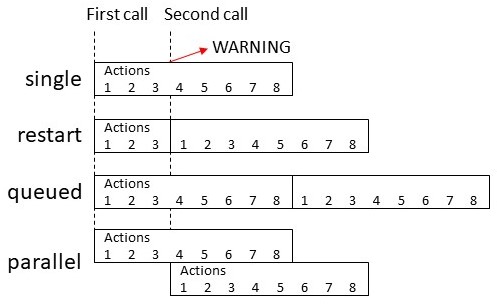 自动化/脚本 running modes visual explained.
For the queued and parallel modes, an additional parameter max is available
to control the maximum number of runs that are awaiting each other. When
omitting this setting, it would default to 10.
To clarify a little more, remember the first example in the bug fix paragraph where the 灯光 bulb would 打开 for 10 seconds after a 按钮 press?
This would make every 按钮 press within the 10 seconds, 重启 the countdown again:
And this example, would 打开/off the 灯光, for 10 seconds twice, if the 按钮 was pressed after 5 seconds.
The modes are also available for 自动化 and 脚本 in the 前端 UI:
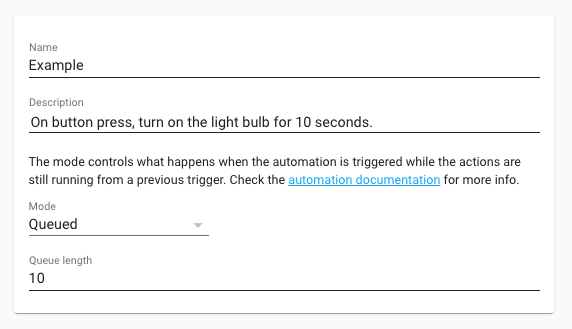 Screenshot of running modes in the 前端.
This is a powerful feature, which allows you to control how 自动化 and 脚本 are run in ways you could not do before.
More information about the running mode can be found in the 自动化 and 脚本 文档.
自动化 & 脚本: Repeats
A brand new 动作 is made to allow for repeating (also called loops) part of your 自动化 or 脚本.
The new repeat feature can be used in three different ways:
- Counted repeat: Control how many times to repeat a sequence.
- While loop: Keep repeating as long the 条件(s) is/are met.
- Repeat until: Runs at least once, and decides after that to repeat until the 条件(s) is/are met.
For example, this would spam your phone with the same message 10 times:
More information about repeats can be found in the 文档.
自动化 & 脚本: Chooser
Got multiple 自动化 for that single 灯光 to turn it on/off? Or multiple 自动化/脚本 to handle the different 按钮 on some 遥控器?
You can now combine them using a chooser. The chooser is able to pick the first sequence that matches a 条件, or if none match, run a default sequence.
This means each individual sequence in the chooser is paired with its own set of 条件.
In the above example, pushing button1, turns on the bulb; while button2 turns it off again. The third 按钮 isn't handled by any of the 条件 in the chooser and the (optional) default is run instead.
The chooser can be used as an if/else statement, where the default acts as
the else. Or even as if/else if/else statement as shown in the YAML
example above.
More information about the chooser can be found in the 文档.
自动化 & 脚本: Sub-second precision
Thanks to a bunch of optimizations done this 发布, which is discussed later in this 博客 post, we now have sub-second precision available to our delays.
This precision is helpful in case you want a delay that is less than a second, for example, 500 milliseconds.
An example 脚本 that toggles the 灯光 every 500 milliseconds 10 times.
自动化 & 脚本: Bonus! Cool down
An often requested feature is to allow for a cool down time on an 自动化. What that entails is setting a limit on the run of an 自动化 or 脚本 to a certain time frame.
While this is not a feature specifically added or build, it can be achieved now using the new run modes.
The single run mode of this 自动化, combined with the last delay of 10
seconds, prevents this 自动化 from being ran more often than only once
every 10 seconds. This is ideal for things like a doorbell.
MDI 图标更新
It has taken some time for us to 升级 to the newest 版本 of Material Design Icons, 5.3.45, there was a reason for that, 版本 5.0.45 contains a lot of backward-incompatible changes.
We wanted to handle these well, so it took some time.
A lot of icons are renamed, and some are removed. In this 发布, we included all new, and all removed icons and we made sure the new and the old name work.
If you use an icon that is renamed or removed we will show a 警告 in the 日志, in 版本 0.115, this conversion path will be removed and removed icons and old names will no longer work.
So make sure to check your 日志 if you need to adjust any of your used MDI icons.
Most of the removed MDI icons can be found in Simple icons, which is available as a custom 集成.
Please note: It is possible that custom 集成 (also known as custom components) use deprecated icons. These can throw 警告 that need to be addressed in the custom 集成.
脚本与场景编辑器更新
The UI to edit or create a 脚本 has been updated, besides support for the new running mode, you can now give your 脚本 a custom icon and ID from the UI.
Especially the ID is helpful, you no longer have to search your 状态 for a long numeric 实体 id that matches your 脚本.
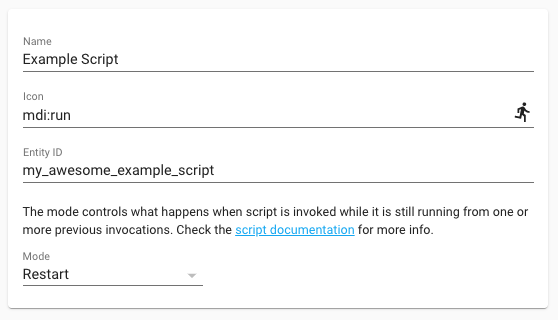 Screenshot of a 脚本 ID, icon and run mode.
The support for setting a custom icon, is also added to the 场景 editor.
更多速度优化
After, the well-received, speed optimization done in the 0.111 & 0.112 releases, the saga towards improving resource usage and responsiveness of the platform continues.
This time we have both @bdraco and @pvizeli to thank for some great optimizations that will reduce the CPU usage of Home Assistant.
First of all, if you are running a Home Assistant OS, 容器 or 受监管模式 安装, then your Home Assistant instance will run on Python 3.8. No 动作 from your end is needed for this.
It is not just a normal Python 版本, but @pvizeli has worked on a highly optimized Python 版本 for Home Assistant, hitting performance improvements that can reach up to 40%! He wrote a more technical article about this on our 开发者 博客.
Then @bdraco did his part on adding some improvements to the 核心. He changed a lot of handling around event & 状态 listeners, in such a way less things 触发器 unneeded, which reduces processing when 状态 change.
This lowers CPU usage and improves response speed when you have many 状态 changes happening in a short time span, or when having a lot of 自动化.
Also, all time listeners now have microsecond precision as they are scheduled on the internal event loop, instead of the previous situation when it relied on the internal clock that triggered every second.
This 发布 should drastically lower the CPU usage of Home Assistant for most 安装.
其他值得注意的变更
- Philips Hue groups can now be turned on/off in the 集成 options via the UI.
- The OpenZWave (beta) got 3 new 服务. Two of those are for setting 用户 codes on 门锁. The other allows for setting 设备-specific 配置 parameters.
- After a moment of absence, @yosilevy is back! He has been the one fixing all kinds of RTL issues we had in Home Assistant, with his return, this 发布 is full of RTL tweaks again!
新集成
Three new 集成 added this 发布:
- PoolSense, added by @haemishkyd
- Dexcom, added by @gagebenne
- Bond hub, added by @prystupa
新平台
The following 集成 got support for a new platform:
- OpenZWave has now support for window 遮盖, added by @Michsior14
现已可通过 UI 设置的集成
以下集成现在已经可以直接通过 Home Assistant UI 进行设置:
如果你需要帮助……
如果这个版本带来了问题,请到我们的 issue tracker 提交报告,并尽量完整填写 issue 模板中的所有字段。
不向后兼容的变更
Below is a listing of the breaking change for this 发布, per subject or 集成. Click on one of those to read more about the breaking change for that specific item.
最低 Python 版本 3.7.1
The minimum required Python 版本 has been bumped from Python 3.7.0 to 3.7.1.
TensorFlow
The TensorFlow 集成 will fail to 升级 due to missing wheels for Python 3.8. This affects all 安装 that rely on our default Docker 图像 running Python 3.8.
To work around this, remove the tensorflow platform under the image_processing domain from your
配置.yaml, before upgrading to 0.113.
Work is under way to resolve the problem. 更多信息 follow this issue: #38073
自动化/脚本
The way 自动化 behaved when they were triggered while "suspended" in a delay or wait_template step from a previous 触发器 event was unexpected. If this happened the suspended step would be aborted and the 自动化 would continue the 动作 sequence with the following step.
This change removes support for that "legacy" behavior, in both 自动化 and 脚本 (although 脚本 were less affected by this.)
It also provides new "modes" of operation for these 动作 sequences, namely
single, restart, queued & parallel. To minimize the impact on existing
自动化 and 脚本, the default mode is single.
In addition, for queued & parallel modes there is now a new 配置
option -- max -- that controls the maximum number of "runs" that can be
running and/or queued up at a time.
And lastly, the delay step is now much more precise, and supports delays of less than one second.
(@pnbruckner - #37729) (自动化 docs) (脚本 docs)
模板
Most of the 模板 platforms would check for extract_entities failing to extract 实体 and avoid setting up a 状态 change listener for "all" after extract_entities had warned that it could not extract the 实体 and updates would need to be done manually.
This protection has been extended to all 模板 platforms.
Alter the behavior of extract_entities to return the successfully extracted 实体 if one or more 模板 fail extraction instead of returning "all" and getting rejected by the platform itself.
相对时间
Previously, the value used for displaying a relative time was floored before being interpolated into the localized string, leading to situations like these:
- 47 hours ago is displayed as "1 day ago" instead of "2 days ago"
- 13 days in the future is displayed as "in 1 week"
This change modifies the relativeTime function to use Math.round instead of
Math.floor so the output more closely matches the actual relative time of the
input.
MQTT
Birth and will messages are now published by default.
MQTT birth message defaults to:{"topic": "homeassistant/status", "payload": "online"}
MQTT will message defaults to: {"topic": "homeassistant/status", "payload": "offline"}
MQTT will published also on clean connect from broker.
(@emontnemery - #37371) (MQTT docs)
ZHA 与 Hue 遥控器
This 更新 does contains a breaking change if you are using 设备 触发器 for the Hue Dimmer models RWL020 and RWL021.
We decided to 配置 these to use the extended manufacturer support so that we can support 4 触发器 per 按钮.
If you were previously using 设备 触发器 in 自动化 for these 设备 you will have reconfigure the 设备 leveraging the 按钮 on the 设备 page or remove and re-pair the 设备 after updating Home Assistant.
Then you will have to 更新 the 自动化 to use the new 触发器.
Sorry for the inconvenience.
(@dmulcahey - #37859) (zha docs)
ZHA 功率计量单位
Previously ZHA was displaying power as kilowatt (kW) for some 设备 (the ones with the SmartEnergy cluster), but since watts are more common as household power unit, ZHA will start using W for those instead.
If you have any calculations or accumulation based on power 传感器, they may need to be updated.
Philips Hue
Configuring a Hue bridge via YAML 配置 is now deprecated. Your current YAML 配置 is imported and can be safely removed after upgrading.
Adding Hue bridges manually by IP can now be done via the UI. Changing allowing Hue groups or unreachable Hue bulb is now managed by clicking the options 按钮 on the Hue 集成 in the UI.
InfluxDB
Support for glob matching is added with InfluxDB filters.
InfluxDB was not using the common filtering logic shared by recorder,
logbook, homekit, etc. and as a result had filtering logic that is
inconsistent with the filtering logic of every other recorder-like component.
This has been corrected causing the following changes in filtering logic.
Same domain specified in both include and exclude:
- Previous behavior: All 实体 in that domain excluded
- New behavior: All 实体 of that domain included unless 实体 is excluded by ID or by glob
Same 实体 ID specified in both include and exclude:
- Previous behavior: 实体 excluded
- New behavior: 实体 included
Filtering has 1+ exclude domains, 0 include domains, and 1+ include 实体 ID's specified:
- Previous behavior: All 实体 not specifically listed by ID were excluded
- New behavior: All 实体 not specifically excluded by either domain or ID are included.
(@mdegat01 - #37069) (influxdb docs)
Transmission
For all torrents 传感器 (e.g., active_torrents or started_torrents) order
of the content of the torrent_info 属性 has changed to oldest first
which means older torrents will appear first in the list.
Also a default limit of 10 items is also applied to the list to avoid very long
strings stored in the recorder database. Both 配置 options, order and
limit, can be adjusted in the 集成 UI.
(@zhulik - #35411) (transmission docs)
Logitech Harmony Hub
New 设备 and activities are visible as harmony 属性. The current activity is now updated as soon as the 遥控器 starts the activity change instead of being delayed until the activity is finished setting up.
(@bdraco - #37559) (harmony docs)
Xiaomi Miio
风扇 and 遥控器 components now have unique LED strings. If you had previously set your 自动化 calls from "风扇_set_led_on/off" to "遥控器_set_led_on/off", you will now need to set those back to "风扇".
Samsung SyncThru Printer
Syncthru 配置 is now done through the 集成 UI page.
(@scop - #36690) (discovery docs) (syncthru docs)
Slack
Re-added the ability to use 遥控器 files (by URL) in Slack messages.
The data schema for sending files in Slack messages has changed, so be sure to 更新 any Slack-related 服务 calls with the new schema as listed in the Slack 集成 文档.
(@bachya - #37161) (slack docs)
RFXCOM RFXtrx
- 配置 of 实体 name must now be done inside Home Assistant
- Multiple 实体 may be generated for a single 设备
- The events signalled from 实体 id's are removed in favor of events from an 集成 level.
- The events format has changed.
(@elupus - #37742) (rfxtrx docs)
Fibaro
Fibaro Home Center 开关 that control 灯光 sources will now correctly be configured as 灯光 实体 (instead of 开关 实体). This causes those 实体 IDs to change from switch. to light. If this is not desirable, change the 设备 role in Home Center to something that isn't a 灯光 source (e.g., Other 设备).
(@danielpervan - #37690) (fibaro docs)
前端:已弃用的 HTML 导入
extra_html_url is now deprecated and support will be removed in 0.115.
You can 开关 to the new extra_module_url or extra_js_url_es5 by changing
your imported file to JavaScript.
With the start of custom components, you would import a HTML file for your component instead of JavaScript. That's why we have always supported importing extra HTML in the 前端 and custom 面板.
This has been deprecated and superseded by ES modules since some time and has no support anymore in browsers. We have a polyfill in place to still support this, but we are going to remove this.
In 版本 0.115 we will remove the ability to import HTML, you can use ES modules as a replacement.
(@bramkragten - #37843) (前端 docs)
前端:主题
The theme variable paper-card-background-color is removed. You can use ha-card-background or card-background-color as a replacement.
In general, all variables that start with paper will be removed at some point.
(@bramkragten - 前端#6377) (前端 docs)
发布 0.113.1 - July 24
- 更新 discord.py to v1.3.4 for API change (@DubhAd - #38060) (discord docs)
- Fix issue with creation of PT2262 设备 in rfxtrx 集成 (@RobBie1221 - #38074) (rfxtrx docs)
- Fix route53 depending on broken package (@balloob - #38079) (route53 docs)
- Bump pysmartthings to v0.7.2 (@andrewsayre - #38086) (smartthings docs)
- Bump androidtv to 0.0.46 (@JeffLIrion - #38090) (androidtv docs)
- Prevent the zeroconf 服务 browser from terminating when a 设备 without any addresses is discovered. (@bdraco - #38094)
- Fix SimpliSafe to work with new MFA (@bachya - #38097) (simplisafe docs)
- Fix text 错误 when getting getting external IP in route53 (@ludeeus - #38100) (route53 docs)
- Fix 脚本 repeat variable lifetime (@pnbruckner - #38124)
- 日志 which task is blocking startup when 调试 logging is on (@bdraco - #38134)
- Fix Xbox Live 集成 (@mKeRix - #38146) (xbox_live docs)
- Fix incorrect mesurement in Toon for meter low (@frenck - #38149) (toon docs)
- Fix Nuki 门锁 and Openers not being available after some time (@pschmitt - #38159) (nuki docs)
- Remove leftover print statement (@bachya - #38163) (simplisafe docs)
发布 0.113.2 - July 28
- Bump netdisco to 2.8.1 (@bdraco - #38173) (discovery docs)
- Stop 自动化 runs when turned off or reloaded (@pnbruckner - #38174) (自动化 docs)
- Bump tesla-powerwall to 0.2.12 to handle powerwall firmware 1.48+ (@bdraco - #38180) (powerwall docs)
- Ignore harmony hubs ips that are already configured during ssdp discovery (@bdraco - #38181) (harmony docs)
- Fix detection of 区域 2 and 3 in Onkyo/Pioneer amplifiers (@vdkeybus - #38234) (onkyo docs)
- Fix repeat 动作 when variables present (@pnbruckner - #38237) (脚本 docs)
- Fix parallel 脚本 containing repeat or choose 动作 with max_runs > 10 (@pnbruckner - #38243) (自动化 docs) (脚本 docs)
- Fix Skybell useragent (@MisterWil - #38245) (skybell docs)
- Improve 设置 retry logic to handle inconsistent powerview hub availability (@bdraco - #38249) (hunterdouglas_powerview docs)
- Don't set up callbacks until 实体 is 创建. (@pavoni - #38251) (vera docs)
- Prevent onvif from blocking startup (@bdraco - #38256) (onvif docs)
- Fix #38289 issue with xboxapi lib (@marciogranzotto - #38293) (xbox_live docs)
- Bump python-miio to 0.5.3 (@rytilahti - #38300) (xiaomi_miio docs)
- Prevent speedtest from blocking startup or causing other intergations to fail 设置 (@bdraco - #38305) (speedtestdotnet docs)
- Fix issue with certain Samsung TVs repeatedly showing auth dialog (@kylehendricks - #38308) (samsungtv docs)
- Add 调试 logging for when a chain of tasks blocks startup (@bdraco - #38311)
- Remove AdGuard 版本 check (@frenck - #38326) (adguard docs)
发布 0.113.3 - August 1
- Add Abode 摄像头 on and off support (@shred86 - #35164) (abode docs)
- Fix songpal already configured check in config flow (@shenxn - #37813) (songpal docs)
- Prevent kodi from blocking startup (@bdraco - #38257) (kodi docs)
- Ignore 遥控器 Plex clients during plex.tv lookup (@jjlawren - #38327) (plex docs)
- Bump androidtv to 0.0.47 and adb-shell to 0.2.1 (@JeffLIrion - #38344) (androidtv docs)
- Bump pychromecast to 7.2.0 (@emontnemery - #38351) (cast docs)
- 更新 aioharmony to 0.2.6 (@ehendrix23 - #38360) (harmony docs)
- Avoid 错误 with ignored harmony config entries (@bdraco - #38367) (harmony docs)
- Prevent nut config flow 错误 when checking ignored entries (@bdraco - #38372) (nut docs)
- Ensure Toon Webhook ID isn't registered on re-registration (@frenck - #38376) (toon docs)
- Fix rmvtransport breaking when destinations don't match (@cgtobi - #38401) (rmvtransport docs)
- Fix ads 集成 after 0.113 (@stlehmann - #38402) (ads docs)
- Pin yarl dependency to 1.4.2 as 核心 dependency (@frenck - #38428)
- Fix double encoding issue in google_translate TTS (@frenck - #38429) (google_translate docs)
所有变更
点击查看所有变更!
- Zerproc cleanup (@emlove - #37072) (zerproc docs)
- Add concept of allowed external URLs to config (@bachya - #36988)
- Add legacy polling option for Amcrest motion detection (@pnbruckner - #36955) (amcrest docs)
- Improve 设置 (@balloob - #37075)
- Add worldclock custom format (@InduPrakash - #36157) (worldclock docs)
- Bump 版本 to 0.113.0dev0 (@frenck - #37071)
- Migrate doorbird to use new logbook platform (@bdraco - #37097) (doorbird docs)
- Improve isoformat timestamp performance for full 状态 (@bdraco - #37105) (history docs)
- Plex tests cleanup and additions (@jjlawren - #37117) (plex docs)
- Ensure doorbird events can be filtered by entity_id (@bdraco - #37116) (doorbird docs)
- 升级 sqlalchemy to 1.3.18 (@frenck - #37123) (recorder docs) (sql docs)
- Add optimistic Guardian 开关 updating (@bachya - #37141) (guardian docs)
- 更新 remote_rpi_gpio 开关 parent (@Kdemontf - #37136) (remote_rpi_gpio docs)
- Improve Smappee 集成 (@bsmappee - #37087) (smappee docs)
- Add support for glob matching in InfluxDB filters (@mdegat01 - #37069) (influxdb docs) (breaking-change)
- 更新 Plex tests to mock websockets (@jjlawren - #37147) (plex docs)
- add phillips 遥控器 cluster (@dmulcahey - #37172) (zha docs)
- Improve scalability of 状态 change event routing (@bdraco - #37174) (自动化 docs)
- Ensure all async_track_state_change_event callbacks run if one throws (@bdraco - #37179)
- Fixup rfxtrx tests to at least run (@elupus - #37186) (rfxtrx docs)
- Attempt to set unique id of rfxtrx 设备 (@elupus - #37159) (rfxtrx docs)
- Bump aioguardian (@bachya - #37188) (guardian docs)
- Add 调试 output for invalid 服务 call data (@pnbruckner - #37171)
- Limit and sort transmission torrents_info 属性 (@zhulik - #35411) (transmission docs) (breaking-change)
- Move transmission limit and order config options to the options flow (@zhulik - #37198) (transmission docs)
- 传感器 sometimes are 创建 without event (@elupus - #37205) (rfxtrx docs)
- Correct typo in input_number UI text (@davet2001 - #37208) (input_number docs)
- Silence spurious 警告 when HomeKit is already running (@bdraco - #37199) (homekit docs)
- Additional testing for InfluxDB and some quality improvements (@mdegat01 - #37181) (influxdb docs)
- Add first unit test to config flow for Plum Lightpad (@prystupa - #37183) (plum_lightpad docs)
- Ensure homekit 状态 changed listeners are unsubscribed on 重载 (@bdraco - #37200) (homekit docs)
- Use eventloop for scheduling (@bdraco - #37184) (asuswrt docs) (generic_thermostat docs) (breaking-change)
- Add mdegat01 as code owner for InfluxDB (@mdegat01 - #37227) (influxdb docs)
- Move Guardian 服务 to 实体 platform 服务 (@bachya - #37189) (guardian docs)
- Use shared zeroconf for discovery netdisco (@bdraco - #37237) (discovery docs)
- Register 'androidtv.learn_sendevent' 服务 (@JeffLIrion - #35707) (androidtv docs)
- Add support for window 遮盖 to ozw 集成 (@Michsior14 - #37217) (ozw docs) (new-platform)
- Remove Hue configurator demo from demo 集成 (@frenck - #37250) (demo docs)
- Bump pychromecast to 7.0.1 (@emontnemery - #37225) (cast docs)
- Changed FilterTest namedtuples to dataclasses (@mdegat01 - #37252) (apache_kafka docs) (azure_event_hub docs) (google_pubsub docs) (prometheus docs)
- Enhance 脚本 集成 to use new features in 脚本 助手 (@pnbruckner - #37201) (脚本 docs)
- Refactor Influx logic to reduce V1 vs V2 code paths (@mdegat01 - #37232) (influxdb docs)
- Cache checking for 实体 exposure in emulated_hue (@bdraco - #37260) (emulated_hue docs)
- Add missed call 传感器 to Freebox (@Quentame - #36895) (freebox docs)
- Add 加湿器 support to google_assistant (@Shulyaka - #37157) (google_assistant docs)
- Improve support for homematic garage 遮盖 (@guillempages - #35350) (homematic docs)
- Create PoolSense 集成 (@haemishkyd - #35561) (poolsense docs) (new-集成)
- Add media_stop for volumio 集成 (@divanikus - #37211) (volumio docs)
- Clean up 'androidtv.learn_sendevent' 服务 (@JeffLIrion - #37276) (androidtv docs)
- Add a 服务 for setting the timer to tado 热水器 (@jfearon - #36533) (tado docs)
- Add constant for PlatformNotReady wait time to use in tests (@mdegat01 - #37266) (influxdb docs)
- Add Dexcom 集成 (@gagebenne - #33852) (dexcom docs) (new-集成)
- Bump pynws-1.2.1 for NWS (@MatthewFlamm - #37304) (nws docs)
- Limit 实体 platform 实体 服务 to same 集成 (@balloob - #37313)
- Add Hue manual bridge config flow + options flow (@frenck - #37268) (hue docs) (breaking-change)
- Fix Influx V1 test query (@mdegat01 - #37309) (influxdb docs)
- Fix flapping flux tests (@bdraco - #37346) (flux docs)
- Add 加湿器 support to homekit (@Shulyaka - #37207) (homekit docs)
- Fix flapping gdacs tests (@bdraco - #37363) (gdacs docs)
- 升级 pre-commit to 2.6.0 (@frenck - #37339)
- Add ozw garage door barrier support (@firstof9 - #37316) (ozw docs)
- Improve unifi 设备 tracker performance (@bdraco - #37308) (unifi docs)
- Fix ozw garage door methods (@MartinHjelmare - #37374) (ozw docs)
- 修改 Influx tests to mock test queries with accurate output (@mdegat01 - #37315) (influxdb docs)
- Remove my codeownership over things I dont use anymore (@robbiet480 - #37401)
- Convert rfxtrx tests to pytest async tests and re-enable (@elupus - #37206) (rfxtrx docs)
- Add GitHub 动作 for CI (@frenck - #37419)
- Reduce time to run zha discover tests (@bdraco - #37424) (zha docs)
- Ensure async_setup is mocked in geonetnz intergration tests (@bdraco - #37426) (geonetnz_quakes docs) (geonetnz_volcano docs)
- Add 助手.location.coordinates (@eifinger - #37234)
- Replace asynctest with tests.async_mock (@balloob - #37428)
- Prevent verisure 门锁 from looping forever and sleeping in test (@bdraco - #37425) (verisure docs)
- Fix undesired power toggling (@ktnrg45 - #37427) (ps4 docs)
- Fix unmocked 设置 in garmin_connect test (@bdraco - #37429) (garmin_connect docs)
- Fix unmocked 设置 in ipp tests (@bdraco - #37430) (ipp docs)
- Stub out ecobee aux heat 服务 (@balloob - #37423) (ecobee docs)
- Fix building of Python Wheels (@frenck - #37433)
- Mock 设置 in sonarr config flow tests (@bdraco - #37432) (sonarr docs)
- Add more unit tests for plum_lightpad (@prystupa - #37275) (plum_lightpad docs)
- Add Plugwise zeroconf discovery (@bouwew - #37289) (plugwise docs)
- Mock 设置 in directv config flow tests (@ctalkington - #37439) (directv docs) (directv docs)
- Apply some suggestions from poolsense code review (@ctalkington - #37440) (poolsense docs)
- Fix extremely minor typo: Cosumption -> Consumption (@smugleafdev - #37322) (solaredge docs)
- Fix DarkSky spamming the 日志 (@RogerSelwyn - #37421) (darksky docs)
- 升级 python-join-api to allow 用户 to specify 动作 (@nkgilley - #37394) (joaoapps_join docs)
- Use a more detailed battery icon for Tesla cars (@jberstler - #37154) (tesla docs)
- Avoid selecting the 状态 创建 column for history (@bdraco - #37450) (history docs)
- Use 设备 class to isolate tesla battery icon (@ctalkington - #37446) (tesla docs)
- Remove pytest-xdist from tox now that it's in requirements_test.txt (@scop - #37455)
- Fix Plugwise zeroconf discovery formatting (@CoMPaTech - #37457) (plugwise docs)
- Xiaomi Gateway subdevice support & AqaraHT + SensorHT 设备 (@starkillerOG - #36539) (xiaomi_miio docs)
- Fix entity_component test flapping (@bdraco - #37445)
- Fix flapping geo_json_events tests (@frenck - #37471) (geo_json_events docs)
- Fix geonetnz_quakes test flapping (@emontnemery - #37473) (geonetnz_quakes docs)
- Call sync function from async context (@timvancann - #37324)
- Support empty output of MQTT binary_sensor value_template (@emontnemery - #37420) (MQTT docs)
- Publish birth and will messages by default (@emontnemery - #37371) (MQTT docs) (breaking-change)
- Fix flapping google_assistant tests (@frenck - #37480) (google_assistant docs)
- Add 加湿器 support to emulated_hue (@Shulyaka - #37110) (emulated_hue docs)
- GitHub 动作: Add hadolint problem matcher (@frenck - #37494)
- GitHub 动作: Add codespell problem matcher (@frenck - #37487)
- GitHub 动作: Add json problem matcher (@frenck - #37490) (hue docs)
- GitHub 动作: Add pylint problem matcher (@frenck - #37463)
- GitHub 动作: Add check executables problem matcher (@frenck - #37488)
- GitHub 动作: Add mypy problem matcher (@frenck - #37485)
- GitHub 动作: Add yamllint problem matcher (@frenck - #37468) (ads docs)
- GitHub 动作: Add flake8 problem matcher (@frenck - #37465)
- GitHub 动作: Show diff on failure (@frenck - #37461)
- Fix flapping geonetnz_volcano test (@bdraco - #37497) (geonetnz_volcano docs)
- 升级 flake8 to 3.8.3 (@scop - #37501)
- Use package constraints in tox lint (@scop - #37500)
- GitHub 动作: Add pytest problem matcher (@frenck - #37508) (toon docs)
- Enhance 自动化 集成 to use new features in 脚本 助手 (@pnbruckner - #37479) (自动化 docs) (脚本 docs)
- Do not count netdata cleared and undefined 报警 as 警告 (@jurgenhaas - #37505) (netdata docs)
- Bump env_canada to 0.1.0 (@michaeldavie - #37483) (environment_canada docs)
- Prebake common history queries (@bdraco - #37496) (history docs)
- Add prometheus metric naming guidelines (@knyar - #37149) (prometheus docs)
- Use the main event loop for homekit (@bdraco - #37441) (homekit docs)
- Add denonavr solution tip for connection_error (@starkillerOG - #37405) (denonavr docs)
- Fix Datadog boolean metrics (@shermdog - #37273) (datadog docs)
- Fix flapping demo geo_location test (@bdraco - #37516) (demo docs)
- Standardise geniusheub 错误 levels (@RogerSelwyn - #37512) (geniushub docs)
- Standardis asuswrt 错误 message level (@RogerSelwyn - #37515) (asuswrt docs)
- Convert Android TV 集成 to async (@JeffLIrion - #37510) (androidtv docs)
- Add config flow + async support for SmartHab 集成 (@outadoc - #34387) (smarthab docs)
- Tado 温控 实体 timer 服务 (@jfearon - #37472) (tado docs)
- Use async_track_state_change_event for 自动化 numeric_state (@bdraco - #37255) (自动化 docs)
- Fix xiaomi_miio 错误 when no 传感器 present (@starkillerOG - #37531) (xiaomi_miio docs)
- 开关 tests to use hass objects instead of direct (@elupus - #37530) (rfxtrx docs)
- 日志 lines do not end with a full stop (@frenck - #37527)
- Fix flake8 problem matcher to handle fatals as 错误 (@frenck - #37536)
- Transition Guardian to use a DataUpdateCoordinator (@bachya - #37380) (guardian docs)
- 开关 rfxtrx to dispatcher (@elupus - #37271) (rfxtrx docs)
- Cleanup async_track_state_change and augment docstring (@bdraco - #37251)
- Add Amcrest audio_detected 二元sensor (@pnbruckner - #37486) (amcrest docs)
- Add new 集成 for Bond hub (@prystupa - #37477) (bond docs) (new-集成)
- 开关 homekit to use async_track_state_change_event (@bdraco - #37253) (homekit docs)
- Add missing manifest object to the check (@ludeeus - #37535)
- Add dependabot for automatic updates to GitHub 动作 (@frenck - #37550)
- Bump 动作/upload-artifact from v1 to v2.0.1 (dependabot - #37555)
- Bump codecov/codecov-动作 from v1 to v1.0.10 (dependabot - #37556)
- Strings capitalization consistency fixes (@scop - #37454)
- Protect loop set default executor (@balloob - #37438)
- Add optimistic mode to 模板 开关 (@akloeckner - #31637) (模板 docs)
- Mock 设置 in plex test to prevent CI failure (@bdraco - #37590) (plex docs)
- Ensure homekit accessory reset only affect the bridges with the accessory (@bdraco - #37588) (homekit docs)
- apply small feedback suggestions from a previous PR that is already merged (@prystupa - #37551) (bond docs)
- Bump voluptuous-serialize 2.4.0 (@balloob - #37241)
- Fix missing Plex account mocks in tests (@jjlawren - #37591) (plex docs)
- 更新 Rejseplanen rjpl to 0.3.6 (@DarkFox - #37215) (rejseplanen docs)
- Make 设备 and activities visible as harmony 属性 (@bdraco - #37559) (harmony docs) (breaking-change)
- 升级 debugpy to 1.0.0b12 (@frenck - #37599) (debugpy docs)
- 升级 coverage to 5.2 (@frenck - #37598)
- Fix typos in Hue 集成 (@frenck - #37597) (hue docs)
- Add current temperature as separate 传感器 in Toon (@frenck - #37336) (toon docs)
- Add host names in esphome 日志 (@TheLastGimbus - #37587) (esphome docs)
- Fix sync/async and small improvements to forked_daapd (@frenck - #37619) (forked_daapd docs)
- Remove dead code from cast (@frenck - #37620) (cast docs)
- Fix acmeda syn/async 遮盖 methods (@frenck - #37618) (acmeda docs)
- Fix sync/async override in sms (@frenck - #37621) (sms docs)
- 开关 what is used for unique identifier (@elupus - #37581) (rfxtrx docs)
- Change MediaPlayerDevice into MediaPlayerEntity (@brefra - #37629) (pioneer docs)
- Ozw 温控 fixes (@marcelveldt - #37560) (ozw docs)
- Bump aiohomekit to 0.2.41 (@Jc2k - #37602) (homekit_controller docs)
- Fix homekit test mocking missed in loop changeover (@bdraco - #37628) (homekit docs)
- Reduce 日志 level of unknown discovered 服务 (@balloob - #37617) (discovery docs)
- fix erroneous dependency used by Bond 集成 (simplejson to json) (@prystupa - #37642) (bond docs)
- Mark the example values as strings because that's what we expect (@balloob - #37640) (alarm_control_panel docs)
- Fix ozw 实体 cleanup on node removal (@marcelveldt - #37630) (ozw docs)
- bump pyvizio 版本 (@raman325 - #37644) (vizio docs)
- Add OZW support for set_config_parameter 服务 (@firstof9 - #37523) (ozw docs)
- Modify cast tests to 设置 via cast 集成 (@emontnemery - #37256) (cast docs)
- Give 风扇 and 遥控器 components unique LED strings (@alexhardwicke - #37605) (xiaomi_miio docs) (breaking-change)
- Vizio: when checking new host against existing config entry hosts, make check hostname aware (@raman325 - #37397) (vizio docs)
- Add preset modes to Touchline (@pilehave - #36054) (touchline docs)
- Updated influxdb-client dependency to 1.8.0 (@mdegat01 - #37396) (influxdb docs)
- Check buckets/dbs for validity during Influx 传感器 startup (@mdegat01 - #37391) (influxdb docs)
- Fix missing Guardian 服务 strings (@bachya - #37659) (guardian docs)
- Apply more suggestions from bond code review (@ctalkington - #37592) (bond docs)
- Set MQTT 传感器 to 状态 unavailable when value expires (@emontnemery - #36609) (MQTT docs) (breaking-change)
- Convert syncthru to config flow and native SSDP discovery (@scop - #36690) (discovery docs) (syncthru docs) (breaking-change)
- Use "next_state" attr instead of "post_pending" for ArmDisarm trait (@engrbm87 - #37325) (google_assistant docs)
- Add ozw usercode support (@firstof9 - #37390) (ozw docs)
- OZW Usercodes 更新 服务.yaml with examples (@firstof9 - #37667) (ozw docs)
- Add 加湿器 support to prometheus (@Shulyaka - #37112) (prometheus docs)
- Refactor Enocean part 1 (@jduquennoy - #35927) (enocean docs)
- Add back Netatmo public 天气 传感器 (@cgtobi - #34401) (netatmo docs)
- Split handling and application of event (@elupus - #37665) (rfxtrx docs)
- Python 3.8 on 核心 容器 (@pvizeli - #37677)
- Detect lingering threads after tests (@elupus - #37270)
- Change audio sample rate for apple watch homekit 摄像头 (@Harryjholmes - #37637) (homekit docs)
- Round time values in get_age() to better approximate the actual age (@GMTA - #37125) (breaking-change)
- Add bond 遮盖 assumed 状态 and local polling (@prystupa - #37666) (bond docs)
- Actually fix Guardian 实体 服务 (@bachya - #37700) (guardian docs)
- Revert "Updated influxdb-client dependency to 1.8.0" (#37396)" (@mdegat01 - #37697) (influxdb docs)
- 升级 foobot-async (@balloob - #37706) (foobot docs)
- Rewrite rfxtrx init logic to do away with global object (@elupus - #37699) (rfxtrx docs)
- bump tuyaha 0.0.7 (@PaulAnnekov - #37709) (tuya docs)
- Fix get profiles checking if has ptz capabilities (@djpremier - #37176) (onvif docs)
- 更新 influxdb-client dependency to 1.8.0, fix test write for InfluxDB v2 (@bednar - #37710) (influxdb docs)
- Fix loopenergy callback updating HA before the object is initialised (@pavoni - #37650) (loopenergy docs)
- Fix Hue homekit discovery (@balloob - #37694) (hue docs)
- Add new repeat loop for 脚本 and 自动化 (@pnbruckner - #37589) (自动化 docs) (脚本 docs)
- Add rfxtrx 设备 classes to known types (@elupus - #37698) (rfxtrx docs)
- Re-add ability to use 遥控器 files (by URL) in Slack messages (@bachya - #37161) (slack docs) (breaking-change)
- Use the shared zeroconf instance for homekit_controller (@bdraco - #37691) (homekit_controller docs)
- 卸载 typing (@balloob - #37735)
- Remove legacy 脚本 mode and simplify remaining modes (@pnbruckner - #37729) (自动化 docs) (脚本 docs) (breaking-change)
- Support 风扇 domain in Bond 集成 (@prystupa - #37703) (bond docs) (new-platform)
- Fix incorrect comparison of speed "off" by identity instead of by value (@prystupa - #37738) (风扇 docs)
- Refactor Bond 集成 to remove duplication (@prystupa - #37740) (bond docs)
- Updates to poolsense 集成 (@haemishkyd - #37613) (poolsense docs) (new-platform)
- Bump ADS to 3.1.3 (@balloob - #37748) (ads docs)
- Reference constraint files from requirement files (@balloob - #37751)
- Bump pyHS100 to 3.5.1 (@balloob - #37749) (tplink docs)
- Fix 脚本 queued mode typo (@pnbruckner - #37759)
- 升级 bond-home to 0.0.9 (@prystupa - #37764) (bond docs)
- Bump teslajsonpy to 0.9.3. (@alandtse - #37771) (tesla docs)
- Significantly improve logging performance when no 集成 are requesting 调试 level (@bdraco - #37776) (logger docs)
- Add Bond hub as a 设备 for bond 实体 (@prystupa - #37772) (bond docs)
- Add generic unavailable and last_updated metrics for prometheus (@esev - #37456) (prometheus docs)
- 开关 rfxtrx to 集成 level config (@elupus - #37742) (rfxtrx docs) (breaking-change)
- Add support for 风扇 direction in bond 集成 (@prystupa - #37789) (bond docs)
- Apply code quality updates to poolsense (@haemishkyd - #37781) (poolsense docs) (new-platform)
- Wrap possible I/O in executor (@jjlawren - #37688) (plex docs)
- Fix Dockerfile.dev for VS Code devcontainer (@ajschmidt8 - #37801)
- Add basic support for 灯光 in bond 集成 (@prystupa - #37802) (bond docs) (new-platform)
- Replace rfxtrx 实体 events with 集成 events (@elupus - #37565) (rfxtrx docs) (breaking-change)
- Bump aiokafka to 0.6.0 (@balloob - #37778) (apache_kafka docs)
- Drop dummy connection (@elupus - #37805) (rfxtrx docs)
- pydaikin 版本 bump to 2.3.1: (@pnguyen-tyro - #37682) (daikin docs)
- Allow an extra packet without dts (for Arlo 摄像头 streaming) (@dermotduffy - #37792) (stream docs)
- Constraints pt3 (@balloob - #37803)
- Add urlencode 模板 filter (@jschlyter - #37753)
- Add rfxtrx ability to send a raw command to 设备 (@elupus - #37793) (rfxtrx docs)
- Drop white blacklist pt1 (@balloob - #37816)
- Simplify logger 集成 (@balloob - #37780) (logger docs)
- Add devolo 二元sensor 设备 class mapping (@2Fake - #37350) (devolo_home_control docs)
- Convert Toon expires_in value to float (@tizzen33 - #37716) (toon docs)
- Apply bond python related feedback from a prior PR (@prystupa - #37821) (bond docs)
- 开关 rfxtrx to config entries (@elupus - #37794) (rfxtrx docs)
- 更新 Travis-CI to use Python 3.7.1 (@scop - #37830)
- Map bond 风扇 speeds to standard HA speeds (@prystupa - #37808) (bond docs)
- Apply code review changes for poolsense (@haemishkyd - #37817) (poolsense docs)
- 版本 bump for asuswrt (@kennedyshead - #37827) (asuswrt docs)
- Travis CI improvements (@scop - #37840)
- Bump 动作/upload-artifact from v2.0.1 to 2.1.0 (dependabot - #37841)
- Add support for generic 设备 (开关) to bond 集成 (@prystupa - #37837) (bond docs) (new-platform)
- Add choose 脚本 动作 (@pnbruckner - #37818)
- Attrs cleanups (@scop - #37849) (摄像头 docs) (cast docs) (device_tracker docs) (esphome docs) (MQTT docs) (stream docs) (zha docs)
- Add mode info 属性 to 脚本 and 自动化 (@bramkragten - #37815) (自动化 docs) (脚本 docs)
- Fix media_content_id 属性 in Spotify 集成 (@aaliddell - #37853) (spotify docs)
- 前端: deprecate
extra_html_url(@bramkragten - #37843) (前端 docs) (breaking-change) - 开关 async_track_state_change to the faster async_track_state_change_event part 3 (@bdraco - #37852) (bayesian docs) (esphome docs) (filter docs)
- Adjust icons for MDI bump (@bramkragten - #37730)
- Avoid homekit crash when temperature is clamped above max value (@bdraco - #37746) (homekit docs)
- Always expose Toon gas 传感器 (@frenck - #37829) (toon docs)
- Use size of 摄像头 in Agent DVR (@timmo001 - #36375) (agent_dvr docs)
- Adjust history as all 脚本 can now be canceled (@bdraco - #37820) (history docs)
- Ensure HomeKit does not throw when a linked motion 传感器 is removed (@bdraco - #37773) (homekit docs)
- Add HmIP-FSI16 to HomematicIP Cloud (@SukramJ - #37715) (homematicip_cloud docs)
- Fix Fibaro HC 灯光 开关 not being configured as 灯光 实体 (@danielpervan - #37690) (fibaro docs) (breaking-change)
- Do no crash Luftdaten on additional data returned by the API (@jbeyerstedt - #37763) (luftdaten docs)
- Fix 区域 cleaning and raise config entry not ready when needed (@dshokouhi - #37741) (neato docs)
- bump zigpy and zha quirks (@dmulcahey - #37859) (zha docs) (breaking-change)
- Updated 前端 to 20200714.0 (@bramkragten - #37862) (前端 docs)
- Have async_track_point_in_utc_time call async_run_job directly from call_at (@bdraco - #37790)
- Add support for fireplaces to bond 集成 (@prystupa - #37850) (bond docs)
- 更新 august manufacturer name (@bdraco - #37867) (august docs)
- 开关 async_track_state_change to the faster async_track_state_change_event part 6 (@bdraco - #37869) (manual_mqtt docs) (min_max docs) (mold_indicator docs) (plant docs)
- 开关 async_track_state_change to the faster async_track_state_change_event part 5 (@bdraco - #37866)
- 开关 async_track_state_change to the faster async_track_state_change_event part 4 (@bdraco - #37863) (derivative docs) (generic_thermostat docs) (集成 docs) (statistics docs)
- 开关 async_track_state_change to the faster async_track_state_change_event (@bdraco - #37834) (group docs)
- 开关 a few more async_track_state_change to the faster async_track_state_change_event (@bdraco - #37833)
- 开关 universal 媒体播放器 to use async_track_state_change_event (@bdraco - #37832) (universal docs)
- Improve handling of 模板 platforms when 实体 extraction fails (@bdraco - #37831) (模板 docs) (breaking-change)
- 开关 async_track_state_change to the faster async_track_state_change_event part 7 (@bdraco - #37870) (alert docs) (knx docs) (zha docs)
- Prefer external URLs because internal can't have valid SSL (@balloob - #37872) (cast docs)
- Use supervisord "group:name" when get process info (@serhtt - #37678) (supervisord docs)
- Don't reuse venv cache when Python 版本 changes (@frenck - #37881)
- Fix yeelight flash (@shenxn - #37743) (yeelight docs)
- Improve Neato 错误 logging by including 设备 name (@dshokouhi - #37865) (neato docs)
- Stop running 脚本 at shutdown (@pnbruckner - #37858)
- Updated 前端 to 20200715.0 (@bramkragten - #37884) (前端 docs)
- Adapt MQTT config flow to default birth and will (@emontnemery - #37875) (MQTT docs)
- Provide workaround for missing/disabled/broken IPv6 (@bdraco - #37887) (zeroconf docs)
- Revert breaking change for 自动化 (@pvizeli - #37885) (自动化 docs)
- 更新 前端 to 20200715.1 (@bramkragten - #37888) (前端 docs) (beta fix)
- Fix swapped variables deprecation in 日志 message (@frenck - #37901) (beta fix)
- Fix 自动化 & 脚本 重启 mode bug (@pnbruckner - #37909) (beta fix)
- Updated 前端 to 20200716.0 (@bramkragten - #37910) (前端 docs) (beta fix)
- Fix ZHA electrical measurement 传感器 initialization (@Adminiuga - #37915) (zha docs) (beta fix)
- Fix unavailable when value is zero (@cgtobi - #37918) (netatmo docs) (beta fix)
- 升级 pysonos to 0.0.32 (@amelchio - #37923) (sonos docs) (beta fix)
- Ensure a 状态 change tracker 设置 from inside a 状态 change listener does not fire immediately (@bdraco - #37924) (beta fix)
- Rfxtrx fixes for beta (@elupus - #37957) (rfxtrx docs) (beta fix)
- Add ozw support for single setpoint thermostat 设备 (@marcelveldt - #37713) (ozw docs) (beta fix)
- Fix bugs updating 状态 of
hdmi_cec开关 (@rajlaud - #37786) (hdmi_cec docs) (beta fix) - fix (@bdraco - #37889) (homekit docs) (beta fix)
- Change ZHA power unit from kW to W (@abmantis - #37896) (zha docs) (breaking-change) (beta fix)
- Fix: Passes secure parameter when setting up Nuki (#36844) (@SeraphimSerapis - #37932) (nuki docs) (beta fix)
- Fix Sonos speaker lookup for Plex (@jjlawren - #37942) (plex docs) (sonos docs) (beta fix)
- Force updates for ZHA 灯光 group 实体 members (@dmulcahey - #37961) (zha docs) (beta fix)
- Bump pychromecast to 7.1.2 (@emontnemery - #37976) (cast docs) (beta fix)
- Force updates for ZHA 灯光 group 实体 members (Part 2) (@dmulcahey - #37995) (zha docs) (beta fix)
- Rfxtrx fixup 恢复 (@elupus - #38039) (rfxtrx docs) (beta fix)
- Make nested get() statements safe (@michaeldavie - #37965) (environment_canada docs) (beta fix)
- Fix issue with Insteon events not firing correctly (@teharris1 - #37974) (insteon docs) (beta fix)
- Fix 通知.slack 服务 calls using data_template (@jnewland - #37980) (slack docs) (beta fix)
- Check if robot has boundaries to 更新 (@dshokouhi - #38030) (neato docs) (beta fix)
- Correct arguments to MQTT will_set (@emontnemery - #38036) (MQTT docs) (beta fix)
- Use keywords for MQTT birth and will (@emontnemery - #38040) (MQTT docs) (beta fix)
- ZHA dependencies bump bellows to 0.18.0 (@Adminiuga - #38043) (zha docs) (beta fix)
- Add MQTT to constraints file (@balloob - #38049) (beta fix)
- Fix rfxtrx stop after first non 灯光 (@elupus - #38057) (rfxtrx docs) (beta fix)