

0.112:让一切更快;日志簿与历史记录
又过了三周!Home Assistant Core 0.112 来了!
到了这个阶段,我几乎觉得我们当前开发的口号, 已经从“让一切更简单”变成了:让一切更快! 🚀
在过去几个版本中,我们做了大量性能优化, 其中最明显的就是前一个 0.111 发布 中前端会更早启动。
这次发布也不例外,给日志簿与历史记录面板带来了堪称改变体验的性能提升。 说真的,我以前甚至会因为它太慢而刻意少用日志簿。
我个人感觉,Home Assistant 正在变得越来越成熟。 它一点点变得更可靠、更快、更易用,也更精致、更细腻。 也许我有点偏心……你怎么看?最近这些改进里,你最喜欢哪一个?
祝你享受这次发布!
../Frenck
重要升级提示!
先来说一条升级到 Home Assistant 核心 0.112 时的重要提醒。
这个版本修改了 Home Assistant 的数据库格式。升级时,数据库会迁移到新的格式。
根据你的数据库大小以及运行 Home Assistant 的硬件性能不同,这个迁移过程可能会让升级后的首次启动多花一些时间。 对大多数人来说,这通常只会多出几分钟;但如果你的数据库非常大(例如超过 30 GiB),可能会花上一两个小时。
所以,如果 Home Assistant 没有立刻启动,请不要惊慌。
日志簿与历史记录 🚀
上面提到的数据库变更,原因就在于日志簿和历史记录。 感谢 @bdraco,过去几周他一直在持续改进 Home Assistant 的这一部分。
他的努力带来的结果就是:历史记录和日志簿现在快得飞起。⚡️
这不是“小幅变快”而已,而是和过去完全不同的新体验。 @bdraco,干得太棒了!
日志簿与历史记录现在有日期/时间范围选择器了
然后, @bramkragten 也加入了日志簿与历史记录的改进列车,让这两个面板变得灵活了许多。
你不再只能在固定时间范围里二选一,而是可以自己定义想查看的数据时间段。
只要选择起始与结束日期时间,它就会只显示该范围内的数据。
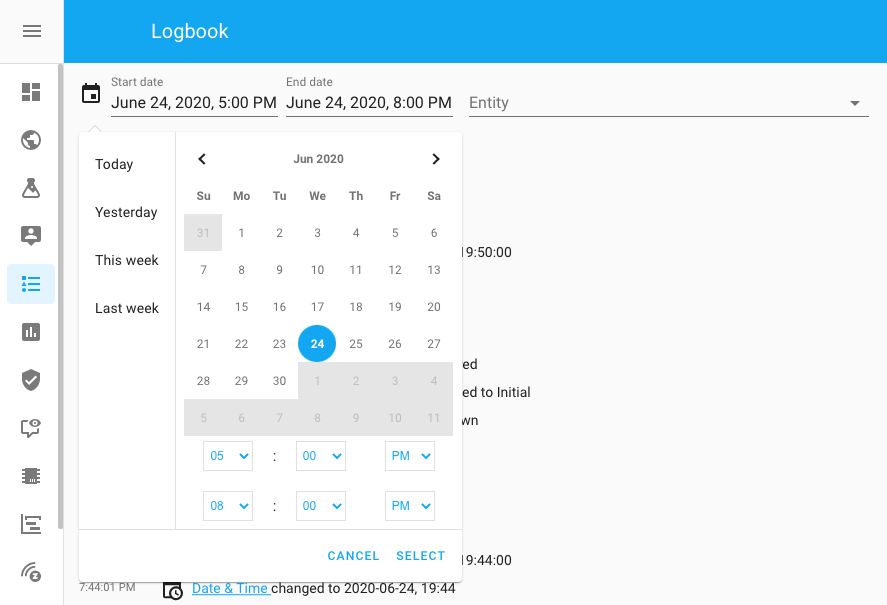 Screenshot of the new date/time picker.
默认情况下,它也不再显示整整一天的数据,而只显示最近几个小时,因此加载会更快。 毕竟大多数时候,我们看的也都是最近发生的事件。
日志簿中现在可以看到是谁做了变更
Talking about the logbook, you can now also see who made a change in the logbook! No more discussion about who changed the temperature!
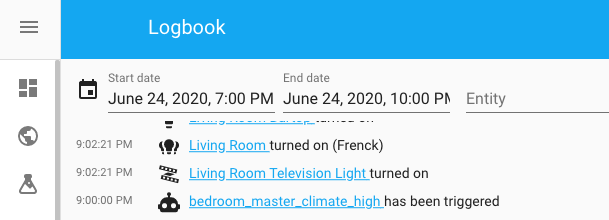 Screenshot of the logbook showing who made the change.
YAML 自动化现已支持多个实体与多个状态
Are you writing your 自动化 in YAML? You might appreciate this one:
A single 条件 rule can now test if multiple 实体 match the 条件. Furthermore, 状态 and 区域 now also accept a list in a 条件. That helps testing if the 实体 matches any of the ones listed.
So this:
Can now be shortened to this:
An example that tests if the 报警 is in any of the specified 状态:
And this 条件 is now also passing when Frenck is at home or at work (fake, of course, since Frenck works from his home).
Or combine! The following 条件 would pass if both Frenck and Daphne are either at home or in the work 区域.
集成专属面板现在都搬到集成页面了
Some 集成, like ZHA, Z-Wave and MQTT have their own 面板 or dev tools. For things like pairing 设备 or publishing MQTT messages.
These used to be on the 配置 page or development tools, which was weird because the 集成 设置 would be on the 集成 page. ZHA also had a lot of 设备 设置 in its own 面板, resulting in a lot of duplicate functionality spread across the Home Assistant interface.
These 面板 and tools are now moved to the 集成 pages, directly within
the 集成 that provides those. You can find them on the 卡片 of the
集成 at the Configure 按钮.
 Screenshot of the MQTT 配置 按钮.
The 设备-specific 设置 are now available on the 设备 page, so we now have 1 place to go for information and 设置 for 设备.
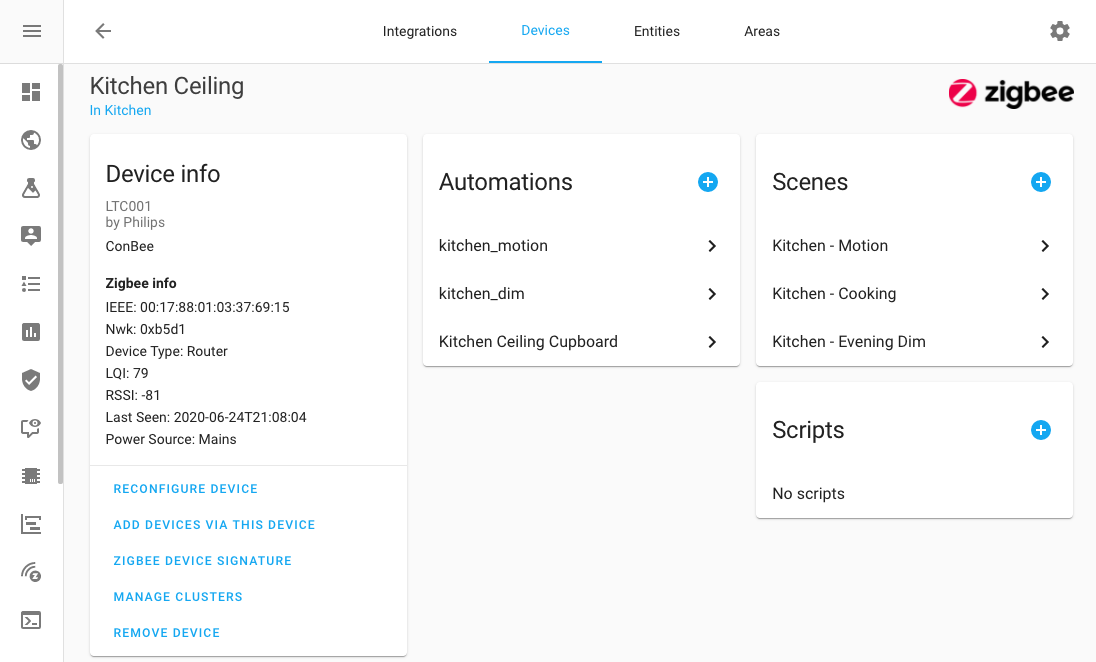 Screenshot of a ZHA 设备.
In the process, we also cleaned some things ups, like adding a 设备 in ZHA. If you change the name of the 设备 while adding it, the 实体 and 实体 IDs are named accordingly.
日志页与信息页的新位置
More moving this 发布, the 日志 and information pages used to be in the development tools 面板, but they didn't really belong there. They aren't really tools for developing, they provide information on your set up.
We moved them to the 配置 page where they are joined with server management and the general 配置.
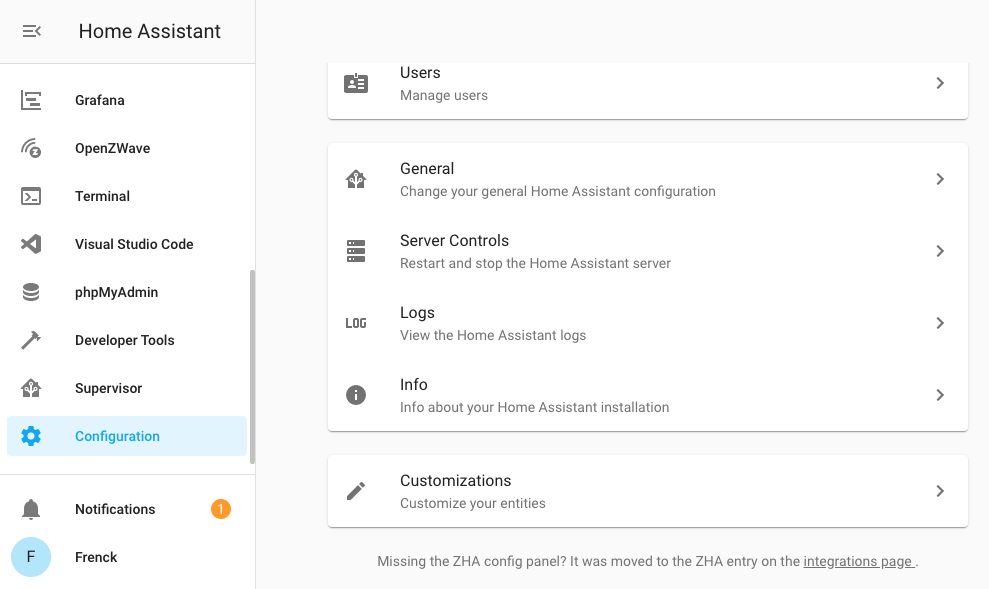 Screenshot of the new home for 日志 & information.
标签页隐藏 5 分钟后自动断开连接
An improvement in the battery of your 设备 and your data cap are going to like:
When the Home Assistant UI is not visible for longer than 5 minutes, it disconnects from your Home Assistant instance. This means you no longer get data or 摄像头 streams and your 设备 can optimize resource and power consumption.
Of course, when showing the browser (or browser tab) again, it will automatically reconnect.
现在会显示所有自动化/场景/脚本
自动化, 场景 and 脚本 in the 配置 面板 are no longer hidden
when they have the hidden 属性. This was erroneously added in the past
and has now been undone.
Talking about the old hidden 属性. They have been slowly deprecated
over time, as they originate from the previous Home Assistant UI. As of this
发布, this 属性 has been completely removed from the system.
其他值得注意的变更
- @balloob has shaved of a couple of seconds from the Home Assistant startup again.
- 实体 that originate from MQTT will now become "unavailable" when the 集成 is not connected to the MQTT broker. Thanks @elupus!
- If you have a Xiaomi 吸尘器 cleaner, @jthure added a 服务 to send it to specific places using a new goto 服务.
- The Smappee 集成 has been fully rewritten, by @bsmappee themselves!
- Auto discovery has been added to the NUT 集成. Please note that some NAS 设备 might be discovered as they support adding an external battery.
新集成
- Add notify_events 通知 集成 (@papajojo - #36049) (notify_events docs) (new-集成)
- Add HVV 集成 (Hamburg public transportation) (@vigonotion - #31564) (hvv_departures docs) (new-集成)
- Add new 遥控器 Python Debugger 集成 (@frenck - #36960) (debugpy docs) (new-集成)
- Add new 加湿器 实体 集成 (@Shulyaka - #28693) ([humidity docs]) (new-集成)
新平台
- Add devolo binary_sensor 设备 (@2Fake - #36370) (devolo_home_control docs) (new-platform)
- Add 传感器 platform for vicare 集成 (heatpump) (@crazyfx1 - #34385) (vicare docs) (breaking-change) (new-platform)
- Add Withings webhooks (@vangorra - #34447) (withings docs) (new-platform)
- 灯光 control support to Axis 设备 (@Kane610 - #36611) (axis docs) (new-platform)
- Fix/Rewrite of Toon 集成 (@frenck - #36952) (toon docs) (breaking-change) (new-platform)
- Part 2: Add signal 传感器 (@ocalvo - #34406) (sms docs) (new-platform)
- Part 3: Add support for incoming sms events (@ocalvo - #37015) (sms docs) (new-platform)
- Add smappee binary_sensor platform (@bsmappee - #37023) (smappee docs) (new-platform)
- Add devolo 传感器 设备 (@2Fake - #37049) (devolo_home_control docs) (new-platform)
现已可通过 UI 设置的集成
以下集成现在已经可以直接通过 Home Assistant UI 进行设置:
- Arcam, done by @elupus
- Avri, done by @timvancann
- Awair, done by @ahayworth
- DenonAVR, done by @starkillerOG
- MetOffice, done by @MrHarcombe
- Plum Lightpad, done by @prystupa
- Smappee, done by @bsmappee
- SMS 通知 via GSM-modem, done by @ocalvo
- Speedtest.net, done by @engrbm87
- Squeezebox, done by @rajlaud
- Tile, done by @bachya
- Xiaomi Aqara, done by @starkillerOG
如果你需要帮助……
如果这个版本带来了问题,请到我们的 issue tracker 提交报告,并尽量完整填写 issue 模板中的所有字段。
不向后兼容的变更
-
Tile
This is now available for 配置 via the 集成 UI. The 实体 IDs have changed to reflect the human-friendly name of the Tile (as defined in the Tile mobile app). Please 更新 your 自动化 accordingly.
-
Panel_Custom
Specifying custom 面板 based on HTML imports is deprecated and will be removed in a future 版本.
(@balloob - #36464) (panel_custom docs)
-
Avri
Avri is now available for configration via the 集成 UI. Remove the 集成 from
configuration.yamland re-add it in the UI.(@timvancann - #34288)
-
Arcam
This is now available for 配置 via the 集成 UI. Remove the 集成 from
configuration.yamland re-add it in the UI. To support theturn_on动作, you will need to 设置 an 自动化 based on an exposed event from the 集成. This can be accomplished via 设备 动作.(@elupus - #34384) (arcam_fmj docs)
-
Android TV
Usage of the 状态 'idle' and 'standby' are switched for the Android TV 集成 to be consistent with other media players. 用户-provided custom 状态 detection rules are not affected.
(@JeffLIrion - #36509) (androidtv docs)
-
Xiaomi Miio
Due to general code updates to the xiaomi_miio 吸尘器 component there are backward-incompatible changes to the following 服务:
xiaomi_miio.vacuum_remote_control_startxiaomi_miio.vacuum_remote_control_stopxiaomi_miio.vacuum_remote_control_movexiaomi_miio.vacuum_remote_control_move_stepxiaomi_miio.vacuum_clean_zone
These all now require that either
entity_idorarea_idis passed when calling the 服务. You need to 更新 all usages (such as 自动化 and 脚本) of these 服务 which do not already passentity_idorarea_id. For example, change the existing 自动化:
to:
(@jthure - #35737) (xiaomi_miio docs)
-
Honeywell Total Connect Comfort
Remnants of EU 集成 for Honeywell thermostats have been removed. As the 集成 was already removed for EU, all consumers should already be US 集成. Existing 配置 should remove
region:lines from theirclimate:honeywell配置 sections.(@jhenkens - #36456) (honeywell docs)
-
Broadlink
The timeout option has been removed from the command learning 服务 because it does not work properly. The 设备 has a fixed timeout of 30 secs, which cannot be changed.
To adapt to these changes, 用户 need to remove
timeout: num_secsfrom calls to thebroadlink.learn_command服务.(@felipediel - #36318) (broadlink docs)
-
前端
The
config集成 will always be loaded if you load the 前端 集成. The 配置 面板 can no longer be disabled.(@balloob - #36587) (default_config docs) (前端 docs) (safe_mode docs)
-
Homematic IP Cloud
The HMIP-MOD-TM 设备 will get a new unique ID due to a merge of the implementation with new HMIP-MOD-HO. So check your 仪表盘, 脚本, 自动化, ... and use the newly 创建 设备/实体. The old 设备 can be deleted under the 设备 section in Home Assistant.
-
Speedtest.net
此integrations is now configured through the UI. To successfully import from
configuration.yamlplease removemonitored_conditions. Ifserver_idis mentioned it will check against the list of servers before importing. -
ZHA
ZHA 传感器 corresponding to
AnalogInputandMultistateInputZigbee clusters have been dropped. These are mostly seen in Aqara vibration/cube 设备 which are pretty much stateless, so remove 实体 and rely onzha_eventsinstead.(@Adminiuga - #36696) (zha docs)
-
Yeelight
It is no longer be possible to override
device_typevia model from the 配置, to force some supported features. For example, force ceiling 灯光 into generic 灯光, etc. Now it will only be used for Yeelight lib, to get correct color temperature ranges. It still possible to pass declared model to the Yeelight library to get correct temperature ranges support.(@zewelor - #36658) (yeelight docs)
-
Viessmann ViCare
Removed existing 属性 from the 温控 实体 which are now available as separate 传感器. If you were using one of the following 属性, you must migrate to the new 传感器. The 传感器 are 创建 automatically.
For all heating types:
supply_temperatureoutside_temperaturecirculationpump_active
For heating type
gas:burner_modulationboiler_temperature
For heating type:
heatpump:return_temperature
(@crazyfx1 - #34385) (vicare docs) (new-platform)
- AlarmDecoder
Previously the autobypass 配置 option only worked for home and away arming. It now works for night arming also. Review the AlarmDecoder 集成 文档 to make sure the autobypass option is configured to your preference.
(@ajschmidt8 - #36692) (alarmdecoder docs)
-
Met Office
This is now available for 配置 via the 集成 UI. You will need to ensure you keep a copy of the DataPoint API key handy to re-enable the 集成 in your server. The location being forecast is, by default, taken as the location of the server, so again if you were forecasting other locations you will need to have those GPS co-ordinates to hand, to re-enter them when configuring new 集成 through the UI.
(@MrHarcombe - #34900) (metoffice docs)
-
Logbook
Changes have been made which improve db performance of 状态 change events and reduce overall db size.
-
context_idhas been removed from the logbook api. -
Remove old/new 状态 data from 状态 change event data since it can now be found by a join of the 状态 table. This change avoids duplicate storage of the 状态 in the events table.
-
Remove support for the deprecated hidden 属性 from logbook and history.
Examples showing how to find the old and new 状态 have been provided in the 状态 and Events 文档.
(@bdraco - #36796, #36883, #37039) (alexa docs) (自动化 docs) (homekit docs) (logbook docs) (recorder docs) (history docs) (脚本 docs)
-
-
Recorder
This breaking change only applies to you if you query/work with the Home Assistant database manually.
entity_idvalidation now default to on when converting 状态 to native. To disable validation when converting 状态 to native, passvalidate_entity_id=Falsetoto_nativeor when usingexecutewithto_native=True, passvalidate_entity_ids=FalseContext ids are no longer duplicated in the
statestable. Join theeventstable onstate.event_idtoevents.event_idto find the context_id instead.更多信息 about our database structure and how to query it, check out our Data Science Portal.
(@bdraco - #36938, #37036) (history docs) (plant docs) (recorder docs) (statistics docs)
-
Denon AVR Network Receivers
This is now available for 配置 via the 集成 UI. Please remove the previous Denon AVR platform from your
configuration.yamlfile. Denon and Marantz receivers are discovered automatically and show up under "配置"-> "集成", from there, click on 配置 and go through the steps. All previous setting options are still available during this 设置.If your receiver does not show up automatically, go to "配置"-> "集成"-> press the "+" icon -> search for "Denon AVR" and enter the 设置.
(@starkillerOG - #35255) (denonavr docs)
-
Smapee
The Smappee 集成 has been completely renewed with API v3 to support all types of Smappee monitors (Energy, Solar, Pro, Plus, Genius, Connect, P1S1 module) and 开关 (Comfort plug, 开关). Existing old 实体 will still be available in this new 集成, but their unique IDs will have changed. 用户 will need to remove the old remaining entries from the 实体 registry.
The
configuration.yamlfile now only requires theclient_idandclient_secret. The username and 密码 will be asked on 认证 when setting up the 集成 via the 前端. Please check the 文档 for the details how to set up the 集成.Example YAML 配置:
(@bsmappee - #36445) (smappee docs)
-
Awair
The Awair 集成 is now configured from the UI, but YAML 配置 will be automatically imported for you. The 集成 no longer supports listing specific 设备 to monitor, because the Awair API rate-limits now apply on a per-设备 basis, rather than per-account. If you do not wish for a 设备 to show up in the UI, simply disable its 实体 from the 集成 page.
Additionally, the Awair 集成 no longer sets custom "device_class" 属性 for non-standard 传感器 (such as the "Awair Score" 传感器). This does not affect the operation of the 传感器, but if you relied on these non-standard values in your 配置 you may need to make adjustments.
(@ahayworth - #34394) (awair docs)
-
Hunter Hydrawise
Hydrawise made an API change that removed rain 传感器 status, changed the behavior of the automatic watering 开关, and the way in which the watering schedule is reported. As a result, the following backward-incompatible changes were made.
- The rain 传感器 is no longer available.
- The
auto_watering开关 状态 now reportsoffwhen the corresponding watering 区域 is actively watering. Ifauto_wateringis enabled the 开关 status will reportoffwhen watering starts and will return toonwhen watering stops in that 区域. - The
next_cycle传感器 date & time 状态 string is now reported in UTC ISO format, e.g.,2020-06-18T13:52:27+0000. Suspended 区域 no longer reportnot_scheduled.
(@ptcryan - #34448) (hydrawise docs)
-
Xiaomi Gateway (Aqara)
YAML 配置 of the Xiaomi Aqara 集成 has been deprecated, please remove the
xiaomi_aqaraplatform from yourconfiguration.yamlfile.Xiaomi Aqara Gateways are discovered automatically and show up under "配置"-> "集成", from there click on 配置 and go through the steps. If your Xiaomi Aqara Gateway does not show up automatically, go to "配置"-> "集成"-> press the "+" icon -> search for "xiaomi_aqara" and enter the 设置. If no key is provided during 设置, only the binary_sensor and 传感器 platforms will be available. A key is required to activate the other platforms.
(@starkillerOG - #35595) (discovery docs) (xiaomi_aqara docs)
-
Withings
Withings "profiles" in YAML 配置 is no longer supported and has been moved into UI-based 配置.
(@vangorra - #36864) (withings docs)
-
Toon
The Toon 集成 has been rewritten to support the new 认证 methods from Eneco/Electrabel and Viesgo. After upgrading, go to the 集成 面板, to re-authenticate the 集成. Please note, that you might need to 更新 your Toon App with a new redirect URL in the Toon Developer portal. Make sure to check the Toon 集成 文档 for information about the URL to use.
The
scan_intervalYAML 配置 option has been deprecated. It is no longer used, as 此integrations is now push-based. If you have it configured, please remove it from your 配置.The "Holiday Mode" & "Toon Program" 二元sensor have been replaced by a "Holiday Mode" and "Thermostat Program" 开关, thus having new 实体. You may need to adjust your 自动化 if you used those in that.
服务
toon.updatehas been removed, it is no longer needed as this is now a push-based 集成. Please make sure you remove those from your 自动化. -
Translations
This breaking change applies to maintainers and 用户 of custom 集成 (
custom_components) that have used the.translationsdirectory for translations, as previously warned that directory is no longer loaded.The new name for this directory is
translations(without the.prefix), for Home Assistant to be able to load your files from this directory, simply remove the.from the name of it.If you publish your custom 集成 to GitHub, you should enable the
hassfest动作, this would have warned you about this change in the previous 3 releases. -
MQTT
-
The embedded MQTT broker, which has been marked as deprecated for the past year, has now been removed.
-
Remove MQTT broker
tls_versionparameter from your 配置 and instead rely on auto negotiation.
(@emontnemery - #37032, #37033) (MQTT docs)
-
-
Squeezebox
This is now available for 配置 via the 集成 UI, and 配置 of the Squeezebox 集成 through
configuration.yamlis now deprecated. Please consider using the 前端 to 配置 the Squeezebox 集成 instead. Servers will automatically be discovered by the "discovery" 集成, or by 此integrations once it is loaded. If the 用户 adds 此integrations from 前端, it will attempt to automatically discover the server as well.The Squeezebox 集成 will now handle individual players coming online or going offline while Home Assistant is running. Previously, the 集成 would only detect players that were present during startup.
(@rajlaud - #35669) (squeezebox docs)
-
Alexa
Alexa Flash Briefings 用户 must now set a 配置 option called
password, like this:If you had configured a flash briefing with the name
passwordbefore, you have to rename it. It is not required anymore to use the legacyapi_password认证 to use Alexa Flash Briefings.You also have to change the endpoint in the Alexa Developer Console to include this 密码 in your URL, like this:
https://YOUR_HOST/api/alexa/flash_briefings/BRIEFING_ID?password=YOUR_PASSWORD.(@Tho85 - #36789) (alexa docs)
-
remote_rpi_gpio
A double inversion happening on the
remote_rpi_gpioplatform has been removed. This might inverse your 开关 behavior for this platform. -
Custom 集成/components
This is more a breaking change for 开发者 of custom 集成 for Home Assistant.
Custom components depending on
helpers.entityfilterfor filtering may need an adjustment. Imports ofFILTER_SCHEMAorBASE_FILTER_SCHEMAwill be fine but any components directly depending on theconvert_filtermethod will need to ensure the dictionary they are passing in hasinclude_entity_globsorexclude_entity_globsfields specified.(@mdegat01 - #36913) (logbook docs) (recorder docs)
告别以下内容
The 集成 below have been removed:
- Lockitron (API platform is decommissioned) (@frenck - #37012)
- Fortigate (replaced by FortiOS 集成) (@kifeo - #34586)
发布 0.112.1 - July 2
- 更新 proxmoxve 集成 to correctly renew 认证 (@jhollowe - #37016) (proxmoxve docs)
- Change 日志 url in config check 错误 通知 (@hdsheena - #37311) (homeassistant docs)
- Smappee dependency 更新 (@bsmappee - #37331) (smappee docs)
- Fix devolo 传感器 subscriber (@2Fake - #37337) (devolo_home_control docs)
- Fix gogogate2 issue where non-admin 用户 could not login (@vangorra - #37353) (gogogate2 docs)
- Use entry.data.get() in forked_daapd config_flow as some entries miss… (@uvjustin - #37359) (forked_daapd docs)
- Fix withings bug that grabbed oldest value instead of the newest (@vangorra - #37362) (withings docs)
- 更新 前端 to 20200702.0 (@bramkragten - #37369) (前端 docs)
- Add DenonAvr missing 错误 message (@starkillerOG - #37370) (denonavr docs)
发布 0.112.2 - July 3
- Don't print MQTT credentials to 日志 (@emontnemery - #37364) (MQTT docs)
- Handle index already existing on db migration with MySQLdb 后端 (@bdraco - #37384) (recorder docs)
- Ensure logbook entries appear when the logbook.日志 (@bdraco - #37388) (logbook docs)
- Bump pytile to 4.0.0 (@bachya - #37398) (tile docs)
- Bump python-miio to 0.5.2.1 (@rytilahti - #37422) (xiaomi_miio docs)
- Bump teslajsonpy to 0.9.2 (@alandtse - #37434) (tesla docs)
发布 0.112.3 - July 6
- Move logbook continuous domain filtering to sql (@bdraco - #37115) (logbook docs)
- Ensure logbook performs well when filtering is configured (@bdraco - #37292) (logbook docs)
- Ensure removed 实体 are not displayed in logbook (@bdraco - #37395) (logbook docs) (recorder docs)
- Stop Speedtest 传感器 更新 on startup if manual option is enabled (@engrbm87 - #37403) (speedtestdotnet docs)
- Fix base topic for 'topic' (@emontnemery - #37475) (MQTT docs)
- Fix base class for ViCare 二元sensor to remove 警告 (@crazyfx1 - #37478) (vicare docs)
- Fix braviatv 认证 refresh (@dcnielsen90 - #37482) (braviatv docs)
- Fix default icon for Withings sleep 传感器 (@SeanPM5 - #37502) (withings docs)
- 更新 前端 to 20200702.1 (@bramkragten - #37566) (前端 docs)
- Suppress spurious homekit 警告 about media player sources when the 设备 is off (@bdraco - #37567) (homekit docs)
- Ensure homekit tv names can be saved (@bdraco - #37571) (homekit docs)
- Fix Plex client controls when connected via plex.tv resource (@jjlawren - #37572) (plex docs)
- Ignore HEOS 1, 3, 5 and 7 for DenonAvr ssdp discovery (@starkillerOG - #37579) (denonavr docs)
发布 0.112.4 - July 9
- Add kwargs to send_magic_packet() 服务 individually (@stshontikidis - #37387) (wake_on_lan docs)
- 升级 sonar to 0.2.3 (@therealryanbonham - #37392) (sonarr docs)
- Place smappee supported 配置 after 设备 class (@bsmappee - #37595) (smappee docs)
- 更新 Smappee 集成 with proper solar, voltage and reactive 实体 (@bsmappee - #37407) (smappee docs)
- Fix DenonAvr discovery of Denon DN-500AV (@starkillerOG - #37529) (denonavr docs)
- Bump 后端 library for Dune HD 集成 (@bieniu - #37594) (dunehd docs)
- Bump aiokef to v0.2.13 which fixes the 设备 from becoming "Unavailable" (@basnijholt - #37607) (kef docs)
- Remove withings use of deprecated classes (@vangorra - #37611) (withings docs)
- Increase slow 设置 logging to 警告 level (@bdraco - #37635)
发布 0.112.5 - July 14
- Smappee dependency 更新 (@bsmappee - #37680) (smappee docs)
- Properly set update_interval during Speedtest 设置 (@engrbm87 - #37708) (speedtestdotnet docs)
- Support multiple MQTT availability topics (@emontnemery - #37418) (MQTT docs)
- Tweak MQTT availability (@emontnemery - #37719) (MQTT docs)
- Fix MQTT availability startup race (@emontnemery - #37718) (MQTT docs)
- Fix homekit_controller discovery via zeroconf (@bdraco - #37725) (zeroconf docs)
- Add support for the DataUpdateCoordinator to not automatically 更新 (@rohankapoorcom - #37734)
- Bump blinkpy 版本 to fix connection 错误 (@fronzbot - #37755) (blink docs)
- UniFi - Handle session expiration (@Kane610 - #37782) (unifi docs)
- deCONZ - don't let 灯光 "attr" events 更新 group data (@Kane610 - #37797) (deconz docs)
所有变更
点击查看所有变更!
- Extend logbook api to be able to fetch a slice of data between two time boundaries. (@bdraco - #35847) (logbook docs)
- 升级 mypy to 0.780 (@scop - #36416)
- Bumped 版本 to 0.112.0dev0 (@frenck - #36417)
- Bump python-synology to 0.8.2 (@Quentame - #36410) (synology_dsm docs)
- Cleanup and improve Plugwise merges (@CoMPaTech - #36406) (plugwise docs)
- Bump lokalise2 2.5.1 (@balloob - #36430)
- Add additional 传感器 to Plugwise 集成 (@CoMPaTech - #36431) (plugwise docs)
- 升级 numpy to 1.18.5 (@frenck - #36434) (iqvia docs) (opencv docs) (tensorflow docs) (trend docs)
- Remove Axis option to enable/disable 摄像头 (@Kane610 - #36420) (axis docs)
- Fix Dynalite to explicitly check valid 设备 class (@ziv1234 - #36418) (dynalite docs)
- Add config flow for Tile (@bachya - #36173) (tile docs) (breaking-change)
- panel_custom: Allow ES5+latest build, deprecate html (@balloob - #36464) (panel_custom docs) (breaking-change)
- Clean up Tile refactor (@bachya - #36450) (tile docs)
- Add notify_events 通知 集成 (@papajojo - #36049) (notify_events docs) (new-集成)
- Add @knyar as a codeowner for prometheus 集成 (@knyar - #36487) (prometheus docs)
- Add 实体 list to 灯光 and 遮盖 group 属性 (@thomasloven - #36477) (group docs)
- Add Avri config flow (@timvancann - #34288) (breaking-change)
- Add devolo binary_sensor 设备 (@2Fake - #36370) (devolo_home_control docs) (new-platform)
- Add and fix type hints (@scop - #36501) (config docs) (switcher_kis docs)
- 升级 youtube_dl to 版本 2020.06.06 (@BKPepe - #36493) (media_extractor docs)
- Arcam config flow (@elupus - #34384) (arcam_fmj docs) (breaking-change)
- Set 状态 for MQTT 实体 to 'unavailable' when no connection to broker (@definitio - #36479) (MQTT docs)
- Fix usage of 状态 'idle' and 'standby' for Android TV (@JeffLIrion - #36509) (androidtv docs) (breaking-change)
- Remove unused parameter for MQTT discovery (@emontnemery - #36526) (MQTT docs)
- 更新 ihcsdk to 2.7.0 (@dingusdk - #36527) (ihc docs)
- 升级 XS1 component to xs1-api-client v3.0.0 (@markusressel - #36500) (xs1 docs)
- 更新 ZHA config flow Zigbee radio description (@Hedda - #35607) (zha docs)
- Add plum_lightpad unique ids (@prystupa - #36549) (plum_lightpad docs)
- Improve devolo Home Control (@2Fake - #36557) (devolo_home_control docs)
- Change logging of successful scans to 调试 priority (@eyager1 - #36538) (ddwrt docs)
- Prevent double ZHA channel initialization (@Adminiuga - #36554) (zha docs)
- Add Xiaomi miio vaccum goto 服务 (@jthure - #35737) (xiaomi_miio docs) (breaking-change)
- Updated tesla-powerwall to 0.2.11 (@z00nx - #36568) (powerwall docs)
- Add 服务 to bypass and unbypass 区域 on NX584 (@mreiling - #36401) (nx584 docs)
- Sonos queue (@gieljnssns - #35817) (sonos docs)
- 更新 aioharmony to include support for XMPP connectivity to Hub (@ehendrix23 - #36485) (harmony docs)
- Add 服务 select 场景 to Yamaha Hifi media player (@StevusPrimus - #36564) (yamaha docs)
- Use TestCase.addCleanup (@balloob - #36560)
- Add status_light to Sonos set_option 服务 (@ianperrin - #35515) (sonos docs)
- Remove EU code from honeywell 集成 (@jhenkens - #36456) (honeywell docs) (breaking-change)
- Clean up command learning in the Broadlink 集成 (@felipediel - #36318) (broadlink docs) (breaking-change)
- Add NX584 报警 binary_sensor zone_number 属性 (@mreiling - #36552) (nx584 docs)
- 升级 pre-commit to 2.5.0 (@frenck - #36596)
- Change nx584 SCAN_INTERVAL to 10 seconds (@mreiling - #36581) (nx584 docs)
- Bump solax library to 0.2.3 (@squishykid - #36600) (solax docs)
- Use past tense in messages for already invalidated deprecated configs (@scop - #36591)
- Mark config dependency of 前端 (@balloob - #36587) (default_config docs) (前端 docs) (safe_mode docs) (breaking-change)
- Fix missing space in powerwall 通知 message (@bdraco - #36603) (powerwall docs)
- Bump dependency & add 设备 for HomematicIP Cloud (@SukramJ - #36595) (homematicip_cloud docs) (breaking-change)
- Add delay in emulated_hue after PUT (@grogi - #35307) (emulated_hue docs)
- 升级 pre-commit to 2.5.1 (@frenck - #36623)
- Add Speedtestdotnet config_flow (@engrbm87 - #36254) (speedtestdotnet docs) (breaking-change)
- Add ue_smart_radio multiple 设备 support (@fredrik-rambris - #36575) (ue_smart_radio docs)
- Fix name of devolo_home_control 集成 (@frenck - #36627)
- Add options flow to Blink (@fronzbot - #35645) (blink docs)
- Use LENGTH_FEET constant (@springstan - #34053) (fitbit docs) (isy994 docs) (proximity docs) (zha docs)
- Abort other config flows on import (@emontnemery - #36608)
- Remove internal qa scale from numato 集成 (@frenck - #36629) (numato docs)
- Use async_on_remove for WLED DataUpdateCoordinator (@frenck - #36640) (wled docs)
- Allow specifying port for wake_on_lan (@janitha - #36510) (wake_on_lan docs)
- 更新 Baidu TTS to support more voice (@kangyue92 - #36532) (baidu docs)
- 更新 ZHA dependencies (@Adminiuga - #36646) (zha docs)
- Add icon_type as 配置 variable (@phan-t - #36594) (lametric docs)
- Refactor ZHA 实体 availability tracking (@Adminiuga - #36645) (zha docs)
- Add timers to xiaomi_miio 吸尘器 (@MarBra - #35417) (xiaomi_miio docs)
- Improve cloud 错误 handling (@balloob - #36670) (cloud docs)
- Cleanup zha.storage from stale 设备 (@Adminiuga - #36700) (zha docs)
- Drop ZHA 传感器 for Analog/Multistate input clusters (@Adminiuga - #36696) (zha docs) (breaking-change)
- Remove Yeelight model to 设备 type mapping (@zewelor - #36658) (yeelight docs) (breaking-change)
- Enforce unique ID for Hassio discovery (@balloob - #36671)
- Add influx 2.0 and InfluxCloud support to InfluxDB 集成 (@mdegat01 - #35392) (influxdb docs)
- Bump pynx584 to 0.5 (@mreiling - #36615) (nx584 docs)
- Add opentherm_gw.set_hot_water_setpoint 服务 (@mvn23 - #34579) (opentherm_gw docs)
- Migrate 脚本 to use describe_event for logbook (@frenck - #36729) (logbook docs) (脚本 docs)
- Implement device_info for LutronCasetaDevice (@ShaneQi - #36706) (lutron_caseta docs)
- 升级 pytest-cov to 2.10.0 (@frenck - #36720)
- Platforms cleanup when adding 实体 fails (@balloob - #36742)
- 更新 config_entry_flow test test_user_has_confirmation (@emontnemery - #36633)
- Poll all status data in Vera (@vangorra - #35703) (vera docs)
- Updated 前端 to 20200613.0 (@bramkragten - #36758) (前端 docs)
- Add 传感器 platform for vicare 集成 (heatpump) (@crazyfx1 - #34385) (vicare docs) (breaking-change) (new-platform)
- Add pi_heating/cooling_demand 状态 属性 (@Adminiuga - #36775) (zha docs)
- Refactor plum_lightpad (@prystupa - #36761) (plum_lightpad docs)
- Set default pjlink timeout (@benoitlouy - #36781) (pjlink docs)
- Fix translations download (@balloob - #36770)
- Add unique id to huawei_lte config entries (@scop - #36765) (huawei_lte docs)
- Add HVV 集成 (Hamburg public transportation) (@vigonotion - #31564) (hvv_departures docs) (new-集成)
- Add alarmdecoder brand specific arming sequences (@ajschmidt8 - #36692) (alarmdecoder docs) (breaking-change)
- Convert MetOffice to use UI for 配置 (@MrHarcombe - #34900) (metoffice docs) (breaking-change)
- Fix TTS key by hashing options values too (@balloob - #36813) (tts docs)
- ConfigFlow default discovery without unique ID (@frenck - #36754) (abode docs) (new-集成)
- Add missing dependencies for Environment Canada (@michaeldavie - #36806) (environment_canada docs)
- Speed up logbook with a lazy event decoder (@bdraco - #36730) (logbook docs)
- Improve history api performance part 4 (@bdraco - #36783) (history docs)
- Use 状态 to avoid decoding logbook 状态 changed events. (@bdraco - #36768) (logbook docs)
- Only process logbook timestamps for events we will keep (@bdraco - #36792) (logbook docs) (recorder docs)
- Add support for multiple entity_ids in 条件 (@frenck - #36817)
- Remove context_id from logbook api (@bdraco - #36796) (alexa docs) (自动化 docs) (homekit docs) (logbook docs) (recorder docs) (脚本 docs) (breaking-change)
- 更新 MQTT tests to not create duplicated config entries (@emontnemery - #36833) (MQTT docs)
- Add support for multiple 状态/区域 in 条件 (@frenck - #36835)
- mobile_app: 摄像头 Stream Webhook (@zacwest - #36839) (mobile_app docs)
- Add support for Dyson Pure HP04 purifying heater + 风扇 (@etheralm - #34537) (dyson docs)
- Add blink tests (@fronzbot - #36672) (blink docs)
- Fix remote_rpi_gpio 开关 inversion (@auchter - #34390) (remote_rpi_gpio docs) (breaking-change)
- Use MDI CPU icon for glances (@spacegaier - #36736) (glances docs)
- DenonAVR Config Flow (@starkillerOG - #35255) (denonavr docs) (breaking-change)
- Fix Plugwise schema name display and non_device_class icons (@CoMPaTech - #36815) (plugwise docs)
- Add Withings webhooks (@vangorra - #34447) (withings docs) (new-platform)
- 更新 Wemo 状态 when changing 状态 (@sqldiablo - #36647) (wemo docs)
- Add growatt battery 设备 (@indykoning - #34773) (growatt_server docs)
- Add precipitation probability to 天气 forcast (@marawan31 - #36019) (environment_canada docs) (天气 docs)
- Bump aiokef 0.2.12 (@basnijholt - #36753) (kef docs)
- Add ebusd HotWaterHeader ActualTemperature and OperationMode (@sknsean - #34921) (ebusd docs)
- Renew Smappee (传感器 and 开关) (@bsmappee - #36445) (smappee docs) (breaking-change)
- 升级 youtube_dl to 版本 2020.06.16.1 (@BKPepe - #36870) (media_extractor docs)
- Use the built-in importlib.metadata library in Python 3.8+ (@jefferyto - #36225)
- Discover controllable Plex clients using plex.tv (@jjlawren - #36857) (plex docs)
- Onboarding to validate redirect uri (@balloob - #36863) (onboarding docs)
- Improve logbook performance when no 实体 are filtered (@bdraco - #36842) (logbook docs)
- Bump plexwebsocket to 0.0.11 (@jjlawren - #36879) (plex docs)
- 升级 requests to 2.24.0 (@balloob - #36886)
- Add internal/external url to safe mode (@balloob - #36894)
- Improve db performance of 状态 change events and reduce overall db size (@bdraco - #36883) (logbook docs) (recorder docs) (breaking-change)
- Bump Netdisco to 2.7.1 (@balloob - #36891) (discovery docs) (ssdp docs)
- Add expiration timestamp to cert_expiry 传感器 (@jjlawren - #36399) (cert_expiry docs)
- 灯光 control support to Axis 设备 (@Kane610 - #36611) (axis docs) (new-platform)
- Fix cert_expiry time-based tests (@jjlawren - #36924) (cert_expiry docs)
- Cope with 属性 错误 being converted (@craiggenner - #36911) (prometheus docs)
- Make panel_custom backwards compatible (@balloob - #36926) (panel_custom docs)
- Fix cert_expiry time-based tests v2 (@jjlawren - #36934) (cert_expiry docs)
- Fix devolo brand name (@2Fake - #36865) (devolo_home_control docs)
- Handle Plex Live TV sessions (@jjlawren - #36919) (plex docs)
- Add discovery to NUT 集成 (@frenck - #36827) (nut docs)
- Fix recorder stopping after unserializable 状态 (@bdraco - #36937) (recorder docs)
- Improve after_dependencies handling (@balloob - #36898)
- Allow harmony activity change on start of switching activity (@ehendrix23 - #36699) (harmony docs)
- Use chip id in Konnected pro boards (@kit-klein - #36940) (konnected docs)
- Remove unused Webhook dependency from 设备 自动化 (@balloob - #36946) (device_automation docs)
- Add TTS support to Heos (@avocadio - #35386) (heos docs)
- 升级 ptvsd to 4.3.2 (@frenck - #36950)
- 更新 前端 to 20200620.0 and add redirects (@bramkragten - #36953) (前端 docs)
- Bump pyaehw4a1 to v.0.3.5 (@bannhead - #36949) (hisense_aehw4a1 docs)
- Fix unique_id in Zeroconf flow (@fredrike - #36948) (daikin docs)
- Fix ESPHome discovery for ignored config entries (@frenck - #36964) (esphome docs)
- Adding PM2.5 and PM2.5 24hr Average (@linuxkidd - #36967) (ambient_station docs)
- Reduce roku scan interval by 5s (@ctalkington - #36966) (roku docs)
- Dynalite 集成 - 升级 library 版本 (@ziv1234 - #36954) (dynalite docs)
- Rachio Rain Delay 开关 更新 (@brg468 - #36909) (rachio docs)
- Add armed_night 状态 for AlarmDecoder (@ajschmidt8 - #36695) (alarmdecoder docs)
- Handle Mobile App registrations for 设备 names containing of only emoji (@TomBrien - #36957) (mobile_app docs)
- Prefilter more logbook events in sql (@bdraco - #36958) (logbook docs)
- 更新 rokuecp to 0.5.0 (@ctalkington - #36975) (roku docs)
- Fix logbook filtering by 实体 id (@bdraco - #36973) (alexa docs) (自动化 docs) (homekit docs) (logbook docs) (脚本 docs)
- Refactor / 更新 Awair 集成 (@ahayworth - #34394) (awair docs) (breaking-change)
- Support Hydrawise API v1.4 (@ptcryan - #34448) (hydrawise docs) (breaking-change)
- Make recorder execute avoid native conversion by default (@bdraco - #36938) (history docs) (plant docs) (recorder docs) (statistics docs) (breaking-change)
- Use roku media 状态 to detect paused media (@ctalkington - #36980) (roku docs)
- Add Xiaomi Aqara Config Flow (@starkillerOG - #35595) (discovery docs) (xiaomi_aqara docs) (breaking-change)
- Bump to pyIntesishome 1.7.5 (@jnimmo - #36562) (intesishome docs)
- Bump pyps4-2ndscreen to 1.1.0 (@ktnrg45 - #36987) (ps4 docs)
- 升级 to bimmer_connected 0.7.7 (@gerard33 - #36985) (bmw_connected_drive docs)
- Fix use of AdGuard 集成 without 版本 (@frenck - #36995) (adguard docs)
- Set webostv scan interval to 10s for quick updates (@damienlevin - #35795) (webostv docs)
- Add support for daikin humidity 传感器 (@fpytloun - #36475) (daikin docs)
- Add default admin 用户 for gogogate2 设置 (@vangorra - #36722) (gogogate2 docs)
- highlight Dockerfile.dev as Dockerfile in github ui (@adaamz - #36933)
- Correct inst method names in system info and issue 模板 (@frenck - #36998)
- Set Plex 媒体播放器 discovery source as an 属性 (@jjlawren - #36884) (plex docs)
- Add new 遥控器 Python Debugger 集成 (@frenck - #36960) (debugpy docs) (new-集成)
- Reduce 状态 conversion overhead in history by lazy loading properties (@bdraco - #36963) (history docs) (plant docs) (recorder docs) (statistics docs)
- Squeezebox config flow (@rajlaud - #35669) (discovery docs) (squeezebox docs) (breaking-change)
- Add NetdataAlarms 传感器 to additionally collect 报警 information (@jurgenhaas - #34339) (netdata docs)
- Bump python-ecobee-api to 0.2.7 (@marthoc - #37002) (ecobee docs)
- 升级 numpy to 1.19.0 (@frenck - #36996) (iqvia docs) (opencv docs) (tensorflow docs) (trend docs)
- Fix history api with no constraints (@bdraco - #36979) (history docs) (plant docs) (recorder docs) (statistics docs)
- 用户 defined profile name for Withings (@vangorra - #36864) (withings docs) (breaking-change)
- Improve isoformat timestamp performance (@bdraco - #36991) (history docs) (logbook docs) (recorder docs)
- Bump Axis library to support fence guard events (@Kane610 - #37007) (axis docs)
- Support guest events in UniFi 设备 tracker (@Kane610 - #37008) (unifi docs)
- Use pytest for more MQTT tests (@emontnemery - #36859) (MQTT docs)
- Drop use of async_mock_mqtt_component (@emontnemery - #37011)
- Remove lockitron 集成 (@frenck - #37012) (breaking-change)
- Handle ArmDisarm execute without arm level (@balloob - #36942) (google_assistant docs)
- Part 1: Support for config flow on SMS 集成 (@ocalvo - #35995)
- Make generic 摄像头 stream_source a 模板 (@zvldz - #36123) (generic docs)
- Xiaomii miio vaccum clean segment 服务 (@jthure - #36801) (xiaomi_miio docs)
- Prevent upnp to use None values (@StevenLooman - #36803) (upnp docs)
- Add new language to Google Cloud TTS (@tomtzeng - #36705) (google_cloud docs)
- Tahoma zwave 灯光 support (@zpetr - #36584) (tahoma docs)
- Add 属性 模板 to 模板 吸尘器 (@firstof9 - #36518) (模板 docs)
- Optimize recorder MySQL tables when repacking (@alex3305 - #36762) (recorder docs)
- Support reconfiguring MQTT config entry (@emontnemery - #36537) (config docs) (MQTT docs)
- Add new 加湿器 实体 集成 (@Shulyaka - #28693) (加湿器 docs) (new-集成)
- Fix/Rewrite of Toon 集成 (@frenck - #36952) (toon docs) (breaking-change) (new-platform)
- Retry failed Amcrest commands that change 设置 (@pnbruckner - #36917) (amcrest docs)
- Add "seconds" as a valid unit_of_measurement (@Leapo - #36811) (uptime docs)
- Fix withings body hydration unit of measure to match documented unit of measure. (@vangorra - #36723) (withings docs)
- Add DataUpdateCoordinator to pihole (@shenxn - #36684) (pi_hole docs)
- Ensure recorder runs are cleaned up during purge (@bdraco - #36989) (recorder docs)
- Extend itach repeat functionality (@celestinjr - #36535) (itach docs)
- Part 2: Add signal 传感器 (@ocalvo - #34406) (sms docs) (new-platform)
- Fix coronavirus worldwide sum (@MartinHjelmare - #36737) (coronavirus docs)
- Improve detected Huawei LTE 设备 name (@scop - #36772) (huawei_lte docs)
- Avoid Home connect test doing I/O (@balloob - #37017) (home_connect docs)
- Bump cloud to 0.34.7 (@balloob - #37018) (cloud docs)
- Remove loading of legacy translations (@ludeeus - #37021) (breaking-change)
- Fix alexa flash briefings after removal of api_password auth (@Tho85 - #36789) (alexa docs) (breaking-change)
- Add 服务 to 触发器 roku search (@ctalkington - #37014) (roku docs)
- Add new Solaredge 传感器 (@terminet85 - #34525) (solaredge docs)
- Remove embedded MQTT broker (@emontnemery - #37032) (MQTT docs) (breaking-change)
- Add 加湿器 设备 动作 (@Shulyaka - #36854) (加湿器 docs)
- Drop use of mock_mqtt_component (@emontnemery - #37013) (alarm_control_panel docs) (manual_mqtt docs) (mqtt_eventstream docs) (mqtt_statestream docs)
- Updated 前端 to 20200623.2 (@balloob - #37035) (前端 docs)
- Optimize database indexes for existing queries (@bdraco - #37036) (history docs) (recorder docs) (breaking-change)
- Drop MQTT broker tls_version parameter (@emontnemery - #37033) (MQTT docs) (breaking-change)
- Bump Plugwise_Smile to v1.1.0 (@bouwew - #37038) (plugwise docs)
- Remove support for deprecated hidden 属性 from logbook and history (@bdraco - #37039) (history docs) (logbook docs) (breaking-change)
- Fix typo in roku 服务 description (@ctalkington - #37042) (roku docs)
- Toon translation updates + tweaks (@frenck - #37043) (toon docs)
- Complete deprecation of hidden 属性 (ATTR_HIDDEN) (@bdraco - #37041) (alert docs) (datadog docs) (区域 docs) (breaking-change)
- Add resource_template to rest binary_sensor (@Hedgehog57 - #30703) (rest docs)
- Remove fortigate 集成 (@kifeo - #34586) (breaking-change)
- Add 加湿器 reproduce 状态 (@Shulyaka - #36799) (加湿器 docs)
- Updated 前端 to 20200623.3 (@balloob - #37045) (前端 docs)
- Part 3: Add support for incoming sms events (@ocalvo - #37015) (sms docs) (new-platform)
- Add support for glob matching to 实体 filters (@mdegat01 - #36913) (logbook docs) (recorder docs) (breaking-change)
- Add Plum Lightpad config flow (@prystupa - #36802) (plum_lightpad docs)
- Handle unexpected versions in forked_daapd zeroconf (@uvjustin - #37053) (forked_daapd docs)
- Add smappee binary_sensor platform (@bsmappee - #37023) (smappee docs) (new-platform)
- Fix rest to use BinarySensorEntity (@frenck - #37054) (rest docs)
- Fix LCN 遮盖 behavior when using output ports (@alengwenus - #37034) (lcn docs)
- Fix asuswrt spamming 日志 with exceptions (@RogerSelwyn - #37063) (asuswrt docs)
- Handle mysql index/column already exists during migration (@bdraco - #37064) (recorder docs)
- Avoid creating a column in v8 schema that is removed in v9 schema (@bdraco - #37062) (recorder docs)
- Raise slow startup timeout to 3h for large db migrations. (@bdraco - #37061)
- Squeezebox dispatch 助手 (@rajlaud - #37030) (squeezebox docs)
- Add devolo 传感器 设备 (@2Fake - #37049) (devolo_home_control docs) (new-platform)
- Handle Centralite Pearl thermostat modes (@Adminiuga - #37065) (zha docs) (beta fix)
- Don't reset multiplier/divisor on failures (@Adminiuga - #37066) (zha docs) (beta fix)
- Fix geniushub spamming 日志 with exceptions (@RogerSelwyn - #37067) (geniushub docs) (beta fix)
- Use cached values for divisor/multiplier (@Adminiuga - #37070) (zha docs) (beta fix)
- Clean up plum_lightpad (@prystupa - #37077) (plum_lightpad docs) (beta fix)
- Add logbook platforms (@balloob - #37078) (alexa docs) (自动化 docs) (homekit docs) (logbook docs) (脚本 docs) (beta fix)
- Ensure history 状态 can be copied (@bdraco - #37081) (history docs) (beta fix)
- Remove invalidation 版本 from ZHA deprecated config options (@frenck - #37089) (zha docs) (beta fix)
- Fix missing 服务 call context in multiple locations (@frenck - #37094) (beta fix)
- Fix Plex when using local tokenless 认证 (@jjlawren - #37096) (plex docs) (beta fix)
- Bump 前端 (@balloob - #37113) (前端 docs) (beta fix)
- Fix recorder purging by batch processing purges (@frenck - #37140) (recorder docs) (beta fix)
- Fix repack when using pymysql (@bdraco - #37142) (recorder docs) (beta fix)
- Catch additional exception for Plex account login failures (@jjlawren - #37143) (plex docs) (beta fix)
- Updated 前端 to 20200626.1 (@balloob - #37150) (前端 docs) (beta fix)
- Fix speedtest blowing up (@balloob - #37151) (speedtestdotnet docs) (beta fix)
- Fix OwnTracks race 条件 (@balloob - #37152) (owntracks docs) (beta fix)
- Fix issue with Insteon 设备 not responding to 设备 changes (@teharris1 - #37160) (insteon docs) (beta fix)
- Bump teslajsonpy to 0.9.0 (@alandtse - #37162) (tesla docs) (beta fix)
- Fix bug where Tile session would expire (@bachya - #37185) (tile docs) (beta fix)
- Fix updating ping 传感器 (@engrbm87 - #37220) (speedtestdotnet docs) (beta fix)
- Fix wind speed change in NWS (@MatthewFlamm - #37222) (nws docs) (beta fix)
- Ensure recorder data integrity and MySQL 门锁 错误 handling (@frenck - #37228) (recorder docs) (beta fix)
- Fixes after PR #36479 (@definitio - #37230) (MQTT docs) (beta fix)
- Fix Tile location accuracy bug (@bachya - #37233) (tile docs) (beta fix)
- Bump ZHA Quirks to 0.0.41 (@dmulcahey - #37235) (zha docs) (beta fix)
- Updated 前端 to 20200629.0 (@balloob - #37240) (前端 docs) (beta fix)
- 更新 myq for latest client 版本 requirement (@bdraco - #37104) (myq docs) (beta fix)
- 更新 fritzconnection to 1.3.0 (@svenstaro - #37212) (fritzbox_netmonitor docs) (beta fix)
- Revert "更新 fritzconnection to 1.3.0" (@bramkragten - #37278) (fritz docs) (fritzbox_callmonitor docs) (fritzbox_netmonitor docs) (beta fix)
- Updated 前端 to 20200701.0 (@bramkragten - #37279) (前端 docs) (beta fix)