

0.110:更快!OpenZWave Beta、HomeKit 摄像头、ONVIF 与日历
你知道我有多兴奋,终于能把 Home Assistant Core 0.110 带给大家了吗?
如果我告诉你,过去几乎每天我都把自己正在生产环境运行的 Home Assistant 升级到最新开发版本,你会相信吗?
最好相信,因为过去 3 周我几乎每天都是这样开始一天的。 那种感觉就像每天都在拆新礼物、每天都能体验到令人惊喜的改进。
今天,我们把这一切打包成一个超大的礼物送给你。🎁
这绝对是 Home Assistant 各个层面上都很重磅的一次发布。 前端和后端都更快了,可用性改进非常多, 还带来了 12 个超棒的新集成,以及大量现有集成的重要更新。
祝你享受这次发布!
../Frenck
图标
在 Home Assistant Core 0.109 中, 我们让前端变得更轻、更快;而这次发布又向前迈进了一步。
图标的加载方式已经更新。随着 Material Icons 集合不断增长, 我们必须调整处理图标的方式,才能确保应用继续保持良好性能。
现在 Material Icons 会被拆分成多个分块, 这样前端在只需要一个图标时,就不必把所有图标都加载进来; 此外,我们也不再把图标存放在 DOM 中,而是放进数据库里。
这节省了大量内存,也让 Home Assistant 前端变得更加轻巧、更加快速!
说实话,优化的还不只是图标……这个版本里有很多地方都被调整过, 就是为了让前端更快。现在它比以往任何时候都更灵敏!
集成分组、搜索与自定义 Logo
@timmo001 为集成页面加入了搜索功能,让你可以更快找到想要的内容。
现在页面中的条目也会按集成进行分组,这意味着同一个集成不再显示多张卡片; 如果一个集成下有多个条目,则会以名称列表的形式展示。
点击某个条目后,对应内容就会显示在卡片中。 这样你就更容易总览所有集成了。
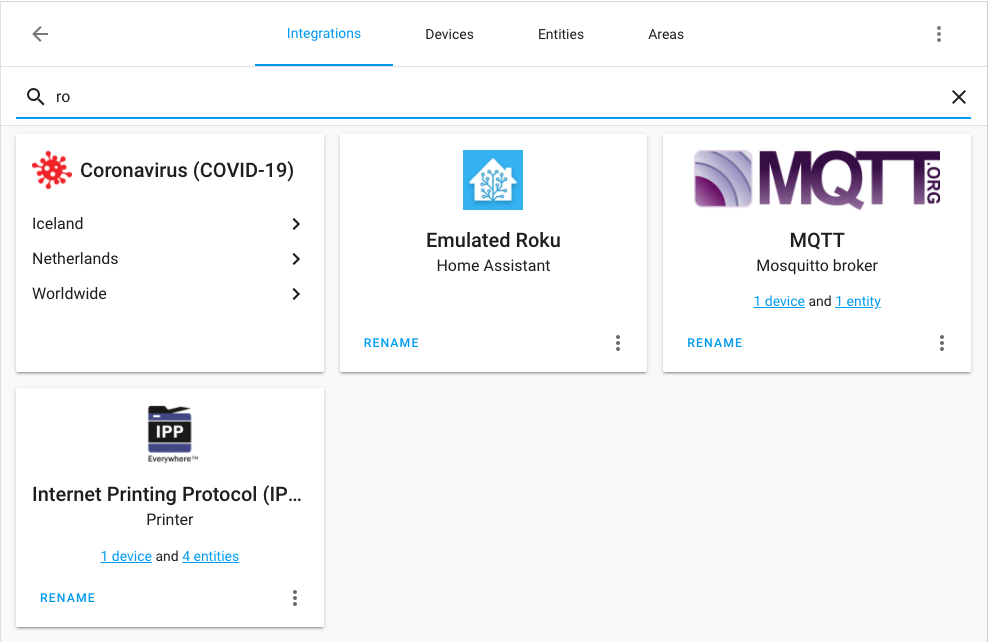 Screenshot of the 集成 page.
哦!我们还让自定义集成也可以使用图标和 Logo 了!
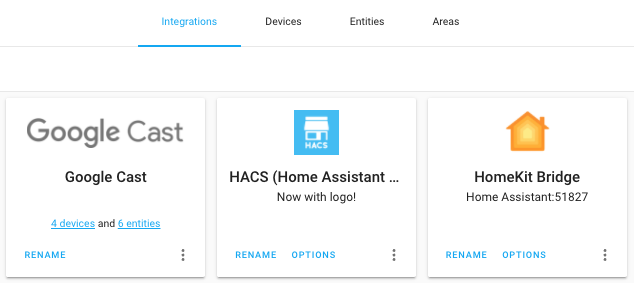 Screenshot of the HACS 集成 with its icon shown.
OpenZWave 集成现已进入 Beta
本次发布带来了全新的 OpenZWave 集成。它自去年 12 月起就以社区自定义集成的形式进行测试,现在已经准备好面向更广泛的用户了。
不过,这个集成目前仍处于早期阶段;并非所有平台和设备都已支持,设置流程也还有一些前置要求,门槛相对较高。请查看我们的文档了解当前要求和说明。
如果你想尝试它,最好已经熟悉自定义插件和 MQTT。目前还不能从现有的 Z-Wave 集成直接迁移,这部分后续会补上。
未来的计划是继续加入更多平台支持,让这个集成的设置过程变得非常简单。敬请期待。
目前我们还没有弃用现有 Z-Wave 集成的计划。 但我们希望这个新集成未来能提供比当前 Z-Wave 集成更简单、更稳定、功能也更丰富的体验。
感谢一直在测试这个自定义集成并提供宝贵数据的社区成员,正因如此我们才能发现 bug 并支持更多设备。特别感谢 @cgarwood 和 @marcelveldt,他们在这个集成的建设上起到了开拓性的作用。
所有被发现的集成都可以忽略了
一个经常被提及的问题/功能请求,就是希望任何被发现的项目都可以被忽略。 大多数集成之前已经支持了,但也有一些还不行。
从 0.110 开始,我们新增了一条开发规则:集成必须支持忽略被发现的项目;而在 0.110 中,我们也已经补齐了所有此前还不支持的集成!
结果就是:任何被发现的项目,现在都可以忽略了。
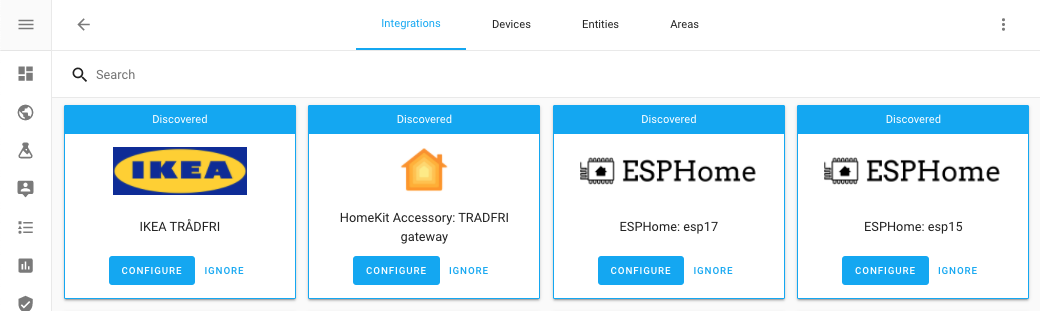 Screenshot of showing ignorable 集成.
日历面板
感谢 @zsarnett,我们有了一个漂亮的新日历面板!
它可以按月、周或日视图显示你所选日历中的全部项目。 另外,Lovelace 的日历卡片也已经在开发中了。
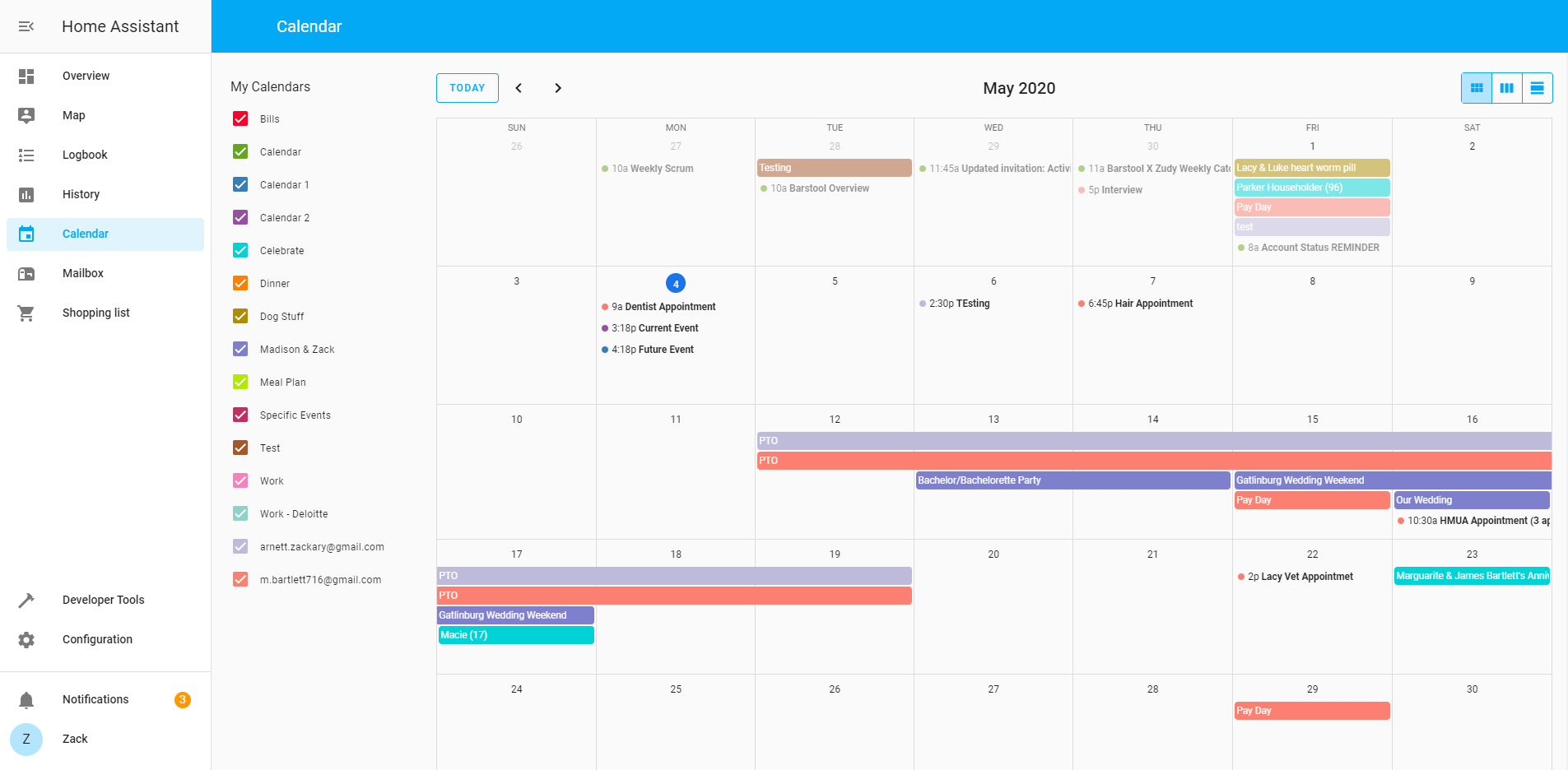 Screenshot of the 日历 面板.
天气卡片
关于上个版本更新后的天气卡片,我们收到了很多反馈;我们认真听取后,又加入了一些功能。 现在你可以为新图标设置主题颜色,甚至可以完全用另一张图片替换它们。
你还可以自定义哪些属性显示为次要信息。
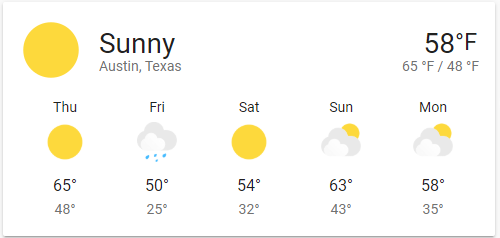 Screenshot of the updated 天气 卡片.
更多信息请查看文档。
内部与外部 URL
There are many cases where an 集成 needs the URL/link to your Home Assistant instance. For example, to set up a Webhook, communicate audio files or 摄像头 streams to an Amazon Alexa or Google Assistant 设备.
We used to have a base_url setting to deal with those cases, but that wasn't
always sufficient. Some 集成 require specific requirements for that
setting, which could lead to conflicting or impossible 设置.
It often resulted in broken TTS, streaming issues for 摄像头's or issues with casting. This 发布 addresses this issue by introducing two new 设置 in 配置 > General.
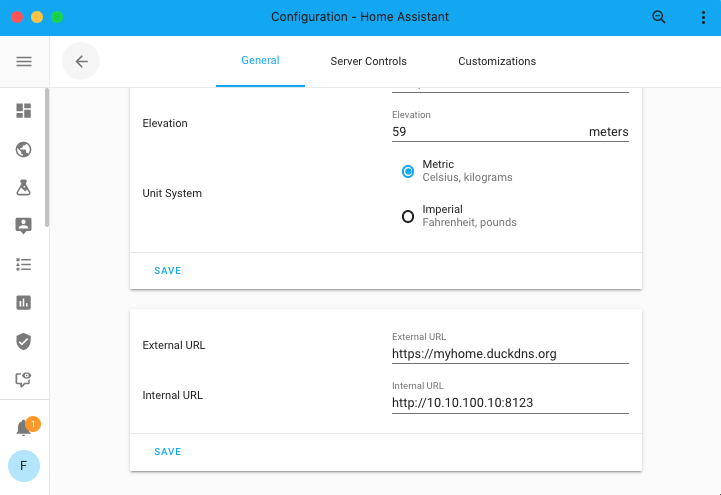 Screenshot of the URLs 配置.
If you want to set those via YAML, homeassistant: main 配置 has now
a external_url and internal_url setting.
These 设置 allow you to override the URLs Home Assistant uses when communicating on your internal network versus the outside world. Please note, that these are overrides. By default, Home Assistant will try to figure this out on its own.
If you have a Home Assistant Cloud subscription, 集成 can now also leverage that. This will reduce the amount of, often complex, 配置 needed.
After upgrading to 0.110, you can delete base_url from your 配置
as Home Assistant will automatically migrate that setting for you on 升级.
自动化现已支持 “not” 条件
When an 自动化 触发器, one can use 条件 to check if the set 动作 of an 自动化 should be run. 条件, however, always take the positive approach: If "something" equals or is "this".
As of this 发布, the 条件 now have support for specifying if a 条件 (or set of 条件) should "not" match. This can be helpful for 设备 or 实体 that have multiple 状态, but you actually only want to ensure it is not just that one 状态.
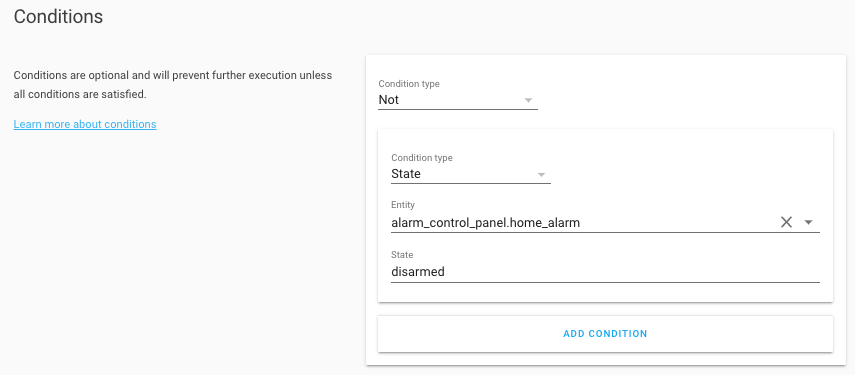 Screenshot of the 自动化 editor with a "not" 条件.
This feature has been added to the 自动化 editor, but is also available for writing 自动化 in YAML:
HomeKit
@bdraco has been busy improving HomeKit support for Home Assistant in 0.109, but it seems like that didn't stop him even a tiny bit. This 发布 @xdissent and @stickpin jumped on the HomeKit bandwagon as well!
HomeKit can now be configured and set up from the Home Assistant 前端, and even allows you to set up multiple instances! This allows one to bypass the maximum amount of 设备 a single HomeKit gateway supports by adding multiple. Using multiple, will also allow you to bypass the 1 TV per bridge limit on HomeKit.
Ready for this? Home Assistant 核心 0.110 now has 摄像头 support for HomeKit!
And if that wasn't enough already, the HomeKit 集成 now sends out more information as HomeKit accessory information. So besides the 实体 id, which was already present, you can also see which 集成 (and its name) provided the accessory in HomeKit.
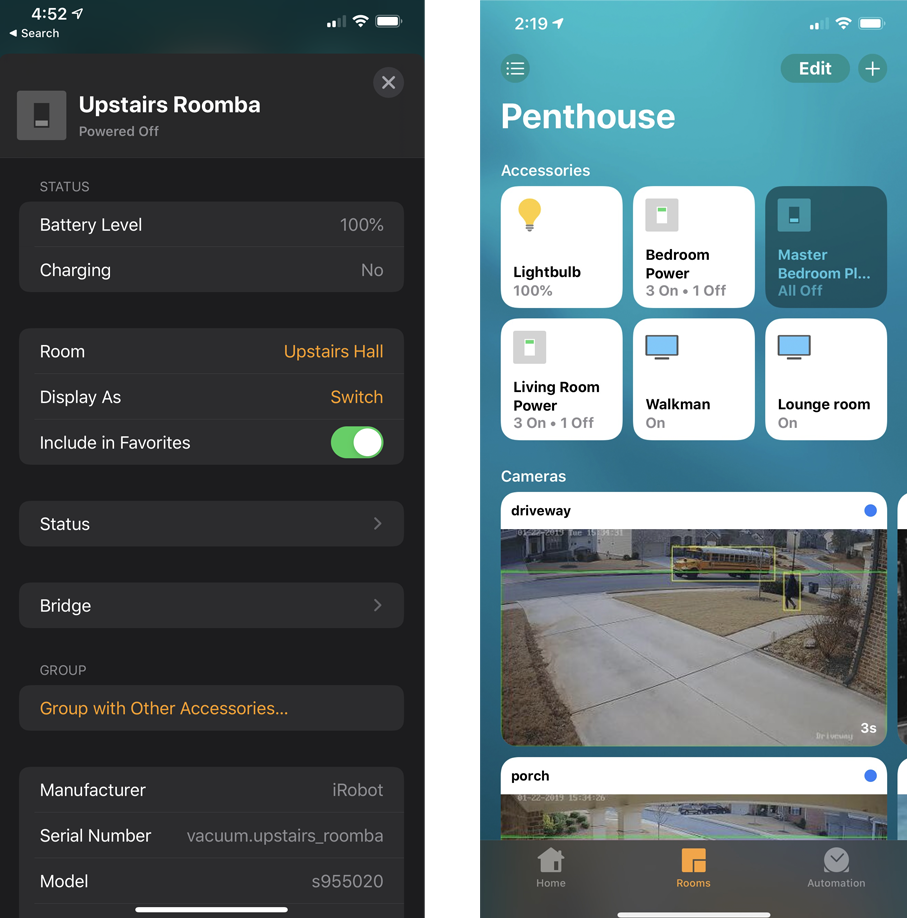 Screenshot from HomeKit. Left: accessory information, Right: 摄像头 support.
ONVIF
The ONVIF 集成 did get lots of love from @hunterjm! ONVIF Profile S conformant 摄像头's, can now be set up via the UI!
And that is not all... It now leverages more features of the ONVIF protocol: pull point subscriptions. This means that events from ONVIF will now show up in Home Assistant as well. So, if your ONVIF compatible 摄像头 supports things like motion, object or sound detection, those will be available now!
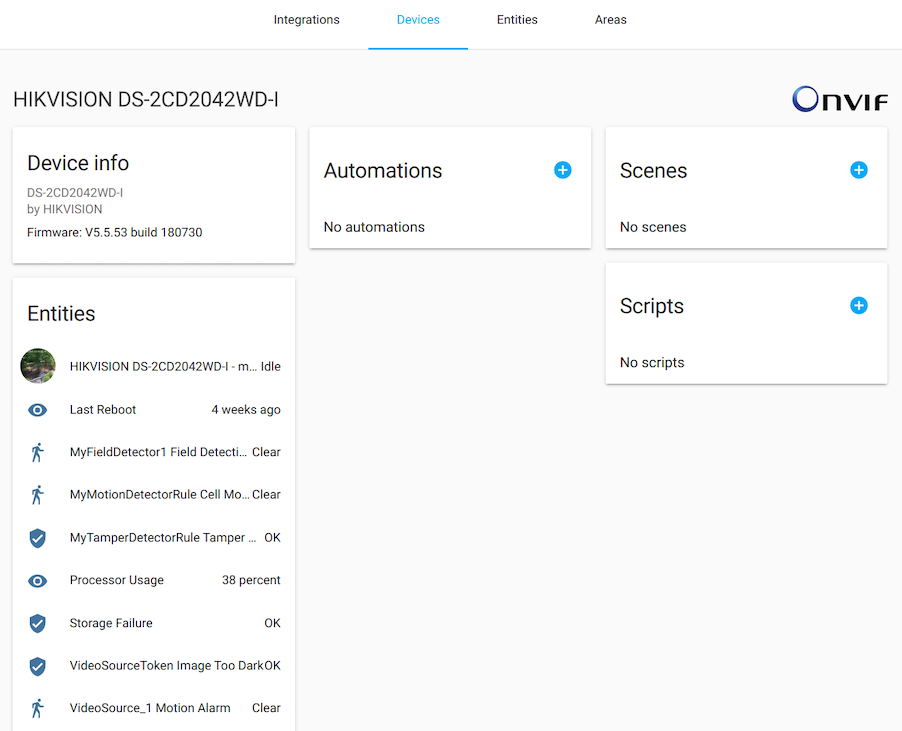 Screenshot of an ONVIF 摄像头 in Home Assistant.
Supervisor
Have you seen the new supervisor UI? @ludeeus did a great job redoing its UI! It now uses the same tabs as the 配置 面板. The 插件 page is split into multiple tabs, the 插件 store is cleaned up and you can view all 日志 in the system tab now (requires advanced mode).
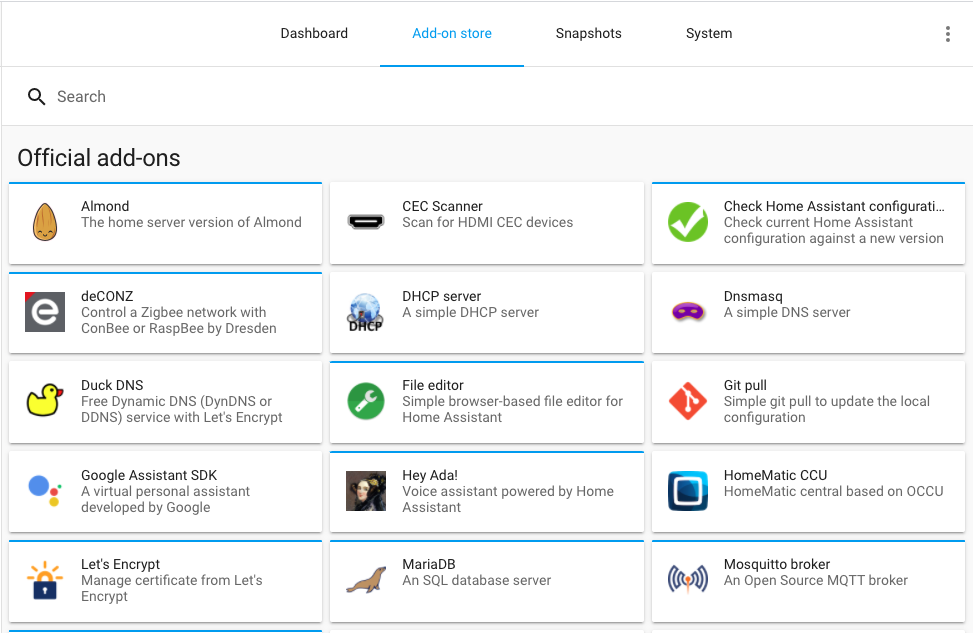 Screenshot of the Supervisor 面板.
Some 插件 are now also marked "advanced" and are only visible when you've enabled advanced mode on your 用户 profile.
其他值得注意的变更
-
It took a while, as many adjustments had to be made. This is the first 发布 supporting Python 3.8 🎉!
-
Quite a few optimizations to make Home Assistant go faster. One of the major changes is that Home Assistant will now set up all configured 集成 instances in parallel during startup. Some startup speed reported improvements from 82 seconds before this change and 28 seconds after this change. That is a huge improvement!
-
The info page in the development tools now shows more information about your set up. Including the name for your 安装 method. It will tell you if you run Home Assistant, Home Assistant 受监管模式 or Home Assistant 核心.
-
@MartinHjelmare added a new detection method for 集成 that potentially harm Home Assistant during runtime. We can now detect if an 集成 tries to close Home Assistant's (shared) HTTP client. If this happens, it will be prevented and write an 错误 message to your 日志, similar to how the I/O detection does it (released in 0.109).
-
The ISY994 got a major 升级! While it has quite a few backward-incompatible changes, it is now available via the UI and many bug are squashed. Thanks @shbatm!
新集成
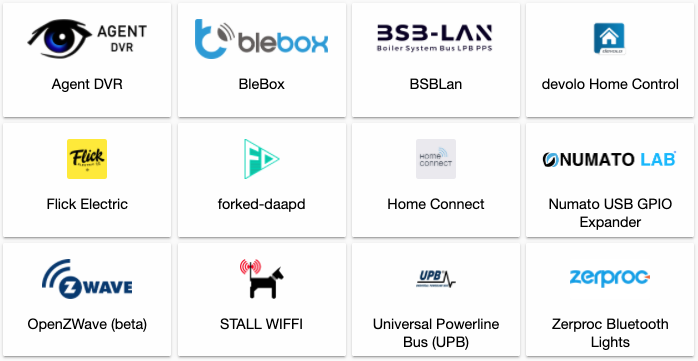
- Add numato 集成 (@clssn - #33816) (numato docs) (new-集成)
- Add zwave MQTT (@MartinHjelmare - #34987) (zwave_mqtt docs) (new-集成)
- Add Home Connect 集成 (@DavidMStraub - #29214) (homeconnect docs) (new-集成)
- Add BleBox 集成 (@gadgetmobile - #32664) (blebox docs) (new-集成)
- Add devolo home control (@2Fake - #33181) (devolo_home_control docs) (new-集成)
- Add agent_dvr 集成 (@ispysoftware - #32711) (agent_dvr docs) (new-集成)
- Add Universal Powerline Bus (@gwww - #34692) (upb docs) (new-集成)
- Add Flick Electric NZ 集成 (@ZephireNZ - #30696) (flickelectric docs) (new-集成)
- Add BSBLan 温控 集成 (@liudger - #32375) (bsblan docs) (new-集成)
- Add Zerproc 集成 (@emlove - #35477) (zerproc docs) (new-集成)
- Add wiffi 集成 (@mampfes - #30784) (wiffi docs) (new-集成)
- Add forked_daapd 集成 (@uvjustin - #31953) (forked_daapd docs) (new-集成)
新平台
- Add Xiaomi miio 报警 Control 面板 (@starkillerOG - #32091) (xiaomi_miio docs) (new-platform)
- Config flow for hunterdouglas_powerview (@bdraco - #34795) (hunterdouglas_powerview docs) (new-platform)
- Add battery 传感器 to hunterdouglas_powerview (@bdraco - #34917) (hunterdouglas_powerview docs) (new-platform)
- Add zwave_mqtt 传感器 platform (@cgarwood - #35135) (zwave_mqtt docs) (new-platform)
- Add zwave_mqtt 灯光 platform (@MartinHjelmare - #35337) (zwave_mqtt docs) (new-platform)
- Universal Powerline Bus 场景 support (@gwww - #35401) (upb docs) (new-platform)
- Add 温控 Platform Support to ISY994 (@shbatm - #35440) (isy994 docs) (new-platform)
- ONVIF Event Implementation (@hunterjm - #35406) (onvif docs) (new-platform)
- Support BleBox 传感器 (@gadgetmobile - #35374) (blebox docs) (new-platform)
- Add 二元sensor platform to zwave_mqtt (@marcelveldt - #35519) (zwave_mqtt docs) (new-platform)
现已可通过 UI 设置的集成
以下集成现在已经可以直接通过 Home Assistant UI 进行设置:
- Blink, done by @fronzbot
- HomeKit, done by @bdraco
- Hunter Douglas PowerView, done by @bdraco
- Lutron Caséta, done by @chrisaljoudi
- Mill, done by @Danielhiversen
- ONVIF, done by @hunterjm
- Pi-hole, done by @shenxn
- Tibber, done by @Danielhiversen
- Tuya, done by @ollo69
- Universal 设备 ISY994, done by @shbatm
如果你需要帮助……
如果这个版本带来了问题,请到我们的 issue tracker 提交报告,并尽量完整填写 issue 模板中的所有字段。
不向后兼容的变更
-
Manual 报警 面板 - When going from 状态
disarmedto any other (armed) 状态 such asarmed_away, the 状态 will bearminginstead ofpendingduring the transition time as set in the 配置. When going from an armed 状态 (such asarmed_away) to thetriggered状态 the 状态 will still bependingduring the transition time as set in the 配置 (as it was before). - (@starkillerOG - #32950) (manual docs)- 状态 属性
pre_pending_statechanged toprevious_state - 状态 属性
post_pending_statechanged tonext_state - 配置 option
pending_timeis renamed toarming_time, functionality is the same. - The time the 报警 stays at
pendingwhen triggered has changed fromdelay_timeof the previous 状态 +arming_time(previously known aspending_time) of the triggered 状态 to only thedelay_timeof the previous 状态.
- 状态 属性
-
Cert Expiry - The "name" 配置 option marked as deprecated in 0.107 has been removed and will now cause 错误 on startup if it remains in the 配置. You should change your 配置 accordingly. - (@jjlawren - #34628) (cert_expiry docs)
-
Stream - pyAV >7.0.0 has dropped support for FFmpeg versions <4.0. FFmpeg will need to be updated to at least 4.0 for stream to work. If you run an Home Assistant with the Superviser or Docker, no manual intervention is needed. Alternative installs can check the stream 集成 文档 for troubleshooting tips. - (@hunterjm - #34648) (stream docs)
-
Nederlandse Spoorwegen - The punctuality 属性 has been removed from the 集成. Ever since NS updated its API a few months ago, its behavior with regards to the punctuality has been incoherent, sometimes even missing from the API's response. This has caused numerous Issues to be 创建 in this repo by 用户 getting 错误 that the punctuality 属性 was unlike what the 集成 was expecting. - (@YarmoM - #34680) (nederlandse_spoorwegen docs)
-
Fortigate (Deprecated) - The Fortigate 集成 will be removed in 0.112.0 and has a replacement in the FortiOS 集成.
Please refer to the fortios integrations on how to 配置 the new parameters. - (@kifeo - #34854)
-
树莓派 摄像头 - To align with ADR-0007, 配置 has been moved under
rpi_camera:as its own platform. - (@alxrdn - #34461) (rpi_camera docs)Old YAML 配置 example:
New YAML 配置 example:
-
ONVIF - ONVIF is now available to be added from the 集成 UI! The
extra_argumentsandrtsp_transport配置 from YAML is now a part of the Options flow for the 集成, and is not automatically imported to the 配置 flow with the rest of the defined ONVIF platforms. - (@hunterjm - #34520) (onvif docs) -
PulseAudio Loopback - Internal library code has been replaced with the pulsectl library. - (@breiti - #34965) (pulseaudio_loopback docs)
- The default connection honors the 配置 in
/etc/pulseand no longer defaults tolocalhost. - When a host is configured, the default port has been changed to 4713 to use the native interface of PulseAudio.
- The 配置 parameters
buffer_sizeandtcp_timeouthave been removed.
- The default connection honors the 配置 in
-
UPnP - 此integrations has been simplified and will always create 传感器, so port mapping functionality has been removed. - (@StevenLooman - #35191) (upnp docs)
Example YAML 配置:
-
ZHA - 配置 options for ZHA 集成 in YAML is now deprecated and will be removed in 0.112.0. - (@Adminiuga - #35161) (zha docs)
Starting with the following radio 配置 options:
usb_pathbaudrateradio_type
-
IMAP Email Content - The 状态 of the
imap_email_contentis replaced when there is no email found. With this change, any other thing like an 自动化 can react to the arrival of an email - (@isk0001y - #35123) (imap_email_content docs) -
Sony Songpal - This is now enabled through the 集成 UI. To call
songpal/set_sound_settingon all songpal 设备, theentity_idnow needs to be set toallinstead of left unset. - (@shenxn - #34714, #35318) (songpal docs) -
HTTP -
base_urlis deprecated and replaced by aninternal_urlandexternal_url核心 配置 setting. - (@frenck - #35224) (basic config docs) (http docs) -
Kodi - Kodi previously reported the media content type for all PVR channels as "channel", no Matter if it was a TV or a radio channel. The media content type is now derived from the used player type, i.e., it reports as "music" for radio channels and "video" for TV channels. - (@Tho85 - #35091) (kodi docs)
-
Mill - Mill is now enabled through the 集成 UI and no longer available via YAML - (@Danielhiversen - #35136) (mill docs)
-
Homematic - 自动化 relying on the numeric value for the garage door status might break, since the status will now be reported as human-readable strings. - (@guillempages - #35349) (homematic docs)
-
Tuya - Tuya is now enabled through the 集成 UI. - (@ollo69 - #35422) (tuya docs)
-
LG webOS Smart TV - A new
unique_idis used forwebostvmedia players for 用户 running a 0.109.X 发布. Duplicate 实体 will be 创建 with new 实体 IDs and old 实体 will need to be manually removed. - (@jjlawren - #34979) (webostv docs) -
Blink As of May 11, 2020 Blink has removed the old username/密码 认证 method, which means all current Blink 集成 prior to this 发布 are broken.
In order to support this change, a 2FA key must be entered before 设置 can continue. Some 用户 may not have 2FA enabled on their account yet, but you will still receive an email at login asking you to allow the 设备 to continue setting up.
Your current YAML 配置 will be converted to a UI-based 配置, but the only supported entries are
username,password, andscan_interval. All other entries must be removed; otherwise, the 集成 will not be configured. - (@fronzbot - #35396) (blink docs) -
Emulated Hue - Emulated Hue was updated for better compatibility with newer systems. Existing 用户 may find that they will need to re-pair their system with emulated hue to reconnect 设备. - (@Tho85 - #35148) (emulated_hue docs)
-
Universal 设备 ISY994 - This migrates ISY994 to PyISY v2 and is now available to be added from the 集成 UI. PyISY 版本 2 is a significant 更新 to the original module used to communicate with the ISY. (@shbatm - #35212, #35338, #35413, #35391 ) (isy994 docs)
As part of the 更新 and many bug fixes, some backward-incompatible changes were introduced:
点击查看 ISY994 的全部不兼容变更
-
Remove ISY 温控 Module support: the ISY 温控 Module was retired by UDI on 3/30/2020: UDI Announcement, support has been removed from the module, so any 实体 based on 温控 module nodes will no longer import into Home Assistant. The enable_climate 配置 option will need be removed from your YAML 配置 file.
-
设备 状态 属性 have changed: some 属性' names and types will have changed as part of the changes to PyISY. If a 用户 relied on a 设备 状态 属性 for a given 实体, they should check that it is still there and formatted the same. In general, more 状态 属性 that were previously unavailable, should appear.
-
isy994_control events now return with additional information about the event. If a 用户 relies on the control event property in 自动化, these will need to be updated since the format has changed to include the additional detail.
-
Nodes that are "grouped" together in the ISY Admin Console will now be correctly identified and sorted, this will cause additional 实体 to be added to Home Assistant. If you were using this "group" feature to ignore some sub-设备 in Home Assistant, you will now need to use the
ignore_stringin the name instead. -
Turning on a 灯光 without providing a brightness value will use the ISY 设备's On Level property instead of turning on to full brightness (if Home Assistant doesn't have a stored value for the last brightness).
Sorting of certain 设备 based on the ISY's
Node Def IDandInsteon Typeproperties have been corrected to match the ISY's provided 设备 categories, as well as 用户 feedback of incorrect sorting for specific 设备. As a result, some 实体 that were incorrectly categorized will now appear under a different platform (e.g. 开关 to binary_sensor, 灯光 to 开关, etc.)Both KeypadLinc Secondary 按钮 and RemoteLinc2 按钮 have been moved from
switchto 传感器. This is because these 按钮 cannot actually be directly controlled via commands sent from theswitchplatform, doing so results in communication 错误 from the ISY because the commands are not valid. These 设备 are being moved tosensorinstead ofbinary_sensorbecause they report a 状态 in a range from0to255;0=Off,255=On according to their last brightness/dimming level sent.The ISY994 集成 now includes a
restore_light_stateoption. In 0.109.0, a change was made to 恢复 a 灯光's brightness to the previous 状态 when turned on with nobrightnessparameter. This was, in part, to fix an issue where the 灯光 to 打开 to full brightness when no parameters were given, regardless of the physical 设备'sOn Levelbrightness setting. Using theOn Levelis now supported and is the default behavior. To keep the current behavior and use Home Assistant's last brightness, set therestore_light_statetoTrueor enable the option in the new config flow options.The following 设备 node types have changed platforms to correct their categorization:
- "BinaryControl" (
SWITCH->BINARY_SENSOR) - "BinaryControl_ADV" (
SWITCH->BINARY_SENSOR; IOLinc 传感器) - "EZIO2x4_Input" (
SWITCH->BINARY_SENSOR) - "EZRAIN_Input" (
SWITCH->BINARY_SENSOR) - "OnOffControl" (
SWITCH->BINARY_SENSOR) - "OnOffControl_ADV" (New; Thermostat Control/Running 传感器)
- "EZIO2x4_Input_ADV" (
SWITCH->传感器, Analog input on EZIO). - "RemoteLinc2" (
LIGHT->SWITCH), - "RemoteLinc2_ADV" (
LIGHT->SWITCH), - RemoteLincs only report 按钮 presses as events, are not controllable and do not accurately report dimmable 状态.
- New Insteon Types for
BINARY_SENSORS: "7.0.", "7.13." (IOLinc/EZIO 传感器)- IOLinc 传感器/control logic will be updated in PR-4 to sort them correctly into two different platforms.
- New Insteon Type for
LOCKS: "4.64." added. - New Insteon Types for
SWITCHES: "0.16.", "7.3.255.", "9.10."
-
发布 0.110.1 - May 21
- Fix Delijn 传感器 naming (@Emilv2 - #35789) (delijn docs)
- Handle None received from pyforked-daapd (@uvjustin - #35830) (forked_daapd docs)
- Fix Daikin duplicate entries (@fredrike - #35833) (daikin docs)
- Homekit should skip 设备 that are missing in 设备 registry (@bdraco - #35857) (homekit docs)
- Updated 前端 to 20200519.1 (@bramkragten - #35877) (前端 docs)
- Fix 灯光 profiles for HomeMatic 灯光 (@danielperna84 - #35882) (homematic docs)
- fix mjpeg issue along with some 摄像头 not returning event capabilities properly (@hunterjm - #35885) (onvif docs)
- Ensure http can startup if homekit fails to load (@bdraco - #35888) (logbook docs)
- Ensure storage write consume the data under the 门锁 (@bdraco - #35889)
- Fix legacy Hunter Douglas PowerView 设备 (@bdraco - #35895) (hunterdouglas_powerview docs)
发布 0.110.2 - May 24
- Auto-level AirVisual API calls (@bachya - #34903) (airvisual docs)
- Fix 服务 registration supported features check (@chmielowiec - #35718)
- Fix Prezzibenzina doing I/O in the event loop (@bachya - #35881)
- 更新 rokuecp to 0.4.1 (@ctalkington - #35899) (roku docs)
- 更新 前端 to 20200519.3 (@bramkragten - #35925) (前端 docs)
- Ensure homekit functions if numpy is unavailable (@bdraco - #35931) (homekit docs)
- Fix ONVIF Transport (@hunterjm - #35932) (onvif docs)
- Fix typo in conf[CONF_SSL] (@Wohlraj - #35946) (zabbix docs)
- Fix Daikin AC 集成 for AirBase units (@fredrike - #35952) (daikin docs)
- Improve ipp unique id parsing (@ctalkington - #35959) (ipp docs)
- Bump pyAV and close unclosed outputs (@hunterjm - #35960) (stream docs)
- Fix lutron_caseta 设置 options (@MartinHjelmare - #35974) (lutron_caseta docs)
- Fix device_registry cleanup behavior (@alengwenus - #35977)
- Bump python-openzwave-MQTT to 1.0.2 (@MartinHjelmare - #35980) (ozw docs)
- Handle StorageError in the Broadlink 集成 (@felipediel - #35986) (broadlink docs)
- 更新 前端 to 20200519.4 (@bramkragten - #35987) (前端 docs)
- Fix ONVIF PTZ and profile encoding issues (@hunterjm - #36006) (onvif docs)
- 升级 hass-nabucasa to 0.34.3 (@frenck - #36025) (cloud docs)
- Migrate rpi_gpio_pwm to extend LightEntity instead of 灯光 (@soldag - #36028) (rpi_gpio_pwm docs)
- Fix shade compatibility with hunter douglas powerview 1.0 hubs (@bdraco - #36040) (hunterdouglas_powerview docs)
- Bump aiohomekit (@Jc2k - #36041) (homekit_controller docs)
- Bump tellduslive 版本 (@fredrike - #36048) (tellduslive docs)
- Fix roku play/pause support (@ctalkington - #35991) (roku docs)
发布 0.110.3 - May 26
- Bump pyvlx to 0.2.16 (@Julius2342 - #35971) (velux docs)
- Bump iaqualink to 0.3.3 (@flz - #35999) (iaqualink docs)
- Fix iaqualink 传感器 (@flz - #36000)
- Fix ONVIF config entry unique ID (@hunterjm - #36008) (onvif docs)
- Re-read last imap_email_content email when no change (@isk0001y - #36065) (imap_email_content docs)
- Fix opengarage async_setup_platform (@Danielhiversen - #36075) (opengarage docs)
- Fix emulated_hue compatibility with older 设备 (@Tho85 - #36090) (emulated_hue docs)
- Fix onvif snapshot for Sricam SP009 (@Minims - #36095) (onvif docs)
- Fix roku play/pause during standby (@ctalkington - #36096) (roku docs)
- Fix bugs with AirVisual auto-leveling API (@bachya - #36097) (airvisual docs)
- Ensure homekit bridge 状态 is restored before creating 设备 (@bdraco - #36098) (homekit docs)
- 更新 rokuecp to 0.4.2 (@ctalkington - #36102) (roku docs)
- guard against missing topic (@hunterjm - #36108) (onvif docs)
- fix preset 警告 (@hunterjm - #36110) (onvif docs)
- Remove unsupported stop feature with Hunter Douglas Powerview 1.0 Hubs (@bdraco - #36129) (hunterdouglas_powerview docs)
- Fix client ID lookup for official apps (@balloob - #36131) (auth docs)
- 更新 前端 to 20200519.5 (@bramkragten - #36154) (前端 docs)
发布 0.110.4 - May 28
- Add ability to ignore heos discovery (@bdraco - #34653) (heos docs)
- Fix Android TV icon when screencap option is disabled (@JeffLIrion - #35710) (androidtv docs)
- Let PAHO MQTT client handle connection to MQTT server (@emontnemery - #35983) (MQTT docs)
- Use a single 服务 browser for zeroconf discovery (@bdraco - #35997) (zeroconf docs)
- Check todoist due date is not None in async_get_events (@gadgetchnnel - #36140) (todoist docs)
- Fix cloud connection within API (@2Fake - #36158) (devolo_home_control docs)
- Revert DSMR not calling 实体 methods (@balloob - #36179) (dsmr docs)
- Fix empty preset element in ONVIF response (@hunterjm - #36182) (onvif docs)
- 更新 cast to use shared zeroconf (@bdraco - #35570) (cast docs)
- Bump zeroconf, pychromecast. 日志 if zeroconf.get_service_info fails. (@emontnemery - #36185) (cast docs) (zeroconf docs)
- Fix roku select source with app ids (@ctalkington - #36191) (roku docs)
- Prevent AirVisual from polling (@bachya - #36199) (airvisual docs)
- Fix custom position range (@emontnemery - #36222) (MQTT docs)
- Correct MQTT 设备 触发器 reconfiguration with same topic (@emontnemery - #36234) (MQTT docs)
发布 0.110.5 - June 5
- Add partial mobile app 传感器 validation (#36433 - @balloob)
- Fix iOS app crashing on None values in Zeroconf 服务 info (#36490 - @frenck)
- 更新 myq for latest api changes (#36469 - @bdraco)
发布 0.110.6 - June 8
- Fix mobile_app registering/更新 传感器 values with an unknown 状态. Will unblock iOS app (#36566 - @frenck)
发布 0.110.7 - June 9
所有变更
点击查看所有变更!
- UniFi - Improve logging related to loosing connection to controller (@Kane610 - #34547) (unifi docs)
- Set MQTT binary_sensor unavailable if expire_after specified (@uphillbattle - #34259) (MQTT docs)
- Add support for AirVisual Node/Pro units (@bachya - #32815) (airvisual docs)
- Add coverage to qwikswitch (@ziv1234 - #33939) (qwikswitch docs)
- Remove hap pyc file (@MartinHjelmare - #34563) (homematicip_cloud docs)
- UniFi - Store controller in config_entry.entry_id (@Kane610 - #34553) (unifi docs)
- Add 服务 to clear SimpliSafe 通知 (@bachya - #34481) (simplisafe docs)
- UniFi - Move some preloading of unavailable clients earlier in 设置 phase (@Kane610 - #34599) (unifi docs)
- 升级 pre-commit to 2.3.0 (@frenck - #34604)
- Rename BinarySensorDevice to BinarySensorEntity (@emontnemery - #34462)
- 升级 mock-open to 1.4.0 (@frenck - #34606)
- 升级 pyupgrade to v2.2.1 (@frenck - #34608)
- 升级 codecov to 2.0.22 (@frenck - #34607)
- Use "arming" 状态 during transition in manual 报警 面板 (@starkillerOG - #32950) (manual docs) (breaking-change)
- Move myStrom 灯光 and 开关 to async (@fabaff - #34079) (mystrom docs)
- Refactor Plex 设备/session updates (@jjlawren - #34616) (plex docs)
- Remove deprecated cert_expiry config (@jjlawren - #34628) (cert_expiry docs) (breaking-change)
- Add onvif PTZ GotoPreset (@Geronimo2015 - #34420) (onvif docs)
- Fix failing vilfo test that was doing i/o (@bdraco - #34647) (vilfo docs)
- 更新 dynalite library and minor changes (@ziv1234 - #34618) (dynalite docs)
- Allow flows to know if 用户 is in advanced mode (@balloob - #34629) (config docs)
- Add NOT 条件 助手 (@frenck - #34624)
- Store 集成 type in AirVisual config entry (@bachya - #34621) (airvisual docs)
- Fix recording duration flag (@hunterjm - #34648) (stream docs) (breaking-change)
- Fix py38 tests (@balloob - #34658) (google_assistant docs) (zeroconf docs)
- Add Signalmessenger group recipients (@bbernhard - #34419) (signal_messenger docs)
- Rename MediaPlayerDevice to MediaPlayerEntity (@emontnemery - #34592)
- Rename LockDevice to LockEntity (@emontnemery - #34594)
- Rename ClimateDevice to ClimateEntity (@emontnemery - #34591)
- Rename AlarmControlPanel to AlarmControlPanelEntity (@emontnemery - #34590)
- Rename CoverDevice to CoverEntity (@emontnemery - #34595)
- Fix tests for Python 3.8 (@balloob - #34672)
- Add ability to ignore rachio discovery (@bdraco - #34649) (rachio docs)
- Add ability to ignore tado discovery (@bdraco - #34650) (tado docs)
- Add ability to ignore myq discovery (@bdraco - #34652) (myq docs)
- Fix more tests on Python 3.8 (@balloob - #34703)
- Python 3.8 on CI (@pvizeli - #34654)
- Rename VacuumDevice to VacuumEntity (@emontnemery - #34674)
- Rename RemoteDevice to RemoteEntity (@emontnemery - #34676)
- Bump pyairvisual and remove unused trends (@bachya - #34707) (airvisual docs)
- Rename 灯光 to LightEntity (@emontnemery - #34593)
- Rename SwitchDevice to SwitchEntity (@emontnemery - #34673)
- Add missing typing to Spotify (@rako77 - #34698) (spotify docs)
- 升级 pillow to 7.1.2 (@frenck - #34733) (doods docs) (proxy docs) (qrcode docs) (seven_segments docs) (sighthound docs) (tensorflow docs)
- Create a unique_id for velux 遮盖 (@tschamm - #34668) (velux docs)
- 升级 pytest-sugar to 0.9.3 (@frenck - #34726)
- 升级 pytest-timeout to v1.3.4 (@frenck - #34609)
- Add unique ID to TRADFRI (@balloob - #34745) (tradfri docs)
- Improve 错误 handling for Powerwall (@jrester - #34580) (powerwall docs)
- 升级 pytest to 5.4.1 (@frenck - #34739)
- Allow ignoring discovery config flow 助手 (@balloob - #34740)
- Make ps4 config flow tests robust (@MartinHjelmare - #34749) (ps4 docs)
- Add hadolint to CI (@pvizeli - #34758)
- Refactor squeezebox (@rajlaud - #34731) (squeezebox docs)
- Bump simplisafe-python to 9.2.0 (@bachya - #34750) (simplisafe docs)
- Set up config entries in parallel (@balloob - #34755)
- Add Rachio rain delay 开关 (@brg468 - #34741) (rachio docs)
- Validate that discovered config flows set a unique ID (@balloob - #34751)
- Arcam fmj bump library to 0.4.4 (@elupus - #34687) (arcam_fmj docs)
- Attempt to fix CI (@balloob - #34800)
- Add 脚本 to copy 后端 translations to 前端 (@balloob - #34706)
- deCONZ - 设备 触发器 for Aqara Opple 开关 (@merdok - #34815) (deconz docs)
- Parallelize collections 助手 (@balloob - #34783)
- Minor 助手 cleanup (@balloob - #34786)
- 日志 threading exceptions properly (@balloob - #34789)
- Add missing blocks (@bdraco - #34832) (homekit docs)
- Removed defunct punctuality from nederlandse_spoorwegen (@YarmoM - #34680) (nederlandse_spoorwegen docs) (breaking-change)
- 更新 nederlandse_spoorwegen nsapi to 3.0.4 (@YarmoM - #34681) (nederlandse_spoorwegen docs)
- Add Xiaomi miio 报警 Control 面板 (@starkillerOG - #32091) (xiaomi_miio docs) (new-platform)
- Fix async_setup type in components/homeassistant module (@gladhorn - #34816) (homeassistant docs)
- Fix typo in arest 传感器 (@brendongo - #34833) (arest docs)
- Remove unnecessary space in greeneye_monitor unique_id (@brendongo - #34834)
- Fix race 条件 in august test under py38 (@bdraco - #34775) (august docs)
- Fix flapping 重载 tests (@bdraco - #34837)
- Bump 版本 to 0.110.0dev0 (@frenck - #34827)
- Fix tuya network failure startup (@ollo69 - #34057) (tuya docs)
- Remove side effects from rachio 开关 init (@bdraco - #34799) (rachio docs)
- Clean up Rachio 二元sensor init (@brg468 - #34855) (rachio docs)
- Prevent tplink tests from doing I/O (@bdraco - #34879) (tplink docs)
- Config flow for hunterdouglas_powerview (@bdraco - #34795) (hunterdouglas_powerview docs) (new-platform)
- Fix async 场景 conversion in Hunter Douglas Powerview (@bdraco - #34899) (hunterdouglas_powerview docs)
- Add numato 集成 (@clssn - #33816) (numato docs) (new-集成)
- Fix crash in NAD 集成 (@gladhorn - #34571) (nad docs)
- Add fortigate deprecation message (@kifeo - #34854) (breaking-change)
- Add overlay options wrapper to rpi_camera (@alxrdn - #34461) (rpi_camera docs) (breaking-change)
- Address new issues flagged by flake8 3.8.0a2 (@scop - #34964)
- Improve logging for unregistered webhooks (@danielperna84 - #34882) (Webhook docs)
- Use built-in test 助手 on 3.8 (@balloob - #34901)
- Fix Webhook imports sorting (@MartinHjelmare - #34988) (Webhook docs)
- Fix not 条件 validation and 实体/设备 extraction (@frenck - #34959)
- Cleanup homekit callbacks and jobs (@bdraco - #34975) (homekit docs)
- Add unique id to esphome config flow (@ctalkington - #34753) (esphome docs)
- Use a future for mock coro (@balloob - #34989) (MQTT docs)
- Introduce a singleton decorator (@balloob - #34803)
- Refactor 遥控器 class in panasonic_viera (@joogps - #34911) (panasonic_viera docs)
- 更新 excess powerwall logging to be 调试 (@bdraco - #34994) (powerwall docs)
- Add battery 传感器 to hunterdouglas_powerview (@bdraco - #34917) (hunterdouglas_powerview docs) (new-platform)
- Config flow for homekit (@bdraco - #34560) (homekit docs)
- Remove some passings of loop (@balloob - #34995) (rflink docs) (shell_command docs) (tradfri docs)
- UniFi - Add simple options flow (@Kane610 - #34990) (unifi docs)
- Attempt to fix flapping august 门锁 test (@bdraco - #34998) (august docs)
- Config flow for ONVIF (@hunterjm - #34520) (onvif docs) (breaking-change)
- Add flow and return 传感器 for MELCloud ATW 设备 (@vilppuvuorinen - #34693) (melcloud docs)
- Add full options to serial 传感器 platform (@guiguid - #34962) (serial docs)
- Fix unknown exception being caught (@shenxn - #35005) (roomba docs)
- Fix CI, incomplete change in melcloud (@frenck - #35016) (melcloud docs)
- Rename WaterHeaterDevice to WaterHeaterEntity (@emontnemery - #34675)
- Several optimizations to 自动化 (@frenck - #35007) (自动化 docs)
- Use pulsectl library for PulseAudio connection (@breiti - #34965) (pulseaudio_loopback docs) (breaking-change)
- Include QoS and retain in MQTT 调试 info (@emontnemery - #35011) (MQTT docs)
- Bump HAP-python to 2.8.3 (@bdraco - #35023) (homekit docs)
- 更新 AirVisual to use DataUpdateCoordinator (@bachya - #34796) (airvisual docs)
- Add more SNMP variable types (@Mich-b - #33426) (snmp docs)
- Fix songpal on 设备 where source!=uri (@rytilahti - #34699) (songpal docs)
- Fix ONVIF YAML import (@frenck - #35035) (onvif docs)
- Add yeelight meteorite (YLDL01YL, ceiling10) (@rytilahti - #35018) (yeelight docs)
- Cleanup homekit strings spacing (@bdraco - #35056) (homekit docs)
- Fix another race in august tests (@bdraco - #35054)
- Add 场景 to default config (@balloob - #35058) (default_config docs)
- added abbreviation for temperature_unit (@unixko - #35076) (MQTT docs)
- Fix proliphix (@mhorst314 - #34397) (proliphix docs)
- 升级 youtube_dl to 版本 2020.05.03 (@BKPepe - #35078) (media_extractor docs)
- Fix vera config ids not being converted to integers (@vangorra - #35070) (vera docs)
- Async vs sync inheritance mismatch fixes (@scop - #35088) (atag docs) (hunterdouglas_powerview docs)
- Use savoury1/ffmpeg4 PPA on Travis, PyAV 7 needs FFmpeg >= 4 (@scop - #35090)
- Check isinstance on collections.abc, not typing classes (@scop - #35087) (smartthings docs)
- Upgrades requests-mock to 1.8.0 (@frenck - #35093)
- Correct 错误 message in Microsoft Face (@ochlocracy - #35096) (microsoft_face docs)
- Add zwave MQTT (@MartinHjelmare - #34987) (zwave_mqtt docs) (new-集成)
- Improve UPnP 配置 flow (@StevenLooman - #34737) (discovery docs) (upnp docs)
- Add support for influxdb path parameter (@pdcemulator - #35089) (influxdb docs)
- Add codeowner to Monoprice 集成 (@OnFreund - #35111) (monoprice docs)
- Fix unloading of Monoprice config entries (@OnFreund - #35112) (monoprice docs)
- Increase surepetcare default timeout (@benleb - #34944) (surepetcare docs)
- Tibber config flow (@Danielhiversen - #34469) (tibber docs)
- Use suggestd_value instead of default in Monoprice options flow (@OnFreund - #35107) (monoprice docs)
- Simplify MQTT 灯光 brightness logic (@LordMike - #35097) (MQTT docs)
- Use asynctest-mock in most places (@balloob - #35109)
- Make alexa and google aware of DEVICE_CLASS_GATE (@bdraco - #35103) (alexa docs) (google_assistant docs)
- Add type to 设备 registry (@balloob - #35095) (adguard docs) (config docs)
- Add required features to 遮盖 服务 registration (@MartinHjelmare - #35073) (遮盖 docs)
- 升级 spotipy to 2.12.0 (@frenck - #35149) (spotify docs)
- 升级 numpy to 1.18.4 (@frenck - #35150) (iqvia docs) (opencv docs) (tensorflow docs) (trend docs)
- Add support for refreshing synology_dsm 传感器 (@ronaldheft - #35141) (synology_dsm docs)
- Return emulated hue id for 更新 requests (@Tho85 - #35139) (emulated_hue docs)
- Support multiple EDL21 meters (@mtdcr - #33594) (edl21 docs)
- Improve emulated_hue compatibility with newer systems (@Tho85 - #35148) (emulated_hue docs)
- 升级 pyupgrade to v2.3.0 (@frenck - #35159)
- 升级 cryptography to 2.9.2 (@BKPepe - #35084)
- scrape: extract strings from new non-text tags (@davidjb - #35021) (scrape docs)
- 升级 zeroconf to 0.26.0 (@fabaff - #35176) (zeroconf docs)
- 升级 alpha_vantage to 2.2.0 (@fabaff - #35172) (alpha_vantage docs)
- 升级 pytz to 2020.1 (@fabaff - #35174)
- Squeezebox add query and sync (@rajlaud - #31748) (squeezebox docs)
- UniFi - Improve signalling and handling of adding new 实体 (@Kane610 - #34925) (unifi docs)
- Simplification of upnp component (@StevenLooman - #35191) (upnp docs) (breaking-change)
- Some Sonos fixes (@amelchio - #35115) (sonos docs)
- Extract instance ID 助手 from updater (@balloob - #35043) (updater docs)
- Group by endpoints and not by 设备 for ZHA Zigbee groups (@dmulcahey - #34583) (zha docs)
- Move life360 I/O out of event loop in config flow (@pnbruckner - #35193) (life360 docs)
- Allow use of common 实体 更新 服务 in AirVisual (@bachya - #35203) (airvisual docs)
- Make sure MQTT 灯光 brightness is not rounded to 0 (@emontnemery - #35207) (MQTT docs)
- Add homekit 摄像头 support (@xdissent - #32527) (homekit docs)
- ISY994 migration to PyISY v2 (Structure Changes to enable 升级, Part 1) (@shbatm - #35212) (isy994 docs) (breaking-change)
- Fix AdGuard 设备 info (@balloob - #35217) (adguard docs)
- Add zwave_mqtt 传感器 platform (@cgarwood - #35135) (zwave_mqtt docs) (new-platform)
- Bump up pyserial dependency (@Adminiuga - #35201) (acer_projector docs)
- Add config flow base strings (@balloob - #34523)
- Strict creation of the config for dynalite (@ziv1234 - #34663) (dynalite docs)
- ISY994 Structure updates in prep for PyISYv2 (Part 2) (@shbatm - #35225) (isy994 docs)
- Add Home Connect 集成 (@DavidMStraub - #29214) (homeconnect docs) (new-集成)
- Add BleBox 集成 (@gadgetmobile - #32664) (blebox docs) (new-集成)
- Updated 前端 to 20200505.0 (@bramkragten - #35253) (前端 docs)
- Clean up 设备 registry if 实体 registry updates (@balloob - #35106)
- Add issue_tracker property to manifest (@frenck - #35153)
- Guard bad 实体 ID in 实体 registry (@balloob - #35271)
- Add manual config flow for Plex (@jjlawren - #34476) (plex docs)
- Fix pyload API statusServer doesn't take parameters (@h4de5 - #35242) (pyload docs)
- Add zwave workaround identification for Kwikset 916 and Kwikset Obsidian (@bryantlee - #35277) (zwave docs)
- Add current step that is in progress (@balloob - #35272) (config docs)
- Fix 风扇 not checking supported_features (@shenxn - #35248) (风扇 docs)
- New 配置 flow for ZHA 集成 (@Adminiuga - #35161) (zha docs) (breaking-change)
- 更新 pydaikin to 2.0.0 (@fredrike - #34807) (daikin docs)
- Provide zeroconf option to bind to only the default interface (@bdraco - #35281) (zeroconf docs)
- Clean up 脚本 for WLED translations (@balloob - #35260)
- Refactor ONVIF (@hunterjm - #35222) (onvif docs)
- 升级 zeroconf to 0.26.1 to resolve performance regression (@bdraco - #35291) (zeroconf docs)
- Fail tests if wrapped callbacks or coroutines throw (@emontnemery - #35010) (MQTT docs)
- Add Synology DSM scan interval option flow (@Quentame - #35183) (synology_dsm docs)
- Reset imap email content 状态 if no email (@isk0001y - #35123) (imap_email_content docs) (breaking-change)
- Add config flow support to songpal 集成 (@shenxn - #34714) (songpal docs) (breaking-change)
- Add 状态 reproduction to the alert component (@bachya - #35267) (alert docs)
- Fix broken CI (@balloob - #35314) (unifi docs)
- Fix incorrect 设备 registry call in Notion (@bachya - #35306) (notion docs)
- Handle config with a limited Plex account (@jjlawren - #35218) (plex docs)
- UniFi - Make 设备 proper push based (@Kane610 - #35152) (unifi docs)
- Add devolo home control (@2Fake - #33181) (devolo_home_control docs) (new-集成)
- Add Homekit 摄像头 codecs (@stickpin - #35238) (homekit docs)
- Add zwave_mqtt 灯光 platform (@MartinHjelmare - #35337) (zwave_mqtt docs) (new-platform)
- Add get_url 助手, deprecate base_url (@frenck - #35224) (config docs) (http docs) (breaking-change)
- Bump plexwebsocket to 0.0.8 (@jjlawren - #35351) (plex docs)
- Enable async_update for 实体 in NWS (@MatthewFlamm - #35048) (nws docs)
- Migrate ISY994 to PyISY v2 (@shbatm - #35338) (isy994 docs) (breaking-change)
- Delete flapping automatic tests (@bdraco - #35356)
- Rewrite JuiceNet for async and config flow (@jesserockz - #34365) (juicenet docs)
- Add modbus 传感器 string data_type (@bradkeifer - #35269) (modbus docs)
- Capitalize kane610 in codeowners since 脚本 are case sensitive (@Kane610 - #35375) (axis docs) (deconz docs) (unifi docs)
- Remove unused decorator in Airly (@bieniu - #35361) (airly docs)
- 升级 youtube_dl to 版本 2020.05.08 (@BKPepe - #35376) (media_extractor docs)
- 更新 devolo_home_control strings (@2Fake - #35362) (devolo_home_control docs)
- Add agent_dvr 集成 (@ispysoftware - #32711) (agent_dvr docs) (new-集成)
- Detect use of deprecated base_url (@frenck - #35353)
- Add config option to ignore Plex Web clients (@jjlawren - #34708) (plex docs)
- Bump up zha-设备-handlers dependecy for ZHA (@Adminiuga - #35379) (zha docs)
- Add Daikin total/cool/heat power 传感器 (@mlemainque - #34391) (daikin docs)
- 升级 pytest to 5.4.2 (@frenck - #35381)
- Fix devolo 开关 on and off (@2Fake - #35357) (devolo_home_control docs)
- async_get_url -> get_url (@frenck - #35382)
- Add Universal Powerline Bus (@gwww - #34692) (upb docs) (new-集成)
- UniFi - Make clients proper push based (@Kane610 - #35273) (unifi docs)
- 更新 ZHA zigpy-deconz dependency (@Adminiuga - #35389) (zha docs)
- Make roku async (@ctalkington - #35104) (roku docs)
- Small collection of random styling tweaks, fixes and Pythonism (@frenck - #35390)
- Improve ISY994 Z-Wave and 二元sensor 设备 sorting (@shbatm - #35391) (isy994 docs) (breaking-change)
- 升级 bravia-tv 后端 to 1.0.4 (@dcnielsen90 - #35393) (braviatv docs)
- UniFi - Additional consolidation for cleanliness sake (@Kane610 - #35395) (unifi docs)
- 更新 rokuecp to 0.2.1 (@ctalkington - #35400) (roku docs)
- Universal Powerline Bus 场景 support (@gwww - #35401) (upb docs) (new-platform)
- 更新 rokuecp to 0.2.2 (@ctalkington - #35404)
- Add 服务 to 打开 the switcher 设备 with timer (@thecode - #33235) (switcher_kis docs)
- Pylint cleanups (@scop - #35409)
- Refactor ZHA config flow (@Adminiuga - #35397) (zha docs)
- 更新 rokuecp to 0.2.3 (@ctalkington - #35420) (roku docs)
- Add config flow, use async loading, and 恢复 brightness option to ISY994 (@shbatm - #35413) (isy994 docs) (breaking-change)
- Add battery information to BLE 设备 (@guillempages - #33222) (bluetooth_le_tracker docs)
- UniFi - Use more common strings for config flow (@Kane610 - #35399) (unifi docs)
- Updated 前端 to 20200509.0 (@bramkragten - #35427) (前端 docs)
- Activate 日历 面板 (@zsarnett - #35276) (日历 docs)
- Improve roku 遥控器 (@ctalkington - #35419) (roku docs)
- 更新 rokuecp to 0.3.2 (@ctalkington - #35429) (roku docs)
- Fix permissions on bluetooth_le_tracker (@bdraco - #35432) (bluetooth_le_tracker docs)
- Fix scaffold and hassfest references (@balloob - #35431)
- reduce roku scan interval by 10s (@ctalkington - #35433) (roku docs)
- Add 设备 Registry support and 设备 Info for ISY994 (@shbatm - #35435) (isy994 docs)
- Add Flick Electric NZ 集成 (@ZephireNZ - #30696) (flickelectric docs) (new-集成)
- Add BSBLan 温控 集成 (@liudger - #32375) (bsblan docs) (new-集成)
- Only add SAJ 传感器 that are enabled and available (@fredericvl - #34978) (saj docs)
- Kodi: Correctly report media content type for PVR channels (@Tho85 - #35091) (kodi docs) (breaking-change)
- Songpal code and test improvement (@shenxn - #35318) (songpal docs) (breaking-change)
- Make upnp 更新 interval configurable (@StevenLooman - #35298) (upnp docs)
- Add 温控 Platform Support to ISY994 (@shbatm - #35440) (isy994 docs) (new-platform)
- Add min_mireds and max_mireds to MQTT 灯光 (@314eter - #32613) (MQTT docs)
- Add const module to oauth2 scaffold 模板 (@MartinHjelmare - #35438)
- Increase coverage and cleanup BleBox 遮盖 (@gadgetmobile - #35369) (blebox docs)
- Fix Daikin power 传感器 (@mlemainque - #35428) (daikin docs)
- Fix roomba bin full 二元sensor (@shenxn - #35443) (roomba docs)
- Add Mill config flow (@Danielhiversen - #35136) (mill docs) (breaking-change)
- Add support for ISY994 Variables as 传感器 (@shbatm - #35453) (isy994 docs)
- Remove logo & icon from manifest (@frenck - #35410)
- UniFi - 更新 设备 registry after 设备 has been upgraded (@Kane610 - #35430) (unifi docs)
- Listen for group member 状态 changes when using
expandin 模板 (@Tho85 - #35398) - Add names for the homematic garage door 状态 (@guillempages - #35349) (homematic docs) (breaking-change)
- Whitelist edl21 negative active energy 传感器 (@mtdcr - #34662) (edl21 docs)
- Bump envoy_reader 版本 (@gtdiehl - #35465) (enphase_envoy docs)
- Remove constants from myq that are now upstream (@bdraco - #35463) (myq docs)
- Open garage, move code to an external library. (@Danielhiversen - #35462) (opengarage docs)
- Make interface_choice option effective (@bdraco - #35444) (zeroconf docs)
- Make homekit TV media players aware of STATE_STANDBY (@bdraco - #35282) (homekit docs)
- 更新 rokuecp to 0.4.0 (@ctalkington - #35436) (roku docs)
- Add config flow for Tuya (@ollo69 - #35422) (tuya docs) (breaking-change)
- Use common strings for directv config flow (@ctalkington - #35471) (directv docs) (directv docs)
- Fix exception in hunterdouglas_powerview with ignored config entry (@bdraco - #35482) (hunterdouglas_powerview docs)
- Make homekit 摄像头 snapshots HAP spec compliant (@bdraco - #35299) (homekit docs)
- Reduce context switching in homekit 状态 updates (@bdraco - #35147) (homekit docs)
- Bump pyatmo 版本 to 3.3.1 (@cgtobi - #35476) (netatmo docs)
- Allow zeroconf instance sharing (@balloob - #35484) (zeroconf docs)
- Add lutron_caseta config entries (@chrisaljoudi - #34133) (lutron_caseta docs)
- Change unique_id for webostv (@jjlawren - #34979) (webostv docs) (breaking-change)
- Correctly handle failed Atag 更新 in coordinator (@MatsNl - #35473) (atag docs)
- Use common strings and fix key name for 错误 in vizio (@raman325 - #35487) (vizio docs)
- Fix 灯光 切换 服务 属性 (@shenxn - #35483) (灯光 docs)
- 升级 slixmpp library to 1.5.1 (@flowolf - #35495) (xmpp docs)
- Handle 错误 fetching available account link 服务 (@balloob - #35485) (cloud docs)
- Minor Tuya Fix (@ollo69 - #35497) (tuya docs)
- Ensure homekit 摄像头 stream can be restarted after failure (@bdraco - #35384) (homekit docs)
- Use config flow base strings (@fredrike - #35494) (point docs)
- Show 设备 details in homekit accessory 服务 info (@bdraco - #35100) (homekit docs)
- Add 设备 and 集成 服务 to ISY994 (@shbatm - #35467) (isy994 docs)
- ONVIF Event Implementation (@hunterjm - #35406) (onvif docs) (new-platform)
- Add cast app media (@Eerovil - #35114) (cast docs)
- Bump pydaikin to 2.0.1, catch HTTPForbidden exception (@fredrike - #35466) (daikin docs)
- Fix Home Connect datetime comparison (@DavidMStraub - #35501) (home_connect docs)
- Move upnp update_interval options flow (@StevenLooman - #35474) (upnp docs)
- Use system zeroconf singleton for homekit (@bdraco - #35502) (homekit docs)
- Compare uvc rtsp stream uri to host config (@danjenkins - #31107) (uvc docs)
- Pre-filter zeroconf 服务 browser updates (@bdraco - #35518) (zeroconf docs)
- 升级 pre-commit to 2.4.0 (@frenck - #35520)
- Fix bsblan get key CONF_PASSKEY (@liudger - #35513) (bsblan docs)
- Bumped aioswitcher to 1.2.0. (@TomerFi - #35510) (switcher_kis docs)
- Bump up ZHA dependecy (@Adminiuga - #35521) (zha docs)
- Code conformance and 传感器 value clean-up on ISY994 (@shbatm - #35514) (isy994 docs)
- Universal Powerline Bus -- Link Events (@gwww - #35526) (upb docs)
- Use common strings for songpal config flow (@shenxn - #35517) (songpal docs)
- Use common strings for ipp config flow (@ctalkington - #35505) (ipp docs)
- Fix zwave_mqtt discovery of 开关 实体 (@marcelveldt - #35533) (zwave_mqtt docs)
- Rewrite Atag (@MatsNl - #35496) (atag docs)
- support BleBox 传感器 (@gadgetmobile - #35374) (blebox docs) (new-platform)
- Return fan_speed_list based on SUPPORT_FAN_SPEED. (@ochlocracy - #35347)
- Meteo-France Vigilance Dependancy 更新 (@Imbuzi - #35537) (meteo_france docs)
- Add validator for battery scan option (@guillempages - #35506) (bluetooth_le_tracker docs)
- Use common strings for roku config flow (@ctalkington - #35504) (roku docs)
- 更新 HAP-python to 2.8.4 (@bdraco - #35541) (homekit docs)
- Fix sense doing I/O in the event loop (@bdraco - #35523) (sense docs)
- Add email as common data string (@balloob - #35546)
- Add temperature 设备 class to Darksky 传感器 (@balloob - #35544) (darksky docs)
- Use config flow references for data (@balloob - #35529)
- Add 二元sensor platform to zwave_mqtt (@marcelveldt - #35519) (zwave_mqtt docs) (new-platform)
- 升级 opengarage library (@Danielhiversen - #35549) (opengarage docs)
- Fix examples in 服务.yaml for squeezebox component (@rajlaud - #35548) (squeezebox docs)
- Bump bsblan lib to 版本 0.3.7 (@liudger - #35551) (bsblan docs)
- Ensure homekit_controller recieves zeroconf c# updates (@bdraco - #35545) (homekit_controller docs) (zeroconf docs)
- Try to automatically detect 区域 on first run of Monoprice 集成 (@OnFreund - #35127) (monoprice docs)
- Implement soundtouch select source (@jtommi - #31669) (soundtouch docs)
- Updated 前端 to 20200512.0 (@bramkragten - #35558) (前端 docs)
- Add Zerproc 集成 (@emlove - #35477) (zerproc docs) (new-集成)
- Add more system information from Supervisor (@frenck - #35560) (hassio docs) (updater docs)
- UniFi - Sites don't declare role on UniFiOS 1.7.0 beta (@Kane610 - #35555) (unifi docs)
- Fix synology temperature rounding (@shenxn - #35556) (synology_dsm docs)
- Bump plexapi to 3.6.0 (@jjlawren - #35563) (plex docs)
- Patch aiohttp client session close (@MartinHjelmare - #34769)
- Fix connection problems in the Broadlink 集成 (@felipediel - #34670) (broadlink docs)
- Add wiffi 集成 (@mampfes - #30784) (wiffi docs) (new-集成)
- Plex discovery on demand (@jjlawren - #35303) (plex docs)
- Add forked_daapd 集成 (@uvjustin - #31953) (forked_daapd docs) (new-集成)
- 更新 knx module to xknx 0.11.3 (@farmio - #35154) (knx docs)
- Add config flow to pi_hole 集成 (@shenxn - #35442) (pi_hole docs)
- Updated 前端 to 20200513.0 (@bramkragten - #35574) (前端 docs)
- Add config flow and 2FA support for Blink (@fronzbot - #35396) (blink docs) (breaking-change)
- Add ssdp discovery for isy994 (@bdraco - #35568) (isy994 docs)
- Properly handle incomplete upnp ssdp discovery (@StevenLooman - #35553) (upnp docs) (beta fix)
- Bump haanna to 0.15.0 (@bouwew - #35579) (plugwise docs) (beta fix)
- Clean up forked_daapd volume saving/setting in async_play_media (@uvjustin - #35584) (forked_daapd docs) (beta fix)
- Fix reversed logic in zeroconf homekit pairing check (@bdraco - #35596) (zeroconf docs) (beta fix)
- Updated 前端 to 20200514.0 (@bramkragten - #35598) (前端 docs) (beta fix)
- Additional checks for ONVIF event capabilities (@hunterjm - #35599) (onvif docs) (beta fix)
- Fix zwave_mqtt creating the 设备 name (@marcelveldt - #35603) (zwave_mqtt docs) (beta fix)
- Fix zwave thermostat specific 设备 type (@zacpotts - #35609) (zwave docs) (beta fix)
- Add check for HTML in translations (@bramkragten - #35615) (ambiclimate docs) (logi_circle docs) (point docs) (starline docs) (beta fix)
- 升级 to pysonos 0.0.29 (@amelchio - #35617) (sonos docs) (beta fix)
- 升级 huawei-lte-api to 1.4.12 (@scop - #35618) (huawei_lte docs) (beta fix)
- additional 日志 info and strings fix (@hunterjm - #35622) (onvif docs) (beta fix)
- Don't remove deprecated ZHA config option yet (@Adminiuga - #35627) (zha docs) (beta fix)
- Rename zwave_mqtt to ozw (@frenck - #35631) (ozw docs) (beta fix)
- Updated 前端 to 20200514.1 (@bramkragten - #35632) (前端 docs) (beta fix)
- Bump python-synology to 0.8.1 (@Quentame - #35640) (synology_dsm docs) (beta fix)
- Prevent discovery of IPP printers lacking identifier (@ctalkington - #35630) (ipp docs) (beta fix)
- 更新 Universal Powerline Bus event name (@gwww - #35644) (upb docs) (breaking-change) (beta fix)
- Bump roombapy to 1.6.1 (@shenxn - #35650) (roomba docs) (beta fix)
- Fix caldav event for 日历 面板 (@bramkragten - #35653) (caldav docs) (beta fix)
- ONVIF: Add check around media capabilities (@hunterjm - #35667) (onvif docs) (beta fix)
- Updated 前端 to 20200515.0 (@bramkragten - #35677) (前端 docs) (beta fix)
- Change MediaPlayerDevice to MediaPlayerEntity (@uvjustin - #35692) (forked_daapd docs) (beta fix)
- Fix handling of additional data in 核心 config storage (@frenck - #35660) (beta fix)
- Bump up ZHA dependencies (@Adminiuga - #35706) (zha docs) (beta fix)
- Abort forked-daapd zeroconf flow if 版本 < 27 (@uvjustin - #35709) (forked_daapd docs) (beta fix)
- 升级 opengarage lib to 0.1.4 (@Danielhiversen - #35729) (opengarage docs) (beta fix)
- Ensure homekit 版本 strings conform to spec (@bdraco - #35741) (homekit docs) (beta fix)
- 更新 mill manifest to reflect config flow (@Danielhiversen - #35748) (beta fix)
- Handle UPS disconnects in NUT (@bdraco - #35758) (nut docs) (beta fix)
- Fix daikin discovery flow (@fredrike - #35767) (daikin docs) (beta fix)
- Skip forked_daapd ignored entries with empty entry.data (@uvjustin - #35772) (forked_daapd docs) (beta fix)
- Bump Atag dependency to 0.3.1.2 (@MatsNl - #35776) (atag docs) (beta fix)
- Updated 前端 to 20200518.0 (@bramkragten - #35785) (前端 docs) (beta fix)
- Fix ONVIF subscription renewal (@hunterjm - #35792) (onvif docs) (beta fix)
- 升级 pysonos to 0.0.30 (@amelchio - #35793) (sonos docs) (beta fix)
- Change 版本 check in forked-daapd zeroconf step (@uvjustin - #35796) (forked_daapd docs) (beta fix)
- Bump up ZHA dependencies. (@Adminiuga - #35797) (zha docs) (beta fix)
- Updated 前端 to 20200519.0 (@bramkragten - #35813) (前端 docs) (beta fix)
- UniFi - Fix disabled 实体 being enabled after a 重启 (@Kane610 - #35819) (unifi docs) (beta fix)