

0.108:Logo、区域页面、Lovelace 实体卡片、Lovelace 地图历史
在聊这篇博客标题里的内容之前:
谨代表所有参与 Home Assistant 项目的人,我们希望你、你的家人以及你关心的人在这场疫情期间都能平安健康。 我们也向所有深受当前局势影响的人表达关心。
请保持坚强,彼此保持距离,勤洗手,注意安全。
❤️
上一个版本周期里,我们一路发布到了 0.107.7,总共 7 个补丁版本。
很多人注意到并提到,过去几个月我们的补丁版本确实变多了。这并不是因为我们发布的东西都是坏的,而是因为我们希望尽快把任何 bug 修复交付给你,这样你就不用为一个修复等待 3 周。
那么,来聊聊房间里的大象吧:Home Assistant Core 0.108!
Martin Hjelmare 与 Ashton Lafferty 加入 Nabu Casa
我们想先宣布一个消息:Martin Hjelmare 已加入 Nabu Casa!
Martin 长期以来一直是核心团队成员,最早在 Home Assistant 0.11(2016 年)时,就通过参与 MySensors 集成的开发开始为项目做贡献!大多数 Home Assistant 贡献者都认识 Martin,因为他在代码审查中总是展现出惊人的耐心。
另外,Ashton Lafferty(cogneato)此前也已经以兼职形式在 Nabu Casa 协助一些工作,比如支持事务。很多人可能早就因为这个认识他了,因为他在我们的 Discord 服务器 上一直非常活跃,热心帮助大家。
我们也很高兴地宣布,Ashton 现在也将全职加入 Nabu Casa!
Congratulations Martin and Ashton! 🎉
集成 Logo 与图标
我们在 GitHub 上创建了一个全新的仓库,其中收录了 Home Assistant 所能集成的各个品牌图标与 Logo。例如,我们的文档中就会使用这些图像。
在 0.108 中,我们开始把这个仓库中的内容用到 Home Assistant 前端里。设备信息页面和集成页面都获得了布局更新。
这些页面现在会显示与对应集成匹配的图标和 Logo。
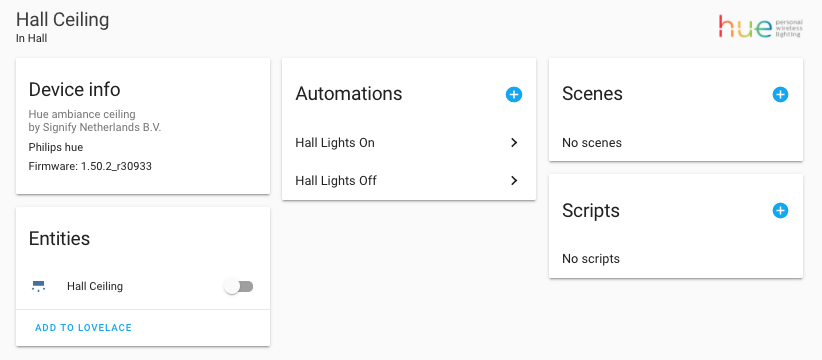 显示 Hue Logo 的设备信息页面截图。
想找一个参与 Home Assistant 项目的方式吗? 我们仍然缺少很多图像,所以正在公开征集帮助!
更多集成现在可以通过 UI 设置
这个版本里,看到这么多集成完成升级真的太棒了! 许多贡献者纷纷出手,为大量集成加入了通过 Home Assistant 前端进行配置的支持。
虽然并不是所有内容都赶上了这次发布,但现在这份名单已经非常惊艳了:
- Freebox, done by @Quentame
- Monoprice, done by @OnFreund
- Roku, done by @ctalkington
- Doorbird, done by @bdraco
- Elk-M1 Control, done by @bdraco
- Logitech Harmony, done by @bdraco
- MyQ, done by @bdraco
- Network UPS Tools (NUT), done by @bdraco
- NuHeat, done by @bdraco
- Rachio, done by @bdraco
Yes, @bdraco has been on fire this 发布! Amazing job!
Lovelace 地图历史
在居家隔离期间,这项功能也许不是特别实用;但等我们终于能再次自由出门时,它会非常酷。 @Hoytron 为 Lovelace 地图卡片加入了显示人物或设备追踪器历史轨迹的能力。你可以定义想显示多少小时的历史记录,系统会在这段时间范围内把所有位置点用线连接起来。
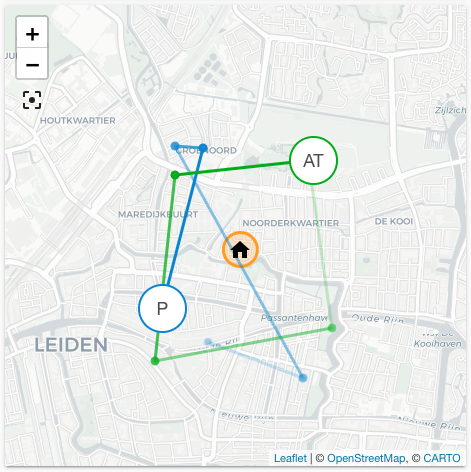 带历史轨迹的地图卡片截图。
全新 Lovelace 卡片:实体
@zsarnett 为 Lovelace 新增了一张卡片:实体卡片。这张卡片看起来和传感器卡片很像,但它支持显示任意实体,而不仅仅是传感器。
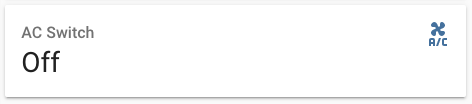 实体卡片截图。
区域配置页面
我们为区域新增了一个总览页面。在这个页面上,你不仅可以看到该区域中的所有设备,还能看到会影响该区域的自动化、场景和脚本。
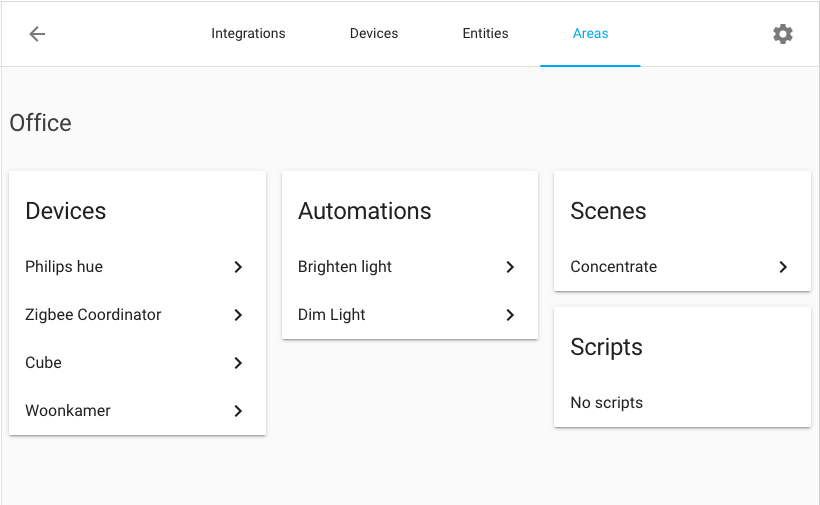 区域配置页面截图。
Horizontal stack 现在能更好处理不同高度
创建 Horizontal stack 时,堆叠中的卡片并不总能对齐得很好。这个问题现在已经得到改进。Horizontal stack 现在能更好地处理堆叠中卡片高度不同的情况。
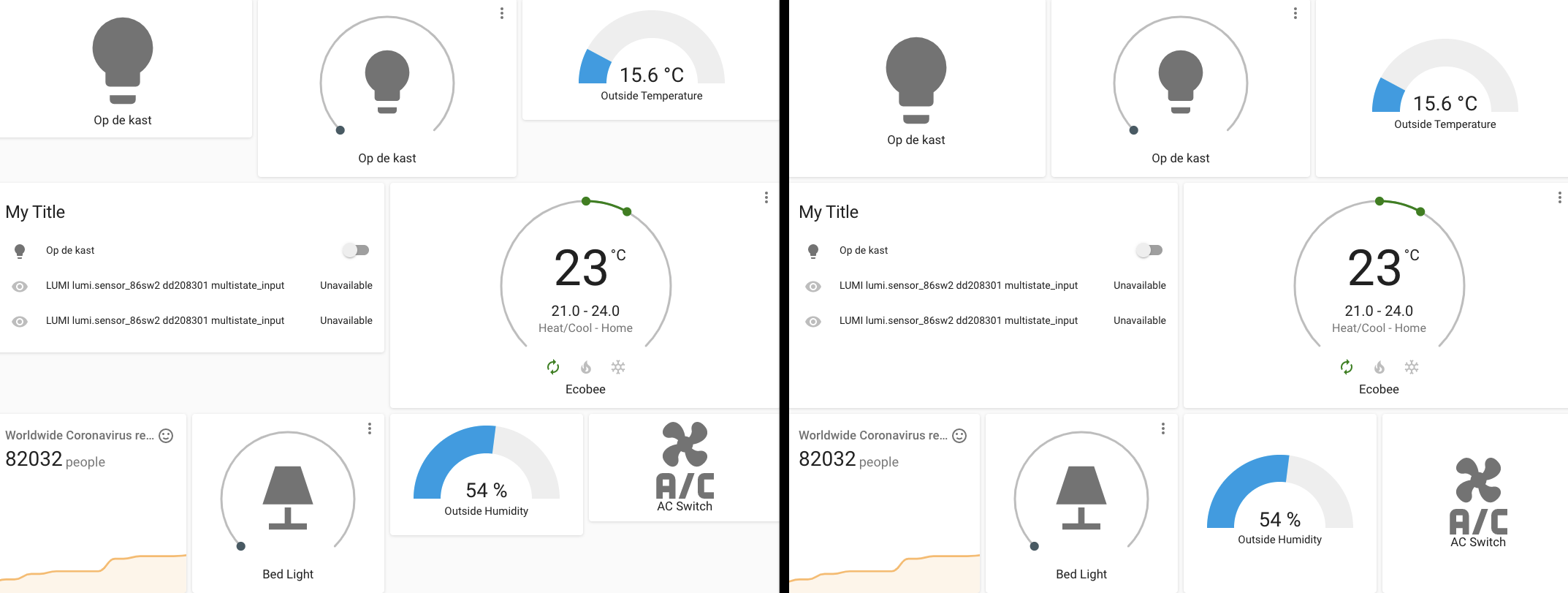 Horizontal Stack 改进前后的对比截图。
其他值得注意的变更
-
"Alexa, show the front door 摄像头." 😲 Alexa now has support for 摄像头, thanks @ochlocracy!
-
选择默认 Lovelace 仪表盘的入口现在已经移到用户资料页面。
-
很多配置页面已经迁移到数据表格,这意味着你现在可以在自动化、场景、脚本、用户和区域中直接搜索。
-
面板视图中的 Lovelace 卡片现在也可以通过 UI 编辑器进行编辑。
-
传感器卡片中的图表现在也可以作为页脚,用在实体卡片等卡片中。
-
Markdown 卡片新增了一个
user变量,可用于显示当前登录用户。 -
With the ZHA Zigbee 集成, Zigbee groups now dynamically create 实体 for 灯光, 开关 and 风扇 that are grouped together. This enables near-simultaneous control over a large group of 灯光 allowing them to 打开 or off at the exact same time. Thank you @dmulcahey!
-
通过 ONVIF 集成添加的摄像头,现在会自动使用摄像头自身提供的静态图像,而不再由 Home Assistant 生成。@roleoroleo 干得漂亮!
-
WLED 获得了不少内部升级,新增了 Wi-Fi 传感器,现在还加入了可控制 WLED 设备特效的服务。
-
Home Assistant 的 Docker 镜像现在开始使用 Jemalloc,以减少内存碎片并加快内存分配速度。结果就是更低的内存占用,以及整体更快的 Home Assistant。
新集成
- Add Powerwalls 集成 (@bdraco - #32851) (powerwall docs) (new-集成)
- Add Nexia thermostat support (Trane / American Standard) (@bdraco - #32826) (nexia docs) (new-集成)
- Add pvpc electricity prices 集成 (@azogue - #32092) (pvpc_hourly_pricing docs) (new-集成)
- Add support for Bosch BMP280 传感器 (@belidzs - #30837) (bmp280 docs) (new-集成)
- Add Nextcloud 集成 (@meichthys - #30871) (nextcloud docs) (new-集成)
- Add 集成 for Schluter (@prairieapps - #31088) (schluter docs) (new-集成)
- Add Internet Printing Protocol (IPP) 集成 (@ctalkington - #32859) (ipp docs) (new-集成)
新平台
- Add support for nexia 自动化 (@bdraco - #33049) (nexia docs) (new-platform)
- Add support for occupancy/vacancy groups in Lutron Caseta component (@swails - #33032) (lutron_caseta docs) (new-platform)
- Fire events for hue 遥控器 按钮 pressed (@azogue - #33277) (hue docs) (new-platform)
- Add 二元sensor for myq gateway connectivity (@bdraco - #33423) (myq docs) (new-platform)
如果你需要帮助……
如果这个版本带来了问题,请到我们的 issue tracker 提交报告,并尽量完整填写 issue 模板中的所有字段。
不向后兼容的变更
-
Lovelace themes - We discovered our theme logic was wrong, when you didn't specify a theme for a Lovelace 卡片 or view. It would default to the 后端 selected theme, even when your local theme was different, or your view had a different theme. To fix this we removed the options
defaultandBackend selectedfrom the Lovelace theme selection, and when there is not theme selected it will not set a theme. This will make sure the element has the same theme as its parent. -
Freebox - Freebox is now available as an 集成 from the 集成 UI! You will need to re-授权 Home Assistant to access the Freebox router. - (@Quentame - #30334) (freebox docs)
-
UniFi - Manual 配置 has been deprecated as the UI 集成 now supports all of the previous available options and more. Your existing YAML 配置 has previously been imported so just remove it. - (@Kane610 - #32699) (unifi docs)
-
Emulated Hue - The
emulated_hueandemulated_hue_hidden属性 have been deprecated. Use the existingentitieshidden配置 instead. - (@bdraco - #32718) (emulated_hue docs)Example YAML 配置:
-
Roku - Roku is now available as an 集成 from the 集成 UI! The
roku_scan服务 has been removed in favor of discovery viassdp. - (@ctalkington - #31988) (roku docs) -
MQTT - Deprecated features from MQTT platforms are now removed. - (@emontnemery - #32909) (MQTT docs)
- For MQTT 灯光 设置 through MQTT discovery, it's no longer possible to specify schema with
platform配置 variable. Instead, schema must be specified by theschema配置 variable. - For MQTT
alarm_control_panel, MQTTbinary_sensorand MQTTsensorset up through MQTT discovery: The undocumented implicit setting ofstate_topicis no longer supported. Instead,state_topicmust be explicitly set. - Support for
json_attributesis removed from MQTT 传感器,json_attributes_topicshould be used instead.
- For MQTT 灯光 设置 through MQTT discovery, it's no longer possible to specify schema with
-
Harmony - Harmony is now available as an 集成 from the 集成 UI! The YAML 配置 now requires a host/ip. - (@bdraco - #32919) (harmony docs)
Example YAML 配置:
-
Sonos - Sonos 属性 have been cleaned up for radio streams. - (@amelchio - #33063) (sonos docs)
- Sonos 实体 playing radio streams used to merge the radio name, the artist and the song name into two 属性. They now have
media_artistandmedia_title属性 that match the playing music (when available). - Radio station artwork is no longer available for Sonos 实体 in polling mode (i.e., on a network separate to the network Home Assistant is on).
- Sonos 实体 playing radio streams used to merge the radio name, the artist and the song name into two 属性. They now have
-
Monoprice - Monoprice is now available as an 集成 from the UI! Please remove the 配置 from YAML and add the Monoprice 集成 from the 集成 page. - (@OnFreund - #30337) (monoprice docs)
-
Lutron Caseta - As a result of some cleanup, the
Device IDandZone ID属性 of Lutron Caseta 设备 have been renamed todevice_idandzone_idto match the convention of the rest of Home Assistant. If you have any 自动化 that reference these 属性, they will need to be updated. - (@swails - #33144) (lutron_caseta docs) -
NuHeat - NuHeat is now available as an 集成 from the UI! The previous 服务 has been removed and is now handled by
set_hvac_mode(温控 1.0). - (@bdraco - #32885) (nuheat docs) -
ElkM1 - ElkM1 is now available as an 集成 from the UI! An auto 配置 mode has been introduced which avoids the need to 设置 the complex include and exclude filters. This functionality still exists when configuring from YAML for power 用户 who want more control over which 实体 elkm1 generates. As 实体 IDs can now be changed, the
alarm_control_panel属性changed_by_entity_idis nowchanged_by_keypadand will show the name of the Elk keypad instead of the 实体 ID. - (@bdraco - #33297) (elkm1 docs) -
HmIP - After HmIP Cloud Maintanance (17.3.2020) it's possible to define labels for each channel of a multi 设备. If the labels of a multi channel 设备 have been changed in the native Homemamtic IP Cloud App, then the 实体 names will change accordingly. - (@SukramJ - #32925) (homematicip_cloud docs)
-
Slack - The Slack 集成 got an overhaul and added support for async and Slack's Block Kit. As the YAML 配置 schema for 此integrations has changed, please be sure to read the 文档. Additionally, because it represents an unacceptable security risk, 遥控器 files (i.e., those that do not exist in a whitelisted directory local to Home Assistant) can no longer be sent to Slack via 此integrations. - (@bachya - #33287) (slack docs)
Example YAML 配置:
-
Network UPS Tools (NUT) - The NUT 集成 is now available as an 集成 from the UI! (@bdraco - #33457) (nut docs) (breaking change)
The following 传感器 are no longer supported:
ups.timeups.dateups.modelups.mfrups.mfr.dateups.serialups.vendoridups.productidups.firmwareups.firmware.aux
告别以下内容
- 报警.com
- Mopar
These 集成 have been removed. The websites for both have changed, causing the 集成 to break because they relied on web scraping, which is no longer allowed (ADR-0004). - (@frenck - #33056 #33066)
发布 0.108.1 - April 8
- Speed up TP-Link 灯光 (@balloob - #33606) (tplink docs)
- 更新 传感器.py (@danbishop - #33788) (octoprint docs)
- Bump pylutron-caseta 版本 to 0.6.1 (@swails - #33815) (lutron_caseta docs)
- 更新 to pyipp==0.9.1 (@ctalkington - #33819) (ipp docs)
- Fix unhandled exception in Recollect Waste (@bachya - #33823) (recollect_waste docs)
- Fix modbus transaction response (@janiversen - #33824) (modbus docs)
- Fix kef DSP_SCAN_INTERVAL timedelta (@basnijholt - #33825) (kef docs)
- Fix Doorbird yaml import aborted if discovery finds it first (@bdraco - #33843) (doorbird docs)
- Bump up ZHA dependencies (@Adminiuga - #33856) (zha docs)
- Fix vizio bug that occurs when CONF_APPS isn't in config entry… (@raman325 - #33857) (vizio docs)
- TTS: Wait till files are 创建 in tests (@balloob - #33760) (tts docs)
- Fix last flaky TTS test (@balloob - #33849) (tts docs)
发布 0.108.2 - April 9
- Improve Plex debounce/throttle logic (@jjlawren - #33805) (plex docs)
- 更新 aioswitcher (@balloob - #33821) (switcher_kis docs)
- Fix nextcloud 传感器 mappings (@L-Henke - #33840) (nextcloud docs)
- Check status code on onvif snapshot (@balloob - #33865) (onvif docs)
- Fix Monoprice robustness (@OnFreund - #33869) (monoprice docs)
- Fix modbus default delay (@janiversen - #33877) (modbus docs)
- Updated 前端 to 20200407.2 (@bramkragten - #33891) (前端 docs)
- Fix onvif consistent return (@balloob - #33898) (onvif docs)
- Modbus: isolate common test functions (@janiversen - #33447)
- Fix Modbus review comments (@janiversen - #33755) (modbus docs)
- Rename domain import in modbus (@janiversen - #33906) (modbus docs)
- Fix tplink HS220 dimmers (@bdraco - #33909) (tplink docs)
- Exclude access token from host info updates in Konnected config flow (@kit-klein - #33912) (konnected docs)
- Bump pyvizio 版本 for vizio (@raman325 - #33924) (vizio docs)
- Fix tplink HS220 dimmers (round 2) (@bdraco - #33928) (tplink docs)
- Guard IPP against negative ink levels (@ctalkington - #33931) (ipp docs)
- Remove print() from Bayesian 二元sensor (@carlos-sarmiento - #33916) (bayesian docs)
发布 0.108.3 - April 10
- Fix Onvif 摄像头 that does not have SnapshotUri such as Sricam (@Minims - #33902) (onvif docs)
- Make homekit aware of DEVICE_CLASS_GATE (@bdraco - #33936) (homekit docs)
- Fix powerwall units (kW) (@bdraco - #33954) (powerwall docs)
- Fix turning off/on 灯光 groups in homekit (@Knapoc - #33965) (homekit docs)
- 更新 pyipp to 0.9.2 (@ctalkington - #33967) (ipp docs)
- Handle 304 http responses in nexia (@bdraco - #33972) (nexia docs)
- Fix shutdown timeout and make it upstream with Supervisor (@pvizeli - #33973)
- Cleanup ZHA group 实体 lifecycle (@dmulcahey - #33977) (zha docs)
- Exclude non thermostats from being detected by nexia (@bdraco - #33979) (nexia docs)
- Use zeroconf UUID if not available via IPP properties (@ctalkington - #33991) (ipp docs)
发布 0.108.4 - April 13
- Fix #33995 Use "now" if departure is None (@eifinger - #34017) (here_travel_time docs)
- Fix nexia 风扇 and hold modes for XL824 thermostats (@bdraco - #34042) (nexia docs)
- Handle all zero serial numbers in NUT (@bdraco - #34045) (nut docs)
- UniFi - Fix unit of measurement from B to MB (@Kane610 - #34091) (unifi docs)
- Fix Daikin 传感器 temperature_unit & cleanup (@fredrike - #34116) (daikin docs)
- Bump pyIntesisHome to 1.7.3 (@jnimmo - #34125) (intesishome docs)
- Fix deprecated icon/username logic in Slack (@bachya - #34156) (slack docs)
- Improve rounding the 灯光 level conversion in Lutron Caseta (@swails - #34167) (lutron_caseta docs)
- Fix Z-Wave brightness off by one (@bdraco - #34170) (zwave docs)
- Increase timeout and 日志 the url of the elkm1 system that time… (@bdraco - #34172) (elkm1 docs)
- Convert sense to use DataUpdateCoordinator for trends data (@bdraco - #34160) (sense docs)
发布 0.108.5 - April 15
- Temporary transition Docker init (@frenck - #34135)
- Catch IPPVersionNotSupportedError in IPP (@ctalkington - #34184) (ipp docs)
- Fix websocket connection bug/errant logic in Ambient PWS (@bachya - #34217) (ambient_station docs)
- Fix Cloud UI bug preventing managing Google 2FA (@balloob - #34241) (cloud docs) (google_assistant docs)
- Add daikin update_before_add (@fredrike - #34248) (daikin docs)
- Fix various Daikin issues (@fredrike - #34249) (daikin docs)
发布 0.108.6 - April 16
- Use config entry id for unique id if serial number is missing (@bdraco - #34154) (nut docs)
- Fix default elkm1 temp units (@bdraco - #34274) (elkm1 docs)
- Skip ignored hosts when checking existing config entries in config flow (@raman325 - #34280) (vizio docs)
- 升级 broadlink lib to 0.13.1 (@Danielhiversen - #34290) (broadlink docs)
- Pass an argument to kef.update_dsp for async_track_time_interval (@basnijholt - #34310) (kef docs)
- Fixes for Sonos media titles (@amelchio - #34311) (sonos docs)
- Abort vizio zeroconf config flow if unique ID is already configured (@raman325 - #34313) (vizio docs)
- 更新 Coordinator: Only schedule a refresh if listenerrs (@balloob - #34317)
发布 0.108.7 - April 21
- Fix setting up multiple UPSes with NUT in 0.108.x (@bdraco - #34427) (nut docs)
- Cloud do checks during 设置 (@balloob - #33507) (cloud docs)
- Rollback modbus to 版本 0.107.7 keep new functionality (@janiversen - #34287) (modbus docs)
- Ensure nexia 状态 file is in a writable location (@bdraco - #34325) (nexia docs)
- Modify requirements for CameraStreamController in Alexa (@ochlocracy - #34470) (alexa docs)
- Fix cloud binary_sensor & TTS/STT (@pvizeli - #34505)
发布 0.108.8 - April 22
- Bump hass-nabucasa 0.34.1 (@pvizeli - #34480) (cloud docs)
发布 0.108.9 - April 24
所有变更
点击查看所有变更!
- Refactor Freebox : add config flow + temperature 传感器 + signal dispatch (@Quentame - #30334) (freebox docs) (breaking change)
- 升级 slacker to 0.14.0 (@fabaff - #32698) (slack docs)
- 升级 pylast to 3.2.1 (@fabaff - #32700) (lastfm docs)
- Add support for simultaneous runs of 脚本 助手 - Part 2 (@pnbruckner - #32442)
- Cleanup 实体 and 设备 registry on MQTT discovery removal (@emontnemery - #32693) (MQTT docs)
- 升级 mypy to 0.770, tighten config a bit (@scop - #32715)
- 升级 psutil to 5.7.0 (@fabaff - #32720) (systemmonitor docs)
- Remove manual 配置 support (@Kane610 - #32699) (unifi docs) (breaking change)
- 升级 sendgrid to 6.1.3 (@fabaff - #32721) (sendgrid docs)
- Bumped 版本 to 0.108.0dev0 (@frenck - #32697)
- Fix delijn 传感器 stuck on last passage (@Emilv2 - #32710) (delijn docs)
- 升级 pre-commit to 2.2.0 (@frenck - #32737)
- Add 更新 class method to DataUpdateCoordinator (@frenck - #32724)
- 升级 sqlalchemy to 1.3.15 (@frenck - #32747) (recorder docs) (sql docs)
- Use platform tag to register components on hue SensorManager (@azogue - #32732) (hue docs)
- Add options flow for SimpliSafe (@bachya - #32631) (simplisafe docs)
- Add memo text 服务 (@brefra - #31222) (velbus docs)
- Move apps 配置 to options flow for vizio 集成 (@raman325 - #32543) (vizio docs)
- Migrate WLED to use DataUpdateCoordinator (@frenck - #32565) (wled docs)
- Extend rtorrent 传感器 functionality (@smega - #32353) (rtorrent docs)
- Bump pypck to 0.6.4 (@alengwenus - #32775) (lcn docs)
- Do not fail when a 用户 has a controller with shared access on… (@bdraco - #32756) (rachio docs)
- Optimize is_entity_exposed in emulated_hue by removing deprec… (@bdraco - #32718) (emulated_hue docs) (breaking change)
- Add config flow for rachio (@bdraco - #32757) (rachio docs)
- Type hint improvements (@scop - #32793)
- Add Insteon Dual Band SwitchLinc model 2477S to ISY994 (@UrbanDave - #32813) (isy994 docs)
- Add model to rachio 设备 info (@bdraco - #32814) (rachio docs)
- Add Abode tests (@shred86 - #32562) (abode docs)
- Add config flow to roku (@ctalkington - #31988) (roku docs) (breaking change)
- Add imperial units to met 天气 (@MatthewFlamm - #32824) (met docs)
- Add additional information to SynologySRM 设备 tracker (@i00 - #32669) (synology_srm docs)
- Bump brother to 0.1.9 (@bieniu - #32861) (brother docs)
- UniFi - Improve expected SSID filter behavior (@Kane610 - #32785) (unifi docs)
- Enable AlarmDecoder arming without security code (@ajschmidt8 - #32390) (alarmdecoder docs)
- Add 'Yeelight LED Ceiling 灯光' model (@sbilly - #31615) (yeelight docs)
- Add window class for Abode 二元sensor (@shred86 - #32854) (abode docs)
- 更新 deconz/遮盖.py to adapt rest-api changes (@Knapoc - #32351) (deconz docs)
- Fix abode test (@balloob - #32871)
- Add 设备 条件 for alarm_control_panel (@springstan - #29063) (alarm_control_panel docs)
- Add Here travel time arrival departure (@eifinger - #29909) (here_travel_time docs)
- Improve IQVIA data/API management based on enabled 实体 (@bachya - #32291) (iqvia docs)
- Deduplicate MQTT tests (@emontnemery - #32874)
- Remove unnecessary awaits in RainMachine (@bachya - #32884) (rainmachine docs)
- Add cleanup to Notion (@bachya - #32887) (notion docs)
- Add cleanup to Ambient PWS (@bachya - #32888) (ambient_station docs)
- Add cleanup to SimpliSafe (@bachya - #32889) (simplisafe docs)
- Add Huawei LTE WiFi status 二元sensor (@scop - #32553) (huawei_lte docs)
- Bump wled 0.3.0, reduce calls stability improvements (@frenck - #32903) (wled docs)
- Run gen_requirements_all and hassfest in pre-commit (@scop - #32792)
- Apply recommendations from roku code review (@ctalkington - #32883)
- Fix 设备 条件 for alarm_control_panel (@springstan - #32916) (alarm_control_panel docs)
- Improve MQTT 灯光 test coverage (@emontnemery - #32907) (MQTT docs)
- Add 属性 and availability to MQTT 摄像头 (@emontnemery - #32908) (MQTT docs)
- Remove mentioning YAML in Roku config flow (@balloob - #32920) (roku docs)
- Clean up Abode unused 自动化 events (@shred86 - #32825) (abode docs)
- Add cleanup to OpenUV (@bachya - #32886) (openuv docs)
- Migrate Brother to use DataUpdateCoordinator (@bieniu - #32800) (brother docs)
- Handle unique WLED 设备 using zeroconf properties (@frenck - #32897) (wled docs)
- 升级 shodan to 1.22.0 (@frenck - #32928) (shodan docs)
- Refactor and simplify homekit_controller 实体 设置 (@Jc2k - #32927) (homekit_controller docs)
- Type hint improvements (@scop - #32905) (directv docs) (directv docs) (gtfs docs) (here_travel_time docs) (遥控器 docs) (开关 docs) (switcher_kis docs) (vizio docs) (区域 docs)
- Small tweaks (@dshokouhi - #32946) (obihai docs)
- Resolve unexpected exception caused by sinch error_code being a string (@bendikrb - #32929) (sinch docs)
- Bump pyubee to 0.10 to support more Ubee routers (@mzdrale - #32934)
- Add support for homekit valve accessories to homekit_controller (@Jc2k - #32937) (homekit_controller docs)
- Remove deprecated features from MQTT platforms (@emontnemery - #32909) (MQTT docs) (breaking change)
- Add pending to 模板 报警 (@MatthewFlamm - #31614) (模板 docs)
- Fix mypy in ci by removing unneeded ignore in 区域 init (@Adminiuga - #32997) (区域 docs)
- Add Powerwalls 集成 (@bdraco - #32851) (powerwall docs) (new-集成)
- Config flow for harmony (@bdraco - #32919) (harmony docs) (遥控器 docs) (breaking change)
- Bump 版本 of zigpy-cc to 0.2.3 (@sanyatuning - #32951) (zha docs)
- Bump aiohomekit to fix Insignia NS-CH1XGO8 and Lennox S30 (@Jc2k - #33014) (homekit_controller docs)
- deCONZ - Add support for Senic and Gira Friends of Hue 遥控器… (@Kane610 - #33022) (deconz docs)
- Harmony config flow improvements (@bdraco - #33018) (harmony docs)
- Add Nexia thermostat support (Trane / American Standard) (@bdraco - #32826) (nexia docs) (new-集成)
- Poll Hue 灯光 in ZHA (@Adminiuga - #33017) (zha docs)
- Make powerwall unique id stable (@bdraco - #33021) (powerwall docs)
- Convert amcrest 二元sensor from poll to stream (@pnbruckner - #32818) (amcrest docs)
- Tests improvements to the Brother 集成 (@bieniu - #32982) (brother docs)
- Break dependency on lutron component (@swails - #33031) (lutron_caseta docs)
- Bump pyhaversion to 3.3.0 (@gadgetchnnel - #33044) (版本 docs)
- Enable incremental Pan/Tilt/Zoom capability to Amcrest/Dahua 摄像头 (@GaryOkie - #32839) (amcrest docs)
- Add IntesisHome support for air to water heat pumps (@jnimmo - #32250) (intesishome docs)
- Modernize nuheat for new 温控 platform (@bdraco - #32714) (nuheat docs)
- Remove alarmdotcom 集成 (ADR-0004) (@frenck - #33056) (breaking change)
- Add config flow for myq (@bdraco - #32890) (myq docs)
- Add support for nexia 自动化 (@bdraco - #33049) (nexia docs) (new-platform)
- Remove mopar 集成 (ADR-0004) (@frenck - #33066) (breaking change)
- Use PEP 526 syntax with NamedTuples (@scop - #33081) (tplink docs)
- Don't exempt project for PR's for stalebot (@frenck - #33086)
- Validate UUID for tankerkoenig (@guillempages - #32805) (tankerkoenig docs)
- bump 版本 zigpy-cc (@sanyatuning - #33097) (zha docs)
- Add scan_interval support for NUT 集成 (@cepresso - #31167) (nut docs)
- Add DEVICE_CLASS_GATE (@bdraco - #33074) (遮盖 docs)
- 升级 spotipy to 2.10.0 (@frenck - #33083) (spotify docs)
- Clean up Sonos 属性 for radio streams (@amelchio - #33063) (sonos docs) (breaking change)
- Handle query and anchors in Spotify URI's (@frenck - #33084) (spotify docs)
- Bump simplisafe-python to 9.0.5 (@bachya - #33116) (simplisafe docs)
- Add Wi-Fi 传感器 to WLED 集成 (@frenck - #33055) (wled docs)
- Fix scheduled 更新 time-drift in data 更新 coordinator (@azogue - #32974)
- Refactor ZHA EventChannels (@Adminiuga - #32709) (zha docs)
- Revert "Validate UUID for tankerkoenig (#32805)" (@guillempages - #33123) (tankerkoenig docs)
- Config Flow and 实体 registry support for Monoprice (@OnFreund - #30337) (monoprice docs) (breaking change)
- Bump pyecobee to 0.2.3 (@jjlawren - #33130) (ecobee docs)
- Monoprice PR followups (@OnFreund - #33133) (monoprice docs)
- Bump gios to 0.0.4 (@bieniu - #33141) (gios docs)
- Add Miflora go_unavailable_timeout (@ferbar - #31156) (miflora docs)
- Handle generic_thermostat 状态 unavailable (@austinmroczek - #32852) (generic_thermostat docs)
- Filter out duplicate app names from vizio's source list (@raman325 - #33051) (vizio docs)
- General code cleanups for lutron_caseta component (@swails - #33144) (lutron_caseta docs) (breaking change)
- Add pvpc electricity prices 集成 (@azogue - #32092) (pvpc_hourly_pricing docs) (new-集成)
- Bump iCloud to 0.9.6.1 (@Quentame - #33161) (icloud docs)
- Fix QVR Pro connection 错误 and add port option (@oblogic7 - #33070)
- Add fahrenheit support in miflora 传感器 (@idyedov - #33136) (miflora docs)
- Add gate support to myq, fix bouncy updates (@bdraco - #33124) (myq docs)
- Integrate dockerbuild (@pvizeli - #33168)
- Add enable_wake_on_start option to Tesla (@alandtse - #33035) (tesla docs)
- Make harmony handle IP address changes (@bdraco - #33173) (harmony docs)
- Improve sense timeout exception handling (@bdraco - #33127) (sense docs)
- Add config flow for Nuheat (@bdraco - #32885) (nuheat docs) (breaking change)
- Add support for occupancy/vacancy groups in Lutron Caseta component (@swails - #33032) (lutron_caseta docs) (new-platform)
- Config flow for doorbird (@bdraco - #33165) (doorbird docs)
- Add Tesla sentry mode 开关 (@hobbe - #32938) (tesla docs)
- Support for COLOR_TEMP in Homematic dimmers (@angelnu - #31207) (homematic docs)
- Add support for Bosch BMP280 传感器 (@belidzs - #30837) (bmp280 docs) (new-集成)
- Add Tado set 在场 (@jasperro - #32765) (tado docs)
- Add aircleaner and humidify 服务 to nexia 温控 (@bdraco - #33078) (nexia docs)
- 更新 sw_version in 设备 registry for ZHA 设备 (@Adminiuga - #33184) (zha docs)
- 开关 legacy calls to init_recorder_component using async_add… (@bdraco - #33185)
- Make sure 实体 platform 服务 work for all platforms of d… (@balloob - #33176)
- Add effect 服务 to WLED 集成 (@frenck - #33026) (wled docs)
- Add unique ID propery to braviatv 实体 (@bieniu - #33037) (braviatv docs)
- Minor changes for new pvpc_hourly_pricing 集成 (@azogue - #33177) (pvpc_hourly_pricing docs)
- Fix state_automation_listener when new 状态 is None (@azogue - #32985) (自动化 docs)
- Add support for Minecraft SRV records (@elmurato - #32372) (minecraft_server docs)
- Fix Google Assistant temperature control for 实体 without mo… (@oxan - #33107) (google_assistant docs)
- Options flow for Monoprice sources (@OnFreund - #33156) (monoprice docs)
- Add Nextcloud 集成 (@meichthys - #30871) (nextcloud docs) (new-集成)
- Bump to 版本 0.8.1 of denonavr (@scarface-4711 - #33169) (denonavr docs)
- 升级 youtube_dl to 版本 2020.03.24 (@BKPepe - #33202) (media_extractor docs)
- Add onvif snapshot uri (@roleoroleo - #33149)
- Add Context support for async_entity removal (@azogue - #33209) (configurator docs) (microsoft_face docs) (persistent_notification docs)
- Add Body Composition data to Garmin Connect (@cyberjunky - #32841) (garmin_connect docs)
- Allow more than one AirVisual config entry with the same API k… (@bachya - #33072) (airvisual docs)
- Add leak 传感器 support to Homekit 集成 (@C6H6 - #33171) (binary_sensor docs) (homekit_controller docs)
- Fix minor bmp280 issues mentioned in late review (@belidzs - #33211) (bmp280 docs)
- Abort myq homekit config when one is already 设置. (@bdraco - #33218) (myq docs)
- Fix pre-commit hooks env for gen_requirements_all & hassfest (@azogue - #33187)
- Enable Jemalloc for Docker 核心 (@pvizeli - #33237)
- Add group 实体 support to ZHA (@dmulcahey - #33196) (zha docs)
- Fix ONVIF 摄像头 snapshot with auth (@frenck - #33241) (onvif docs)
- Bump aiohue 版本 to 2.1.0 (@azogue - #33234) (hue docs)
- Fix issue with smhi-pkg (@pvizeli - #33248)
- 升级 hole to 0.5.1 (@fabaff - #33249) (pi_hole docs)
- 更新 vizio app_id 状态 属性 to show app config dict in… (@raman325 - #32727) (vizio docs)
- Add group 实体 for ZHA 开关 (@dmulcahey - #33207) (zha docs)
- Dynamic 更新 interval for Airly 集成 (@bieniu - #31459) (airly docs)
- Activate asyncio 调试 when HA run in 调试 mode (@balloob - #33251)
- Refactor API 文档 (@fabaff - #33217)
- Revert "Fix issue with smhi-pkg" (@pvizeli - #33259)
- Bump gios library to 版本 0.0.5 (@bieniu - #33266) (gios docs)
- 升级 discord.py to 1.3.2 (@fabaff - #33280) (discord docs)
- 升级 jinja2 to >=2.11.1 (@fabaff - #33244)
- 升级 pyyaml to 5.3.1 (@fabaff - #33246)
- Fix GDACS 集成 to remove stale 实体 from 实体 registry (@exxamalte - #33283) (gdacs docs)
- Add Android TV 遮盖 art (screen content) (@i00 - #33232) (androidtv docs)
- 更新 PySwitchbot to 0.8.0 and add 密码 配置 option (@jarylc - #33252) (switchbot docs)
- Handle empty Plex client username (@jjlawren - #33271) (plex docs)
- 升级 tibber to 0.13.6 (@Danielhiversen - #33293) (tibber docs)
- Bump nexia to 0.7.2 (@bdraco - #33292) (nexia docs)
- Abort rachio homekit config when one is already 设置 (@bdraco - #33285) (rachio docs)
- Support homekit matches that have a dash after the model (@bdraco - #33274) (zeroconf docs)
- Add support for 仪表盘 to Lovelace cast 服务 (@bramkragten - #32913) (cast docs)
- Remove 状态 when 实体 is removed from registry (@emontnemery - #32184)
- Add 实体 for ZHA 风扇 groups (@dmulcahey - #33291) (zha docs)
- Fix ZHA 灯光 crashing on color loop effect (@balloob - #33298) (zha docs)
- Fix dispatcher logging (@balloob - #33299)
- Add 集成 for Schluter (@prairieapps - #31088) (schluter docs) (new-集成)
- Config flow for elkm1 (@bdraco - #33297) (elkm1 docs) (breaking change)
- Bump nexia to 0.7.3 (@bdraco - #33311) (nexia docs)
- Fix setting HomeKit temperatures with imperial units (@bdraco - #33315) (homekit docs)
- Implement Alexa.CameraStreamController in Alexa (@ochlocracy - #32772) (alexa docs)
- Fail tests with uncaught exceptions (@ziv1234 - #33312)
- Fix ZHA 灯光 group on 状态 (@dmulcahey - #33308) (zha docs)
- Fix nuheat unexpectedly switching to a permanent hold (@bdraco - #33316) (nuheat docs)
- :vicare: Improve scan_interval (@oischinger - #33294) (vicare docs)
- Fix Lovelace resources health info (@bramkragten - #33309) (Lovelace docs)
- Add inline comments to elkm1 about how config is updated from… (@bdraco - #33361) (elkm1 docs)
- Fix Abode tests uncaught exceptions (@shred86 - #33365)
- Fix GDACS tests (@exxamalte - #33357) (gdacs docs)
- Fix broken supported_features in Plum Lightpad (@ColinHarrington - #33319) (plum_lightpad docs)
- Fix uncaught exceptions in dynalite (@ziv1234 - #33374) (dynalite docs)
- Fixes for Sonos media position (@amelchio - #33379) (sonos docs)
- 更新 ZHA group 实体 when Zigbee group membership changes (@dmulcahey - #33378) (zha docs)
- Migrate GIOS to use DataUpdateCoordinator (@bieniu - #33306) (gios docs)
- Fix 媒体播放器 supported features default value (@rigrig - #33366) (bluesound docs) (emby docs) (mpd docs)
- Fix openweathermap 传感器.py so no KeyError if raining is miss… (@austinmroczek - #33372) (openweathermap docs)
- Calculate Plum Lightpad brightness and glowIntensity correctly (@ColinHarrington - #33352) (plum_lightpad docs)
- Fix homematicip_cloud tests that have uncaught exceptions (@SukramJ - #33371) (homematicip_cloud docs)
- Handle Plex certificate updates (@jjlawren - #33230) (plex docs)
- Fix wrong SI unit_prefix in 集成 component (#33227) (@bangom - #33228) (集成 docs)
- 升级 broadlink to 0.13.0 (@tiagofreire-pt - #33240) (broadlink docs)
- plexwebsocket bump 0.0.7 to fix ignored tests (@jjlawren - #33398) (plex docs)
- Miscellaneous ZHA code cleanup (@dmulcahey - #33395) (zha docs)
- Modbus patch, to allow communication with "slow" equipment using tcp (@janiversen - #32557) (modbus docs)
- Bump opencv to 4.2.0.32 (@cgtobi - #33391) (opencv docs)
- Use new HMIP labels for HomematicIP Cloud multi 设备 (@SukramJ - #32925) (homematicip_cloud docs) (breaking change)
- Handle Ecobee 服务 timeouts (@jjlawren - #33381) (ecobee docs)
- Bluesound volume stepper bugfix (@thrawnarn - #33404) (bluesound docs)
- Bump aiohomekit 版本 to fix Ecobee 开关 (@Jc2k - #33396) (homekit_controller docs)
- Fix GeoNet NZ Quakes tests (@exxamalte - #33383) (geonetnz_quakes docs)
- fix ZHA IASWD commands (@dmulcahey - #33402) (zha docs)
- Bump aioambient to 1.1.0 (@bachya - #33414) (ambient_station docs)
- Remove Modbus legacy code (@janiversen - #33407) (modbus docs)
- Prevent nut from doing I/O in the event loop (@bdraco - #33420) (nut docs)
- Add konnected multi output (@kit-klein - #33412) (konnected docs)
- Fix for nissan_leaf component getting stuck (@vwir - #33425) (nissan_leaf docs)
- Move Tado 区域 状态 handling into upstream python-tado library (@bdraco - #33195) (tado docs)
- Filter the history of device_tracker by location 属性 (@Santobert - #33356) (history docs)
- Fix detection of 区域 master in soundtouch 媒体播放器 (@da-anda - #33157) (soundtouch docs)
- RFC - Add a 3rd 状态 to the HA shutdown sequence for writing… (@dmulcahey - #33358)
- Add KEF 服务 for DSP (@basnijholt - #31967) (kef docs)
- Add ability to specify group when creating 用户 (@bramkragten - #33373) (config docs)
- Updated 前端 to 20200330.0 (@bramkragten - #33449) (前端 docs)
- Fix change of entity_id for discovered MQTT 实体 (@emontnemery - #33444) (MQTT docs)
- Add new mapped 天气 条件 classes to Météo France (@evoblicec - #33450) (meteo_france docs)
- Add Internet Printing Protocol (IPP) 集成 (@ctalkington - #32859) (ipp docs) (new-集成)
- Correct FortiOS 集成 name in manifest (@frenck - #33454) (fortios docs)
- bump 版本 zigpy-cc (@sanyatuning - #33448) (zha docs)
- Fix uncaught exceptions in ZHA tests (@dmulcahey - #33442) (zha docs)
- Add HomeKit support for slat tilting (@mst - #33388) (homekit docs)
- Overhaul the Slack 集成 (async and Block Kit support) (@bachya - #33287) (slack docs) (breaking change)
- 更新 issue 模板 (@frenck - #33434)
- Require admin to manage Lovelace (@bramkragten - #33435) (Lovelace docs)
- Fix hue tests that have uncaught exceptions (@azogue - #33443)
- Fix deconz tests that have uncaught exceptions (@azogue - #33462) (deconz docs)
- Best effort 状态 initialization of bayesian 二元sensor (@jlmcgehee21 - #30962) (bayesian docs)
- Fire events for hue 遥控器 按钮 pressed (@azogue - #33277) (hue docs) (new-platform)
- Add humidity support to homekit thermostats (@bdraco - #33367) (homekit docs)
- Improve handling of nuheat switching 状态 (@bdraco - #33410) (nuheat docs)
- Add 二元sensor for myq gateway connectivity (@bdraco - #33423) (myq docs) (new-platform)
- Retry sense 设置 later if listing 设备 times out. (@bdraco - #33455) (sense docs)
- Google Assistant: parallize as many requests as possible (@balloob - #33472) (google_assistant docs)
- Add 版本 and 设备 type to powerwall device_info (@bdraco - #33453) (powerwall docs)
- 更新 VIZIO name to match brand guidelines (@raman325 - #33465) (vizio docs)
- Bumped Apprise 版本 to v0.8.5 (@caronc - #33473) (apprise docs)
- Ignore link local addresses during doorbird ssdp config flow (@bdraco - #33401) (doorbird docs)
- Prepare rachio for cloudhooks conversion (@bdraco - #33422) (rachio docs)
- Enable KNX tunnel auto_reconnect by default (@cyberjunky - #33387) (knx docs)
- Fix setting 区域 overlays for tados that support swing (@bdraco - #33439) (tado docs)
- Refactor DirecTV 集成 to Async (@ctalkington - #33114) (directv docs) (directv docs)
- allow overriding host api url in config flow (@kit-klein - #33481) (konnected docs)
- Apply recommendations from IPP review (@ctalkington - #33477)
- Add config flow for nut (@bdraco - #33457) (nut docs) (breaking change)
- Bump up zha dependencies. (@Adminiuga - #33488) (zha docs)
- Correct issue on new 设备 joins in ZHA (@dmulcahey - #33470) (zha docs)
- Replace asyncio.wait with asyncio.gather since wait ignores exceptions (@ziv1234 - #33380)
- Clean up ZHA channel reporting 配置 (@Adminiuga - #33497) (zha docs)
- Add MQTT 调试 info (@emontnemery - #33461) (MQTT docs)
- Fix invalid directory for dnsmasq files in asuswrt (@springstan - #33503) (asuswrt docs)
- Expand network util to check for link local addresses (@bdraco - #33499) (axis docs) (doorbird docs)
- Updated 前端 to 20200401.0 (@bramkragten - #33505) (前端 docs)
- Add 设备 触发器 for Hue 遥控器 (@azogue - #33476) (hue docs)
- Enable sisyphus to recover from bad DNS without 重启 (@jkeljo - #32846) (sisyphus docs) (beta fix)
- Fix netatmo 设备 unavailable and 服务 (@cgtobi - #33509) (netatmo docs) (beta fix)
- Remove extraneous parameter from AlarmDecoder 服务 (@ajschmidt8 - #33516) (beta fix)
- 更新 to roku==4.1.0 (@ctalkington - #33520) (roku docs) (beta fix)
- Bump brother to 0.1.11 (@bieniu - #33526) (brother docs) (beta fix)
- Clarify 灯光 reproduce 状态 deprecation 警告 (@MartinHjelmare - #33531) (灯光 docs) (beta fix)
- Fix MQTT cleanup regression from #32184. (@emontnemery - #33532) (MQTT docs) (beta fix)
- Ensure harmony hub is ready before importing (@bdraco - #33537) (harmony docs) (beta fix)
- Bump HAP-python to 2.8.0 (@bdraco - #33539) (homekit docs) (beta fix)
- Mark new gate 设备 class as 2FA (@balloob - #33541) (google_assistant docs) (beta fix)
- Temporary Plex play_media workaround (@jjlawren - #33542) (plex docs) (beta fix)
- Bump pyipp to 0.8.2 (@ctalkington - #33544) (ipp docs) (beta fix)
- 更新 to pyipp==0.8.3 (@ctalkington - #33554) (ipp docs) (beta fix)
- Use homekit 服务 callbacks for 灯光 to resolve out of sync 状态 (@bdraco - #32348) (homekit docs) (beta fix)
- Fix asuswrt network failure startup (@ollo69 - #33485) (asuswrt docs) (beta fix)
- Convert TTS tests to async (@balloob - #33517) (tts docs) (beta fix)
- Add missing flow_title to doorbird (@bdraco - #33557) (doorbird docs) (beta fix)
- Plex followup to #33542 (@jjlawren - #33558) (plex docs) (beta fix)
- Identify 摄像头 in 错误 日志 for generic and mjpeg 摄像头 (@azogue - #33561) (mjpeg docs) (beta fix)
- 升级 luftdaten to 0.6.4 (@fabaff - #33564) (luftdaten docs) (beta fix)
- Fix source name (@bieniu - #33565) (braviatv docs) (beta fix)
- Bump gios library to 版本 0.1.1 (@bieniu - #33569) (gios docs) (beta fix)
- Fix browsing regression (@Jc2k - #33572) (zeroconf docs) (beta fix)
- Bump adguardhome to 0.4.2 (@frenck - #33575) (adguard docs) (beta fix)
- Add default delay to Harmony config entries (@bramkragten - #33576) (harmony docs) (beta fix)
- Updated 前端 to 20200403.0 (@bramkragten - #33586) (前端 docs) (beta fix)
- Debounce calls to Plex server (@jjlawren - #33560) (plex docs) (beta fix)
- Hass.io 集成 do not warn safe mode (@balloob - #33600) (hassio docs) (beta fix)
- Use IP addresses instead of mDNS names when wled discovered (@balloob - #33608) (wled docs) (beta fix)
- Identify more Sonos radio stations with poor titles (@amelchio - #33609) (sonos docs) (beta fix)
- Use IP addresses instead of mDNS names when IPP discovered (@ctalkington - #33610) (ipp docs) (beta fix)
- Handle race 条件 in harmony 设置 (@bdraco - #33611) (harmony docs) (beta fix)
- Bump twentemilieu to 0.3.0 (@frenck - #33622) (twentemilieu docs) (beta fix)
- 更新 zha dependencies (@Adminiuga - #33639) (zha docs) (beta fix)
- Plex logging additions & cleanup (@jjlawren - #33681) (plex docs) (beta fix)
- Handle float values for homekit lightning (@bdraco - #33683) (homekit docs) (beta fix)
- Skip parsing Plex session if incomplete (@jjlawren - #33534) (plex docs) (beta fix)
- Fix nuheat response 错误 checking (@bdraco - #33712) (nuheat docs) (beta fix)
- Fix rachio import of run time from yaml (@bdraco - #33723) (rachio docs) (beta fix)
- Fix Plex debounce wrapper (@jjlawren - #33730) (plex docs) (beta fix)
- Fix MQTT 调试 info for subscriptions with wildcard. (@emontnemery - #33744) (MQTT docs) (beta fix)
- Abort rachio config flow if the api key is already configured… (@bdraco - #33747) (rachio docs) (beta fix)
- Bump 前端 (@bramkragten - #33751) (前端 docs) (beta fix)
- Defer Plex 传感器 retry instead of aborting (@jjlawren - #33753) (plex docs) (beta fix)
- Bump HAP-python to 2.8.1 (@bdraco - #33756) (homekit docs) (beta fix)
- Bump aioambient to 1.1.1 (@bachya - #33761) (ambient_station docs) (beta fix)
- Bump simplisafe-python to 9.0.6 (@bachya - #33762) (simplisafe docs) (beta fix)
- Catch IPPParseError during config flow (@ctalkington - #33769) (ipp docs) (beta fix)
- 更新 nexia for thermostats without zoning (@bdraco - #33770) (nexia docs) (beta fix)
- Fix nuheat reverting to auto mode after setting temp hold (@bdraco - #33772) (nuheat docs) (beta fix)
- Fix minor async issues in Plex (@jjlawren - #33785) (plex docs) (beta fix)
- Fix unhandled exceptions for config, default_config, harmony (@ziv1234 - #33731) (config docs) (default_config docs) (harmony docs) (beta fix)
- Updated 前端 to 20200407.1 (@bramkragten - #33799) (前端 docs) (beta fix)
- Bump pyW215 to 0.7.0 (@springstan - #33786) ([dlink docs]) (beta fix)