

0.107:多个 Lovelace 仪表盘、助手,以及新的媒体播放器卡片
George F. Will 曾说过: "未来总会在不经意间到来。"
不过,George,这次我们不同意: 现在正式宣布 Home Assistant Core 0.107 发布!
这次发布为前端带来了海量精彩的新功能和漂亮的改进。
再见,旧版状态 UI
正如我们在 0.105 中宣布的那样,旧版状态 UI 现已从 Home Assistant 中移除。如果你使用 Home Assistant 的时间不超过一年,可能压根不知道它是什么,因为“新的” Lovelace UI 早已成为默认界面。那就是 Lovelace 之前我们一直在使用的 UI。
如果你愿意来一段回忆杀,也许值得读一读 Home Assistant 0.7 的发布说明,当年经过大改版、如今也已被移除的状态 UI,最初就是在那里被宣布的。现在,整整 100 个版本过去了,是时候正式告别这个陪伴我们很久很久的状态 UI 了……
当我们在 0.105 中宣布旧版状态 UI 弃用时,并不是所有人都对此感到高兴。于是我们做了一次调查,想了解大家会怀念状态 UI 的什么,结果发现,大多数人主要是把它当成所有实体的总览页面来使用(当然,它的布局风格也确实可以在 Lovelace 里复现)。
因此,在这个版本中,我们为你带来了一个对应的 Lovelace 解决方案,而且还不止如此……
欢迎多个 Lovelace 仪表盘
你现在可以创建多个 Lovelace 配置了,我们称之为: Lovelace 仪表盘!
你可以拥有一个主仪表盘、一个自动生成的仪表盘(像旧版状态 UI 那样)、一个专门用于实验的仪表盘、一个给管理员使用的仪表盘、一个给墙装平板使用的仪表盘,等等。
而且,没错,你甚至可以同时混用多个由 YAML 管理的 Lovelace 仪表盘、由 UI 管理的 Lovelace 仪表盘,以及自动生成的 Lovelace 仪表盘。
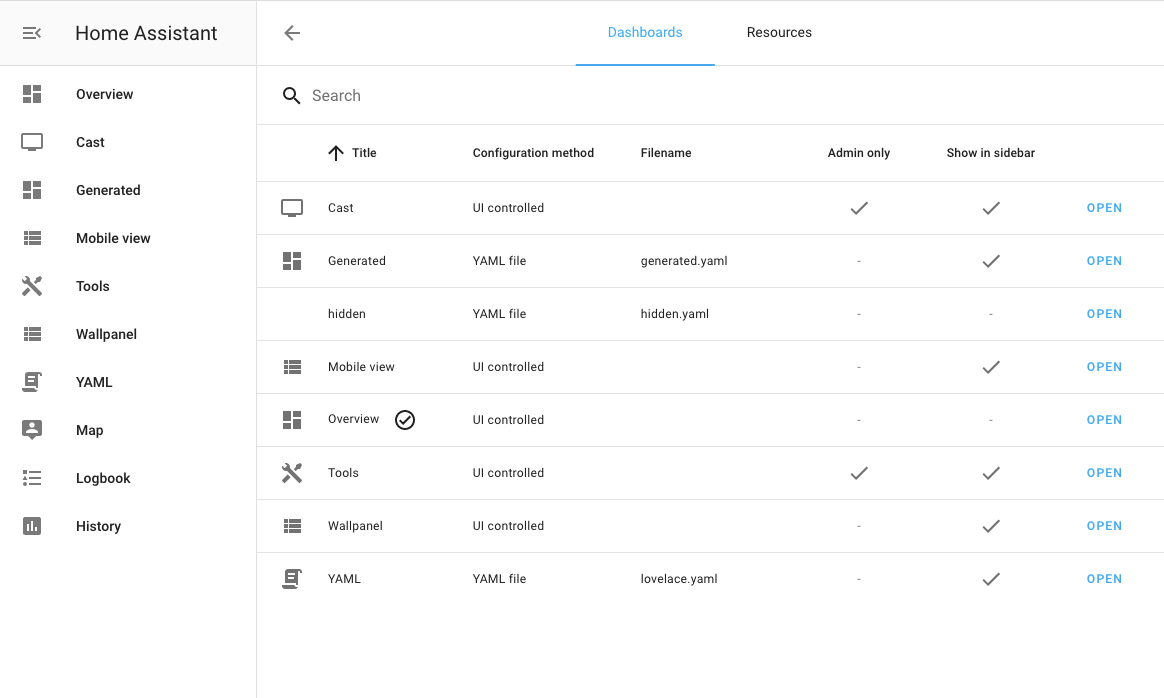 新的 Lovelace 配置面板截图。
每个仪表盘都可以加入菜单侧边栏,并支持自定义标题与图标。此外,你还可以把某个仪表盘限制为仅管理员用户可访问。
新的 Lovelace 配置面板允许你直接在 UI 中创建任意数量的仪表盘,而 YAML 仪表盘则可以在 configuration.yaml 中设置,详见文档。
不过,如果你使用的是 Lovelace 的手动 YAML 模式,这项很棒的新功能也带来了一项弃用变更:你需要把 resources 段从 ui-lovelace.yaml 移动到 configuration.yaml 中的 lovelace: 段里。
这目前还不算破坏性变更;如果我们在 lovelace: 段中没有找到相关内容,仍然会从旧位置加载,但这种兼容回退会在未来版本中移除。
如果你是通过前端管理 Lovelace,我们会自动迁移这些 resources。请注意,resources 现在已经不再出现在 Lovelace 原始配置编辑器里,而是移动到了 Lovelace 配置面板中。
全新媒体播放器卡片
@zsarnett 回归前端团队了,而且这次显然不打算低调回归。他为前端做了大量工作,并为 Lovelace 创建了一张漂亮的全新媒体控制卡片。
它的灵感来自 Android 中的媒体控制组件,并会根据当前播放媒体的封面自动变换颜色。我们觉得它真的非常惊艳!
 全新媒体控制卡片截图。
助手配置面板
当你创建更复杂的自动化时,通常会需要一些助手。比如一个开关,用来保存某种状态,或者其他输入字段。直到现在,这些内容都必须写在 YAML 里,也就是大家熟悉的 input_* 系列字段/集成。
现在,我们已经有了一个 UI 来添加和管理这些助手元素;这让非高级用户,或任何更喜欢通过前端管理系统的人,也都能方便地使用这项功能。
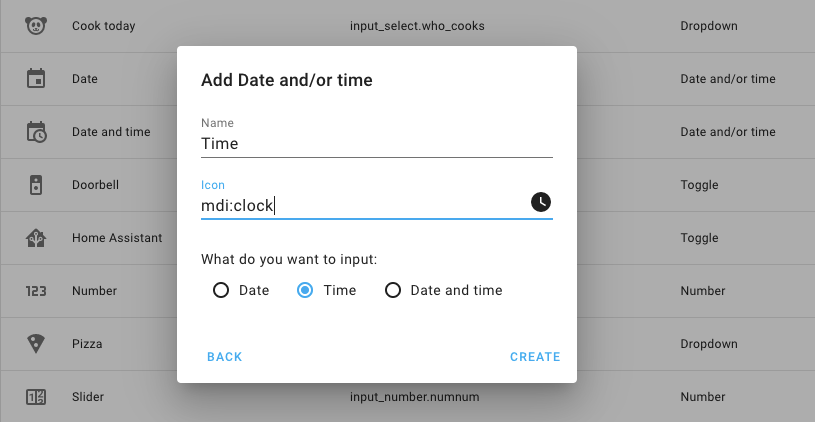 助手配置对话框截图。
感谢 @Adminiuga 实现了让这项前端改动成为可能的后端功能!不仅如此,如果你更喜欢 YAML,[#Adminiuga] 的这些改动也让 input_* 的 YAML 配置能够在不重启 Home Assistant 的情况下直接重载。
Lovelace 编辑体验改进
@zsarnett 改造了我们的卡片选择器。现在不再只是一个简单的“选卡片”按钮,而是会直接显示基于你自己实体的实时预览。 @thomasloven 则为 horizontal stack、vertical stack 以及 conditional 卡片加入了 UI 编辑器。
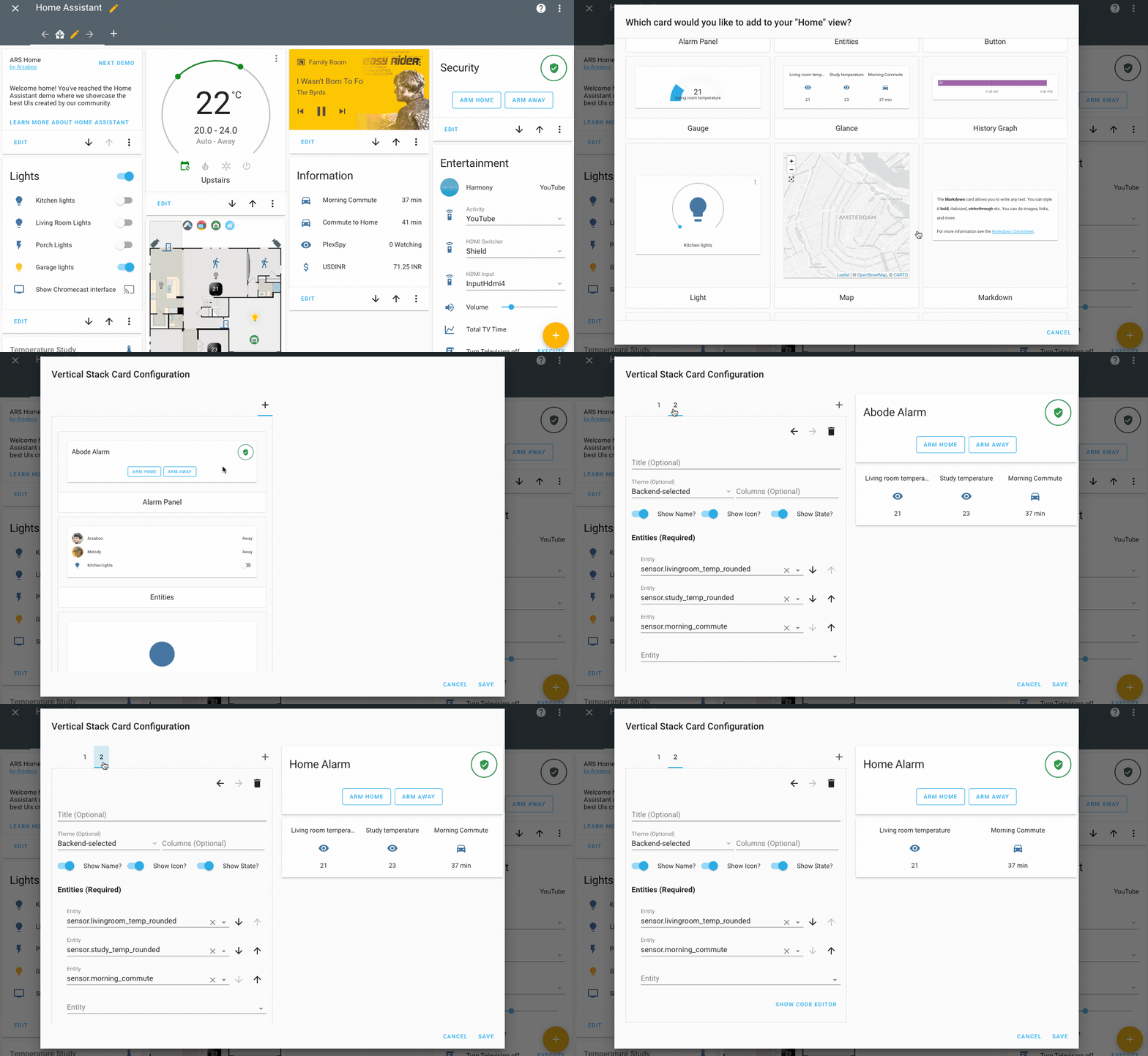 新版卡片选择器与堆叠编辑器的录屏演示。
其他值得注意的变更
- @Misiu 加入了一个 UI,可为每位用户单独设置视图可见性。
- 数据表格现在快得飞起了,例如实体配置面板,哪怕在手机上也是如此 🚀。
- 日志簿也获得了一些性能提升,感谢 @KapJI!
- @bdraco 这次对 August 集成火力全开,把它打磨成了顶级集成!做得太棒了!
- @Jc2k 加入了对启用 HomeKit 的电视以及 occupancy 传感器的初步支持。
- @tulindo 加入了对更新款 SamsungTV 型号的支持。
- 现在 Alexa 已支持启动和取消计时器,感谢 @Tho85。
新集成
- Add platform Ezviz (@BaQs - #30378) (ezviz docs) (new-集成)
- Add Avri waste collection 传感器 (@timvancann - #31134) (new-集成)
- Add Tankerkoenig 集成 (@guillempages - #28661) (tankerkoenig docs) (new-集成)
- Add QVR Pro 集成 (@oblogic7 - #31173) (qvr_pro docs) (new-集成)
- Add edl21 component for SML-based smart meters (@mtdcr - #27962) (edl21 docs) (new-集成)
- Add IamMeter 集成 (@lewei50 - #30465) (iammeter docs) (new-集成)
- Add griddy 集成 (@bdraco - #32591) (griddy docs) (new-集成)
新平台
- Add Config flow to august (@bdraco - #32133) (august docs) (new-platform)
- Add Dynalite 开关 platform (@ziv1234 - #32389) (dynalite docs) (new-platform)
- Add support for MELCloud Air-to-Water 设备 (@vilppuvuorinen - #32078) (melcloud docs) (new-platform)
如果你需要帮助……
如果这个版本带来了问题,请到我们的 issue tracker 提交报告,并尽量完整填写 issue 模板中的所有字段。
不向后兼容的变更
-
Xfinity Gateway (Deprecated) - The Xfinity Gateway 集成 relies on web scraping and is deprecated, to be removed in Home Assistant 核心 0.109. (ADR-0004) - (@frenck - #32017)
-
Groups - Groups are NOT being removed, but the 配置 options, 服务, and 服务 options related to the (previously deprecated and now removed) 状态 UI are now removed in this 发布. This includes:
- The
viewandcontrol配置 options for a group. - The
group.set_visibility服务 call - The
control,visible,viewoptions on thegroup.set服务 call
Please ensure your 配置 and 自动化 do not use these anymore. - (@frenck - #32021) (group docs)
- The
-
Input Number - Adds an 实体 ID to input_number 警告. Passing an out of range value to
input_number.set_valuewill now raise a validation 错误. Incrementing/decrementing aninput_numberwill no longer cause 警告. - (@balloob - #32012) (input_number docs) -
History Graph - The
history_graph集成 has been deprecated in Home Assistant 0.105 and is now removed. 此integrations was used for the old 状态 UI, which is no longer available. A Lovelace an equivalent is available: The Lovelace History Graph. (@frenck - #32028) -
Weblink - The
weblink集成 is was deprecated in 0.105.0 and now removed. 此integrations only works with the old 状态 UI, which is no longer available. (@frenck - #32024)With Lovelace, the same can be achieved using:
-
Environment Canada - 此integrations was previously using web scraping for 天气 alert details. The details 属性 has been removed to make it compliant. (ADR-0004) - (@michaeldavie - #32077) (environment_canada docs)
-
Units of Time - Time units have been standardized throughout all 集成. - (@springstan - #32065)
If you were using a non standard unit in an 自动化 or 传感器 please change it to the following:
- μs for microseconds
- ms for milliseconds
- s for seconds
- min for minutes
- h for hours
- d for days
- w for weeks
- m for months
- y for years
-
HomematicIP Cloud - Migrates HomematicIP Cloud 服务 to admin 服务. - (@SukramJ - #32107) (homematicip_cloud docs)
The 用户 needs to be in the administrator role to execute these HomematicIP Cloud 服务:
homematicip_cloud.dump_hap_confighomematicip_cloud.reset_energy_counter
-
HomeKit Controller - Support for HomeKit controller's legacy pairing data folder
.homekithas been deprecated and in Home Assistant 核心 发布 0.109.0 we plan to remove this code. Pairings have not been saved this way since Home Assistant 0.94, so if you are running Home Assistant 0.94 or later this does not affect you - your pairings were already migrated to 配置 entries. If you are running an older 发布 and do not 升级 soon you will not be able to automatically migrate your existing pairings at 升级 time and will have to manually re-pair them. - (@Jc2k - #32158) (homekit_controller docs) -
自动化 - The
hide_entity配置 option on an 自动化 was deprecated in Home Assistant 0.105 and is removed in this 发布. It was used for the old 状态 UI, which is no longer available, making this option obsolete. Please ensure your 配置 is not using this option. - (@frenck - #32038) (自动化 docs) -
IQVIA - When configuring IQVIA via
configuration.yaml, themonitored_conditionskey has been deprecated and will be removed in 0.114.0. All 传感器 are now 创建 by default. (ADR-0003) - (@bachya - #32223) (iqvia docs)Example YAML 配置:
-
GitHub - The 实体 状态 has been changed to return the 'short SHA' commit hash, so 自动化 based on
latest_commit_shashould be adapted to that. - (@Mariusthvdb - #31581) (github docs) -
AirVisual - AirVisual is now available to be added through the 集成 UI! If you 配置 it in
configuration.yamlyou will need to 更新 to the new 配置. Additionally, in order to protect the AirVisual cloud API,scan_intervalin no longer configurable for 此integrations. - (@bachya - #32072) (airvisual docs)Example YAML 配置:
-
IFTTT - IFTTT now checks that received Webhook data is a dictionary (example
{ "value": 1 }) to prevent Home Assistant internals from breaking. - (@balloob - #32317) (ifttt docs) -
AlarmDecoder - AlarmDecoder 集成 now uses Honeywell's Instant mode instead of Night-Stay for
alarm_arm_night. Instant mode is generally thought to be more secure for night-time use because it disables the entry delay since visitors aren't expected. - (@ajschmidt8 - #32292) (alarmdecoder docs) -
Tibber - Upgraded Tibber library to 0.13.0 and some 属性 have names which have changed. - (@Danielhiversen - #32369) (tibber docs)
currentPhase1->currentL1currentPhase2->currentL2currentPhase3->currentL3
-
REST - Add
application/xmlas an XML to JSON auto converted MIME types for rest 传感器 - (@bdraco - #32289) (rest docs) -
Certificate Expiry - The
name配置 option has been deprecated and is no longer used by the 集成. An improved default 实体 & display naming scheme is provided. Name and entity_id overrides should be handled via the 前端. 配置 using name will marked broken with the 0.109 发布. - (@jjlawren - #32066) (cert_expiry docs)Example YAML 配置:
-
Plex Media Player - The 'show all controls' option for Plex is deprecated and will be removed in the Home Assistant 核心 0.110.0 发布. Also, discovery and legacy config file loading (plex.conf) has been removed. - (@jjlawren - #32391 #32510) (discovery docs) (plex docs)
Example YAML 配置:
-
Abode - Abode retired its legacy 自动化 and quick 动作 on 28 Feb. This change removes support for legacy 自动化 and quick 动作 while adding support for CUE 自动化 which will show up in Home Assistant as 开关 (same as previous implementation). Abode's replacement for quick 动作 is manually triggered CUE 自动化 which can be called through Home Assistant 服务
abode.trigger_automation(previously labeledabode.trigger_quick_action). - (@shred86 - #32296) (abode docs) -
deCONZ - The events on the Aqara Magic Cube have changed, so they will match with the 设备 触发器 discriptions. If you made 自动化 for the Magic Cube on the 设备 page, you will want to change your 自动化. If you configured your 自动化 based on events from the 开发者 tools, there is nothing breaking. This also fixes the double tap function on side 2, which didnt work if you configured it in the 设备 page - (@Dorzel107 - #32108) (deconz docs)
-
Emoncms - The way the
unit_of_measurementis set has changed to make use of the ability for this to be set in the source feed in Emocms. - (@borpin - #32042) (emoncms docs)The unit will now be assigned as follows:
- Take the unit from the API if it is available
- Otherwise take the unit from config, either specified or the default unit (W)
-
Vizio SmartCast TV - Adds app support. For TVs that support apps, 'SMARTCAST' and 'CAST' sources have been replaced with
SmartCast Home. Any 自动化 that rely on those sources will need to be updated. - (@raman325 - #32432) -
Onvif - Added more onvif PTZ move modes. The onvif 摄像头 服务
camera.onvif_ptzhas been moved from the 摄像头 domain to the onvif domain.onvif_ptz服务 was also renamed toptz, so 服务 calls need to be updated toonvif.ptz. - (@olijouve - #30152) (onvif docs)Example YAML 配置:
-
Facebook Messenger - On October 29, 2019 Facebook announced a breaking change that all broadcast API will stop working on March 4th, 2020, so BROADCAST as a target option is now removed. - (@chmielowiec - #32517) (facebook docs)
-
Samsung Smart TV - Adds support for newer SamsungTV models. Specifying the port in
configuration.yamlis no longer needed and thus the port config option has been deprecated. - (@tulindo - #31537) (samsungtv docs) -
Netatmo - The unreliable 二元sensor are removed since they don't provide much value due to their polling nature. To 触发器 自动化 it is recommended to use the event netatmo_event. - (@cgtobi - #32673) (netatmo docs)
Example 触发器 for 自动化:
-
DirecTV - DirecTV is now available to be added from the 集成 UI. The concept of 设备 has been removed and now the DirecTV receiver, and all client 设备, are added. There is no longer a
portoption as the default port should work just fine. The name can be set via 实体 UI rather thannameoption. - (@ctalkington - #32162) (directv docs) (directv docs) -
iCloud - iCloud family 设备 are no longer added automatically. Use the
with_family配置 option or re-add the 集成 via the 前端, in case you do want to make use of the iCloud family 设备. - (@Quentame - #32644) (icloud docs) -
设备 Tracker - The
hide_if_away配置 parameter has been removed for all 设备 trackers. This option was used to hide 设备 trackers from the UI if the 设备 was not at home. This applied to the old 状态 UI, which now has been removed. - (@frenck - #32705) (device_tracker docs) (breaking change) (beta fix) -
Sonos - Sonos 设备 will now report
idleinstead ofpausedif they do not have any current artist metadata available. This can happen when you were playing Spotify on your Sonos and use the Spotify app to play on another 设备. - (@balloob - #32712) (sonos docs) (breaking change) (beta fix)
Beta Fixes
- Bump pyipma dependency (fixes bug in 0.106) (@dgomes - #32286) (ipma docs) (beta fix)
- If 设备 has volume disabled, the volume will be
None. However in these (@bazwilliams - #32702) (openhome docs) (beta fix) - Remove deprecated hide_if_away from 设备 trackers (@frenck - #32705) (device_tracker docs) (breaking change) (beta fix)
- Broaden exception handling for IQVIA (@bachya - #32708) (iqvia docs) (beta fix)
- Sonos idle (@balloob - #32712) (sonos docs) (breaking change) (beta fix)
- 更新 Vizio
sourceproperty to only return current app if i… (@raman325 - #32713) (vizio docs) (beta fix) - Resolve Home Assistant fails to start when Sense 集成 i… (@bdraco - #32716) (sense docs) (beta fix)
- Fix legacy Samsung TV (@escoand - #32719) (samsungtv docs) (beta fix)
- Set self._current_app to None when vizio 设备 is off (@raman325 - #32725) (vizio docs) (beta fix)
- Updated 前端 to 20200312.0 (@bramkragten - #32741) (前端 docs) (beta fix)
- Bump py-august to 0.25.0 (@bdraco - #32769) (august docs) (beta fix)
- Check if 面板 url used and delay 仪表盘 reg till start (@bramkragten - #32771) (前端 docs) (Lovelace docs) (beta fix)
- Updated 前端 to 20200313.0 (@bramkragten - #32777) (前端 docs) (beta fix)
- Fix homekit_controller beta connectivity issues (@Jc2k - #32810) (homekit_controller docs) (beta fix)
- Add brightness 状态 to emulated hue when 设备 support only color temp and brightness (@vaceslav - #31834) (emulated_hue docs) (beta fix)
- Optimize directv client initialization (@ctalkington - #32706) (directv docs) (directv docs) (beta fix)
- Add 日志 message on timeout and 更新 less often for upnp 设备 (@StevenLooman - #32740) (upnp docs) (beta fix)
- Fix handling of 属性 reports in ZHA 传感器 and 二元sensor (@dmulcahey - #32776) (zha docs) (beta fix)
- Fix onvif 错误 with non ptz 摄像头 (@timmo001 - #32783) (onvif docs) (beta fix)
- Fix brightness_pct in 灯光 设备 turn_on 动作 (@frenck - #32787) (灯光 docs) (beta fix)
- Bump eagle_reader API 版本 to v0.2.4 (@gtdiehl - #32789) (rainforest_eagle docs) (beta fix)
- Fix directv location of unknown 错误 string (@ctalkington - #32807) (directv docs) (directv docs) (beta fix)
- Remove extra logging from directv init. (@ctalkington - #32809) (directv docs) (directv docs) (beta fix)
- Require a hyphen in Lovelace 仪表盘 url (@bramkragten - #32816) (Lovelace docs) (beta fix)
- Add Netatmo Home Coach as model (@Danielhiversen - #32829) (netatmo docs) (beta fix)
- Add SF transition to HmIP-BSL and remove obsolete code in HMIPC (@SukramJ - #32833) (homematicip_cloud docs) (beta fix)
- Make sure panel_custom won't crash on invalid data (@balloob - #32835) (hassio docs) (panel_custom docs) (beta fix)
- Ensure unique_ids for all evohome thermostats (@zxdavb - #32604) (evohome docs) (beta fix)
- Bump teslajsonpy to 0.5.1 (@alandtse - #32827) (tesla docs) (beta fix)
- Ignore the ignored konnected config entries (@kit-klein - #32845) (beta fix)
- Bump insteonplm to 0.16.8 (@teharris1 - #32847) (insteon docs) (beta fix)
- 更新 pyozw 0.1.9 (@pvizeli - #32864) (zwave docs) (beta fix)
- Updated 前端 to 20200316.0 (@bramkragten - #32866) (前端 docs) (beta fix)
- Add Lovelace 重载 服务 for yaml resources (@bramkragten - #32865) (Lovelace docs) (beta fix)
- Bump ZHA quirks to 0.0.37 (@dmulcahey - #32867) (zha docs) (beta fix)
- Remove group as a dependency from 实体 集成 (@balloob - #32870) (beta fix)
- Lovelace: storage key based on id instead of url_path (@bramkragten - #32873) (Lovelace docs) (beta fix)
- Updated 前端 to 20200316.1 (@bramkragten - #32878) (前端 docs) (beta fix)
- Fix iCloud init while pending (@Quentame - #32750) (icloud docs) (beta fix)
- Add default port to samsung tv (@tulindo - #32820) (samsungtv docs) (beta fix)
- Corrected minor misspellings (@dajo - #32857) (homekit_controller docs) (system_log docs) (toon docs) (beta fix)
- Make 区域 dependency of 设备 tracker an after dep (@balloob - #32880) (device_tracker docs) (beta fix)
- Bump iCloud to 0.9.5 (@Quentame - #32901) (icloud docs) (beta fix)
- Changed 传感器 icons to be more emotionally sensitive (@brubaked - #32904) (coronavirus docs) (beta fix)
- Bump cast to 4.2.0 (@balloob - #32906) (cast docs) (beta fix)
- Fix setting up options due to config data freeze (@engrbm87 - #32872) (mikrotik docs) (beta fix)
- Fix input text 重载 (@bramkragten - #32911) (input_text docs) (beta fix)
- Introduce safe scan_interval for vicare (@oischinger - #32915) (vicare docs) (beta fix)
- Fix hassio 面板 load (@balloob - #32922) (hassio docs) (beta fix)
- Updated 前端 to 20200318.0 (@bramkragten - #32931) (前端 docs) (beta fix)
- Fix flaky tests for HMIPC (@SukramJ - #32806) (beta fix)
发布 0.107.1 - March 18
- Updated 前端 to 20200318.1 (@bramkragten - #32957) (前端 docs)
- Add 设备 自动化 as 前端 dependency (@balloob - #32962) (前端 docs)
- Fix 区域 config (@balloob - #32963) (区域 docs)
发布 0.107.2 - March 20
- 0.107.2 - Bump aiohomekit to fix Insignia NS-CH1XGO8 and Lenno… (@Jc2k - #33016) (homekit_controller docs)
- Fix 摄像头.options to 摄像头.stream_options. (@ochlocracy - #32767) (摄像头 docs)
- Fix velbus in the 107 发布 (@Cereal2nd - #32936) (velbus docs)
- Refactor ZHA 设置 (@Adminiuga - #32959) (zha docs)
- Fix somfy optimistic mode when missing in conf (@tetienne - #32995) (somfy docs)
- Axis - Fix char in stream url (@Kane610 - #33004) (axis docs)
- Fix sighthound dependency issue (@robmarkcole - #33010) (sighthound docs)
- Bump simplisafe-python to 9.0.3 (@bachya - #33013) (simplisafe docs)
- 0.107.2 - Bump aiohomekit to fix Insignia NS-CH1XGO8 and Lenno… (@Jc2k - #33016) (homekit_controller docs)
- Handle zigpy clusters without ep_attribute 属性. (@Adminiuga - #33028) (zha docs)
- Fix 区域 in packages (@balloob - #33027)
- Fix RainMachine not properly storing data in the config entry (@bachya - #33002) (rainmachine docs)
发布 0.107.3 - March 20
- Fix netatmo Webhook registration issue (@cgtobi - #32994) (netatmo docs)
- Fix discovery issue with netatmo 温控 设备 (@cgtobi - #33040) (netatmo docs)
- Fix packages for schemas without a default (@frenck - #33045) (person docs)
发布 0.107.4 - March 20
- Add negative tests for identify schema for packages (@balloob - #33050)
- Bump simplisafe-python to 9.0.4 (@bachya - #33059) (simplisafe docs)
- Bump aioasuswrt to 1.2.3 and fix asuswrt 传感器 (@Knapoc - #33064) (asuswrt docs)
- Fix package default extraction (@balloob - #33071)
发布 0.107.5 - March 21
- 升级 huawei-lte-api to 1.4.11 (@scop - #32791) (huawei_lte docs)
- Validate UUID for tankerkoenig (@guillempages - #32805) (tankerkoenig docs)
- Try all Samsung TV websocket ports (@escoand - #33001) (samsungtv docs)
- Split ZHA 设备 loading and 实体 adding (@Adminiuga - #33075) (zha docs)
- Fix totalconnect AttributeError introduced in 0.107 (@austinmroczek - #33079) (totalconnect docs)
- Fix tankerkoenig with more than 10 stations (@guillempages - #33098) (tankerkoenig docs)
- Fix Extend ONVIF unique ID with profile index (@frenck - #33103) (onvif docs)
发布 0.107.6 - March 24
- Integrate dockerbuild (@pvizeli - #33168)
- Fix 脚本 logging with name (@balloob - #33120)
- Fix minut point updating frozen config entry data (@frenck - #33148) (point docs)
- Bump OZW fork to 0.1.10 (@pvizeli - #33205) (zwave docs)
发布 0.107.7 - March 25
- Fix velbus dimming control (@brefra - #33139) (velbus docs)
- Increase timeout setting up IPMA (@dgomes - #33194) (ipma docs)
- Refactor ZHA platform 设置 (@Adminiuga - #33226) (zha docs)
- Ensure recorder event loop recovers if the database server dis… (@bdraco - #33253) (recorder docs)
- Schedule Unifi shutdown callback earlier (@jjlawren - #33257) (unifi docs)
All changes
- Nuki: add support for unique id (@pvizeli - #31824) (nuki docs)
- 更新 pyhomematic to 0.1.65 (@danielperna84 - #32006) (homematic docs)
- 升级 requests to 2.23.0 (@frenck - #32013)
- Deprecate Xfinity Gateway 集成 (ADR-0004) (@frenck - #32017) (breaking change)
- Remove 状态 UI options in group 集成 (@frenck - #32021) (group docs) (breaking change)
- Add 实体 ID to input_number 警告 (@balloob - #32012) (input_number docs) (breaking change)
- 更新 vizio dependency and 集成 name (@raman325 - #31975) (vizio docs)
- Add convert_to_pil_image to pil util (@robmarkcole - #31825)
- Remove weblink 集成 (@frenck - #32024) (demo docs) (breaking change)
- Remove history_graph 集成 (@frenck - #32028) (demo docs) (breaking change)
- Prevent committing to dev/master/rc directly (@frenck - #32029)
- Fix extra arguments of group 集成 (@frenck - #32032) (group docs)
- 模板 platform tweaks (@balloob - #32037) (模板 docs)
- Change TTS codeowner to @pvizeli (@robbiet480 - #32041) (tts docs)
- 更新 file headers and outdated 文档 links (@springstan - #32022)
- Significantly reduce code in august 集成 (@bdraco - #32030) (august docs)
- Add asuswrt interface and dnsmasq location 配置 (@pkishino - #29834) (asuswrt docs)
- ZHA 设备 channel refactoring (@Adminiuga - #31971) (zha docs)
- Add www to all 文档 links (@springstan - #32063) (auth docs) (cast docs) (honeywell docs) (kodi docs) (nest docs) (pandora docs) (sun docs)
- Add unique ID to ONVIF 摄像头 实体 (@frenck - #32093) (onvif docs)
- Change get_entity to return a extended entry, add inputs to de… (@bramkragten - #32083) (config docs) (default_config docs)
- Bump env_canada to 0.0.35 to address issue 31924 (@michaeldavie - #32077) (environment_canada docs) (breaking change)
- Fix Frontier Silicon player 状态 (@jezcooke - #32082) (frontier_silicon docs)
- Mock setup_entry in oauth2 tests (@balloob - #32102)
- Add name option for Frontier Silicon 设备 (@jezcooke - #32085) (frontier_silicon docs)
- Fix volume control for Frontier Silicon media players (@jezcooke - #32040) (frontier_silicon docs)
- Add boost support for Hive TRVs (@martinlong1978 - #31261) (hive docs)
- Add sighthound save 图像 (@robmarkcole - #32103) (sighthound docs)
- UniFi - Add unit of measurement to bandwidth 传感器 (@Kane610 - #32114) (unifi docs)
- Add unique_id to directv 实体 (@ctalkington - #31838) (directv docs) (directv docs)
- Add and use time related constants (@springstan - #32065) (breaking change)
- Use f-strings in 集成 starting with "A" (@springstan - #32110)
- Deduplicate code in the august 集成 (@bdraco - #32101) (august docs)
- Remove no-longer-needed SimpliSafe websocket watchdog (@bachya - #32129) (simplisafe docs)
- Improve 条件 validation 错误 msg (@balloob - #32135)
- Add platform Ezviz (@BaQs - #30378) (ezviz docs) (new-集成)
- Refactor homekit_controller to be fully asynchronous (@Jc2k - #32111) (homekit_controller docs)
- Add Supla gate (@Rocik - #31643) (supla docs)
- Use ciso8601 library to parse datetime faster (@KapJI - #32128)
- Speed up validate_entity_id (@balloob - #32137)
- Use f-strings in 集成 starting with "B"-"E" (@springstan - #32121)
- Handle unhandled IQVIA data 更新 exception (@bachya - #32144) (iqvia docs)
- Modernize SimpliSafe config flow (@bachya - #32130) (simplisafe docs)
- Modernize RainMachine config flow (@bachya - #32131) (rainmachine docs)
- Clean up RainMachine config entry data (@bachya - #32132) (rainmachine docs)
- 升级 qnapstats to 0.3.0 (@colinodell - #32148) (qnap docs)
- Add support for simultaneous runs of 脚本 助手 (@pnbruckner - #31937) (自动化 docs) (脚本 docs)
- Add constants file for directv (@ctalkington - #32157) (directv docs) (directv docs)
- Remove some unneeded pylint suppressions (@scop - #32152)
- 升级 pre-commit to 2.1.1 (@frenck - #32159)
- Add and use more unit constants (@scop - #32122)
- Use f-strings in 集成 starting with "F"and"G" (@springstan - #32150)
- Remove friendly_name 属性 from twitch 传感器 (@springstan - #32067) (twitch docs)
- Migrate HomematicIP Cloud 服务 to admin 服务 (@SukramJ - #32107) (homematicip_cloud docs) (breaking change)
- Add shopping_list_item_added event_type (@thegame3202 - #28334) (shopping_list docs)
- Add MQTT WS command to remove 设备 (@emontnemery - #31989) (MQTT docs)
- Remove unused RainMachine config flow function (@bachya - #32165) (rainmachine docs)
- Remove unused SimpliSafe config flow function (@bachya - #32166) (simplisafe docs)
- Fix flaky coverage in UK transport test (@balloob - #32053)
- Add observed 实体 to bayesian 传感器 (@paolog89 - #27721) (bayesian docs)
- Modernize Notion config flow (@bachya - #32167) (notion docs)
- Modernize Ambient PWS config flow (@bachya - #32164) (ambient_station docs)
- Refactor homekit_controller config flow tests (@Jc2k - #32141) (homekit_controller docs)
- Deprecate homekit_controller .homekit folder (@Jc2k - #32158) (homekit_controller docs) (breaking change)
- Do not report 状态 when closing down (@balloob - #32168) (alexa docs) (google_assistant docs)
- Add Config flow to august (@bdraco - #32133) (august docs) (new-platform)
- Fix description of 风扇 服务 set_direction (@springstan - #32181)
- Use orjson to parse json faster (@KapJI - #32153) (recorder docs)
- Improve 错误 handling (@emontnemery - #32182) (MQTT docs)
- Support multiple Lovelace 仪表盘 (@balloob - #32134) (前端 docs) (Lovelace docs)
- Remove hide_entity property from 自动化 集成 (@frenck - #32038) (自动化 docs) (breaking change)
- Revert "Use orjson to parse json faster (#32153)" (@balloob - #32185) (recorder docs)
- Refactor away deprecated homekit_controller test 助手 (@Jc2k - #32177) (homekit_controller docs)
- Add missing 设备 class 属性 to homekit_controller 传感器 (@Jc2k - #32175) (homekit_controller docs)
- Add homekit_controller occupancy 传感器 (@Jc2k - #32188) (homekit_controller docs)
- Add Config Flow for sense (@bdraco - #32160) (sense docs)
- Fix name of emby media player (@springstan - #32183) (emby docs)
- Add model to august device_info (@bdraco - #32187) (august docs)
- Make SimpliSafe 实体 unavailable when WiFi is lost (@bachya - #32154) (simplisafe docs)
- Reduce August doorbell detail updates (@bdraco - #32193) (august docs)
- homekit_controller test cleanups (@Jc2k - #32212) (homekit_controller docs)
- Make homekit_controller a local push 集成 (@Jc2k - #32213) (homekit_controller docs)
- Improve debounce cooldown (@balloob - #32161)
- Lovelace resource mgmt (@balloob - #32224) (Lovelace docs)
- Address homekit_controller feedback on #32212 and #32213 (@Jc2k - #32228) (homekit_controller docs)
- Centralize august activity updates (@bdraco - #32197) (august docs)
- Make heos and transmission config flow tests more robust (@Ikuyadeu - #31783)
- Show kernel 版本 on linux (@sanyatuning - #32276)
- Bump pyipma dependency (fixes bug in 0.106) (@dgomes - #32286) (ipma docs) (beta fix)
- Remove ability to 配置 monitored 条件 in IQVIA (@bachya - #32223) (iqvia docs) (breaking change)
- Coordinate all august detail and activity updates (@bdraco - #32249) (august docs)
- Add 设备 动作 to 遮盖 (@emontnemery - #28064) (遮盖 docs) (device_automation docs)
- Add usage 传感器 for each 设备 sense detects that show powe… (@bdraco - #32206) (sense docs)
- Fix unhandled exception in Ambient PWS_URL (@bachya - #32238) (ambient_station docs)
- Support vizio pairing through config flow (@raman325 - #31520) (vizio docs)
- Dynalite listener for config entry 更新 (@ziv1234 - #32116) (dynalite docs)
- Add Avri waste collection 传感器 (@timvancann - #31134) (new-集成)
- Set min and max temp only if it is not None (@Petro31 - #32262) (generic_thermostat docs)
- Pass in aiohttp session for onvif (@frenck - #32045) (onvif docs)
- Explicitly set unique ids for GDACS 集成 (@exxamalte - #32203) (gdacs docs)
- Change github 传感器 状态 to short commit sha (@Mariusthvdb - #31581) (github docs) (breaking change)
- Use f-strings in 集成 starting with "H" - "L" (@springstan - #32265)
- change 日志 level (@exxamalte - #32244) (feedreader docs)
- Add and use percentage constant (@springstan - #32094)
- Allow managing Lovelace storage 仪表盘 (@balloob - #32241) (前端 docs) (Lovelace docs) (区域 docs)
- Use collection 助手 for counter 集成 (@Adminiuga - #32295) (counter docs)
- Bump up ZHA depdendency (@Adminiuga - #32336) (zha docs)
- Updated 前端 to 20200228.0 (@bramkragten - #32334) (前端 docs)
- Bump pyipma to 2.0.5 (@dgomes - #32337) (ipma docs)
- Add config entry for AirVisual (@bachya - #32072) (airvisual docs) (breaking change)
- 恢复 august 门锁 changed_by 状态 on 重启 (@bdraco - #32340) (august docs)
- Add brightness to 灯光 设备 turn_on 动作 (@emontnemery - #32219) (灯光 docs)
- Fix github 传感器 short SHA (@Mariusthvdb - #32316) (github docs)
- ZHA: Support 灯光 flashing (@chmielowiec - #32234) (zha docs)
- Require IFTTT to send data as dictionary (@balloob - #32317) (ifttt docs) (breaking change)
- Bump avri api 版本 (@timvancann - #32373)
- Add sms support to pushbullet 通知 (@doudz - #32347) (pushbullet docs)
- 升级 youtube_dl to 版本 2020.03.01 (@BKPepe - #32376) (media_extractor docs)
- Add optimistic mode for somfy 遮盖 that do not support position (@ColinRobbins - #31407) (somfy docs)
- Add Tankerkoenig 集成 (@guillempages - #28661) (tankerkoenig docs) (new-集成)
- Fix AlarmDecoder 集成 to use Instant Mode for alarm_arm_night (@ajschmidt8 - #32292) (alarmdecoder docs) (breaking change)
- Add Media Stop Support to BraviaTV Mediaplayer (@dcnielsen90 - #32220) (braviatv docs) (braviatv docs) (braviatv docs)
- Refactor dynalite 集成 for multi-platform (@ziv1234 - #32335) (dynalite docs)
- 升级 Tibber library to 0.13.0 (@Danielhiversen - #32369) (tibber docs) (breaking change)
- Add application/xml as an XML to JSON auto converted mime type… (@bdraco - #32289) (rest docs) (breaking change)
- Move keypad battery implementation details into py-august (@bdraco - #32349) (august docs)
- Keeping adding in Github repositories after 错误 (@kuchel77 - #32393) (github docs)
- Refactor Certificate Expiry 传感器 (@jjlawren - #32066) (cert_expiry docs) (breaking change)
- Bump ZHA Quirks to 0.0.34 (@dmulcahey - #32401) (zha docs)
- Add coronavirus 集成 (@balloob - #32413)
- Add QVR Pro 集成 (@oblogic7 - #31173) (qvr_pro docs) (new-集成)
- Bump brother library (@bieniu - #32436)
- Remove SUPPORT_PLAY_MEDIA from Roku (@JeffLIrion - #32378) (roku docs)
- Flume Cleanups (unique id, fix missing timeout, http session,… (@bdraco - #32384) (flume docs)
- Fix ZHA 设备 healthcheck pings (@Adminiuga - #32425) (zha docs)
- 更新 system 日志 grouping (@balloob - #32367) (system_log docs)
- Numeric 状态 触发器: validate that above is not above below (@balloob - #32421)
- Bump total-connect-client to 0.53 (@austinmroczek - #32460)
- 更新 roombapy to 1.4.3 (@pschmitt - #32462) (roomba docs)
- Fix 设备 tracker TrackerEntity defaults (@balloob - #32459) (device_tracker docs) (geofency docs) (gpslogger docs) (icloud docs) (locative docs) (mobile_app docs) (owntracks docs) (tesla docs) (traccar docs) (unifi docs)
- Add energy added 属性 to Tesla charging rate 传感器 (@alandtse - #32368) (tesla docs)
- Add is_volume_muted property to vizio 集成 (@raman325 - #32332) (vizio docs)
- Add set_speed to smarty 风扇 (@z0mbieprocess - #32255) (smarty docs)
- 更新 错误 handling in 更新 coordinator (@balloob - #32452)
- Use a requests Session for rest 传感器 (@bdraco - #32463) (rest docs)
- Remove ZHA 属性 listening channel (@dmulcahey - #32468) (zha docs)
- 升级 huawei-lte-api to 1.4.10 (@scop - #32472) (huawei_lte docs)
- Fix filter 传感器 processing 状态 that aren't numbers (@dgomes - #32453)
- Deprecate 摄像头 WS API (@balloob - #32473) (摄像头 docs)
- 升级 Tibber library to 0.13.2 (@Danielhiversen - #32478) (tibber docs)
- Catch an extra 错误 for Ring (@balloob - #32477) (ring docs)
- add const file for roku (@ctalkington - #32470) (roku docs)
- Remove 'show all controls' option for Plex (@jjlawren - #32391) (plex docs) (breaking change)
- GeoNet NZ Quakes code improvements (@exxamalte - #32338) (geonetnz_quakes docs)
- Add abode support for CUE 自动化 (@shred86 - #32296) (abode docs) (breaking change)
- Add more Huawei LTE 传感器 (@scop - #32123) (huawei_lte docs)
- Add icons to Coronavirus (@Quentame - #32480) (coronavirus docs)
- Reduce 日志 level for initial 错误 and bump library 版本 (@ties - #32381) (buienradar docs)
- ZHA: Successful pairing feedback (@chmielowiec - #32456) (zha docs)
- Add sighthound timestamped file (@robmarkcole - #32202) (sighthound docs)
- ZHA Dependencies bump (@Adminiuga - #32483) (zha docs)
- Use SCAN_INTERVAL instead of Throttle for google travel time (@shidarin - #31420) (google_travel_time docs)
- Make gen_requirements_all.py case insensitive for ignored pack… (@belidzs - #30885)
- Allow string values on zwave.set_node_value (@matejdro - #31061) (zwave docs)
- Add node_def_id for ISY994i wrapped X10 modules (@rbeiter - #31815) (isy994 docs)
- Add edl21 component for SML-based smart meters (@mtdcr - #27962) (edl21 docs) (new-集成)
- Add soundtouch 属性 exposing multiroom 区域 info (@da-anda - #28298) (soundtouch docs)
- fix double tab and match events. (@Dorzel107 - #32108) (deconz docs) (breaking change)
- Emoncms API now provides a Unit of Measurement (@borpin - #32042) (emoncms docs) (breaking change)
- Add async_setup_entry/async_unload_entry for 遥控器 platform (@ctalkington - #31974) (遥控器 docs)
- Add github 传感器 latest tag 属性 (@Mariusthvdb - #32360) (github docs)
- Modernize WWLLN config flow (@bachya - #32194)
- Mock all invocations of coronavirus.get_cases (@balloob - #32487)
- Use unique_id in Plex config entries (@jjlawren - #32489) (plex docs)
- UniFi - Add block network access control to config option (@Kane610 - #32004) (unifi docs)
- Add Dynalite 开关 platform (@ziv1234 - #32389) (dynalite docs) (new-platform)
- Initial support for HomeKit enabled televisions (@Jc2k - #32404) (homekit_controller docs)
- Add Huawei LTE operator and network related 传感器 (@ilarrain - #32485) (huawei_lte docs)
- Improve 脚本 validation (@balloob - #32461)
- Make it possible to fetch proxy media player album art (@balloob - #32471) (媒体播放器 docs)
- Require title, separate show 侧边栏 option (@balloob - #32479) (Lovelace docs)
- Allow teaching logbook about events (@balloob - #32444) (logbook docs)
- Remove discovery and legacy config file loading for Plex (@jjlawren - #32510) (discovery docs) (plex docs) (breaking change)
- Bugfix evohome converting non-UTC timezones (@zxdavb - #32120) (evohome docs)
- guard against invalid 触发器 and 动作 scenarios (@dmulcahey - #32512) (zha docs)
- Add OwnTracks Friends via person 集成 (@kirichkov - #27303) (owntracks docs)
- Add app support for TVs to Vizio 集成 (@raman325 - #32432) (breaking change)
- 升级 hass-nabucasa to 0.32 (@balloob - #32508) (cloud docs)
- 升级 youtube_dl to 版本 2020.03.06 (@BKPepe - #32521) (media_extractor docs)
- Add availability to roku media player 实体 (@ctalkington - #32484) (roku docs)
- Add more onvif PTZ move modes (@olijouve - #30152) (onvif docs) (breaking change)
- Implement source switching for homekit_controller televisions (@Jc2k - #32526) (homekit_controller docs)
- Updated 前端 to 20200306.0 (@bramkragten - #32532) (前端 docs)
- Specify rtsp_transport for Onvif 摄像头 (@engrbm87 - #31918) (摄像头 docs) (onvif docs) (stream docs)
- Add config_flow to shopping_list (@vigonotion - #32388) (shopping_list docs)
- fix step name in strings.json for vizio (@raman325 - #32536) (vizio docs)
- Make ZHA 场景 channel an eventable channel. (@Adminiuga - #32546) (zha docs)
- Allow multiple 属性 reads in ZHA (@dmulcahey - #32498) (zha docs)
- Fix unnecessary method call (@shred86 - #32549) (abode docs)
- Fix Yandex transport after API change (@devbis - #32500) (yandex_transport docs)
- Add guard to ZHA 设备 触发器 (@dmulcahey - #32559) (zha docs)
- Refactor ZHA 设备 keep alive checker (@Adminiuga - #32561) (zha docs)
- Bump zeroconf to 0.24.5 (@bdraco - #32573) (zeroconf docs)
- Simplify logbook duplicate handling (@amelchio - #32572) (logbook docs)
- Add Tibber retry (@Danielhiversen - #32554) (tibber docs)
- Bump pyicloud to 0.9.3 (@Quentame - #32582) (icloud docs)
- 升级 youtube_dl to 版本 2020.03.08 (@BKPepe - #32581) (media_extractor docs)
- Bump denonavr to 0.8.0 (@scarface-4711 - #32578) (denonavr docs)
- Add support for Ubee Router DVW32CB (@seanvictory - #32406)
- Bump rflink to 0.0.52 (@jeyrb - #32588) (rflink docs)
- Correct grammatical 错误 in CUSTOM_WARNING (@davet2001 - #32569)
- Add Steam game ID and screenshot paths as 属性 (@i00 - #32005) (steam_online docs)
- Add thinkingcleaner optional host param (@MansM - #32542) (thinkingcleaner docs)
- Fix Withings timezone test (@frenck - #32602)
- Remove AlexaPowerController from device_class garage 遮盖 in… (@ochlocracy - #32607) (alexa docs)
- Add IamMeter 集成 (@lewei50 - #30465) (iammeter docs) (new-集成)
- Alexa: Support 吸尘器 without turn_on/turn_off feature (@Tho85 - #32570) (alexa docs)
- homekit_controller fixes from testing with an LG TV: (@Jc2k - #32610) (homekit_controller docs)
- Fix TypeError Exception in AlexaSpeaker (@dcnielsen90 - #32318) (alexa docs)
- Bump up ZHA dependencies. (@Adminiuga - #32609) (zha docs)
- Deduplicate MQTT mixin tests (@emontnemery - #32563) (MQTT docs)
- Add new 传感器 to Brother 集成 (@bieniu - #32466) (brother docs)
- Reflect new repo name (@marengaz - #32611)
- Convert august to async (@bdraco - #32586) (august docs)
- Freeze config entry data (@balloob - #32615) (axis docs) (heos docs) (homematicip_cloud docs) (met docs) (mikrotik docs) (MQTT docs) (plex docs) (samsungtv docs) (smartthings docs) (transmission docs) (upnp docs)
- Validate WWLLN window size in config schema (@bachya - #32621)
- Add PollControl cluster support to ZHA (@Adminiuga - #32618) (zha docs)
- 升级 hass_nabucasa to 0.32.2 (@balloob - #32522) (cloud docs)
- Add a commit interval setting to recorder (@bdraco - #32596) (recorder docs)
- Breakout tado 区域 code into a single place (@bdraco - #32564) (tado docs)
- Ensure AirVisual import config flow checks API key correctness (@bachya - #32624)
- Alexa: Add support for starting and cancelling timers (@Tho85 - #32616) (alexa docs)
- Clear discovery topic for MQTT 设备 触发器 (@emontnemery - #32617) (MQTT docs)
- Sonos: Return URI as media_content_id (@GeorgeSG - #32626) (sonos docs)
- Remove facebook broadcast api (@chmielowiec - #32517) (facebook docs) (breaking change)
- Add tests for workday 传感器 (@penright - #31832) (workday docs)
- Revert "Breakout tado 区域 code into a single place (#32564)" (@michaelarnauts - #32639) (tado docs)
- Add 设备 check to iCloud config flow (@Quentame - #31950) (icloud docs)
- Add support for newer SamsungTV models (@tulindo - #31537) (samsungtv docs) (breaking change)
- Clean up homekit_controller 实体 设置 (@Jc2k - #32628) (homekit_controller docs)
- Use callback instead of async methods in Timer (@balloob - #32638) (timer docs)
- UniFi - Fix block functionality (@Kane610 - #32625) (unifi docs)
- Add support for MELCloud Air-to-Water 设备 (@vilppuvuorinen - #32078) (melcloud docs) (new-platform)
- Check against 开关 attr not being None (@balloob - #32647) (开关 docs)
- Add options flow for AirVisual (@bachya - #32634) (airvisual docs)
- Add griddy 集成 (@bdraco - #32591) (griddy docs) (new-集成)
- Fix bmw connected drive door_lock_state 属性 错误 (@gerard33 - #32074) (bmw_connected_drive docs)
- input_datetime guard for unexpected 状态 on 恢复 (@bramkragten - #32652) (input_datetime docs)
- Use f-strings in 集成 starting with "M" (@springstan - #32271)
- Refactor netatmo webhooks (@cgtobi - #32195) (netatmo docs)
- 门锁 operation 传感器 for August (@bdraco - #32593) (august docs)
- Throw ConfigEntryNotReady when august servers are offline or u… (@bdraco - #32635) (august docs)
- Bump aiohomekit for more reconnect fixes (@Jc2k - #32657) (homekit_controller docs)
- Bump python-ecobee-api to 0.2.2 (@jjlawren - #32667) (ecobee docs)
- Use bomradarloop v0.1.4 (@maddenp - #32660)
- Add codeowner for directv. (@ctalkington - #32661) (directv docs) (directv docs)
- Add entity_service calibrate_meter to utility_meter (@dgomes - #32658) (utility_meter docs)
- Updated 前端 to 20200311.0 (@bramkragten - #32675) (前端 docs)
- Clean up custom polling in ZHA 设备 and 灯光 (@dmulcahey - #32653) (zha docs)
- Refactor homekit_controller 实体 更新 to work more like 更新 coordinator (@Jc2k - #32670) (homekit_controller docs)
- 更新 homekit_controller to use CharacteristicPermissions constants (@Jc2k - #32679) (homekit_controller docs)
- Additional ZHA cleanup (@dmulcahey - #32678) (zha docs)
- Fix demos (@bramkragten - #32086) (demo docs)
- UniFi - Client tracker schedules 更新 on disconnect event (@Kane610 - #32655) (unifi docs)
- Remove Netatmo 二元sensor (@cgtobi - #32673) (netatmo docs) (breaking change)
- Connect to more recent versions of IZone (@Swamp-Ig - #32552) (izone docs)
- Simplfy homekit_controller characteristic writes (@Jc2k - #32683) (homekit_controller docs)
- Allow sw_version 更新 of a 设备 registry entry. (@Adminiuga - #32630)
- Fix rate of change calculation of statistics 传感器 (@flo-wer - #32597) (statistics docs)
- Remove duplicated config from MQTT tests (@emontnemery - #32689)
- Rewrite and add Plex tests (@jjlawren - #32633) (plex docs)
- Add JSON benchmark (@balloob - #32690)
- Fix issue #23758 - 恢复 Canary 传感器 and ensure 报警 con… (@chiefdragon - #32627) (canary docs)
- Updated 前端 to 20200311.1 (@bramkragten - #32691) (前端 docs)
- Add config flow to directv (@ctalkington - #32162) (directv docs) (directv docs) (breaking change)
- 更新 directpy==0.7 for directv. (@ctalkington - #32694) (directv docs) (directv docs)
- Fetch iCloud family 设备 only when wanted (@Quentame - #32644) (icloud docs) (breaking change)
- Add codeowner for roku. (@ctalkington - #32695) (roku docs)
- If 设备 has volume disabled, the volume will be
None. However in these (@bazwilliams - #32702) (openhome docs) (beta fix) - Remove deprecated hide_if_away from 设备 trackers (@frenck - #32705) (device_tracker docs) (breaking change) (beta fix)
- Broaden exception handling for IQVIA (@bachya - #32708) (iqvia docs) (beta fix)
- Sonos idle (@balloob - #32712) (sonos docs) (breaking change) (beta fix)
- 更新 Vizio
sourceproperty to only return current app if i… (@raman325 - #32713) (vizio docs) (beta fix) - Resolve Home Assistant fails to start when Sense 集成 i… (@bdraco - #32716) (sense docs) (beta fix)
- Fix legacy Samsung TV (@escoand - #32719) (samsungtv docs) (beta fix)
- Set self._current_app to None when vizio 设备 is off (@raman325 - #32725) (vizio docs) (beta fix)
- Updated 前端 to 20200312.0 (@bramkragten - #32741) (前端 docs) (beta fix)
- Bump py-august to 0.25.0 (@bdraco - #32769) (august docs) (beta fix)
- Check if 面板 url used and delay 仪表盘 reg till start (@bramkragten - #32771) (前端 docs) (Lovelace docs) (beta fix)
- Updated 前端 to 20200313.0 (@bramkragten - #32777) (前端 docs) (beta fix)
- Fix homekit_controller beta connectivity issues (@Jc2k - #32810) (homekit_controller docs) (beta fix)
- Add brightness 状态 to emulated hue when 设备 support only color temp and brightness (@vaceslav - #31834) (emulated_hue docs) (beta fix)
- Optimize directv client initialization (@ctalkington - #32706) (directv docs) (directv docs) (beta fix)
- Add 日志 message on timeout and 更新 less often for upnp 设备 (@StevenLooman - #32740) (upnp docs) (beta fix)
- Fix handling of 属性 reports in ZHA 传感器 and 二元sensor (@dmulcahey - #32776) (zha docs) (beta fix)
- Fix onvif 错误 with non ptz 摄像头 (@timmo001 - #32783) (onvif docs) (beta fix)
- Fix brightness_pct in 灯光 设备 turn_on 动作 (@frenck - #32787) (灯光 docs) (beta fix)
- Bump eagle_reader API 版本 to v0.2.4 (@gtdiehl - #32789) (rainforest_eagle docs) (beta fix)
- Fix directv location of unknown 错误 string (@ctalkington - #32807) (directv docs) (directv docs) (beta fix)
- Remove extra logging from directv init. (@ctalkington - #32809) (directv docs) (directv docs) (beta fix)
- Require a hyphen in Lovelace 仪表盘 url (@bramkragten - #32816) (Lovelace docs) (beta fix)
- Add Netatmo Home Coach as model (@Danielhiversen - #32829) (netatmo docs) (beta fix)
- Add SF transition to HmIP-BSL and remove obsolete code in HMIPC (@SukramJ - #32833) (homematicip_cloud docs) (beta fix)
- Make sure panel_custom won't crash on invalid data (@balloob - #32835) (hassio docs) (panel_custom docs) (beta fix)
- Ensure unique_ids for all evohome thermostats (@zxdavb - #32604) (evohome docs) (beta fix)
- Bump teslajsonpy to 0.5.1 (@alandtse - #32827) (tesla docs) (beta fix)
- Ignore the ignored konnected config entries (@kit-klein - #32845) (beta fix)
- Bump insteonplm to 0.16.8 (@teharris1 - #32847) (insteon docs) (beta fix)
- 更新 pyozw 0.1.9 (@pvizeli - #32864) (zwave docs) (beta fix)
- Updated 前端 to 20200316.0 (@bramkragten - #32866) (前端 docs) (beta fix)
- Add Lovelace 重载 服务 for yaml resources (@bramkragten - #32865) (Lovelace docs) (beta fix)
- Bump ZHA quirks to 0.0.37 (@dmulcahey - #32867) (zha docs) (beta fix)
- Remove group as a dependency from 实体 集成 (@balloob - #32870) (beta fix)
- Lovelace: storage key based on id instead of url_path (@bramkragten - #32873) (Lovelace docs) (beta fix)
- Updated 前端 to 20200316.1 (@bramkragten - #32878) (前端 docs) (beta fix)
- Fix iCloud init while pending (@Quentame - #32750) (icloud docs) (beta fix)
- Add default port to samsung tv (@tulindo - #32820) (samsungtv docs) (beta fix)
- Corrected minor misspellings (@dajo - #32857) (homekit_controller docs) (system_log docs) (toon docs) (beta fix)
- Make 区域 dependency of 设备 tracker an after dep (@balloob - #32880) (device_tracker docs) (beta fix)
- Bump iCloud to 0.9.5 (@Quentame - #32901) (icloud docs) (beta fix)
- Changed 传感器 icons to be more emotionally sensitive (@brubaked - #32904) (coronavirus docs) (beta fix)
- Bump cast to 4.2.0 (@balloob - #32906) (cast docs) (beta fix)
- Fix setting up options due to config data freeze (@engrbm87 - #32872) (mikrotik docs) (beta fix)
- Fix input text 重载 (@bramkragten - #32911) (input_text docs) (beta fix)
- Introduce safe scan_interval for vicare (@oischinger - #32915) (vicare docs) (beta fix)
- Fix hassio 面板 load (@balloob - #32922) (hassio docs) (beta fix)
- Updated 前端 to 20200318.0 (@bramkragten - #32931) (前端 docs) (beta fix)
- Fix flaky tests for HMIPC (@SukramJ - #32806) (beta fix)