

0.106:灯光亮度步进、更好的安全模式与人物对话框
你好呀,Home Assistant Core 0.106!很高兴见到你 😃
这是一次很棒的发布,提升了稳定性、可靠性,并带来了许多贴心的新功能,让整体体验更加友好、更加容易使用。让我们开始吧!
安全模式改进
在 Home Assistant 0.105 中,我们引入了安全模式。我们的目标是,无论发生什么情况,都尽量确保 Home Assistant 能启动起来,并给你一个可操作的界面。
@balloob 在这个版本中继续大幅改进了这项功能。现在,即便核心系统出现问题,甚至 Lovelace 配置无法读取,Home Assistant 也更有能力撑过去。此外,安全模式的展示方式也做了调整,让你能立刻看出自己正处于安全模式:
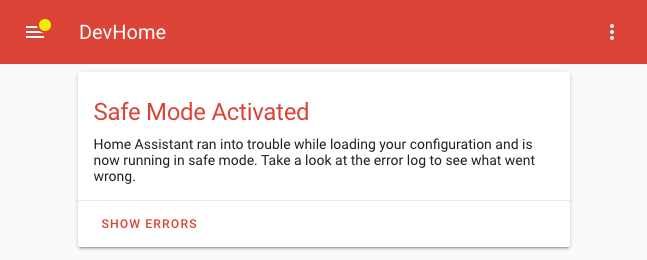 Home Assistant 运行在安全模式时的截图。
灯光亮度步进调节
你有没有试过做一个自动化来调亮或调暗灯光?或者把遥控器接进来,用它控制灯光亮度? 如果试过,你大概知道这件事以前做起来有多麻烦,往往还得额外写不少模板才能实现。
这个版本让这一切简单多了。下面是一个设备自动化示例:
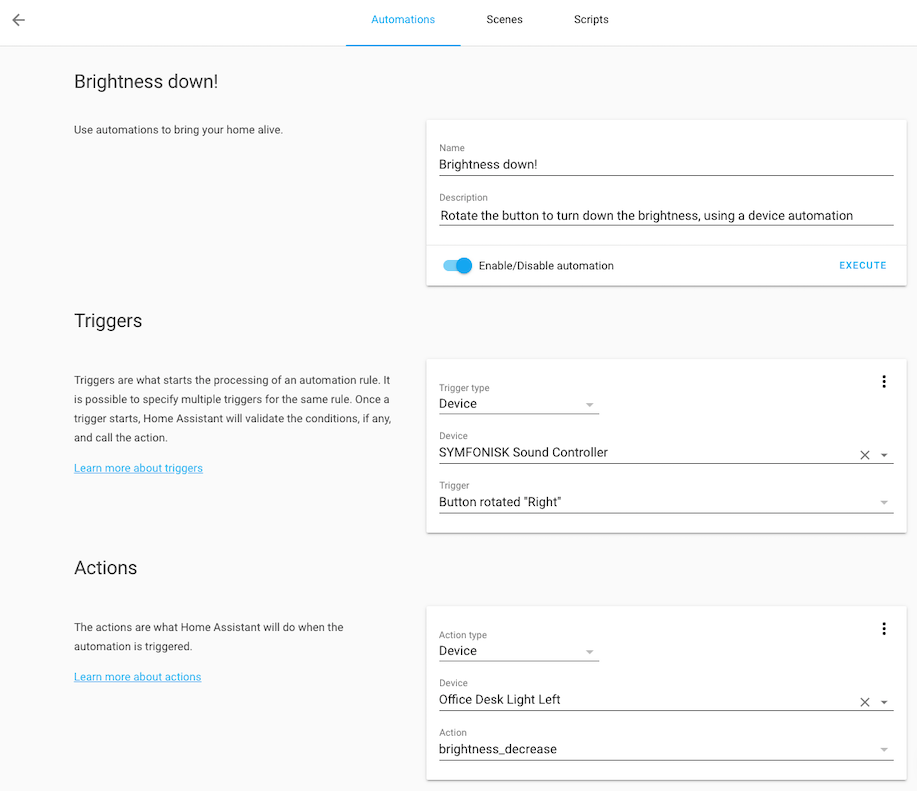 带调光灯光的设备自动化截图。
我们也把这项功能加入到了 light.turn_on 服务中。现在你可以基于当前亮度,
通过 brightness_step(-255 到 255)和 brightness_step_pct(-100 到 100)参数来调整亮度。
有一点值得注意:当亮度降到 0 时,灯光会被关闭;如果灯光当前已关闭,而你把亮度往上调,它就会被打开。 这非常实用,因为如果你手上有一个旋钮式调光按钮(例如 IKEA SYMFONISK),你就可以直接通过旋转来调节亮度,甚至仅靠旋转就能完成开灯和关灯。
人物更多信息对话框改进
人物现在拥有全新的更多信息对话框。它会在地图上显示该人物所在的位置;如果此人当前不在任何区域中,你还可以一键用他的当前位置创建一个区域。
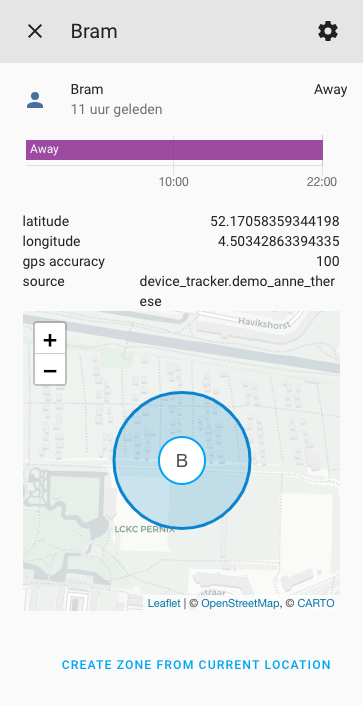 人物新版更多信息对话框截图。
实体配置面板现在会显示所有实体
此前,实体配置面板只会显示那些能被 Home Assistant 唯一识别的实体(也就是拥有所谓 unique ID 的实体)。但并不是所有集成都能提供这个信息,因此实体面板看不到全部实体,容易让人困惑。
从这个版本开始,我们把所有实体都纳入了这个面板中,让你能完整总览系统内的全部可用实体。虽然不是所有实体都能编辑,因为这需要实体具备唯一标识;如果某个实体没有 unique ID,铅笔图标上就会显示斜杠。
 配置面板中不可编辑实体的截图。
由于现在所有实体都会出现在这个面板里,它不仅能为你提供一个清晰完整的总览;你还可以利用 0.105 中引入的“相关项”功能,查看这些实体被用在了哪里!
开发者工具面板更新
开发者工具面板也迎来了一些贴心的小改进。在“信息”标签页中,你现在可以看到一份自己正在使用的全部集成列表,日志也开始能够识别对应的集成了。
这两个地方现在都带上了文档和 GitHub issue 跟踪器的链接,让你在遇到集成问题时可以更快深入排查。
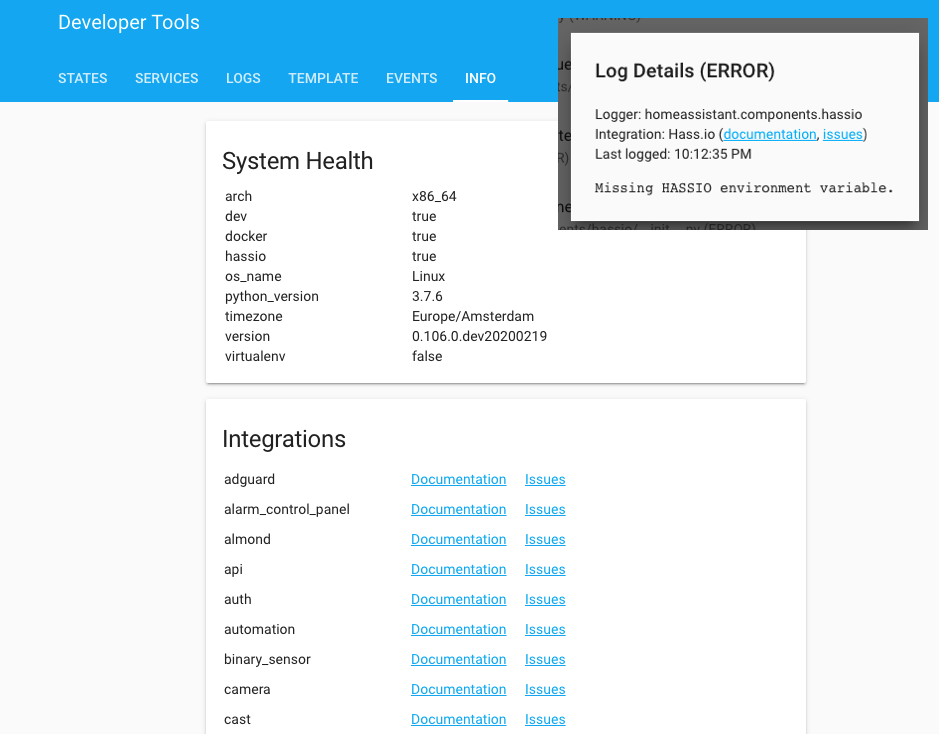 集成列表与示例日志消息截图。
传感器卡片
我们的传感器卡片迎来了样式更新。最初这个设计借鉴自 Lovelace Mini Graph 卡片,而现在它也同步更新,以匹配那张卡片改进后的新外观。
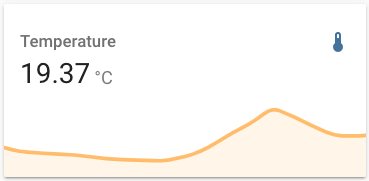 更新后的传感器卡片截图。
其他值得注意的变更
别急……还有更多!下面是这个版本里一些其他值得一提的小改动:
-
在上个版本引入的区域编辑器中,你现在已经可以修改“家”区域的位置了。虽然“家”区域的半径目前还不能调整(我们会继续完善!),但你已经可以在地图上拖动它。
-
同样是对上个版本功能的延伸,
state_color选项现在也可用于其他卡片,因此你可以覆盖卡片的默认行为。 -
新建自动化时,现在默认会使用设备自动化,而不是状态触发器和服务调用。设备自动化在 UI 中创建起来更简单也更清晰。当然,你依然可以像以前一样继续使用旧式触发器和动作。
-
在自动生成的 Lovelace 中,我们不再默认加入自动化和电池实体。你可以在自动化配置面板中找到自动化,而电池实体则可以在设备配置页面中查看。 如果你仍然希望在 Lovelace UI 中显示自动化和/或电池实体,也可以随时手动把它们加回来。
-
脚本和场景现在都支持设置自定义图标。以前你必须通过 customization 才能做到这点,现在直接在配置中设置即可。
自定义卡片
如果你是某张很棒的 Lovelace 自定义卡片的作者,
那请注意:我们对 Lovelace 做了一些可能会影响自定义卡片的调整,务必阅读开发者网站上的这篇博客文章。
新集成
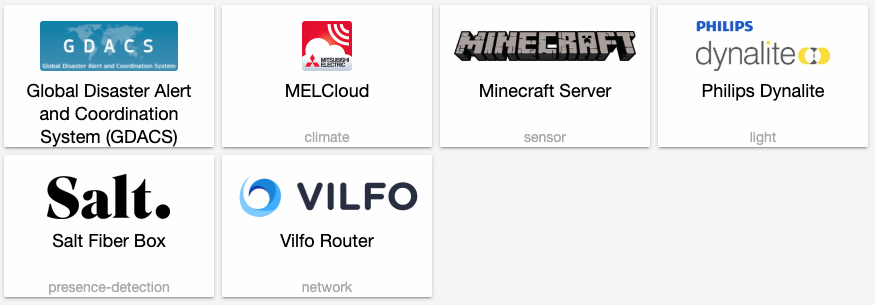
- Add Salt Fiber Box 设备 tracker (@bjornorri - #30986) (new-集成)
- Add GDACS feed 集成 (@exxamalte - #31235) (gdacs docs) (new-集成)
- Add Minecraft Server 集成 (@elmurato - #30992) (minecraft_server docs) (new-集成)
- Add MELCloud 集成 (@vilppuvuorinen - #30712) (melcloud docs) (new-集成)
- Dynalite 集成 (@ziv1234 - #27841) (dynalite docs) (new-集成)
- Add initial 版本 of Vilfo Router 集成 (@ManneW - #31177) (vilfo docs) (new-集成)
新平台
- Add totalconnect 区域 as 二元sensor (@austinmroczek - #28712) (totalconnect docs) (new-platform)
- Add Tahoma 门锁 support (@vlebourl - #31311) (tahoma docs) (new-platform)
- Clean up Tahoma smartlock (@vlebourl - #31430) (tahoma docs) (new-platform)
- Add Tado water_heater (@michaelarnauts - #30095) (tado docs) (breaking change) (new-platform)
如果你需要帮助……
如果这个版本带来了问题,请到我们的 issue tracker 提交报告,并尽量完整填写 issue 模板中的所有字段。
不向后兼容的变更
-
Tesla - Tesla default scan interval has been raised to 660 seconds from 300 seconds. This is the result of new testing showing the prior default would not allow Tesla vehicles to fall asleep. You should reevaluate your scan interval if you have changed it, to avoid battery drain. The scan interval has had the minimum lowered to 60. - (@alandtse - #31194) (tesla docs)
-
Insteon - The Insteon 实体 设备 状态 属性 were changed to conform to naming standards. Insteon Address is now
insteon_addressand Insteon Group is nowinsteon_group. You may need to 更新 自动化 and 脚本 that rely on these 属性. - (@teharris1 - #31183) (insteon docs) -
AVM FRITZ!DECT (Removed) - FRITZ!Dect is being removed and you should use the FRITZ!Box 集成 instead, which offers more features. - (@escoand - #31359) ([fritzbox docs])
Example YAML 配置:
should change to
-
Danfoss Air - The names of some danfoss_air 传感器 include a misspelling of the word Danfoss. This typo has been corrected and you will need to adjust all occurrences respectively. - (@KasperLK - #31344) (danfoss_air docs)
The following 传感器 are affected:
dandoss_air_dial_battery->danfoss_air_dial_batterydandoss_air_exhaust_fan_speed->danfoss_air_exhaust_fan_speeddandoss_air_supply_fan_speed->danfoss_air_supply_fan_speed
-
Météo-France - Météo-France now supports the 配置 flow and is now available to be added as an 集成 from the 集成 UI! There are no more
monitored_conditionsand all 传感器 will be added automatically. - (@Quentame - #29927) (meteo_france docs) -
Glances - Glances 传感器 are now dynamically added, which results in 实体 having new names, in particular 传感器 for mounted disks and temperature. You will need to remove the existing 配置 and re-add it, and adjust for any 自动化 you have using the new 实体 names. - (@engrbm87 - #28639) (glances docs)
-
服务 Calls - 服务 calls that reference non-existing 实体 will now 日志 a 警告 instead of silently being omitted. If you are using a 模板 and want to select no 实体, you need to pass
noneinstead. The TTS 集成 will no longer target all media players if no 实体 ID passed in. You need to specifyallinstead. - (@balloob - #31427) -
灯光 - It is no longer allowed to pass both
brightnessandbrightness_pcttolight.turn_on服务. Previously passing both would have usedbrightness_pct. - (@balloob - #31452) (灯光 docs) -
DSMR - Added Belgian meter. Some DSMR 传感器 have been renamed to align with DSMR specifications. "Power" 传感器 are now properly "Energy" 传感器 and those which were previously using "low" and "normal" descriptions now use "tarif 1" and "tarif 2", respectively. - (@dupondje - #30121) (dsmr docs)
Example of 传感器 changes:
Power Consumption (low)->Energy Consumption (tarif 1)Power Consumption (normal)->Energy Consumption (tarif 2)
-
Orange Livebox Play TV - The Orange Livebox Play TV 集成 has been removed. A change to the site scraped with 此integrations has changed, causing the 集成 to break. 此integrations violated our design decisions and is therefore removed. - (@frenck - #31525) (breaking change)
-
核心 - Only administrator 用户 can stop or 重启 Home Assistant. - (@balloob - #31509) (homeassistant docs)
-
Sure Petcare - Sure Petcare supports new features and has improved existing features. As a result, you will want to note that the format of the
feeders/flaps/petsoptions changed from a map (id/name) to a simple list of IDs, which means thenameoption is removed. Thenameis now gathered directly from the Sure Petcare API but changeable via the HA UI.The
household_id(which is no longer needed) and customizing optionsiconanddevice_classare also removed but can still be configured via the UI. - (@benleb - #31437) (surepetcare docs)Example YAML 配置:
-
前端 -
frontend.set_themeandfrontend.reload_themesnow require admin access. This will not break 自动化 that set themes because those are run with admin access. Also, athemes_updated eventno longer contains all theme data. - (@balloob - #31654) (前端 docs) -
Modbus - The Modbus 二元sensor can now read data from discrete inputs. A new variable
input_typewas added to define if you want to read fromcoilordiscrete_input. Coil is the default option. - (@vzahradnik - #30004) (modbus docs)Example YAML 配置:
-
Tado - Adding support of multiple Tado accounts has changed the unique ID generation of 传感器 and 温控 设备, and now includes the ID of the home. As a result you will see new 实体 ID's for
sensorandclimate设备.In addition, support for 热水器 区域 has been added. Tado hot water 区域 with temperature control previously 创建 a 温控 实体, e.g.,
climate.hot_water, and these will be replaced by awater_heater.hot_water实体. This change is not breaking for hot water 区域 without temperature control as they do not have a 温控 区域.(@gorynychzmey - #31527) (@michaelarnauts - #30095) (tado docs)
Example YAML 配置:
If you have only one account this 配置 will also work:
-
UniFi - Changing tracking 设置 will no longer disable 实体 but will remove them completely from the 状态 machine and 实体 registry. The SSID filter will now mark all wireless clients as
not_homeif they are connected to SSIDs that are not a part of the filter. - (@Kane610 - #31762) (unifi docs) -
Rest - Many 设备 continue to use XML for RESTful APIs. This change implements converting XML output to JSON via
xmltojsonso it can work with the existing rest 传感器 component.xmltojsontags may be confusing; if you are not familiar with the conversion, please use the xmltodict tool 创建 by @balloob to identify the tags to be used to parse the resulting JSON.As the 属性 that usually need to be scraped are deeper in the document, support for passing in a 模板 to find the JSON 属性 has been added. JSON APIs that do not have their 属性 at the top level can also benefit from this change. - (@bdraco - #31809) (rest docs)
Example YAML 配置:
-
GreenEye Monitor (GEM) - Greeneye Monitor temperature readings are now correct (previously they would report as twice the actual value). If you've compensated for this in your 仪表盘 or displays, you'll need to undo that compensation with this 发布. - (@jkeljo - #31896) (greeneye_monitor docs)
-
Duke Energy - The Duke Energy 集成 has been removed. The website of Duke Energy changed, causing the 集成 to break because it relied on web scraping, which is no longer allowed to be used. - (@frenck - #31921) (breaking change)
-
deCONZ - deCONZ will no longer change 实体 to being disabled when using the 集成 配置 options but rather remove them completely from the 状态 machine. Enabling the option will load all relevant 实体 again. - (@Kane610 - #31661) (deconz docs)
-
Ring - All Ring accounts require two-factor 认证. This means that it is no longer possible to 配置 it via YAML as this cannot support 2FA. - (@balloob - #32039) (ring docs) (breaking change) (beta fix)
-
Hue - The
filenameoption from the Hue bridge 配置 has been deprecated in 0.104 and now removed. - (@frenck - #32027) (hue docs) (breaking change) (beta fix)
Beta Fixes
- Only check 前端 for safe mode if 前端 wanted to be loa… (@balloob - #31969) (beta fix)
- Fix Plex 传感器 title handling (@jjlawren - #31973) (plex docs) (beta fix)
- Bump ZHA quirks and add skip 配置 support (@dmulcahey - #31982) (zha docs) (beta fix)
- Fix bug in ecobee 集成 (@marthoc - #32008) (ecobee docs) (beta fix)
- Fix recursion bug (@balloob - #32009) (homeassistant docs) (beta fix)
- Don't return coroutine in DLNA/DMR 服务 handler (@tsvi - #32011) (dlna_dmr docs) (beta fix)
- Bump pyatmo to 3.2.4 (@cgtobi - #32018) (netatmo docs) (beta fix)
- Add missing name to logging in DataUpdateCoordinator (@MatthewFlamm - #32023) (beta fix)
- Add minimal 版本 contrain to urllib3 (@frenck - #32031) (beta fix)
- Updated 前端 to 20200220.0 (@balloob - #32033) (前端 docs) (beta fix)
- Enhance Dynalite 集成 after review (@ziv1234 - #31760) (dynalite docs) (beta fix)
- Remove YAML config from Ring 集成 (@balloob - #32039) (ring docs) (breaking change) (beta fix)
- Fix i/o in august 摄像头 async 图像 更新 (@bdraco - #32044) (august docs) (beta fix)
- Updated 前端 to 20200220.1 (@balloob - #32046) (前端 docs) (beta fix)
- Bump brother to 0.1.6 (@bieniu - #32054) (brother docs) (beta fix)
- Add additional logging to rest 传感器 (@arsaboo - #32068) (rest docs) (beta fix)
- Add ConfigEntryNotReady exception to Plex (@jjlawren - #32071) (plex docs) (beta fix)
- Fix Plugwise 温控 issues for new firmware #32080 (@CoMPaTech - #32109) (plugwise docs) (beta fix)
- 0.106 Beta - provide correctly formatted placeholders (@kit-klein - #32119) (konnected docs) (beta fix)
- Properly define depenency for Scrape 集成 on Rest integ… (@balloob - #32136) (scrape docs) (beta fix)
- Fix vizio bug to use 'get' to get volume_step since it is optional (@raman325 - #32151) (vizio docs) (beta fix)
- Improve Vizio fix to avoid KeyError (@raman325 - #32163) (vizio docs) (beta fix)
- Dedup and clarify imported konnected config flows (@kit-klein - #32138) (konnected docs) (beta fix)
- Bump python-tado to 0.3.0 (@michaelarnauts - #32186) (tado docs) (beta fix)
- Updated 前端 to 20200220.3 (@bramkragten - #32189) (前端 docs) (beta fix)
- Fix Arlo doing I/O in event loop (@balloob - #32190) (arlo docs) (beta fix)
- Bump socialbladeclient to 0.5 (@pinkywafer - #32191) (socialblade docs) (beta fix)
- Fix 错误 where SimpliSafe websocket would disconnect and not reconnect (@bachya - #32199) (simplisafe docs) (beta fix)
- Updated 前端 to 20200220.4 (@bramkragten - #32205) (前端 docs) (beta fix)
- Remove deprecated Hue options (fixes CI) (@frenck - #32027) (hue docs) (breaking change) (beta fix)
发布 0.106.1 - February 27
- Add missing translations for 灯光 动作 (@emontnemery - #32216) (灯光 docs)
- Mark clients away if they have never been seen. (@lociii - #32222) (unifi docs)
- Fix DSMR 5 (@dupondje - #32233) (dsmr docs)
- Bump simplisafe-python to 9.0.0 (@bachya - #32215) (simplisafe docs)
- Bump simplisafe-python to 9.0.2 (@bachya - #32273) (simplisafe docs)
- deCONZ - Race 条件 on slower systems (@Kane610 - #32274) (deconz docs)
- Catch more Hue 错误 (@balloob - #32275) (hue docs)
发布 0.106.2 - February 28
- Updated 前端 to 20200220.5 (@bramkragten - #32312) (前端 docs)
- revent saving/deleting Lovelace config in safe mode (@balloob - #32319) (Lovelace docs)
- UniFi - Temporary workaround to get 设备 tracker to mark cli… (@Kane610 - #32321) (unifi docs)
- Ensure rest 传感器 are marked unavailable when http requests… (@bdraco - #32309) (rest docs)
发布 0.106.3 - March 2
Added a Coronavirus 集成 to help monitor the ongoing epidemic. More information here.
发布 0.106.4 - March 2
- Fixed TypeError with old server versions (@elmurato - #32329) (minecraft_server docs)
- Bump pyeight to 0.1.4 (@mezz64 - #32363) (eight_sleep docs)
- Catch Eight Sleep API 错误, don't round None type (@mezz64 - #32410)
- Coronavirus updates (@balloob - #32417)
- Add unique ID to coronavirus (@balloob - #32423)
发布 0.106.5 - March 3
- Fix too many 设备 tracker updates in 日志 for Tesla (@alandtse - #32426)
- Filter out duplicate logbook 状态 (@balloob - #32427)
- Properly define dependency for pvoutput 集成 on rest in… (@bdraco - #32435)
- Fix pushover's ATTR_RETRY env variable typo (@axilleas - #32440)
- Remove hassfest blacklisted rest (@balloob - #32441)
- UniFi - Fix websocket bug (@Kane610 - #32449)
发布 0.106.6 - March 10
- Get pending iCloud 设备 when available + request again when needs an 更新 (@Quentame - #32400) (icloud docs)
- Send messages conforming new facebook policy (@chmielowiec - #32516) (facebook docs)
- 更新 python-velbus to fix a missing data file (@Cereal2nd - #32580) (velbus docs)
- 升级 to coronavirus 1.1.0 (@balloob - #32648) (coronavirus docs)
All changes
- Change scan_interval defaults for Tesla (@alandtse - #31194) (tesla docs) (breaking change)
- Removes I/O from linky tests (@balloob - #31299)
- Reorganize insteon code (@teharris1 - #31183) (insteon docs) (breaking change)
- 升级 pre-commit to 2.0.1 (@frenck - #31308)
- Add opening and closing 状态 to MQTT 遮盖 (@rickvdl - #31259) (MQTT docs)
- Bump pytrafikverket to 0.1.6.1 (@endor-force - #30697) (trafikverket_train docs) (trafikverket_weatherstation docs)
- 更新 媒体播放器 and add tests to qualify vizio 集成 for platinum quality score (@raman325 - #31187) (vizio docs)
- Register on HA stop event to gracefully shutdown HomematicIP Cloud connections (@SukramJ - #31289) (homematicip_cloud docs)
- Axis - config flow use new 助手 functions (@Kane610 - #31286) (axis docs)
- UniFi - Try to discover local controller (@Kane610 - #31326) (unifi docs)
- Bump pytest to 5.3.5 (@frenck - #31327)
- Remove Throttle on async_setup and bump pyvizio 版本 (@raman325 - #31337) (vizio docs)
- Fix typos found by codespell (@cclauss - #31243)
- UniFi 集成 move to push messaging (@Kane610 - #31086) (unifi docs)
- Axis - Use 核心 to start component tests (@Kane610 - #31328)
- drop fritzdect (@escoand - #31359) (breaking change)
- Let 核心 resolve entity_id for lastfm from username (@inverse - #31280) (lastfm docs)
- Add totalconnect 区域 as 二元sensor (@austinmroczek - #28712) (totalconnect docs) (new-platform)
- Add Tahoma 门锁 support (@vlebourl - #31311) (tahoma docs) (new-platform)
- Run mypy through a pyenv/virtualenv enabler wrapper 脚本 (@scop - #30922)
- Remove hour delay before checking for updates (@balloob - #31368) (updater docs)
- Add play, pause, previous and next track to kef (@basnijholt - #31373) (kef docs)
- Replace unmaintained BraviaRC 后端 with new fork: (@dcnielsen90 - #31234) (braviatv docs) (braviatv docs) (braviatv docs)
- deCONZ - Improve config flow logging (@Kane610 - #31381) (deconz docs)
- UniFi - 日志 better information than a backtrace when poor 开关 data is involved (@Kane610 - #31382) (unifi docs)
- Add temperature and humidity to xiaomi miio air quality monitor (@fierland - #31287) (xiaomi_miio docs)
- Support multiple attachments in signal messenger 集成 (@bbernhard - #31141) (signal_messenger docs)
- 升级 importlib-metadata to 1.5.0 (@fabaff - #31390)
- 升级 sendgrid to 6.1.1 (@fabaff - #31394) (sendgrid docs)
- 升级 holidays to 0.10.1 (@fabaff - #31392) (workday docs)
- 升级 discord.py to 1.3.1 (@fabaff - #31391) (discord docs)
- 升级 praw to 6.5.1 (@fabaff - #31393) (reddit docs)
- Add unique_id to essent 传感器 (@vanbalken - #31408) (essent docs)
- Catch 设备 not found in 设备 自动化 (@balloob - #31401) (device_automation docs)
- 升级 numpy to 1.18.1 (@fabaff - #31411) (iqvia docs) (opencv docs) (tensorflow docs) (trend docs)
- 更新 pyhomematic to 0.1.64 (@danielperna84 - #31406) (homematic docs)
- Add Salt Fiber Box 设备 tracker (@bjornorri - #30986) (new-集成)
- 升级 alpha_vantage to 2.1.3 (@fabaff - #31388) (alpha_vantage docs)
- Search specific train in Nederlandse Spoorwegen (@gurbyz - #28898) (nederlandse_spoorwegen docs)
- Enable SUPPORT_VOLUME_STEP (@Cloudenius - #31023) (pioneer docs)
- deCONZ - Library cleanup (@Kane610 - #31410) (deconz docs)
- Streamline SimpliSafe data and token management (@bachya - #31324) (simplisafe docs)
- Replace cmp option with eq and order (@springstan - #31423)
- Bump pyvizio 版本 and add additional 设备 info (@raman325 - #31417) (vizio docs)
- Pass correct config to updater (@balloob - #31428) (updater docs)
- Add guard clause for discovery_info to tahoma platforms (@vlebourl - #31434) (tahoma docs)
- Add color to 灯光 模板 (@tetienne - #31435) (模板 docs)
- Clean up Tahoma smartlock (@vlebourl - #31430) (tahoma docs) (new-platform)
- Fix issue with Notion dispatcher topic (@bachya - #31441) (notion docs)
- Fix issue with IQVIA dispatcher topic (@bachya - #31440) (iqvia docs)
- Fix issue with WWLLN dispatcher topic (@bachya - #31442)
- Fix issues with Ambient PWS dispatcher topic (@bachya - #31439) (ambient_station docs)
- Add missing await to HMIPC (@SukramJ - #31415) (homematicip_cloud docs)
- Add timeout 属性 for send files (@Konsts - #31379) (telegram_bot docs)
- Fix misspelled 传感器 names (@KasperLK - #31344) (danfoss_air docs) (breaking change)
- 更新 StepSpeaker and Speaker interfaces in Alexa (@ochlocracy - #31444) (alexa docs)
- Remove Alexa.InputController from 设备 without supported inputs in Alexa (@ochlocracy - #31450) (alexa docs)
- Bump pyvizio 版本 for bug fixes (@raman325 - #31453) (vizio docs)
- Add config flow to Meteo-France (@Quentame - #29927) (meteo_france docs) (breaking change)
- 日志 警告 when 实体 referenced in 服务 call not found (@balloob - #31427) (breaking change)
- Use 实体.async_request_call in 服务 助手 (@balloob - #31454)
- Add brightness_step to 灯光.turn_on (@balloob - #31452) (灯光 docs) (breaking change)
- deCONZ - Revert from using disabled_by when setting options (@Kane610 - #31446) (deconz docs)
- Add belgian meter and rename some dsmr 传感器 (@dupondje - #30121) (dsmr docs) (breaking change)
- Add GDACS feed 集成 (@exxamalte - #31235) (gdacs docs) (new-集成)
- 更新 link when IO in event loop (@balloob - #31519)
- Remove of liveboxplaytv 集成 (ADR0004) (@frenck - #31525) (breaking change)
- Updated the provider name to blockchain.com (@P-Verbrugge - #31534) (blockchain docs)
- Changed website name to blockchain.com (@P-Verbrugge - #31528) (bitcoin docs)
- 更新 the 更新 coordinator API to make it easier to use (@balloob - #31471) (hue docs)
- Make amcrest 集成 more robust (@pnbruckner - #30843) (amcrest docs)
- Skip updates when Plex client viewing photos (@jjlawren - #31556) (plex docs)
- Unregister listener for stats 传感器 with max_age (@azogue - #31580) (statistics docs)
- Add Minecraft Server 集成 (@elmurato - #30992) (minecraft_server docs) (new-集成)
- Extract 服务 from init.py for HomematicIP Cloud (@SukramJ - #31376) (homematicip_cloud docs)
- Fix exceptions when using newer Samsung TVs (@escoand - #31602) (samsungtv docs)
- Clean up 核心 服务 (@balloob - #31509) (group docs) (homeassistant docs) (breaking change)
- Bump denonavr to 0.7.12 (@scarface-4711 - #31629) (denonavr docs)
- Actually enable alarmdecoder to see open/close 状态 of bypassed RF 区域 when armed (@melyux - #31426) (alarmdecoder docs)
- Use slug in ping 设备 tracker config validation (@springstan - #31329) (ifttt docs) (media_extractor docs) (onewire docs) (ping docs)
- Handle missing next train from NS (@YarmoM - #31626) (nederlandse_spoorwegen docs)
- Remove stray 调试 from unifi 集成 (@CHAZICLE - #31634) (unifi docs)
- Add Abode water valve support (@shred86 - #30635) (abode docs)
- 设备 tracker 实体 based on GPS should always publish updates (@balloob - #31551) (device_tracker docs)
- Hue to retry if hub 错误 out (@balloob - #31616) (hue docs)
- Bump insteonplm to 0.16.7 (@teharris1 - #31645) (insteon docs)
- Only auth on enter_learning in response to 错误 for broadlink (@bmfurtado - #27341) (broadlink docs)
- Add unique ID to edimax 开关 (@andersonshatch - #27984) (edimax docs)
- Added 区域 type Technical as power. (@crallian - #31611) (spc docs)
- Add recorder vars db_max_retries and db_retry_wait (@TechnicallyJoe - #31561) (recorder docs)
- Sure Petcare new features various improvements (@benleb - #31437) (surepetcare docs) (breaking change)
- Add ZHA Texas Instruments CC 设备 support (@sanyatuning - #31621) (zha docs)
- ZHA tests refactoring (@Adminiuga - #31682) (zha docs)
- Clean up 前端 服务 and events (@balloob - #31654) (前端 docs) (breaking change)
- Add brightness 灯光 设备 动作 (@balloob - #31567) (device_automation docs) (灯光 docs)
- Fix Météo-France I/O while testing (@Quentame - #31695) (meteo_france docs)
- Bump velbus 版本 + load velbus module names into 设备 info (@Cereal2nd - #31664) (velbus docs)
- Vicare water_heater set_temperature fix and bump PyVicare to 0.1.7 (@oischinger - #31672) (vicare docs)
- Add MELCloud 集成 (@vilppuvuorinen - #30712) (melcloud docs) (new-集成)
- Dynalite 集成 (@ziv1234 - #27841) (dynalite docs) (new-集成)
- Extend Modbus 二元sensor to support discrete inputs (@vzahradnik - #30004) (modbus docs) (breaking change)
- Fix Evohome checking override duration (@eavanvalkenburg - #31697) (evohome docs)
- For vizio 集成, set unique ID early to prevent multiple zeroconf discovery items for the same 设备 to appear (@raman325 - #31686) (vizio docs)
- Use latest 版本 of python-pushover (forked) to fix issue with diff… (@SoftXperience - #31647) (pushover docs)
- Add Glances 传感器 dynamically (@engrbm87 - #28639) (glances docs)
- Adjust 实体 slow 警告 for custom component (@balloob - #31711)
- Limit derivative test (@balloob - #31717)
- Add support of multiple Tado accounts (@gorynychzmey - #31527) (tado docs) (breaking change)
- Disable Hue groups for new 设置 (@balloob - #31713) (hue docs)
- Significantly reduce the number of API calls that the august 集成 (@bdraco - #31685) (august docs)
- 实体 Registry to store and 恢复 name/icon (@balloob - #31714) (config docs)
- Support Konnected Pro 报警 面板, embrace async, leverage latest HA features/architecture (@kit-klein - #30894) (konnected docs)
- Fix set volume level (@maxcanna - #31731) (frontier_silicon docs)
- 更新 Modbus 服务 manifest (@vzahradnik - #31727)
- pyipma 版本 bump (@dgomes - #31739) (ipma docs)
- Read door open/close events from the activity 日志. (@bdraco - #31732) (august docs)
- Improve Huawei LTE timeouting/stalling request behavior (@scop - #31710) (huawei_lte docs)
- Refresh the august access token when needed (@bdraco - #31735) (august docs)
- Add new Webhook 动作 to allow enabling encryption in an exis… (@robbiet480 - #31743) (mobile_app docs)
- Use set for dependency lookup in hassfest (@balloob - #31746)
- Fix spelling of ecobee in manifest (@frenck - #31751) (ecobee docs)
- Add availability status to Modbus 实体 and improve 错误 handling (@vzahradnik - #31073) (modbus docs)
- Fix moving average test for discrete derivative 传感器 (@basnijholt - #31750)
- Improve Plex 媒体播放器 实体 naming (@jjlawren - #31755) (plex docs)
- Add initial 版本 of Vilfo Router 集成 (@ManneW - #31177) (vilfo docs) (new-集成)
- Whitelist shopping list updated event (@balloob - #31742) (websocket_api docs)
- Add 设备 name to 传感器 name for mobile_app (@dshokouhi - #31756) (mobile_app docs)
- ZHA tests refactoring (@Adminiuga - #31744) (zha docs)
- Updated 前端 to 20200212.0 (@bramkragten - #31772) (前端 docs)
- Cleanup August activity processing and add tests (@bdraco - #31774) (august docs)
- Fix spelling of VIVOTEK (@frenck - #31773) (vivotek docs)
- Fix spelling of apcupsd in manifest (@frenck - #31770) (apcupsd docs)
- Fix spelling of AVM FRITZ!Box in manifest (@frenck - #31765) (fritz docs)
- Implement PlatformNotReady to Linky + fix TypeError (@Quentame - #31768)
- UniFi - Change handling of updated options (@Kane610 - #31762) (unifi docs) (breaking change)
- Rename codecov so it will be picked up (@balloob - #31775)
- Fix spelling of ASUSWRT in manifest (@frenck - #31764) (asuswrt docs)
- 更新 to 版本 2.6 of ihcsdk (@dingusdk - #31789) (ihc docs)
- Spelling: Config(uration) (@frenck - #31782)
- Add and use bunch of data size and rate related constants (@scop - #31781)
- Fix spelling of NETGEAR and CalDAV in manifests (@frenck - #31790) (caldav docs) (netgear docs) (netgear_lte docs)
- Write 状态 if schedule 更新 状态 from async context (@balloob - #31758) (ps4 docs)
- Add support for real-time data from SimpliSafe (@bachya - #31424) (simplisafe docs)
- 更新 onewire component (@MrDadoo - #31419) (onewire docs)
- Add multi select support to config validation and to custom serializer (@Kane610 - #31798)
- Catch unexpected exceptions when validating config (@balloob - #31795)
- Use time.monotonic instead of time.time where appropriate (@scop - #31780) (bme680 docs) (doods docs) (maxcube docs) (netatmo docs) (proxmoxve docs) (verisure docs)
- Add Home Assistant Companion to manifest.json so we can sugges… (@robbiet480 - #31808) (前端 docs)
- 更新 Plex connection class to push (@jjlawren - #31806) (plex docs)
- Remove force from async_schedule_update_ha_state for HMIPC (@SukramJ - #31796) (homematicip_cloud docs)
- Add summary attribtue for currently playing media (@jjlawren - #31803) (plex docs)
- Fix swap of min and max default values in Modbus 温控 (@vzahradnik - #31801) (modbus docs)
- Add 设备 registry support for Plex (@jjlawren - #31797) (plex docs)
- 更新 directv to directpy==0.6 (@ctalkington - #31812) (directv docs) (directv docs)
- Speed up tests of HomematicIP Cloud (@SukramJ - #31810)
- Allow hourly forecast in IPMA (@abmantis - #30979) (ipma docs)
- Limit translations_develop to an 集成 (@balloob - #31804)
- Annotate more async functions correctly (@balloob - #31802) (coolmaster docs) (esphome docs) (homekit_controller docs) (mysensors docs) (sonos docs) (starline docs) (upnp docs)
- Fire HASS events on SimpliSafe events (@bachya - #31811) (simplisafe docs)
- Change multi_select config validator to class (@Kane610 - #31828)
- Remove energy 传感器 from incompatible Ata 设备 (@vilppuvuorinen - #31831) (melcloud docs)
- Add turn_on_action 配置 variable (@maxcanna - #31792) (lg_netcast docs)
- Bump pillow to 7.0 (@robmarkcole - #31847) (doods docs) (proxy docs) (qrcode docs) (seven_segments docs) (tensorflow docs)
- Simplify missing Garmin Connect data handling, mark 实体 un/available (@scop - #31718) (garmin_connect docs)
- Add Tado water_heater (@michaelarnauts - #30095) (tado docs) (breaking change) (new-platform)
- Revert "Check netgear device_tracker link_rate to ensure 设备 is connected" (@MartinHjelmare - #31855) (netgear docs)
- 助手 typing improvements (@scop - #31865)
- Improve media name detection on lg_netcast (@maxcanna - #31863) (lg_netcast docs)
- 更新 pyTibber libary, add signal strength for Pulse and watty (@Danielhiversen - #31851) (tibber docs)
- Bump Apprise 版本 to v0.8.4 (@caronc - #31868) (apprise docs)
- Add support for displaying Daf Yomi (@moshekaplan - #30628) (jewish_calendar docs)
- Use new custom_serializer (@jjlawren - #31871) (config docs)
- Fix CalDAV recurring events (@PhilRW - #31805) (caldav docs)
- Convert august to async so a token refresh 门锁 can be used (@bdraco - #31848) (august docs)
- Add rainforest_eagle support for legacy hardware (@jcalbert - #28082) (rainforest_eagle docs)
- Support XML conversion for RESTful 传感器 (@bdraco - #31809) (rest docs) (breaking change)
- Fix mikrotik detecting capsman support (@Marco98 - #31819) (mikrotik docs)
- Adjust tests after speed up to 恢复 coverage for HomematicIP Cloud (@SukramJ - #31836) (homematicip_cloud docs)
- 升级 python-velbus to 2.0.41 (@Cereal2nd - #31875)
- Type hint improvements (@scop - #31876) (elgato docs) (esphome docs) (iaqualink docs) (nsw_rural_fire_service_feed docs) (遥控器 docs) (wled docs)
- Bump adafruit-blinka and adafruit-circuitpython-mcp230xx (@jardiamj - #31845) (mcp23017 docs)
- 更新 nederlandse_spoorwegen to properly handle punctuality (@Squixx - #31741) (nederlandse_spoorwegen docs)
- Add timestamp to lg_netcast media_image_url to 更新 图像 correctly (@laszlojakab - #30933) (lg_netcast docs)
- Clean up netgear 设备 tracker (@MartinHjelmare - #31861) (netgear docs)
- Activate Stale bot for PR's (@frenck - #31837)
- Fix check_real location guard (@MartinHjelmare - #31890)
- Clean soundtouch (@MartinHjelmare - #31888) (soundtouch docs)
- Fix bugs in greeneye_monitor voltage reporting (@jkeljo - #31895) (greeneye_monitor docs)
- 升级 greeneye_monitor to 2.0 (@jkeljo - #31896) (greeneye_monitor docs) (breaking change)
- prevent dev_id being permanently assigned as config_name (@mueslo - #31886) (device_tracker docs)
- 升级 youtube_dl to 版本 2020.02.16 (@BKPepe - #31905) (media_extractor docs)
- 升级 aiohue (@balloob - #31903) (hue docs)
- Add POD support, sleep fitness 传感器 to EightSleep (@mezz64 - #31874) (eight_sleep docs)
- Add logger name to system 日志 (@balloob - #31902) (system_log docs)
- Allow specifying an icon for a 场景 (@balloob - #31898) (homeassistant docs)
- Add icons to 脚本 (@balloob - #31899) (脚本 docs)
- Bump dependency to 0.10.17 for HomematicIP Cloud (@SukramJ - #31911) (homematicip_cloud docs)
- Start safe mode if invalid 核心 conf (@balloob - #31904)
- Hue Group features based on the bulbs in it (@guimaraes13 - #31897) (hue docs)
- Updated 前端 to 20200212.0 (@bramkragten - #31912) (前端 docs)
- Provide 用户 consumable 错误 when 门锁 operations fail (@bdraco - #31864) (august docs)
- Bump simplisafe-python to 8.1.1 (@bachya - #31915) (simplisafe docs)
- Remove duke_energy 集成 (ADR-0004) (@frenck - #31921) (breaking change)
- Updated 前端 to 20200217.0 (@bramkragten - #31922) (前端 docs)
- Add async_unload_entry to iCloud (@Quentame - #31917) (icloud docs)
- Add an options flow to demo (@bramkragten - #31920) (demo docs)
- Bump aio_geojson_geonetnz_quakes to 0.12 (@exxamalte - #31930) (geonetnz_quakes docs)
- Fix translations_develop (@austinmroczek - #31942)
- Bump aio_geojson_nsw_rfs_incidents to 0.3 (@exxamalte - #31941) (nsw_rural_fire_service_feed docs)
- Bump pyps4-2ndscreen to 1.0.7 (@ktnrg45 - #31943) (ps4 docs)
- Add pigpio 遥控器 functionality (@Poeschl - #31667) (rpi_gpio_pwm docs)
- Fix 实体 registry not saving name/icon (@balloob - #31932)
- Untag discovery as an allowed dependency (@balloob - #31934) (apple_tv docs) (freebox docs) (octoprint docs) (roku docs) (sabnzbd docs) (xiaomi_aqara docs) (yeelight docs)
- Read Modbus 温控 current temp from input register (@vzahradnik - #31944) (modbus docs)
- Add support for SimpliSafe system 通知 (@bachya - #31936) (simplisafe docs)
- Add Twitch subscription and additional stats (@Poeschl - #31122) (twitch docs)
- Extend safe mode (@balloob - #31927) (zeroconf docs)
- Do not use a set for hvac modes in SmartThings (@balloob - #31959) (smartthings docs)
- Audit 状态 handling off august bridges and 传感器 (@bdraco - #31935) (august docs)
- deCONZ - Directly reflect changes to config entry options (@Kane610 - #31661) (deconz docs) (breaking change)
- 升级 pre-commit to 2.1.0 (@frenck - #31962)
- Fix pre-commit hook issue on Windows (@teharris1 - #31648)
- Add support for MQTT 设备 触发器 (@emontnemery - #31679) (device_automation docs) (MQTT docs)
- UniFi config option SSID filter (@Kane610 - #31842) (unifi docs)
- deConz - Use proper mechanisms for options flow tests (@Kane610 - #31965)
- Optimize find bad JSON data (@balloob - #31963)
- Add options to ignore shared/managed Plex clients (@jjlawren - #31738) (plex docs)
- Fix Plex naming and 设备 for misbehaving clients (@jjlawren - #31970) (plex docs)
- 升级 to bimmer_connected 0.7.1 to fix US and China access (@gerard33 - #31968) (bmw_connected_drive docs)
- Modbus remove unnecessary get calls (@vzahradnik - #31966) (modbus docs)
- Bump vallox-websocket-api to 2.4.0 (@springstan - #31913) (vallox docs)
- Add new 设备 to HomematicIP Cloud (@SukramJ - #31914) (homematicip_cloud docs)
- Add shutter group to HomematicIP Cloud (@SukramJ - #31916) (homematicip_cloud docs)
- Fix test for HMIPC (@SukramJ - #31981)
- Updated 前端 to 20200219.0 (@bramkragten - #31979) (前端 docs)
- Only check 前端 for safe mode if 前端 wanted to be loa… (@balloob - #31969) (beta fix)
- Fix Plex 传感器 title handling (@jjlawren - #31973) (plex docs) (beta fix)
- Bump ZHA quirks and add skip 配置 support (@dmulcahey - #31982) (zha docs) (beta fix)
- Fix bug in ecobee 集成 (@marthoc - #32008) (ecobee docs) (beta fix)
- Fix recursion bug (@balloob - #32009) (homeassistant docs) (beta fix)
- Don't return coroutine in DLNA/DMR 服务 handler (@tsvi - #32011) (dlna_dmr docs) (beta fix)
- Bump pyatmo to 3.2.4 (@cgtobi - #32018) (netatmo docs) (beta fix)
- Add missing name to logging in DataUpdateCoordinator (@MatthewFlamm - #32023) (beta fix)
- Add minimal 版本 contrain to urllib3 (@frenck - #32031) (beta fix)
- Updated 前端 to 20200220.0 (@balloob - #32033) (前端 docs) (beta fix)
- Enhance Dynalite 集成 after review (@ziv1234 - #31760) (dynalite docs) (beta fix)
- Remove YAML config from Ring 集成 (@balloob - #32039) (ring docs) (breaking change) (beta fix)
- Fix i/o in august 摄像头 async 图像 更新 (@bdraco - #32044) (august docs) (beta fix)
- Updated 前端 to 20200220.1 (@balloob - #32046) (前端 docs) (beta fix)
- Bump brother to 0.1.6 (@bieniu - #32054) (brother docs) (beta fix)
- Add additional logging to rest 传感器 (@arsaboo - #32068) (rest docs) (beta fix)
- Add ConfigEntryNotReady exception to Plex (@jjlawren - #32071) (plex docs) (beta fix)
- Fix Plugwise 温控 issues for new firmware #32080 (@CoMPaTech - #32109) (plugwise docs) (beta fix)
- 0.106 Beta - provide correctly formatted placeholders (@kit-klein - #32119) (konnected docs) (beta fix)
- Properly define depenency for Scrape 集成 on Rest integ… (@balloob - #32136) (scrape docs) (beta fix)
- Fix vizio bug to use 'get' to get volume_step since it is optional (@raman325 - #32151) (vizio docs) (beta fix)
- Improve Vizio fix to avoid KeyError (@raman325 - #32163) (vizio docs) (beta fix)
- Dedup and clarify imported konnected config flows (@kit-klein - #32138) (konnected docs) (beta fix)
- Bump python-tado to 0.3.0 (@michaelarnauts - #32186) (tado docs) (beta fix)
- Updated 前端 to 20200220.3 (@bramkragten - #32189) (前端 docs) (beta fix)
- Fix Arlo doing I/O in event loop (@balloob - #32190) (arlo docs) (beta fix)
- Bump socialbladeclient to 0.5 (@pinkywafer - #32191) (socialblade docs) (beta fix)
- Fix 错误 where SimpliSafe websocket would disconnect and not reconnect (@bachya - #32199) (simplisafe docs) (beta fix)
- Updated 前端 to 20200220.4 (@bramkragten - #32205) (前端 docs) (beta fix)
- Remove deprecated Hue options (fixes CI) (@frenck - #32027) (hue docs) (breaking change) (beta fix)