

Community Highlights: 3rd edition
It's time for the third installment of our revamped community highlights. We got some really great stuff again.
This time I (Paulus) am in charge of writing the community highlights. The reason for this is that the main item involves Frenck's own work, and he felt weird promoting his own awesome, great, wonderful, enlighting and fabulous work on the revamped Visual Studio Code 插件.
Visual Studio Code 插件 updated
Visual Studio Code is a free text editor by Microsoft that works inside your browser. It makes it very easy to manage your 配置.
The 插件 used to be only available for x64 设备 like intel NUC. With this 更新, it is now also available for ARM64 设备, including the 树莓派 3 and 4 (the 64-bit 版本).
It comes 已安装 with all the extensions necessary for editing Home Assistant related files:
- Home Assistant Config Helper
- ESPHome VSCode
- YAML checker
- Material Design Icons support
If this is the first time you hear about the Home Assistant Config 助手, it is genius. It will set-up a realtime connection from VS Code directly to your Home Assistant 安装 so it can offer auto-complete suggestions when editing your 配置. This is pre-configured and works out of the box with the VS Code 插件.
To 安装 the 插件, search for Visual Studio Code in the 插件 store.
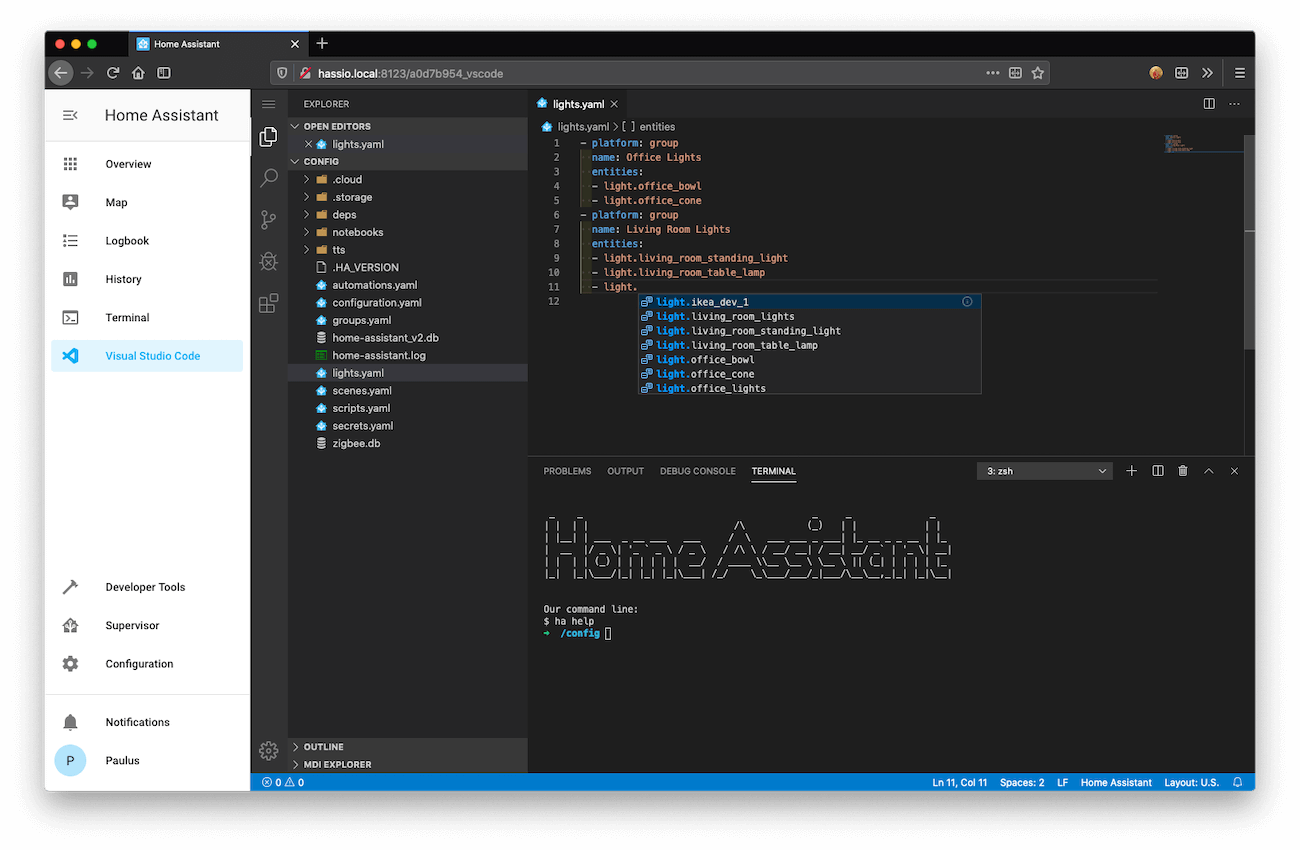
VS Code 插件 part 2
But there is more in the 插件! Home Assistant contains an 插件 服务 registry where 插件 can make their 服务 available for other 插件 without requiring any 配置. The VS Code 插件 uses this feature to offer a built-in terminal that has pre-configured tools to connect to the MariaDB 插件 and the MQTT 插件.
To try it out, open VS Code, click on the menu 按钮 top left -> view -> terminal.
MQTT command-line
This requires the Mosquitto 插件 to be 已安装 and an MQTT 传感器 (instructions).
To publish a message to an MQTT topic:
Or watch all messages that go through your MQTT broker:
SQL command-line
This requires the MariaDB 插件 to be 已安装 and the recorder configured to use it (instructions).
To query the available tables:
Beta time!
Today we are releasing the first beta of Home Assistant 核心 0.106. It is packed with awesome features. For a sneak peek of what is coming, check the beta 发布 notes.
I'm personally most excited about the extended safe mode. It will guarantee that the 前端 will always load, no Matter how broken your 配置 is.
Navigation Arrow
On Reddit 用户 /u/Jenova70 showed a super slick navigation arrow that indicates the traffic on his daily commute. Very slick! Instructions can be found in the comments.
I built a physical "navigation arrow" that is changing color based on the estimated time of arrival at work (Waze commute data :) ) from r/homeassistant
<脚本 async src="//embed.redditmedia.com/widgets/platform.js" charset="UTF-8"></脚本>
Thanks, Jean-Loïc Pouffier & cogneato for sending in this item! 👍
Got a tip for the next edition?
Have you seen (or made) something awesome, interesting, unique, amazing, inspirational, unusual or funny, using Home Assistant?
Click here to send us your Community Highlight suggestion.
Also, don't forget to share your creations with us via Social Media:
- Twitter it! Be sure to mention @home_assistant
- Share it on our Facebook group
- Post it to our subreddit
- Tag @homeassistant on Instagram
- Or via chat, drop us a line in the #lounge at Discord
See you next edition!