

0.105:安全模式、页眉与页脚、全新区域编辑器、Garmin、Sighthound

如果你错过了,我们最近决定调整 Home Assistant 中使用的一些命名,详情可以查看这篇博客文章。
因此,这就是 Home Assistant Core 0.105 版本!
旧版“状态 UI”现已弃用
2018 年 6 月,我们发布了 Home Assistant 0.72,首次引入了 Lovelace。到了 2019 年 1 月,随着 Home Assistant 0.86 的发布,它正式成为默认用户界面。
这也意味着,Lovelace 作为状态 UI 的替代方案正式推出至今已经超过一年,是时候和旧版状态 UI 说再见了。本次发布将其标记为弃用,并会在 0.107 版本中从 Home Assistant 中彻底移除。
如果你还没有使用 Lovelace,我们建议你现在就切换过去。默认情况下,Lovelace 与旧版状态 UI 的体验已经非常接近,同时还能在你需要时提供更多灵活性。
除此之外,所有与状态 UI 相关的配置选项也一并弃用。请务必阅读不向后兼容的变更,确认你的配置中是否还有需要移除的选项。
安全模式
人都会犯错,配置里打个字母、缩进写错一格,都是很常见的事。但如果配置里出现这样的错误,就可能导致 Home Assistant 完全无法访问,这显然不太友好。你会失去对 Home Assistant 的访问权限,还得通过别的方法层层排查:到底哪里出了问题?
这个版本为 Home Assistant 引入了“安全模式”。如果在启动过程中,Home Assistant 因为某些原因无法正确读取你的配置,它仍然会继续启动,并使用上一次成功启动时保留下来的部分配置内容。
当这种情况发生时,Home Assistant 会以“安全模式”启动。在这个模式下,系统不会加载正常运行所需的内容,但你仍然可以访问 Home Assistant 前端、设置以及插件(例如 VSCode 或 Configurator 插件)。这样你就能修正问题, 然后重启 Home Assistant 再试一次。
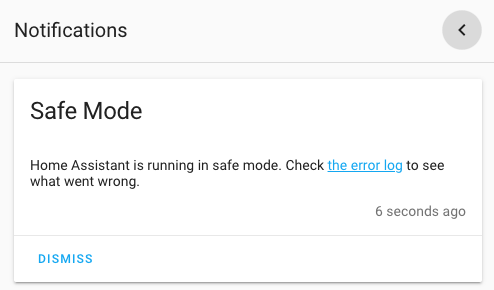 Home Assistant 以安全模式启动时的截图。
请注意,这项功能目前还不算完美,而且只有在升级到本次发布后,Home Assistant 至少成功启动过一次的情况下才能生效。
我们相信,这项功能会让 Home Assistant 更稳健、更易用,也能在你犯错时更宽容一些。
全新改版的 Supervisor 面板
还记得以前的 Hass.io 面板吗?随着 Home Assistant 全新命名方案 的推出,它现在已经更名为 Supervisor 面板。
于是 @ludeeus 最近可忙坏了!他把整个 Supervisor 面板都重写了一遍,使其适配我们当前的前端技术栈,还加入了很多非常漂亮的新视觉元素。
感谢 @ludeeus,效果真的太棒了!
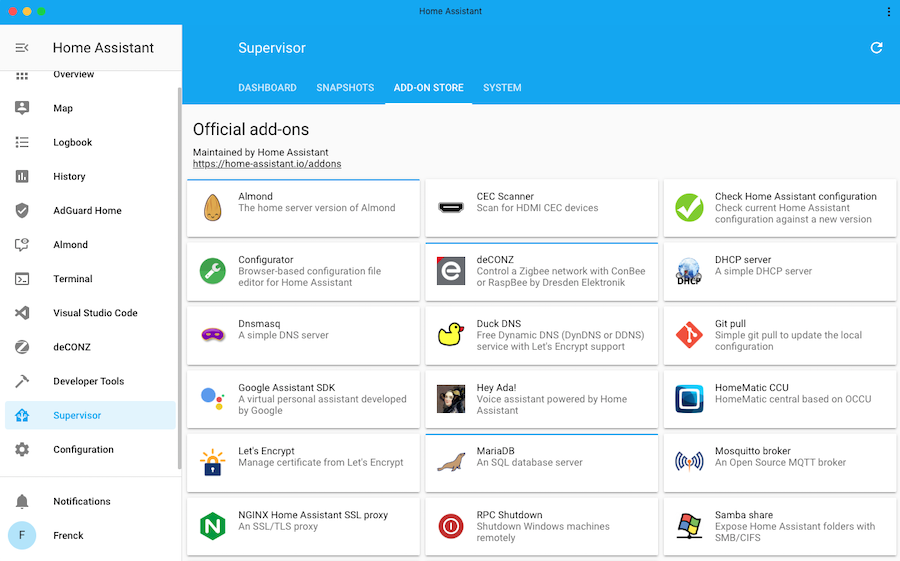 全新改版的 Supervisor 面板截图。
插件上的新图标让插件仪表盘和商店都更醒目了。另外,插件卡片上新增的状态指示也让你更容易发现哪些插件需要升级,或者在浏览插件商店时快速看出哪些已经安装。
请注意,你需要运行 Home Assistant Core 0.105 才能看到这些新图标。
配置面板变更
在这个版本中,我们开始重构配置面板。过去几个版本里,配置区域累积了很多功能,现在是时候把这些内容整理并统一起来了。
在接下来的几个版本中,我们会继续改进,让功能更容易查找,也让不同元素之间的关联更清晰,从而让整体导航体验更顺手。当前版本里,我们已经加入了配置分区、全新的标签页界面,以及一些视觉上的调整。
此外,设备页面也更新了:现在会显示某个设备被哪些自动化、脚本和场景使用,并加入了基于该设备快速创建这些内容的能力。
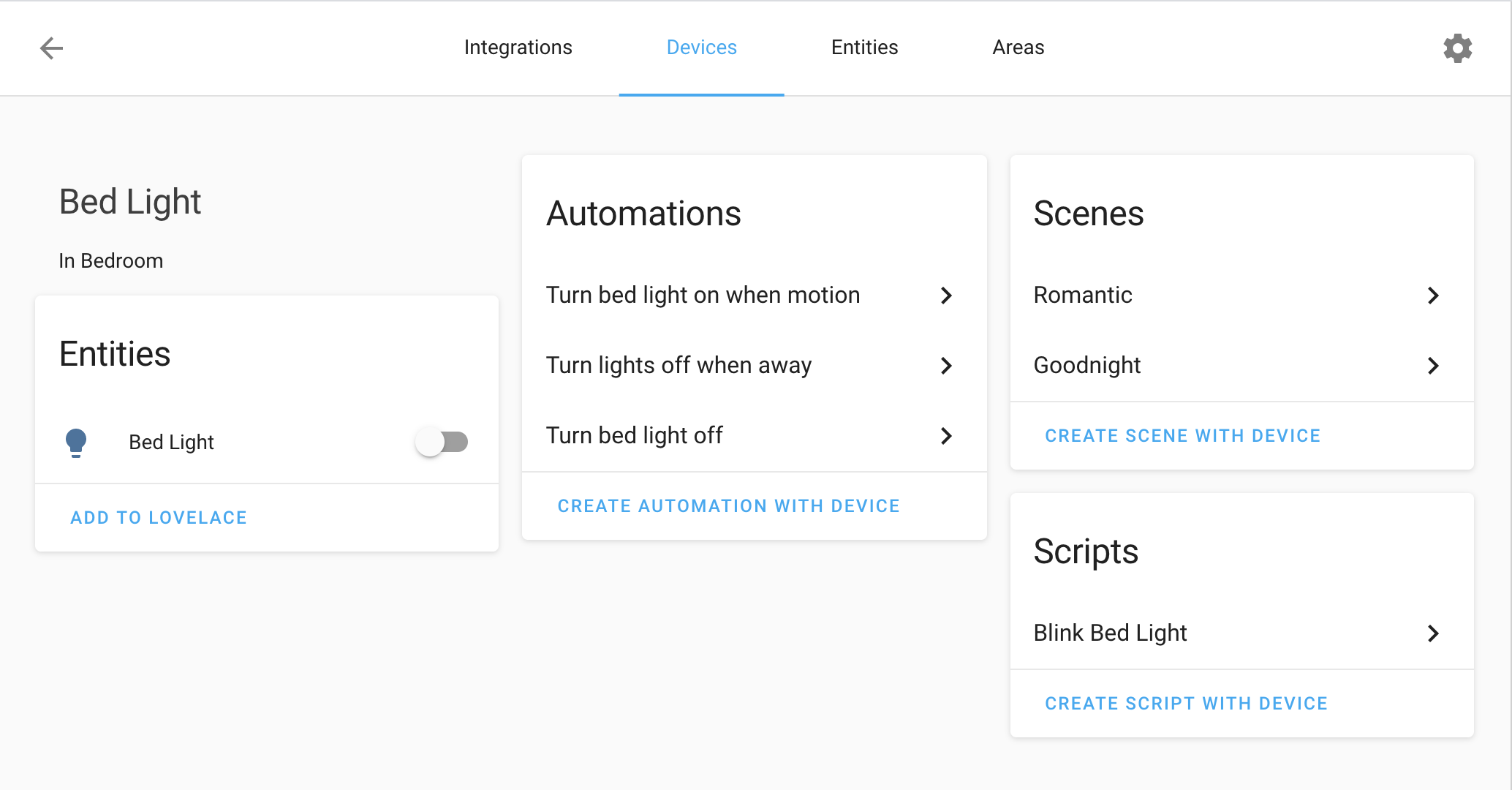 新版设备信息页面截图。
在实体的更多信息对话框中,我们把设置按钮改成直接打开实体设置对话框,并新增了一个“相关项”标签页! 这样你就可以看到该实体关联了哪些设备、集成、区域、场景、脚本、自动化、实体和分组。
对于在 UI 中创建的场景、脚本和自动化,我们还在更多信息对话框中直接加入了编辑按钮,让你无需再到处寻找就能快速修改。
实体卡片的页眉与页脚
Two new types are added to the 实体 卡片, a header and a footer. At this moment, we have two options for these, an 图像 and 按钮.
It allows you to create some very cool looking 卡片, but also provides you the option to put 按钮 in the bottom of the 卡片. Very useful for 按钮 that activate 场景, for example.
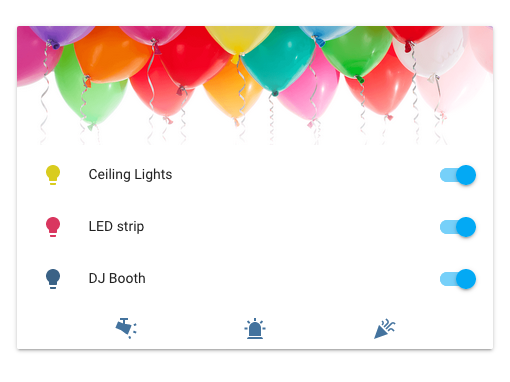 实体卡片新增页眉与页脚的截图。
改进后的区域编辑器
全新的区域编辑器来了!现在你不会再在集成列表里找到区域了,因为它们已经被移动到配置面板中的独立分区。
在这个新编辑器中,你可以通过拖放来移动区域,甚至还能通过拖动圆圈来调整区域大小。
新增区域、删除区域,或者修改区域名称,现在都比以往更容易。
 区域编辑器的录屏演示。
新编辑器仅适用于通过 UI 创建的区域;在 configuration.yaml 中设置的区域仍然是只读的。
另外,如果你在 YAML 配置中定义了区域,请注意现在name 已成为必填项。
额外的好消息是,我们还新增了一个服务:zone.reload。这个服务允许你在不重启 Home Assistant 的情况下重载区域配置。
图标不再根据状态变色
这项变化一开始可能不太明显,但你迟早会注意到它。
除了灯光之外,实体卡片现在不再根据状态变化自动改变图标颜色。
之所以这样做,是因为有人提出希望所有类型的实体在激活时都能变成黄色,而不只是少数几种实体类型。不过那样很快就会失控,就像下面这张截图展示的一样。
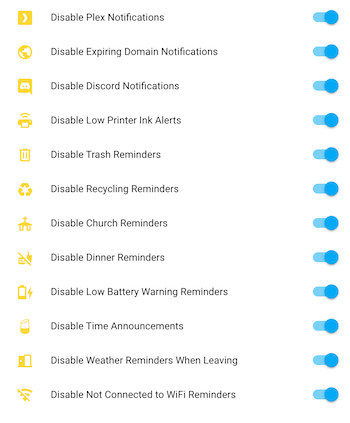 所有东西都变成黄色图标,显然也不是正确答案。
因此,我们默认对除灯光以外的所有实体类型禁用了这一行为。不过,我们同时新增了一个新选项:state_color。
通过这个选项,你可以决定是否恢复旧行为、将其扩展到更多实体类型,甚至连灯光也一起关闭。
其他卡片现在也会为更多域的图标显示激活颜色。
其他 Lovelace 和前端改进
Lovelace 还有很多改进,远不止这里能全部写完,下面是其中一些亮点:
-
在自动生成模式下,如果某个实体名称以所在区域或分组名称开头,那么显示时会去掉这部分前缀。 例如,如果你有一盏名为“客厅灯光”的灯,且它位于“客厅”区域中,那么它会在标题为“客厅”的卡片里显示为“灯光”。
-
我们不再在自动生成模式中显示
device_tracker实体。我们建议你将一个或多个设备追踪器绑定到 person,这样它们会在 UI 中显示出来。 -
我们为 Lovelace 添加了许多无障碍特性;现在几乎所有内容都可以通过 Tab 键导航。 我们会继续在这方面努力,让有障碍需求的用户也能更好地使用 Home Assistant。
完整变更列表请查看 Lovelace 更新日志。
前端方面还有更多改进:
- Logbook 面板 is a lot quicker
- Maps no longer fit 区域, but only 实体
- ZHA 面板 now supports binding 设备 to groups
- Ability to add new 区域 on the 设备 page
- Material Design Icons are updated to v4.8.95
- A lot, like a really large amount, of bug fixes!
其他消息
这个部分现在清空了,但别难过!原本的“In other news”栏目现在已经拥有自己的独立博客文章, 我们会定期发布:
想看第一期?社区亮点,第一期!
如果你看到过(或者亲手做过)什么使用 Home Assistant 打造的超棒、有趣、独特、惊艳、启发性十足、特别或搞笑的作品,欢迎把你的社区亮点建议发给我们,这样我们就有机会把它收录进下一篇博客文章中。
新集成
- Add search 集成 (@balloob - #30511) (search docs) (new-集成)
- Add Safe Mode (@balloob - #30723) (前端 docs) (http docs) (safe_mode docs) (breaking change) (new-集成)
- Add Derivative component (@afaucogney - #26456) (derivative docs) (new-集成)
- Add sighthound 集成 (@robmarkcole - #28824) (sighthound docs) (new-集成)
- Add Garmin Connect 集成 (@cyberjunky - #30792) (garmin_connect docs) (new-集成)
- Add Gammu based local SMS 通知 (@ocalvo - #31233) (sms docs) (new-集成)
- Add OPNSense 设备 tracker (@mtreinish - #26834) (opnsense docs) (new-集成)
新平台
- 模板 报警 面板 (@alistairg - #30487) (模板 docs) (new-platform)
- ZHA 遮盖 设备 support (@billyburly - #30639) (zha docs) (new-platform)
如果你需要帮助……
如果这个版本带来了问题,请到我们的 issue tracker 提交报告,并尽量完整填写 issue 模板中的所有字段。
不向后兼容的变更
-
Safe Mode -
--demo-modehas been removed. A new safe mode has now been introduced, which loads the bare minimum necessary to load the Home Assistant 前端 and allows for managing the 配置. This is not yet perfect. An invalid 核心 配置 can still cause Home Assistant to refuse to start up. (@balloob - #30723) (前端 docs) (http docs) (safe_mode docs) -
Google Assistant - 实体 exposed to Google Assistant, that have aliases configured (YAML only feature), will now expose the configured name, instead of the first configured alias.
Because of that, it might be that 实体 that have a name and aliases set for Google Assistant, may show up with a "new" name.
This mitigates an issue with Google Assistant, which seems to ignore the configured name when aliases are configured. - (@frenck - #30799) (google_assistant docs)
-
Hass.io/Supervisor - The "Hass.io" menu item in the side bar has been renamed to Supervisor. This was done to match the announced re-branding. While not really a breaking change, it still is a change that might cause confusion at first. - (@frenck - #31480)
-
Spotify - Spotify is now available to be added from the 集成 UI! Removing the current Spotify platform and setting up the 集成 from scratch is recommended.
The 设备 aliases and the
spotify.play_playlist服务, have been removed. Be sure to remove calls to that 服务 from your 自动化.If you use the Spotify platform at this moment:
- Remove the current 配置 from your
configuration.yamlfile. - Remove the
.spotify-token-cachefile from your 配置 directory. It is no longer used, however, it does contain security credentials. - Follow the 文档 on how to set up the new Spotify 集成 from scratch.
Please note, if you have an existing Spotify Developer Application, you need to edit it. The URL's have changed. Consult the 集成 文档 for the new URL's to use.
(@frenck - #30717) (spotify docs)
- Remove the current 配置 from your
-
Automation Deprecated - The
hide_entity配置 option on an 自动化 is now deprecated and will be removed in Home Assistant 0.107. With Lovelace now being the standard, this option has become obsolete. Please ensure your 自动化 are not using this option. An example of an invalid 配置 is below. - (@frenck - #30799) (自动化 docs)Bad 配置 example YAML:
-
Group Deprecated - Group 配置 options, 服务 and 服务 options related to the old 状态 UI are now deprecated and pending for removal in Home Assistant 0.107.0.
This includes:
- The
viewandcontrol配置 options for a group - The
group.set_visibility服务 call - The
control,visible, andviewoptions on thegroup.set服务 call.
Please ensure your 配置 and 自动化 do not use these anymore. - (@frenck - #30831) (group docs)
- The
-
Weblink Deprecated - The weblink 集成 is now deprecated and pending removal in Home Assistant 0.107.0. 此integrations only works with the old 状态 UI. - (@frenck - #30834)
-
History Graph Deprecated - The
history_graph集成 has been deprecated and pending for removal in Home Assistant 0.107.0. 此integrations was used for the old 状态 UI. Going ahead, please ensure this 配置 option is not used in your 配置. - (@frenck - #30835) -
Neato - This change adds a neato boundary name to the 状态 if it exists, requiring to potentially 更新 自动化. - (@Olen - #29915) (neato docs)
-
Xiaomi miio (风扇) - This change adjusts some 风扇 speed values according to the Xiaomi app 版本 5.6.34. and therefore, you will need to 更新 anything that utilizes the following 风扇 speed values:
- Quiet -> Silent
- Balanced -> Standard
- Turbo -> Medium
- Max -> Turbo
In addition, the
hidden配置 option for thexiaomi_miio集成 has been removed. (This would only affect 遥控器.) - (@tiagofreire-pt - #30614) (@frenck - #30727) (xiaomi_miio docs) -
Samsung Smart TV - Samsung Smart TV is now available to be added from the 集成 UI! If you would rather add it manually, please note the new 配置 below. - (@escoand - #28306) (samsungtv docs)
Example 配置 YAML:
-
Netatmo - Netatmo is now available from the 集成 UI and takes advantage of OAuth2 account linking! There are a good number of changes to note:
- For 认证, only client id and secret are required, no need to pass your username and 密码 anymore.
- Public 天气 传感器 are removed and will be added back in a separate PR.
- 服务
set_schedulenow requires the name of the home. - Webhooks are removed and will be added back in a separate 更新.
- 服务 to 切换 the 灯光/set it to auto have been removed until implemented in
pyatmo.
If you have an existing 配置, you will need to remove/更新 that and run the 配置 flow dialogue to get their 传感器/etc, back using the
configuration.yamloption.(@cgtobi - #29851) (netatmo docs) (new-platform)
Example 配置 YAML:
-
Nederlandse Spoorwegen (NS) - The Nederlandse Spoorwegen API and NSAPI have recently changed and this change accommodates for that. The
nederlandse_spoorwegen传感器 now requires a single API token instead of username and 密码 credentials.The "RetrieveTripInformationPublic" API ("Public-Travel-Information" product) will be deprecated on 31-01-2020. You MUST create a new API token for the "Reisinformatie" API ("Ns-App" product) and use that one instead.
(@YarmoM - #30599 #30971) (nederlandse_spoorwegen docs)
The following platform 属性 are renamed for consistency with
timenaming:departure_platformbecomesdeparture_platform_planneddeparture_platform_changedbecomesdeparture_platform_actualarrival_platformbecomesarrival_platform_plannedarrival_platform_changedbecomesarrival_platform_actual
Example 配置 YAML:
-
Simplisafe - Many changes here!
Simplisafe's cloud API anticipates receiving updates all at once, which our method did not do, which and could result in failed updates. This change consolidates all of the 服务 calls into a single admin 服务, and makes
set_pinandremove_pinrequire admin rights.It is no longer possible to 配置
scan_intervalfor the 集成 and a code-defined interval has been set, as there was potential for 用户 setting this too low and possibly ruin the 集成 for everyone.Also, the 集成 now makes us of
triggeredandarming状态. Control 面板 实体 no longer have analarm_active属性.(@bachya - #30567, #30909, #31060) (simplisafe docs)
Example 配置 YAML:
-
Egardia - 二元sensor for the Egardia 集成 were hidden by default, which is no longer the case. This could affect 自动化 that rely on the hidden 状态 属性 of 实体 创建 by 此integrations. - (@frenck - #30728) (egardia docs)
-
Emby - The
auto_hide配置 option has been removed from the Emby platform. Please be sure to remove it from your 配置. - (@frenck - #30729) (emby docs) -
Fibaro - 实体 from the Fibaro 集成 were hidden in Home Assistant if they were hidden in Fibaro, which is no longer the case. This could affect 自动化 that rely on the hidden 状态 属性 of 实体 创建 by 此integrations. - (@frenck - #30730) (fibaro docs)
-
AVM FRITZ!Box Net Monitor - The 属性
wan_access_typehas been removed fromfritzbox_netmonitoras the new 版本 of the fritzconnection 集成 no longer exposes it. As a result, the information will no longer be available in the Home Assistant 传感器. - (@basdelfos - #30210) (fritz docs) (fritzbox_netmonitor docs) -
MQTT Fan - This fixes
supported_featuresfor an MQTT 风扇. Setting speed now requires only a speed command topic.Before this change, only a speed 状态 topic had to be set to support the setting of a speed. The speed 状态 topic is not taken into account as it just decides if Home Assistant gets feedback for 状态 and speed updates.
Likewise, setting oscillation now requires only an oscillation command topic. Before this change, only an oscillation 状态 topic had to be set to support the setting of the oscillation. The oscillation 状态 topic is not taken into account as it just decides if Home Assistant gets feedback for 状态 and oscillation 更新.
(@springstan - #28680) (MQTT docs)
Example 配置 YAML:
-
Vizio SmartCast TV - The Vizio 集成 is now available to be added from the 集成 UI! When adding a soundbar the options are now between
tvorspeakerin order to align with the 设备 classes defined in the 媒体播放器 component and to add Amazon Alexa and Google Assistant support. If you prefer to enter the 配置 manually make note of the changes below. - (@raman325 - #30653, #30802) (vizio docs)Example 配置 YAML:
-
Statistics - If max_age is configured, this change will keep updating the statistics even when none of the observed 实体 change their 状态. That means that after some time, all recorded 状态 are purged and the statistics 传感器 itself changes to 状态 unknown instead of just keeping its old 状态 indefinitely. Also, some 属性 (
total,min_age,change,change_rate,mean,stdev) will change tounknown.用户 should ensure that any 自动化 that interrogate the statistics 传感器's 状态 and 属性 can handle
unknown.(@exxamalte - #27372) (statistics docs)
Example
configuration.yaml: -
PulseAudio Loopback Revert - The default port was incorrectly changed to 4713, however, the official 文档 状态 that the default port is 4712 for
module-cli-protocolwhich is used in 此integrations. Therefore, the port has been changed back to 4712 and all previously configured 开关 now need to listen to port 4712. - (@springstan - #30939) (pulseaudio_loopback docs) -
Apple iCloud -
account_nameis removed from the manual 配置; nothing changes when using the 集成 UI. - (@Quentame - #30898) (icloud docs) -
Evohome - Honeywell TCC systems that consist of a single thermostat (i.e., non-evohome systems) will now be split into two 温控 实体 instead of one: a) the whole-house 区域 (for target temperature), and b) the location (for Away, Eco modes). Functionality will not be lost, but this will affect 自动化, etc.: the entity_id of these may need changing. - (@zxdavb - #30968) (evohome docs)
-
Sonos - The following Sonos 服务 now need to be called by a 用户 with admin access:
sonos.join,sonos.unjoin,sonos.snapshot,sonos.restore. Sonos 服务 now no longer will default to "all" 实体 if noentity_idis passed in. This has been aligned with the other 服务 in Home Assistant. To target all, addentity_id: all. - (@balloob - #30813) (sonos docs) -
LG webOS Smart TV - After the discovery of some additional commands, the client library now has much better tracking of TV power 状态. As a result of the client library changes, the standby_connection parameter is no longer needed/present (since the relevant behavior can be steered automatically by the client library now) - (@bendavid - #31042) (webostv docs)
-
Zone - If you're using YAML to 配置 区域, specifying a name is now required. - (@balloob - #30774) (区域 docs)
Example 配置 YAML:
-
Openuv - Openuv is now available to be added from the 集成 UI! It is no longer possible to specify monitored 条件 within the OpenUV 集成; all 实体 are added by default. - (@bachya - #31019) (openuv docs)
Example 配置 yaml:
-
RainMachine - RainMachine is now available to be added from the 集成 UI! It is no longer possible to specify monitored 条件 within the RainMachine 集成; all 实体 are added by default. Additionally, the
zone_run_timeparameter is now configured directly within the controller withinconfiguration.yaml. - (@bachya - #31066) (rainmachine docs)Example 配置 YAML:
-
MaryTTS - The codec and locale 配置 changed to the official config keys from MaryTTS. - (@Poeschl - #30805) (marytts docs)
en-GB,en-USbecomesen_GB,en_USaiff,au,wavbecomesAIFF_FILE,AU_FILE,WAVE_FILE
The MaryTTS network logic has been extracted into an external package and the effects setting has been added.
Example 配置 YAML:
-
ZHA remotes -
binary_sensorandswitch实体 are not going to be available for some Zigbee "遥控器", but they were not supposed to be available to begin with. - (@Adminiuga - #31146) (zha docs)Affected 设备:
- Centralite 3130 遥控器 dimmer, DeviceType: 0x0001, removes binary_sensor 实体
- OSRAM LIGTIFY Dimming 开关, DeviceType: 0x0001, removes binary_sensor 实体
- Securifi Ltd. Penut Plug, DeviceType: 0x0000, removes binary_sensor 实体
- 45856GE Jasco Products, DeviceType: 0x0103
- Aqara Model lumi.遥控器.b486opcn01, removes 开关 实体
- Aqara Model lumi.遥控器.b686opcn01, removes 开关 实体
- Sercom Corp, SZ-ESW01, removes 开关 实体
-
NMBS - The generated
unique_idandentity_idhave changed for the live 传感器. If you were using the live 传感器, you will need to 更新 自动化 and 脚本 with the newly generated ids, and you might have to clear old entries from the 实体 registry. - (@thibmaek - #31078) (nmbs docs) -
MikroTik - MikroTik 集成 can now be added from the 集成 UI! It also supports importing existing 配置 from
configuration.yaml(refer to the docs to 更新 your 配置). Now uses the 实体 registry for managing 设备 (known_devices.yamlwill not be used anymore), this causes 设备 to be re-discovered. - (@engrbm87 - #27484) (mikrotik docs)
Removed
Hats over your heart for these shuttered 集成. Pour one out for:
-
PostNL Removed - PostNL changed their unofficial API and implemented protection, which breaks the 集成. It has been confirmed through them that there is no workaround and no likely solution any time in the near future, so it is being removed. - (@peternijssen - #30902)
-
Cisco Spark Removed - Cisco Spark has been rebranded to Cisco Webex Teams. Cisco Webex Teams is available as 集成 in Home Assistant, which can be used as a replacement. - (@frenck - #30738)
-
Owlet - Removed - The API that the Owlet component was based on has been deprecated by the vendor. There is no other public API provided by the vendor that the component can be upgraded to use, so the component has been removed. - (@oblogic7 - #31160)
-
Hook Removed - The
hook集成 has been removed due to the shutdown of the connected 服务. All servers that have been providing this 服务 will be turned off on 31 Jan 2020. - (@springstan - #31046)
发布 0.105.1 - February 5
- Check for known Hue vulnerability (@balloob - #31494) (hue docs)
- Move program_mode check (@aneisch - #31501) (radiotherm docs)
- Updated 前端 to 20200130.2 (@balloob - #31502) (前端 docs)
- Sonos 服务 to work without admin access (@balloob - #31506) (sonos docs)
发布 0.105.2 - February 6
- 0.105.0 (@frenck - #31489) (abode docs) (adguard docs) (airly docs)
- Fix 自动化 sun import (@balloob - #31521) (自动化 docs)
- Fix migrating huawei_lte entry without recipient (@chmielowiec - #31522) (huawei_lte docs)
- Only normalise Garmin connect data to minutes if the value is not None (@d0ugal - #31526) (garmin_connect docs)
- Fix iCloud determine_interval: add default interval to max_interval (@Quentame - #31533) (icloud docs)
- Limit OAuth scopes for Netatmo and Home Assistant Cloud (@frenck - #31538) (netatmo docs)
- Use min and m as units in Garmin Connect for consistency and correctness (@scop - #31543) (garmin_connect docs) (breaking change)
- Deprecate old netatmo keys (@balloob - #31544) (netatmo docs)
- 更新 aiopylgtv to 0.3.3 (@bendavid - #31545) (webostv docs)
- Guard for reloading with no 区域 config (@balloob - #31547) (区域 docs)
发布 0.105.3 - February 10
- Bump ZHA dependencies. (@Adminiuga - #31555) (zha docs)
- Resolve August 集成 makes too many requests and hits rate limits (@bdraco - #31558) (august docs)
- Bump adguardhome to 0.4.1 (@frenck - #31565) (adguard docs)
- Fix librouteros response 错误 handling (@engrbm87 - #31588) (mikrotik docs)
- 更新 pynws to 0.10.4 (@MatthewFlamm - #31591) (nws docs)
- Catch garmin_connect keyerrors with unknown 实体 type updates (@cyberjunky - #31608) (garmin_connect docs)
- Bump ZHA dependencies. (@Adminiuga - #31619) (zha docs)
- Fix hvac_action for mill (@Danielhiversen - #31630) (mill docs)
- Fix wrong 错误 message in netatmo 集成 (@cgtobi - #31690) (netatmo docs)
发布 0.105.4 - February 14
- Guard writing 自动化/场景/脚本 config (@balloob - #31568) (config docs)
- For vizio 集成, set unique ID early to prevent multiple zeroconf discovery items for the same 设备 to appear (@raman325 - #31686) (vizio docs)
- Fix missing 设备 class in netatmo 二元sensor (@cgtobi - #31693) (netatmo docs)
- Fix person 重载 服务 (@balloob - #31716) (person docs)
- Fix smoke detection for HomematicIP Cloud (@SukramJ - #31753) (homematicip_cloud docs)
- Updated 前端 to 20200130.3 (@bramkragten - #31771) (前端 docs)
- Fix person device_trackers null (@balloob - #31829) (person docs)
- Google Assistant: Remove speaker type and earlier filter out 设备 from being locally exposed (@balloob - #31830) (google_assistant docs)
- Spotify 集成 hotfixes (@frenck - #31835) (spotify docs)
发布 0.105.5 - February 17
- 升级 bimmer_connected to 0.7.0 (@gerard33 - #31894) (bmw_connected_drive docs)
- Report which data causes JSON serialization 错误 (@balloob - #31901)
Beta Fixes
- ZHA dependencies bump (@Adminiuga - #31295) (zha docs) (beta fix)
- Add 区域 服务.yaml (@balloob - #31298) (beta fix)
- Add 区域 to defaul config (@balloob - #31303) (default_config docs) (beta fix)
- Handle 服务 calls that do not refer 实体 IDs (@balloob - #31317) (beta fix)
- Updated 前端 to 20200130.0 (@bramkragten - #31318) (前端 docs) (beta fix)
- Fix HTTP config serialization (@balloob - #31319) (http docs) (beta fix)
- Guard Z-Wave 灯光 HS conversion on None (@balloob - #31320) (zwave docs) (beta fix)
- Fix wemo 灯光 (@balloob - #31323) (wemo docs) (beta fix)
- Emulated Hue: changed fallback 设备-type to fix Alexa compatibility issues (#30013) (@xtools-at - #31330) (emulated_hue docs) (beta fix)
- Fix async bug in amcrest when registering 服务 (@pnbruckner - #31334) (amcrest docs) (beta fix)
- Guard for callbacks in 服务 助手 (@balloob - #31339) (摄像头 docs) (beta fix)
- Fix incorrect annotation async flock 通知 (@balloob - #31342) (flock docs) (beta fix)
- 更新 Hue data fetching (@balloob - #31338) (hue docs) (beta fix)
- 升级 pysma, fix #27154 (@kellerza - #31346) (sma docs) (beta fix)
- Partially Revert "Deprecate hide_if_away from device_tracker (#30833) (@frenck - #31348) (device_tracker docs) (beta fix)
- Protect for unknown 状态 属性. (@ochlocracy - #31354) (alexa docs) (beta fix)
- bump quirks (@dmulcahey - #31355) (zha docs) (beta fix)
- Fix wemo 设备 types for 灯光 (@balloob - #31360) (wemo docs) (beta fix)
- Updated wemo 灯光 fix for #31360 (@DanTLehman - #31369) (wemo docs) (beta fix)
- Fix auto_bypass in alarmdecoder (@springstan - #30961) (alarmdecoder docs) (beta fix)
- deCONZ - Add support for new 开关 type (@Kane610 - #31362) (deconz docs) (beta fix)
- Add dump 服务 to MQTT 集成 (@balloob - #31370) (MQTT docs) (beta fix)
- Filter int in 风扇 speed_list when yielding RangeController in Alexa (@ochlocracy - #31375) (alexa docs) (beta fix)
- deCONZ - 服务 normalize bridge id (@Kane610 - #31378) (deconz docs) (beta fix)
- Revert "Bump alarmdecoder to 1.13.9 (#30303)" (@springstan - #31385) (alarmdecoder docs) (beta fix)
- Fix 服务 annotations (@balloob - #31402) (input_select docs) (媒体播放器 docs) (beta fix)
- deCONZ - Fix magic cube awake gesture (@FrengerH - #31403) (deconz docs) (beta fix)
- Fix rflink commands containing equals sign (@akasma74 - #31412) (rflink docs) (beta fix)
- Emulated Hue + Alexa: Fix 设备 not discovered and 错误 response (#30013 & #29899) (@xtools-at - #31413) (emulated_hue docs) (beta fix)
- Fix 设备 name Google Assistant when using aliases (@frenck - #31416) (google_assistant docs) (breaking change) (beta fix)
- always call set_volume with integer values (@bendavid - #31418) (webostv docs) (beta fix)
- Rework Mikrotik 设备 scanning following Unifi (@engrbm87 - #27484) (mikrotik docs) (breaking change) (beta fix)
- 更新 NSAPI to 3.0.2 (@YarmoM - #30971) (nederlandse_spoorwegen docs) (breaking change) (beta fix)
- Samsung TV refinements (@escoand - #31248) (samsungtv docs) (beta fix)
- Fix theme color (@quthla - #31366) (前端 docs) (beta fix)
- Keep track of the derivative for unit_time (@basnijholt - #31397) (derivative docs) (beta fix)
- 更新 libpurecool upstream library to latest 版本 (@etheralm - #31457) (dyson docs) (beta fix)
- Updated 前端 to 20200130.1 (@bramkragten - #31460) (前端 docs) (beta fix)
- 更新 vizio host check to handle entries that don't have port (@raman325 - #31463) (vizio docs) (beta fix)
- Fix coordinator reference (@balloob - #31467) (hue docs) (beta fix)
- Fix iCloud 设备 battery level can be None (@Quentame - #31468) (icloud docs) (beta fix)
- 自动化 设备/实体 extraction to include 触发器 + 条件 (@balloob - #31474) (自动化 docs) (beta fix)
- Re-branding of Hass.io 面板 to Supervisor (@frenck - #31480) (hassio docs) (breaking change) (beta fix)
- Remove tests for deprecated key (@balloob - #31491) (beta fix)
- Fix Google API key test (@balloob - #31492) (beta fix)
All changes
- Add Doorbird events to logbook (@oblogic7 - #30588) (doorbird docs)
- 模板 报警 面板 (@alistairg - #30487) (模板 docs) (new-platform)
- Fix aurora 传感器 not converting latitude and longitude correctly (@Watchfox - #28643) (aurora docs)
- Add neato boundary name to 状态 if it exists (@Olen - #29915) (neato docs) (breaking change)
- Fix aurora import order (@MartinHjelmare - #30606) (aurora docs)
- tweak honeywell manifest (@zxdavb - #30612) (honeywell docs)
- Fix statistics 传感器 honouring max_age (@exxamalte - #27372) (statistics docs) (breaking change)
- Add preset scheduling to radiothermostat (@zombielinux - #29847) (radiotherm docs)
- Fix TOD component incorrectly determining the 状态 between sunrise and sunset (@Anonym-tsk - #30199) (tod docs)
- 更新 PYAEHW4A1 to 版本 0.3.4 (@bannhead - #30616) (hisense_aehw4a1 docs)
- Check netgear device_tracker link_rate to ensure 设备 is connected (@dlashua - #30581) (netgear docs)
- Change nomenclature for Roborock 风扇 speeds (@tiagofreire-pt - #30614) (xiaomi_miio docs) (breaking change)
- Add INFO logging to generic_thermostat component for keep-alive turn … (@nemccarthy - #28740) (generic_thermostat docs)
- Add Samsung TV config flow (@escoand - #28306) (samsungtv docs) (breaking change)
- Convert vizio component from sync to async component (@raman325 - #30605) (vizio docs)
- 升级 praw to 6.5.0 (@fabaff - #30643) (reddit docs)
- 升级 shodan to 1.21.2 (@fabaff - #30641) (shodan docs)
- 升级 pylast to 3.2.0 (@fabaff - #30644) (lastfm docs)
- 升级 colorlog to 4.1.0 (@fabaff - #30642)
- 升级 pydocstyle to 5.0.2 (@scop - #30648)
- deCONZ - Disable daylight 传感器 by default (@Kane610 - #30625) (deconz docs)
- Add search 集成 (@balloob - #30511) (search docs) (new-集成)
- Fix Alexa ChangeReports Filter non-proactively_reported_properties (@ochlocracy - #30655) (alexa docs)
- Remove self as Emulated Hue codeowner (@NobleKangaroo - #30654) (emulated_hue docs)
- Implement TimeHoldController Interface in Alexa (@ochlocracy - #30650) (alexa docs)
- Add support for variable 风扇 speed list length. (@ochlocracy - #30574) (alexa docs)
- Use storage based collections for input_number 实体 (@Adminiuga - #30576) (input_number docs)
- pushover: improve 错误 when 图像 download fails (@Mic92 - #30615) (pushover docs)
- Add support for Dyson TP06 风扇 (@etheralm - #30611) (dyson docs)
- Refactor Netatmo 集成 (@cgtobi - #29851) (netatmo docs) (breaking change)
- Use storage collections for input_select 实体 management (@Adminiuga - #30604) (input_number docs) (input_select docs)
- Fix test_scenes_with_entity (@scop - #30684)
- 更新 iCloud 传感器 when 服务 finish its 更新 (@Quentame - #30680) (icloud docs)
- 升级 huawei-lte-api to 1.4.6 (@scop - #30683) (huawei_lte docs)
- Use collection 助手 for input_text 实体 (@Adminiuga - #30633) (input_text docs)
- Fixing unit of measure for withings hydration. Fixes #30570 (@vangorra - #30685) (withings docs)
- Optimistically set tplink 灯光 状态 (@vangorra - #30189) (tplink docs)
- ZHA 遮盖 设备 support (@billyburly - #30639) (zha docs) (new-platform)
- Drop timer component microseconds (@inputd - #30198) (timer docs)
- Make met config flow tests robust (@MartinHjelmare - #30689)
- Make hue config flow tests more robust (@MartinHjelmare - #30678)
- Bumped oru to 0.1.11 (adds a timeout to the api request) (@bvlaicu - #30704) (oru docs)
- 更新 NSAPI to 版本 3.0.0 (@YarmoM - #30599) (nederlandse_spoorwegen docs) (breaking change)
- Fix SynologyDSM 传感器 if network_sensors is None (@Quentame - #30718) (synologydsm docs)
- Consolidate SimpliSafe property 服务 (@bachya - #30567) (simplisafe docs) (breaking change)
- Unhide SPC 二元sensor by default (@frenck - #30699) (spc docs)
- Support yeelight color 灯光 with nightlight (@zewelor - #30194) (yeelight docs)
- Add unique ID to Airly config entries (@bieniu - #30681) (airly docs)
- Remove hidden property from xiaomi_miio.遥控器 集成 (@frenck - #30727) (xiaomi_miio docs) (breaking change)
- Bump apprise to 0.8.3 (@frenck - #30731) (apprise docs)
- Remove hidden property from egardia 集成 (@frenck - #30728) (egardia docs) (breaking change)
- Remove hidden property from emby 集成 (@frenck - #30729) (emby docs) (breaking change)
- Remove hidden property from fibaro 集成 (@frenck - #30730) (fibaro docs) (breaking change)
- Bump env_canada to 0.0.34 (@michaeldavie - #30713) (environment_canada docs)
- Removes unneeded abort if unique id in Oauth2 discovery flow (@frenck - #30733)
- 更新 Hue SSDP discovery (@balloob - #30695) (hue docs)
- Fix hassfest allowing omitting discovery methods when using OAuth2Flow (@frenck - #30732)
- 更新 config flow test scaffolding (@balloob - #30694)
- Removes Cisco Spark 集成 (@frenck - #30738) (breaking change)
- Fix translation from HA playlist to UPnP playlistItem (@StevenLooman - #30743) (dlna_dmr docs)
- Fix 'NewIPAddress' 错误 in component fritz (@basdelfos - #30210) (fritz docs) (fritzbox_netmonitor docs) (breaking change)
- Fix small typo in alarmdotcom component (@akinomeroglu - #30758)
- Fix supported_features in MQTT 风扇 (@springstan - #28680) (MQTT docs) (breaking change)
- Add support for the voltage 传感器 on the greeneye GEM (@garbled1 - #30484) (greeneye_monitor docs)
- Add Safe Mode (@balloob - #30723) (前端 docs) (http docs) (safe_mode docs) (breaking change) (new-集成)
- Hass.io allow to reset 密码 with CLI (@pvizeli - #30755) (hassio docs)
- 升级 youtube_dl to 版本 2020.01.15 (@BKPepe - #30767) (media_extractor docs)
- Use storage based collections for Timer platform (@Adminiuga - #30765) (timer docs)
- Search: Add search to default config and don't resolve 区域 (@bramkragten - #30762) (default_config docs) (search docs)
- Allow input_* and timer component 设置 without config (@Adminiuga - #30772) (input_boolean docs) (input_number docs) (input_select docs) (input_text docs) (timer docs)
- Add Config Flow support, 设备 Registry support, available property to vizio component (@raman325 - #30653) (vizio docs) (breaking change)
- 更新 pyubee to 0.8 (@mzdrale - #30785)
- Add support for 吸尘器 to Alexa. (@ochlocracy - #30764) (alexa docs)
- Mark hide_entity deprecated in 自动化 集成 (@frenck - #30799) (自动化 docs) (breaking change)
- Bump librouteros to 3.0.0 (@springstan - #30800) (mikrotik docs)
- 更新 pynws to v0.10.1 (@MatthewFlamm - #30662) (nws docs)
- Fixed pyyaml requirement from 5.2.0 to 5.2 (@WoLpH - #30808)
- Use collection 助手 for input_datetime component (@Adminiuga - #30815) (input_datetime docs)
- Handle location API being exhausted (@balloob - #30798)
- Deprecate 状态 UI options in group 集成 (@frenck - #30831) (group docs) (breaking change)
- Deprecate weblink 集成 (@frenck - #30834) (breaking change)
- Deprecate hide_if_away from device_tracker (@frenck - #30833) (device_tracker docs) (breaking change)
- Deprecate history_graph 集成 (@frenck - #30835) (breaking change)
- Remove unused import (@dshokouhi - #30858) (ring docs)
- Bump pyvizio 版本 to 0.1.1 (@raman325 - #30867) (vizio docs)
- 更新 pyatmo to 3.2.2 and add available 属性 (@cgtobi - #30882) (netatmo docs)
- Extract collection 实体 registry cleaner into a 助手 (@Adminiuga - #30844) (input_boolean docs) (input_datetime docs) (input_number docs) (input_select docs) (input_text docs) (person docs) (timer docs)
- Remove option to 配置 SimpliSafe scan interval (@bachya - #30909) (simplisafe docs) (breaking change)
- remove PostNL component as it is no longer working (@peternijssen - #30902) (breaking change)
- Adds icon endpoint to NO_AUTH (@ludeeus - #30910) (hassio docs)
- Add battery voltage 状态 属性 for ZHA 设备 (@Adminiuga - #30901) (zha docs)
- Refactor rounding for ZHA electrical measurement 传感器 (@Adminiuga - #30923) (zha docs)
- 更新 outdated 文档 links in json files (@springstan - #30916) (apprise docs) (geonetnz_volcano docs) (pcal9535a docs) (sinch docs) (starline docs) (versasense docs)
- Use default media player 设备 classes for vizio component (@raman325 - #30802) (vizio docs) (breaking change)
- Add 服务 to geniushub (@zxdavb - #30918) (geniushub docs)
- Add 服务 to evohome (@zxdavb - #29816) (evohome docs)
- Revert "Pulseaudio: Changed default port from 4712 to 4713 (#28857)" (@springstan - #30939) (pulseaudio_loopback docs) (breaking change)
- Don't use unit_of_measurement in 状态 属性. (@Adminiuga - #30941) (zha docs)
- Add play media support and Spotify control to Openhome (@bazwilliams - #28698) (openhome docs)
- Minor enhancements to jewish_calendar (@ajmarks - #30632) (jewish_calendar docs)
- Add logical Zigbee 设备 type to ZHA 设备 info (@dmulcahey - #30954) (zha docs)
- Fix can't add multiple iCloud accounts (remove account name) (@Quentame - #30898) (icloud docs) (breaking change)
- Improve Wemo config entry support, add 设备 info (@balloob - #30963) (wemo docs)
- initial commit (@zxdavb - #30968) (evohome docs) (breaking change)
- Add foundation for 集成 服务 (@balloob - #30813) (sonos docs) (breaking change)
- Fix options 更新 during import config flow step for vizio component (Bugfix for #30653) (@raman325 - #30977) (vizio docs)
- print component import 错误 to logfile (@zhumuht - #30346)
- Add Derivative component (@afaucogney - #26456) (derivative docs) (new-集成)
- Add 状态 reproduction to 遥控器 (@bachya - #30990) (遥控器 docs)
- Add 属性 departure_minutes and delay_minutes to the nmbs 传感器 (@rdehuyss - #30958) (nmbs docs)
- Minor fixes for webostv (@bendavid - #30998) (webostv docs)
- Add kef supports_on option (@basnijholt - #30937) (kef docs)
- Small tweaks for evohome (@zxdavb - #31007) (evohome docs)
- Adds missing strings to Almond (@frenck - #31013) (almond docs)
- Adds missing strings to Withings (@frenck - #31012) (withings docs)
- Enable some more bandit checks (@scop - #30857) (command_line docs) (vicare docs) (x10 docs) (yi docs)
- Use config_entry.unique_id in iCloud (@Quentame - #30984) (icloud docs)
- Bump zigpy-zigate to 0.5.1 (@doudz - #31004) (zha docs)
- Allow OpenUV 实体 to be unavailable (@bachya - #31018) (openuv docs)
- Handle ghost 区域 gracefully (@zxdavb - #31008) (evohome docs)
- 升级 importlib-metadata to 版本 1.4.0 (@BKPepe - #31027)
- 升级 pyyaml to 5.3 (@BKPepe - #31026)
- Allow ZHA 设备 creation for the Zigbee coordinator (@dmulcahey - #31032) (zha docs)
- Remove all empty *_setup_platform() from 集成 (@frenck - #31025)
- Bump pyintesishome to v1.6 (@jnimmo - #31044) (intesishome docs)
- 更新 pyipma to 2.0 (@abmantis - #30746) (ipma docs)
- Add xiaomi miio 传感器 cgllc.airmonitor.s1 & cgllc.airmonitor.b1 (@zhumuht - #30345) (xiaomi_miio docs)
- 更新 issue and PR 模板 (@frenck - #31056)
- 开关 evohome to use a whitelist for valid zonetype (@zxdavb - #31047) (evohome docs)
- Bump pytest to 5.3.4 (@frenck - #31045)
- Iteration on issue and PR 模板 (@frenck - #31058)
- Fix prometheus component to fully sanitize Unicode characters (@joegross - #31037) (prometheus docs)
- Add tahoma io:AwningValanceIOComponent (@jensihnow - #30944) (tahoma docs)
- Fix fan_modes in tuya 温控 (@springstan - #30942) (tuya docs)
- Fix luftdaten broken icon for "Pressure at sealevel" (@reuank - #31053) (luftdaten docs)
- Enhance info_from_service function in zeroconf 集成 (@raman325 - #31059) (zeroconf docs)
- Add zeroconf discovery support for vizio 集成 (@raman325 - #30949) (vizio docs)
- Add the Home Assistant 版本 as a Sentry 发布 (@d0ugal - #31065) (sentry docs)
- Add disabled 实体 support to WLED (@frenck - #31040) (wled docs)
- change group id creation (@dmulcahey - #31075) (zha docs)
- Allow unloading mobile app (@balloob - #30995) (mobile_app docs)
- Improve 状态 tracking for WebOsTV (@bendavid - #31042) (webostv docs) (breaking change)
- Add DIRECTORY and PLUGIN to kodi media types (@thoscut - #28336) (kodi docs)
- Add zeroconf discovery support to Brother Printer 集成 (@bieniu - #30959) (brother docs)
- Migrate 区域 to use collection 助手 (@balloob - #30774) (区域 docs) (breaking change)
- Code Cleanup for Vizio component (@raman325 - #31076)
- Simplify 自动化 服务 (@balloob - #30996) (自动化 docs)
- Remove monitored 条件 from OpenUV (@bachya - #31019) (openuv docs) (breaking change)
- Add myself to owners for components I contributed (@jkeljo - #31020) (greeneye_monitor docs) (sisyphus docs)
- Deprecate hook 集成 (@springstan - #31046) (breaking change)
- Add keep-alive which is required for some hlk-sw16 variants (@jameshilliard - #31062) (hlk_sw16 docs)
- pydaikin 版本 bump (@fredrike - #31080) (daikin docs)
- Remove monitored 条件 from RainMachine (@bachya - #31066) (rainmachine docs) (breaking change)
- Add sighthound 集成 (@robmarkcole - #28824) (sighthound docs) (new-集成)
- Cleanup of PR and issue 模板 (@frenck - #31070)
- 升级 sqlalchemy to 1.3.13 (@frenck - #31101) (recorder docs) (sql docs)
- Fix HomeKit window covering to support float numbers in the position (@dokmic - #31081) (homekit docs)
- Add temperature support to 灯光 模板 (@tetienne - #30595) (模板 docs)
- Allow framerates less than 1 (@uvjustin - #31108) (generic docs)
- 升级 shodan to 1.21.3 (@fabaff - #31111) (shodan docs)
- Add update_entry dict to unique ID flow abort 助手 (@frenck - #31090)
- Change Samsung TV 状态 detection (@tulindo - #30236) (samsungtv docs)
- Use speak2mary for MaryTTS 集成 and enable sound effects (@Poeschl - #30805) (marytts docs) (breaking change)
- Add disabled 实体 support to AdGuard (@frenck - #31106) (adguard docs)
- Fix connection failure 日志 message in async_setup_entry for Vizio component (@raman325 - #31097) (vizio docs)
- 升级 youtube_dl to 版本 2020.01.24 (@BKPepe - #31124) (media_extractor docs)
- 更新 cast to 4.1.1 (@balloob - #31113) (cast docs)
- Add Buienradar 摄像头 for Belgium (@MiniLau - #30399) (buienradar docs)
- Fix 模板 components to process entity_id 配置 option (@dokmic - #31084) (模板 docs)
- Remove unused async_setup_platform (@SukramJ - #31132) (homematicip_cloud docs)
- 更新 Hue existing config entry with discovery data (@frenck - #31087) (hue docs)
- Rewrite of Spotify 集成 (@frenck - #30717) (spotify docs) (breaking change)
- Validate coveragerc with hassfest (@balloob - #31112)
- Make pylint fail on informational messages too (@scop - #31136)
- Add logo & icon support to Manifest (@frenck - #31131)
- Fix when you have two wemo 设备 (@balloob - #31139) (wemo docs)
- Include supported 状态 in Alexa SecurityPanelController 配置 object (@ochlocracy - #31120) (alexa docs)
- Make SimpliSafe 集成 more resilient to SimpliSafe cloud issues (@bachya - #31116) (simplisafe docs)
- Add smarter API usage for RainMachine (@bachya - #31115) (rainmachine docs)
- Fix RainMachine 更新 动作 (@bachya - #31147) (rainmachine docs)
- Fix Huawei LTE SMS recipient setting from options UI (@scop - #31117) (huawei_lte docs)
- Remove no longer used Hound config (@scop - #31154)
- 更新 ZHA 遥控器 registry to proper identify "遥控器 (@Adminiuga - #31146) (zha docs) (breaking change)
- improvements to zha 遮盖 (@billyburly - #31144) (zha docs)
- Fix 状态 handling for older webos versions (@bendavid - #31099) (webostv docs)
- Separate iCloud class (@Quentame - #31022) (icloud docs)
- Remove Owlet component (@oblogic7 - #31160) (breaking change)
- Fix the ihc.set_runtime_value_int 服务 function not working with 模板 (@dingusdk - #31145) (ihc docs)
- Add additional 报警 状态 to SimpliSafe (@bachya - #31060) (simplisafe docs) (breaking change)
- Refactor RainMachine 开关 platform (@bachya - #31148) (rainmachine docs)
- Implement 'volume_set' 服务 for Android TV 设备 (@JeffLIrion - #31161) (androidtv docs)
- Introduce unique_id for lastfm to allow changing entity_id in backwards compatible way (@inverse - #31163) (lastfm docs)
- Fix Velbus 遮盖 (includes velbus lib 升级) (@Cereal2nd - #31153) (velbus docs)
- Use unique_id for config_entries of HomematicIP Cloud (@SukramJ - #31133) (homematicip_cloud docs)
- Add counters 传感器 for Velbus (@brefra - #31165) (velbus docs)
- Bump insteonplm to 0.16.6 (@teharris1 - #31182) (insteon docs)
- Add hassfest URL validation to 文档 link (@frenck - #31143) (soma docs)
- Bump aiobotocore to 0.11.1 (@finnysamuel - #30951) (aws docs)
- Use non-deprecated method of instantiating RainMachine client (@bachya - #31149) (rainmachine docs)
- 升级 huawei-lte-api to 1.4.7 (@scop - #31155) (huawei_lte docs)
- Add unique IDs to 自动化/场景 (@balloob - #31150) (自动化 docs) (config docs) (homeassistant docs) (脚本 docs)
- Add webostv sound_output capability (@starkillerOG - #31121) (webostv docs)
- Check that 文档 urls are valid (@rohankapoorcom - #31188) (solarlog docs)
- Disable failing dsmr tests (@frenck - #31202)
- Fix unnecessary regeneration of access token in Tesla component (@alandtse - #31193) (tesla docs)
- 升级 HAP-python to 2.7.0 (@frenck - #31201) (homekit docs)
- Added missing file (@cyberjunky - #31189)
- 更新 remove 服务 (@dmulcahey - #31164) (zha docs)
- Fix ps4 错误 if pin begins with a 0 (@ktnrg45 - #31198) (ps4 docs)
- Use config_entry.unique_id in Linky (@Quentame - #31051)
- Add Garmin Connect 集成 (@cyberjunky - #30792) (garmin_connect docs) (new-集成)
- Constrain SimpliSafe's check for emergency token usage (@bachya - #31214) (simplisafe docs)
- 更新 Hue discovery (@balloob - #31215) (hue docs)
- Fix typo: serivce --> 服务 (@cclauss - #31217)
- Cleanup of HomematicIP Cloud tests (@SukramJ - #31181) (homematicip_cloud docs)
- Bump python-synology to 0.4.0 : Add support for DSM v5 + fix 传感器 unknown for 15 min (@aaska - #31049) (synologydsm docs)
- 更新 ZHA 实体 discovery tests (@Adminiuga - #31191) (zha docs)
- Add test for adding a 设备 to HomematicIP Cloud (@SukramJ - #31224) (homematicip_cloud docs)
- Add Gammu based local SMS 通知 (@ocalvo - #31233) (sms docs) (new-集成)
- Add gammu to wheels (@pvizeli - #31239)
- Mill, correct hvac_mode. Fixes #31236 (@Danielhiversen - #31242) (mill docs)
- Add brefra to codeowners list Velbus 集成 (@brefra - #31245) (velbus docs)
- Google Assistant: Track if request is local (@balloob - #31226) (cloud docs) (google_assistant docs)
- Add proxmoxve SSLError check and remove 日志 spam (@jhollowe - #30818) (proxmoxve docs)
- 升级 iaqualink to 0.3.1 (@frenck - #31257) (iaqualink docs)
- 升级 dsmr_parser to 0.18, re-enable tests (@frenck - #31256) (dsmr docs)
- Mark 设备 unavailable when it leaves Zigbee network. (@Adminiuga - #31264) (zha docs)
- deCONZ - New 灯光 level 传感器 属性 (@Kane610 - #31255) (deconz docs)
- Bump abodepy 版本 to 0.17.0 (@shred86 - #31250) (abode docs)
- Bump pyhaversion to 3.2.0 (@basnijholt - #31241)
- Fix Plugwise 温控 issues (@bouwew - #31209) (plugwise docs)
- Fix reporting of battery 传感器 for Tesla (@alandtse - #31232) (tesla docs)
- Add channel-mapping for HomeMatic (@danielperna84 - #31178) (homematic docs)
- 更新 homeassistant-pyozw to 0.1.8 (@pvizeli - #31270) (zwave docs)
- 升级 pre-commit to 2.0.0 (@frenck - #31267)
- fix knx 灯光 turn_on with ct (@farmio - #31184) (knx docs)
- Fix example for set_datetime 服务 (@l3d00m - #31159)
- Fix 灯光.turn_on for emulated_hue (@rslota - #31195) (emulated_hue docs)
- Create truly live unique id (@thibmaek - #31078) (nmbs docs) (breaking change)
- Add device_class to Tesla 传感器 (@alandtse - #31231) (tesla docs)
- Remove useless assignment (@tetienne - #31272) (模板 docs)
- Bump iCloud to 0.9.2 + fix 设置 日志 (@Quentame - #31273) (icloud docs)
- Catch 'ConnectionResetError' exceptions for Android TV integra… (@JeffLIrion - #31274) (androidtv docs)
- Add OPNSense 设备 tracker (@mtreinish - #26834) (opnsense docs) (new-集成)
- Add PowerController to 遮盖 in Alexa (@ochlocracy - #31265) (alexa docs)
- Add support for rangeValueDeltaDefault in Alexa AdjustRangeValue directive (@ochlocracy - #31258) (alexa docs)
- Fix tests for opnsense (@pvizeli - #31277)
- ZHA group and 设备 cleanup (@dmulcahey - #31260) (zha docs)
- Add code owner for amcrest 集成 (@pnbruckner - #31276) (amcrest docs)
- Allow filtering of sources for Android TV (@JeffLIrion - #30994) (androidtv docs)
- Updated 前端 to 20200129.0 (@bramkragten - #31279) (前端 docs)
- Add command 'ps_hold' to PS4 (@ktnrg45 - #31283) (ps4 docs)
- Fix callback and async (@balloob - #31281)
- Catch 错误 when searching for 场景 or 自动化 (@balloob - #31288) (search docs)
- Find related items 脚本/自动化 (@balloob - #31293) (自动化 docs) (脚本 docs) (search docs)
- Use all new 助手 functions (@Kane610 - #31278) (deconz docs)
- Fix 服务 助手 not handling sync methods (@balloob - #31254)
- ZHA dependencies bump (@Adminiuga - #31295) (zha docs) (beta fix)
- Add 区域 服务.yaml (@balloob - #31298) (beta fix)
- Add 区域 to defaul config (@balloob - #31303) (default_config docs) (beta fix)
- Handle 服务 calls that do not refer 实体 IDs (@balloob - #31317) (beta fix)
- Updated 前端 to 20200130.0 (@bramkragten - #31318) (前端 docs) (beta fix)
- Fix HTTP config serialization (@balloob - #31319) (http docs) (beta fix)
- Guard Z-Wave 灯光 HS conversion on None (@balloob - #31320) (zwave docs) (beta fix)
- Fix wemo 灯光 (@balloob - #31323) (wemo docs) (beta fix)
- Emulated Hue: changed fallback 设备-type to fix Alexa compatibility issues (#30013) (@xtools-at - #31330) (emulated_hue docs) (beta fix)
- Fix async bug in amcrest when registering 服务 (@pnbruckner - #31334) (amcrest docs) (beta fix)
- Guard for callbacks in 服务 助手 (@balloob - #31339) (摄像头 docs) (beta fix)
- Fix incorrect annotation async flock 通知 (@balloob - #31342) (flock docs) (beta fix)
- 更新 Hue data fetching (@balloob - #31338) (hue docs) (beta fix)
- 升级 pysma, fix #27154 (@kellerza - #31346) (sma docs) (beta fix)
- Partially Revert "Deprecate hide_if_away from device_tracker (#30833) (@frenck - #31348) (device_tracker docs) (beta fix)
- Protect for unknown 状态 属性. (@ochlocracy - #31354) (alexa docs) (beta fix)
- bump quirks (@dmulcahey - #31355) (zha docs) (beta fix)
- Fix wemo 设备 types for 灯光 (@balloob - #31360) (wemo docs) (beta fix)
- Updated wemo 灯光 fix for #31360 (@DanTLehman - #31369) (wemo docs) (beta fix)
- Fix auto_bypass in alarmdecoder (@springstan - #30961) (alarmdecoder docs) (beta fix)
- deCONZ - Add support for new 开关 type (@Kane610 - #31362) (deconz docs) (beta fix)
- Add dump 服务 to MQTT 集成 (@balloob - #31370) (MQTT docs) (beta fix)
- Filter int in 风扇 speed_list when yielding RangeController in Alexa (@ochlocracy - #31375) (alexa docs) (beta fix)
- deCONZ - 服务 normalize bridge id (@Kane610 - #31378) (deconz docs) (beta fix)
- Revert "Bump alarmdecoder to 1.13.9 (#30303)" (@springstan - #31385) (alarmdecoder docs) (beta fix)
- Fix 服务 annotations (@balloob - #31402) (input_select docs) (媒体播放器 docs) (beta fix)
- deCONZ - Fix magic cube awake gesture (@FrengerH - #31403) (deconz docs) (beta fix)
- Fix rflink commands containing equals sign (@akasma74 - #31412) (rflink docs) (beta fix)
- Emulated Hue + Alexa: Fix 设备 not discovered and 错误 response (#30013 & #29899) (@xtools-at - #31413) (emulated_hue docs) (beta fix)
- Fix 设备 name Google Assistant when using aliases (@frenck - #31416) (google_assistant docs) (breaking change) (beta fix)
- always call set_volume with integer values (@bendavid - #31418) (webostv docs) (beta fix)
- Rework Mikrotik 设备 scanning following Unifi (@engrbm87 - #27484) (mikrotik docs) (breaking change) (beta fix)
- 更新 NSAPI to 3.0.2 (@YarmoM - #30971) (nederlandse_spoorwegen docs) (breaking change) (beta fix)
- Samsung TV refinements (@escoand - #31248) (samsungtv docs) (beta fix)
- Fix theme color (@quthla - #31366) (前端 docs) (beta fix)
- Keep track of the derivative for unit_time (@basnijholt - #31397) (derivative docs) (beta fix)
- 更新 libpurecool upstream library to latest 版本 (@etheralm - #31457) (dyson docs) (beta fix)
- Updated 前端 to 20200130.1 (@bramkragten - #31460) (前端 docs) (beta fix)
- 更新 vizio host check to handle entries that don't have port (@raman325 - #31463) (vizio docs) (beta fix)
- Fix coordinator reference (@balloob - #31467) (hue docs) (beta fix)
- Fix iCloud 设备 battery level can be None (@Quentame - #31468) (icloud docs) (beta fix)
- 自动化 设备/实体 extraction to include 触发器 + 条件 (@balloob - #31474) (自动化 docs) (beta fix)
- Re-branding of Hass.io 面板 to Supervisor (@frenck - #31480) (hassio docs) (breaking change) (beta fix)
- Remove tests for deprecated key (@balloob - #31491) (beta fix)
- Fix Google API key test (@balloob - #31492) (beta fix)