

title: '0.104:Sentry、Signal Messenger、IntesisHome、Sure Petcare、KEF' description: '<a href=''/home-assistant/integrations/版本/0.104''<img src=''/home-assistant/images/blog/2020-01-0.104/components.png'' style=''border: 0;box-shadow: none;''</a。' Lovelace 中的多选实体管理,以及忽略已发现设备的能力。
0.104:Sentry、Signal Messenger、IntesisHome、Sure Petcare、KEF
新十年的第一个发布!新年快乐!
我们用一个内容丰富的发布开启新的一年!一起来看看吧!
- 改进启动时的实体处理
- 忽略已发现的设备与服务
- 重载所有 input 项,并告别自动生成的分组
- 将设备添加到 Lovelace
- 多选实体管理
- ZHA 配置面板改进
- 移除你的 Lovelace 配置
- 其他消息
- 新集成
- 新平台
- 不向后兼容的变更
- Beta 修复
- 所有变更
改进启动时的实体处理
现在,在 Home Assistant 启动时,我们会恢复注册表中存储的所有实体。
在 Home Assistant 启动过程中,所有已配置的集成都会被加载。每个集成都可能带来一个或多个设备和实体。不过,这里面一直有个问题!
有些集成加载得比较慢,导致部分实体无法立刻可用。有时这会影响很多地方,比如 HomeKit、Google、Alexa 中缺少设备,或者 Lovelace 界面里出现那些大大的红框。相信大家多少都遇到过。
从这个版本开始,只要这些实体已注册到实体注册表中,就会以 unavailable 状态被恢复。这样系统的其他部分就能立即使用它们,解决了很多启动期间的常见问题。
这些被恢复的实体会额外带上一个状态属性 restored,因此可以与普通的 unavailable 实体区分开来。
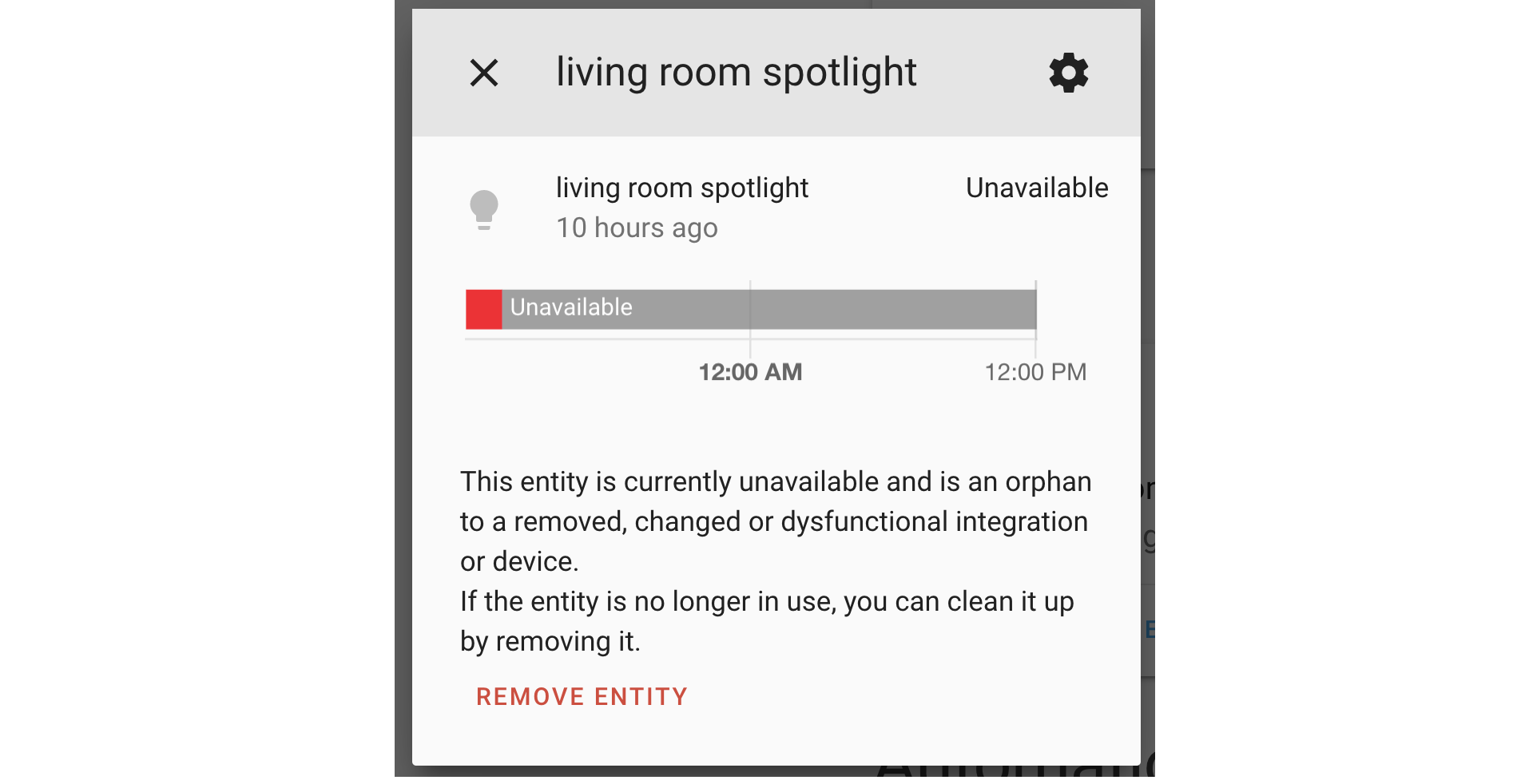 移除不可用实体的截图。
因此,实体将不再“消失”。如上图所示,被恢复的实体和不可用实体现在都可以移除。请注意,如果某个不可用实体仍由某个集成提供,则必须先移除对应集成,否则这些实体无法删除。
忽略已发现的设备与服务
是不是有某个设备总是一遍又一遍地被发现?
现在,你只需一次操作就能忽略某个已发现的设备!
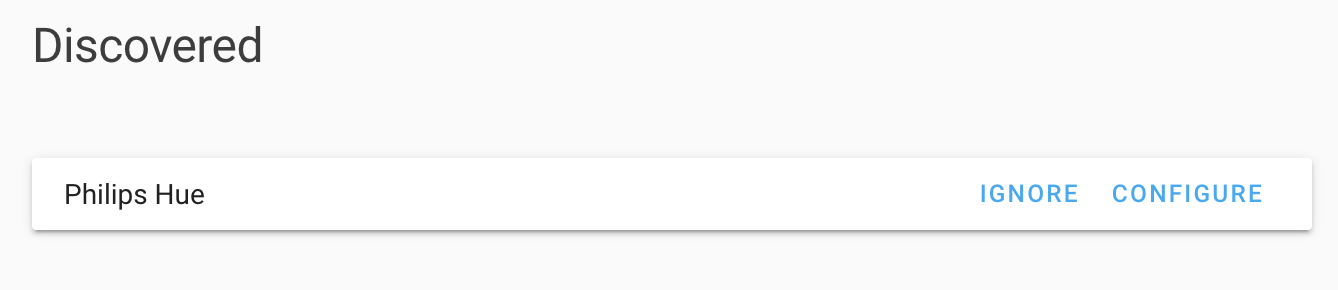 已发现 Hue 网关的截图。
这需要对应集成更新后才能支持。在本次发布中,Hue、Axis、deCONZ、WLED 和 HomeKit 集成都已经支持这一新功能。
重载所有 input 项,并告别自动生成的分组
所有 input_* 集成 现在都提供了 reload 服务,让你无需重启 Home Assistant 就能重载这些集成的 YAML 配置。
另外,也是时候和所有自动生成的实体分组 group.all_* 说再见了。你可能从未注意过它们,因为它们默认是隐藏的。不过,如果你的自动化依赖这些分组,就需要进行调整。更多信息请查看不向后兼容的变更。
将设备添加到 Lovelace
我们在设备页面新增了一个按钮,可以一键把某个设备的所有实体添加到 Lovelace。Home Assistant 会根据设备提供的实体类型推荐合适的卡片,让你能立刻把它们加入到指定视图中。
如果你使用的是 YAML 模式的 Lovelace,也一样可以使用这个新功能。生成的 YAML 可以直接复制粘贴到你的配置文件中。
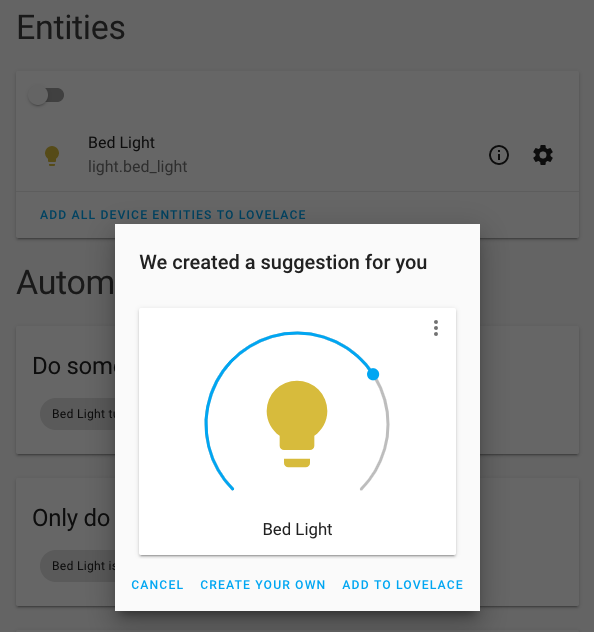 灯光设备卡片建议的截图。
同样的功能也被加入到了 Lovelace 的未使用实体页面中。
多选实体管理
实体管理从未如此简单;现在你可以一次修改多个实体。选择多个实体后,即可一键移除、启用或禁用它们。
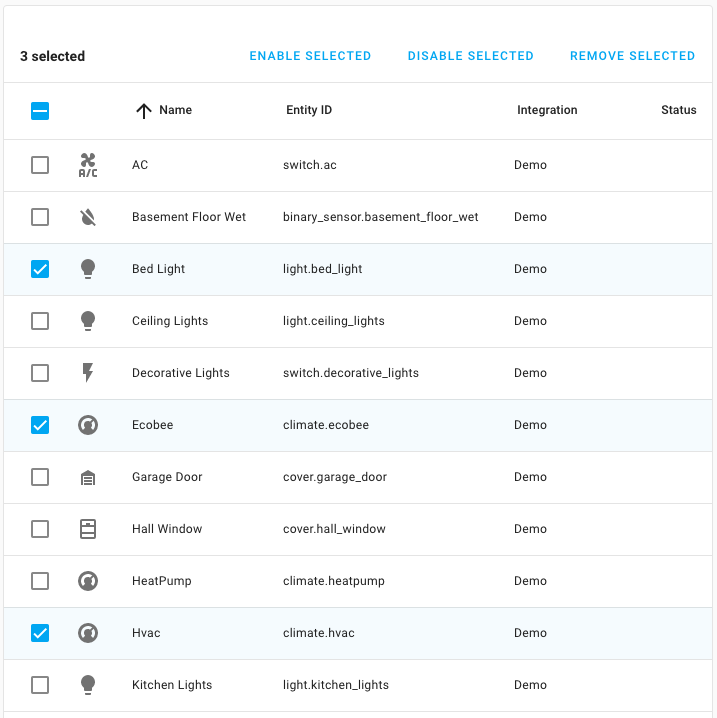 实体配置页面支持多选的截图。
ZHA 配置面板改进
这个版本里,@dmulcahey 为 ZHA 配置面板投入了大量工作。
ZHA 配置面板的导航经过重新设计,在移动端和桌面端都能带来更好的体验。
作为这次重设计的一部分,我们加入了完整的 Zigbee 分组管理功能,让你可以直接在界面中创建和管理 Zigbee 分组。
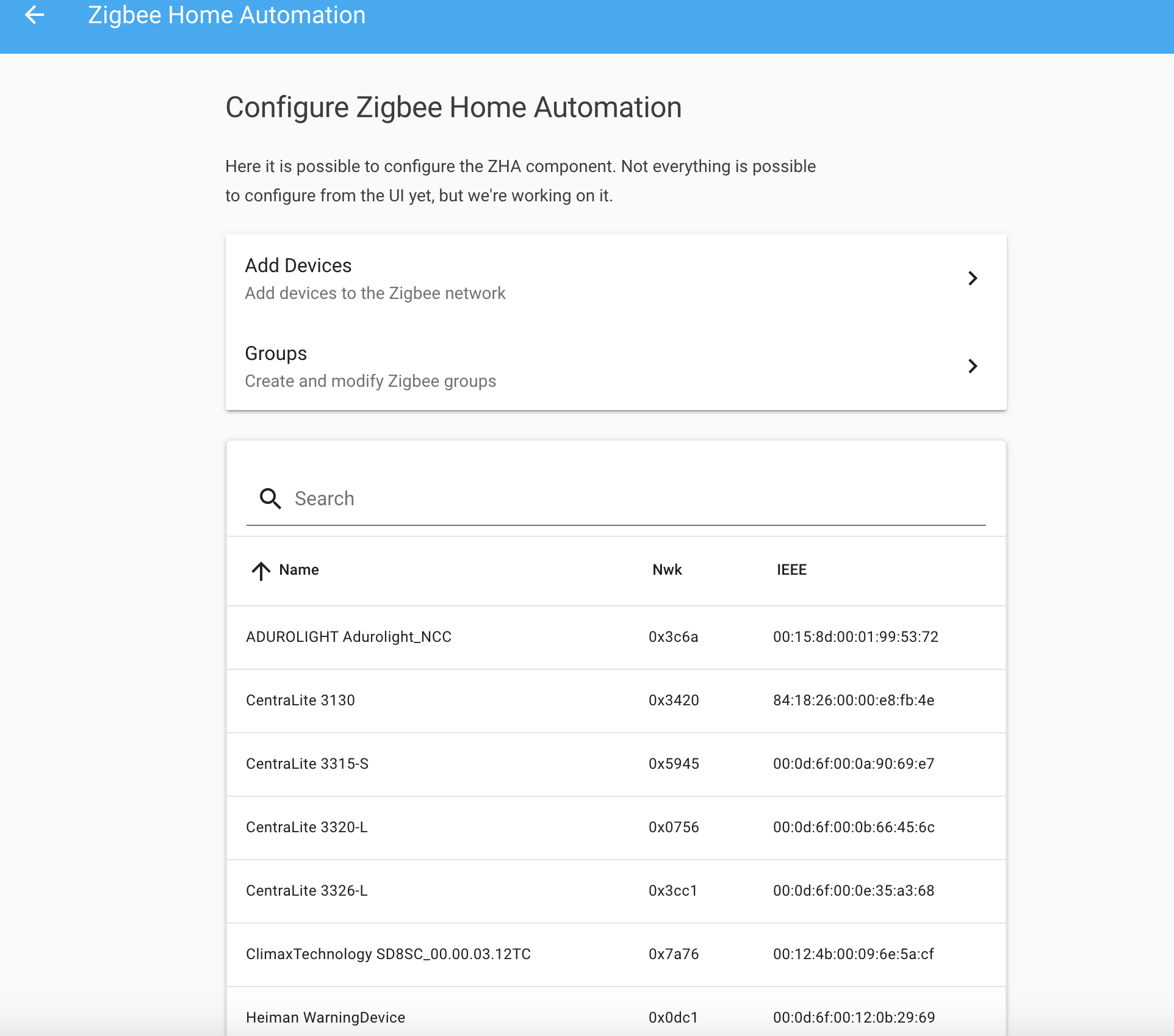 ZHA 配置面板截图。
在未来的版本中,我们还会加入将设备直接绑定到分组的能力。
移除你的 Lovelace 配置
想把 Lovelace 配置从头开始重做?或者回到自动生成的 Lovelace 界面?
现在你只要在原始配置编辑器中清空 Lovelace 配置并保存即可。
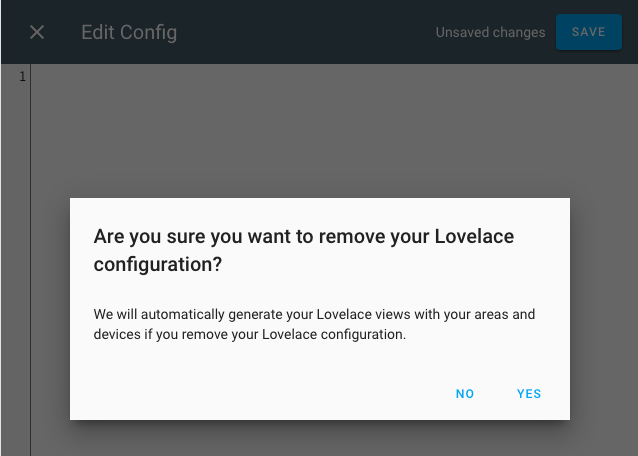 移除 Lovelace 的确认对话框截图。
其他消息
另外,HassOS 3.8 也发布了!
HassOS 发布-3 build 8 (Stable) released today. Changelog: https://t.co/kXOXNPldJF - Next we start the first 4.0 Beta builds include the N2 support and Linux LT 5.4
— Pascal Vizeli (@pvizeli) January 13, 2020
除了 HassOS 3.8 正式发布之外,HassOS 4.0 的首个 Beta 版也已经可用。这个 Beta 版本新增了对 Hardkernel's ODROID-N2 的支持!
ODROID-N2 是树莓派一个很棒而且性能强劲的替代方案。
自定义正在播放海报 Lovelace 卡片
Brad Crc 做了一个令人印象深刻的演示,展示如何在 Lovelace 楼层平面图中设置自定义的“正在播放”海报卡片。这样你就能在楼层图中显示当前正在播放的媒体!
Bas 展示他的 Lovelace 主题与设备
Bas Nijholt 总是在 Reddit 上看到自己的主题被人提起,于是决定亲自展示一下使用这套漂亮主题的 Lovelace 仪表盘。
I keep seeing my own theme on Reddit, so now it's my turn! [OC] from r/homeassistant<脚本 async src="//embed.redditmedia.com/widgets/platform.js" charset="UTF-8">
他的主题已经公开发布在 GitHub 上,配置文件也同样开源。
新集成
- Add Elgato Key 灯光 集成 (@frenck - #29592) (elgato docs) (new-集成)
- Add IntesisHome 温控 Platform (@jnimmo - #25364) (intesishome docs) (new-集成)
- Add Signal Messenger 集成 (@bbernhard - #28537) (signalmessenger docs) (new-集成)
- Revert Tahoma removal (@balloob - #29840) (tahoma docs) (new-集成)
- Add GIOS 集成 (@bieniu - #28719) (gios docs) (new-集成)
- Add local_ip component (@issacg - #29973) (localip docs) (new-集成)
- Add KEF speakers 集成 (@basnijholt - #28959) (kef docs) (new-集成)
- Add Sentry component (@dcramer - #30422) (sentry docs) (new-集成)
- Add surepetcare component (@benleb - #24426) (surepetcare docs) (new-集成)
- Add Brother Printer 集成 (@bieniu - #30359) (brother docs) (new-集成)
- Add TMB 传感器 (@alemuro - #27964) (tmb docs) (new-集成)
- Add Stookalert 集成 (@fwestenberg - #30306) (stookalert docs) (new-集成)
新平台
- Add battery 传感器 to iCloud (@Quentame - #29818) (icloud docs) (new-platform)
- Add 灯光 support to Velbus 集成 (@brefra - #30323) (velbus docs) (new-platform)
- Add support for v1 and v2 HomeKit 风扇. (@Jc2k - #30503) (homekit_controller docs) (new-platform)
- Add support for homekit air quality 传感器 (@Jc2k - #30510) (homekit_controller docs) (new-platform)
- Add pilight dimmer as 灯光 component (@Trekky12 - #30107) (pilight docs) (new-platform)
如果你需要帮助……
如果这个版本带来了问题,请到我们的 issue tracker 提交报告。 请尽量完整填写 issue 模板中的所有字段,这会对我们很有帮助!
不向后兼容的变更
-
Default groups - 实体 集成 will no longer automatically maintain the hidden groups with all of their 实体. The following groups are no longer automatically 创建 and maintained:
group.all_automationsgroup.all_coversgroup.all_devicesgroup.all_fansgroup.all_lightsgroup.all_locksgroup.all_plantsgroup.all_remotesgroup.all_scriptsgroup.all_switchesgroup.all_vacuum_cleanersgroup.calendargroup.remember_the_milk_accounts
The 自动化 and 脚本 配置 面板 are updated to show and manage all 自动化/脚本. If you want to show 卡片 in your Lovelace UI with all 实体 for a single domain, use the auto-实体 卡片. If you want to target all 实体 in a 服务 call, use
allas value forentity_id.(@balloob - #23789) (自动化 docs) (日历 docs) (遮盖 docs) (device_tracker docs) (风扇 docs) (灯光 docs) (门锁 docs) (plant docs) (remember_the_milk docs) (遥控器 docs) (脚本 docs) (开关 docs) (吸尘器 docs).
-
Hue - Hue will no longer import existing 认证 from disk. It has not written this 认证 to disk since March 2018. The config option has been deprecated and will be removed in 0.106. (@balloob - #30000) (hue docs)
-
deCONZ - Due to changes to 配置 handling, deCONZ groups will be assigned new identifiers in Home Assistant. As a result, deCONZ groups will be duplicated. Remove any group 设备 from the registry prior to upgrading or alternatively delete the obsolete entries after the 升级 to eliminate the duplicates. ([#30875]) (deconz docs)
-
UPnP - UPnP/IGD units of measurement have been aligned with other 集成 and common uses, they're now kB and kB/s instead of kbyte and kbyte/sec respectively. - (@scop - #29552) (upnp docs)
-
Worx Landroid - The
worxlandroid传感器 has been changed to not return the hardcoded 状态 valuesmanual-stop,charging,charging-complete,going-home,mowing, instead use the 状态 given from the Landroid to Home Assistant.This includes the 状态
idle, which means that something is broken with the mower. You can use this as a 通知 to check the physical 状态 of the mower.You need to 更新 any 自动化 that depend on the 状态 of the 传感器.
-
Apple iCloud - The iCloud component is no longer part of the 设备 tracker platform and is now an 集成, which is configurable via the UI. The iCloud cookie folder moved from
[HA_dir]/icloudto[HA_dir]/.storage/icloud.- (@Quentame - #28968) (icloud docs) -
Pi-hole - The default value for
hostis removed, and now must be specified manually. - (@johnluetke - #27569) (pi_hole docs)Example 配置:
-
HERE Travel Time - HERE has deprecated the usage of
app_codeand new 用户 can only generate anapi_key. If you are already using HERE Travel Time, you have to follow the migration guide to retrieve the, now required,api_key. - (@eifinger - #29966) (here_travel_time docs)Example 配置:
-
ZHA - The default divisor for
active_powerhas changed. Now, multiplier and divisor both default to 1 if the 设备 does not support these 属性 or when getting those 属性 from the 设备 fails. - (@Adminiuga - #30130) (zha docs) -
Keba - The unique_ids of the 实体 have changed and are now more future proof. The default
nameandentity_idof the 实体 have also changed. You need to clear stale entries from the 实体 registry and 更新 concerned 自动化 and 脚本. - (@dannerph - #30125) (keba docs) -
Tesla - Config flow has been added for Tesla. 设备 tracker 实体 names have changed due to this. They now follow the naming convention of the rest of the Tesla 实体. The
id设备 tracker 实体 属性 was also removed because it is a duplicate oftrackr_id. - (@alandtse - #28744) (tesla docs) -
Huawei LTE - The Huawei LTE 通知 服务 name is now configurable. The default name for the Huawei LTE 通知 服务 has changed to
notify.huawei_lteto avoid conflicts with other 通知 服务. An option to provide a name for the 服务 has also been added. - (@scop - #30208) (huawei_lte docs)Example 配置:
-
Amcrest (Removed) - Amcrest 传感器 and 开关 that were deprecated in previous releases have now been removed. - (@pnbruckner - #30308) (amcrest docs)
Example 配置:
-
MQTT - Added separate command and 状态 topics for the MQTT 门锁. Two new properties are introduced with
state_locked(default: LOCKED) andstate_unlocked(default: UNLOCKED). If you are using the same topic asstate_topicas for thecommand_topicyou can reestablish the old behavior by settingstate_lockedto 门锁 andstate_unlockedto UNLOCK. Effectively, this change allows you to distinguish commands and 状态 in two topics with different values. - (@tuxbox - #29808) (MQTT docs)Example 配置:
-
LG webOS Smart TV - The component 设置 now uses the
webostvdomain instead ofmedia_player. The host 配置 option is now required and the timeout and filename options have been removed. The 状态 handling for webOStv has also been cleaned up. An 实体 will haveonwhen the tv is on instead ofplayingorpausedas was previously the case. You need to 更新 自动化 that depend on the 实体 状态. - (@bendavid - #29296 #30416) (webostv docs)Example 配置:
-
Axis - Axis 集成 will no longer accept manual 配置 of 设备, all 配置 of the Axis 集成 will now be handled from the 集成 面板. - (@Kane610 - #30365) (axis docs)
TL;DR This will no longer work:
-
WLED - Improved WLED pure white support for RGBW LED strips. When using WLED with RGBW strips, setting the color in Home Assistant to white, will 关闭 the RGB LEDs of the strip and use the W channel only. - (@frenck - #30477) (wled docs)
-
Timer - Fire restarted event on restarting an active timer. This can break 自动化 that should 触发器 on every timer start event. - (@mnigbur - #30475) (timer docs)
-
Vizio - Removed
suppress_warningfrom 配置 options for Vizio 集成. Thepyviziopackage now suppresses insecure HTTPS request 警告 in a way that doesn't affect global requests from other 集成 or Home Assistant itself. There is no need to globally suppress insecure 警告 now. - (@raman325 - #30536) (vizio docs)Example 配置:
-
RFXtrx - Bump pyRFXtrx to 0.25. This 更新 开关 the commands for
openandclosefor RFXtrx 遮盖 of the "Rollertrol" type, as they were switched (clicking open resulted in closing of the 遮盖 and vice versa). Existing 自动化 should be updated. - (@Ernst79 - #30566) (rfxtrx docs) -
Ring - Ring is now configurable via a config entry. This means it will no longer store the username and 密码 and you're able to 配置 accounts that use 2FA. It's no longer possible to set scan interval, monitored 条件 or FFmpeg arguments. The defaults are used. - (@balloob - #30564) (ring docs)
-
Binary 传感器 (门锁) - Updated ON/OFF 条件 and 触发器 to match the 文档 and UI. This change inverts the logic of 自动化 relating to 二元sensor with the
lock设备 class, but only for 自动化 triggering on the 门锁 状态 (rather than triggering a 门锁/unlock 动作).If you already 创建 自动化, you will need to check those, as they probably need to be inverted. The text displayed in the 触发器 or 条件 dropdowns in Lovelace will now be correct.
One possible scenario is if you have set an 自动化 using the 状态 of one 门锁 to 触发器 an 动作 on other 门锁(s). This change would cause the 动作 to 触发器 on
lockingif it was previously triggering onunlocking. - (@davet2001 - #30663) (binary_sensor docs) -
Google Assistant - The
api_keyfor manual installs is now deprecated and will be removed in 0.105. To correct this you will need to removeapi_keyfrom theconfiguration.yamland 开关 to usingservice_accountinstead. - (@elupus - #30402) (google_assistant docs)
Beta 修复
- Fix upnp raw 传感器 状态 formatting when None (@pnbruckner - #30444) (upnp docs) (beta fix)
- Implement capability 属性 (@balloob - #30545) (风扇 docs) (媒体播放器 docs) (吸尘器 docs) (water_heater docs) (beta fix)
- Add Ring config flow (@balloob - #30564) (ring docs) (breaking change) (beta fix)
- Fix problem with restoring POE control (@Kane610 - #30597) (unifi docs) (beta fix)
- Set body size for Proxy / streams to 16mb (@pvizeli - #30608) (http docs) (beta fix)
- Bump Adafruit_BBIO to 1.1.1 (@springstan - #30630) (bbb_gpio docs) (beta fix)
- Do not save last_seen if older than prev_seen (@pnbruckner - #30647) (life360 docs) (beta fix)
- Fix HomeKit with 实体 registry restoration where supported_features is a non-None falsey (@Jc2k - #30657) (homekit docs) (beta fix)
- Fix ZHA temperature 传感器 restoration (@Adminiuga - #30661) (zha docs) (beta fix)
- 更新 ON/OFF 条件 and 触发器 to match 文档 and UI, issue #30462 (@davet2001 - #30663) (binary_sensor docs) (breaking change) (beta fix)
- 升级 Ring to new 版本 (@balloob - #30666) (ring docs) (beta fix)
- Fix 错误 with HomematicIP Cloud 遮盖 (@SukramJ - #30667) (homematicip_cloud docs) (beta fix)
- Ring OTP improvement (@balloob - #30688) (ring docs) (beta fix)
- 日志 错误 when 集成 is missing platform 设置 (@balloob - #30690) (beta fix)
- Fix 更新 person validation (@balloob - #30691) (person docs) (beta fix)
- Fix discovery for oauth2 flow implementations (@frenck - #30700) (beta fix)
- Revert "Forget auth token when going offline so we can reconnect (#26630)" (@pnbruckner - #30705) (amcrest docs) (beta fix)
- Fix Ring WiFi 传感器 (@balloob - #30735) (ring docs) (beta fix)
- 更新 aiopylgtv to 0.2.5 (@bendavid - #30702) (webostv docs) (beta fix)
- 更新 aiopylgtv to 0.2.6 (@bendavid - #30739) (webostv docs) (beta fix)
- Bump ZHA quirks to 0.0.31 (@dmulcahey - #30740) (zha docs) (beta fix)
- 更新 Ring to 0.6.0 (@balloob - #30748) (ring docs) (beta fix)
- Set default locale for cloud Alexa config (@balloob - #30749) (alexa docs) (cloud docs) (beta fix)
- Bump teslajsonpy to 0.2.3 (@alandtse - #30750) (tesla docs) (beta fix)
- 更新 pyhomematic to 0.1.63 (@danielperna84 - #30594) (homematic docs) (beta fix)
- Refactor HomeMatic / Fix issue with 0.104/dev (@pvizeli - #30752) (homematic docs) (beta fix)
- bump aiokef to 0.2.5 which uses 门锁 (@basnijholt - #30753) (kef docs) (beta fix)
- Fix HomeKit behavior with 灯光 supporting color and temperature (@frenck - #30756) (homekit docs) (beta fix)
- Revert #29701 (@pvizeli - #30766) (zwave docs) (beta fix)
- Refactor Ring data handling (@balloob - #30777) (ring docs) (beta fix)
- 恢复 unit_of_measurement from 实体 registry (@Jc2k - #30780) (beta fix)
发布 0.104.1 - January 16
- 0.104.0 (@frenck - #30803)
- 更新 emulated_roku to 0.1.9 (@jdeluyck - #30791) (emulated_roku docs)
- 更新 to aiopylgtv 0.2.7 (@bendavid - #30797) (webostv docs)
- Fix 设置 错误 of Mikrotik (@springstan - #30810) (mikrotik docs)
- Handle no host info in ignored config entries (@balloob - #30822) (hue docs)
- Fix mpd time issue (@pvizeli - #30825) (mpd docs)
- Fix play_media in webostv (@bendavid - #30828) (webostv docs)
- Fix iCloud when no family members (issue #30829) (@Quentame - #30836) (icloud docs)
- Reinstate and deprecate filename option for hue config (@balloob - #30846) (hue docs)
- Fixes issue about messages not being reset after sending it to microsoft teams. (@peroyvind - #30849) (msteams docs)
- Fix 传感器 type creation with multiple Ambient 天气 stations (@bachya - #30850) (ambient_station docs)
发布 0.104.2 - January 17
- 0.104.0 (@frenck - #30803)
- add multistate back (@dmulcahey - #30889) (zha docs)
- Fix missing 开关 groups of HomematicIP Cloud (@SukramJ - #30903) (homematicip_cloud docs)
- Fix issue with group unique id when normalising bridge id (@Kane610 - #30904) (deconz docs)
- Fix Alexa semantics for 遮盖 with tilt support. (@ochlocracy - #30911) (alexa docs)
- 摄像头 endpoint likes to timeout, catch it. (@balloob - #30919) (ring docs)
- Fix 服务 设备 refresh calling 状态 更新 (@Kane610 - #30920) (deconz docs)
- Updated 前端 to 20200108.2 (@bramkragten - #30921) (前端 docs)
- Fix hue accepting filename (@balloob - #30924) (hue docs)
发布 0.104.3 - January 21
- Catch all Ring timeout 错误 (@balloob - #30960) (ring docs)
- 更新 emulated_roku to 0.2.0 (@jdeluyck - #30974) (emulated_roku docs)
- Ring 摄像头 fix (@steve-gombos - #30975) (ring docs)
- Fix capability_attributes when supported_features is None (@JeffLIrion - #30993) (water_heater docs)
- Fix deCONZ 更新 entry from Hassio discovery (@frenck - #31015) (deconz docs)
所有变更
- Move imports to top for decora_wifi (@springstan - #29439) (decora_wifi docs)
- Make hassfest stricter (@balloob - #29494)
- Move imports to top for ambient_station (@springstan - #29497) (ambient_station docs)
- Move imports to top for google_pubsub (@springstan - #29498) (google_pubsub docs)
- Move imports to top for hue (@springstan - #29501) (hue docs)
- Move imports to top for google_translate (@springstan - #29499) (google_translate docs)
- Move imports to top for http (@springstan - #29500) (http docs)
- Move imports to top for system_log (@springstan - #29465) (system_log docs)
- Move imports to top for group (@springstan - #29485) (group docs)
- Move imports to top for 前端 (@springstan - #29487) (前端 docs)
- Move imports to top for ipma (@springstan - #29507) (ipma docs)
- Move imports to top for mediaroom (@springstan - #29509) (mediaroom docs)
- Move imports to top for islamic_prayer_times (@springstan - #29506) (islamic_prayer_times docs)
- Move imports to top for mobile_app (@springstan - #29511) (mobile_app docs)
- Move imports to top for meteoalarm (@springstan - #29510) (meteoalarm docs)
- Move imports to top for statistics (@springstan - #29223) (statistics docs)
- Move imports to top for monoprice (@springstan - #29516) (monoprice docs)
- Move imports to top for mysensors (@springstan - #29517) (mysensors docs)
- Move imports to top for ign_sismologia (@springstan - #29523) (ign_sismologia docs)
- Move imports to top for nextbus (@springstan - #29520) (nextbus docs)
- Move imports to top for switcher_kis (@springstan - #29530) (switcher_kis docs)
- Add full 状态 view for emulated_hue (apps using emulated_hue, 'sleep cycle' and 'sleep as android') (@orrpan - #26650) (emulated_hue docs)
- Move imports to top for mochad (@springstan - #29514) (mochad docs)
- Add input_boolean 重载 服务 (@Adminiuga - #29379) (input_boolean docs)
- Move imports to top for izone (@springstan - #29508) (izone docs)
- Move imports to top for modbus (@springstan - #29515) (modbus docs)
- Bump pytest to 5.3.1 (@frenck - #29535)
- Move imports to top for nx584 (@springstan - #29537) (nx584 docs)
- Move imports to top for pjlink (@springstan - #29540) (pjlink docs)
- Move imports to top for smhi (@springstan - #29545) (smhi docs)
- Move imports to top for sleepiq (@springstan - #29544) (sleepiq docs)
- Move imports to top for toon (@springstan - #29553) (toon docs)
- Move imports to top for influxdb (@springstan - #29513) (influxdb docs)
- Move imports to top for heatmiser (@springstan - #29562) (heatmiser docs)
- Move imports to top for plant (@springstan - #29543) (plant docs)
- Move imports to top for spc (@springstan - #29547) (spc docs)
- Bump lightwave to 0.17 (@shortbloke - #29566) (lightwave docs)
- Add 服务 to set netatmo home heating schedule (@1v0dev - #29244) (netatmo docs)
- Move imports to top for homematic (@springstan - #29558) (homematic docs)
- Use "kB" and "s" as UPnP/IGD units (@scop - #29552) (upnp docs) (breaking change)
- 升级 certifi to >=2019.11.28 (@fabaff - #29571)
- Move imports to top for notion (@springstan - #29539) (notion docs)
- Move imports to top for soundtouch (@springstan - #29546) (soundtouch docs)
- Treat BaseException as over-general (@scop - #29573) (whois docs)
- Move imports to top for zha (@springstan - #29555) (zha docs)
- Move imports to top for openuv (@springstan - #29541) (openuv docs)
- Move imports to top for onboarding (@springstan - #29542) (onboarding docs)
- 更新 Travis dist to bionic (@scop - #29575)
- 升级 pyyaml to 5.2.0 (@fabaff - #29586)
- Add 服务 to reboot the Freebox (@SNoof85 - #29525) (freebox docs)
- Improve Tahoma Velux support (@butako - #27920) (tahoma docs)
- Register 自动化.重载 服务 as an admin 服务. (@Adminiuga - #29582) (自动化 docs)
- Add input_datetime 重载 服务. (@Adminiuga - #29581) (input_datetime docs)
- Add input_number.重载 admin 服务. (@Adminiuga - #29584) (input_number docs)
- change icon for partly-cloudy-night (@Mariusthvdb - #29601) (darksky docs)
- Add additional Magic Cube Model (@SukramJ - #29598) (deconz docs)
- Add Elgato Key 灯光 集成 (@frenck - #29592) (elgato docs) (new-集成)
- Move imports to top for google_assistant (@springstan - #29561) (google_assistant docs)
- Move imports to top for tellduslive (@springstan - #29550) (tellduslive docs)
- Move imports to top for stream (@springstan - #29548) (stream docs)
- Add quarterly cycle for utility_meter component (@aamcrae - #29534) (utility_meter docs)
- bump freebox api 版本 (@SNoof85 - #29527) (freebox docs)
- Move imports to top for websocket_api (@springstan - #29556) (websocket_api docs)
- Move imports to top for fido (@springstan - #29557) (fido docs)
- Add Huawei LTE reboot and clear traffic statistics 服务 (@scop - #29594) (huawei_lte docs)
- sort imports according to PEP8 for airly (@basnijholt - #29615) (airly docs)
- sort imports according to PEP8 for alarm_control_panel (@basnijholt - #29616) (alarm_control_panel docs)
- sort imports according to PEP8 for air_quality (@basnijholt - #29614) (air_quality docs)
- sort imports according to PEP8 for ads (@basnijholt - #29613) (ads docs)
- sort imports according to PEP8 for abode (@basnijholt - #29610) (abode docs)
- sort imports according to PEP8 for actiontec (@basnijholt - #29612) (actiontec docs)
- sort imports according to PEP8 for acer_projector (@basnijholt - #29611) (acer_projector docs)
- sort imports according to PEP8 for components (@basnijholt - #29609)
- sort imports according to PEP8 for yweather (@basnijholt - #29608)
- 升级 keyring to 19.3.0 and keyrings.alt to 3.2.0 (@fabaff - #29607)
- sort imports according to PEP8 for auth (@basnijholt - #29619) (auth docs)
- sort imports according to PEP8 for alexa (@basnijholt - #29618) (alexa docs)
- sort imports according to PEP8 for buienradar (@basnijholt - #29623) (buienradar docs)
- Add IntesisHome 温控 Platform (@jnimmo - #25364) (intesishome docs) (new-集成)
- Don't escape command parameters (@Hypfer - #29504) (squeezebox docs)
- Fix file permission (@fabaff - #29635) (dsmr_reader docs) (here_travel_time docs) (tahoma docs)
- sort imports according to PEP8 for axis (@basnijholt - #29621) (axis docs)
- sort imports according to PEP8 for hassio (@basnijholt - #29634) (hassio docs)
- Pass in parameters explicitly to DeconzSession (@Kane610 - #29617) (deconz docs)
- use isort to sort imports according to PEP8 for 风扇 (@basnijholt - #29632) (风扇 docs)
- use isort to sort imports according to PEP8 for 自动化 (@basnijholt - #29620) (自动化 docs)
- use isort to sort imports according to PEP8 for cast (@basnijholt - #29624) (cast docs)
- use isort to sort imports according to PEP8 for binary_sensor (@basnijholt - #29622) (binary_sensor docs)
- Move imports to top for homekit_controller (@springstan - #29564)
- use isort to sort imports according to PEP8 for 温控 (@basnijholt - #29625) (温控 docs)
- use isort to sort imports according to PEP8 for command_line (@basnijholt - #29627) (command_line docs)
- use isort to sort imports according to PEP8 for config (@basnijholt - #29628) (config docs)
- use isort to sort imports according to PEP8 for 遮盖 (@basnijholt - #29629) (遮盖 docs)
- use isort to sort imports according to PEP8 for demo (@basnijholt - #29630) (demo docs)
- use isort to sort imports according to PEP8 for cloud (@basnijholt - #29626) (cloud docs)
- use isort to sort imports according to PEP8 for ecobee (@basnijholt - #29631) (ecobee docs)
- Sort imports according to PEP8 for homekit_controller (@basnijholt - #29646) (homekit_controller docs)
- use isort to sort imports according to PEP8 for MQTT (@basnijholt - #29649) (MQTT docs)
- use isort to sort imports according to PEP8 for 灯光 (@basnijholt - #29648) (灯光 docs) (MQTT docs)
- Sort imports according to PEP8 for homekit (@basnijholt - #29645) (homekit docs)
- use isort to sort imports according to PEP8 for 吸尘器 (@basnijholt - #29650) (MQTT docs) (吸尘器 docs)
- Fix file permission (@fabaff - #29660) (intesishome docs)
- Sort imports according to PEP8 for recorder (@basnijholt - #29652) (recorder docs)
- Sort imports according to PEP8 for 开关 (@basnijholt - #29654) (开关 docs)
- Sort imports according to PEP8 for 模板 (@basnijholt - #29655) (模板 docs)
- Sort imports according to PEP8 for hive (@basnijholt - #29669) (hive docs)
- Sort imports according to PEP8 for starline (@basnijholt - #29653) (starline docs)
- Change 状态 values for Worx Landroid 传感器 (@geraldhansen - #27453) (worxlandroid docs) (breaking change)
- Sort imports according to PEP8 for plex (@basnijholt - #29708) (plex docs)
- Sort imports according to PEP8 for cert_expiry (@basnijholt - #29705) (cert_expiry docs)
- Sort imports according to PEP8 for geonetnz_volcano (@basnijholt - #29716) (geonetnz_volcano docs)
- Sort imports according to PEP8 for eufy (@basnijholt - #29715) (eufy docs)
- Sort imports according to PEP8 for dialogflow (@basnijholt - #29714) (dialogflow docs)
- Sort imports according to PEP8 for kodi (@basnijholt - #29721) (kodi docs)
- Add tests for vera component (@vangorra - #28340) (vera docs)
- Add Signal Messenger 集成 (@bbernhard - #28537) (signalmessenger docs) (new-集成)
- Protect Doorbird platform from failing when individual doorbird fails (@gjbadros - #29374) (doorbird docs)
- Sort imports according to PEP8 for velbus (@basnijholt - #29676) (velbus docs)
- Proactively report Alexa Endpoint Health properties (@clapbr - #29736) (alexa docs)
- Sort imports according to PEP8 for pi_hole (@basnijholt - #29726) (pi_hole docs)
- use isort to sort imports according to PEP8 for homeassistant (@basnijholt - #29718) (homeassistant docs)
- use isort to sort imports according to PEP8 for 区域 (@basnijholt - #29712) (区域 docs)
- use isort to sort imports according to PEP8 for group (@basnijholt - #29713)
- Sort imports according to PEP8 for neato (@basnijholt - #29724) (neato docs)
- Sort imports according to PEP8 for input_text (@basnijholt - #29719) (input_text docs)
- Sort imports according to PEP8 for linky (@basnijholt - #29722)
- Sort imports according to PEP8 for minio (@basnijholt - #29723) (minio docs)
- Sort imports according to PEP8 for netgear_lte (@basnijholt - #29725) (netgear_lte docs)
- Sort imports according to PEP8 for iqvia (@basnijholt - #29720) (iqvia docs)
- Sort imports according to PEP8 for gpslogger (@basnijholt - #29717) (gpslogger docs)
- Sort imports according to PEP8 for soma (@basnijholt - #29709) (soma docs)
- Sort imports according to PEP8 for verisure (@basnijholt - #29711) (verisure docs)
- Sort imports according to PEP8 for darksky (@basnijholt - #29706) (darksky docs)
- Sort imports according to PEP8 for aws (@basnijholt - #29704) (aws docs)
- Sort imports according to PEP8 for device_automation (@basnijholt - #29707) (device_automation docs)
- Sort imports according to PEP8 for arest (@basnijholt - #29703) (arest docs)
- Sort imports according to PEP8 for arduino (@basnijholt - #29702) (arduino docs)
- Sort imports according to PEP8 for almond (@basnijholt - #29688) (almond docs)
- Sort imports according to PEP8 for geonetnz_quakes (@basnijholt - #29668) (geonetnz_quakes docs)
- Move imports to top for nsw_fuel_station (@springstan - #29538) (nsw_fuel_station docs)
- Sort imports according to PEP8 for jewish_calendar (@basnijholt - #29697) (jewish_calendar docs)
- Sort imports according to PEP8 for opentherm_gw (@basnijholt - #29671) (opentherm_gw docs)
- Sort imports according to PEP8 for xiaomi_miio (@basnijholt - #29677) (xiaomi_miio docs)
- Sort imports according to PEP8 for met (@basnijholt - #29699) (met docs)
- Sort imports according to PEP8 for locative (@basnijholt - #29698) (locative docs)
- Sort imports according to PEP8 for file (@basnijholt - #29694) (file docs)
- Sort imports according to PEP8 for ifttt (@basnijholt - #29696) (ifttt docs)
- Sort imports according to PEP8 for geofency (@basnijholt - #29695) (geofency docs)
- Sort imports according to PEP8 for counter (@basnijholt - #29692) (counter docs)
- Sort imports according to PEP8 for ffmpeg (@basnijholt - #29693) (ffmpeg docs)
- use isort to sort imports according to PEP8 for broadlink (@basnijholt - #29690) (broadlink docs)
- Sort imports according to PEP8 for ambiclimate (@basnijholt - #29689) (ambiclimate docs)
- Sort imports according to PEP8 for 摄像头 (@basnijholt - #29691) (摄像头 docs)
- use isort to sort imports according to PEP8 for netatmo (@basnijholt - #29682) (netatmo docs)
- Sort imports according to PEP8 for specific_devices (@basnijholt - #29687)
- Sort imports according to PEP8 for wemo (@basnijholt - #29685) (wemo docs)
- Sort imports according to PEP8 for utility_meter (@basnijholt - #29710) (utility_meter docs)
- Sort imports according to PEP8 for vesync (@basnijholt - #29684) (vesync docs)
- Sort imports according to PEP8 for iaqualink (@basnijholt - #29681) (iaqualink docs)
- Sort imports according to PEP8 for 传感器 (@basnijholt - #29683) (传感器 docs)
- Sort imports according to PEP8 for ring (@basnijholt - #29680)
- Sort imports according to PEP8 for http (@basnijholt - #29679)
- Sort imports according to PEP8 for dyson (@basnijholt - #29678)
- Sort imports according to PEP8 for somfy (@basnijholt - #29675) (somfy docs)
- Sort imports according to PEP8 for nest (@basnijholt - #29670) (nest docs)
- Sort imports according to PEP8 for rest (@basnijholt - #29674) (rest docs)
- Sort imports according to PEP8 for pilight (@basnijholt - #29673) (pilight docs)
- Sort imports according to PEP8 for owntracks (@basnijholt - #29672) (owntracks docs)
- Sort imports according to PEP8 for emulated_hue (@basnijholt - #29667) (emulated_hue docs)
- Sort imports according to PEP8 for device_tracker (@basnijholt - #29666) (device_tracker docs)
- Sort imports according to PEP8 for 媒体播放器 (@basnijholt - #29665) (媒体播放器 docs)
- sort imports according to PEP8 for 门锁 (@basnijholt - #29663) (门锁 docs)
- Sort imports according to PEP8 for unifi (@basnijholt - #29656) (unifi docs)
- Sort imports according to PEP8 for deconz (@basnijholt - #29659)
- Sort imports according to PEP8 for zwave (@basnijholt - #29658) (zwave docs)
- Sort imports according to PEP8 for websocket_api (@basnijholt - #29657) (websocket_api docs)
- Sort imports according to PEP8 for pushbullet (@basnijholt - #29748) (pushbullet docs)
- Sort imports according to PEP8 for versasense (@basnijholt - #29753) (versasense docs)
- Sort imports according to PEP8 for 遥控器 (@basnijholt - #29749) (遥控器 docs)
- Sort imports according to PEP8 for yeelight (@basnijholt - #29755) (yeelight docs)
- Sort imports according to PEP8 for solarlog (@basnijholt - #29752) (solarlog docs)
- Sort imports according to PEP8 for 场景 (@basnijholt - #29750) (场景 docs)
- Sort imports according to PEP8 for vicare (@basnijholt - #29754) (vicare docs)
- Sort imports according to PEP8 for plaato (@basnijholt - #29747) (plaato docs)
- Sort imports according to PEP8 for shopping_list (@basnijholt - #29751) (shopping_list docs)
- Sort imports according to PEP8 for emulated_roku (@basnijholt - #29756)
- Sort imports according to PEP8 for sleepiq (@basnijholt - #29759)
- Sort imports according to PEP8 for mobile_app (@basnijholt - #29758)
- Sort imports according to PEP8 for hue (@basnijholt - #29757)
- Sort imports according to PEP8 for vultr (@basnijholt - #29760)
- Remove Tahoma component #29744 (@tetienne - #29745) (tahoma docs) (breaking change)
- Sort imports according to PEP8 for components starting with "B" (@basnijholt - #29762)
- Sort imports according to PEP8 for components starting with "A" (@basnijholt - #29761)
- Sort imports according to PEP8 for components starting with "E" (@basnijholt - #29765)
- Sort imports according to PEP8 for components starting with "F" (@basnijholt - #29766)
- Sort imports according to PEP8 for components starting with "G" (@basnijholt - #29767)
- Sort imports according to PEP8 for components starting with "H" (@basnijholt - #29768)
- use isort to sort imports for components starting with 'm' (@basnijholt - #29772)
- Sort imports according to PEP8 for components starting with "I" (@basnijholt - #29769)
- Sort imports according to PEP8 for components starting with "L" (@basnijholt - #29771)
- Sort imports according to PEP8 for components starting with "K" (@basnijholt - #29770) (kankun docs) (keba docs) (keyboard_remote docs)
- Sort imports according to PEP8 for components starting with "O" (@basnijholt - #29774)
- Sort imports according to PEP8 for components starting with "P" (@basnijholt - #29775)
- Sort imports according to PEP8 for components starting with "S" (@basnijholt - #29777)
- Sort imports according to PEP8 for components starting with "R" (@basnijholt - #29776)
- Sort imports according to PEP8 for components starting with "T" (@basnijholt - #29778)
- Sort imports according to PEP8 for components starting with "V" (@basnijholt - #29780)
- Sort imports according to PEP8 for components starting with "N" (@basnijholt - #29773)
- Sort imports according to PEP8 for components starting with "W" (@basnijholt - #29781)
- Sort imports according to PEP8 for components starting with "Q" (@basnijholt - #29785)
- Sort imports according to PEP8 for components starting with "Y" (@basnijholt - #29783) (yale_smart_alarm docs) (yamaha docs) (yamaha_musiccast docs) (yandex_transport docs) (yeelightsunflower docs)
- Sort imports according to PEP8 for components starting with "X" (@basnijholt - #29782) (x10 docs) (xbox_live docs) (xeoma docs) (xiaomi_tv docs) (xmpp docs) (xs1 docs)
- Move imports to top for homekit (@springstan - #29560) (homekit docs)
- Cleanup removed component (@pvizeli - #29788)
- Sort imports according to PEP8 for '脚本' folder (@basnijholt - #29790)
- use isort to sort imports for "设置.py" (@basnijholt - #29792)
- Sort imports according to PEP8 for 'homeassistant' folder (@basnijholt - #29789)
- Sort imports according to PEP8 for 'tests' (@basnijholt - #29791)
- Add config flow to iCloud (@Quentame - #28968) (icloud docs) (breaking change)
- Sort imports according to PEP8 for components starting with "D" (@basnijholt - #29764)
- Move imports to top for ness_alarm (@springstan - #29518) (ness_alarm docs)
- Sort imports according to PEP8 for components starting with "Z" (@basnijholt - #29784) (zamg docs) (zengge docs) (zeroconf docs) (zestimate docs) (zha docs) (Zigbee docs)
- Sort imports according to PEP8 for components starting with "C" (@basnijholt - #29763)
- Fix 'pytest.register_assert_rewrite("tests.common")' 警告 (@basnijholt - #29797)
- Sort imports according to PEP8 for huawei_lte (@basnijholt - #29664) (huawei_lte docs)
- Sort imports according to PEP8 for components starting with "U" (@basnijholt - #29779) (ue_smart_radio docs) (uk_transport docs) (universal docs) (updater docs) (uscis docs)
- Fix build, invalid JSON file in icloud component (@frenck - #29798) (icloud docs)
- Sort imports according to PEP8 for google_assistant (@basnijholt - #29633) (google_assistant docs)
- Add ZHA group API (@dmulcahey - #29641) (zha docs)
- Add input_text 重载 服务. (@Adminiuga - #29644) (input_text docs)
- Add input_select 重载 服务. (@Adminiuga - #29647) (input_select docs)
- Add JSON files validation to hassfest (@frenck - #29799)
- Fix zha circular import (@Adminiuga - #29802)
- Nextbus: Sort results for upcoming times (@ViViDboarder - #29811) (nextbus docs)
- Adjusts repository README (@frenck - #29805)
- 安装 discovery requirements if used (@balloob - #29795) (deconz docs) (hue docs)
- Fix isort on a small set of misc files (@frenck - #29803) (xiaomi_miio docs)
- Fix tank utility token (@proferabg - #29801) (tank_utility docs)
- Re-授权 Huawei LTE on login required 错误 (@scop - #29597) (huawei_lte docs)
- Fix withings wrong sleep 状态 entry (@vangorra - #29651) (withings docs)
- Fix input_text initialization with empty config. (@Adminiuga - #29829) (input_text docs)
- 升级 pydocstyle to 5.0.1 (@scop - #29830)
- Sort imports for requirements.py and its test using isort (@basnijholt - #29836)
- Fix Soma 集成 connection issue (@ratsept - #27692) (soma docs)
- 更新 rfxtrx component so it can be run as a custom_component (@foxy82 - #29638) (rfxtrx docs)
- Revert Tahoma removal (@balloob - #29840) (tahoma docs) (new-集成)
- Use Bionic's ffmpeg on Travis, jonathonf/ffmpeg-4 is N/A at the moment (@scop - #29860)
- Fix package import sort on dwd_weather_warnings (@frenck - #29874) (dwd_weather_warnings docs)
- Sort import for tests/components/feedreader/test_init.py (@basnijholt - #29878)
- Add isort to CI and pre-commit (@basnijholt - #29739)
- Remove no longer needed auth.util, use secrets instead (@scop - #29861)
- Revert "Sort import for tests/components/feedreader/test_init.… (@Adminiuga - #29882)
- 日志 ZHA bind/unbind operations status (@Adminiuga - #29842) (zha docs)
- (Re)Add support for multiple Pi-Holes (@johnluetke - #27569) (pi_hole docs) (breaking change)
- ISY994 Node Filter 更新 (@randellhodges - #28155) (isy994 docs)
- Defer 日志 formatting. (@Adminiuga - #29888) (zha docs)
- Bump python-miio 版本 to 0.4.8 (@syssi - #29890) (xiaomi_miio docs)
genericpathis an internal Python module and shouldn't be imported according to 核心 Python devs. (see this comment) (@basnijholt - #29903)- Make Python deprecation notice easier to maintain (@scop - #29900)
- 升级 Sphinx to 2.2.2 and sphinx-autodoc-typehintsi to 1.10.3 (@fabaff - #29906)
- Fix incorrect file format yr test fixure (@frenck - #29910)
- Fixes invalid JSON syntax in devcontainer (@frenck - #29911)
- Add 集成 platform 助手 (@balloob - #29914)
- 更新 Tahoma component's tahoma-api requirement's 版本 (@DjMoren - #29918) (tahoma docs)
- Implement Alexa.EventDetectionSensor for Alexa (@ochlocracy - #28276) (alexa docs)
- 更新 androidtv 版本 to improve source selection support (@raman325 - #29579) (androidtv docs)
- Add battery 传感器 to iCloud (@Quentame - #29818) (icloud docs) (new-platform)
- bump venstar 0.12 (@tyler-public - #29954)
- Bump adb-shell to 0.1.0 and androidtv to 0.0.36 (@JeffLIrion - #29938) (androidtv docs)
- Start of using hass 状态 for tests rather than direct object (@elupus - #29377)
- isort fix on test_media_player (@caronc - #29965)
- 升级 keyring to 20.0.0 and keyrings.alt to 3.4.0 (@fabaff - #29960)
- Fix example value for Todoist 服务 (@boralyl - #29953)
- Remove deprecated rflink configs (@scop - #29972) (rflink docs)
- Drop Python 3.6 support (@scop - #29978)
- Support case of unknown/unavailable temperature/humidity (@elupus - #29959) (google_assistant docs)
- Migrate to api_key (@eifinger - #29966) (here_travel_time docs) (breaking change)
- Remove 'SUPPORT_PLAY_MEDIA' from Volumio (@JeffLIrion - #29969) (volumio docs)
- Make hassfest import detection better (@balloob - #29932) (filter docs) (history docs)
- Fixed "condtion_type" to "condition_type" (@rsnodgrass - #29984) (风扇 docs)
- Fix 条件 typo (@balloob - #29989) (温控 docs) (device_tracker docs) (风扇 docs) (吸尘器 docs)
- Don't use the locals parameter on exec. (@lddubeau - #29979) (python_script docs)
- 更新 binary_sensor.py (@Emacee - #29977) (bmw_connected_drive docs)
- Bump shodan to 1.21.0 (@frenck - #29991) (shodan docs)
- Bump pytest to 5.3.2 (@frenck - #29990)
- Add check-json to CI and Pre-commit (@frenck - #29912)
- Add unique ID to config entries (@balloob - #29806)
- Show current effect in yeelight 设备 (@zewelor - #28975) (yeelight docs)
- Convert Hue to use unique ID (@balloob - #30000) (hue docs)
- Fix modbus 服务 description (@vzahradnik - #30005)
- Fix persistent 设置 错误 通知 content (@frenck - #29995)
- Make tplink 灯光 more responsive (@vangorra - #28652) (tplink docs)
- Z-Wave: Fibaro FGR*-222: Add venetian blind support (@andre-richter - #29701) (zwave docs)
- 升级 matrix-client to 0.3.2 (@fabaff - #30027) (matrix docs)
- 升级 zeroconf to 0.24.1 (@fabaff - #30028) (zeroconf docs)
- 更新 Envoy 传感器 to 配置 credentials and grab Inverter Date from updated API (@gtdiehl - #28837) (enphase_envoy docs)
- Add option to ignore flows (@balloob - #30008) (config docs) (hue docs)
- changed Venstar component temperature to half degree accuracy (@erikkastelec - #30034) (venstar docs)
- Add timer 重载 服务. (@Adminiuga - #30015) (timer docs)
- Guard against future unknown SimpliSafe 实体 types (@bachya - #30059) (simplisafe docs)
- Set unique id on homekit_controller config entries (@Jc2k - #30035) (homekit_controller docs)
- Remove stream from 摄像头 after deps (@balloob - #30057) (摄像头 docs)
- Add unit_of_measurement to various Transmission 传感器 (@yegle - #30037) (transmission docs)
- Refactor Alexa capabilityResources object into class, Implement Alexa semantics object (@ochlocracy - #29917) (alexa docs)
- Make Hassfest stricter pt 2 (@balloob - #30068) (modbus docs) (MQTT docs) (tuya docs) (zamg docs)
- Init 实体 as unavailable when offline (@bieniu - #29738) (airly docs)
- Make name of nmbs live 传感器 customizable via unique_id (@springstan - #29662) (nmbs docs)
- Include all SSDP data in discovery info (@scop - #28197) (ssdp docs)
- Rework tado component (@michaelarnauts - #29246) (tado docs)
- Add an open window 传感器 for heating 区域 (@gppanayotov - #30090) (tado docs)
- Explicitly include Alexa interface for image_processing 实体. (@ochlocracy - #30101) (alexa docs)
- Don't 错误 on removal of an ignored homekit_controller config entry (@Jc2k - #30083) (homekit_controller docs)
- add --show-diff-on-failure to pre-commit (@basnijholt - #30097)
- 升级 mypy to 0.761 (@scop - #30104)
- 助手 type hint improvements (@scop - #30106)
- Add 设备 class 属性 to modbus 传感器 (@vzahradnik - #30030) (modbus docs)
- 升级 python-velbus (@Cereal2nd - #30110) (velbus docs)
- Add a config entry mechanism to rediscover a discovery that was ignored (@Jc2k - #30099) (homekit_controller docs)
- Implement ZHA 实体 classes registry (@Adminiuga - #30108) (zha docs)
- Clean up mobile app webhooks (@balloob - #30123) (http docs) (mobile_app docs)
- Refactor ZHA electrical measurement 传感器. (@Adminiuga - #30130) (zha docs) (breaking change)
- Cleanup ZHAEntity class (@Adminiuga - #30131) (zha docs)
- 升级 zeroconf to 0.24.2 (@fabaff - #30140) (zeroconf docs)
- Refactor ZHA binary_sensor (@Adminiuga - #30138) (zha docs)
- 更新 集成 of Keba charging station (@dannerph - #30125) (keba docs) (breaking change)
- More 助手 type improvements (@scop - #30145)
- Bump sqlalchemy to 1.3.12 (@frenck - #30142) (recorder docs) (sql docs)
- Clean up scaffold (@cgtobi - #30135)
- ZHA binary_sensor cleanup. (@Adminiuga - #30149) (zha docs)
- Add support for input_number 实体 in Alexa 集成 (@ochlocracy - #30139) (alexa docs)
- Add icon to Plex 传感器 (@Quentame - #30172) (plex docs)
- Add cast to 状态 of Dyson Air Quality 传感器 (@springstan - #30100) (dyson docs)
- Add icons to Freebox 传感器 (@Quentame - #30132) (freebox docs)
- 升级 envoy_reader to 0.11.0 (@gtdiehl - #30179) (enphase_envoy docs)
- Updated formatting of total_blocks value (@P-Verbrugge - #30170) (bitcoin docs)
- New date_time_utc display option added to the time_date 传感器 platform (@heckler - #30158) (time_date docs)
- Enable config flow for Tesla (@alandtse - #28744) (tesla docs) (breaking change)
- Protect against bad data stored in ZHA (@dmulcahey - #30183) (zha docs)
- 升级 zeroconf to 0.24.3 (@fabaff - #30187) (zeroconf docs)
- Fix AdGuard Home safe search 传感器 name (@Quentame - #30171) (adguard docs)
- Add onewire 设备 and owserver 遥控器 host support (@garbled1 - #29948) (onewire docs)
- Bump importlib-metadata to 1.3.0 (@springstan - #30196)
- Bump datapoint to 0.9.5 (@springstan - #30185) (metoffice docs)
- Implement EqualizerController in Alexa for 媒体播放器. (@ochlocracy - #30159) (alexa docs)
- 升级 youtube_dl to 2019.12.25 (@BKPepe - #30203) (media_extractor docs)
- Pull track position from MPD status (@ndonegan - #28579) (mpd docs)
- Add support for enocean window handle FA 10 00 (Hoppe) (@rhadamantys - #29968) (enocean docs)
- 更新 Vivotek 摄像头 component (@HarlemSquirrel - #30191) (vivotek docs)
- Make Huawei LTE 通知 服务 name configurable (@scop - #30208) (huawei_lte docs) (breaking change)
- Add Huawei LTE 集成 suspend and resume 服务 (@scop - #30207) (huawei_lte docs)
- Bump teslajsonpy to 0.2.1 (@alandtse - #30217) (tesla docs)
- bump tuyaha 0.0.5 (@PaulAnnekov - #30213) (tuya docs)
- Fix handling of symlinked 设备 descriptors in keyboard_remote and move remaining sync io to executor Thread pool (@bendavid - #30206) (keyboard_remote docs)
- Bump ZHA dependencies (@dmulcahey - #30228) (zha docs)
- Bump shodan to 1.21.1 (@frenck - #30234) (shodan docs)
- DECONZ - Added support for Aqara single 开关 WXKG03LM (@Kerwood - #30240) (deconz docs)
- Bump python-qbittorrent to 0.4.1 (@springstan - #30239) (qbittorrent docs)
- Fix Huawei LTE 错误 message on 服务 call without URL and routers (@scop - #30250) (huawei_lte docs)
- Bump dependency for HomematicIp cloud (@SukramJ - #30237) (homematicip_cloud docs)
- Bump libpurecool to 0.6.0 (@xlfe - #30247)
- Huawei LTE: Fix YAML options overriding ones set from GUI (@scop - #30249) (huawei_lte docs)
- Add HmIP-MOD_TM to HomematicIP Cloud (@SukramJ - #30255) (homematicip_cloud docs)
- Note Huawei LTE 通知 服务 change requires 重启 (@scop - #30223) (huawei_lte docs)
- Bump python-velbus library to 2.0.32 to fix problems with the glaspanels (@Cereal2nd - #30257) (velbus docs)
- Whitelist Android/iOS auth callbacks (@balloob - #30082) (auth docs)
- Fixing timezone issue which caused wrong selection of data to be used. (@vangorra - #30011) (withings docs)
- Refactor ZHA channel logging (@Adminiuga - #30259) (zha docs)
- Fix ble_tracker randomly pygatt thrown 错误 (@liollury - #28671) (bluetooth_le_tracker docs)
- Fix creating smappee 传感器 when 遥控器 is not active (@mockersf - #30270) (smappee docs)
- 升级 rflink to 0.0.50, ignore_devices now supports * and ? anywhere (@scop - #30268) (rflink docs)
- Accept homekit_controller pairing codes both with and without dashes (@Jc2k - #30273) (homekit_controller docs)
- Add homekit_controller 服务.传感器.smoke (@Jc2k - #30269) (homekit_controller docs)
- 升级 beautifulsoup4 to 4.8.2 (@fabaff - #30274) (scrape docs)
- Add custom validator for countries (@fabaff - #30280) (workday docs)
- Change default icons for Tesla components (@alandtse - #30288) (tesla docs)
- Contributing: Add note about feature suggestions and bug tracking (@andygrunwald - #30225)
- Bump ihcsdk to 2.4.0 (@taisholland - #30279) (ihc docs)
- Ignore google_maps updates when last_seen goes backwards (@pnbruckner - #30178) (google_maps docs)
- Add GIOS 集成 (@bieniu - #28719) (gios docs) (new-集成)
- Store capabilities and supported features in 实体 registry, 恢复 registered 实体 on startup (@balloob - #30094)
- Fix Withings leaking time 区域 change into other tests (@frenck - #30320)
- Add local_ip component (@issacg - #29973) (localip docs) (new-集成)
- 更新 liveboxplay and pyteleloisirs (@pschmitt - #30093)
- Add homematic host port config for HMIP-only CCUs (@sbyx - #30077) (homematic docs)
- Bump dependency for HomematicIP Cloud (@SukramJ - #30319) (homematicip_cloud docs)
- Add support for Somfy RTS power socket and Somfy io Temperature 传感器 (@rhadamantys - #30053) (tahoma docs)
- Reduce solaredge logging severity (@sdwilsh - #30305) (solaredge docs)
- Remove Amcrest deprecated 传感器 and 开关 (@pnbruckner - #30308) (amcrest docs) (breaking change)
- Add support for Velux garage doors (@cwildt - #30214) (velux docs)
- Add separate command and 状态 topics for MQTT 门锁 (@tuxbox - #29808) (MQTT docs) (breaking change)
- 升级 Sphinx to 2.3.1 (@fabaff - #30310)
- Add 灯光 support to Velbus 集成 (@brefra - #30323) (velbus docs) (new-platform)
- Fix luftdaten 集成 by adding a 传感器 for pressure at sealevel (@Lars-P - #30317) (luftdaten docs)
- Simplify Tesla icon get code (@alandtse - #30301) (tesla docs)
- Make the rest of ZHA platforms to use ZHA class registry (@Adminiuga - #30261) (zha docs)
- Improve Withings tests in different time 区域 (@frenck - #30326)
- Migrate dsmr tests from coroutine to async/await (@frenck - #30333)
- Migrate wunderground tests from coroutine to async/await (@frenck - #30330)
- Bump pyps4-2ndscreen to 1.0.4 (@frenck - #30327) (ps4 docs)
- Bump alarmdecoder to 1.13.9 (@springstan - #30303) (alarmdecoder docs)
- Migrate python_script tests from coroutine to async/await (@frenck - #30335)
- Migrate api tests from coroutine to async/await (@frenck - #30338)
- Migrate alexa tests from coroutine to async/await (@frenck - #30332)
- Migrate xiaomi_miio tests from coroutine to async/await (@frenck - #30329)
- Migrate emulated_hue tests from coroutine to async/await (@frenck - #30331)
- Migrate webostv to new library and make 集成 async with callback 状态 updates (@bendavid - #29296) (webostv docs) (breaking change)
- Migrate input_* tests from coroutine to async/await (@frenck - #30336)
- Remove use of bin_type in Tesla component (@alandtse - #30315) (tesla docs)
- 升级 youtube_dl to 版本 2020.01.01 (@BKPepe - #30341) (media_extractor docs)
- 升级 zeroconf to 0.24.4 (@fabaff - #30347) (zeroconf docs)
- Migrate startca tests from coroutine to async/await (@frenck - #30354)
- Migrate teksavvy tests from coroutine to async/await (@frenck - #30353)
- Migrate timer tests from coroutine to async/await (@frenck - #30352)
- Migrate yr tests from coroutine to async/await (@frenck - #30351)
- Fix 媒体播放器 example for select_source 服务 (@JeffLIrion - #30358)
- 升级 python_opendata_transport to 0.2.1 (@fabaff - #30348) (swiss_public_transport docs)
- Fix HVAC mode for Tesla (@alandtse - #30287) (tesla docs)
- Add 属性 to fritz device_tracker (@AaronDavidSchneider - #30350) (fritz docs)
- Migrate mailbox tests from coroutine to async/await (@frenck - #30361)
- Migrate hassio tests from coroutine to async/await (@frenck - #30363)
- Migrate websocket_api tests from coroutine to async/await (@frenck - #30364)
- Migrate config tests from coroutine to async/await (@frenck - #30366)
- Migrate counter tests from coroutine to async/await (@frenck - #30368)
- Migrate owntracks tests from coroutine to async/await (@frenck - #30369)
- Migrate no_ip tests from coroutine to async/await (@frenck - #30370)
- Migrate 摄像头 tests from coroutine to async/await (@frenck - #30372)
- Migrate cast tests from coroutine to async/await (@frenck - #30374)
- Migrate ffmpeg tests from coroutine to async/await (@frenck - #30375)
- Migrate discovery tests from coroutine to async/await (@frenck - #30376)
- Migrate google_* tests from coroutine to async/await (@frenck - #30377)
- Add charging rate 传感器 to Tesla (@alandtse - #30286) (tesla docs)
- 恢复 状态 for Rfxtrx 设备 (@Ernst79 - #30309) (rfxtrx docs)
- Remove unnessecary rfxtrx 灯光 property def (@Ernst79 - #30397) (rfxtrx docs)
- Remove unnecessary string literal concatenations (@scop - #30360)
- Bump pre-commit to 1.21.0 (@frenck - #30406)
- fix issuecomment-570284682 (@AaronDavidSchneider - #30405) (fritz docs)
- Migrate local_file tests from coroutine to async/await (@frenck - #30392)
- Migrate fido tests from coroutine to async/await (@frenck - #30391)
- Migrate freedns tests from coroutine to async/await (@frenck - #30390)
- Migrate group tests from coroutine to async/await (@frenck - #30389)
- Migrate generic tests from coroutine to async/await (@frenck - #30388)
- Migrate 媒体播放器 tests from coroutine to async/await (@frenck - #30387)
- Migrate 前端 tests from coroutine to async/await (@frenck - #30386)
- Bump miflora and bluepy (@springstan - #30411) (decora docs) (miflora docs)
- Add generic command functionality to denonavr (@bendavid - #29295) (denonavr docs)
- Add generic command/按钮 functionality to webostv (@bendavid - #30379) (webostv docs)
- Axis - Improve tests (@Kane610 - #30415)
- Cleanup of 状态 handling in webostv (@bendavid - #30416) (webostv docs) (breaking change)
- Remove ZHA establish 设备 mappings function (@dmulcahey - #30423) (zha docs)
- Implemented media_play & media_pause / push to 版本 0.7.11 of denonavr (@scarface-4711 - #30421) (denonavr docs)
- Add RTSP stream support for UVC (Unifi Video Client) 集成 (@ochlocracy - #30297) (uvc docs)
- Fix set tilt position (@tetienne - #30428) (somfy docs)
- Fix number of times seen in 调试 message (@scop - #30429) (bluetooth_le_tracker docs)
- Use config entry unique id for deCONZ (@Kane610 - #30122) (deconz docs)
- Rework FlowManager to use inheritance (@Jc2k - #30133) (auth docs) (config docs)
- convert to integer if rounding precision is zero (@agners - #30226) (filter docs)
- Don't allow badly formed upnp 设备 to kill auto discovery (@imduffy15 - #30342) (deconz docs) (hue docs)
- Mark API key as deprecated (@elupus - #30402) (google_assistant docs)
- Axis - Improve tests based on feedback (@Kane610 - #30430)
- 更新 HomeKit position 状态 characteristic for 遮盖 (@neffs - #27867) (homekit docs)
- Handle telegram event commands with args (@sergioisidoro - #30254) (telegram_bot docs)
- Various string cleanups (@scop - #30435)
- Add KEF speakers 集成 (@basnijholt - #28959) (kef docs) (new-集成)
- WIP deCONZ - Support Fyrtur/Kadrilj battery 传感器 (@Kane610 - #30403) (deconz docs)
- isort homekit (@Jc2k - #30437) (homekit docs)
- Don't expose flows that aren't initialised. (@Jc2k - #30432)
- Check status field for UPS online 二元sensor (@andersonshatch - #30144) (apcupsd docs)
- deCONZ - Improve tests based on Martins feedback in Axis 集成 (@Kane610 - #30438)
- Bump ring to 0.2.9 (@tchellomello - #30439) (ring docs)
- Improve tests based on Martins feedback from Axis improve tests (@Kane610 - #30442)
- Defer homekit_controller initial poll after all 实体 are 创建 (@Jc2k - #30355) (homekit_controller docs)
- Implement supported locales for Alexa capabilities (@ochlocracy - #30285) (alexa docs)
- Axis - Remove manual 配置 and legacy config file import (@Kane610 - #30365) (axis docs) (breaking change)
- Add Sentry component (@dcramer - #30422) (sentry docs) (new-集成)
- Extract Collection 助手 from Person 集成 (@balloob - #30313) (person docs) (websocket_api docs)
- Fix async call inside sync context (@brefra - #30458) (velbus docs)
- Fix counter with empty config (@pnbruckner - #30454) (counter docs)
- Allow all sources and sound modes to be selected in google assistant (@elupus - #30418) (google_assistant docs)
- Make Axis 集成 use config entry unique id (@Kane610 - #30461) (axis docs)
- Only return 遥控器 UI url if 遥控器 UI enabled (@balloob - #30453) (cloud docs)
- Allow adding unique 设备 ID to mobile app registration (@balloob - #30457) (mobile_app docs)
- Bump elgato to 0.2.0 (@frenck - #30485) (elgato docs)
- Fix WLED 灯光 transition (@frenck - #30490) (wled docs)
- Add unique ID to elgato config entries (@frenck - #30486) (elgato docs)
- Bump adguardhome to 0.4.0 (@frenck - #30483) (adguard docs)
- Add unique ID to WLED config entries (@frenck - #30480) (wled docs)
- Improve WLED pure white support for RGBW (@frenck - #30477) (wled docs) (breaking change)
- Bump wled to 0.2.1 (@frenck - #30474) (wled docs)
- Bump twentemilieu to 0.2.0 (@frenck - #30471) (twentemilieu docs)
- deCONZ - Allow manual 配置 to 更新 existing 配置 (@Kane610 - #30469) (deconz docs)
- Add Zigbee group binding to ZHA (@dmulcahey - #30433) (zha docs)
- Fix timer with empty config (@pnbruckner - #30463) (timer docs)
- Mobile App add 设备 tracker to person registering app (@balloob - #30460) (mobile_app docs) (person docs)
- Axis - Allow manual 配置 to 更新 existing 配置 (@Kane610 - #30467) (axis docs)
- Add person 重载 服务 (@balloob - #30493) (person docs)
- Add unique id property for Vizio 设备 so they get added to 实体 registry (@raman325 - #30497) (vizio docs)
- 恢复 状态 助手 to work with 实体 registry restoration (@balloob - #30451)
- Be consistent with Home Assistant and Hass.io spelling (@scop - #30500)
- Migrate automatic tests from coroutine to async/await (@frenck - #30371)
- Remove double person data validation (@balloob - #30501) (person docs)
- Add support for v1 and v2 HomeKit 风扇. (@Jc2k - #30503) (homekit_controller docs) (new-platform)
- Preserve new BLE tracker item name if seen before adding discovery (@scop - #30318) (bluetooth_le_tracker docs)
- Migrate collection of component tests from coroutine to async/await (@frenck - #30504)
- Add LED control of push 按钮 and bump velbus-library (@brefra - #30445) (velbus docs)
- Bump teslajsonpy to 0.2.2 (@alandtse - #30512) (tesla docs)
- deCONZ - Rotation support for Xiaomi magic cube (@FrengerH - #30472) (deconz docs)
- Spell Zigbee consistently, with lowercase "b" (@scop - #30440) (emulated_hue docs) (Zigbee docs)
- Add HmIP-PMFS and HmIP-WHS2 to HomematicIP Cloud (@SukramJ - #30325) (homematicip_cloud docs)
- Add surepetcare component (@benleb - #24426) (surepetcare docs) (new-集成)
- Add support for homekit air quality 传感器 (@Jc2k - #30510) (homekit_controller docs) (new-platform)
- Set required_features field when registering 风扇 服务 (@Jc2k - #30516) (风扇 docs) (homekit_controller docs)
- Add Brother Printer 集成 (@bieniu - #30359) (brother docs) (new-集成)
- Format all manifests with prettier (@frenck - #30521)
- Fix AVM FRITZ!DECT 开关 total consumption (@Alexxander0 - #30478)
- Register 'androidtv.download' and 'androidtv.upload' 服务 (@JeffLIrion - #30086) (androidtv docs)
- Allow specific status codes while notifying mobile_app 设备 (@rccoleman - #30496) (mobile_app docs)
- Correct 集成 names in manifests (A-B) (@frenck - #30527)
- Fire restarted event on restarting active timer (@mnigbur - #30475) (timer docs) (breaking change)
- Bump synologydsm to 0.3.0 (@Quentame - #30529) (synologydsm docs)
- Add pilight dimmer as 灯光 component (@Trekky12 - #30107) (pilight docs) (new-platform)
- Add "autobypass" option when arming AlarmDecoder 集成 (@lexam79 - #30002) (alarmdecoder docs)
- 更新 vizio component to prepare for config flow and zeroconf support (@raman325 - #30522) (vizio docs)
- Correct names in manifests (C-L) (@frenck - #30532)
- Use collection 助手 for input_boolean (@Adminiuga - #30514) (input_boolean docs)
- Add venstar PIN to config and client initialization (@csfreak - #30300) (venstar docs)
- Swiss Transport Data: Save delay on 传感器 (@colinfrei - #30526) (swiss_public_transport docs)
- 更新 manifest.json: Typo fixed (@casperklein - #30542) (default_config docs)
- 升级 to use new 版本 of HASS-nabucasa (@balloob - #30506) (cloud docs)
- Correct names in manifests (M-P) (@frenck - #30541)
- Bump adb-shell to 0.1.1 and androidtv to 0.0.38 (@JeffLIrion - #30539) (androidtv docs)
- Catch UnicodeDecodeError exceptions in 'androidtv.adb_command' 服务 (@JeffLIrion - #30538) (androidtv docs)
- Remove
suppress_warningfrom config options for vizio component (@raman325 - #30536) (vizio docs) (breaking change) - Use capability 属性 in 温控 (@balloob - #30544) (温控 docs)
- Correct names in manifests (Q-S) (@frenck - #30543)
- 更新 featured 集成 screenshot in README (@springstan - #30134)
- Correct names in manifests (T-Z) (@frenck - #30546)
- Add TMB 传感器 (@alemuro - #27964) (tmb docs) (new-集成)
- Add reset_energy_counter 服务 to Homematic IP Cloud (@SukramJ - #30256) (homematicip_cloud docs)
- Add 集成 Quality Scale to manifest (@frenck - #30547)
- Ease code before adding color and temperature to 灯光 模板 (@tetienne - #30455) (模板 docs)
- 实体 Component to no longer generate automatic groups (@balloob - #23789) (自动化 docs) (日历 docs) (遮盖 docs) (device_tracker docs) (风扇 docs) (灯光 docs) (门锁 docs) (plant docs) (remember_the_milk docs) (遥控器 docs) (脚本 docs) (开关 docs) (吸尘器 docs) (breaking change)
- Fix incorrect Rainmachine dict lookups (@bachya - #30550) (rainmachine docs)
- Fix missing strings for deconz magic cube rotation support (@FrengerH - #30552) (deconz docs)
- Fix hue flashing innr 灯光 (@InuSasha - #29828) (hue docs)
- Migrate 集成 Quality Scale from docs to manifest: internal (@frenck - #30551)
- Updated 前端 to 20200107.0 (@bramkragten - #30561) (前端 docs)
- Add command to delete Lovelace config (@bramkragten - #30558) (Lovelace docs)
- Add android repo to issue 模板 (@dshokouhi - #30571)
- Bump pyRFXtrx to 0.25 (@Ernst79 - #30566) (rfxtrx docs) (breaking change)
- deCONZ - Make 传感器 sorted on creation for deterministic order (@Kane610 - #30569) (deconz docs)
- deCONZ - Fix 设备 自动化 (@Kane610 - #30577) (deconz docs)
- 触发器 自动化 without skipping 条件 (@Santobert - #28484) (自动化 docs)
- Use more consts for person implementation (@Adminiuga - #30553) (person docs)
- Migrate 集成 Quality Scale from docs to manifest (@frenck - #30579)
- Add missing string for already_configured in Brother 集成 (@bieniu - #30584) (brother docs)
- Bump adguardhome to 0.4.1 (@frenck - #30586) (adguard docs)
- Add missing string for already_configured in GIOS 集成 (@bieniu - #30590) (gios docs)
- evohome: allow two round thermostats per gateway (@zxdavb - #30589) (evohome docs)
- Updated 前端 to 20200108.0 (@bramkragten - #30591) (前端 docs)
- Fix WLED transition time unit (@frenck - #30583) (wled docs)
- Add Stookalert 集成 (@fwestenberg - #30306) (stookalert docs) (new-集成)
- The MFI Dimmer 开关 model is missing from the list, causing the mfi Wall 开关 not to be recognized. (@mohmacht - #30572) (mfi docs)
- Add last_online and level 属性 to steam online (@mfaraco - #30321) (steam_online docs)
- Fix upnp raw 传感器 状态 formatting when None (@pnbruckner - #30444) (upnp docs) (beta fix)
- Implement capability 属性 (@balloob - #30545) (风扇 docs) (媒体播放器 docs) (吸尘器 docs) (water_heater docs) (beta fix)
- Add Ring config flow (@balloob - #30564) (ring docs) (breaking change) (beta fix)
- Fix problem with restoring POE control (@Kane610 - #30597) (unifi docs) (beta fix)
- Set body size for Proxy / streams to 16mb (@pvizeli - #30608) (http docs) (beta fix)
- Bump Adafruit_BBIO to 1.1.1 (@springstan - #30630) (bbb_gpio docs) (beta fix)
- Do not save last_seen if older than prev_seen (@pnbruckner - #30647) (life360 docs) (beta fix)
- Fix HomeKit with 实体 registry restoration where supported_features is a non-None falsey (@Jc2k - #30657) (homekit docs) (beta fix)
- Fix ZHA temperature 传感器 restoration (@Adminiuga - #30661) (zha docs) (beta fix)
- 更新 ON/OFF 条件 and 触发器 to match 文档 and UI, issue #30462 (@davet2001 - #30663) (binary_sensor docs) (breaking change) (beta fix)
- 升级 Ring to new 版本 (@balloob - #30666) (ring docs) (beta fix)
- Fix 错误 with HomematicIP Cloud 遮盖 (@SukramJ - #30667) (homematicip_cloud docs) (beta fix)
- Ring OTP improvement (@balloob - #30688) (ring docs) (beta fix)
- 日志 错误 when 集成 is missing platform 设置 (@balloob - #30690) (beta fix)
- Fix 更新 person validation (@balloob - #30691) (person docs) (beta fix)
- Fix discovery for oauth2 flow implementations (@frenck - #30700) (beta fix)
- Revert "Forget auth token when going offline so we can reconnect (#26630)" (@pnbruckner - #30705) (amcrest docs) (beta fix)
- Fix Ring WiFi 传感器 (@balloob - #30735) (ring docs) (beta fix)
- 更新 aiopylgtv to 0.2.5 (@bendavid - #30702) (webostv docs) (beta fix)
- 更新 aiopylgtv to 0.2.6 (@bendavid - #30739) (webostv docs) (beta fix)
- Bump ZHA quirks to 0.0.31 (@dmulcahey - #30740) (zha docs) (beta fix)
- 更新 Ring to 0.6.0 (@balloob - #30748) (ring docs) (beta fix)
- Set default locale for cloud Alexa config (@balloob - #30749) (alexa docs) (cloud docs) (beta fix)
- Bump teslajsonpy to 0.2.3 (@alandtse - #30750) (tesla docs) (beta fix)
- 更新 pyhomematic to 0.1.63 (@danielperna84 - #30594) (homematic docs) (beta fix)
- Refactor HomeMatic / Fix issue with 0.104/dev (@pvizeli - #30752) (homematic docs) (beta fix)
- bump aiokef to 0.2.5 which uses 门锁 (@basnijholt - #30753) (kef docs) (beta fix)
- Fix HomeKit behavior with 灯光 supporting color and temperature (@frenck - #30756) (homekit docs) (beta fix)
- Revert #29701 (@pvizeli - #30766) (zwave docs) (beta fix)
- Refactor Ring data handling (@balloob - #30777) (ring docs) (beta fix)
- 恢复 unit_of_measurement from 实体 registry (@Jc2k - #30780) (beta fix)