

title: '0.102:官方 Android 应用、Almond、场景编辑器' description: 'Home Assistant 0.102 来了!由于我们上周举办了一年一度的项目现状演讲,这次发布准备过程相当忙碌,也分走了不少精力。这并不意味着这次没有什么可分享的内容,只是发布说明可能没有那么精修。 本页属于 Home Assistant 中文博客与更新记录,适合了解版本演进、功能变更与社区动态。' 账号关联。
0.102:官方 Android 应用、Almond、场景编辑器
Home Assistant 0.102 来了!由于我们上周举办了一年一度的项目现状演讲,这次发布准备过程相当忙碌,也分走了不少精力。这并不意味着这次没有什么可分享的内容,只是发布说明可能没有那么精修。
首先,我们在阿姆斯特丹 ING 办公室举办了今年的项目现状演讲!现场非常棒。你可以在 YouTube 上观看回放,或者关注即将发布的博客文章,我们会在里面总结所有公告。
那么,这次有什么新内容?很多。
Android 应用已发布!
在项目现状演讲上,我们宣布已经发布了官方 Home Assistant Android 应用 的首个版本。它仍在持续开发中,但基础功能已经可以正常使用。
它由 @CedrickFlocon 开发,源码已经在 GitHub 上公开。我们也已经看到其他开发者加入进来,这真的太好了!欢迎继续参与。
私有语音助手
我们与斯坦福合作,将他们开源且注重隐私的虚拟助手 Almond 深度集成进 Home Assistant。更多信息请参阅单独的博客文章。
账号关联
有些公司只允许我们通过云 API 来集成他们的产品。这些云 API 通常使用 OAuth2 规范 来进行账号关联。问题在于,这套规范并不能很好地处理非公开或去中心化的安装方式。
因此,在今天之前,如果你要通过 OAuth2 关联一个集成,你必须先注册开发者账号、配置 Home Assistant,并把实例公开到互联网上,之后才能进入账号关联步骤。这显然不够理想!
Home Assistant Cloud 正在推出一项新的账号关联服务,所有人都可以免费使用,而且不需要云账号。有了这项服务,Home Assistant 会管理开发者账号,而你只需要完成自己的账号关联即可。
第一个使用这项新服务的集成是 Somfy。当然,你仍然可以手动配置。这个集成建立在我们的全新 OAuth2 框架之上。我们预计未来会有更多集成开发者把 OAuth2 集成迁移过来。
用自然语言创建自动化
作为一项实验性功能,我们加入了一种全新的自动化创建方式。在 Almond 的帮助下,我们可以把自然语言转换成 Home Assistant 自动化。
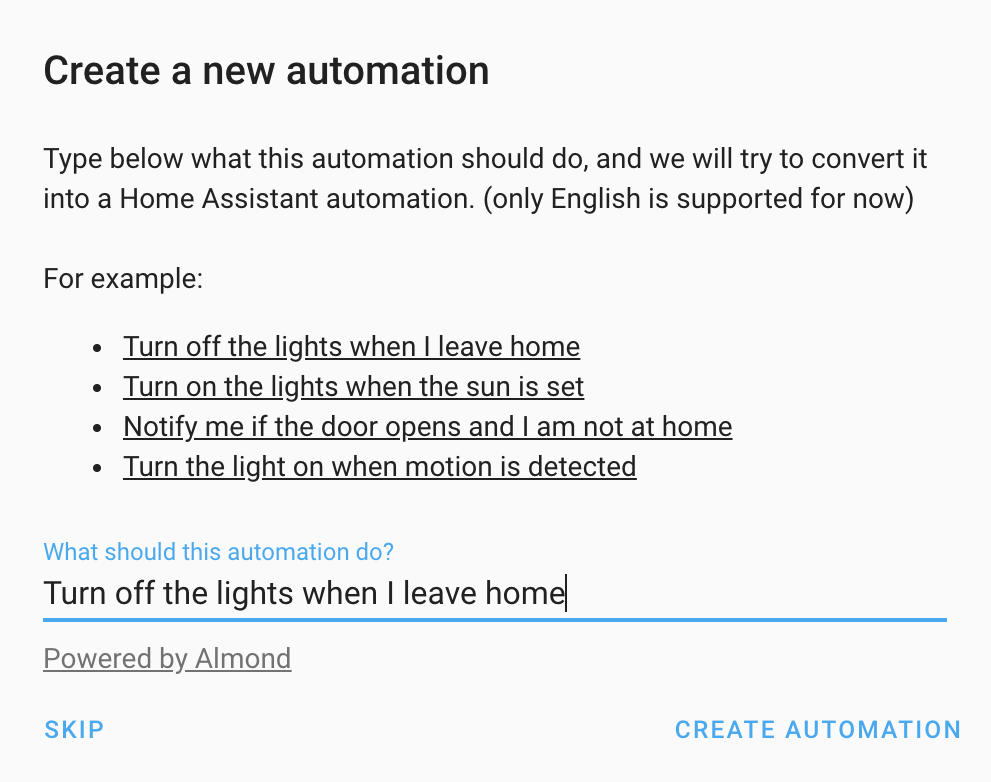 创建自动化对话框截图。
当你在自动化编辑器中选择 + 添加新的自动化时,会看到一个新的对话框,你可以直接用自然语言描述自己想要的自动化,比如:Turn on the lights when I come home。我们会尝试把它转换成一个自动化。如果这个自动化还需要指定设备或人物,我们也会进一步向你询问。之后,你可以在编辑器中检查生成结果并保存。
请注意,目前并非所有设备都已受支持,而且 Almond 还需要更多训练来给出更好的结果。如果你想帮助 Almond 变得更好,可以查看前面 Almond 相关部分的说明。
场景编辑器
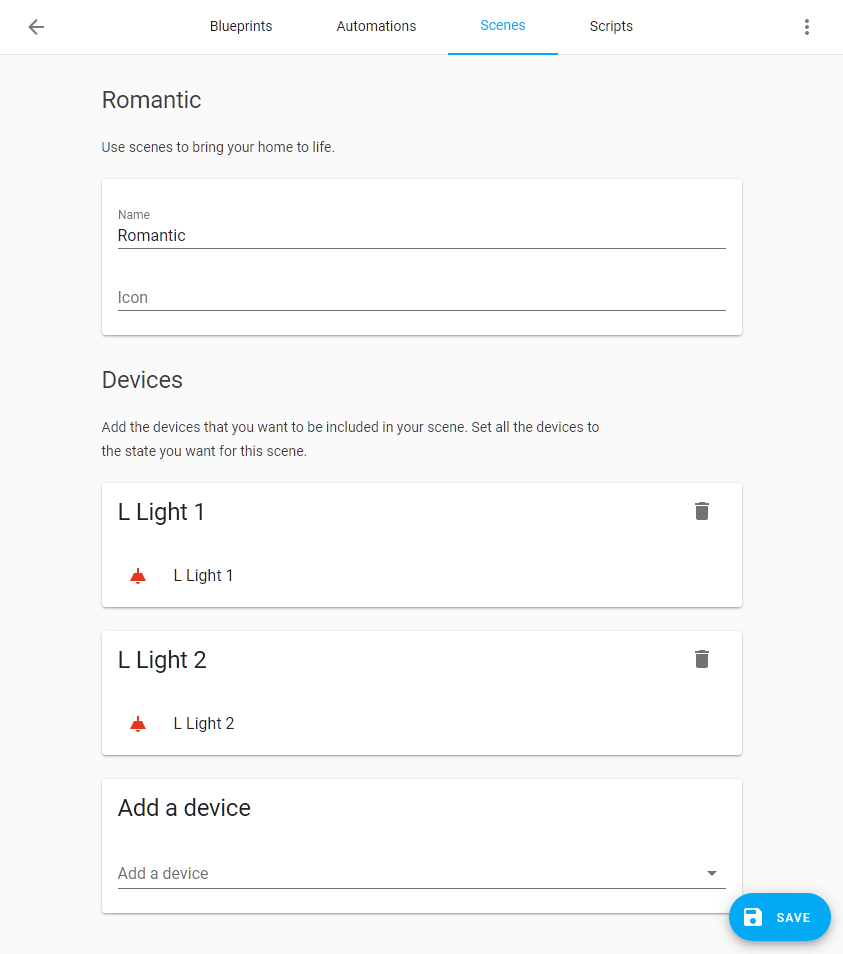 Screenshot of the 场景 editor.
我们还推出了一个场景编辑器。借助场景编辑器,你可以轻松把设备状态保存到场景中。你只需要选择想要包含在场景中的设备(如果你使用高级模式,也可以选择实体),然后把它们设置成你希望在场景激活时呈现的状态。
要使用场景编辑器,你的场景配置需要放在配置目录中的 scenes.yaml 文件里,并在 configuration.yaml 中引入。每个场景都需要有唯一的 ID,编辑器才能正常工作。
然后把你的 configuration.yaml 更新成下面这样:
其他消息
Andrew 学会了 Swift,并为 Mac 做了一个新的迷你应用:
Using my new found Swift skills I 创建 a tiny Mac menu bar app to control 开关 on @home_assistant https://t.co/N7wl2gXd2O
— Andrew Jackson (@AndrewCodeChimp) November 18, 2019
Saves me reaching behind the printer for the awkward power 按钮.
Consider it alpha, I've got a lot to learn on both swift and HA! pic.twitter.com/o6Wm7Le5nm
我们的 Android 应用并不是最近唯一的新应用。@tuanha2000vn 还发布了 Hasskit,这是一个基于 Flutter 构建、可同时运行在 Android 和 iOS 上的新应用。
最后,Brad 在 Reddit 上发布了一段视频,展示了他在 Lovelace 中对 picture elements 的精彩用法。来看看吧:
现在,Xiaomi 扫地机器人用户也可以使用这个很棒的自定义 Lovelace 卡片:
Wow 😲
— Home Assistant (@home_assistant) November 8, 2019
This custom 卡片 for Xiaomi 吸尘器 cleaners allows you to exactly tell what part of the house your 吸尘器 cleaner has to clean 👏https://t.co/NJtrRLKvDZ pic.twitter.com/iNOOwt5Wxd
New 集成
- Add Unifi Led (@florisvdk - #27475) (unifiled docs) (new-集成)
- Almond 集成 (@balloob - #28282) (almond docs) (new-集成)
- Speech to Text component (@pvizeli - #28434) (demo docs) (stt docs) (new-集成)
- Add WLED 集成 (@frenck - #28542) (wled docs) (new-集成)
- Add azure servicebus 通知 服务 (@hfurubotten - #27566) (azure_service_bus docs) (new-集成)
- Add pcal9535a 集成 (@Shulyaka - #26563) (pcal9535a docs) (new-集成)
新平台
- Add Huawei LTE mobile data 开关 support (@scop - #28188) (huawei_lte docs) (new-platform)
- Add support for Xiaomi Air Quality Monitor (cgllc.airmonitor.b1) (@fwestenberg - #27735) (xiaomi_miio docs) (new-platform)
- Add 开关 (on/off 区域) to geniushub (@castaway - #28182) (geniushub docs) (new-platform)
- Add config endpoint for 场景 (@bramkragten - #28429) (config docs) (homeassistant docs) (new-platform)
- Add override 开关 for juicenet (@jesserockz - #28049) (juicenet docs) (new-platform)
- Add SST/TTS support over NC (@pvizeli - #28527) (cloud docs) (stt docs) (new-platform)
如果你需要帮助……
问题反馈
如果你遇到了这个版本引入的问题,请在我们的 issue tracker 中报告。请务必填写 issue 模板中的所有字段。
Backward-incompatible changes
-
Huawei LTE - 配置 has been consolidated below
huawei_lte. 设备 tracker no longer uses known_devices.yaml but 实体 registry. - (@scop - #26675) (huawei_lte docs)Example 配置 yaml:
-
Ikea Tradfri - This removes the battery 传感器 that was 创建 for the signal repeater. The 传感器 would never have a 状态, and after some inspection, it does not look like that 设备 present any valuable metrics. - (@ludeeus - #28181) (tradfri docs)
-
UPNP/IGD - All UPNP/IGD 传感器 are now in one 设备. You have to remove and re-add the 集成 to get rid of the previous 设备. (@escoand - #27517) (upnp docs)
-
PS4 - 状态
offis now 状态standby. Affects 用户 defined 脚本, 自动化, etc. (@ktnrg45 - #28261) (ps4 docs) -
SSDP -
ssdpin manifest.json has changed; it is now a list of dicts, and as we now match using the UPnP 设备 description fields directly,device_typehas to be renamed todeviceType. No included 集成 use it at the moment, nor are they broken by this change. If any custom 集成 are using it, they need to adjust accordingly. (@scop - #28285) (ssdp docs) -
HomematicIP Cloud - The 属性 naming between Homematic IP
HmIP-BSM(灯光) andHmIP-FSM/HmIP-PSM(开关) was different and in case of 灯光 not correct. The 属性 forHmIP-BSMhave been renamed:- energy_counter_kwh --> today_energy_kwh
- power_consumption --> current_power_w
Please check your 自动化, 脚本, 场景, etc., if you are using the old 属性 in 模板, and replace them with the new ones. - (@SukramJ - #28271) (homematicip_cloud docs)
-
Plugwise - Detection of a legacy Anna (firmware 1.8.x) is no longer automatic: owners of a legacy Anna have to provide info in 配置.yaml, the last line. This change was needed to be able to fix issue #26520. - (@bouwew - #28237) (plugwise docs)
Example 配置 yaml:
-
Android TV - The
sourceandsources_list属性 for Fire TV 设备 will use friendly app names instead of app IDs (e.g., "Netflix" instead of "com.netflix.ninja"). If you are using these 属性 in 自动化, 传感器, etc., you will need to 更新 them.- If you are currently checking that the
source属性 of a Fire TV 设备 is a particular app ID, you have two options:- Check the
app_id属性 instead - Replace that app ID with the friendly name for the app.
- Check the
- If you are currently checking the
sources_list属性, then you will need to check for friendly app names instead of app IDs.
You can still use app IDs for the 媒体播放器.select_source 服务. - (@JeffLIrion - #28417) (androidtv docs)
- If you are currently checking that the
-
Homekit - Thermostats supported by the Homekit Controller component were reporting "off" for the running status when the HVAC was powered on but not actively heating or cooling. This
hvac_action属性 will now properly return "idle" instead of off. Any logic that tests for thehvac_action条件 ofoffwill need to change toidle. There is no change to any other 状态. - (@GaryOkie - #28625) (homekit_controller docs) -
OpenALPR local - The "alp_bin" option has been corrected to "alpr_bin" as is outlined in the 文档. 用户 should check their config and 更新 if necessary. (@HexF - #28746) (openalpr_local docs)
Beta Fixes
- Bump ZHA quirks to 0.0.28 (@dmulcahey - #28750) (zha docs) (beta fix)
- Updated 前端 to 20191114.0 (@bramkragten - #28768) (前端 docs) (beta fix)
- Fix account link 版本 check (@balloob - #28770) (cloud docs) (beta fix)
- Fix amazon dependency conflicts (@bbrendon - #28217) (amazon_polly docs) (aws docs) (beta fix)
- Change unique id for SAJ 传感器 based on 设备 SN (@fredericvl - #28663) (saj docs) (breaking change) (beta fix)
- Fix changing venstar operation_mode (@iamtpage - #28754) (venstar docs) (beta fix)
- Fix Repetier 集成 实体 indexing (@MTrab - #28766) (repetier docs) (beta fix)
- Fix HomematicIP Cloud 报警 Control 面板 support for basic mode (@SukramJ - #28778) (homematicip_cloud docs) (beta fix)
- Fix Swisscom empty response received (@LeoCal - #28782) (swisscom docs) (beta fix)
- Fix broken postnl 传感器 (@peternijssen - #28794) (beta fix)
- Updated 前端 to 20191115.0 (@bramkragten - #28797) (前端 docs) (beta fix)
- Fix Comfoconnect 错误 during startup (@michaelarnauts - #28802) (comfoconnect docs) (beta fix)
- Fix miio air quality 传感器 (@valkjsaaa - #28828) (xiaomi_miio docs) (beta fix)
- 更新 pyatmo to 3.0.1 (@cgtobi - #28829) (netatmo docs) (beta fix)
- Updated 前端 to 20191118.0 (@bramkragten - #28852) (前端 docs) (beta fix)
- Fix 文档 URL in failed platform config check (@frenck - #28814) (beta fix)
- Fix Synology 摄像头 whitelist (@h4de5 - #28822) (synology docs) (beta fix)
- Fix setting colors while reproducing a 灯光 状态 (@Santobert - #28871) (灯光 docs) (beta fix)
- Updated 前端 to 20191119.0 (@bramkragten - #28875) (前端 docs) (beta fix)
- Updated 前端 to 20191119.1 (@bramkragten - #28881) (前端 docs) (beta fix)
- Updated 前端 to 20191119.2 (@bramkragten - #28896) (前端 docs) (beta fix)
- Fix Almond onboarding url when using cloud (@bramkragten - #28908) (almond docs) (beta fix)
发布 0.102.1 - November 21
- Fix missing Netatmo 传感器 (@cgtobi - #28899) (netatmo docs)
- Updated 前端 to 20191119.5 (@bramkragten - #28925) (前端 docs)
- Fix Plex startup race 条件 #28934 @jjlawren
发布 0.102.2 - November 24
- Fix Plex 设置 race 条件 v2 (@jjlawren - #28943) (plex docs)
- Fix ikea 灯光 on deconz (@pvizeli - #28949) (deconz docs)
- Fix manual config (@cgtobi - #28956) (netatmo docs)
- Fix temp not being reported properly (@shred86 - #28973) (abode docs)
- Updated 前端 to 20191119.6 (@bramkragten - #28996) (前端 docs)
- Alexa gracefully handle 温控 设备 without presets (@frenck - #29010) (alexa docs)
发布 0.102.3 - November 29
- Fix smartthings cloud Webhook (@bramkragten - #29219) (smartthings docs)
All changes
- 遮盖 all possible values for venstar operation_mode (@iamtpage - #27949) (venstar docs)
- Add onvif local datetime support (@djpremier - #26656) (onvif docs)
- Fix Venstar formatting to 恢复 clean CI (@kennedyshead - #28171) (venstar docs)
- Add Unifi Led (@florisvdk - #27475) (unifiled docs) (new-集成)
- Modernize Huawei LTE (@scop - #26675) (huawei_lte docs) (breaking change)
- Use latest withings_api module (@vangorra - #27817) (withings docs)
- Tradfri config flow enhancements (@ludeeus - #28179) (tradfri docs)
- Add stop feature to tradfri 遮盖 (@ludeeus - #28180) (tradfri docs)
- Fix tzinfo type for onvif component (@djpremier - #28178) (onvif docs)
- Adding device_class to samsungtv (@kennedyshead - #28168) (samsungtv docs)
- Bump python-slugify to 4.0.0 (@BKPepe - #28186)
- Removes unwanted tradfri battery 传感器 (@ludeeus - #28181) (tradfri docs) (breaking change)
- Huawei LTE 传感器 metadata 更新 (@scop - #28187) (huawei_lte docs)
- Add Samsung TV automatic protocol detection (@escoand - #27492) (samsungtv docs)
- [homematic]Pass channel to 灯光 color functions (@guillempages - #27306) (homematic docs)
- [homematic]Add support for HmIP-BSL LEDs (@guillempages - #27307) (homematic docs)
- move hass-前端 import back down (@gngj - #28203) (前端 docs)
- Address post-merge coolmaster config flow code review (@OnFreund - #28163) (coolmaster docs)
- Add presentation URL to SSDP discovery info (@scop - #28196) (ssdp docs)
- Change Alexa default display category based on 媒体播放器 device_class (@ochlocracy - #28191) (alexa docs)
- Add 设备 条件 support for 媒体播放器 (@shmooey - #28161) (媒体播放器 docs)
- Add 设备 条件 support for device_tracker (@shmooey - #28190) (device_tracker docs)
- Increased python-eq3bt 版本 to latest (0.1.11) (@Poeschl - #28175) (eq3btsmart docs)
- Add support for supportedOperations to Alexa.PlaybackController (@ochlocracy - #28212) (alexa docs)
- Improved Alexa ThermostatController thermostatMode handling (@ochlocracy - #28176) (alexa docs)
- Add additional 设备 条件 to 遮盖 (@emontnemery - #27830) (遮盖 docs)
- Implement Alexa.PlaybackStateReporter Interface for alexa (@ochlocracy - #28215) (alexa docs)
- Add cloud account linking support (@balloob - #28210) (cloud docs) (somfy docs)
- Add Huawei LTE mobile data 开关 support (@scop - #28188) (huawei_lte docs) (new-platform)
- 升级 speedtest-cli to 2.1.2 (@fabaff - #28216)
- Add available 状态 to unifiled 集成 (@florisvdk - #28189) (unifiled docs) (new-集成)
- 更新 praw to 6.4.0 (@fabaff - #27324) (reddit docs)
- Suppress traceback (fixes #28243) (@fabaff - #28262) (iss docs)
- Add charset to imap component. (@ZiroNL - #28258) (imap docs)
- Reorg and test 属性 for HomematicIP Cloud (@SukramJ - #28234) (homematicip_cloud docs)
- Add support for Xiaomi Air Quality Monitor (cgllc.airmonitor.b1) (@fwestenberg - #27735) (xiaomi_miio docs) (new-platform)
- Add transmission info about torrents that is accessible with templating (@JPHutchins - #27111) (transmission docs)
- More header cleanup for websocket proxy (@pvizeli - #28288) (hassio docs)
- Bump avea to 1.4 (@pattyland - #28287) (avea docs)
- Remove GTT component (@eliseomartelli - #28286)
- Hue: Create new config flow when auth is lost (@bramkragten - #28204) (hue docs)
- Revert "More header cleanup for websocket proxy (#28288)" (@pvizeli - #28293) (hassio docs)
- Add support for Somfy Garage door Rollixo IO DiscreteGarageOpenerIOComponent in Tahoma component (@yjajkiew - #28291) (tahoma docs)
- Type hint improvements (@scop - #28260)
- Add more iaqualink 实体 properties, fix timeout issues (@flz - #28236) (iaqualink docs)
- Add keyboard_remote 触发器 on multiple event types and emulate key hold events (@bendavid - #27761) (keyboard_remote docs)
- Remove blocking I/O from the event loop (@syssi - #28305) (xiaomi_miio docs)
- Use dict[key] for required config keys (@syssi - #28304) (xiaomi_miio docs)
- Bump black to 19.10b0 (@frenck - #28310) (androidtv docs) (envirophat docs) (hangouts docs) (here_travel_time docs)
- Add source constants for all config entry discovery sources (@frenck - #28311)
- Almond 集成 (@balloob - #28282) (almond docs) (new-集成)
- Bump pre-commit to 1.20.0 (@frenck - #28313)
- Bump youtube_dl to 2019.10.29 (@frenck - #28312) (media_extractor docs)
- Add description for arlo.更新 服务 (@PixelJonas - #28270)
- Bump pytest to 5.2.2 (@cgtobi - #28230)
- Add 服务 description for sabnzbd component (@karouf - #28252)
- Clean up Xiaomi Air Quality Monitor support (cgllc.airmonitor.b1) (@syssi - #28301) (xiaomi_miio docs)
- allow multiple heaters per incomfort gateway (@zxdavb - #28324) (incomfort docs)
- Add OAuth2 config flow scaffold (@balloob - #28220)
- Add 服务.yaml to local_file component. (@ZiroNL - #28330)
- Add 设备 触发器 to 遮盖 (@emontnemery - #28063) (自动化 docs) (遮盖 docs)
- Flux 日志 with 调试 instead of info (@Santobert - #28352) (flux docs)
- Add modelnumber for ecobee4 (@marthoc - #28278) (ecobee docs)
- Fill 服务.yaml for duckdns (@gngj - #28248)
- Implement Alexa.SeekController Interface for 媒体播放器 in Alexa (@ochlocracy - #28299) (alexa docs)
- Don't set entity_id in ZHA 实体 (@Adminiuga - #28362) (zha docs)
- 更新 withings-api to avoid data parsing bugs. (@vangorra - #28382) (withings docs)
- Add 服务.yaml to onvif component (@ZiroNL - #28349)
- Fix Telegram Bot (@Anonym-tsk - #28369)
- Fill 服务.yaml for squeezebox (@gngj - #28247)
- Add file list to 属性 of folder 传感器 (@thoscut - #28338) (folder docs)
- Show all UPNP/IGD 传感器 in one 设备 (@escoand - #27517) (upnp docs) (breaking change)
- fix feedreader handling unrecognized published date (@exxamalte - #28225) (feedreader docs)
- Introduce SUPPORT_COLOR_TEMP for flux_led component (@yeralin - #26692) (flux_led docs)
- 升级 thingspeak to 1.0.0 (@fabaff - #28424) (thingspeak docs)
- 升级 attrs to 19.3.0 (@fabaff - #28421)
- Add a 服务 YAML for the Dominos 集成 (#27289) (@Schoonology - #28339)
- 升级 pysnmp to 4.4.12 (@fabaff - #28428) (snmp docs)
- Bump pyEight library to 0.1.2 to 更新 API URL (@mezz64 - #28413) (eight_sleep docs)
- Use defined 设备 class constants for Homematic (@SukramJ - #28438) (homematic docs)
- Add improved 场景 support to the alarm_control_panel 集成 (@Santobert - #28269) (alarm_control_panel docs)
- Add improved 场景 support to the water_heater 集成 (@Santobert - #28277) (demo docs) (water_heater docs)
- deCONZ - Add Xiaomi Aqara Cube 设备 触发器 support (@Kane610 - #27548) (deconz docs)
- deCONZ - Support creating battery 传感器 when reported (@Kane610 - #27538) (deconz docs)
- deCONZ - Improve discovery logging (@Kane610 - #28452) (deconz docs)
- Add 场景.create 服务 (@Santobert - #28300) (homeassistant docs)
- 更新 MQTT 传感器 test (@fabaff - #28449)
- Change ps4 状态 off to 状态 standby (@ktnrg45 - #28261) (ps4 docs) (breaking change)
- Fix inability to transition between specific presets in Venstar component (@nkaminski - #28238) (venstar docs)
- pre-commit: ship default and full configs (@scop - #28463)
- SSDP matching improvements (@scop - #28285) (ssdp docs) (breaking change)
- Bump env_canada to 0.0.30 (@michaeldavie - #28487) (environment_canada docs)
- Fixing #27722 Watson TTS platform (sdk 升级) (@rutkai - #28468) (watson_tts docs)
- Use 集成 name in docstring (@fabaff - #28445)
- Handle Huawei LTE timeouts (@scop - #28465) (huawei_lte docs)
- Fix flaky Samsung TV tests (@escoand - #28503)
- Always provide brightness value (@elupus - #28228) (google_assistant docs)
- Fix flaky YesssSMS tests on 调试 messages (@escoand - #28506)
- Import CancelledError from asyncio, not .futures (@scop - #28511) (bluesound docs)
- Don't use deprecated encoding to json.loads (@scop - #28509)
- 更新 Vivotek component stream source (@HarlemSquirrel - #27941) (vivotek docs)
- Don't fail tox pylint if PYLINT_ARGS is not set (@scop - #28403)
- 升级 pillow to 6.2.1 (@fabaff - #28442) (image_processing docs) (proxy docs) (qrcode docs)
- Add dump config 服务 to HomematicIP Cloud (@SukramJ - #28231) (homematicip_cloud docs)
- 升级 TwitterAPI to 2.5.10 (@fabaff - #28401) (twitter docs)
- Replace Netatmo CO2 传感器 icon (@tlrobinson - #28520) (netatmo docs)
- Imports twitch (@fabaff - #28517) (twitch docs)
- 升级 paho-MQTT to 1.5.0 (@fabaff - #28423) (MQTT docs) (shiftr docs)
- 升级 jinja2 to >=2.10.3 (@fabaff - #28422)
- iaqualink: better handling of failures (@flz - #28514) (iaqualink docs)
- Add 服务 description for ness 报警 (@tefinger - #28250)
- Add information to IFTTT 服务.yaml (@PixelJonas - #28385)
- Expose set auto mode for all Dyson 风扇 (@soraxas - #28488) (dyson docs)
- Add compatibility for other STBY Codes (@soundstorm - #28478) (pioneer docs)
- Remove legacy reproduce 状态 (@balloob - #28458)
- Align 属性 naming between 灯光 and 开关 for HomematicIP Cloud (@SukramJ - #28271) (homematicip_cloud docs) (breaking change)
- Enable transition time for HmIP-BSL - HomematicIP Cloud (@SukramJ - #28201) (homematicip_cloud docs)
- Speech to Text component (@pvizeli - #28434) (demo docs) (stt docs) (new-集成)
- Add 开关 (on/off 区域) to geniushub (@castaway - #28182) (geniushub docs) (new-platform)
- Cleanup 设备 Registry on Z-Wave Node Removal (@cgarwood - #28240) (zwave docs)
- Support Huawei LTE SSDP discovery (@scop - #28214) (huawei_lte docs)
- Fire an event when nzbget download completes (@chriscla - #27763) (nzbget docs)
- Add heating_type for ViCare 集成 (@crazyfx1 - #27296) (vicare docs)
- Bump 版本 for asuswrt to 1.1.22 (@kennedyshead - #28322) (asuswrt docs)
- Add config endpoint for 场景 (@bramkragten - #28429) (config docs) (homeassistant docs) (new-platform)
- 更新 ephember library 版本 (@ttroy50 - #28507) (ephember docs)
- Checking 状态 before actually sending a new 状态 change. Some projectors return ERR if you try to 关闭 a projector that's already off. (@mflage - #28529) (pjlink docs)
- rate is a separate word (@balloob - #28535) (demo docs) (stt docs)
- 更新 Plugwise (@bouwew - #28237) (plugwise docs) (breaking change)
- Improve 场景.create 服务 (@Santobert - #28533) (homeassistant docs)
- Reduce test requirements duplication, sync flake8 and related (@scop - #28538)
- Avoid drawing image_processing font text inside the bow line (@snowzach - #27796) (image_processing docs)
- Add override 开关 for juicenet (@jesserockz - #28049) (juicenet docs) (new-platform)
- Move imports in samsungtv component (@Quentame - #27775) (samsungtv docs)
- Try fix tests (@pvizeli - #28470)
- Add additional support over NC (@pvizeli - #28527) (cloud docs) (stt docs) (new-platform)
- Bump pytile and re-order imports (@bachya - #28570) (tile docs)
- 更新 nextbus stop tag to accept strings (@Grodesh - #27765) (nextbus docs)
- Bump adb-shell to 0.0.8 (@JeffLIrion - #28582)
- Fix Doods 错误 when detection labels are specified in list form (@snowzach - #28574) (doods docs)
- 升级 youtube_dl to 2019.11.05 (@BKPepe - #28578) (media_extractor docs)
- Reset 状态 when connection to MPC-HC is lost (@temeteke - #27541) (mpchc docs)
- Add MQTT temp_low/high_template in SCHEMA_BASE (@kevinkk525 - #28257) (MQTT docs)
- Add Netatmo 摄像头 服务 (@ssenart - #27970) (netatmo docs)
- Fix token sent to Almond Web (@balloob - #28584) (almond docs)
- 更新 to latest Somfy changes (@balloob - #28207) (somfy docs)
- Always run flake8 through pre-commit, and with doctests (@scop - #28490)
- Handle exceptions from PyViCare library (@oischinger - #28536) (vicare docs)
- Add WLED 集成 (@frenck - #28542) (wled docs) (new-集成)
- 更新 to latest 集成 library 版本 (@exxamalte - #28597) (geonetnz_quakes docs)
- 升级 greeneye_monitor to 1.0.1 (@jkeljo - #28600) (greeneye_monitor docs)
- Add 设备 动作 to 吸尘器 (@balloob - #28554) (device_automation docs) (吸尘器 docs)
- Add 设备 动作 to 风扇 (@balloob - #28550) (device_automation docs) (风扇 docs)
- Add 门锁 设备 触发器 (@balloob - #28547) (device_automation docs) (门锁 docs)
- Add 风扇 设备 触发器 (@balloob - #28545) (device_automation docs) (风扇 docs)
- Fix simple typo: unhasable -> unhashable (@timgates42 - #28605)
- Add 设备 触发器 to 吸尘器 (@balloob - #28548) (自动化 docs) (device_automation docs) (吸尘器 docs)
- Fix demo TTS (@bramkragten - #28608) (demo docs)
- Add 温控 设备 动作 (@balloob - #28552) (温控 docs) (device_automation docs)
- Add azure servicebus 通知 服务 (@hfurubotten - #27566) (azure_service_bus docs) (new-集成)
- Add 温控 设备 触发器 (@balloob - #28544) (自动化 docs) (温控 docs) (device_automation docs) (homekit docs)
- Add 风扇 设备 条件 (@balloob - #28549) (device_automation docs) (风扇 docs)
- Add 吸尘器 设备 条件 (@balloob - #28551) (device_automation docs) (吸尘器 docs)
- Add cool mode to HomematicIP 温控 (@SukramJ - #28525) (homematicip_cloud docs)
- Add 设备 条件 to 温控 (@balloob - #28553) (device_automation docs)
- Add support for conversation ID (@balloob - #28620) (almond docs) (conversation docs)
- Match 报警 in NUT UPS status message (@bwarden - #28591) (nut docs)
- Use friendly app names for Fire TV sources (@JeffLIrion - #28417) (androidtv docs) (breaking change)
- Add Huawei LTE 设备 registry support (@scop - #28594) (huawei_lte docs)
- Fix generic_thermostat too_hot/too_cold (@akasma74 - #27860) (generic_thermostat docs)
- Add 开关 platform to WLED 集成 (@frenck - #28606) (wled docs) (new-platform)
- Add TT WS API (@balloob - #28599) (cloud docs) (websocket_api docs)
- Add turn_on/off to tfiac (@fredrike - #27712) (tfiac docs)
- Fix issue with multiple Netatmo home coach 设备 (@cgtobi - #28407) (netatmo docs)
- Add attribution and onboarding commands to conversation and Almond (@bramkragten - #28621) (almond docs) (conversation docs)
- Updated 前端 to 20191108.0 (@bramkragten - #28638) (前端 docs)
- Bump ZHA quirks 版本 (@dmulcahey - #28636) (zha docs)
- Move imports in xiaomi_miio (@Misiu - #27773) (xiaomi_miio docs)
- Added support for multiple SAJ solar inverters (@fredericvl - #28612) (saj docs)
- Add support for Heat Mode detection for ecobee Heat Pumps (@arigit - #28273) (ecobee docs)
- Fix unhandled exception when Swisscom Internet Box is not responsive (@LeoCal - #28618) (swisscom docs)
- Add pcal9535a 集成 (@Shulyaka - #26563) (pcal9535a docs) (new-集成)
- Add bluesound speaker group 属性 (@bluestripe - #28142) (bluesound docs)
- Fix xiaomi 吸尘器 tests (@MartinHjelmare - #28658)
- Add 传感器 platform to WLED 集成 (@frenck - #28632) (wled docs) (new-platform)
- 升级 bimmer_connected to 0.6.2 (@gerard33 - #28651) (bmw_connected_drive docs)
- verisure autolock 服务 (@persandstrom - #27366) (verisure docs)
- Skip updating idle Plex clients (@jjlawren - #28664) (plex docs)
- Hue: store current 传感器 实体 by bridge (@bramkragten - #28679) (hue docs)
- #28645: Bump up zm-py to 0.4.0 (@rohankapoorcom - #28681) (zoneminder docs)
- Add codeowner for lutron 集成 (@JonGilmore - #28682) (lutron docs)
- Add xiaomi_miio chuangmi.plug.hmi206 (@rytilahti - #28688) (xiaomi_miio docs)
- Add Lutron hybrid keypad raise/lower 按钮 (@kevineriklee - #28674) (lutron docs)
- Allow icons to be masked (@bramkragten - #28692) (前端 docs)
- fix typo in comments (@basnijholt - #28694)
- Add config flow tests for OwnTracks (@Quentame - #28644) (owntracks docs)
- 更新 Homekit 温控.py to remap current mode (@GaryOkie - #28625) (homekit_controller docs) (breaking change)
- Bump up ZHA dependencies. (@Adminiuga - #28711) (zha docs)
- Ensure SimpliSafe 报警 control 面板 can return from being offline (@bachya - #28710) (simplisafe docs)
- Bump plexapi to 3.3.0 (@jjlawren - #28709) (plex docs)
- 更新 binary_sensor.py (@effelle - #28707) (MQTT docs)
- Allow preset boost for Homematic IP Cloud power 开关 (@SukramJ - #28713) (homematicip_cloud docs)
- 升级 discogs_client to 2.2.2 (@fabaff - #28723) (discogs docs)
- Fix Here Travel Time unable to find 实体 on startup (@eifinger - #27237) (here_travel_time docs)
- Use library method for season number (@jjlawren - #28708) (plex docs)
- Remove choice word when Almond has choices (@balloob - #28725) (almond docs)
- ESPHome fix missing 状态 in certain circumstances (@OttoWinter - #28729) (esphome docs)
- Set up Almond Web to connect to HA (@balloob - #28603) (almond docs)
- 版本 bump pypoint (@fredrike - #28737) (point docs)
- 升级 async_upnp_client==0.14.12 (@StevenLooman - #28733) (dlna_dmr docs) (upnp docs)
- Add 设备 classes to 天气 传感器. (@davet2001 - #28512)
- 升级 psutil to 5.6.5 (@fabaff - #28717) (systemmonitor docs)
- Travis and tox config improvements (@scop - #28667)
- Correct openalpr_local config option name (@HexF - #28746) (openalpr_local docs) (breaking change)
- Bump ZHA quirks to 0.0.28 (@dmulcahey - #28750) (zha docs) (beta fix)
- Updated 前端 to 20191114.0 (@bramkragten - #28768) (前端 docs) (beta fix)
- Fix account link 版本 check (@balloob - #28770) (cloud docs) (beta fix)
- Fix amazon dependency conflicts (@bbrendon - #28217) (amazon_polly docs) (aws docs) (beta fix)
- Change unique id for SAJ 传感器 based on 设备 SN (@fredericvl - #28663) (saj docs) (breaking change) (beta fix)
- Fix changing venstar operation_mode (@iamtpage - #28754) (venstar docs) (beta fix)
- Fix Repetier 集成 实体 indexing (@MTrab - #28766) (repetier docs) (beta fix)
- Fix HomematicIP Cloud 报警 Control 面板 support for basic mode (@SukramJ - #28778) (homematicip_cloud docs) (beta fix)
- Fix Swisscom empty response received (@LeoCal - #28782) (swisscom docs) (beta fix)
- Fix broken postnl 传感器 (@peternijssen - #28794) (beta fix)
- Updated 前端 to 20191115.0 (@bramkragten - #28797) (前端 docs) (beta fix)
- Fix Comfoconnect 错误 during startup (@michaelarnauts - #28802) (comfoconnect docs) (beta fix)
- Fix miio air quality 传感器 (@valkjsaaa - #28828) (xiaomi_miio docs) (beta fix)
- 更新 pyatmo to 3.0.1 (@cgtobi - #28829) (netatmo docs) (beta fix)
- Updated 前端 to 20191118.0 (@bramkragten - #28852) (前端 docs) (beta fix)
- Fix 文档 URL in failed platform config check (@frenck - #28814) (beta fix)
- Fix Synology 摄像头 whitelist (@h4de5 - #28822) (synology docs) (beta fix)
- Fix setting colors while reproducing a 灯光 状态 (@Santobert - #28871) (灯光 docs) (beta fix)
- Updated 前端 to 20191119.0 (@bramkragten - #28875) (前端 docs) (beta fix)
- Updated 前端 to 20191119.1 (@bramkragten - #28881) (前端 docs) (beta fix)
- Updated 前端 to 20191119.2 (@bramkragten - #28896) (前端 docs) (beta fix)
- Fix Almond onboarding url when using cloud (@bramkragten - #28908) (almond docs) (beta fix)