

0.101:Airly、Apprise、Sinch、Solar-Log、Microsoft Teams
Hacktoberfest 活动
Hacktoberfest 已经快结束了,而今年真的非常精彩。过去一个月里,我们总共合并了 1318 个 PR,其中大多数都包含在这次发布中!
我们共有: 154 authors on home-assistant 184 authors on home-assistant.io 30 authors on home-assistant-polymer
非常感谢所有贡献者!
API 密码与受信任网络
现在已经无法再通过受信任网络,或在 URL 后追加 ?api_password=X 的方式来发起已认证请求。现在你需要先获取认证令牌,再使用该令牌发起请求。
这些功能在 Home Assistant 0.90 和 0.91(大约在 2019 年 4 月发布)中就已经被弃用。原本计划在 Home Assistant 0.96(2019 年 7 月 17 日发布)中移除。
通过 HTTP 配置来设置 API 密码和 Trusted Networks 认证提供程序的支持也已经移除。现在需要在认证提供程序部分中进行配置(文档)。
所谓直接认证,是指你可以不使用 bearer token,仅通过从受信任网络发起请求,或在 URL 中追加 ?api_password=X 的方式来完成认证请求。
这些功能仍然可以作为认证提供程序使用(文档)。
你可以使用长期有效访问令牌,它们可以在前端的个人资料页面中创建。这些令牌不会过期,并且可以加入到请求头中。更多信息请参阅开发者文档。
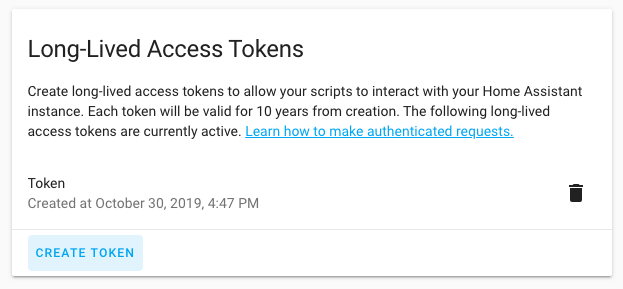 个人资料页面中的长期有效访问令牌界面截图。
或者,你也可以使用基于 Webhook 的集成。Webhook 是一个难以猜测的唯一 URL,可用于向 Home Assistant 发送数据。发送到 Webhook 的请求不需要认证。 你的 Webhook 需要可以从互联网访问;如果你订阅了云服务,云端会帮你处理这件事。你可以在云配置页面中找到云端 Webhook URL。
Hassbian
你可能已经看到了,我们将逐步停止维护 Hassbian。
Hassbian 是在 Raspbian 基础上为 Home Assistant 优化的一个发行版。由于开发者时间有限,再加上 Hass.io 这类更简单的替代方案已经出现,现在是时候让 Hassbian 退场了。
衷心感谢所有参与 Hassbian 项目的人,特别是长期推动这个项目的 @landrash,以及 @ludeeus。
更多信息,请阅读这篇博客文章。
设备 自动化
这个版本改进了对报警、遮盖、门锁和传感器的支持。
在 0.100 中,我们加入了 for 选项,用来指定某个设备处于某个状态持续一段时间后再触发。现在,这项功能也已加入自动化编辑器。
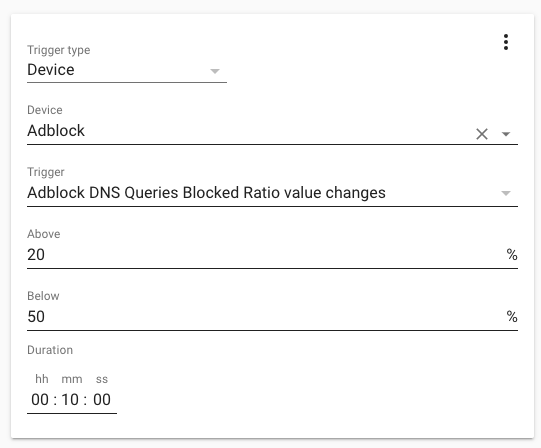 Screenshot of a 设备 触发器 with duration.
前端
前端这边也发生了很多变化;我们收到了大量来自 Hacktoberfest 的 PR,为前端加入了本地化支持,也进一步改善了用户体验。 特别感谢 @springstan,他完成了大量本地化工作。现在,我们的绝大部分界面都已经可以翻译了!
非常感谢所有贡献者!
多亏了 @timmo001,我们现在有了自己的确认对话框!再也不用面对难看的浏览器原生弹窗了。
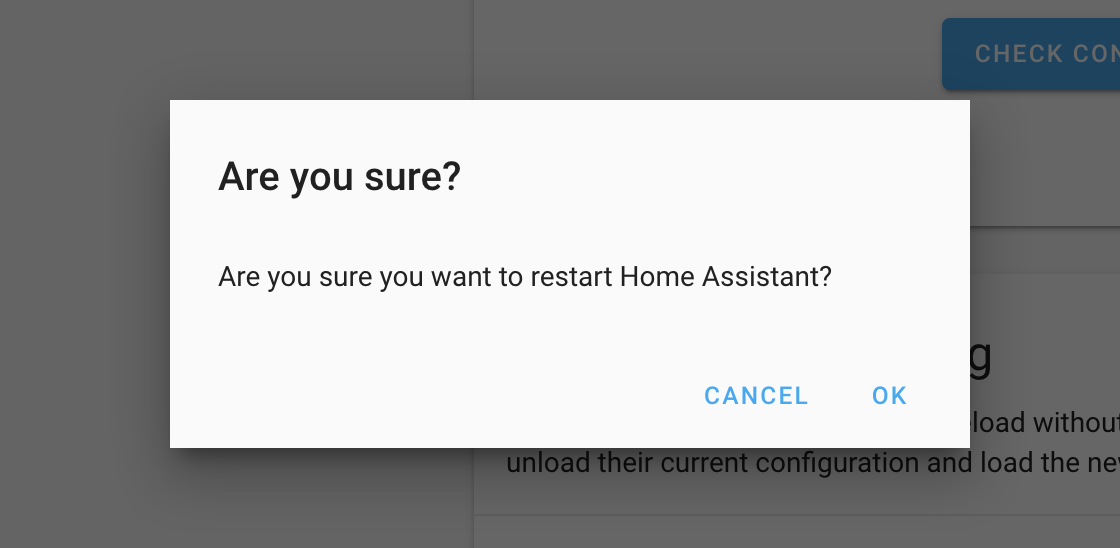 重启 Home Assistant 时的确认对话框截图。
在上一个版本中,我们把所有 JSON 输入都改成了 YAML 输入;而在这个版本中,我们为所有 YAML 和 Jinja2 输入加入了代码编辑器。这让 YAML 的阅读和编写都轻松了许多。
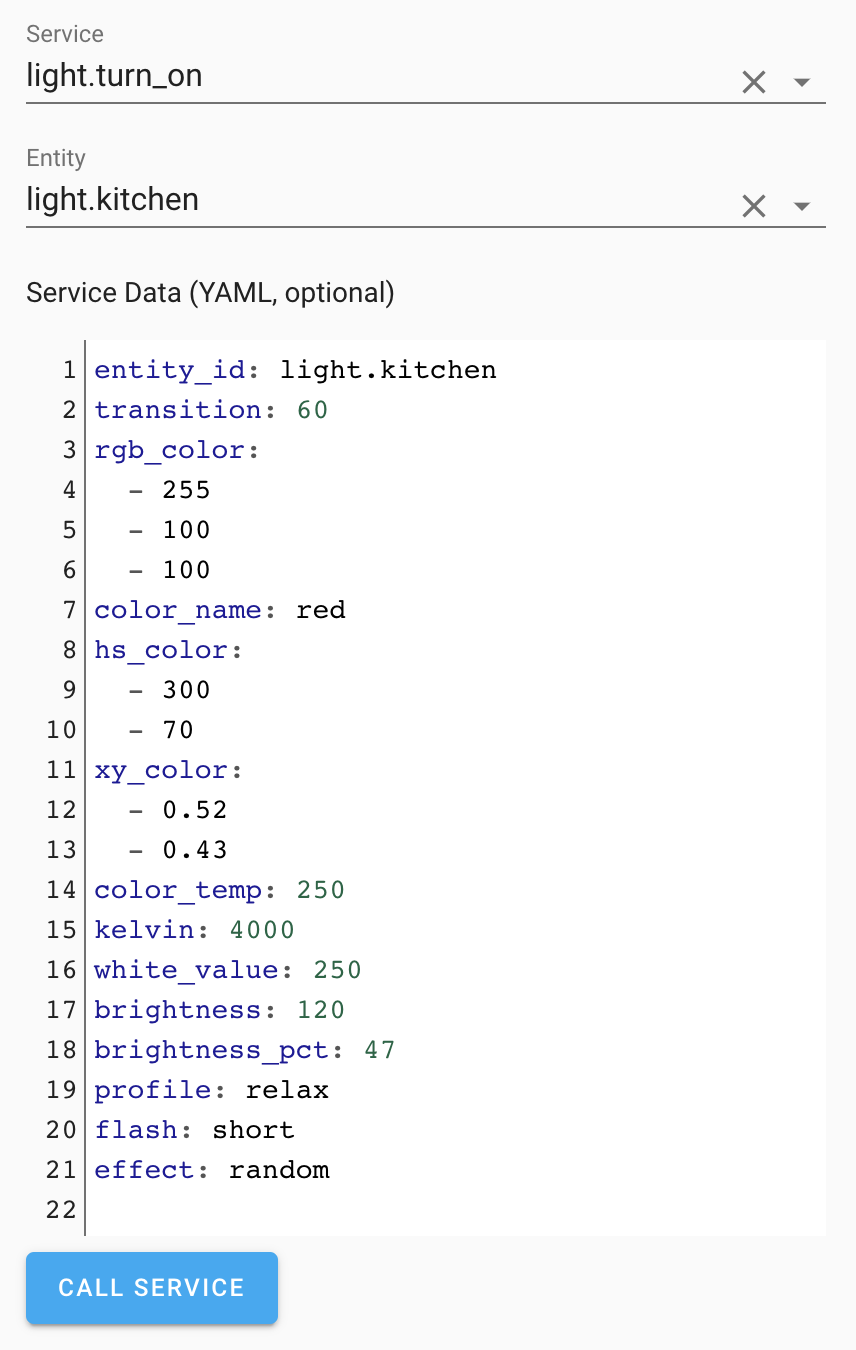 带有 YAML 编辑器的服务开发者工具截图。
实体注册表现在也迁移到了数据表格界面,因此你可以更轻松地搜索和排序实体,更快找到自己想要的那一个。
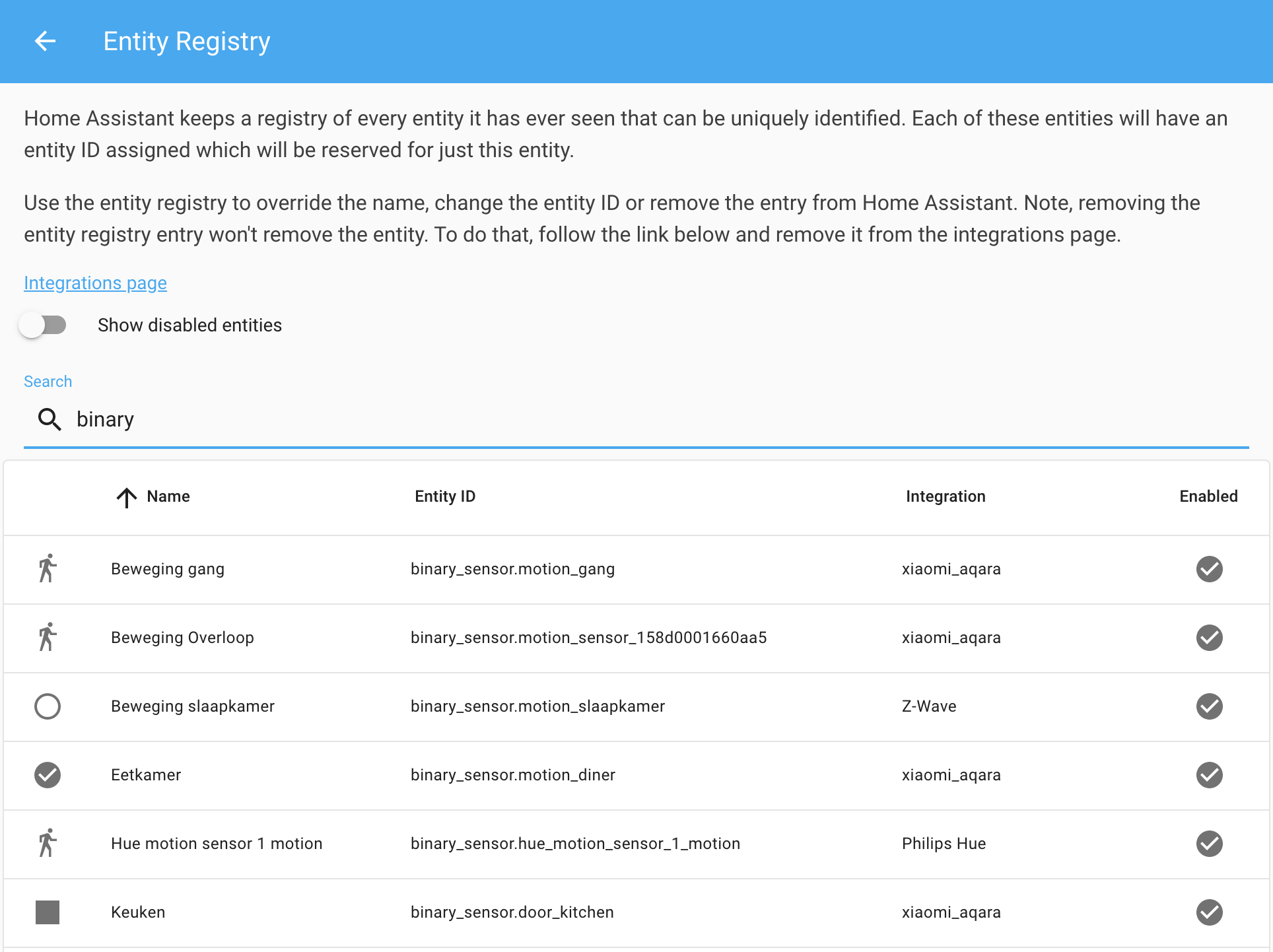 实体注册表数据表格截图。
我们还改进了自动化中的设备选择器。现在你可以搜索设备,并查看它所在的区域。
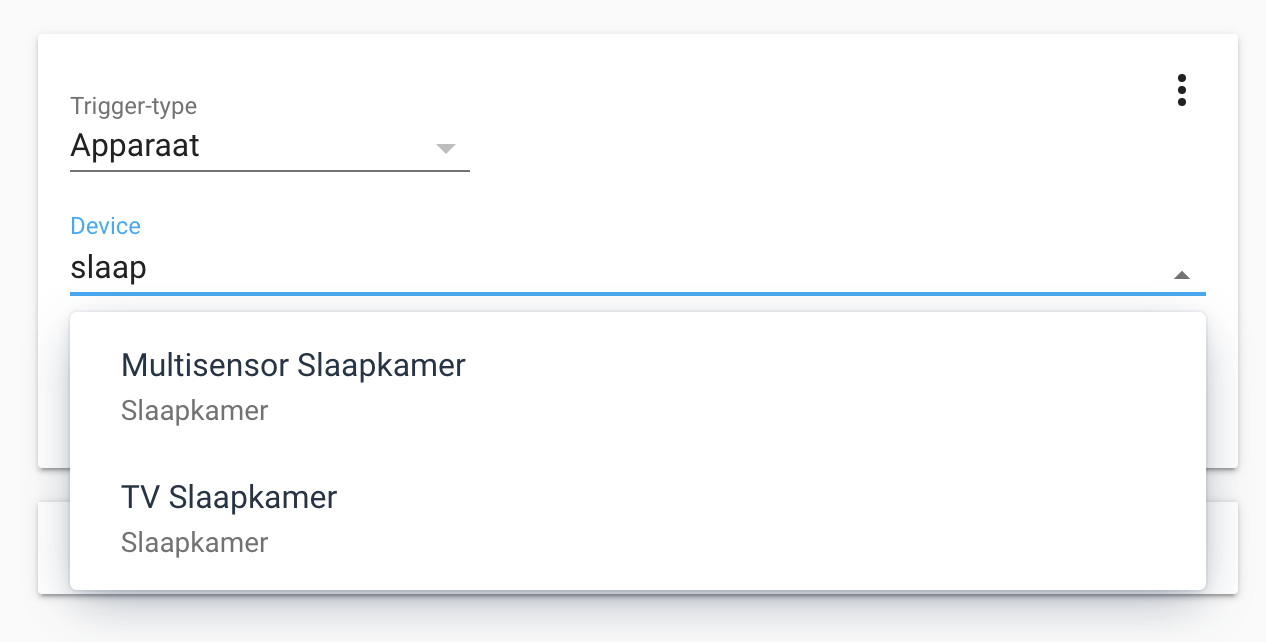 设备选择器截图。
mdonoughe 在自动化编辑器中加入了“激活场景”动作的支持。
Lovelace
所有变更请查看 Lovelace 更新日志。
其他消息
Proud to announce that the Visual Studio Code 插件 for @home_assistant reached v1.0.0! 🎉
— Franck Nijhof (@Frenck) October 26, 2019
This 版本 ships the second generation code-server, VSCode 1.39, HA extension 1.3, updates MDI ext and adds a rainbow indent function ❤️
Oh, and it is FAST 🚀 pic.twitter.com/eBe8CirZ4B
It is done! Making magic with #python #opencv #tensorflow #homeassistant. https://t.co/ZiN5AE7ixt
— Esther Makes Tech (@esthermakestech) October 19, 2019
Weekend IOT project: 天气 info from the Cloud, literally. Details on github here:https://t.co/V9xpxqyRAv#homeassistant #arduino #MQTT #smarthome pic.twitter.com/YrkEBpa9Rw
— Gabe Scelta (@sfgabe) October 14, 2019
🎉Restriction 卡片 for @home_assistant released 🎉
— Ian Richardson (@iantrich) October 17, 2019
Client-side security for your Lovelace 卡片
* Options to hide/block/门锁/密码-protect/confirm interactions with 卡片
* Set 条件 for when to apply
* Set exemptions based on 用户https://t.co/psiVBf9U7N
New 集成
- Add Airly 集成 (@bieniu - #26375) (airly docs) (new-集成)
- Add Apprise 通知 集成 (@caronc - #26868) (apprise docs) (new-集成)
- New 传感器 platform 集成 for Orange and Rockland Utility smart energy meter (@bvlaicu - #27571) (oru docs) (new-集成)
- Add sinch 集成 (通知 component) (@bendikrb - #26502) (sinch docs) (new-集成)
- Add Solar-日志 platform (@Ernst79 - #27036) (solarlog docs) (new-集成)
- New platform for Microsoft Teams (@peroyvind - #27981) (msteams docs) (new-集成)
新平台
- UniFi - Bandwidth 传感器 (@Kane610 - #27229) (unifi docs) (breaking change) (new-platform)
- Neato battery 传感器 (@dshokouhi - #27286) (neato docs) (new-platform)
- Add 传感器 platform to Airly 集成 (@bieniu - #27717) (airly docs) (new-platform)
- Move imports in MQTT component (@exxamalte - #27835) (MQTT docs) (new-platform)
发布 0.101.1 - October 31
- Bump songpal to fix a regression (@rytilahti - #28115) (songpal docs)
- Bump pymyq to 2.0.1 (@bachya - #28348) (myq docs)
- Bump pysaj to v0.0.13 (fix for 传感器 date) (@fredericvl - #28351) (saj docs)
- Bump env_canada to fixed 0.0.29 版本 (@shmick - #28360) (environment_canada docs)
- Fix Airly asyncio timeout 错误 (@bieniu - #28387) (airly docs)
- Fix hdate spamming homeassistant 日志 (@tsvi - #28392) (jewish_calendar docs)
- Fix check config (@balloob - #28393)
- Check for import 错误 before validating config (@balloob - #28395)
发布 0.101.2 - November 1
- Prevent TypeError when KNX RGB(W) 灯光 value contains None (@phispi - #28358) (knx docs)
- Change Abode cache file path, add cache path to config flow (@MisterWil - #28389) (abode docs)
- SNMP 开关 fix integer support (@rfpronk - #28425) (snmp docs)
- Use server-specific unique_ids for Plex 媒体播放器 (@jjlawren - #28447) (plex docs)
- Also 安装 after_deps (@balloob - #28453)
发布 0.101.3 - November 5
- Fix missing import (@timmccor - #28460) (sonos docs)
- Fix Airly if more than one config entry (@bieniu - #28498) (airly docs)
- Add deprecated 属性 to 灯光.reproduce_state (@Santobert - #28557) (灯光 docs)
如果你需要帮助……
问题反馈
如果你遇到了这个版本引入的问题,请在我们的 issue tracker 中报告。请务必填写 issue 模板中的所有字段。
Backward-incompatible changes
-
Removed - The following 集成 have been removed:
-
Direct 认证 via trusted networks or API password - It is no longer possible to make authenticated requests using trusted networks or by appending ?api_password=X to the URL. You will now first need to get an 认证 token and use that token to make requests. Auth providers for trusted networks and API passwords are still available. - (@balloob - #27656) (auth docs) (http docs) (websocket_api docs)
-
Stride - The Stride 通知 集成 was discontinued in February 2019 due to a take over by Slack. - (@hmmbob - #27934)
-
Hipchat - The Hipchat 通知 集成 was discontinued in February 2019, also due to a take over by Slack. - (@fabaff - #27399)
-
-
Deprecated - Python 3.6 support is deprecated (to be removed completely by December 2019), as 版本 3.8.0 is now out - (@scop - #27680)
-
Scene - 场景 have to be configured more strictly from now on. Each 实体 must be configured with a valid 状态. Furthermore, the 属性 that can be used must be
device state attributes. This means that they should be listed under developer-tools -> states. - ([场景 docs]) -
Ecobee - Adds
turn_onmethod to ecobee 温控 platform. Previously, callingclimate.turn_onwould cause the ecobee thermostat to 打开 in heat mode, regardless of the mode when the thermostat was turned off. Now, the thermostat will 打开 to the last "active" HVAC mode (i.e., "heat", "cool", or "auto") (or, if the thermostat was "off" when Home Assistant started, to "auto"). - (@marthoc - #27103) (ecobee docs) -
Genius Hub - This addresses an issue that requires the
unique_idof 温控 and water_heater 实体 to be changed. After upgrading HA with this change, 用户 will have stale 实体 in the 实体 registry that they may wish to clear out. - (@zxdavb - #27916) (geniushub docs) -
Abode - The 配置 variables were removed:
name,excludeandlights, which were all previously optional. Existing 用户 of the abode 集成 that use these 配置 variables will have to remove them from theconfiguration.yamlfile. 实体 that 用户 wish to disable can be done from the 实体 Registry in the 配置 UI. - (@shred86 - #26699) (abode docs) -
AdGuard Home - The AdGuard Home 集成 has been made compatible with AdGuard Home v0.99.0. However, support for lower versions is now limited. Upgrading to AdGuard Home v0.99.0 or newer is advised. - (@frenck - #27926) (adguard docs)
-
UniFi - Previously, UniFi POE control 开关 had 属性 showing network usage for receiving and transmitting data of that 实体. This has been replaced with separate 传感器, a pair per network client; one for received data and one for transmitted data. The default 配置 is to keep this disabled so, if you want to use this, either enable select 实体 in the 实体 registry or go to your UniFi 集成 options and enable it for all clients (see HASS 0.98 博客 post for guidance). - (@Kane610 - #27229) (unifi docs)
-
IKEA Tradfri - The Tradfri 传感器 (e.g., 按钮 遥控器 and motion detectors) are now being represented as battery 实体 and will no longer have remaining battery power represented as an 属性. Use the 传感器 状态 instead to monitor the remaining battery power. - (@ggravlingen - #27245) (tradfri docs)
-
Jewish Calendar
- The output of the timestamp 传感器 have been streamlined, so they're easier to use in 自动化. All the timestamp 传感器 will return UTC time in ISO 8601 format. 属性 have been added to get a UNIX timestamp. - (@tsvi - #26940) (jewish_calendar docs)
- The holiday type 传感器 has been removed and added as an 属性 to the holiday 传感器. The holiday name 传感器 has been renamed to holiday. (@tsvi - #27654) (jewish_calendar docs) (breaking change)
-
Onkyo - Added
max_receiver_volume, which sets the maximum volume of the receiver - this will default to 80, which worked with older Onkyo models. See 文档 for details on how to find your receivers' max volume.The max_volume is now a percentage instead of a number from 0 to 80. If you have a
max_volumesetting of 80, you will need to change this to 100, if you have it as 40 you will need to change this to 50. To work out the new max volume setting use this formula:( / 80) * 100- (@foxy82 - #27218) (onkyo docs) -
MQTT - Allow MQTT JSON 灯光 floating-point transition. The MQTT 灯光 with JSON schema will now send a float instead of an int with the
transitionkey. In this way, transitions shorter than 1s can be used (0.5 seconds, for instance) if the MQTT 灯光 supports it. 灯光 that are based on the "ArduinoJson" module should not experience problems due to the change from int to float (the float value will be truncated to an int). - (@starkillerOG - #27253) (MQTT docs) -
Somfy - 用户 that have already 创建 their app in the Sofy developer console will need to 更新 the redirect URI to be able to 授权 a new account. You need to change the redirect URI for your app on
https://developers.somfy.comto/auth/external/callbackinstead of/auth/somfy/callback. - (@balloob - #27727) (somfy docs) -
Glances - Glances is now its own 集成 and configured through config flow. Configured 传感器 with platform type glances should be edited as shown below. - @engrbm87] - #27221) (glances docs) (breaking change)
Example 配置 YAML:
Before:
After:
-
Tesla - Tesla
entity_idandunique_idhave changed. This is necessary so that multi-vehicle households have a way to distinguish vehicles by basing the name off the name in the app. 用户 should remove old tesla entries from the 实体 registry after the 升级 and 更新 自动化 where tesla entity_ids are used. - (@alandtse - #27957) (tesla docs) -
Roku - Roku TVs will now report "standby" instead of "off" when they are turned off. Roku TVs can be turned on directly to a source by selecting from the source list. When a
media_playerreturnsSTATE_OFF itloses access to the source list. By returningSTATE_STANDBYinstead, the 状态 is more accurately reflected and thesource_list属性 is now accessible when the TV screen is off. - (@Villhellm - #28148) (roku docs)
All changes
- Add unique_id to cert_expiry (@jjlawren - #27140) (cert_expiry docs)
- Improve 设备 tracker tests (@Kane610 - #27159)
- Add PowerLevelController for 风扇 to alexa (@ochlocracy - #27158) (alexa docs)
- 更新 broadlink library (@Danielhiversen - #27157) (broadlink docs)
- Adds fields to 灯光.切换 服务 description (@frenck - #27155)
- Add support for
forto binary_sensor, 灯光 and 开关 设备 条件 (@emontnemery - #27153) (binary_sensor docs) (device_automation docs) (灯光 docs) (开关 docs) - Unload cert_expiry config entries (@jjlawren - #27150) (cert_expiry docs)
- Envisalink startup reconnect (@Cinntax - #27063) (envisalink docs)
- Fix homekit temperaturesensor round (@gonzalezcalleja - #27047) (homekit docs)
- Support 区域 expanders in alarmdecoder (@hugheaves - #27167) (alarmdecoder docs)
- Handle all single 区域 thermostats (@zxdavb - #27168) (evohome docs)
- Add 设备 registry support to ecobee 集成 (@marthoc - #27109) (ecobee docs)
- WAQI add unique ID and availability (@dshokouhi - #27086) (waqi docs)
- Add Airly 集成 (@bieniu - #26375) (airly docs) (new-集成)
- Add SecurityPanelController for alarm_control_panel to alexa (@ochlocracy - #27081) (alexa docs)
- Add examples to 灯光 服务 (@Santobert - #27192)
- Improve evohome 调试 logging (@zxdavb - #27178) (evohome docs)
- Add 设备 条件 support to 传感器 实体 (@emontnemery - #27163) (传感器 docs)
- Fix 模板 风扇 turn_on 动作 (@sermayoral - #27181) (模板 docs)
- Fix tests running in hass.io 图像 (@balloob - #27169)
- 门锁 open 服务 data (@Santobert - #27204)
- Add acceleration 传感器 to Homematic IP Cloud (@SukramJ - #27199) (homematicip_cloud docs)
- lock_reproduce_state (@Santobert - #27203) (门锁 docs)
- 开关 reproduce 状态 (@Santobert - #27202) (开关 docs)
- Add turn_on method to ecobee 温控 platform (@marthoc - #27103) (ecobee docs) (breaking change)
- Add opentherm_gw config flow (@mvn23 - #27148) (opentherm_gw docs)
- Add doods contains flags on 区域 to allow specifying overlap (@snowzach - #27035) (doods docs)
- Guard against network 错误 for Dark Sky (@space-pope - #27141) (darksky docs)
- Adds guards for missing information in call stack frames (@frenck - #27217)
- Add hive trv support (@MagicalTrev89 - #27033) (hive docs)
- UniFi - Improve 开关 tests (@Kane610 - #27200)
- Require Python >= 3.6.1 (@scop - #27226)
- automation_reproduce_state (@Santobert - #27222) (自动化 docs)
- Add set_location 服务 doc (@oncleben31 - #27216)
- fan_reproduce_state (@Santobert - #27227) (风扇 docs)
- Add improved 场景 support to the 灯光 集成 (@Santobert - #27182) (灯光 docs)
- Improve influxdb 错误 handling (@definitio - #27225) (influxdb docs)
- Refactor Tradfri 开关 设备 (@ggravlingen - #26864) (tradfri docs)
- Add initial 状态 to Flux 开关 (@Santobert - #27089) (flux docs)
- Repair SolarEdge_local inverter fahrenheit temperature (@scheric - #27096) (solaredge_local docs)
- add 脚本 shortcut for activating 场景 (@mdonoughe - #27223)
- Bump python-miio 版本 to 0.4.6 (@syssi - #27231) (xiaomi_miio docs)
- Add Xiaomi Air 加湿器 CB1 (zhimi.加湿器.cb1) support (@syssi - #27232) (xiaomi_miio docs)
- Add io:SomfyBasicContactIOSystemSensor to TaHoma component (@jensihnow - #27234) (tahoma docs)
- Add basic test support to Homematic IP Cloud (@SukramJ - #27228) (homematicip_cloud docs)
- Neato config flow (@Santobert - #26579) (neato docs)
- PS4 bump to renamed dependency (@ktnrg45 - #27144) (ps4 docs)
- UniFi - Bandwidth 传感器 (@Kane610 - #27229) (unifi docs) (breaking change) (new-platform)
- 开关 on/off all 灯光, and wait for the result (@mjrider - #27078) (灯光 docs)
- Refactor IKEA Tradfri, part 2 (@ggravlingen - #27245) (tradfri docs) (breaking change)
- Bump pybotvac and use new exceptions (@Santobert - #27249) (neato docs)
- Add 'flash_length' to esphome 灯光 async_turn_off (@CQoute - #27214) (esphome docs)
- Add missing 文档 for some Hassio 服务 (@oncleben31 - #27215)
- Validate generated 条件 (@emontnemery - #27263) (binary_sensor docs) (device_automation docs) (灯光 docs) (传感器 docs) (开关 docs)
- Add 属性 to neato 集成 (@Santobert - #27260) (neato docs)
- Add PTZ support to Foscam 摄像头 component (@skgsergio - #27238) (foscam docs)
- Note snake_case 状态 属性 name convention in 实体 docs (@scop - #27287)
- 升级 pylint (@scop - #27279)
- fixed minor typo in docs/source/api/助手.rst (@bhageena - #27282)
- FIX: Typo (@SoldierCorp - #27267)
- Refactor tradfri 灯光 (@ggravlingen - #27259) (tradfri docs)
- Neato battery 传感器 (@dshokouhi - #27286) (neato docs) (new-platform)
- Neato clean up (@Santobert - #27294) (neato docs)
- UniFi - Improve controller tests (@Kane610 - #27261) (unifi docs)
- Validate generated 设备 触发器 (@emontnemery - #27264) (binary_sensor docs) (deconz docs) (device_automation docs) (传感器 docs) (zha docs)
- Fix 设备 条件 scaffold (@emontnemery - #27300)
- Making withings 日志 less noisy. (@vangorra - #27311) (withings docs)
- Do not fail smtp 通知 服务 on connection 错误 (@bbrendon - #27240) (smtp docs)
- move import to top-level (@exxamalte - #27314) (transport_nsw docs)
- Move imports in geo_rss_events component (@exxamalte - #27313) (geo_rss_events docs)
- move import to top-level (@exxamalte - #27320) (feedreader docs)
- 升级 certifi to >=2019.9.11 (@fabaff - #27323)
- Align 用户 name vs username (@ottersen - #27328) (transmission docs)
- 升级 beautifulsoup4 to 4.8.1 (@fabaff - #27325) (scrape docs)
- 升级 sqlalchemy to 1.3.9 (@fabaff - #27322) (recorder docs) (sql docs)
- Fix Logi Circle 摄像头 not responding to 打开/off commands (@evanjd - #27317) (logi_circle docs)
- Add 场景.apply 服务 (@balloob - #27298)
- Improve Neato login process (@Santobert - #27327) (neato docs)
- Validate generated 设备 动作 (@emontnemery - #27262) (device_automation docs) (zha docs)
- Cleanup handling of 属性 for HomematicIP Cloud (@SukramJ - #27331) (homematicip_cloud docs)
- Include unit_of_measurement in 传感器 设备 触发器 capabilities (@emontnemery - #27265) (传感器 docs)
- Improve UniFi config flow tests and add options flow test (@Kane610 - #27340) (unifi docs)
- Run mypy in pre-commit (@scop - #27339)
- move import to top-level (@exxamalte - #27348) (workday docs)
- Move imports in caldav component (@exxamalte - #27349) (caldav docs)
- Add 文档 for logger.set_level 服务 (@oncleben31 - #27211)
- Support async validation of 设备 触发器 (@emontnemery - #27333) (自动化 docs) (deconz docs) (zha docs)
- deCONZ - 更新 discovery address (@Kane610 - #27365) (deconz docs)
- Refactor Tradfri constants (@ggravlingen - #27334) (tradfri docs)
- 安装 requirements for all deps with tests (@balloob - #27362) (epsonworkforce docs) (ign_sismologia docs) (supla docs)
- Migrate Neato to use top-level imports (@Santobert - #27363) (neato docs)
- Fix ecobee 天气 platform (@marthoc - #27369) (ecobee docs)
- Move imports in vlc component (@mnigbur - #27361) (vlc docs)
- Move imports in season component (@Quentame - #27358) (season docs)
- Move imports in nissan_leaf component (@Quentame - #27359) (nissan_leaf docs)
- Move imports in netatmo component (@Quentame - #27360) (netatmo docs)
- move import to top-level (@exxamalte - #27353) (onkyo docs)
- move import to top-level (@exxamalte - #27352) (systemmonitor docs)
- Allow Google Assistant relative volume control (@RyanEwen - #26585) (google_assistant docs)
- Remove hipchat (@fabaff - #27399) (breaking change)
- Move imports in waze_travel_time component (@eifinger - #27384) (waze_travel_time docs)
- Move imports in wemo component (@Quentame - #27393) (wemo docs)
- Move imports in wink component (@Quentame - #27392) (wink docs)
- Move imports in wunderlist component (@Quentame - #27391)
- Move imports in xmpp component (@Quentame - #27390) (xmpp docs)
- Move imports in yamaha + yamaha_musiccast component (@Quentame - #27389) (yamaha docs) (yamaha_musiccast docs)
- Move imports in zengge component (@Quentame - #27387) (zengge docs)
- Move imports in zestimate component (@Quentame - #27386) (zestimate docs)
- Move imports in Zigbee component (@Quentame - #27383) (Zigbee docs)
- Move imports in yr component (@Quentame - #27382)
- Move imports in google_travel_time component (@eifinger - #27381) (google_travel_time docs)
- Move imports in github component (@mnigbur - #27406) (github docs)
- Move imports in eufy component (@mnigbur - #27405) (eufy docs)
- Move imports in apple_tv component (@Quentame - #27356) (apple_tv docs)
- Remove hydroquebec 集成 (ADR-0004) (@frenck - #27407)
- Standardize times in time 传感器 Jewish 日历 (@tsvi - #26940) (jewish_calendar docs) (breaking change)
- Revert "Allow Google Assistant relative volume control (#26585)" (@balloob - #27416) (google_assistant docs)
- Bump aiohttp to 3.6.2 (@frenck - #27409)
- Bump sqlalchemy to 1.3.10 (@frenck - #27408) (recorder docs) (sql docs)
- move songpal imports to top (@rytilahti - #27402) (songpal docs)
- Bump python-slugify to 3.0.6 (@quthla - #27430)
- Refactor home --> hap for Homematic IP Cloud (@SukramJ - #27368) (homematicip_cloud docs)
- Move Arduino imports (@tulindo - #27438) (arduino docs)
- 更新 upstream (@cgtobi - #27440) (rmvtransport docs)
- Move imports in waterfurnace component (@Quentame - #27449) (waterfurnace docs)
- Bump pyhik to 0.2.4 (@mezz64 - #27523) (hikvision docs)
- moved imports to top level (@Bouni - #27511) (browser docs)
- Move imports in updater component (@Quentame - #27485) (updater docs)
- Move imports in rmvtransport (@cgtobi - #27420) (rmvtransport docs)
- SNMP 开关 payloads are not guaranteed to be integers (@cyberjacob - #27422) (snmp docs)
- Move trend imports to top level (@thaohtp - #27507) (trend docs)
- Move imports in waqi component (@Quentame - #27450) (waqi docs)
- Move imports in acer_projector component (@Bouni - #27456) (acer_projector docs)
- Move imports in vizio component (@Quentame - #27452) (vizio docs)
- Bump pygatt to 4.0.5 (@foreign-sub - #27526) (bluetooth_le_tracker docs) (skybeacon docs)
- Fix typing for 设备 条件 scaffold (@emontnemery - #27487)
- Move imports in upcloud component to top-level (@thaohtp - #27514) (upcloud docs)
- Refactor Tradfri 遮盖 (@ggravlingen - #27413) (tradfri docs)
- Add improved 场景 support to input number 集成 (@abstrakct - #27530) (input_number docs)
- Move imports in http component (@Quentame - #27474) (http docs)
- Handle empty 服务 in 脚本 动作 gracefully (@emontnemery - #27467)
- moved imports to top level (@Bouni - #27494) (auth docs)
- Move imports in rfxtrx component (@javicalle - #27549) (rfxtrx docs)
- fill 服务.yaml for downloader (@Mofeywalker - #27553)
- Add test to Homematic IP Cloud 天气 (@SukramJ - #27536)
- Add test to Homematic IP Cloud 报警 control 面板 (@SukramJ - #27534)
- Add test to Homematic IP Cloud 遮盖 (@SukramJ - #27535)
- Add test to Homematic IP Cloud 传感器 (@SukramJ - #27533)
- moved imports to top level (@Bouni - #27512) (bt_home_hub_5 docs)
- Add test to Homematic IP Cloud 温控 (@SukramJ - #27472) (homematicip_cloud docs)
- moved imports to top level (@Bouni - #27508) (broadlink docs)
- moved imports to top level (@Bouni - #27509) (brottsplatskartan docs)
- Move imports in startca to top-level (@thaohtp - #27510) (startca docs)
- moved imports to top level (@Bouni - #27503) (bluetooth_le_tracker docs)
- moved imports to top level (@Bouni - #27501) (bh1750 docs)
- moved imports to top level (@Bouni - #27498) (axis docs)
- 更新 blink 版本 to 0.14.2 (@fronzbot - #27555) (blink docs)
- moved imports to top level (@Bouni - #27500) (bbox docs)
- Move imports in aruba component to top-level (@thaohtp - #27497) (aruba docs)
- moved imports to top level (@Bouni - #27496) (aws docs)
- moved imports to top level (@Bouni - #27495)
- Add 设备 条件 support to the 门锁 集成 (@emontnemery - #27488) (门锁 docs)
- moved imports to top level (@Bouni - #27483) (aquostv docs)
- Move imports in uscis component (@Quentame - #27481) (uscis docs)
- Move imports in vasttrafik component (@Quentame - #27480) (vasttrafik docs)
- Move imports in venstar component (@Quentame - #27478) (venstar docs)
- Move imports in verisure component (@Quentame - #27476) (verisure docs)
- Move imports in vera component (@Quentame - #27477) (vera docs)
- Fix 更新 after network 错误 (@bieniu - #27444) (airly docs)
- Move AmazonPolly imports (@tulindo - #27443) (amazon_polly docs)
- Change persistent 通知 about dev-info 面板 (@fredrike - #27441) (hassio docs) (homeassistant docs)
- Bump pysyncthru to 0.5.0 (@foreign-sub - #27439) (syncthru docs)
- Bump RtmAPI to 0.7.2 (@quthla - #27433) (remember_the_milk docs)
- Move imports in watson_iot component (@Quentame - #27448) (watson_iot docs)
- moved imports to top level (@Bouni - #27454) (abode docs)
- Bump PyGithub to 1.43.8 (@quthla - #27432) (github docs)
- Move imports in w800rf32 component (@Quentame - #27451) (w800rf32 docs)
- moved imports to top level (@Bouni - #27458) (ads docs)
- Move imports in dht component (@doudz - #27459) (dht docs)
- Move Epson imports (@tulindo - #27457) (epson docs)
- moved imports to top level (@Bouni - #27468) (anthemav docs)
- moved imports to top level (@Bouni - #27469) (aprs docs)
- Move imports for pushbullet component (@doudz - #27460) (pushbullet docs)
- Add test to Homematic IP Cloud 开关 (@SukramJ - #27532)
- add 设备 条件 for platform 遮盖 (@Mofeywalker - #27544) (遮盖 docs)
- Add strings for 设备 自动化 to scaffold (@balloob - #27556)
- Move imports in tts component (@Michsior14 - #27565) (tts docs)
- Filled 服务.yaml for browser 集成 (@springstan - #27563)
- Filled 服务.yaml for logbook 集成 (@springstan - #27560)
- Move imports in tikteck component (@Michsior14 - #27568) (tikteck docs)
- Fix pioneer volume when using onkyo component (@foxy82 - #27218) (onkyo docs) (breaking change)
- 升级 alpha_vantage to 2.1.1 (@fabaff - #27580) (alpha_vantage docs)
- Move imports in thermoworks_smoke component (@Michsior14 - #27586) (thermoworks_smoke docs)
- 升级 pillow to 6.2.0 (@fabaff - #27581) (image_processing docs) (proxy docs) (qrcode docs)
- Move import in deutsche_bahn 集成 (@springstan - #27579) (deutsche_bahn docs)
- Move imports in thingspeak component (@Michsior14 - #27585) (thingspeak docs)
- Move imports in tplink_lte component (@Michsior14 - #27583) (tplink_lte docs)
- Move imports in bme280 component (@Bouni - #27505) (bme280 docs)
- Move imports in tplink component (@Michsior14 - #27567) (tplink docs)
- Add abode config entries and 设备 registry (@shred86 - #26699) (abode docs) (breaking change)
- Allow MQTT json 灯光 floating point transition (@starkillerOG - #27253) (MQTT docs) (breaking change)
- Move imports in rflink component (@javicalle - #27367) (rflink docs)
- move imports in tibber component (@Michsior14 - #27584) (tibber docs)
- 升级 to flake8-docstrings 1.5.0, pytest 5.2.1, and pytest-cov 2.8.1 (@scop - #27588)
- 升级 Mastodon.py to 1.5.0 (@fabaff - #27598) (mastodon docs)
- Move imports in syslog (@Michsior14 - #27602) (syslog docs)
- add content for 服务.yaml in component media_extractor (@Mofeywalker - #27608)
- move imports in ted5000 component (@Michsior14 - #27601) (ted5000 docs)
- move imports in tellstick component (@Michsior14 - #27600) (tellstick docs)
- Move top level imports (@ggravlingen - #27597) (tradfri docs)
- Improve neato tests (@Santobert - #27578) (neato docs)
- Refactor Tradfri base class (@ggravlingen - #27589) (tradfri docs)
- Google Assistant Local SDK (@balloob - #27428) (cloud docs) (google_assistant docs) (http docs) (Webhook docs) (zeroconf docs)
- 更新 pyhomematic to 0.1.61 (@danielperna84 - #27620) (homematic docs)
- fix: exception after kaiterra api call timeout (@Michsior14 - #27622) (kaiterra docs)
- Issue #27288 Moving imports to top for tesla component (@stevendlander - #27618) (tesla docs)
- add content for 服务.yaml for ccomponent stream (@Mofeywalker - #27610)
- 更新 yandex transport after api change (@rishatik92 - #27591) (yandex_transport docs)
- Issue #27288 Move imports to top for FFMPEG (@stevendlander - #27613) (ffmpeg docs)
- move imports to top-level (@exxamalte - #27630) (pushover docs)
- move imports in synology_srm component (@Michsior14 - #27603) (synology_srm docs)
- moved imports to top level (@Bouni - #27632) (bt_smarthub docs)
- moved imports to top level (@Bouni - #27634) (cisco_ios docs)
- Move imports in darksky component (@exxamalte - #27633) (darksky docs)
- Fix temperature and heating mode (@crazyfx1 - #27604) (vicare docs)
- moved imports to top level (@Bouni - #27640) (co2signal docs)
- ESPHome Fix intermediary 状态 published (@OttoWinter - #27638) (esphome docs)
- moved imports to top level (@Bouni - #27641) (config docs)
- Fix html5 通知 文档 url (@delphiki - #27636) (html5 docs)
- Apply isort on rfxtrx classes (@javicalle - #27615) (rfxtrx docs)
- Fix ESPHome 温控 preset mode refactor (@OttoWinter - #27637) (esphome docs)
- Refactor imports for tensorflow (@stevendlander - #27617) (tensorflow docs)
- Move imports in bluesound component (@Bouni - #27502) (bluesound docs)
- Fix ZHA regressions caused by "Support async validation of 设备 触发器" (@emontnemery - #27401) (自动化 docs) (deconz docs) (zha docs)
- move imports in squeezebox component (@Michsior14 - #27650) (squeezebox docs)
- Typing misc fixes (@scop - #27543) (binary_sensor docs) (device_automation docs) (灯光 docs) (传感器 docs) (开关 docs)
- Updated 前端 to 20191014.0 (@bramkragten - #27661) (前端 docs)
- Move imports in panasonic_viera component (@javicalle - #27665) (panasonic_viera docs)
- Improve discovery title (@Kane610 - #27664) (deconz docs)
- Move imports in panasonic_bluray component (@javicalle - #27658) (panasonic_bluray docs)
- 更新 Unlock directive for Alexa LockController (@ochlocracy - #27653) (alexa docs)
- move imports in statsd component (@Michsior14 - #27649) (statsd docs)
- Move imports in steam_online component (@Michsior14 - #27648) (steam_online docs)
- move imports in stream component (@Michsior14 - #27647) (stream docs)
- Move imports in switchmate component (@Michsior14 - #27646) (switchmate docs)
- Remove direct 认证 via trusted networks or API 密码 (@balloob - #27656) (auth docs) (http docs) (websocket_api docs) (breaking change)
- Add Apprise 通知 集成 (@caronc - #26868) (apprise docs) (new-集成)
- Deprecate Python 3.6 support, 3.8.0 is out (@scop - #27680) (breaking change)
- moved imports to top level (@Bouni - #27682) (discord docs)
- moved imports to top level (@Bouni - #27678) (digitalloggers docs)
- moved imports to top level (@Bouni - #27675) (denonavr docs)
- moved imports to top level (@Bouni - #27677) (digital_ocean docs)
- Handle marker attrs that may not exist (@bwarden - #27519) (cups docs)
- Improve code coverage for HomematicIP Cloud (@SukramJ - #27606) (homematicip_cloud docs)
- Move imports in decora component (@Bouni - #27645) (decora docs)
- moved imports to top level (@Bouni - #27683) (dlib_face_detect docs)
- Move imports in yeelight + yeelightsunflower component (@Quentame - #27388) (yeelight docs) (yeelightsunflower docs)
- Move imports in bme680 component (@Bouni - #27506) (bme680 docs)
- Fix missing strings in soma config flow (@ratsept - #27689) (soma docs)
- moved imports to top level (@Bouni - #27695) (dnsip docs)
- Add battery status in owntracks (@luca-angemi - #27686) (owntracks docs)
- moved imports to top level (@Bouni - #27693) (dlib_face_identify docs)
- 更新 fritzconnection requirement to 0.8.4 (@AaronDavidSchneider - #27698) (fritz docs) (fritzbox_netmonitor docs)
- Moved imports to top-level in spotify 集成 (@springstan - #27703) (spotify docs)
- moved imports to top level (@Bouni - #27679) (discogs docs)
- Bump PyMata to 2.20 (@quthla - #27431) (arduino docs)
- Add improved 场景 support to input_text (@abstrakct - #27687) (input_text docs)
- Fix config imports (@balloob - #27669) (config docs)
- Add improved 场景 support for input_select (@abstrakct - #27697) (input_select docs)
- move imports in sony_projector component (@Michsior14 - #27718) (sony_projector docs)
- move imports in speedtestdotnet component (@Michsior14 - #27716) (speedtestdotnet docs)
- move imports in spotcrime component (@Michsior14 - #27715) (spotcrime docs)
- Moved imports to top-level in fritzbox_callmonitor component (@springstan - #27705) (fritzbox_callmonitor docs)
- moved imports to top level (@Bouni - #27696) (dovado docs)
- New 传感器 platform 集成 for Orange and Rockland Utility smart energy meter (@bvlaicu - #27571) (oru docs) (new-集成)
- Move imports in device_tracker component (@Bouni - #27676) (device_tracker docs)
- Add evohome high_precision temperatures (@zxdavb - #27513) (evohome docs)
- Move imports in Kodi component (@tulindo - #27728) (kodi docs)
- Add 传感器 platform to Airly 集成 (@bieniu - #27717) (airly docs) (new-platform)
- Bump pyatmo 版本 to 2.3.2 (@cgtobi - #27731) (netatmo docs)
- New cache on Azure (@pvizeli - #27739)
- Add cache for mypy (@pvizeli - #27745)
- Bump ndms2-client to 0.0.10 (@foxel - #27734) (keenetic_ndms2 docs)
- 升级 youtube_dl to 2019.10.16 (@BKPepe - #27737) (media_extractor docs)
- Axis - Improve discovery title by adding placeholder support (@Kane610 - #27663) (axis docs)
- Add 设备 动作 support to the alarm_control_panel 集成 (@emontnemery - #27616) (alarm_control_panel docs) (device_automation docs)
- Move imports in slack and socialblade (@springstan - #27747) (samsungtv docs) (slack docs) (socialblade docs)
- Run mypy in pre-commit without args to match CI (@scop - #27741)
- Fix On/Off for melissa (@kennedyshead - #27733) (melissa docs)
- Forget auth token when going offline so we can reconnect (@antlarr - #26630) (amcrest docs)
- bump rpi.gpio to 0.7.0 (@Misiu - #27753) (mcp23017 docs) (rpi_gpio docs)
- Move imports in rpi_gpio (@Misiu - #27752) (rpi_gpio docs)
- Move imports in ifttt component (@Quentame - #27792) (ifttt docs)
- Move imports in keyboard component (@Quentame - #27791) (keyboard docs)
- Move imports in linux_battery component (@Quentame - #27789) (linux_battery docs)
- Move imports in ampio component (@Bouni - #27788) (ampio docs)
- Move imports in liveboxplaytv component (@Quentame - #27790)
- Move imports in amcrest component (@Bouni - #27787) (amcrest docs)
- Move imports in imap + imap_email_content component (@Quentame - #27793) (imap docs) (imap_email_content docs)
- Move imports in netgear_lte component (@Quentame - #27777) (netgear_lte docs)
- Move imports in nest component (@Quentame - #27778) (nest docs)
- moved imports to top level (@Bouni - #27781) (airvisual docs)
- Move imports in netgear component (@Quentame - #27776) (netgear docs)
- moved imports to top level (@Bouni - #27784)
- Generate ADB key for Android TV 集成 (@JeffLIrion - #27344) (androidtv docs)
- moved imports to top level (@Bouni - #27782) (aladdin_connect docs)
- Move imports in android_ip_webcam component (@Bouni - #27797) (android_ip_webcam docs)
- Add on_off_inverted to KNX 温控 (@tombbo - #25900) (knx docs)
- Move imports in html5 component (@Quentame - #27473) (html5 docs)
- Move imports in MQTT component (@exxamalte - #27835) (MQTT docs) (new-platform)
- Move imports in august component (@Bouni - #27810) (august docs)
- Move imports in asterisk_mbox component (@Bouni - #27807) (asterisk_mbox docs)
- Move imports in arlo component (@Bouni - #27806) (arlo docs)
- Move imports in aqualogic component (@Bouni - #27805) (aqualogic docs)
- Move imports in apcupsd component (@Bouni - #27803) (apcupsd docs)
- Move imports in awair component (@Bouni - #27811) (awair docs)
- Move imports in baidu component (@Bouni - #27812) (baidu docs)
- Move imports in gitlab_ci component (@Quentame - #27827) (gitlab_ci docs)
- Move imports in google component (@Quentame - #27826) (google docs)
- Mypy 设置 fixes (@scop - #27825)
- Move imports in flic component (@Quentame - #27821) (flic docs)
- Move imports in fitbit component (@Quentame - #27820) (fitbit docs)
- Move imports in flux_led component (@Quentame - #27822) (flux_led docs)
- Move imports in fritz + fritzbox_netmonitor component (@Quentame - #27823) (fritz docs)
- Move imports in MCP23017 component (@Misiu - #27769) (mcp23017 docs)
- Move imports in anel_pwrctrl component (@Bouni - #27798) (anel_pwrctrl docs)
- Move imports in bbb_gpio component (@Bouni - #27813) (bbb_gpio docs)
- Move imports in bitcoin component (@Bouni - #27814) (bitcoin docs)
- bump client (@zxdavb - #27799) (geniushub docs)
- Move imports in telegram_bot component (@Quentame - #27785) (telegram_bot docs)
- Add 设备 动作 support to the 门锁 集成 (@emontnemery - #27499) (门锁 docs)
- Add grid 传感器 to SolarEdge_local (@scheric - #27247) (solaredge_local docs)
- Unload linky config entry (@Quentame - #27831)
- Fix attribution (@bieniu - #27815) (airly docs)
- Added handling for connection 错误 in 状态 更新, added available property (@ratsept - #27794) (soma docs)
- Add device_info to HomematicIP 温控 and acp (@SukramJ - #27771) (homematicip_cloud docs)
- Add opentherm_gw options flow. (@mvn23 - #27316) (opentherm_gw docs)
- Add ability for MQTT 设备 tracker to map non-default topic payloads to 区域/状态 (@raman325 - #27143) (MQTT docs)
- Move holiday info into a single 传感器 with multiple attributess (@tsvi - #27654) (jewish_calendar docs) (breaking change)
- Add sinch 集成 (通知 component) (@bendikrb - #26502) (sinch docs) (new-集成)
- Add 服务 description for route53 集成 (@tefinger - #27774)
- Move imports in openweathermap component (@Quentame - #27779) (openweathermap docs)
- Move imports in apns component (@Bouni - #27804) (apns docs)
- Move imports in yweather (@Misiu - #27842)
- Move imports in brunt component (@Bouni - #27856) (brunt docs)
- Move imports in blockchain component (@Bouni - #27852) (blockchain docs)
- Move blackbird imports (@Bouni - #27849) (blackbird docs)
- cryptography + numpy for python 3.8 (@pvizeli - #27861) (iqvia docs) (opencv docs) (tensorflow docs) (trend docs)
- Move imports in bom component (@Bouni - #27854)
- Move imports in bmw_connected_drive component (@Bouni - #27853) (bmw_connected_drive docs)
- Move imports in blink component (@Bouni - #27850) (blink docs)
- Move imports in blinksticklight component (@Bouni - #27851) (blinksticklight docs)
- Move imports in recorder component (@exxamalte - #27859) (recorder docs)
- Refactor the conversation 集成 (@balloob - #27839) (conversation docs) (shopping_list docs)
- Use pre-commit in CI and tox (@scop - #27743)
- Introduce new OAuth2 config flow 助手 (@balloob - #27727) (somfy docs) (breaking change)
- Move imports in fritzbox, fritz 设备 tracker, fritzdect, fritzbox netmonitor (@springstan - #27746) (fritz docs) (fritzbox docs) (fritzbox_netmonitor docs)
- Move imports in cppm_tracker component (@Bouni - #27889) (cppm_tracker docs)
- Move imports in concord232 component (@Bouni - #27887) (concord232 docs)
- Move imports in comfoconnect component (@Bouni - #27886) (comfoconnect docs)
- Move imports in coinmarketcap component (@Bouni - #27885) (coinmarketcap docs)
- Move imports in coinbase component (@Bouni - #27884) (coinbase docs)
- Move imports in ciscospark component (@Bouni - #27879)
- Move imports in cisco_webex_teams component (@Bouni - #27878) (cisco_webex_teams docs)
- Move imports in cmus component (@Bouni - #27883) (cmus docs)
- Move imports in cloud component (@Bouni - #27881) (cloud docs)
- Add remove function to hue 传感器 (@bramkragten - #27652) (hue docs)
- Move imports to top for hikvisioncam (@briglx - #27895) (hikvisioncam docs)
- Move imports in coolmaster component (@Bouni - #27888) (coolmaster docs)
- Move imports in cisco_mobility_express component (@Bouni - #27877) (cisco_mobility_express docs)
- Move imports in cast component (@Bouni - #27875) (cast docs)
- Move imports in canary component (@Bouni - #27874) (canary docs)
- Move imports in buienradar component (@Bouni - #27873) (buienradar docs)
- Move imports in channels component (@Bouni - #27876) (channels docs)
- Move imports for nilu component (@hfurubotten - #27896) (nilu docs)
- Guard cloud check (@balloob - #27901) (owntracks docs) (smartthings docs)
- Bump keyring to 19.2.0 (@foreign-sub - #27899)
- Better header check for OAuth2 助手 (@balloob - #27897)
- 吸尘器 reproduce 状态 (@Santobert - #27868) (吸尘器 docs)
- Azure pytest parallel (@pvizeli - #27864)
- Move import for htu21d component (@briglx - #27908) (htu21d docs)
- Move imports for hp_ilo components (@briglx - #27906) (hp_ilo docs)
- Fix flaky 集成 test (@balloob - #27905)
- Move imports in harmony component (@briglx - #27904) (harmony docs)
- Move imports to top for harman_kardon_avr (@briglx - #27903) (harman_kardon_avr docs)
- Dont create coroutine until acting on it (@balloob - #27907) (google_assistant docs)
- Report 状态 (@elupus - #27759) (google_assistant docs)
- 升级 pylint to 2.4.3 and astroid to 2.3.2 (@scop - #27912)
- Run pylint parallel (@pvizeli - #27919)
- Split homematic color and effect support (@guillempages - #27299) (homematic docs)
- Add 温控 profiles to Homematic IP Cloud (@SukramJ - #27772) (homematicip_cloud docs)
- Move imports in luftdaten component (@Quentame - #27929) (luftdaten docs)
- Bump 版本 of homematicip to 0.10.13 (@SukramJ - #27928) (homematicip_cloud docs)
- Added night arm mode support to Envisalink component (@gdrapp - #27087) (envisalink docs)
- Move imports in cpuspeed component (@Bouni - #27890) (cpuspeed docs)
- Remove 助手 imports relying on 已安装 requirements (@balloob - #27898)
- 升级 mypy to 0.740 (@scop - #27913) (遮盖 docs) (group docs) (sun docs) (开关 docs) (websocket_api docs) (区域 docs)
- Add improved 场景 support to the 遮盖 集成 (@Santobert - #27914) (遮盖 docs)
- Bump abodepy 版本 (@shred86 - #27931) (abode docs)
- Add support for AdGuard Home v0.99.0 (@frenck - #27926) (adguard docs) (breaking change)
- remove duplicate unique_id, add unique_id for issues (@zxdavb - #27916) (geniushub docs) (breaking change)
- Remove stride (@hmmbob - #27934) (breaking change)
- Import shuffle (@balloob - #27935) (http docs) (persistent_notification docs) (stream docs)
- 更新 pysonos to 0.0.24 (@timmccor - #27937) (sonos docs)
- Bump pybotvac (@Santobert - #27933) (neato docs)
- Central 更新 for Plex platforms (@jjlawren - #27764) (plex docs)
- move imports in sonos component (@Michsior14 - #27938) (sonos docs)
- Move imports in smappee component (@Michsior14 - #27943) (smappee docs)
- move imports in snapcast component (@Michsior14 - #27940) (snapcast docs)
- Move imports in snmp component (@Michsior14 - #27939) (snmp docs)
- Fix whois 错误, check expiration_date for list and pick first (@cyberjacob - #27930) (whois docs)
- Move imports in sql component (@Michsior14 - #27713) (sql docs)
- move imports in smarthab component (@Michsior14 - #27942) (smarthab docs)
- Fixing config_entries.async_forward_entry_unload calls (step 1) (@Quentame - #27857) (cert_expiry docs) (locative docs) (luftdaten docs) (withings docs)
- move imports in sma component (@Michsior14 - #27945) (sma docs)
- Remove tplink 设备 tracker (@rytilahti - #27936) (tplink docs)
- Add option to disable HTTPS verification in Luci component (@mzdrale - #27946) (luci docs)
- bugfix evohome and bump client (@zxdavb - #27968) (evohome docs)
- Move imports in dte_energy_bridge component (@djpremier - #27975) (dte_energy_bridge docs)
- Move imports in crimereports component (@djpremier - #27973) (crimereports docs)
- move imports in serial component (@zxdavb - #27971) (serial docs)
- Move imports in onvif component (@djpremier - #27969) (onvif docs)
- Move imports in dweet component (@djpremier - #27976) (dweet docs)
- Refactor entity_ids, tweak names and consolidate classes (@zxdavb - #27921) (incomfort docs)
- Move imports for ebusd component (@djpremier - #27979) (ebusd docs)
- isort the geniushub code (@zxdavb - #27978) (geniushub docs)
- isort the evohome code (@zxdavb - #27977) (evohome docs)
- Move imports in futurenow component (@djpremier - #27991) (futurenow docs)
- Move imports in frontier_silicon component (@djpremier - #27990) (frontier_silicon docs)
- Move imports in gc100 component (@djpremier - #27993) (gc100 docs)
- Move imports in gntp component (@djpremier - #27994) (gntp docs)
- Move imports in goalfeed component (@djpremier - #27995) (goalfeed docs)
- Move imports in everlights component (@djpremier - #27983) (everlights docs)
- Move imports in elkm1 component (@djpremier - #27982) (elkm1 docs)
- Move imports in osramlightify component (@javicalle - #27985) (osramlightify docs)
- Move imports in eliqonline component (@djpremier - #27980) (eliqonline docs)
- Move imports in 前端 component (@djpremier - #27988) (前端 docs)
- Move imports in message_bird component (@djpremier - #28022) (message_bird docs)
- Move imports in mopar component (@djpremier - #28028)
- Move imports in mvglive component (@djpremier - #28031) (mvglive docs)
- Move imports in mpd component (@djpremier - #28030) (mpd docs)
- Move imports in namecheapdns component (@djpremier - #28034) (namecheapdns docs)
- Move imports in neurio_energy component (@djpremier - #28035) (neurio_energy docs)
- Move imports in openevse component (@djpremier - #28043) (openevse docs)
- Move imports in magicseaweed component (@djpremier - #28020) (magicseaweed docs)
- Move imports in lw12wifi component (@djpremier - #28019) (lw12wifi docs)
- Move imports in logbook component (@djpremier - #28016) (logbook docs)
- Move imports in lirc component (@djpremier - #28015) (lirc docs)
- Move imports in linode component (@djpremier - #28014) (linode docs)
- Move imports in oasa_telematics component (@djpremier - #28039) (oasa_telematics docs)
- Move imports in iss component (@djpremier - #28003) (iss docs)
- Move imports in iperf3 component (@djpremier - #28002) (iperf3 docs)
- Move imports in pandora component (@djpremier - #28045) (pandora docs)
- Move imports in otp component (@djpremier - #28044) (otp docs)
- Move imports in ohmconnect component (@djpremier - #28041) (ohmconnect docs)
- Move imports in norway_air component (@djpremier - #28037) (norway_air docs)
- Move imports in niko_home_control component (@djpremier - #28036) (niko_home_control docs)
- Move imports in mythicbeastsdns component (@djpremier - #28033) (mythicbeastsdns docs)
- Move imports in mychevy component (@djpremier - #28032) (mychevy docs)
- Move imports in mobile_app component (@djpremier - #28027) (mobile_app docs)
- Add Vivotek 摄像头 component code owner (@HarlemSquirrel - #28024) (vivotek docs)
- Move imports in metoffice component (@djpremier - #28023) (metoffice docs)
- Move imports in lupusec component (@djpremier - #28018) (lupusec docs)
- Move imports in loopenergy component (@djpremier - #28017) (loopenergy docs)
- Move imports in lifx_legacy component (@djpremier - #28013) (lifx_legacy docs)
- Move imports in lifx component (@djpremier - #28012) (lifx docs)
- Move imports in lg_soundbar component (@djpremier - #28011) (lg_soundbar docs)
- Glances config flow (@engrbm87 - #27221) (glances docs) (breaking change)
- Move imports in konnected component (@djpremier - #28009) (konnected docs)
- Move imports in juicenet component (@djpremier - #28006) (juicenet docs)
- Move imports in insteon component (@djpremier - #28001) (insteon docs)
- Move imports in greenwave component (@djpremier - #27998) (greenwave docs)
- Move imports in kira component (@djpremier - #28007) (kira docs)
- Move imports in itach component (@djpremier - #28005) (itach docs)
- Move imports in gpsd component (@djpremier - #27997) (gpsd docs)
- Make dispatch signals unique per server (@jjlawren - #28029) (plex docs)
- Bump teslajsonpy and add 更新 开关 (@alandtse - #27957) (tesla docs) (breaking change)
- rest_command component should support PATCH method (@pho3nixf1re - #27989) (rest_command docs)
- 升级 discord.py to 1.2.4 (@fabaff - #28054) (discord docs)
- Fix buienradar component and add smoke tests (@ties - #27965) (buienradar docs)
- Code cleanup for orangepi_gpio (@pascallj - #27958) (orangepi_gpio docs)
- Not slugify cert_expiry name (@Quentame - #28055) (cert_expiry docs)
- Add hvac_action to geniushub (@zxdavb - #28056) (geniushub docs)
- Add ESPHome 传感器 force_update option (@OttoWinter - #28059) (esphome docs)
- 助手 type hint additions and improvements (@scop - #27986)
- Include subscriber information when MQTT message can't be decoded (@emontnemery - #28062) (MQTT docs)
- Leverage zigpy for IEEE address conversions (@Adminiuga - #27972) (zha docs)
- Refactor Tradfri 灯光 group (@ggravlingen - #27714) (tradfri docs)
- Fix mypy missing from dev 安装 脚本 (@OttoWinter - #28060)
- 升级 youtube_dl to 版本 2019.10.22 (@BKPepe - #28070) (media_extractor docs)
- Move imports in piglow component (@djpremier - #28046) (piglow docs)
- Counter 配置 with value (@Santobert - #28066) (counter docs)
- Fix Plex test timeouts (@jjlawren - #28077)
- Move remaining of ZHA imports to top level. (@Adminiuga - #28071) (zha docs)
- Move imports in shodan component (@djpremier - #28098) (shodan docs)
- Move imports in skybeacon component (@djpremier - #28099) (skybeacon docs)
- Move imports in shiftr component (@djpremier - #28097) (shiftr docs)
- Move imports in seven_segments component (@djpremier - #28096) (seven_segments docs)
- Move imports in sesame component (@djpremier - #28095) (sesame docs)
- Move imports in rpi_pfio component (@djpremier - #28094) (rpi_pfio docs)
- Move imports in repetier component (@djpremier - #28093) (repetier docs)
- Move imports in remember_the_milk component (@djpremier - #28092) (remember_the_milk docs)
- Move imports in rejseplanen component (@djpremier - #28091) (rejseplanen docs)
- Move imports in recollect_waste component (@djpremier - #28089) (recollect_waste docs)
- Move imports in prometheus component (@djpremier - #28086) (prometheus docs)
- Move imports in proliphix component (@djpremier - #28085) (proliphix docs)
- Move imports in pocketcasts component (@djpremier - #28084) (pocketcasts docs)
- Move imports in opencv component (@djpremier - #28042) (opencv docs)
- Move imports in mitemp_bt component (@djpremier - #28026) (mitemp_bt docs)
- Move imports in miflora component (@djpremier - #28025) (miflora docs)
- Move imports in lastfm component (@djpremier - #28010) (lastfm docs)
- Move imports in knx component (@djpremier - #28008) (knx docs)
- Move imports in gtfs component (@djpremier - #27999) (gtfs docs)
- Move imports in ptvsd component (@djpremier - #28087)
- Move imports in isy994 component (@djpremier - #28004) (isy994 docs)
- Support to use Whatsapp numbers (fixes ##28065) (@fabaff - #28078) (twilio docs) (twilio_call docs) (twilio_sms docs)
- Add modelnumber for ecobee4 (@marthoc - #28107) (ecobee docs)
- Add support for more Orange Pi 设备 (@pascallj - #28109) (orangepi_gpio docs)
- Add improved 场景 support to the counter 集成 (@Santobert - #28103) (counter docs)
- Add support SQL 吸尘器 for PostgeSQL (@bastshoes - #28106) (recorder docs)
- Move imports in dsmr component (@djpremier - #27974) (dsmr docs)
- Minor tweaks for 传感器 设备 自动化 (@emontnemery - #27829) (传感器 docs)
- Fix test coverage, reverting top level import ptvsd (@frenck - #28118)
- Implement ToggleController, RangeController, and ModeController in alexa (@ochlocracy - #27302) (alexa docs)
- Add option to specify mDNS advertised IP address for HomeKit Bridge (@mback2k - #26791) (homekit docs)
- Support custom source type for MQTT 设备 tracker (@raman325 - #27838) (MQTT docs)
- Add support for resource_template for rest 传感器 (@fredrike - #27869) (rest docs)
- Support SmartStrip type 设备 (HS300, HS107) in tplink component (@mattkasa - #26220) (tplink docs)
- Add 模板 filters to convert objects to and from JSON strings (@SteveDinn - #27909)
- Move imports in hue component (@javicalle - #28121) (hue docs)
- Add improved 场景 support to the input_datetime 集成 (@Santobert - #28105) (input_datetime docs)
- Fix #28104 - CalDav support for floating datetimes (@lukas-hetzenecker - #28123) (caldav docs)
- Fix 服务 descriptions (@schmittx - #28122)
- Timer reproduce 状态 (@Santobert - #28117) (timer docs)
- Fix bootstrap dev dependencies message (@scop - #28114)
- Move imports in wake_on_lan component (@djpremier - #28100) (wake_on_lan docs)
- Open Hardware Monitor 传感器 reconnect (@Anonym-tsk - #28052) (openhardwaremonitor docs)
- Squeezebox LMS reconnect (@Anonym-tsk - #27378) (squeezebox docs)
- Move imports in melissa component (@djpremier - #28021) (melissa docs)
- Add Solar-日志 platform (@Ernst79 - #27036) (solarlog docs) (new-集成)
- Save client identifier from Plex auth for future use (@jjlawren - #27951) (plex docs)
- Additional SSL validation checks for cert_expiry (@jjlawren - #28047) (cert_expiry docs)
- New platform for Microsoft Teams (@peroyvind - #27981) (msteams docs) (new-集成)
- Fix issues with new tile 2020 设备 (@rolfberkenbosch - #28133) (tile docs)
- Add Alexa.ChannelController functions for media players (@Dilbert66 - #27671) (alexa docs)
- Move imports in nuheat component (@djpremier - #28038) (nuheat docs)
- Move imports in raspihats component (@djpremier - #28088) (raspihats docs)
- Round system monitor load averages to 2 decimal digits (@scop - #27558) (systemmonitor docs)
- Cleanup typing and asserts for HomematicIP Cloud (@SukramJ - #28144) (homematicip_cloud docs)
- Avoid query operations on a pjlink powered off projector (@mflage - #28132) (pjlink docs)
- Fix Lutron Pico (@JonGilmore - #27059) (lutron docs)
- Support for additional Abode timeline events (@libots - #28124) (abode docs)
- Fix supported_features in MQTT 遮盖 (@Tofandel - #28120) (MQTT docs)
- Downgrade aioHTTP 3.6.2 to 3.6.1 (@pvizeli - #28143)
- Rebase Implement Alexa.DoorbellEventSource Interface Controller (@ochlocracy - #27726) (alexa docs)
- Add support for SAJ inverters connected via WiFi (@fredericvl - #27742) (saj docs)
- Config entry and 设备 for Coolmaster 集成 (@OnFreund - #27925) (coolmaster docs)
- changed STATE_OFF to STATE_STANDBY (@Villhellm - #28148) (roku docs) (breaking change)
- Allow multiple Transmission clients and add unique_id to 实体 (@engrbm87 - #28136) (transmission docs)
- Parallelize pylint everywhere (@scop - #28149)
- Updated 前端 to 20191023.0 (@bramkragten - #28150) (前端 docs)