

0.100: Better Plex, Bye JSON, HERE Travel time.
欢迎来到又一个精彩版本的发布说明!没错,我们这次不是 1.0,而是 0.100!我们觉得距离 1.0 的目标还没完全准备好,但每天都在持续推进。想提前看看我们的思路,可以阅读开发者博客中的 Home Assistant 1.0 简易模式。
Hacktoberfest
It is Hacktoberfest. This means that we're spending the month celebrating contributing to 开源. If you make 4 pull requests this month, you get a free Hacktoberfest t-shirt! More info and what to work on, check our Hacktoberfest 博客 post.
Average contributions per day have doubled for the month of October. There are now on average 40 contributions coming in each day. Breakdown is ~50% Home Assistant 后端, ~37% 文档 and ~13% the 前端. Most of these contributions you'll see in the next 发布!
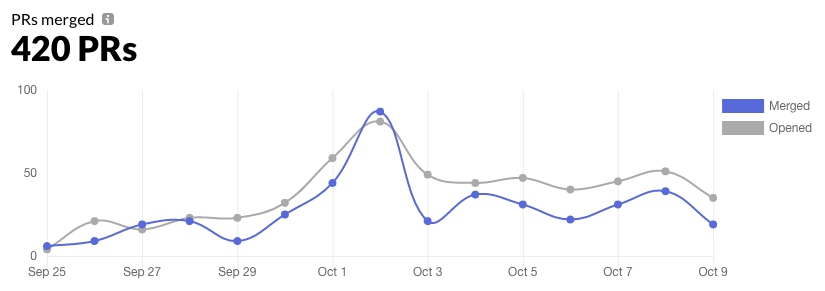 Last 14 days of pull pequest throughput in the Home Assistant organization. (source)
2019 年年度状况更新
We're going to have another 状态 of the Union! It will be held at November 13, in Amsterdam. Like last year, it will be hosted by our friends at ING. I'm looking forward to talk about all the great things that are happening in Home Assistant land. We had 150 tickets available when we announced it on social media, and they were all gone in less than 24 hours!
We're going to make sure that there will be a live stream available. We'll announce that in time via the 博客 and social media. Some people are talking about hosting viewing parties across the globe. Keep an eye out on the social category on the forums for announcements. This would also be the place to announce if you are planning on hosting one.
Plex
@jjlawren has been on fire with the Plex 集成. You will now be able to link your account via the official Plex account link feature.
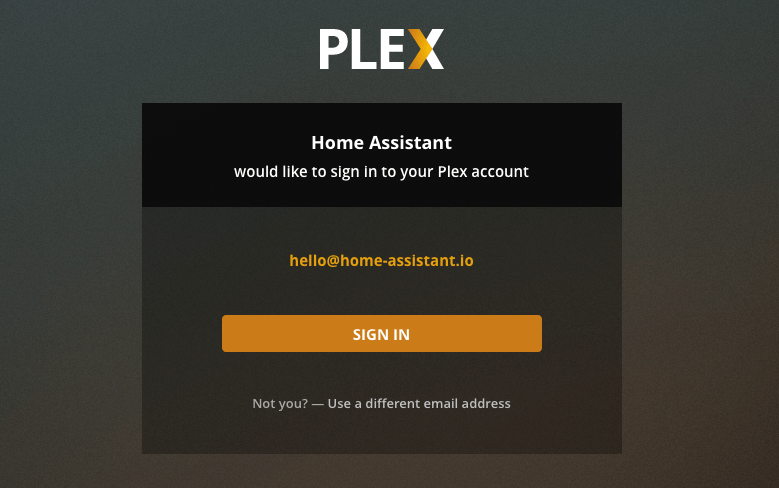 Screenshot of the Plex 用户 interface asking the 用户 if they want to link with Home Assistant.
Lovelace
@iantrich fire has not been put out yet. This 版本 he has also added many new functions to Lovelace! Check the Lovelace changelog for all changes. Some hightlights:
- There are a lot more option for 状态 filtering
- We have a bunch of new UI editors
- A new 动作
urlto link to external sites - Config 面板: Disabled 实体 are now hidden by default.
设备 自动化
@emontnemery has been hard at work at further expanding 设备 自动化 aided by @dmulcahey and @Kane610. This 发布 includes improved support for Zigbee (ZHA) 设备, 传感器, 二元sensor, 开关 and Deconz. One neat new improvement is the addition of a "for" option. This allows you to specify 触发器 for when a certain 设备 has been on for a period of time.
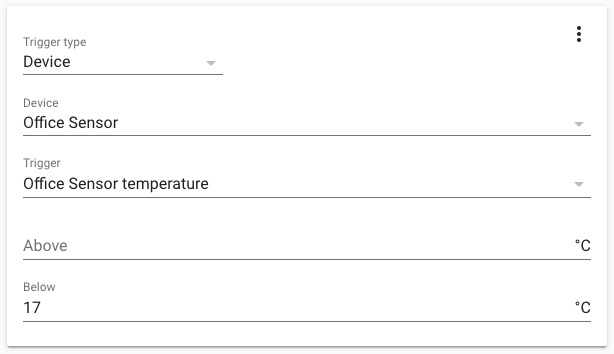 Screenshot of a 设备 触发器 for a temperature 传感器.
自动化 editor
@emontnemery has added a bunch of functions to the 自动化 editor, you can now use and and or 条件, and give your 自动化 a description so you know why you did what you did.
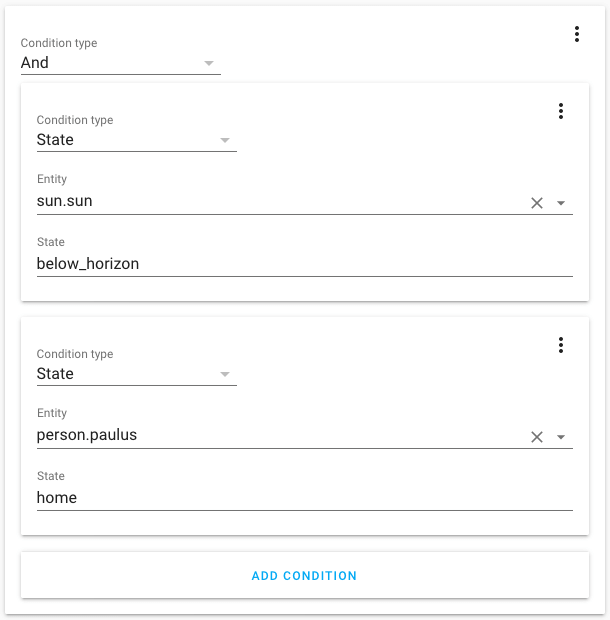 Screenshot of an and-条件 in the 自动化 editor.
设备
设备 自动化 are now available on the experimental 设备 page that we introduced in the last 发布. You can now see all the 触发器, 条件 and 动作 the 设备 supports. Clicking on it will open the 自动化 editor with the 自动化 filled in, ready to edit.
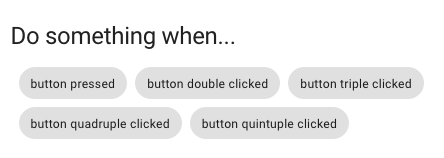
We also added the 实体 registry, so you can change all the 设置 of the 设备 实体 in one place.
And, bonus, when you rename a 设备 on the 设备 page, it will now also rename the 实体 of that 设备 if they contain the 设备 name. When you are in advanced mode, it can also rename the 实体 id's for you.
告别 JSON 👋
On the 后端 we have been using YAML for a long time, but on the 前端, we still used JSON for a lot of things. JSON is harder to write than YAML so we have aligned that. All data inputs on the 前端 now accept YAML. You can still use JSON, as JSON is valid YAML.
This includes:
- The 自动化 editor
- The 脚本 editor
- 服务 data in dev tools
- 状态 in dev tools
- Events in dev tools
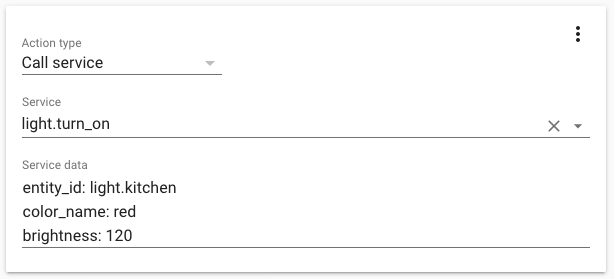 Screenshot of a 服务 动作 in the 自动化 editor using YAML.
Thank You, @Amelchio
核心 developer @amelchio is taking a break from working on Home Assistant. Amelchio has been a contributing member of the Home Assistant community for 2.5 years in which he made a grand total of 275 pull requests! Amelchio has worked on improving database performance and under his wing the Sonos, LIFX and Netgear LTE 集成 flourished. He is an example community member, always available in the chat to help other people contribute to Home Assistant.
Thanks Anders, we're going to miss you! ❤️
In other news
Hans Oischinger showcased how he can steer his 吸尘器 cleaner to specific 房间 in his house via his floorplan. Besides this tweet, he also wrote a great 博客 about it.
Freed my 吸尘器 robot from the cloud with https://t.co/tirC2vcsqK
— Hans Oischinger (@oischinger) September 29, 2019
This unlocked some new functionality for my 吸尘器:
配置 and start zoned cleanup in @home_assistant with live map overlayed on the floorplan pic.twitter.com/jtPZHk2xeT
To improve discovery, we're collecting discovery info of 设备 and 服务. Please help us gather zeroconf discovery info and HomeKit discovery info.
As always, this 发布 of Home Assistant is accompanied with a new 发布 of the Home Assistant Podcast:
Time for another #smarthome #Podcast
— Phil Hawthorne (@philhawthorne) October 9, 2019
This week we're talking @home_assistant 版本 1...hundred, @hacktoberfest and catch up with 🇦🇺 Tony about his #homeautomation journey with Home Assistant, or maybe it should just be @NodeRED 🤷♂️https://t.co/DUtNZTHOAA
New 集成
- Add support for DOODS 图像 Processing (@snowzach - #26208) (doods docs) (new-集成)
- Izone component (@Swamp-Ig - #24550) (izone docs) (new-集成)
- Add transport data from maps.yandex.ru api (@rishatik92 - #26252) (yandex_transport docs) (new-集成)
- Add Kaiterra 集成 (@Michsior14 - #26661) (kaiterra docs) (new-集成)
- Add Ombi 集成 (@larssont - #26755) (ombi docs) (new-集成)
- Add here_travel_time (@eifinger - #24603) (here_travel_time docs) (new-集成)
- Add support for SOMA Smartshades 设备 (@ratsept - #26226) (soma docs) (new-集成)
- Add saj component (@fredericvl - #26902) (saj docs) (new-集成)
New Platforms
- Add iaqualink 二元sensor and unique_id (@flz - #26616) (iaqualink docs) (new-platform)
- Add basic support for IKEA Fyrtur blinds (@ggravlingen - #26659) (tradfri docs) (new-platform)
- Centralize rainbird config and add 二元sensor platform (@konikvranik - #26393) (rainbird docs) (breaking change) (new-platform)
发布 0.100.1 - October 10
- Fix build not succeeding @bramkragten
发布 0.100.2 - October 12
- Vangorra withings fix (@vangorra - #27404) (withings docs)
- Bump python-songpal (@rytilahti - #27398) (songpal docs)
- bump songpal to fix attrs usage when using its most recent 版本 (@rytilahti - #27410) (songpal docs)
- iaqualink: set 5s timeout, use cookiejar defaults (@flz - #27426) (iaqualink docs)
- Add mobile_app dependency on cloud (@uSpike - #27470) (mobile_app docs)
- Fix for unknown 传感器 状态 (@marthoc - #27542) (ecobee docs)
- Google: catch query not supported (@balloob - #27559) (google_assistant docs)
- Fixing nzbget units display (@chriscla - #27521) (nzbget docs)
发布 0.100.3 - October 21
- Use URI provided by Plex for local connections (@jjlawren - #27515) (plex docs)
- 更新 pymyq to 2.0.0 (@bachya - #28069) (myq docs)
如果你需要帮助……
……欢迎随时使用我们非常活跃的论坛,或者加入我们的 聊天频道。
反馈问题
如果这次发布引入了问题,请前往我们的 issue tracker 提交反馈。请务必填写 issue 模板中的所有字段。
Backward-incompatible changes
-
Removed - The following 集成 which were marked in .98 for pending removal have now been removed (ADR-0004):
-
NZBGet - The 集成 has been changed to support multiple platforms and future events, and common code has been centralized to the component. The 配置 has moved from the 传感器 platform to the
nzbgetkey in 配置.yaml, and themonitored_variablesoption has been removed. 用户 need to 更新 their 配置. - (@chriscla - #26462) (nzbget docs)New example 配置 entry:
-
SpaceAPI - Values that were not compliant with the SpaceAPI specification were changed.
contact / mailing_listhas changed tocontact / ml, to migrate change themailing_listkey tomllocation / addressis no longer required but is optional as the latitude and longitude properties of the location are added automatically from the HA config). There is no need to change anything. - (@Bouni - #26453) (spaceapi docs)
-
Linky - Linky 传感器 have been grouped to one Linky 设备. 用户 will need to remove and re-add the Linky 集成 to clear the 设备 registry. - (@piitaya - #26738)
-
Elv - ELV/PCA is now its own 集成. Existing 配置 should be removed and replaced. Optionally the port for the serial interface can be specified (default is: /dev/ttyUSB0). - (@majuss - #26552) (elv docs)
Example 配置 entry:
-
自动化 - Custom component 开发者 who started playing with 设备 自动化 only: we have restructured how 集成 can expose their 设备 触发器/条件/动作. Instead of 1 platform
device_automation.pyit's nowdevice_action.py,device_trigger.py,device_condition.py. The method to attach a 设备 触发器 has been updated fromasync_triggertoasync_attach_triggerto better reflect what is going on. - (@balloob - #26880) (自动化 docs) (binary_sensor docs) (deconz docs) (device_automation docs) (灯光 docs) (开关 docs) (zha docs) -
Ecobee - Ecobee will now be set up via config flow. Existing 用户 will have their config imported from ecobee.conf via an import flow so it shouldn't break their experience. 用户 configuring via 配置.yaml will have their api key and options imported into the flow but will still need to finish authorization via the flow (instead of the configurator component as previously). The 配置 parameter
hold_temphas been removed, as it was not being used in the 温控 platform and had no effect on whether the temperature was held indefinitely or not. 用户 will need to remove the parameterhold_tempfrom 配置.yaml. Ecobee-specific 服务 will now be registered under the ecobee domain rather than the 温控 domain, and 服务 names will not include the prefix "ecobee_" (e.g., the 服务 "温控.ecobee_resume_program" will become "ecobee.resume_program"). - (@marthoc - #26634) (ecobee docs) -
Transmission - The Transmission 集成 can now be configured through a config flow via 集成 in the GUI. Once configured all 传感器 and 开关 will be 创建 and available for the 用户.
monitored_conditionshas been removed so existing 用户 need to 更新 their 配置 in 配置.yaml and remove monitored 条件. The existing 配置 will be imported as an entry under 集成. - (@engrbm87 - #26434) (transmission docs)Example 配置 entry:
-
Rainbird - Rainbird is now its own platform. The 配置 of rainbird 开关 has been moved under
zones:as part of therainbird:集成. - (@konikvranik - #26393) (rainbird docs)Example 配置 entry:
-
Incomfort - 设备 状态 属性 that were causing pointless 状态 changes have been removed:
"rf_message_rssisignal strength (between gateway & boiler), changes almost every scan_intervalnodenrunknown, is staticrfstatus_cntrunknown, changes
This is not likely to be considered a breaking change by 用户. - (@zxdavb - #26802) (incomfort docs)
-
Evohome - 设备 状态 属性 keys have been changed to snake_case and, since this a breaking change, the opportunity was taken to revise/simplify the entire 设备 状态 属性 schema. Evohome is a complicated 集成, has had major changes in recent times, and is not yet mature - these changes address some bugs and related architectural issues:
- Modify behavior of set_temperature to mirror that of the vendor's UI (e.g., any target temp changes until next setpoint, unless explicitly set otherwise)
- Setpoint datetimes are now correctly converted to local/aware isoformat (internally, and for logging/状态 属性)
- Use snake_case for 设备 状态 属性
- Add a unique_id for each 实体 (systemId, zoneID, dhwId)
- Refactoring - remove API wrappers (no longer using private methods)
- Add away mode for DHW (set to permanent off or Auto, depending)(@zxdavb - #26810) (evohome docs)
-
OpenTherm - Move 温控 实体 状态 to hvac_action 属性 to comply with 温控 1.0. May break e.g., 自动化. - (@mvn23 - #25931) (opentherm_gw docs)
-
Genius Hub - 用户 connecting to a Hub via the v1 API will need to specify a valid MAC address for the hub (see example YAML, below). Those using the v3 API will be unaffected. This change is in preparation for for further changes, so the geniushub 实体 can be given more appropriate
entity_ids.Some 传感器 实体 fro GeniusHub Issues have been renamed, and so will get a new 实体 ID:
- 传感器.错误 to 传感器.geniushub_errors
- 传感器.警告 to 传感器.geniushub_warnings
- 传感器.information to 传感器.geniushub_informationeniushub and bump client to v0.6.26 - (@zxdavb - #26640) (geniushub docs)
Example 配置 entry:
Beta Fixes
- Only generate 设备 触发器 for 传感器 with unit (@emontnemery - #27152) (传感器 docs) (beta fix)
- Add above and below to 传感器 触发器 extra_fields (@emontnemery - #27160) (传感器 docs) (beta fix)
- 更新 connect-box to fix issue with attrs (@pvizeli - #27194) (upc_connect docs) (beta fix)
- Fix validation when 自动化 is saved from 前端 (@emontnemery - #27195) (自动化 docs) (beta fix)
- Fix ecobee 二元sensor and 传感器 unique ids (@marthoc - #27208) (ecobee docs) (beta fix)
- Bump adb-shell to 0.0.4; bump androidtv to 0.0.30 (@JeffLIrion - #27224) (androidtv docs) (beta fix)
- Fix closed status for non horizontal awnings. (@psicot - #26840) (tahoma docs) (beta fix)
- Fix 更新 on cert_expiry startup (@jjlawren - #27137) (cert_expiry docs) (beta fix)
- Fix onvif PTZ 服务 freeze (@skgsergio - #27250) (onvif docs) (beta fix)
- Fix the todoist 集成 (@boralyl - #27273) (todoist docs) (beta fix)
- Fix Plex 媒体播放器.play_media 服务 (@jjlawren - #27278) (plex docs) (beta fix)
- Remove manual config flow step (@jjlawren - #27291) (plex docs) (beta fix)
- Improve speed websocket sends messages (@balloob - #27295) (websocket_api docs) (beta fix)
- Google: Report all 状态 on activating report 状态 (@balloob - #27312) (google_assistant docs) (beta fix)
- Fix single Plex server case (@jjlawren - #27326) (plex docs) (beta fix)
- Updated 前端 to 20191002.1 (@bramkragten - #27329) (前端 docs) (beta fix)
- Fix translations for binary_sensor 触发器 (@emontnemery - #27330) (binary_sensor docs) (beta fix)
- Fix connection issues with withings API by switching to a maintained codebase (@vangorra - #27310) (withings docs) (beta fix)
- 更新 zigpy-zigate to 0.4.1 (@doudz - #27345) (zha docs) (beta fix)
- Updated 前端 to 20191002.2 (@bramkragten - #27370) (前端 docs) (beta fix)
All changes
- Add support for DOODS 图像 Processing (@snowzach - #26208) (doods docs) (new-集成)
- Bump zigate to 0.3.0 (@doudz - #26586) (zha docs)
- 升级 youtube_dl to 2019.09.12.1 (@BKPepe - #26593) (media_extractor docs)
- Improve 蓝牙 tracker 设备 code (@pgilad - #26067) (bluetooth_tracker docs)
- Disable Watson TTS Telemetry (@poofyteddy - #26253) (watson_tts docs)
- Fix Typo (@SNoof85 - #26612) (cert_expiry docs)
- Refactor 蓝牙 Tracker to async (@pgilad - #26614) (bluetooth_tracker docs)
- deCONZ - create deconz_events through 传感器 platform (@Kane610 - #26592) (deconz docs)
- zha ZCL color loop effect (@amigan - #26549) (zha docs)
- Add iaqualink 二元sensor and unique_id (@flz - #26616) (iaqualink docs) (new-platform)
- Add group 属性 to Homematic IP Cloud (@SukramJ - #26618) (homematicip_cloud docs)
- Move deCONZ 服务 to their own file (@Kane610 - #26645) (deconz docs)
- Add built in 天气 to Homematic IP Cloud (@SukramJ - #26642) (homematicip_cloud docs)
- deCONZ - battery 传感器 instead of battery 属性 (@Kane610 - #26591) (deconz docs)
- deCONZ - Remove mechanisms to import a 配置 from 配置.yaml (@Kane610 - #26648) (deconz docs)
- Refactor nzbget to support future platform changes (@chriscla - #26462) (nzbget docs) (breaking change)
- Fix Environment Canada 天气 forecast, retain icon_code 传感器 (@michaeldavie - #26646) (environment_canada docs)
- Emulate color temperature for non-ct 灯光 in 灯光 groups (@bryanyork - #23495) (google_assistant docs) (group docs)
- Use pynzbgetapi exceptions consistently (@chriscla - #26667) (nzbget docs)
- deCONZ - Improve 服务 tests (@Kane610 - #26663) (deconz docs)
- zha: fix 0 second transitions being ignored. (@abmantis - #26654) (zha docs)
- pytfiac 版本 bump to 0.4 (@fredrike - #26669) (tfiac docs)
- 开关 py_nextbus to py_nextbusnext (@ViViDboarder - #26681) (nextbus docs)
- Disconnect velux on hass stop (@gibman - #26266) (velux docs)
- Improve Envoy detection and support multiple Envoys (@jesserizzo - #26665) (enphase_envoy docs)
- Fix volumio set shuffle (@zewelor - #26660) (volumio docs)
- Fix mysensors validation for composite 实体 (@MartinHjelmare - #26666) (mysensors docs)
- Add support for 自动化 description (@emontnemery - #26662) (自动化 docs) (config docs)
- Add alternative name for Tibber 传感器 (@Danielhiversen - #26685) (tibber docs)
- deCONZ improve 灯光 tests (@Kane610 - #26697) (deconz docs)
- Hide "PTZ is not available on this 摄像头" 警告 (@definitio - #26649) (onvif docs)
- deCONZ rewrite 传感器 tests (@Kane610 - #26679) (deconz docs)
- Fix torque degree char (@roblandry - #26183) (torque docs)
- Change datetime.now() to dt_util.now() (@tsvi - #26582)
- Add additional needles to glances cpu_temp 属性 (@shutupflanders - #22311) (glances docs)
- Move alexa 集成 to use dt_util (@tsvi - #26723) (alexa docs)
- Bumps pytest to 5.1.2 (@frenck - #26718)
- Bumps aiohttp to 3.6.0 (@frenck - #26728)
- Bumps pre-commit to 1.18.3 (@frenck - #26717)
- 更新 Solax Library to 0.2.2 (@squishykid - #26705) (solax docs)
- Bump aiohttp to 3.6.1 (@frenck - #26739)
- Add Plex config flow support (@jjlawren - #26548) (plex docs)
- Bump restrictedpython to 5.0 (@frenck - #26741)
- Izone component (@Swamp-Ig - #24550) (izone docs) (new-集成)
- Bump influxdb to 5.2.3 (@frenck - #26743) (influxdb docs)
- 更新 codeowners (@amelchio - #26733) (lifx docs) (lifx_cloud docs) (netgear_lte docs) (sonos docs)
- Add transport data from maps.yandex.ru api (@rishatik92 - #26252) (yandex_transport docs) (new-集成)
- deCONZ improve gateway tests (@Kane610 - #26709) (deconz docs)
- Revert "Add transport data from maps.yandex.ru api (#26252)" (@pvizeli - #26762) (yandex_transport docs)
- Bump openwrt-luci-rpc to 版本 1.1.1 (@flowolf - #26759) (luci docs)
- Type hint additions (@scop - #26765) (自动化 docs) (遮盖 docs) (前端 docs) (http docs) (媒体播放器 docs) (开关 docs)
- Add transport data from maps.yandex.ru api (@rishatik92 - #26766) (yandex_transport docs)
- ZHA 警报器 and 警告 设备 support (@dmulcahey - #26046) (zha docs)
- Bump aiowwlln to 2.0.2 (@bachya - #26769)
- Bump simplisafe-python to 5.0.1 (@bachya - #26775) (simplisafe docs)
- Add 集成 scaffolding 脚本 (@balloob - #26777)
- Bump HAP-python to 2.6.0 for homekit (@Jc2k - #26783) (homekit docs)
- Bump pynws 版本 to 0.8.1 (@MatthewFlamm - #26770) (nws docs)
- Add optimizer data to solaredge_local (@scheric - #26708) (solaredge_local docs)
- MQTT 二元sensor expire after (@KiLLeRRaT - #26058) (MQTT docs)
- 升级 importlib-metadata to 0.23 (@fabaff - #26787)
- 升级 python-whois to 0.7.2 (@fabaff - #26788) (whois docs)
- Fix doods missing detector name kwarg (@snowzach - #26784) (doods docs)
- Add myself as a pi_hole codeowner (@johnluetke - #26796) (pi_hole docs)
- Fix spaceapi (@Bouni - #26453) (spaceapi docs) (breaking change)
- 更新 灯光.py (@CQoute - #26703) (esphome docs)
- Bump hbmqtt to 0.9.5 (@frenck - #26804) (MQTT docs)
- Bump python-slugify to 3.0.4 (@frenck - #26801)
- Bump pytest to 5.1.3 (@frenck - #26794)
- Bump iperf3 to 0.1.11 (@frenck - #26795) (iperf3 docs)
- Bump shodan to 1.17.0 (@frenck - #26797) (shodan docs)
- Bump request_mock to 1.7.0 (@frenck - #26799)
- Bump pylutron to 0.2.5 (@thecynic - #26815)
- 升级 sendgrid to 6.1.0 (@fabaff - #26809) (sendgrid docs)
- Exempt 'Help wanted' issue from stale bot (@frenck - #26829)
- Add 设备 自动化 support to binary_sensor 实体 (@emontnemery - #26643) (binary_sensor docs)
- 更新 Vivotek 摄像头 component (@HarlemSquirrel - #26754) (vivotek docs)
- Add basic support for IKEA Fyrtur blinds (@ggravlingen - #26659) (tradfri docs) (new-platform)
- Unload Plex config entries (@jjlawren - #26771) (plex docs)
- Add Kaiterra 集成 (@Michsior14 - #26661) (kaiterra docs) (new-集成)
- Add manual step to Plex config flow (@jjlawren - #26773) (plex docs)
- Add Ombi 集成 (@larssont - #26755) (ombi docs) (new-集成)
- Prevent Wemo doing I/O in event loop (@balloob - #26835) (wemo docs)
- Split scaffolding 脚本 (@balloob - #26832)
- Remove deprecated ups 集成 (ADR-0004) (@frenck - #26824) (breaking change)
- Remove deprecated usps 集成 (ADR-0004) (@frenck - #26823) (breaking change)
- Remove deprecated sytadin 集成 (ADR-0004) (@frenck - #26819) (breaking change)
- Add here_travel_time (@eifinger - #24603) (here_travel_time docs) (new-集成)
- Remove deprecated srp_energy 集成 (ADR-0004) (@frenck - #26826) (breaking change)
- Remove deprecated fedex 集成 (ADR-0004) (@frenck - #26822) (breaking change)
- Store ZHA 灯光 brightness when fading off to 打开 at the correct brightness (@abmantis - #26680) (zha docs)
- Bump pyotp to 2.3.0 (@frenck - #26849) (otp docs)
- Remove deprecated linksys_ap 集成 (ADR-0004) (@frenck - #26847) (breaking change)
- Bump up ZHA dependencies (@Adminiuga - #26746)
- fix onvif/摄像头 setting up 错误 (@sanyatuning - #26825) (onvif docs)
- Bump homematicip_cloud to 0.10.11 (@SukramJ - #26852) (homematicip_cloud docs)
- Group Linky 传感器 to Linky meter 设备 (@piitaya - #26738) (breaking change)
- Add unit to 'charging_level_hv' bwm_connected_drive 传感器 (@timmccor - #26861) (bmw_connected_drive docs)
- Add reproduce 状态 模板 (@balloob - #26866)
- Put draw_box in image_processing (@robmarkcole - #26712) (doods docs) (image_processing docs) (tensorflow docs)
- Move elv 集成 to component and bump pypca (@majuss - #26552) (elv docs) (breaking change)
- Add availability_template to 模板 传感器 platform (@grillp - #26516) (模板 docs)
- Add 设备 自动化 support to ZHA (@dmulcahey - #26821) (zha docs)
- Removes unnecessary else/elif blocks (@frenck - #26884)
- Add and corrects typehints in 实体 助手 & 核心 class (@frenck - #26805)
- Add comment for clarity to 助手.实体.enabled() (@frenck - #26793)
- Reorg 设备 自动化 (@balloob - #26880) (自动化 docs) (binary_sensor docs) (deconz docs) (device_automation docs) (灯光 docs) (开关 docs) (zha docs) (breaking change)
- Use Python3 new super syntax sugar (@frenck - #26890)
- bump quirks (@dmulcahey - #26885) (zha docs)
- 更新 zigpy_zigate to 0.4.0 (@doudz - #26883) (zha docs)
- Inverting 状态 for opening/closing Homekit 遮盖 (@tleegaard - #26872) (homekit_controller docs)
- Removes unnecessary utf8 source encoding declarations (@frenck - #26887) (lcn docs) (yandex_transport docs)
- Removes unnecessary print_function future import (@frenck - #26888)
- Add availability_template to 模板 开关 platform (@grillp - #26513) (模板 docs)
- Bump ndms2-client to 0.0.9 (@foxel - #26899) (keenetic_ndms2 docs)
- Add voltage 属性 to Xiaomi Aqara 设备 (@zhumuht - #26876) (xiaomi_aqara docs)
- Fix bed_activity history chart of the Xiaomi Aqara vibration 传感器 (@zhumuht - #26875) (xiaomi_aqara docs)
- Fix missing whitespace around arithmetic operator (@JeffLIrion - #26908) (xiaomi_aqara docs)
- deCONZ - Improve ssdp discovery by storing uuid in config entry (@Kane610 - #26882) (deconz docs)
- Add google_assistant alarm_control_panel (@engrbm87 - #26249) (google_assistant docs)
- Add call direction 传感器 for Obihai (@dshokouhi - #26867) (obihai docs)
- deCONZ - Increase bridge discovery robustness in config flow (@Kane610 - #26911) (deconz docs)
- Add config flow to ecobee (@marthoc - #26634) (ecobee docs) (breaking change)
- Remove lamps and groups from ha when removed from Hue (@bramkragten - #26881) (hue docs)
- Add MySensors ACK (@petewill - #26894) (mysensors docs)
- Add mysensors codeowner (@MartinHjelmare - #26917) (mysensors docs)
- Bump pyobihai, add unique ID and availability (@dshokouhi - #26922) (obihai docs)
- Add Plex config options support (@jjlawren - #26870) (plex docs)
- Add config flow to transmission (@engrbm87 - #26434) (transmission docs) (breaking change)
- Centralize rainbird config and add 二元sensor platform (@konikvranik - #26393) (rainbird docs) (breaking change) (new-platform)
- Add ecobee 服务 to create and delete vacations (@marthoc - #26923) (ecobee docs)
- Bump androidtv to 0.0.28 (@JeffLIrion - #26906) (androidtv docs)
- Add more ebusd Vaillant "bai" 传感器 (@sashao - #26750) (ebusd docs)
- Add xbox live custom 更新 interval (@MartinHjelmare - #26939) (xbox_live docs)
- Guard against non supported 实体 (@balloob - #26941) (alexa docs)
- Bump pyowlet to 1.0.3 (@jaburges - #26892)
- Revert Nest HVAC mode when disabling Eco mode (@joe248 - #26934) (nest docs)
- Fix ecobee 集成 (@marthoc - #26951) (ecobee docs)
- Add CO2 level reading for Kaiterra 集成 (@Michsior14 - #26935) (kaiterra docs)
- Improve validation of 设备 触发器 config (@emontnemery - #26910) (自动化 docs) (config docs) (device_automation docs)
- Add 设备 动作 support for ZHA (@dmulcahey - #26903) (zha docs)
- Add support for Z-Wave battery level (@oandrew - #26943) (zwave docs)
- 更新 Alexa discovery description (@bramkragten - #26933) (alexa docs)
- Add 模板 to scaffold device_trigger, device_condition, (@balloob - #26871)
- 升级 mypy to 0.730, address raised issues (@scop - #26959) (http docs)
- Add hive boost to 温控 and water_heater (@KJonline - #26789) (hive docs)
- Bump Travis timeout to 50 minutes (@scop - #26978)
- Remove no longer needed Python < 3.6 compatibility code (@scop - #27024)
- Fix possible OpenUV exception due to missing data (@bachya - #26958) (openuv docs)
- 更新 pythonegardia to 1.0.40 (@SneakSnackSnake - #27009) (egardia docs)
- Improve ecobee 服务 schemas (@marthoc - #26955) (ecobee docs)
- Add more providers, bump yessssms 版本 to 0.4.1 (@flowolf - #26874)
- 升级 youtube_dl to 2019.09.28 (@BKPepe - #27031) (media_extractor docs)
- Add availability_template to 模板 遮盖 platform (@grillp - #26509) (模板 docs)
- Add availability_template to 模板 二元sensor platform (@grillp - #26510) (模板 docs)
- Add availability_template to 模板 风扇 platform (@grillp - #26511) (模板 docs)
- Add availability_template to 模板 灯光 platform (@grillp - #26512) (模板 docs)
- Add availability_template to 模板 吸尘器 platform (@grillp - #26514) (模板 docs)
- Add create, remove of 设备 for HomematicIP_Cloud (@SukramJ - #27030) (homematicip_cloud docs)
- Add venstar support for hvac 动作 (@david81 - #26956) (venstar docs)
- Change hive hotwater to hot_water + bug fix (@KJonline - #27038) (hive docs)
- Return esphome 遮盖 position as Integer (@neffs - #27039) (esphome docs)
- Type hint additions (@scop - #26831) (device_automation docs) (前端 docs) (group docs) (媒体播放器 docs) (persistent_notification docs) (sun docs) (websocket_api docs) (区域 docs)
- 升级 pytest to 5.2.0 (@scop - #27058)
- Bump zha quirks to 0.0.26 (@dmulcahey - #27051) (zha docs)
- Add Pi-hole enable and disable 服务 (@johnluetke - #27055) (pi_hole docs)
- add utc tz to forecast (@MatthewFlamm - #27049) (darksky docs)
- Fix rest_command when server is unreachable (@sebasje - #26948) (rest_command docs)
- Fix incomfort and Bump client to 0.3.5 (@zxdavb - #26802) (incomfort docs) (breaking change)
- Add support for SOMA Smartshades 设备 (@ratsept - #26226) (soma docs) (new-集成)
- Bump pyecobee to 0.1.4 (@marthoc - #27074) (ecobee docs)
- Fix SSL connections to Pi-hole (@johnluetke - #27073) (pi_hole docs)
- Bump shodan to 1.19.0 (@frenck - #27079) (shodan docs)
- Add some icons for Obihai (@dshokouhi - #27075) (obihai docs)
- bumped 版本 of upstream library (@exxamalte - #27083) (geonetnz_quakes docs)
- Remove last of 设备 tracker scanner (@Kane610 - #27082) (unifi docs)
- Bugfix evohome (@zxdavb - #26810) (evohome docs) (breaking change)
- Add saj component (@fredericvl - #26902) (saj docs) (new-集成)
- Add availability_template to 模板 门锁 platform (@grillp - #26517) (模板 docs)
- Cleanup coroutine threadsafe (@pvizeli - #27080) (bluetooth_le_tracker docs) (group docs) (MQTT docs) (proxy docs)
- Plex external config flow (@jjlawren - #26936) (plex docs)
- Bump attrs to 19.2.0 (@frenck - #27102)
- 更新 meteoalertapi to 版本 0.1.6 (@rolfberkenbosch - #27099) (meteoalarm docs)
- Nzbget 服务 (@chriscla - #26900) (nzbget docs)
- Delete here_travel_time dead code COORDINATE_SCHEMA (@eifinger - #27090) (here_travel_time docs)
- Add missing http dependency (@jjlawren - #27097) (plex docs)
- Add 实体 registry support to ecobee 集成 (@marthoc - #27088) (ecobee docs)
- 更新 opentherm_gw.温控 to match 温控 1.0 (@mvn23 - #25931) (opentherm_gw docs) (breaking change)
- Improve validation of 设备 动作 config (@emontnemery - #27029) (自动化 docs)
- Bump adb-shell to 0.0.3 (@JeffLIrion - #27108) (androidtv docs)
- Add Vera last 用户 and low battery 属性 (@colohan - #27043) (vera docs)
- Add neural support to amazon polly (@bbrendon - #27101) (amazon_polly docs)
- Bump androidtv to 0.0.29 (@JeffLIrion - #27120) (androidtv docs)
- 更新 文档 link URL for 集成 in all manifests (@frenck - #27114)
- Tweak geniushub and bump client to v0.6.26 (@zxdavb - #26640) (geniushub docs) (breaking change)
- move ATTR_MODE to homeassistant.const (@eifinger - #27118)
- 更新 文档 link URL for 集成 (part2) (@frenck - #27117)
- Fix generated comment in CODEOWNERS (@tribut - #27115)
- Disable flaky/slow test (@emontnemery - #27125)
- UniFi - Try to handle when UniFi erroneously marks offline client as wired (@Kane610 - #26960) (unifi docs)
- deCONZ - Support Symfonisk sound controller with 设备 触发器 (@Kane610 - #26913) (deconz docs)
- Add support for
forto binary_sensor, 灯光 and 开关 设备 触发器 (@emontnemery - #26658) (device_automation docs) - Updated 前端 to 20191002.0 (@bramkragten - #27134) (前端 docs)
- Fix 错误 on failed Plex 设置 (@jjlawren - #27132) (plex docs)
- Bump up ZHA dependencies. (@Adminiuga - #27127) (zha docs)
- Fix unavailable 温控 实体 in Alexa StateReport (@ochlocracy - #27128) (alexa docs)
- gpiozero requirement ver (@bbrendon - #27129) (remote_rpi_gpio docs)
- 更新 KNX 集成 to xknx 0.11.2 (@farmio - #27130) (knx docs)
- Display 风扇 实体 as 风扇 category in Alexa (@ochlocracy - #27135) (alexa docs)
- Improve validation of 设备 条件 config (@emontnemery - #27131) (自动化 docs) (binary_sensor docs) (灯光 docs) (开关 docs)
- Fix colorTemperatureInKelvin in Alexa report when 灯光 is off (@ochlocracy - #27107) (alexa docs)
- Add 设备 触发器 support to 传感器 实体 (@emontnemery - #27133) (自动化 docs) (binary_sensor docs) (device_automation docs) (传感器 docs)
- Add Google Report 状态 (@balloob - #27112) (alexa docs) (cloud docs) (google_assistant docs)
- Handle all single 区域 thermostats (@zxdavb - #27168) (evohome docs)
- Only generate 设备 触发器 for 传感器 with unit (@emontnemery - #27152) (传感器 docs) (beta fix)
- Add above and below to 传感器 触发器 extra_fields (@emontnemery - #27160) (传感器 docs) (beta fix)
- 更新 connect-box to fix issue with attrs (@pvizeli - #27194) (upc_connect docs) (beta fix)
- Fix validation when 自动化 is saved from 前端 (@emontnemery - #27195) (自动化 docs) (beta fix)
- Fix ecobee 二元sensor and 传感器 unique ids (@marthoc - #27208) (ecobee docs) (beta fix)
- Bump adb-shell to 0.0.4; bump androidtv to 0.0.30 (@JeffLIrion - #27224) (androidtv docs) (beta fix)
- Fix closed status for non horizontal awnings. (@psicot - #26840) (tahoma docs) (beta fix)
- Fix 更新 on cert_expiry startup (@jjlawren - #27137) (cert_expiry docs) (beta fix)
- Fix onvif PTZ 服务 freeze (@skgsergio - #27250) (onvif docs) (beta fix)
- Fix the todoist 集成 (@boralyl - #27273) (todoist docs) (beta fix)
- Fix Plex 媒体播放器.play_media 服务 (@jjlawren - #27278) (plex docs) (beta fix)
- Remove manual config flow step (@jjlawren - #27291) (plex docs) (beta fix)
- Improve speed websocket sends messages (@balloob - #27295) (websocket_api docs) (beta fix)
- Google: Report all 状态 on activating report 状态 (@balloob - #27312) (google_assistant docs) (beta fix)
- Fix single Plex server case (@jjlawren - #27326) (plex docs) (beta fix)
- Updated 前端 to 20191002.1 (@bramkragten - #27329) (前端 docs) (beta fix)
- Fix translations for binary_sensor 触发器 (@emontnemery - #27330) (binary_sensor docs) (beta fix)
- Fix connection issues with withings API by switching to a maintained codebase (@vangorra - #27310) (withings docs) (beta fix)
- 更新 zigpy-zigate to 0.4.1 (@doudz - #27345) (zha docs) (beta fix)
- Updated 前端 to 20191002.2 (@bramkragten - #27370) (前端 docs) (beta fix)