

title: '0.99: Withings, 设备 自动化, launch Home Assistant Cast from Python.' description: '<a href=''/home-assistant/integrations/版本/0.99''<img src=''/home-assistant/images/blog/2019-09-0.99/components.png'' style=''border: 0;box-shadow: none;''</a。' 自动化 for everyone.
0.99: Withings, 设备 自动化, launch Home Assistant Cast from Python.
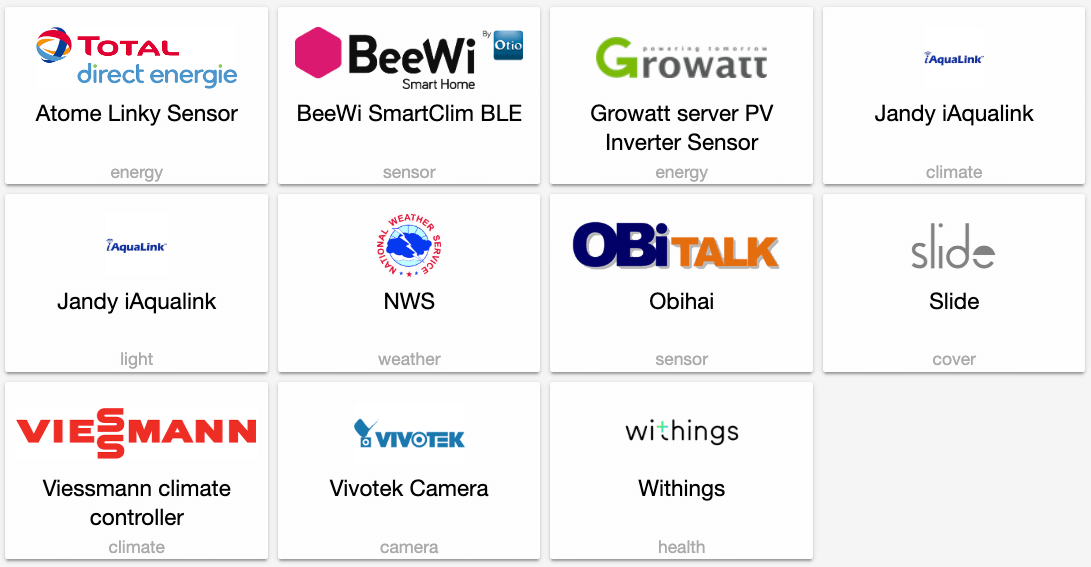
Happy 6th birthday to us! Yep, it's been 6 years since the first commit, 6 years since we started our quest for a local and privacy foucsed home 自动化 hub. And I think that we're doing a pretty ok job 😏
It’s time for Home Assistant 发布 99. And this 发布 is adding a bunch of new great features all over the place.
欢迎 Bram!
Nabu Casa has hired Bram Kragten. Bram has been active in the Home Assistant community for a while and is one of the driving forces behind the Lovelace UI. He will work on the Home Assistant 前端 full-time. He will focus on making it easier to manage your Home Assistant 安装, make sure all of the 前端 is translatable and drive our efforts on making the 前端 accessible for visually impaired people.
This is possible thanks to all the people who subscribe to Home Assistant Cloud ❤️
设备 自动化
We took a step back, looked at Home Assistant, and thought about how we could make it easier for 用户 to create 自动化. We realized that there was 房间 for improvement. We identified the following issues:
- To write 自动化, 用户 need to learn Home Assistant concepts like events, 实体 and 服务.
- It's difficult to discover what can be automated. For example, if you’re automating a long press on the "打开" 按钮 on a Zigbee 遥控器, you need to know to listen to the event “zha_event” and match against the Zigbee 设备 identifier of your 遥控器 and the long press type.
So we put our inventor hat on and have come up with a solution that allows 用户 to create 自动化 in the concepts that they already know: 设备. Now when a 用户 starts configuring an 自动化 触发器, it can pick 设备 自动化 as a new type.
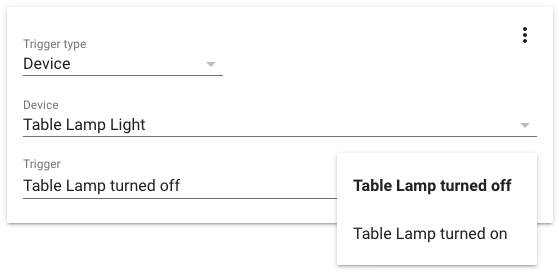 Screenshot of defining a 设备 触发器 in the UI.
The 用户 starts by picking one of their 设备 that is integrated into Home Assistant. A second dropdown will now appear that contains all the possible 触发器 for this 设备. This list is populated based on the 集成 that are linked to this 设备 (ie. Hue & 灯光).
设备 自动化 are available for 触发器, 条件 and 动作. Today’s 发布 supports 灯光, 开关 and Deconz. More to come in future releases as 集成 开发者 adopt it.
Big thanks to @emontnemery for driving this effort. He added initial support for 设备 自动化 as a YAML-only feature in Home Assistant 0.97 and has worked hard to extend it in this 发布 with UI support and support for 条件, 动作 and more 集成. Also a big thanks to @kane610 who added added support for 设备 自动化 to Deconz which helped squash bugs and improve the design.
前端
There is a lot to talk here. Buckle up.
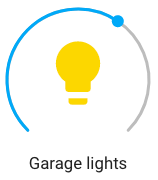
@thomasloven has built a brand new round slider from scratch for use in Home Assistant. It is using modern technologies to create a great experience. This component was so useful standalone that he has decided to 发布 it as a standalone web component that anyone can use in their websites.
Shout out to @iantrich who has been on fire in recent weeks squashing a ton of bugs and adding some nice features to improve the Lovelace experience. And a shout out to @SeanPM5 who has been bringing UX bugs and improvements to our attention. Our 前端 team is seriously awesome.
Unused 实体 has been moved into the 配置 UI section and completely revamped by @bramkragten. It's now a table, you can see a lot more info, you can sort it. If you are using Lovelace storage mode, you can select 实体 and add them to your UI directly from that screen.
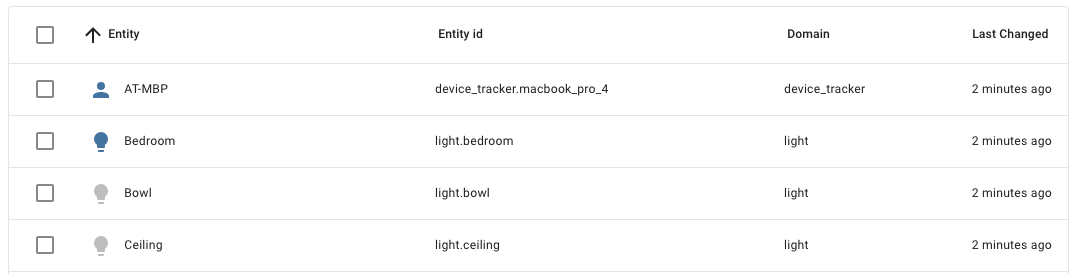 Screenshot of the new unused 实体 page.
Now that we have a data table component, Bram also went ahead and used it in a new 设备 page. This page, still experimental, will allow 用户 to see a list of all their 设备 and sort them by manufacturer, 区域 or battery %. The goal is to create a one stop shop for 设备 management.
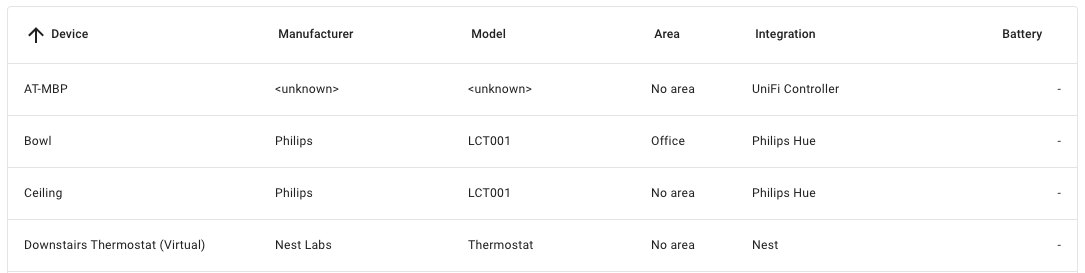 Screenshot of the new 设备 page.
And there is a ton more, here are some of the other highlights:
- Allow subscribing to an MQTT topic inside the MQTT dev tools @bramkragten
- Option to display last changed in glance-卡片 @iantrich
- Add 图像 option to glance 卡片 实体 @iantrich
- Allow controlling timer 实体 from the more info dialog @iantrich
- Fill example data in dev tools @bramkragten
- Stop effect in more-info-灯光 @iantrich
- Add vibration on mobile when controlling 实体 @bramkragten
- 更新 Home Assistant 日志 when activating the info developer tool tab @bramkragten
从 Python 启动 Home Assistant Cast
Home Assistant now supports opening Home Assistant Cast from the 后端. It is available as the 服务 cast.show_lovelace_view. This allows you to open a view on your Chromecast as part of an 自动化. For example, show the frontdoor and who is home when your doorbell rings.
Note that Home Assistant Cast requires your Home Assistant 安装 to be accessible via https://. If you're using Home Assistant Cloud, you don't need to do anything. Otherwise you must make sure that you have configured the base_url for the http integrations.
Hass.io
Hass.io is now able to work with your secrets stored in Home Assistant. So now you are able to use !secret my_value inside 插件 options like you can do inside configuration.yaml. For more info about how to define secrets, check the docs.
We have published a 发布 candidate of HassOS that is compatible with the new 树莓派 4. Download it here.
其他消息
Home Assistant had a booth this year at the CEDIA home tech trade show. We spend a lot of time talking to manufacturers about local APIs, official 集成 and better support for 开源 systems.
Hanging out at @CEDIAExpo in innovation alley pic.twitter.com/9SnUXo11oA
— Home Assistant (@home_assistant) September 13, 2019
We also had some great drinks in the evenings with companies that integrate with Home Assistant. In this picture Konnected.io and Senic.
Beers after CEDIA with @balloob from Home Assistant and teams from Senic and Neeo. pic.twitter.com/c6Ag4DeEtU
— Konnected.io (@Konnected_io) September 14, 2019
@timmo has released 版本 2.0 of his Home 面板. This is an alternative 用户 interface for Home Assistant.
It's finally here. 🎉
— Timmo (@timmo001) September 14, 2019
Home 面板 v2.0.0 is now released and has been completely rewritten in #React with #TypeScript
⚠️Please read the 发布 notes before upgrading as are backward-incompatible changes to know about before upgrading!https://t.co/NMDQu4zZW8#HomePanel #HomeAssistant pic.twitter.com/ucA1HxwurB
New 集成
- Add Withings support (@vangorra - #25154) (withings docs) (new-集成)
- Add NWS 天气 (@MatthewFlamm - #23647) (nws docs) (new-集成)
- Add BeeWi SmartClim BLE 传感器 (@alemuro - #26174) (beewi_smartclim docs) (new-集成)
- Add support Slide 遮盖 (@ualex73 - #25913) (slide docs) (new-集成)
- Add atome 传感器 platform (@BaQs - #26197) (atome docs) (new-集成)
- Add Viessmann ViCare 温控 platform (@oischinger - #26151) (vicare docs) (new-集成)
- Add new 集成 for Jandy iAqualink pool control (@flz - #26034) (iaqualink docs) (new-集成)
- Add vivotek 摄像头 component (@HarlemSquirrel - #26071) (vivotek docs) (new-集成)
- Add growatt server 集成 (@indykoning - #25635) (growatt_server docs) (new-集成)
- Add Obihai 集成 (@dshokouhi - #26537) (obihai docs) (new-集成)
New Platforms
- Add support for Supla 开关 (@Rocik - #26188) (supla docs) (new-platform)
- GeoNet NZ Quakes 传感器 (@exxamalte - #26078) (geonetnz_quakes docs) (new-platform)
- Jewish 日历 二元sensor (@tsvi - #26200) (jewish_calendar docs) (breaking change) (new-platform)
- Add 灯光 platform to iaqualink 集成 (@flz - #26484) (iaqualink docs) (new-platform)
- Add 传感器 platform to iaqualink component (@flz - #26544) (iaqualink docs) (new-platform)
- Add 开关 platform to iaqualink 集成 (@flz - #26545) (iaqualink docs) (new-platform)
发布 0.99.1 - September 19
- Encode prometheus metric names per the prom spec (@growse - #26639) (prometheus docs)
- Bump TRADFRI (@balloob - #26731) (tradfri docs)
- Bump pyobihai to fix issue with 用户 account (@dshokouhi - #26736) (obihai docs)
发布 0.99.2 - September 19
Forgot to include 前端 更新 99.1.
- fix continue 集成 flow (#3766) @bramkragten
- Show toast on success save 实体 设置 (#3763) @bramkragten
- Align behaviour 状态 badge (#3767) @bramkragten
发布 0.99.3 - September 25
- Bump zigpy-zigate to 0.3.1 (@doudz - #26600) (zha docs)
- HM-CC-TC was not recognized (@MajestyIV - #26623) (homematic docs)
- Bring back babel for ES5 builds @bramkragten
如果你需要帮助……
……欢迎随时使用我们非常活跃的论坛,或者加入我们的 聊天频道。
反馈问题
如果这次发布引入了问题,请前往我们的 issue tracker 提交反馈。请务必填写 issue 模板中的所有字段。
Backward-incompatible changes
-
Unifi - Removes support of directly configuring the UniFi platform for 设备 trackers. Use
unifi:instead. Extra 配置 through config entry options from the GUI (see 发布 notes 0.98 for example) and through unifi 配置 in 配置.yaml will continue to work.- (@Kane610 - #26587) (unifi docs) -
Plex
- 配置 is moved from the 媒体播放器 and 传感器 platforms to the plex component. Existing 配置 will need to be updated. The
remove_unavailable_clientsandclient_remove_intervaloptions for 媒体播放器 实体 have been removed as the functionality has limited value now that the 实体 registry exists. - (@jjlawren - #26488) (discovery docs) (plex docs) - Logins using a username/密码/servername are no longer supported on the Plex 传感器 platform. This functionality will be partially restored in followup PRs which add a 配置 flow and external 认证. - (@jjlawren - #26444) (plex docs)
- Remove default host for Plex config. - (@jjlawren - #26583) (plex docs)
- Removes default value of host config parameter.
- Requires one of host or token in the 配置.
New example 配置 entry:
- 配置 is moved from the 媒体播放器 and 传感器 platforms to the plex component. Existing 配置 will need to be updated. The
-
PiHole - This change requires existing 配置 for the
pi_hole集成 to be moved from 传感器 platform key to api_holetop level key. This allows 服务, 开关, and possibly other 实体 to be added to the 集成 in a future pull request. - (@johnluetke - #25837) (pi_hole docs)monitored_conditionsis removedpi_hole配置 block defines host, port, location and ssl options
New example 配置 entry:
-
Jewish 日历 - This platform has been moved to an 集成. 自动化 based on
sensor.issur_melacha_in_effectcomparison toTrue/Falseneed to be updated to usebinary_sensor.issur_melacha_in_effecton and off 状态. - (@tsvi - #26200) (jewish_calendar docs)New example 配置 entry:
-
Homematic IP - Unify device_state_attributes handling for Homematic IP Cloud. The naming of 实体 属性 has been corrected (missing underscore) to follow the standards:
- moisture detected --> moisture_detected
- motion detected --> motion_detected
- power mains failure --> power_mains_failure
- 在场 detected --> presence_detected
- smoke detector 报警 --> smoke_detector_alarm
- water level detected --> water_level_detected
- window 状态 --> window_state
-
Linky - This platform has been moved to an 集成. - (@Quentame - #26076)
New example 配置 entry:
-
Radiotherm - 更新 温控 属性. 自动化 may break if the 用户 is checking against the previous "mode" or "风扇" 属性 or previous mode or 风扇 属性 values. - (@dieselrabbit - #26465) (radiotherm docs)
- The old "mode" 属性 is now supported via "hvac_action" 属性.
- The old "风扇" 属性 now called "fan_action" to follow "hvac_action" .
-
SolarEdge - Monitored 条件 are no longer supported. - (@Cereal2nd - #26282) (solaredge docs)
-
SMA - Removes deprecated SMA config - (@balloob - #26306) (sma docs)
Beta Fixes
- Fix CCM messages (@gerard33 - #26589) (bmw_connected_drive docs) (beta fix)
- 更新 PyChromecast (@balloob - #26594) (cast docs) (beta fix)
- Use Nabu Casa url if no https url set (@balloob - #26682) (cast docs) (beta fix)
- Updated 前端 to 20190917.0 (@bramkragten - #26686) (前端 docs) (beta fix)
- Fix Nuki issues (@pvizeli - #26689) (nuki docs) (breaking change) (beta fix)
- Bump connect-box library to fix logging (@pvizeli - #26690) (upc_connect docs) (beta fix)
- Updated 前端 to 20190917.1 (@bramkragten - #26691) (前端 docs) (beta fix)
- Rename MockToggleDevice to MockToggleEntity (@emontnemery - #26644) (beta fix)
- Fix translation, adjust 触发器 names (@emontnemery - #26635) (device_automation docs) (灯光 docs) (开关 docs) (beta fix)
- Fix cert expiry config flow check and 更新 (@Cereal2nd - #26638) (cert_expiry docs) (beta fix)
- Fix 发布 access for bram (@pvizeli - #26693) (beta fix)
- Updated 前端 to 20190917.2 (@bramkragten - #26696) (前端 docs) (beta fix)
- Verify withings config (@balloob - #26698) (withings docs) (beta fix)
- Updated 前端 to 20190918.0 (@bramkragten - #26704) (前端 docs) (beta fix)
- Fix yeelight inheritance order (@zewelor - #26706) (yeelight docs) (beta fix)
All changes
- 更新 azure-pipelines-发布.yml for Azure Pipelines (@pvizeli - #26128)
- Add myself as codeowner to HmIP Cloud (@SukramJ - #26140) (homematicip_cloud docs)
- DuckDNS 设置 backoff (@kellerza - #25899) (duckdns docs)
- Venstar: define success for all branches of set_temperature() (@iamtpage - #26148) (venstar docs)
- Add NWS 天气 (@MatthewFlamm - #23647) (nws docs) (new-集成)
- Use literal string interpolation in 核心 (f-strings) (@frenck - #26166)
- Allow bumping 版本 for nightly builds (@balloob - #26167)
- 更新 ambiclimate library (@Danielhiversen - #26182) (ambiclimate docs)
- Refactor open garage (@Danielhiversen - #26179) (opengarage docs)
- Speed up history
get_states(@bramkragten - #23881) (history docs) - Huawei LTE misc improvements (@scop - #26203) (huawei_lte docs)
- Nightly builds (@pvizeli - #26204)
- Add web socket API command to get a single ZHA 设备 (@dmulcahey - #26196) (zha docs)
- 更新 传感器.py (@newbee112 - #26218) (glances docs)
- Support formatting and scaling with ZHA Metering cluster (@presslab-us - #26201) (zha docs)
- Fix flaky updater tests (@andrewsayre - #26221)
- Remove throttle from 更新 (@michaeldavie - #26216) (environment_canada docs)
- Bump dependency to add PLAY_STATE_STOPPED (@schmittx - #26239) (apple_tv docs)
- Cleanup strings (@andrewsayre - #26243) (smartthings docs)
- Fix WWLLN 实体 management (@exxamalte - #26250)
- Enable cert_expiry config entries (@Cereal2nd - #25624) (cert_expiry docs)
- Velbus config entries remove decorator (@Cereal2nd - #26256) (velbus docs)
- Bump androidtv to 0.0.25 and add tests (@JeffLIrion - #26202) (androidtv docs)
- Add two new methods to the OpenUV component that consume only a singl… (@StephenWetzel - #26207) (openuv docs)
- Clean up HEOS strings (@andrewsayre - #26242) (heos docs)
- Fix deConz thermostat 集成 (@5mauggy - #26267) (deconz docs)
- Remove deprecated SMA config (@balloob - #26306) (sma docs) (breaking change)
- Add HEAD and PUT support to webhooks (@balloob - #26299) (Webhook docs)
- Add support for Homekit accessory battery 传感器 (@Jc2k - #26210) (homekit_controller docs)
- Add Withings support (@vangorra - #25154) (withings docs) (new-集成)
- Add precision argument to the Range Filter (@dgomes - #25874) (filter docs)
- Fetch Onkyo current radio preset (@pszafer - #26211) (onkyo docs)
- UniFi - use 实体 registry disabled_by to control available 实体 (@Kane610 - #26141) (unifi docs)
- Fix onvif 摄像头 设置 错误 (@sanyatuning - #24585) (onvif docs)
- 升级 youtube_dl to 2019.09.01 (@BKPepe - #26330) (media_extractor docs)
- Add a keypress 服务 for AlarmDecoder (@jkeljo - #26100) (alarmdecoder docs)
- Add support for Supla 开关 (@Rocik - #26188) (supla docs) (new-platform)
- Change evohome to asyncio client (@zxdavb - #26042) (evohome docs)
- 升级 sqlalchemy to 1.3.8 (@BKPepe - #26331) (recorder docs) (sql docs)
- Migrate Axis, deCONZ and UniFi to use config entry subclass (@Kane610 - #26173) (axis docs) (deconz docs) (unifi docs)
- 升级 tibber library (@Danielhiversen - #26332) (tibber docs)
- Inverted rflink 遮盖 (@fmartens - #26038) (rflink docs)
- UniFi - Simplify getting controller from config entry (@Kane610 - #26335) (unifi docs)
- Add BeeWi SmartClim BLE 传感器 (@alemuro - #26174) (beewi_smartclim docs) (new-集成)
- New 模板 传感器 属性 (@gadgetchnnel - #26127) (模板 docs)
- Add improvements of device_automation from 前端 PR 3514 (@emontnemery - #26295) (自动化 docs) (device_automation docs) (灯光 docs)
- added missing bluepy dependency for miflora (@ChristianKuehnel - #26297) (miflora docs)
- USGS Earthquakes icon for geolocation 实体 (@exxamalte - #26353) (usgs_earthquakes_feed docs)
- Test with 3.6.1 in Travis (@scop - #26347)
- Push to 版本 0.7.10 of denonavr (@scarface-4711 - #26362) (denonavr docs)
- Bump androidtv to 0.0.26 and 更新 tests (@JeffLIrion - #26340)
- 更新 google_maps dependency and improve 错误 message (@costastf - #26361) (google_maps docs)
- 更新 zigpy_zigate to 0.2.0 (@doudz - #26327) (zha docs)
- Allow passing dictionaries to async_register_entity_service (@balloob - #26370) (灯光 docs) (开关 docs)
- Support new 温控 arch for zhong_hong (@crhan - #26309) (zhong_hong docs)
- Correct file permissions, removing executable bits (@frenck - #26376)
- Use literal string interpolation in 集成 A (f-strings) (@frenck - #26377)
- Remove solaredge_local duplicate code (@ThaStealth - #25941) (solaredge_local docs)
- Use literal string interpolation in 集成 B-D (f-strings) (@frenck - #26378)
- Use literal string interpolation in 集成 E-G (f-strings) (@frenck - #26379)
- GeoNet NZ Quakes 传感器 (@exxamalte - #26078) (geonetnz_quakes docs) (new-platform)
- Use literal string interpolation in 集成 H-J (f-strings) (@frenck - #26380)
- Removes executable but from hassfest codeowners (@frenck - #26381)
- Add support Slide 遮盖 (@ualex73 - #25913) (slide docs) (new-集成)
- Use literal string interpolation in 集成 N-Q (f-strings) (@frenck - #26391)
- 更新 OpenCV 4.1.1 / Numpy 1.17.1 (@pvizeli - #26387) (iqvia docs) (opencv docs) (tensorflow docs) (trend docs)
- Use literal string interpolation in 集成 T-W (f-strings) (@frenck - #26394)
- Use literal string interpolation in 集成 K-M (f-strings) (@frenck - #26389)
- Use literal string interpolation in 集成 R-S (f-strings) (@frenck - #26392)
- Use literal string interpolation in 集成 X-Z (f-strings) (@frenck - #26395)
- Fixes invalid JSON files and whitespace corrections in YAML files (@frenck - #26396) (ihc docs) (point docs) (solax docs)
- Refactor pihole 集成 (@johnluetke - #25837) (pi_hole docs) (breaking change)
- Change xiaomi 摄像头 conf_host to 模板 (@vaidyasr - #25799) (xiaomi docs)
- Fix Emulated Hue AttributeError: 'NoneType' object has no 属性 '… (@croghostrider - #26018) (emulated_hue docs)
- Allow passing None as input_text config (@balloob - #26409) (input_text docs)
- IGN Sismologia icon for geolocation 实体 (@exxamalte - #26408) (ign_sismologia docs)
- Migrate legacy typehints in 核心 to PEP-526 (@frenck - #26403) (device_tracker docs)
- Add X10 设备 as ISY994 开关 (@taylorsilva - #26342) (isy994 docs)
- Add config flow to linky (@Quentame - #26076) (breaking change)
- Correct file permissions in slide 集成 (@frenck - #26390) (slide docs)
- Use literal string interpolation in honeywell (@zxdavb - #26386) (honeywell docs)
- Initial commit (@zxdavb - #26385) (geniushub docs)
- Initial commit (@zxdavb - #26383) (evohome docs)
- NSW Rural Fire 服务 icon for geolocation 实体 (@exxamalte - #26416) (nsw_rural_fire_service_feed docs)
- Add prettier to vscode (@pvizeli - #26417)
- Updated 前端 to 20190904.0 (@bramkragten - #26421) (前端 docs)
- Add 设备 to MQTT 摄像头 (@zewelor - #26238) (MQTT docs)
- 实体 registry doesn't overwrite with None (@Swamp-Ig - #24275)
- Replaces IOError by OSError (@frenck - #26428)
- Add atome 传感器 platform (@BaQs - #26197) (atome docs) (new-集成)
- Cleanup Dockerfile.dev (@pvizeli - #26451)
- Add 设备 自动化 条件 (@emontnemery - #26313) (自动化 docs) (device_automation docs) (灯光 docs)
- Queensland Bushfire Alert icon for geolocation 实体 (@exxamalte - #26439) (qld_bushfire docs)
- Standardize Plex server connections (@jjlawren - #26444) (plex docs) (breaking change)
- Add plex server config options to 媒体播放器 platform (@jjlawren - #26458) (plex docs)
- Add 设备 自动化 动作 (@emontnemery - #26455) (device_automation docs) (灯光 docs)
- deCONZ - use 实体 registry disabled_by to control available 实体 (@Kane610 - #26219) (deconz docs)
- Add person to device_sun_light_trigger (@kellerza - #25877) (device_sun_light_trigger docs)
- Change darksky icon for clear night (@Mariusthvdb - #26452) (darksky docs)
- Jewish 日历 二元sensor (@tsvi - #26200) (jewish_calendar docs) (breaking change) (new-platform)
- bump geniushub client (@zxdavb - #26476) (geniushub docs)
- Unify device_state_attributes handling for Homematic IP Cloud (@SukramJ - #26449) (homematicip_cloud docs) (breaking change)
- Add yeelight nightlight support via separate 灯光 实体 (@zewelor - #26224) (yeelight docs)
- Add set 场景 服务 calls to yeelight (@zewelor - #26255) (yeelight docs)
- Add device_info to Linky 集成 (@Quentame - #26477)
- 更新 radiotherm 温控 属性 (@dieselrabbit - #26465) (radiotherm docs) (breaking change)
- Add Viessmann ViCare 温控 platform (@oischinger - #26151) (vicare docs) (new-集成)
- Add new 集成 for Jandy iAqualink pool control (@flz - #26034) (iaqualink docs) (new-集成)
- Add protocol and model as an optional restriction for tellstick 传感器 (@brange - #26026) (tellstick docs)
- Fix KNX 灯光 tunable white rounding 错误 (@farmio - #26364) (knx docs)
- Bump aiowwlln to 2.0.1 (@bachya - #26486)
- Vicare: Avoid invalid temperature values (@oischinger - #26485) (vicare docs)
- Use PEP 526 type annotations, add some type hints (@scop - #26464)
- Restructure Z-Wave 温控 (@Santobert - #25724) (zwave docs)
- fix cluster 配置 (@dmulcahey - #26494) (zha docs)
- Bump androidtv to 0.0.27 (@JeffLIrion - #26497) (androidtv docs)
- 设备 自动化: Rename name to entity_name in translations (@emontnemery - #26491) (灯光 docs)
- Bump ZHA dependencies. (@Adminiuga - #26504) (zha docs)
- Bump geniushubclient (@zxdavb - #26519) (geniushub docs)
- 更新 to async_upnp_client==0.14.11 (@StevenLooman - #26515) (dlna_dmr docs) (upnp docs)
- Updated 前端 to 20190908.0 (@bramkragten - #26524) (前端 docs)
- Add vivotek 摄像头 component (@HarlemSquirrel - #26071) (vivotek docs) (new-集成)
- Enable SolarEdge config entries (@Cereal2nd - #26282) (solaredge docs) (breaking change)
- use newly added is_server for cluster reporting (@dmulcahey - #26533) (zha docs)
- Add 设备 自动化 support to 开关 实体 (@emontnemery - #26466) (device_automation docs) (灯光 docs) (开关 docs)
- Remove 设备 from 设备 动作 schema (@emontnemery - #26536) (device_automation docs)
- Move iaqualink 更新 from 温控 to component (@flz - #26505) (iaqualink docs)
- Do not complain about automatic generated files (@balloob - #26540)
- Fix Tuya 灯光 without brightness (@tyjtyj - #26534) (tuya docs)
- Add Delta Counter of HmIP-SPDR to Homematic IP Cloud (@SukramJ - #26538) (homematicip_cloud docs)
- Add 灯光 platform to iaqualink 集成 (@flz - #26484) (iaqualink docs) (new-platform)
- Move config and connections to Plex component (@jjlawren - #26488) (discovery docs) (plex docs) (breaking change)
- Fix radiotherm local time (@tsvi - #26526) (radiotherm docs)
- Add more 属性 to vicare 温控 实体 (@oischinger - #26521) (vicare docs)
- Add growatt server 集成 (@indykoning - #25635) (growatt_server docs) (new-集成)
- Add zwave application 版本 (@lifeisafractal - #26205) (zwave docs)
- Remove unnecessary force_refresh=True, clarify system behavior (@flz - #26543) (iaqualink docs)
- Add Météo France icons + device_class (@Quentame - #26441) (meteo_france docs)
- Bump geniushub-client to 0.6.13 (@zxdavb - #26554) (geniushub docs)
- Add 传感器 platform to iaqualink component (@flz - #26544) (iaqualink docs) (new-platform)
- Refactor Cast (@balloob - #26550) (cast docs)
- fix events for smartthings acceleration cluster (@dmulcahey - #26557) (zha docs)
- osram cluster (@dmulcahey - #26555) (zha docs)
- Nuki less strict (@pvizeli - #26542) (nuki docs)
- deCONZ 设备 自动化 (@Kane610 - #26366) (deconz docs)
- Improve startup of devcontainer (@pvizeli - #26572)
- Cleanup stale 脚本 stuff (@pvizeli - #26573)
- Bump UPC connect / fix auth issue (@pvizeli - #26570) (upc_connect docs)
- bump dependencies (@dmulcahey - #26576) (zha docs)
- Updated 前端 to 20190911.0 (@bramkragten - #26578) (前端 docs)
- Make uk_transport 传感器 timezone/DST aware (@tsvi - #26577) (uk_transport docs)
- Fix GTFS 传感器 wrong timezone (@tsvi - #26580) (gtfs docs)
- Add 开关 platform to iaqualink 集成 (@flz - #26545) (iaqualink docs) (new-platform)
- Add Obihai 集成 (@dshokouhi - #26537) (obihai docs) (new-集成)
- Remove default host for Plex config (@jjlawren - #26583) (plex docs) (breaking change)
- Home Assistant Cast (@balloob - #26566) (cast docs)
- Deprecate Python 3.6.0 (@pvizeli - #26575)
- Check if git is dirty before committing (@balloob - #26588)
- Remove support of UniFi 设备 tracker 配置 import (@Kane610 - #26587) (unifi docs) (breaking change)
- Fix CCM messages (@gerard33 - #26589) (bmw_connected_drive docs) (beta fix)
- 更新 PyChromecast (@balloob - #26594) (cast docs) (beta fix)
- Use Nabu Casa url if no https url set (@balloob - #26682) (cast docs) (beta fix)
- Updated 前端 to 20190917.0 (@bramkragten - #26686) (前端 docs) (beta fix)
- Fix Nuki issues (@pvizeli - #26689) (nuki docs) (breaking change) (beta fix)
- Bump connect-box library to fix logging (@pvizeli - #26690) (upc_connect docs) (beta fix)
- Updated 前端 to 20190917.1 (@bramkragten - #26691) (前端 docs) (beta fix)
- Rename MockToggleDevice to MockToggleEntity (@emontnemery - #26644) (beta fix)
- Fix translation, adjust 触发器 names (@emontnemery - #26635) (device_automation docs) (灯光 docs) (开关 docs) (beta fix)
- Fix cert expiry config flow check and 更新 (@Cereal2nd - #26638) (cert_expiry docs) (beta fix)
- Fix 发布 access for bram (@pvizeli - #26693) (beta fix)
- Updated 前端 to 20190917.2 (@bramkragten - #26696) (前端 docs) (beta fix)
- Verify withings config (@balloob - #26698) (withings docs) (beta fix)
- Updated 前端 to 20190918.0 (@bramkragten - #26704) (前端 docs) (beta fix)
- Fix yeelight inheritance order (@zewelor - #26706) (yeelight docs) (beta fix)