

0.98: Improved 实体 management, options and Home Assistant Alerts

It's time for the 0.98 发布. As Home Assistant grows, some features will sometimes be left partially implemented, leaving things to be desired. In this 发布 we've been focusing on tieing up these loose ends, sometimes with new features. Getting better all the time!
实体管理
One of the things that we've been improving in this 发布 is 实体 management. Historically we've let this up to 集成, but that caused 用户 to learn multiple ways and more work for 集成 开发者.
Generally 实体 management is not that important, you want all the 实体 创建 by your 集成! However this was less the case when we started migrating over 设备 trackers. This became clear when we migrated over Unifi.
So in this 发布 we're introducing a couple of new features that are available for all 实体 in the 实体 registry and 集成 that are set up via config entries.
The first feature is that it's now possible to disable 实体. If an 实体 is disabled, it will not be added to Home Assistant when an 集成 adds it. So now it will be easy to manage which 实体 will show up. This option is accessible from the 实体 registry
The second feature is a new option to automatically disable any new 实体 that an 集成 discovers. In the case of a 设备 tracker, newly connected 设备 to the network won't be added anymore. This option is accessible from the 集成 details page via a 按钮 on the toolbar at the top.
With these two features we are now at feature parity with the filtering features that are available in the 设备 tracker 集成. Next step will be polishing of the person 集成 to get all those shiny new 设备 tracker 实体 under one roof.
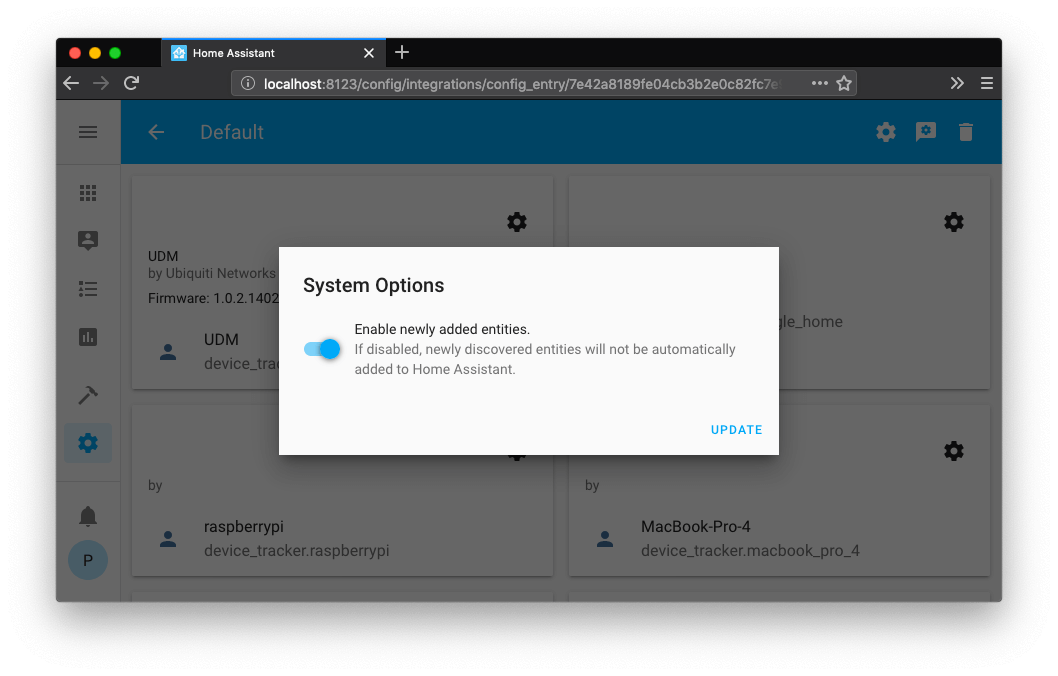 Screenshot of 集成 system options
配置条目选项
We introduced config entries last year as our way as a generic way for 集成 to store 认证 and 配置. By allowing 集成 to define the storage format, there are no more backward-incompatible changes for anything stored inside config entries!
Config entries also work great with people who prefer 配置.yaml. At startup a config entry is 创建/updated with the 配置.
With this 发布 @kane610 added a new possibility for 集成 to offer options in the UI. Options that previously required you to edit 配置.yaml can now be offered via the interface.
This 发布 adds config entry options to Deconz and Unifi 集成 with many more to come.
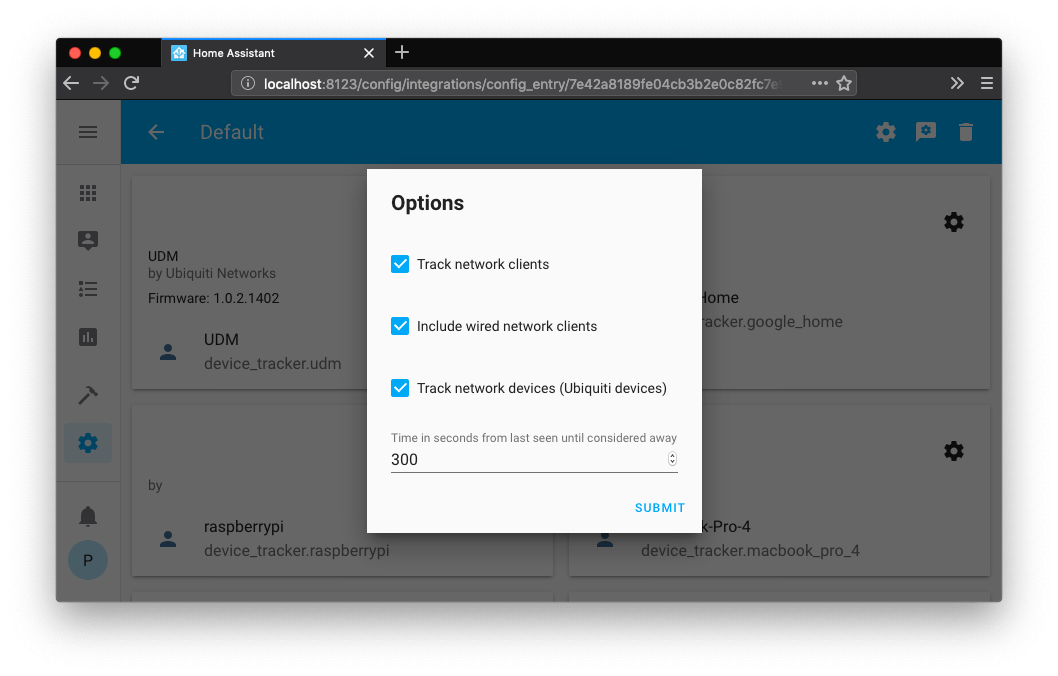 Screenshot of Unifi config options
Home Assistant Alerts
设备 and 服务 can receive updates that can cause 集成 to break. This is frustrating and sometimes the cause can be hard to track down. Usually the 用户 on forums/chat are aware and can help redirect people in the right direction, but that's not a scalable solution!
So to combat this, we're launching Home Assistant Alerts. Home Assistant Alerts is a website that will track 已知问题 and explains in 用户 friendly language what is going on. Alerts can be tagged with applicable Home Assistant versions, 集成 and Python packages.
In the future we're planning on integrating this directly in Home Assistant, so that 用户 can be pro-actively notified of issue related to their 配置.
Docker 基础镜像变更
If you run Home Assistant via Docker (not Hass.io) and are using the homeassistant/home-assistant 容器, the 图像 are now using the same 图像 as hass.io, which are using Alpine Linux instead of Debian.
The hass.io 图像 are a third of the size of the old 图像 and are heavily optimized thanks to the hard work by @pvizeli.
This change will only impact you if you were extending or customizing the 图像 with Debian packages. If you want to continue to use the Debian based 图像, you can find the Dockerfile for the old 图像 here.
For more background on this decision, see ADR-006.
网页抓取
With this 发布 we have deprecated 集成 that rely on webscraping. These will be removed from Home Assistant in a future 发布. Our scrape 集成 will remain part of Home Assistant.
Webscraping is fragile, breaks often requires frequent updates and there have been occasions where websites have banned our 用户.
用户 that rely on these 集成 can continue using them as custom components.
For more background on this decision, see ADR-004.
其他消息
Mason Made 创建 a great video walking through her Lovelace UI with a fancy custom 侧边栏. Check it out:
Reddit 用户 Skyfox2k has built a batcave for his robo 吸尘器. Once the 吸尘器 starts, Home Assistant will open the door and the 吸尘器 can come out to clean!
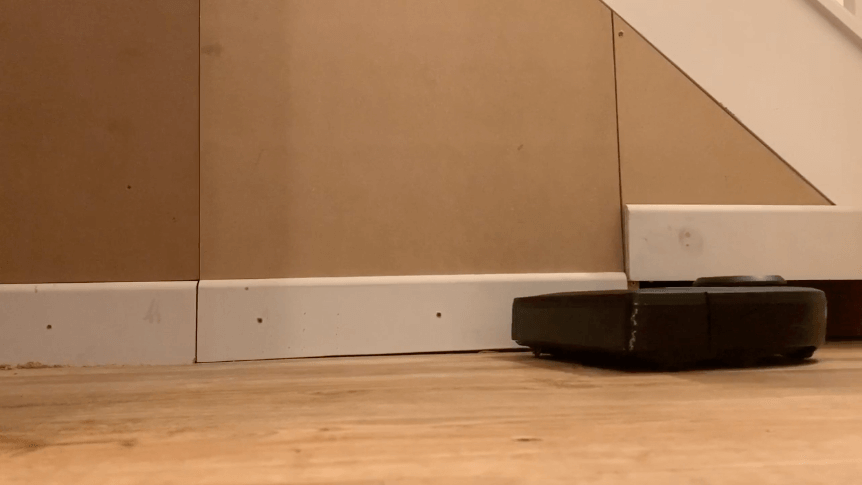 Screencap of the batcave video.
New 集成
- Add Plugwise component (@CoMPaTech - #25533) (plugwise docs) (new-集成)
- GeoNet NZ Quakes feed 集成 (@exxamalte - #25736) (geonetnz_quakes docs) (new-集成)
- Add Keba charging station/wallbox as component (@dannerph - #24484) (keba docs) (new-集成)
- Add Minio component (@tkislan - #23567) (minio docs) (new-集成)
New Platforms
- Add ring 开关 platform (@rossdargan - #25612) (ring docs) (new-platform)
- Add ring 灯光 platform (@rossdargan - #25733) (ring docs) (new-platform)
- Expose Lutron RA2 occupancy 传感器 (@achatham - #25854) (lutron docs) (new-platform)
发布 0.98.1 - August 29
- 更新 传感器.py (@eliseomartelli - #26209) (qbittorrent docs)
- Fix for 0.98: Don't 更新 disabled 实体 (Homematic IP Cloud) (@SukramJ - #26236) (homematicip_cloud docs)
- Fix ZHA 状态 恢复 by always restoring last seen on 设备 (@dmulcahey - #26271) (zha docs)
- Fix missing DarkSky mdi icon (@mbo18 - #26274) (darksky docs)
- Fix partly cloudy (@balloob - #26277) (buienradar docs) (mysensors docs)
- UniFi - dont schedule updates on disabled 实体 (@Kane610 - #26278) (unifi docs)
发布 0.98.2 - September 2
- Expose current direction properly on 状态 machine (@balloob - #26298) (demo docs) (风扇 docs)
- bump tuyaha 0.0.4 (@PaulAnnekov - #26303) (tuya docs)
- Fix Alexa Report 状态 (@balloob - #26305) (alexa docs) (cloud docs)
- Fix alexa bad temp 传感器 (@balloob - #26307) (alexa docs)
- Fix google_maps scan interval (@tyjtyj - #26328) (google_maps docs)
发布 0.98.3 - September 4
- 升级 pyhaversion to 3.1.0 (@fabaff - #26232) (版本 docs)
- String has nothing to do with class method naming (@Kane610 - #26368) (deconz docs)
- Fix race during initial Sonos group construction (@amelchio - #26371) (sonos docs)
- Allow 核心 config updated (@balloob - #26398) (websocket_api docs)
- Met, check for existing location (@Danielhiversen - #26400) (met docs)
- 更新 Harmony to 0.1.13 (@ehendrix23 - #26402) (harmony docs)
- Fix 状态 report (@balloob - #26406) (alexa docs)
- Bump ISY994's PyISY dependency to 1.1.2 (@OverloadUT - #26413) (isy994 docs)
发布 0.98.4 - September 4
- Fix Tuya 开关 (@balloob)
发布 0.98.5 - September 6
We have been notified by Gregor Godbersen that our markdown renderer was vulnerable for an XSS attack if exposed to specially crafted markdown. This was introduced in the Home Assistant 0.98 发布. We have verified that Home Assistant 0.98.0 does not render unsafe markdown, yet still wanted to make sure to issue an 更新 as soon as possible.
More information in this 前端 pull request.
如果你需要帮助……
……欢迎随时使用我们非常活跃的论坛,或者加入我们的 聊天频道。
反馈问题
如果这次发布引入了问题,请前往我们的 issue tracker 提交反馈。请务必填写 issue 模板中的所有字段。
Backward-incompatible changes
-
Deprecated
集成 which make use of web scraping and are pending for removal in Home Assistant 0.100.0 ADR-004:
-
Ruter - Removed - Ruter Labs which hosted the API has shut down the 服务. As an alternative, see the Entur public transport 集成. - (@ludeeus - #26041)
-
Googlehome - Removed - In recent months 此integrations was broken when Google changed the port they serve this information on, in addition to requiring a token header in the request. That method requires the 用户 to have a rooted android 设备, and even then then the "result" was not the best, since you often need to get that token. As an alternative to the 设备 tracker, 用户 can look into https://community.home-assistant.io/t/monitor-reliable-multi-user-distributed-蓝牙-occupancy-presence-detection/68505 - (@ludeeus - #26035)
-
EDP Ready - Removed - The 服务 has moved to a new portal and the previous API does not work anymore. - (@abmantis - #25971)
-
Zwave -
zwave.update_config服务 call has been removed. - (@kpine - #25959) (zwave docs) -
Nissanleaf - Nissan leaf European API no longer supports location control. The
nissan_connect:element from the homeassistantnissan_leaf:配置 must be removed. - (@filcole - #26139) (nissan_leaf docs) -
ZHA - This change has the unique_id use the ieee address instead of the nwk address. The ieee address is static and therefore the unique_id will be stable now. - (@dmulcahey - #25707) (zha docs)
Previous format:
unique_id=0x0b64:1:0x0006New format:
unique_id=00:0d:6f:00:0e:c8:d4:e7:1:0x0006 -
Updater - The updater component is now a 二元sensor that is always available. The 实体 ID is
binary_sensor.updater. The 状态 is on/off depending on whether an 更新 is available or not. The latest 版本 as well as the 发布 notes are 属性 of this 二元sensor. 自动化 that are listening for the existence ofupdater.updatershould now 触发器 whenbinary_sensor.updaterchanges to on. This makes the component more transparent and understandable for the 用户. Additionally, it is visible if there is an 错误 or the source (https://updater.home-assistant.io/) is outdated. - (@Santobert - #25418) (updater docs) -
Mikrotik - The Mikrotik 设备 tracker 集成 is now a component (hub) with a 设备 tracker platform. If you have a device_tracker section where
mikrotikis a platform in your 配置.yaml you will need to move it to the hub config section formikrotikand make sure you follow the new config format. - (@slackr31337 - #25664) (mikrotik docs)Example 配置 entry:
-
Prometheus - Previously, the 集成 would create too many metrics based on
entity_idname which would pollute and fill the database. The naming of metrics has been changed and doesn't use theentity_idanymore. Any consumers of the prometheus data will need to be changed to use the new names. The 用户 can now also use the newcomponent_config_globto remap the metrics any way the 用户 sees fit. - (@perosb - #24103) (prometheus docs)Example 配置 entry:
-
Kodi - Kodi 服务 are now their own domain and the
media_player.kodi_*服务 are nowkodi.*- (@JeffLIrion - #25753) (kodi docs)media_player.kodi_add_to_playlistis nowkodi.add_to_playlistmedia_player.kodi_call_methodis nowkodi.call_method
-
Sonos - This change rejects previously accepted calls using content_types (图像, tvshow, video, episode or channel) when using
media_player.play_media, and changes the behavior of a content_type of "playlist" to play a Sonos playlist, rather than a URL. - (@ahertz - #26054) (sonos docs) -
Statistics - The names of statistics 传感器 no longer get
meanorcountappended automatically, respecting the name configured by the 用户. If you use 此integrations, this name change will affect the name of the 实体. - (@frenck - #26119) (statistics docs)Example 配置 entry:
Beta Fixes
- Load 用户-provided descriptions for python_scripts (@JeffLIrion - #26069) (python_script docs) (beta fix)
- Splitt device_state_attributes between 设备 and group for Homematic IP Cloud (@SukramJ - #26137) (homematicip_cloud docs) (beta fix)
- Nissanleaf login fix (@filcole - #26139) (nissan_leaf docs) (breaking change) (beta fix)
- 日志 警告 if disabled 实体 receive updates. (@balloob - #26143) (beta fix)
- Fix tuya 开关 状态 (@PaulAnnekov - #26145) (tuya docs) (beta fix)
- 重载 config entry when 实体 enabled in 实体 registry, remove 实体 if disabled. (@balloob - #26120) (beta fix)
- CoolMaster: Change auto to heat_cool (@OnFreund - #26144) (coolmaster docs) (breaking change) (beta fix)
- Bump androidtv to 0.0.24 (@JeffLIrion - #26158) (androidtv docs) (beta fix)
- fix issue setting scan_interval (@chaoranxie - #26165) (google_maps docs) (beta fix)
- Fix possible KeyError in SimpliSafe (@bachya - #26190) (simplisafe docs) (beta fix)
- 更新 pyheos to 0.6.0 (@andrewsayre - #26191) (heos docs) (beta fix)
- bump quirks 版本 (@dmulcahey - #26198) (zha docs) (beta fix)
- luci 设备-tracker dependency fix (@flowolf - #26215) (luci docs) (beta fix)
- deCONZ normalizes 遮盖 values to follow Zigbee spec (@Kane610 - #26240) (deconz docs) (beta fix)
- SMA beta fix #26225 (@kellerza - #26244) (sma docs) (beta fix)
All changes
- 脚本/test: fix tox env (@scop - #25620)
- Move mypy 设置 to 设置.cfg (@scop - #25611)
- Add support for HomeKit CO2 传感器 (@tleegaard - #25603) (homekit_controller docs)
- Fix test_install_existing_package (@elupus - #25627)
- Blacken top level *.py (@scop - #25621)
- Huawei LTE 传感器 unique id improvements (@scop - #25609) (huawei_lte docs)
- Add some debugging to azure mypy job (@scop - #25632)
- Add each fronius 传感器 as own 模板 (@nielstron - #25608) (fronius docs)
- Add Plugwise component (@CoMPaTech - #25533) (plugwise docs) (new-集成)
- Fix velbus codeowner (@Cereal2nd - #25649) (velbus docs)
- ZHA code cleanup. (@Adminiuga - #25644) (zha docs)
- Add ELECTRICITY_IMPORTED_TOTAL obis to dsmr (@johnnychicago - #25655) (dsmr docs)
- isort ZHA imports. (@Adminiuga - #25660) (zha docs)
- Azure mypy related tweaks (@scop - #25663)
- Spelling fixes (@scop - #25666)
- Azure ci 模板 (@pvizeli - #25688)
- 升级 pydocstyle to 4.0.0, do not run in tox (@scop - #25667) (filter docs) (islamic_prayer_times docs) (lw12wifi docs) (wunderground docs)
- Plugwise haanna 0.10.1 (@CoMPaTech - #25693) (plugwise docs)
- Bump geniushub client, handle dead 设备, handle raise_for_status (@zxdavb - #25687) (geniushub docs)
- Refactor ZHA Zigbee Cluster report 配置 (@Adminiuga - #25589) (zha docs)
- Make myself the codeowner for androidtv (@JeffLIrion - #25697) (androidtv docs)
- Add usb_path to Z-Wave network_status websocket response (@cgarwood - #25617) (zwave docs)
- PS4 Merge async_setup_platform into async_setup_entry (@ktnrg45 - #25689) (ps4 docs)
- Zwave 温控: 风扇 状态 属性 missing (#25287) (@jaminh - #25573) (zwave docs)
- fix unique id in cluster channels (@dmulcahey - #25707) (zha docs) (breaking change)
- don't mark 设备 unavailable without ping try (@dmulcahey - #25710) (zha docs)
- stagger 设备 init to avoid flooding network (@dmulcahey - #25709) (zha docs)
- Bump androidtv to 0.0.21; add 'state_detection_rules' config parameter (@JeffLIrion - #25647) (androidtv docs)
- Refactor ZHA Zigbee channel registry. (@Adminiuga - #25716) (zha docs)
- Add zigate support to zha (@doudz - #25552) (zha docs)
- Add ring 开关 platform (@rossdargan - #25612) (ring docs) (new-platform)
- Add ring 灯光 platform (@rossdargan - #25733) (ring docs) (new-platform)
- Use more decorators for ZHA 核心 registries. (@Adminiuga - #25737) (zha docs)
- Implement "Aux Heat" support for Zwave 温控 (@eyager1 - #25694) (zwave docs)
- Add test case to identify missing MQTT 配置 abbreviations (@emontnemery - #25616) (MQTT docs)
- Manufacturer specific channel for SmartThings. (@Adminiuga - #25739) (zha docs)
- Deprecates usps 集成 (ADR-0004) (@frenck - #25743) (breaking change)
- Deprecates sytadin 集成 (ADR-0004) (@frenck - #25742) (breaking change)
- Deprecates ups 集成 (ADR-0004) (@frenck - #25746) (breaking change)
- Deprecates fedex 集成 (ADR-0004) (@frenck - #25745) (breaking change)
- Deprecates srp_energy 集成 (ADR-0004) (@frenck - #25754) (breaking change)
- Updater component is always available and shows on/off depending on whether an 更新 is available or not (@Santobert - #25418) (updater docs) (breaking change)
- 集成 requirement check refactor (@elupus - #25626)
- Add Mikrotik hub and rework 设备 tracker (@slackr31337 - #25664) (mikrotik docs) (breaking change)
- Deprecates linksys_ap 集成 (ADR-0004) (@frenck - #25804) (breaking change)
- Fix Broadlink MP1 unavailable 错误 (@miroslawkrol - #25806) (broadlink docs)
- Add arcus trigonometry functions to 模板 (@tomilehto - #25510)
- Add 错误 handling to !include command in yaml (@thomasloven - #25801)
- Webhook for Traccar (@escoand - #24762) (traccar docs)
- Refactor ZHA 设备 initialized logic (@dmulcahey - #25796) (zha docs)
- Fix 64-bit modbus 传感器 register reads (@tomilehto - #25672) (modbus docs)
- GeoNet NZ Quakes feed 集成 (@exxamalte - #25736) (geonetnz_quakes docs) (new-集成)
- Fix 设备 re-connect when API connection lost (@slackr31337 - #25842)
- Prometheus metrics naming based on device_class and unit_of_measurement (@perosb - #24103) (prometheus docs) (breaking change)
- Websocket call for rendering jinja2 模板 subscription (@thomasloven - #25614) (websocket_api docs)
- Bump androidtv to 0.0.22 (@JeffLIrion - #25848) (androidtv docs)
- Move Kodi 服务 from '媒体播放器' domain to 'kodi' (@JeffLIrion - #25753) (kodi docs) (breaking change)
- 更新 传感器.py (@MatsNl - #25825) (statistics docs)
- Add pip-wheel-metadata in .gitignore (@oncleben31 - #25832)
- Fix 配置 field name (@skarcha - #25840) (plex docs)
- Allow components with empty list config (i.e., person) in packages (@kellerza - #25827)
- Make reproduce 状态 use platform instead of rely on function (@balloob - #25856) (温控 docs) (group docs) (媒体播放器 docs)
- Type check various base components (@scop - #25878)
- Fix 脚本/translations_develop launch + clean some unused 错误 i18n (@Quentame - #25459) (arcam_fmj docs) (heos docs) (tellduslive docs) (twentemilieu docs) (upnp docs) (vesync docs) (zha docs)
- Tado AIR_CONDITIONING module was not working propertly (@ejaviga - #25677) (tado docs)
- First pass fixing tests that raise exceptions caught by asyncio.gather (@balloob - #25860) (demo docs) (吸尘器 docs)
- Add reproduce 状态 support to input_boolean (@balloob - #25858) (input_boolean docs)
- eq3bt: handle zero (closed valve) as a valid mode. fixes #25333 (@rytilahti - #25905) (eq3btsmart docs)
- 更新 syncthru library to fix issue (@nielstron - #25924) (syncthru docs)
- Bump 版本 of library aio_geojson_geonetnz_quakes to v0.9 (@exxamalte - #25946) (geonetnz_quakes docs)
- Add OTGW domestic hot water enable option as 服务 (@tcoenraad - #25849) (opentherm_gw docs)
- Bump androidtv to 0.0.23 (@JeffLIrion - #25950)
- Use canonical pre-commit black URL (@scop - #25948)
- 更新 homekit_controller import style (@Jc2k - #25940) (homekit_controller docs)
- Handle more Life360 错误 in config flow & bump package to 4.1.1 (@pnbruckner - #25930) (life360 docs)
- Improve Sonos 错误 handling on slow networks (@amelchio - #25902) (sonos docs)
- Bump simplisafe-python to 4.3.0 (@bachya - #25955) (simplisafe docs)
- Bump aioambient to 0.3.2 (@bachya - #25956) (ambient_station docs)
- Expose Lutron RA2 occupancy 传感器 (@achatham - #25854) (lutron docs) (new-platform)
- Add volumio shuffle support (@zewelor - #25871) (volumio docs)
- Fix Tile 错误 (@paraselene - #25866) (tile docs)
- Complete some incomplete type hints in 助手 (@scop - #25953)
- Remove uvloop from default 安装 and warn about stream+shell_command (@balloob - #25929) (stream docs)
- Tweaks to options flow (@balloob - #25969) (config docs)
- Remove zwave.update_config 服务 call (@kpine - #25959) (zwave docs) (breaking change)
- edp_redy: remove component (@abmantis - #25971) (breaking change)
- Add netgear_lte.disconnect_lte 服务 (@amelchio - #25967) (netgear_lte docs)
- Add broadlink 开关 retry time option (@zhumuht - #25873) (broadlink docs)
- Fix ecobee preset and add 温控 mode back (@balloob - #25970) (ecobee docs)
- 更新 pyvera to 0.3.4 (@KptnKMan - #25986) (vera docs)
- 升级 youtube_dl to 2019.08.13 (@fabaff - #25987) (media_extractor docs)
- 升级 Mastodon.py to 1.4.6 (@fabaff - #25989) (mastodon docs)
- 升级 pytz to >=2019.02 (@fabaff - #25991)
- 升级 sqlalchemy to 1.3.7 (@fabaff - #25997) (recorder docs) (sql docs)
- 升级 restrictedpython to 4.0 (@fabaff - #25993) (python_script docs)
- 升级 shodan to 1.15.0 (@fabaff - #25990) (shodan docs)
- Guard against unavailable 温控 实体 (@balloob - #25978) (alexa docs)
- Ensure sun 条件 are using the right date (@emontnemery - #23664)
- 升级 numpy to 1.17.0 (@fabaff - #25998) (iqvia docs) (opencv docs) (tensorflow docs) (trend docs)
- 升级 python-slugify to 3.0.3 (@fabaff - #25995)
- 升级 importlib-metadata to 0.19 (@fabaff - #26003)
- 升级 voluptuous to 0.11.7 (@fabaff - #26007)
- 升级 pyyaml to 5.1.2 (@fabaff - #25994)
- 升级 pillow to 6.1.0 (@fabaff - #26005) (proxy docs) (qrcode docs) (tensorflow docs)
- Fix bmw_connected_drive and eq3btsmart components by updating their dependencies (@OliverRepo - #26012) (bmw_connected_drive docs) (eq3btsmart docs)
- 升级 luftdaten to 0.6.3 (@fabaff - #26009) (luftdaten docs)
- 升级 pysnmp to 4.4.11 (@fabaff - #26010) (snmp docs)
- 升级 beautifulsoup4 to 4.8.0 (@fabaff - #26006) (scrape docs)
- Allow 实体 to indicate they should be disabled by default (@balloob - #26011)
- Hue tweak registered 设备 type + discovery exception (@balloob - #25977) (hue docs)
- Fix config entry has options check (@balloob - #25976) (config docs)
- 更新 KNX 服务.yaml (@farmio - #26014)
- 实体 registry api 更新 disable (@balloob - #26015) (config docs)
- 升级 voluptuous-serialize to 2.2.0 (@fabaff - #26008)
- Fix unnecessary db entries for metro_france (@oncleben31 - #25957) (meteo_france docs)
- Tone down huawei_lte logging (@scop - #26020) (huawei_lte docs)
- Don't force a query to the main lutron repeater on 更新 (@thecynic - #25939) (lutron docs)
- 升级 pre-commit to 1.18.2 (@scop - #26029)
- 更新 hole to 0.5.0 (@fabaff - #26022) (pi_hole docs)
- Fix background crash in sisyphus 集成 (@jkeljo - #26032) (sisyphus docs)
- Skip homekit_controller polls when system is overloaded and still trying to process the previous one (@Jc2k - #25968) (homekit_controller docs)
- Run flake8 on pre-commit (@scop - #26028)
- 升级 sisyphus-control to 2.2.1 (@jkeljo - #26033) (sisyphus docs)
- 升级 Dialogflow to work with V2 API (@jshridha - #25975) (dialogflow docs)
- Updates to Environment Canada components (@michaeldavie - #25973) (environment_canada docs)
- Add system options to config entries (@Kane610 - #25926)
- Remove the ruter 集成 (@ludeeus - #26041) (breaking change)
- Add support of new Xiaomi Aqara Curtain models (@syssi - #25942) (xiaomi_aqara docs)
- Fritz 设备 tracker: set 'scanning' 日志 to 调试 (@ThaSiouL - #26043) (fritz docs)
- Fix Mikrotik ARP ping (@slackr31337 - #25965) (mikrotik docs)
- Make sure config flows extend ConfigFlow base class (@balloob - #26051) (ipma docs) (met docs) (smhi docs)
- Revert "Fix bmw_connected_drive and eq3btsmart components by updating their dependencies (#26012)" (@pvizeli - #26065) (bmw_connected_drive docs) (eq3btsmart docs)
- Bump nabucasa-cloud to 0.17 (@pvizeli - #26066) (cloud docs)
- fix 报警 webhooks (@fredrike - #26062) (point docs)
- Add Keba charging station/wallbox as component (@dannerph - #24484) (keba docs) (new-集成)
- Add packages 版本 to Tensoflow for wheels packages (@pvizeli - #26068) (tensorflow docs)
- Remove reference to typing.Deque (added in Python 3.6.1) (@jkeljo - #26030) (摄像头 docs)
- huawei_lte: support out of range values in default 传感器 formatter (@flebourse - #26052) (huawei_lte docs)
- SMA simplify config (@kellerza - #25880) (sma docs)
- Add config entry options support to deCONZ (@Kane610 - #26049) (deconz docs)
- pysma library 更新 0.3.4 (@kellerza - #26075) (sma docs)
- Save config entry after updating system options (@balloob - #26077) (config docs)
- Convert progress API to WS (@balloob - #26082) (config docs)
- Add Minio component (@tkislan - #23567) (minio docs) (new-集成)
- Add path option to SABnzbd component (@cj-thornton - #25908) (sabnzbd docs)
- Add strings for traccar config flow (@balloob - #26089) (traccar docs)
- 更新 pyrainbird to 版本 0.2.1 to fix 区域 number (@konikvranik - #26064) (rainbird docs)
- 更新 pylacrosse library to 版本 0.4.0 (@legacycode - #26088) (lacrosse docs)
- Docker ADR (@pvizeli - #26085)
- Bump geniushub client (@zxdavb - #26084) (geniushub docs)
- Use init_subclass for Config Entries (@balloob - #26059) (hue docs) (met docs)
- Sonos playlists play media (@ahertz - #26054) (sonos docs) (breaking change)
- Remove the googlehome 集成 (@ludeeus - #26035) (breaking change)
- Test with 3.6.0 in Travis (@scop - #26039)
- add id to 状态 属性 (@sander76 - #26086) (homematicip_cloud docs)
- Fix open-ui cli arg (@balloob - #26091)
- [bugfix] Exception if vendor's servers are currently unavailable (@WoLpH - #26093) (evohome docs)
- Bump up zha dependencies. (@Adminiuga - #26097) (zha docs)
- 更新 bimmer_connected to 0.6.0 (@gerard33 - #26098) (bmw_connected_drive docs)
- Add support for 警告 属性 to Homematic IP Cloud (@SukramJ - #26103) (homematicip_cloud docs)
- check if a 灯光 supports brightness (@croghostrider - #26055) (emulated_hue docs)
- bump quirks (@dmulcahey - #26106) (zha docs)
- 升级 ruamel_yaml to 0.15.100 (@BKPepe - #26095)
- 升级 pydocstyle to 4.0.1 (@scop - #26111)
- 升级 pytest to 5.1.1 (@scop - #26112)
- Remove coveralls test dependency (@scop - #26110)
- Check and fix test suite leaving files behind (@scop - #25981)
- 更新 PyEssent (@TheLastProject - #26115) (essent docs)
- remove ATTR_ID for groups (@SukramJ - #26114) (homematicip_cloud docs)
- 更新 eternalegypt to 0.0.10 (@amelchio - #26117) (netgear_lte docs)
- UniFi config entry options (@Kane610 - #26113) (unifi docs)
- 模板 二元sensor 属性 (@gadgetchnnel - #22664) (模板 docs)
- Add descriptive fields to 脚本 config (@JeffLIrion - #26056) (脚本 docs)
- Fix tests leaving files behind (@balloob - #26121)
- Statistics 传感器 repect given name (@frenck - #26119) (statistics docs) (breaking change)
- 更新 azure-pipelines-发布.yml for Azure Pipelines (@pvizeli - #26128)
- Load 用户-provided descriptions for python_scripts (@JeffLIrion - #26069) (python_script docs) (beta fix)
- Splitt device_state_attributes between 设备 and group for Homematic IP Cloud (@SukramJ - #26137) (homematicip_cloud docs) (beta fix)
- Nissanleaf login fix (@filcole - #26139) (nissan_leaf docs) (breaking change) (beta fix)
- 日志 警告 if disabled 实体 receive updates. (@balloob - #26143) (beta fix)
- Fix tuya 开关 状态 (@PaulAnnekov - #26145) (tuya docs) (beta fix)
- 重载 config entry when 实体 enabled in 实体 registry, remove 实体 if disabled. (@balloob - #26120) (beta fix)
- CoolMaster: Change auto to heat_cool (@OnFreund - #26144) (coolmaster docs) (breaking change) (beta fix)
- Bump androidtv to 0.0.24 (@JeffLIrion - #26158) (androidtv docs) (beta fix)
- fix issue setting scan_interval (@chaoranxie - #26165) (google_maps docs) (beta fix)
- Fix possible KeyError in SimpliSafe (@bachya - #26190) (simplisafe docs) (beta fix)
- 更新 pyheos to 0.6.0 (@andrewsayre - #26191) (heos docs) (beta fix)
- bump quirks 版本 (@dmulcahey - #26198) (zha docs) (beta fix)
- Nightly builds (@pvizeli - #26204)
- luci 设备-tracker dependency fix (@flowolf - #26215) (luci docs) (beta fix)
- deCONZ normalizes 遮盖 values to follow Zigbee spec (@Kane610 - #26240) (deconz docs) (beta fix)
- SMA beta fix #26225 (@kellerza - #26244) (sma docs) (beta fix)