

0.90:远程 UI、流媒体与用户分组
Home Assistant 0.90 来了,只能说:太强了。这次发布塞满了各种酷炫内容,多到都不知道该从哪里开始,那我们就直接进入正题吧。
第一个重磅功能是,Home Assistant Cloud 现在支持远程控制了。这让你即使不在家,也能查看家里的情况。收到“检测到移动”的通知?现在你可以立刻查看发生了什么,并在外出时直接采取行动。它采用端到端加密。想开始使用?只需要启用它,就这么简单。
想了解它的工作方式,请查看文档,或收听 Home Assistant Podcast 最新一期。
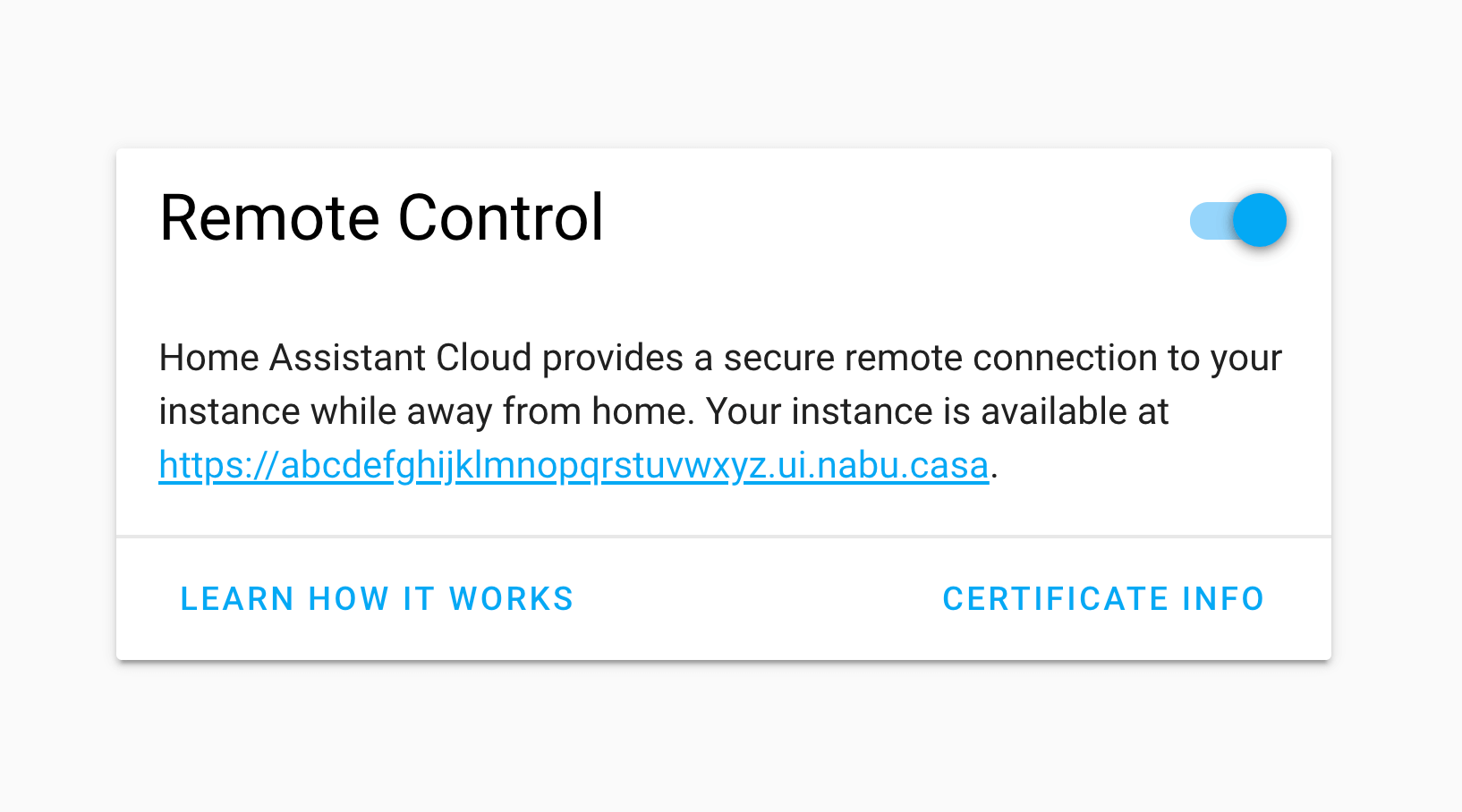 Screenshot of the 遥控器 UI preference.
人人可用的摄像头流媒体
在这个版本里,我们开始认真打磨摄像头能力。 @hunterjm 为此投入了数月时间,现在终于可以首次公开展示了。借助 stream 集成,我们可以转发家中摄像头的视频流,并重新封装成你的显示设备能够理解的格式。此前,摄像头流媒体仅限前端使用,而且只有每秒 2 帧。第一版我们重点支持的是 HLS 格式,现代浏览器和 Chromecast 都支持它。每个摄像头集成都需要单独适配,而在首个版本中,我们目前只为 generic 摄像头集成加入了支持。
那现在能做到什么?比如门铃响起时,你可以立刻把前门摄像头画面投到电视上;又或者在婴儿房安装一个摄像头,把 Google Home Hub 变成婴儿监视器。
要开始使用,请在 configuration.yaml 中加入 stream:,配置 generic 摄像头,然后开始使用新的 camera.play_stream 服务。
Stream any 摄像头 on any 设备.
— Paulus Schoutsen (@balloob) February 28, 2019
New feature by @hunterjm coming soon to a @home_assistant near you. pic.twitter.com/At9wUkcZZJ
用户分组
这是一个酝酿和开发了很久的功能:你现在可以把用户加入分组,从而阻止他们通过 UI 修改配置。被放入新“用户”组的用户将不会看到配置面板或开发者工具的入口。当前这还只是一个 UI 层面的功能,并不是安全特性。我们正在努力把它扩展为真正的安全能力,也就是在 API 层面限制访问。
更聪明的 SmartThings
如果你使用 Home Assistant Cloud,设置 SmartThings 时现在会自动利用 Cloudhooks。这意味着你无需把实例暴露到互联网就能开始使用 SmartThings。设置更简单了,感谢 @andrewsayre!SmartThings 现在还新增了对三轴传感器和空调设备的支持。
区域增强
这个版本也进一步增强了区域功能。感谢 @Swamp-Ig,当你把 Home Assistant 同步到 Google Assistant 时,区域现在会作为房间提示一并带过去,这会让设置变得更加轻松。
区域 can now also be used as targets in 服务. Just specify area_id instead of entity_id in your 脚本 or 自动化.
我们还把区域整合进了集成的设置流程。添加集成时,我们会检查新增了哪些设备,并立即提示你进行配置,这样你就不会忘记了。
VSCode 扩展
如果你错过了这个消息,本周早些时候 Kees Schollaart 发布了他的 VSCode Home Assistant 扩展首个版本。它可以连接到你的实例,并在你编辑配置时提供实体 ID 自动补全!
This weekend I built a @code extension for @home_assistant! It connects with your Home Assistant host and will provide auto-completion for your entity_id's! Check it out in the Marketplace: https://t.co/21PxCqWrlQ Ideas/feedback more than welcome! Thanks for helping @balloob! pic.twitter.com/la9SPr5Rjw
— Kees Schollaart (@keesschollaart) March 17, 2019
新平台
- Live Streams Component (@hunterjm - #21473) (摄像头 docs) (stream docs) (new-platform)
- Add support for homekit controller 传感器 (@cpopp - #21535) (homekit_controller docs) (new-platform)
- Add SmartThingsAccelCluster to ZHA binary_sensor (@roblandry - #21609) (zha docs) (new-platform)
- Xfinity Gateway device_tracker platform (@cisasteelersfan - #21026) (device_tracker docs) (new-platform)
- Add Time of Flight 传感器 using VL53L1X (@josemotta - #21230) (tof docs) (new-platform)
- Adding enigma2 media player (@fbradyirl - #21271) (媒体播放器.enigma2 docs) (new-platform)
- Add support for Cisco Mobility Express (@fbradyirl - #21531) (cisco_mobility_express docs) (new-platform)
- Add ClearPass Policy Manger 设备 tracker (@zemerick1 - #21673) (device_tracker docs) (new-platform)
- Add 天气 传感器 to Homematic IP (@SukramJ - #21887) (homematicip_cloud docs) (new-platform)
发布 0.90.1 - March 21
- Fix ZHA force polled 实体. (@Adminiuga - #22222)
- Bump total-connect-client to 0.25, fixing issue with Total Connect (@kkr16 - #22230)
- Stream fixes (@hunterjm - #22238) (stream docs)
- Allow on/off on tado 温控 component. (@michaelarnauts - #22242) (tado docs)
- Fix validate Webhook requirements (@andrewsayre - #22248) (smartthings docs)
- 更新 Hass-NabuCasa 0.9 (@pvizeli - #22258) (cloud docs)
发布 0.90.2 - March 26
- Fix ps4 no creds with additional 设备 (@ktnrg45 - #22300)
- Prefer TCP for RTSP streams (@hunterjm - #22338)
- 更新 hass-nabucasa & fix 状态 (@pvizeli - #22385)
- Enable hass.io 面板 without ping (@pvizeli - #22388)
- reset unsub to None on timeout (@hunterjm - #22404)
- Bump pyotgw to 0.4b2 (@mvn23 - #21973)
- Fix opentherm_gw blocks HA startup when gateway unreachable. (@mvn23 - #22106)
- Fix TypeError in current_temperature if no temperature is known. (@mvn23 - #22112)
- Improve opentherm gw startup (@mvn23 - #22121)
如果你需要帮助……
欢迎使用我们非常活跃的论坛,或者加入我们的聊天频道。虽然发布说明开放评论,但我们更希望你使用前面这些沟通渠道。谢谢。
反馈问题
如果你遇到了这个版本引入的问题,请在我们的 issue tracker 中报告。请务必填写 issue 模板中的所有字段。
向后不兼容的变更
- http.api_password - Deprecated - 用户 who are still using api_password for 认证 will need to move its 配置 under auth_providers. Please see the updated 文档 for further details. Those who don't make this change will see an INFO level reminder in the Home Assistant 日志 until the fix is made for a time, but please note, api_password 认证 will eventually be removed completely and we advise 用户 to change to use one of the other authentication methods. If you manually specify auth providers in your
configuration.yaml, you will need to migrate your API 密码 from the http section to the auth provider section to continue using it. (@awarecan - #21884) (api docs) (前端 docs) (hassio docs) (http docs) (MQTT docs) (websocket_api docs) (zeroconf docs) (摄像头.proxy docs) - Default Config - Default config no longer contains the discovery component. That is now part of the initial written 配置.yaml. If you rely on default config and want to use discovery, add
discovery:back to your 配置.yaml. - Netatmo
- Added support for multiple Netatmo thermostats/valves allowing the 用户 to specify different homes or 房间! Please check the updated 文档 for 配置 details. (@shanbs - #19407) (netatmo docs) (温控.netatmo docs)
current_operationwill no longer return the the boiler status, but the operation_mode. For example, heat, cool, or idle. Please check the updated 文档 for more details. (@shanbs - #21633) (netatmo docs)
- Utility Meter - Currently the offset 配置 parameter is an integer that limits daily cycles to have offsets in days, monthly cycles to have offsets in months, etc. This change increases the flexibility of offset by making it a more flexible time period that can be described in a combination of hours, days, months, etc. This makes it possible for a yearly cycle to start at a given day of a given month. Please see the updated 文档 for the new 配置 options. (@dgomes - #20926) (utility_meter docs)
- KNX - An 更新 for xknx to 版本 0.10.0 requires 用户 to 更新 their 配置 by changing
target_temperature_addresstotarget_temperature_state_address. Other fixes and features:- Connection config can now be configured in xknx.yml.
- Introduce a configurable rate limit which limits the number of KNX telegrams sent to the bus per second.
- 用户 who configured their 灯光 via xknx.yml no longer need to manually set min_kelvin and max_kelvin (fixes #21251) (@marvin-w - #21541) (knx docs)
- Nanoleaf - The Nanoleaf component now supports both nanoleaf 灯光, Aurora and Canvas. As a result of this change the 用户 needs to change the platform from
nanoleaf_auroratonanoleaf(@Oro - #21913) (灯光.nanoleaf docs) - FireTV- is now androidtv. Instead of having near-duplicate 集成 for androidtv and firetv, the decision was made to combine them into one.
用户 will need to change
- platform: firetvto- platform: androidtvin their 配置. (@JeffLIrion - #21944) - Tellstick - Some 配置 cleanup. The way Tellsick 传感器 配置 was set up using dynamic values for named 传感器 will not be supported in future versions of Home Assistant. 用户 that have configured the optional named 传感器 initiated with only_named will have to 更新 their 配置. Make sure to check the updated 文档 for further details. (@endor-force - #21402) (tellstick docs)
- MQTT - Pass
Messageobject to MQTT message callbacks instead oftopic,messageandqos. 用户 of custom components please take note, these values are now available on the passed in message object:msg.topic,msg.message,msg.qos. The old method will continue to work for now but will print 警告. (@emontnemery - #21959) (MQTT docs)
Beta 修复
- mobile_app component (@robbiet480 - #21475) (mobile_app docs) (beta fix) (new-platform)
- Remove UTF8 decoding for Waze (@philhawthorne - #22020) (传感器.waze_travel_time docs) (beta fix)
- Bring back the boiler status (@cgtobi - #22021) (netatmo docs) (beta fix)
- 更新 additional platforms to use new MQTT message callback (@emontnemery - #22030) (device_tracker docs) (mqtt_eventstream docs) (owntracks docs) (snips docs) (alarm_control_panel.manual_mqtt docs) (自动化.MQTT docs) (传感器.arwn docs) (传感器.mqtt_room docs) (beta fix)
- Fix lifx 灯光 async 错误 (@awarecan - #22031) (lifx docs) (beta fix)
- Fix Google Assistant 用户 with Cloud (@pvizeli - #22042) (cloud docs) (beta fix)
- Mobile App: Require encryption for registrations that support it (@robbiet480 - #21852) (mobile_app docs) (beta fix)
- Mobile App: Support rendering multiple 模板 at once (@robbiet480 - #21851) (mobile_app docs) (beta fix)
- Mobile App: 更新 Location schema updates & 设备 ID generation (@robbiet480 - #21849) (mobile_app docs) (beta fix)
- Mobile App: Register 设备 into the registry (@robbiet480 - #21856) (mobile_app docs) (beta fix)
- Mobile App: 传感器 (@robbiet480 - #21854) (mobile_app docs) (beta fix) (new-platform)
- Bump androidtv to 0.0.11 (@JeffLIrion - #22025) (androidtv docs) (beta fix)
- Mobile App: Enable loading via discovery (surprise inside!) (@robbiet480 - #22027) (mobile_app docs) (beta fix)
- Mobile App: Discovery to default 配置.yaml, zeroconf to default_config (@robbiet480 - #22028) (default_config docs) (mobile_app docs) (beta fix)
- Mobile App: Expose Cloud 遥控器 UI FQDN in registration response (@robbiet480 - #22055) (cloud docs) (mobile_app docs) (beta fix)
- Return config entry ID after creation (@balloob - #22060) (config docs) (beta fix)
- Correct context (@awarecan - #22061) (alexa docs) (beta fix)
- 二元sensor for 遥控器 UI & Fix timezone (@pvizeli - #22076) (beta fix)
- Bump androidtv to 0.0.12 (@JeffLIrion - #22072) (androidtv docs) (beta fix)
- Prevent cloud 遥控器 UI when using 127.0.0.1 as trusted network (@balloob - #22093) (cloud docs) (beta fix)
- Beta Fix: FFMPEG and Stream component (@hunterjm - #22091) (摄像头.ffmpeg docs) (摄像头.generic docs) (摄像头.onvif docs) (beta fix)
- delete previously removed 服务 option from 服务 yaml (@hunterjm - #22123) (beta fix)
- Remove hass.config from aws_lambda 通知 payload (@awarecan - #22125) (breaking change) (beta fix)
- Allow non-admins to listen to certain events (@balloob - #22137) (websocket_api docs) (beta fix)
- Bump tado 版本 (@WebSpider - #22145) (tado docs) (beta fix)
- Fix resetting access token on streams with keepalive (@hunterjm - #22148) (stream docs) (beta fix)
- Remove config check over supervisor (@pvizeli - #22156) (hassio docs) (beta fix)
- 升级 toonapilib to 3.2.2 + lower interval (@frenck - #22160) (toon docs) (beta fix)
- bump total_connect_client to 0.24 (@uchagani - #22166) (totalconnect docs) (beta fix)
- 更新 Hass-NabuCasa 0.8 (@pvizeli - #22177) (cloud docs) (beta fix)
- Always load Hass.io component on Hass.io (@balloob - #22185) (beta fix)
- Fixed typing 错误 (@Swamp-Ig - #22207) (beta fix)
所有变更
- 升级 pyopenuv to 1.0.9 (@bachya - #21513) (openuv docs)
- 升级 pypollencom to 2.2.3 (@bachya - #21517) (传感器.pollen docs)
- 升级 pytile to 2.0.6 (@bachya - #21516) (device_tracker docs)
- Upgraded py17track to 2.2.2 (@bachya - #21515) (传感器.seventeentrack docs)
- 升级 pyflunearyou to 1.0.2 (@bachya - #21514) (传感器.flunearyou docs)
- Bump starlingbank 版本 to 3.1 (@Dullage - #21501) (传感器.starlingbank docs)
- 升级 opensensemap-api to 0.1.5 (@fabaff - #21524) (air_quality docs)
- Register 'firetv.adb_command' 服务 (@JeffLIrion - #21419) (媒体播放器.firetv docs)
- Add arm night for 报警 decoder (@koolsb - #21488) (alarmdecoder docs)
- 升级 numpy to 1.16.2 (@fabaff - #21525) (binary_sensor.trend docs) (image_processing.opencv docs) (image_processing.tensorflow docs) (传感器.pollen docs)
- 升级 python-mystrom to 0.5.0 (@fabaff - #21523) (灯光.mystrom docs) (开关.mystrom docs)
- MQTT 报警 added value_template and code_arm_required (@ToRvaLDz - #19558) (alarm_control_panel.MQTT docs)
- Add direct binding for 遥控器 and 灯光 for ZHA (@dmulcahey - #21498) (zha docs)
- Add support for homekit controller 传感器 (@cpopp - #21535) (homekit_controller docs) (new-platform)
- 更新 CODEOWNERS (@dgomes - #21545)
- Clean up gpslogger tests (@MartinHjelmare - #21543)
- new websocket api way (@dmulcahey - #21533) (zha docs)
- Add pause/unpause 服务 to RainMachine (@bachya - #21548) (rainmachine docs)
- prevent duplicate event channel registration (@dmulcahey - #21534) (zha docs)
- Allow config entry reloading (@balloob - #21502)
- Add separate on/off ids on manual configured IHC 灯光 (@msvinth - #20253) (ihc docs) (灯光.ihc docs) (new-platform)
- add friendly name to 设备 in the 设备 registry (@dmulcahey - #21499) (zha docs)
- Allow chaining contexts (@balloob - #21028) (自动化 docs)
- bump pyxeoma to 1.4.1 to fix and close #19306 (@trunet - #21568) (摄像头.xeoma docs)
- fix exception (@dmulcahey - #21571) (zha docs)
- Add config entry remove callback (@andrewsayre - #21576)
- mobile_app component (@robbiet480 - #21475) (mobile_app docs) (beta fix) (new-platform)
- Memory optimization for logbook (@amelchio - #21549) (logbook docs)
- Get 房间 hints from 区域 (@Swamp-Ig - #21519) (google_assistant docs)
- Centrally define Watt (@dgomes - #21570)
- Add network throughput statistics to systemmonitor 传感器 (@dgomes - #21575) (传感器.systemmonitor docs)
- 更新 for new pyvesyncv_v2 library and vesync 开关 support (@webdjoe - #21449) (开关.vesync docs)
- ZHA fixes (@dmulcahey - #21592) (zha docs)
- 更新 pyhomematic (@danielperna84 - #21600) (homematic docs)
- Add parameter hold_secs for Harmony 遥控器 send command (@ehendrix23 - #19650) (遥控器 docs) (遥控器.harmony docs)
- 升级 motorparts to 1.1.0 (@rohankapoorcom - #21602)
- Further Yale ZWave 门锁 设备 mapping cleanup (@mw-white - #21128) (zwave docs)
- Added support for multiple Netatmo thermostats/valves (@shanbs - #19407) (netatmo docs) (温控.netatmo docs) (breaking change)
- Add the velbus sync clock 服务 (@Cereal2nd - #21308) (velbus docs)
- SmartThings remove SmartApp/自动化 on 集成 removal (@andrewsayre - #21594) (smartthings docs) (new-feature)
- Bumping aioasuswrt (@kennedyshead - #21627) (asuswrt docs)
- Add 设备 HMIP-eTRV-C to HomematicIP (@SukramJ - #21612)
- Add 'app_name' property and 'apps' config entry to Fire TV (@JeffLIrion - #21601) (androidtv docs)
- Add optional sender name for SendGrid (@srirams - #21610) (通知.sendgrid docs)
- fix derived rate, fixes #20097 (@wburgers - #21620) (传感器.dsmr docs)
- Bump pyflunearyou to 1.0.3 (@bachya - #21634) (传感器.flunearyou docs)
- Return Netatmo 温控 operation_mode instead of boiler status (@shanbs - #21633) (netatmo docs) (breaking change)
- Expose create/delete cloudhook (@balloob - #21606) (cloud docs)
- Add storage 助手 to ZHA and use it for the 设备 node descriptor (@dmulcahey - #21500) (zha docs) (new-platform)
- Allow 配置 of 更新 interval for ness_alarm (@nickw444 - #21415) (ness_alarm docs)
- Replace travis (@pvizeli - #21641)
- Fix 动作 with tox (@pvizeli - #21642)
- GitHub Workflow (@pvizeli - #21643)
- 升级 youtube_dl to 2019.03.01 (@fabaff - #21647) (media_extractor docs)
- Add support for DHT and DS18B20 传感器 via Konnected firmware (@heythisisnate - #21189) (konnected docs)
- Allow targeting 区域 in 服务 calls (@balloob - #21472) (alert docs) (自动化 docs) (group docs) (image_processing docs) (灯光 docs) (场景 docs) (脚本 docs)
- Add 摄像头 name to 日志 (@arsaboo - #21653) (摄像头.generic docs)
- Netatmo, handle missing thermostat 设备 (@Danielhiversen - #21651) (netatmo docs)
- Add SmartThingsAccelCluster to ZHA binary_sensor (@roblandry - #21609) (zha docs) (new-platform)
- Add support for multiple 设备 for PS4 component (@ktnrg45 - #21302) (ps4 docs)
- Xfinity Gateway device_tracker platform (@cisasteelersfan - #21026) (device_tracker docs) (new-platform)
- Adds option in UPnP component to override callback url (@StevenLooman - #21583) (媒体播放器.dlna_dmr docs)
- Serialize amcrest snapshot commands and bump PyPI package to 1.2.4 (@pnbruckner - #21664) (amcrest docs)
- Bump nessclient 版本 to 0.9.14 (@nickw444 - #21679) (ness_alarm docs)
- Allow 202 status code as a successful REST 通知 response (@u1f35c - #21678) (通知 docs)
- Bump teslajsonpy to 0.0.24 (@alandtse - #21675) (tesla docs)
- Fix Z-Wave relative imports (@balloob - #21693) (zwave docs)
- Use new style for built-in ws commmands (@balloob - #21694) (websocket_api docs)
- Google Assistant: Create and pass context to 服务 calls (@Swamp-Ig - #21551) (google_assistant docs)
- 更新 to teslajsonpy v0.0.25 (@alandtse - #21702) (tesla docs)
- Utility Meter offset defined by a time_period (@dgomes - #20926) (utility_meter docs) (breaking change)
- Change amcrest camera_image to async (@pnbruckner - #21720) (amcrest docs)
- Start preparing for homekit_controller config entries (@Jc2k - #21564) (homekit_controller docs)
- Support multiple keys in ifttt 触发器 (@zeehio - #21454) (ifttt docs)
- Fix initialization and add "pending" status of Satel integra (@c-soft - #21194) (satel_integra docs)
- Fix pylint 警告 on python 3.7 (@awarecan - #21714) (温控.eq3btsmart docs)
- Make pytest in tox quite (@awarecan - #21727)
- tplink - catch SmartDeviceException on is_dimmable call (@ljmerza - #21726) (tplink docs)
- Remove pytest 警告 message (@awarecan - #21713)
- 更新 .travis.yml (@pvizeli - #21736)
- Revert Travis until github 动作 work better for PR (@pvizeli - #21746)
- Allow 灯光 切换 服务 to accept all 打开 params (@zewelor - #20912) (灯光 docs)
- Introduce target_temperature_state_address for 温控 设备 (@marvin-w - #21541) (knx docs) (breaking change)
- 升级 pylint to 2.3.1 (@scop - #21789)
- Add Time of Flight 传感器 using VL53L1X (@josemotta - #21230) (tof docs) (new-platform)
- 升级 huawei-lte-api to 1.1.5 (@scop - #21791) (huawei_lte docs)
- Adding enigma2 media player (@fbradyirl - #21271) (媒体播放器.enigma2 docs) (new-platform)
- Bump loopenergy to 0.1.0. Loop updated their socket.io server from 0.9 to 2.0 - which required a library 更新. (@pavoni - #21809) (传感器.loopenergy docs)
- remove occupancy, as it is not available at this level in the iRail api (@nudded - #21810) (传感器.nmbs docs)
- Onboarding to generate auth code (@balloob - #21777) (auth docs) (onboarding docs)
- Remove stub from config component (@balloob - #21822) (config docs)
- change paths to be relative (@uchagani - #21827) (zwave docs)
- Change how we import config modules (@balloob - #21824) (config docs)
- Load logger and system_log components as soon as possible (@awarecan - #21799)
- Resolve auth_store loading race 条件 (@awarecan - #21794)
- 日志 if aiohttp hits 错误 during IndieAuth (@robbiet480 - #21780) (auth docs)
- Add support for Cisco Mobility Express (@fbradyirl - #21531) (cisco_mobility_express docs) (new-platform)
- Synology 传感器 quick return if attr is null (@cmsimike - #21709) (传感器.synologydsm docs)
- fix empty TOPIC_BASE issue (@engrbm87 - #21740) (MQTT docs)
- Updated to pyeconet 0.0.10 (@w1ll1am23 - #21837) (water_heater docs)
- Fix config entry exception in Ambient PWS (@bachya - #21836) (ambient_station docs)
- Fixed a misspelling in a docstring (@bachya - #21846) (ambient_station docs)
- mobile_app improvements (@robbiet480 - #21607) (mobile_app docs)
- 更新 honeywell.py to read current humidity for US Thermostats (@Hackashaq666 - #21728) (温控.honeywell docs)
- Fix TypeError (@wburgers - #21734) (传感器.dsmr docs)
- Introduce 实体.async_write_ha_state() to not miss 状态 transition (@emontnemery - #21590)
- Fix authorization header in cors (@piitaya - #21662) (http docs)
- Only commit if need. (@awarecan - #21848)
- Bump quirks for ZHA and handle resulting battery % change (@dmulcahey - #21869) (zha docs)
- Better cloud check (@balloob - #21875) (cloud docs) (mobile_app docs)
- Add ClearPass Policy Manger 设备 tracker (@zemerick1 - #21673) (device_tracker docs) (new-platform)
- Add SmartThings 温控 support for Air Conditioners (@andrewsayre - #21840) (smartthings docs) (new-feature)
- Add SmartThings 传感器 support for Three Axis (@andrewsayre - #21841) (smartthings docs) (new-feature)
- Add 用户 group (@balloob - #21832)
- 更新 ZHA 状态 handling (@dmulcahey - #21866) (zha docs)
- Change lib for whois 传感器 (@ludeeus - #21878) (传感器.whois docs)
- Don't wait until final position of Velux 遮盖 is reached (@Julius2342 - #21558) (velux docs)
- Fix missing code_required check in async_alarm_arm_night (@ToRvaLDz - #21858) (MQTT docs)
- Fix icon for 传感器.discogs_random_record (@thibmaek - #21891) (传感器.discogs docs)
- Add myself to CODEOWNERS for NMBS code (@thibmaek - #21892)
- Modbus write_register accept single value and array (@gertdb - #21621) (modbus docs)
- Add custom holidays to workday 传感器 (@epleypa - #21718) (binary_sensor.workday docs)
- Return time based 属性 as datetime in Unifi module (@ndonegan - #21146) (device_tracker docs)
- Allow emulated hue to set 温控 component temperature (@chilicheech - #19034) (emulated_hue docs)
- bump netdisco to 2.4.0 (@fbradyirl - #21914)
- Deprecate http.api_password (@awarecan - #21884) (api docs) (前端 docs) (hassio docs) (http docs) (MQTT docs) (websocket_api docs) (zeroconf docs) (摄像头.proxy docs) (breaking change)
- Don't hang forever if manually added cast is down (@emontnemery - #21565) (cast docs)
- Add WS subscription command for MQTT (@balloob - #21696) (MQTT docs) (websocket_api docs)
- Add 'ssl' parameter for FiOS Quantum Gateway and 升级 Pypi (@cisasteelersfan - #21669) (device_tracker docs)
- Add as_timestamp() to Jinja filters. (@rbdixon - #21910)
- HomeKit controller config flow fixes (@Jc2k - #21898) (homekit_controller docs)
- 更新 enigma2 based on review comments (@fbradyirl - #21890) (enigma2 docs)
- Remove confusing 警告 for TTS without entity_id (@amelchio - #21927) (tts docs)
- Fixes Modbus 服务.yaml validity (@gertdb - #21923)
- Add cloudhook support to SmartThings component (@andrewsayre - #21905) (smartthings docs)
- If registration supports encryption then return encrypted payloads (@robbiet480 - #21853) (mobile_app docs)
- Allow inverting netdata 传感器 values (@michaelarnauts - #21711) (传感器.netdata docs)
- Changed from nanoleaf_aurora to nanoleaf (@Oro - #21913) (灯光.nanoleaf docs) (breaking change)
- Minor 版本 bump for anthemav package (@nugget - #21932) (媒体播放器.anthemav docs)
- Add 区域 permission check (@balloob - #21835)
- Add an asyncio 门锁 around pairing, which cant be used concurrently (@Jc2k - #21933) (homekit_controller docs)
- Add 更新 用户 command (@balloob - #21922) (config docs)
- Offload Cloud component (@pvizeli - #21937) (cloud docs)
- 升级 schiene to 0.23 (@fabaff - #21940) (传感器.deutsche_bahn docs)
- Live Streams Component (@hunterjm - #21473) (摄像头 docs) (stream docs) (new-platform)
- 更新 lametric icon to be HA logo (@robbiet480 - #21957) (lametric docs)
- Avoid playing queue pollution when restoring Sonos snapshots (@amelchio - #21963) (sonos docs)
- 更新 to sense component to fully be async (@kbickar - #21698) (sense docs)
- fix ephember doing http call from property (@ttroy50 - #21855) (温控.ephember docs)
- Add 天气 传感器 to Homematic IP (@SukramJ - #21887) (homematicip_cloud docs) (new-platform)
- Add cloud status (@balloob - #21960) (cloud docs)
- Fix MagicHome LEDs with flux_led component (@autinerd - #20733) (灯光.flux_led docs)
- Stream: Only add base url when needed (@balloob - #21979) (摄像头 docs) (stream docs)
- Allow changing 密码 without being admin (@balloob - #21978) (config docs)
- Fix some cloud things (@balloob - #21977)
- homekit_controller: Bump homekit to 0.13.0 (@Jc2k - #21965) (homekit_controller docs)
- skip flaky test (@balloob - #21981)
- Write 状态 directly in all MQTT platforms (@emontnemery - #21971) (MQTT docs)
- Use .get to ensure we dont get KeyError (@robbiet480 - #21993) (mobile_app docs)
- Fix 错误 introduced by #21933 (@Jc2k - #21988) (homekit_controller docs)
- Add stream source for amcrest component (@dshokouhi - #21983) (amcrest docs)
- Set homekit controller 实体 as unavailable if new connections fail (@Jc2k - #21901) (homekit_controller docs)
- Centrally define Energy Units (kWh and Wh) (@dgomes - #21719)
- Mobile App: Registration schema improvements (@robbiet480 - #21850) (mobile_app docs)
- Add a 服务 require_admin wrapper (@balloob - #21953)
- 更新 pyhomematic to 0.1.58 (@danielperna84 - #21989) (homematic docs)
- Use asyncio 门锁 (@amelchio - #21985) (sonos docs)
- Add breaking change section to PR 模板 (@awarecan - #21994)
- Rename 'firetv' to 'androidtv' and add Android TV functionality (@JeffLIrion - #21944) (breaking change)
- Tellstick 传感器 配置 cleanup (@endor-force - #21402) (tellstick docs) (breaking change)
- Add availability and next run datetime to RainMachine 开关 (@bachya - #21786) (rainmachine docs)
- Add program/区域 enable/disable 服务 to RainMachine (@bachya - #21785) (rainmachine docs)
- Bump NabuCasa library to 0.5 (@pvizeli - #22010) (cloud docs)
- Avoid playing queue pollution with Sonos unjoin (@amelchio - #22004) (sonos docs)
- Wait for Sonos regrouping in 服务 calls (@amelchio - #22006) (sonos docs)
- fix 错误 in LutronButton init if 按钮 doesn't have a type (@beavis9k - #21921) (lutron docs)
- HomeKit controller 灯光 - remove code that can never execute (@Jc2k - #21951) (homekit_controller docs)
- Nanoleaf availability check (@Oro - #21945) (灯光.nanoleaf docs)
- Pass Message object to MQTT message callbacks (@emontnemery - #21959) (MQTT docs) (breaking change)
- Remove default temp unit (@andrewsayre - #22012) (smartthings docs)
- Allow all success status codes in REST 通知 response (@isabellaalstrom - #22011) (通知 docs)
- Check updated_date for list and pick first (@GGeezes - #22008)
- Remove UTF8 decoding for Waze (@philhawthorne - #22020) (传感器.waze_travel_time docs) (beta fix)
- Bring back the boiler status (@cgtobi - #22021) (netatmo docs) (beta fix)
- 更新 additional platforms to use new MQTT message callback (@emontnemery - #22030) (device_tracker docs) (mqtt_eventstream docs) (owntracks docs) (snips docs) (alarm_control_panel.manual_mqtt docs) (自动化.MQTT docs) (传感器.arwn docs) (传感器.mqtt_room docs) (beta fix)
- Fix lifx 灯光 async 错误 (@awarecan - #22031) (lifx docs) (beta fix)
- Fix Google Assistant 用户 with Cloud (@pvizeli - #22042) (cloud docs) (beta fix)
- Mobile App: Require encryption for registrations that support it (@robbiet480 - #21852) (mobile_app docs) (beta fix)
- Mobile App: Support rendering multiple 模板 at once (@robbiet480 - #21851) (mobile_app docs) (beta fix)
- Mobile App: 更新 Location schema updates & 设备 ID generation (@robbiet480 - #21849) (mobile_app docs) (beta fix)
- Mobile App: Register 设备 into the registry (@robbiet480 - #21856) (mobile_app docs) (beta fix)
- Mobile App: 传感器 (@robbiet480 - #21854) (mobile_app docs) (beta fix) (new-platform)
- Bump androidtv to 0.0.11 (@JeffLIrion - #22025) (androidtv docs) (beta fix)
- Mobile App: Enable loading via discovery (surprise inside!) (@robbiet480 - #22027) (mobile_app docs) (beta fix)
- Mobile App: Discovery to default 配置.yaml, zeroconf to default_config (@robbiet480 - #22028) (default_config docs) (mobile_app docs) (beta fix)
- Mobile App: Expose Cloud 遥控器 UI FQDN in registration response (@robbiet480 - #22055) (cloud docs) (mobile_app docs) (beta fix)
- Return config entry ID after creation (@balloob - #22060) (config docs) (beta fix)
- Correct context (@awarecan - #22061) (alexa docs) (beta fix)
- 二元sensor for 遥控器 UI & Fix timezone (@pvizeli - #22076) (beta fix)
- Bump androidtv to 0.0.12 (@JeffLIrion - #22072) (androidtv docs) (beta fix)
- Prevent cloud 遥控器 UI when using 127.0.0.1 as trusted network (@balloob - #22093) (cloud docs) (beta fix)
- Beta Fix: FFMPEG and Stream component (@hunterjm - #22091) (摄像头.ffmpeg docs) (摄像头.generic docs) (摄像头.onvif docs) (beta fix)
- delete previously removed 服务 option from 服务 yaml (@hunterjm - #22123) (beta fix)
- Remove hass.config from aws_lambda 通知 payload (@awarecan - #22125) (breaking change) (beta fix)
- Allow non-admins to listen to certain events (@balloob - #22137) (websocket_api docs) (beta fix)
- Bump tado 版本 (@WebSpider - #22145) (tado docs) (beta fix)
- Fix resetting access token on streams with keepalive (@hunterjm - #22148) (stream docs) (beta fix)
- Remove config check over supervisor (@pvizeli - #22156) (hassio docs) (beta fix)
- 升级 toonapilib to 3.2.2 + lower interval (@frenck - #22160) (toon docs) (beta fix)
- bump total_connect_client to 0.24 (@uchagani - #22166) (totalconnect docs) (beta fix)
- 更新 Hass-NabuCasa 0.8 (@pvizeli - #22177) (cloud docs) (beta fix)
- Always load Hass.io component on Hass.io (@balloob - #22185) (beta fix)
- Fixed typing 错误 (@Swamp-Ig - #22207) (beta fix)