

Serial analog 传感器
This 博客 post is about building a super simple analog 传感器 for Home Assistant. The physical 传感器 will send the data over its virtual serial port as it will be connected over USB. The concept is similar to the TEMPer USB 设备. The attatched 传感器 type to the microcontroller can be any kind of 传感器 which gives you an analog signal from brightness over soil moisture to temperature.
The microcontroller will only transfer the voltage of an analog input pin which will be between 0 and 1024. Home Assistant will use the new serial 传感器 platform to read the data and perform 动作 to convert the raw reading into a real measurement. This means that you don't have to adjust the code of your microcontroller if you change the attached 传感器 type.
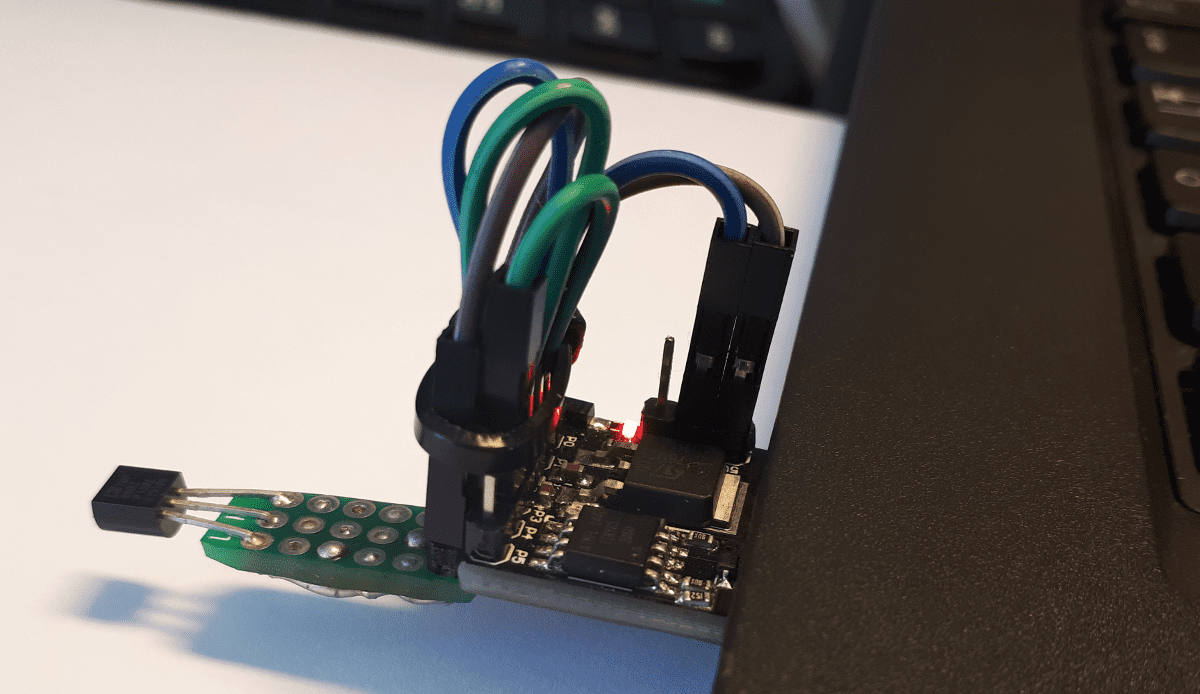 The assembled 传感器
All parts needed in this how-to can be bought for less than 2 Euro or 2 USD from China. I'm going to use the following items which were already available in my craft crate:
- Digispark USB Development Board
- Temperature 传感器 TMP36 (or any other 传感器 that gives you an analog signal)
- Cables (if you don't want to connect the 传感器 directly to the board)
The cabling is easy.
There are other boards with the same size available. Like those with the far more powerful Mega32U4 chip. However, it would work with boards from the Arduino family as well if you adjust the code provided below.
The sketch is pretty simple. We are going to send the readings to a virtual serial output every 5 seconds. No logic needed. A little plus is that the onboard LED is blinking as an indicator that the board is working. Upload the code to your Digispark board. Keep in mind that the upload process is different than with Arduino or ESP8266 boards.
To make it work with other boards simply use Serial.begin(115200); and Serial.println(reading);.
If you connect with a tool like minicom to your system's serial port /dev/ttyACM0, then you will get the data. To use the 传感器 with Home Assistant the serial 传感器 platform needs to be set up.
The physical 传感器 reads the current voltage of the pin. A template 传感器 takes the reading and converts it into a measurement. The data sheet of the 传感器 unit usually contains details about the involved calculations.
Hide the serial 传感器 if you don't want to see the raw data in the 前端 and you are done. The whole 设置 with a Digispark is not very reliable because there is no hardware USB support. As a showcase and if you don't build your 自动化 rules around it does the 传感器 what it should for a very small price.