

Laundry 传感器 with NodeMCU and Home Assistant
This is a guest post by Home Assistant 用户 and contributor Nolan Gilley.
Today I'll show you how I used Home Assistant, a NodeMCU (ESP8266), and a couple of accelerometers to automate our laundry 房间. This is a rewrite of an old post where I did the same thing using a Moteino & 树莓派. This 版本 only requires a NodeMCU.
We have an older washer and dryer which doesn't have any form of 通知 when cycles complete. Home Assistant was the obvious solution, I just needed to create 传感器 for the washer and dryer. I tried using sound 传感器 but found them unreliable. I ended up using an accelerometer attached to the back of each appliance. I also added magnetic reed 开关 on the doors of the washer and dryer to detect whether they're open or closed. I connected the accelerometers and reed 开关 to an NodeMCU which will relay the data to my MQTT broker.
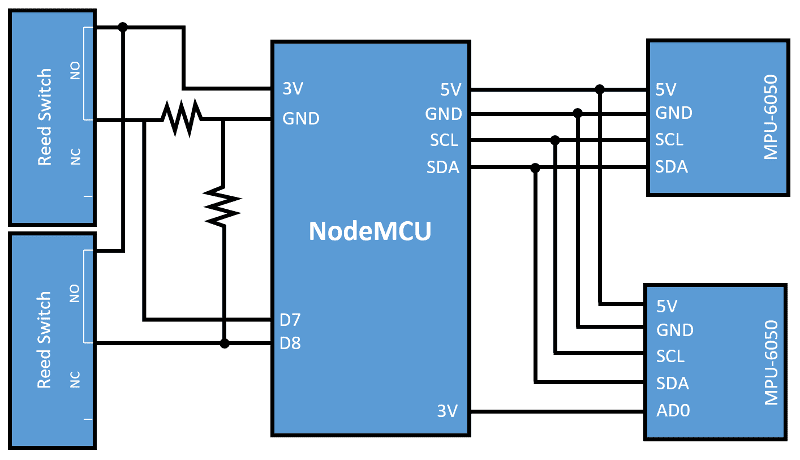 Block diagram of schematic
After taking some sample data from the accelerometers while each appliance was in operation, I decided to plot the data to help determine the proper thresholds of when the 设备 were running or off. I had to do this in order to get precise ranges so the dryer 传感器 wouldn't get tripped by the washer or vice versa. In the plot below you can see the acceleration in each direction for the accelerometer connected to the dryer. It's easy to see when the dryer is in operation here. I used the same technique for the washer's accelerometer.
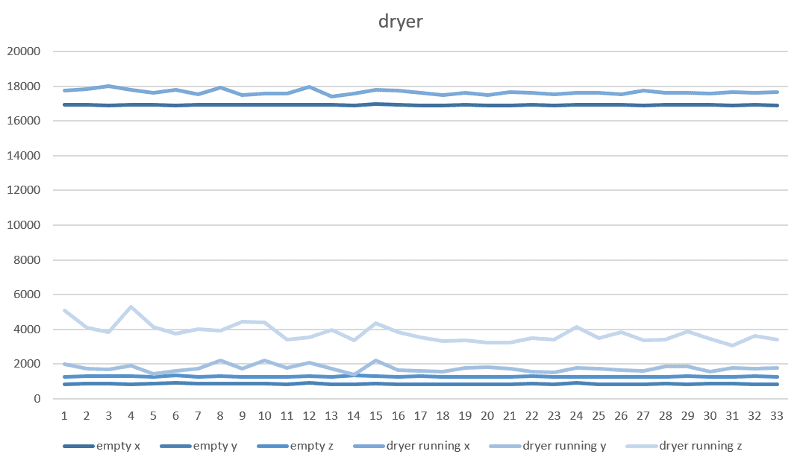 Graph showing the accelerometer data
Next it was just a Matter of integrating everything with Home Assistant. I was able to use the MQTT component to read the washer and dryer 状态 from the Moteino and display it in Home Assistant.
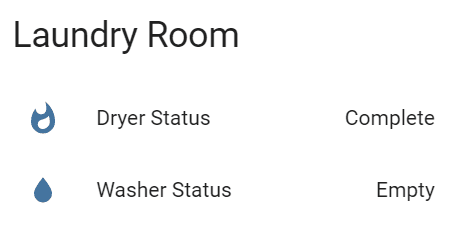 Status of the dryer and washer in Home Assistant
Next I wrote 脚本 that are run whenever the washer or dryer completes a load. This is triggered by the automation component. When the laundry is complete I have the 灯光 in the house turn red and notify me via Join. Once the door is opened and laundry emptied another 脚本 runs that sets the 灯光 back to normal. So far it has been very helpful and very reliable.
 NodeMCU connected to MPU-6050 accelerometer.
Materials used:
Sketch for the NodeMCU is available here.
Home Assistant 配置:
Resources used: