
Laundry 自动化: insight and 通知

这是 Home Assistant 用户和贡献者 Nolan Gilley 撰写的一篇客座文章。

在我们家,洗衣这件事已经困扰我们很久了。我们的洗衣机和烘干机都没有蜂鸣提醒,经常会忘记衣服,最后变得有异味还得重洗。于是我决定用一些便宜的电子元件自己监测洗衣机和烘干机,做一个解决方案。

作为 Home Assistant 的重度用户,我觉得它非常适合用来管理界面和通知系统。接下来我只需要一种方法来监测洗衣机和烘干机。我试过用声音传感器,但可靠性不够。最后我选择把加速度计固定在每台设备背面。我还在洗衣机和烘干机门上加了磁簧开关,用来检测门是开还是关。我把加速度计和磁簧开关连接到 Moteino(一款带 RF 收发器的 Arduino 克隆板)上。Moteino 可以执行逻辑判断设备当前处于什么状态,并把数据无线发送给另一块通过串口连接到树莓派的 Moteino。树莓派读取串口数据后,再通过 MQTT 转发给 Home Assistant 使用。这样非常好,因为我不需要在树莓派上运行 Home Assistant。我可以把 Home Assistant 跑在更快的机器上,再把 MQTT component 指向我的树莓派。

在每台设备运行时采集了一些加速度计样本数据后,我决定把数据画成图,以便确定设备运行和停止时的合适阈值。我必须这样做,才能得到足够精确的范围,避免烘干机传感器被洗衣机触发,反之亦然。下图展示了连接在洗衣机上的加速度计在 x 方向上的加速度。可以很直观地看出洗衣机何时在运行。我对烘干机的加速度计也用了同样的方法。

显示加速度计数据的图表

接下来就是把所有东西接入 Home Assistant。我可以使用 MQTT component 读取来自 Moteino 的洗衣机和烘干机状态,并在 Home Assistant 中显示出来。
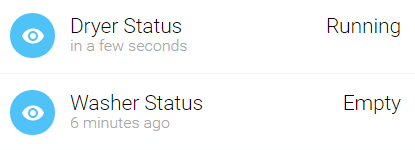
Home Assistant 中的烘干机和洗衣机状态

然后我写了几个脚本,在洗衣机或烘干机完成一轮后自动运行。这些脚本由 automation component 触发。当洗衣完成时,我会让家里的灯光变红,并通过 notify me via PushBullet 收到通知。等衣物处理完后,另一个脚本会把灯光恢复正常。到目前为止,这套方案非常有帮助,也非常可靠。

左上:磁簧开关。左下:Moteino。右侧:加速度计。

使用的材料:

Sketch for the Moteino is available here.

Home Assistant 配置:

Note

这里的自动化和脚本语法使用的是已弃用且不再受支持的格式。

mqtt:
  broker: 192.168.1.100
  port: 1883
  keepalive: 60
  qos: 0

sensor:
  platform: mqtt
  name: "Dryer Status"
  state_topic: "sensor/dryer"
  unit_of_measurement: ""

sensor 2:
  platform: mqtt
  name: "Washer Status"
  state_topic: "sensor/washer"
  unit_of_measurement: ""

automation:
  alias: "Dryer complete"

  platform: state
  state_entity_id: sensor.dryer_status
  state_from: "Running"
  state_to: "Complete"

  execute_service: script.turn_on
  service_entity_id: script.dryer_complete

automation 2:
  alias: "Dryer emptied"

  platform: state
  state_entity_id: sensor.dryer_status
  state_from: "Complete"
  state_to: "Empty"

  execute_service: script.turn_on
  service_entity_id: script.dryer_cleared

script:
  dryer_complete:
    alias: "Dryer Complete Script"
    sequence:
      - alias: "Pushbullet Notification"
        execute_service: notify.notify
        service_data:
          message: "The dryer has finished its cycle, please empty it!"
      - alias: "Living Room Lights Red"
        execute_service: scene.turn_on
        service_data:
          entity_id: scene.red
      - delay:
          seconds: 1
      - alias: "Living Room Lights Off"
        execute_service: light.turn_off
        service_data:
          entity_id: group.living_room
      - delay:
          seconds: 1
      - alias: "Living Room Lights Red"
        execute_service: scene.turn_on
        service_data:
          entity_id: scene.red

  dryer_cleared:
    alias: "Dryer Cleared Script"
    sequence:
      - alias: "Living Room Lights Off"
        execute_service: light.turn_off
        service_data:
          entity_id: group.living_room
      - delay:
          seconds: 1
      - alias: "Living Room Lights Normal"
        execute_service: scene.turn_on
        service_data:
          entity_id: scene.normal

参考资源: