

Washington State Department of Transportation (WSDOT)
The Washington State Department of Transportation (WSDOT) integration will give you travel time information from the Washington State Department of Transportation (WSDOT).
Prerequisites
First, you need to get a free Traveler Information api_key from the WSDOT API webpage. Just enter your email address to instantly get the key.
Once you have the key, you are ready to configure your WSDOT sensors.
此集成可通过 UI 配置。前往 设置 > 设备与服务 添加。
Supported functionality
WSDOT does provide information about ferry schedules, mountain passes, tolls, etc. but so far only Travel Time data is available on this platform.
Examples
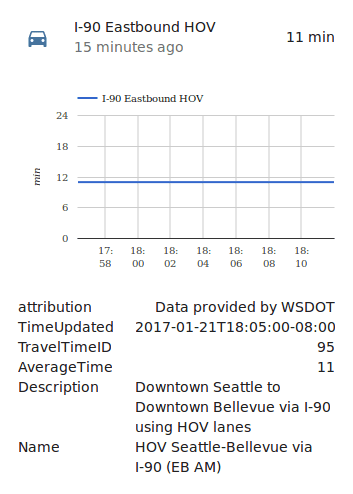
Here's an example of the sensor in use:
Data updates
WSDOT retrieves travel time updates every 2 minutes. This is not currently configurable.
Advanced configuration
If you would like to manually curate the sensors provided by WSDOT, you can edit your "configuration.yaml" file to remove, rename, or re-add routes.
:::tip
更改配置后需要重启 Home Assistant。
:::
Figuring out which Travel Time ID (id) is associated with your routes is a bit of a challenge. If you visit
https://wsdot.com/Traffic/api/TravelTimes/TravelTimesREST.svc/GetTravelTimesAsJson?AccessCode=[your_api_key_here]
substituting your api_key, you will get a list of all available routes.
Search through it and then find the key TravelTimeID.
That tells you the number you need.
Troubleshooting
If no tips here help resolve your issue, feel free to open a bug and make sure to include the debug logs and diagnostics data whenever possible.
Can't set up the device
Symptom: "Invalid API Key"
When trying to set up the integration, the form shows the message "Invalid API Key".
Description
This means that the API key entered in the configuration was denied access to https://wsdot.wa.gov.
Resolution
To resolve this issue, try the following steps:
- Double-check that you input your API key correctly.
- A correct API Key is a series of eight, four, four, four, twelve hexadecimal (
0,1,2,3,4,5,6,7,8,9,a,b,c,d,e,f) components. - Example:
0123456a-789b-012c-345d-6789012345ef. - Make sure that you included the dashes, and no extra spaces or newlines.
- A correct API Key is a series of eight, four, four, four, twelve hexadecimal (
- Test your API key.
- Test your API key directly against WSDOT by entering it into the following URL in your browser:https://wsdot.wa.gov/Traffic/api/TravelTimes/TravelTimesREST.svc/GetTravelTimesAsJson?AccessCode=[your-api-key-here].
- If this returns a "Request Error" page saying "Invalid Access Code", you will need to check your key, or obtain a new one.
- If this returns a page of raw JSON data, your API key is valid.
- Obtain a new API key.
- If you have not yet obtained an API key, or you lost or mistyped an earlier API key, you can get a new one.
- Navigate to https://wsdot.wa.gov/traffic/api/, enter your email and hit the Submit button. The new API key will immediately be displayed below the input box.
No data displayed
Symptom: "Unknown" time shown
Description
One or more WSDOT element content diaplays unknown.
Resolution
The WSDOT travel sensors poll for new travel times every 2 minutes. You may have to wait up to 4 minutes for initial durations to populate.
Removing the integration
This integration follows standard integration removal.
To remove an integration instance from Home Assistant
- Go to Settings > Devices & services and select the integration card.
- From the list of devices, select the integration instance you want to remove.
- Next to the entry, select the three-dot
menu. Then, select Delete.