

Belkin WeMo
Belkin WeMo 集成是将各种 Belkin WeMo 设备接入 Home Assistant 的主集成。
Home Assistant 目前支持以下设备类型:
- Binary sensor (Belkin WeMo Motion Sensor)
- Fan (Belkin WeMo (Holmes) Smart Humidifier)
- Light (Belkin WeMo LED lights and Smart Dimmer Switch)
- Switch (Belkin WeMo Switches and includes support for WeMo enabled Mr. Coffee smart coffee makers.)
配置
如果省略可选的 discovery 配置项、将其设为 true,或启用了 discovery 集成,则会自动发现支持的设备。如果将 discovery 设为 false,则 wemo 集成和 discovery 集成都不会自动发现 WeMo 设备。当 discovery 配置项被省略或设为 true 时,加载 wemo 集成会扫描本地网络中的 WeMo 设备,即使您没有使用 discovery 集成也是如此。
Alternately, WeMo devices that are not discoverable can be statically configured. If you have WeMo devices on subnets other than where Home Assistant is running, or devices in a remote location reachable over a VPN, you will need to configure them manually. Statically configured devices may be used with or without automatic discovery enabled. Example static configuration:
Note that if you use static device entries, you may want to set up your router (or whatever runs your DHCP server) to force your WeMo devices to use a static IP address. Check the DHCP section of your router configuration for this ability.
If the device doesn't seem to work and all you see is the state "unavailable" on your dashboard, check that your firewall doesn't block incoming requests on port 8989, since this is the port to which the WeMo devices send their updates.
设备选项
Selecting the Configure button on the WeMo integration will bring up some additional options that can be configured for WeMo devices.
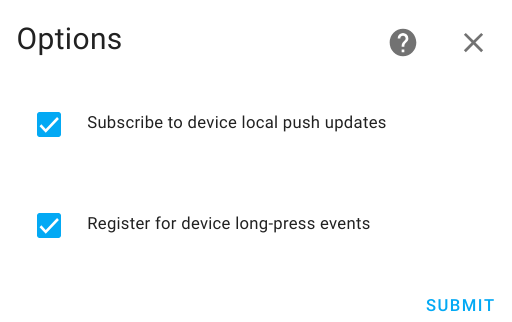
Subscribe to device local push updates: WeMo devices support both the Local Push and Local Polling IoT classes. Home Assistant will default subscribe to event notifications from WeMo devices and use the Local Push IoT class. If the Local Push doesn't work, Home Assistant will use Local Polling as a fallback. Some devices are known not to work well with Local Push. WeMo devices expect to be on the same subnet as Home Assistant and will not work with Local Push otherwise. For devices known not to work with Local Push, the Subscribe to local push updates option can be disabled to force only Local Polling to be used.
There are some downsides of disabling Subscribe to device local push updates:
-
The WeMo Motion detector will not work in Home Assistant when Subscribe to device local push updates is disabled. The same will be for the sensor on the WeMo Maker device. Without a push subscription, Home Assistant will be unaware of motion events.
-
Long press events, when the button on a wall switch/dimmer is pressed, will not work if Subscribe to device local push updates is disabled.
-
Automations based on the device being locally switched on or off will be delayed by at least the polling interval (below).
Register for device long-press events: WeMo wall switches and dimmers will notify Home Assistant when the button on the device is held for more than 2 seconds. This feature is enabled by default in Home Assistant (see below). If this feature causes issues for your device, it can be disabled by deselecting the Register for device long-press events option.
模拟设备
Various software that emulate WeMo devices often use alternative ports. Static configuration should include the port value:
风扇
The wemo platform allows you to control your Belkin WeMo humidifiers from within Home Assistant. This includes support for the Holmes Smart Humidifier.
WeMo devices are automatically discovered if the discovery integration is enabled.
属性
There are several attributes which can be used for automations and templates:
操作
There are several actions which can be used for automations and control of the humidifier:
长按事件和触发器
For WeMo Light Switches and Dimmers, pressing the button on the device for two seconds will activate a long press event. The long-press can trigger an automation
either by using an event trigger or a device trigger. For an event trigger the event_type will be wemo_subscription_event. The event data will have a type parameter
set to the value LongPress and a name parameter indicating the dimmer or light switch that was triggered.
The following is an example implementation of an automation:
A device automation can also be used through the automation editor. Look for the Wemo button was pressed for 2 seconds trigger for the dimmer or light switch device.
Note: Due to the way that long press events are received by Home Assistant, modifying any of the Rules through the WeMo app can cause long press events to stop working until Home Assistant is restarted. Home Assistant modifies the local device's rules database to enable long press event support. This local modification is not synchronized with the cloud service. Any rule changes from the cloud service (via the app) will likely overwrite the local changes made by Home Assistant.