

Tasmota
This integration allows you to control Tasmota devices over MQTT.
Requirements
- 在 Home Assistant 中设置 MQTT 代理和 MQTT 集成。
- Tasmota 设备的 MQTT 设置配置为与 MQTT 代理通信。
- Tasmota 设备刷写了 9.2 或更高版本(
tasmota-lite.bin不支持此集成)。 - 配置用于本机发现的 Tasmota 设备 (
SetOption19 0)。转到 Tasmota 设备的 Web 界面,选择 工具,然后选择 控制台。在您可以看到占位符 输入命令 的位置,输入或粘贴SetOption19 0并点击 Return。 - 尽管 Tasmota 集成支持自定义 fulltopic,但强烈建议将 fulltopic 保留为默认值,Tasmota 不会阻止设置无效或非唯一的 fulltopic,例如没有“%prefix%”或“%topic%”标记的 fulltopic。
- 仅当 Tasmota 设备和 Home Assistant 服务器位于同一本地网络时,才支持基于 tasmota32 网络摄像头的设备的“相机”功能。
支持的功能
支持 Tasmota 按钮、风扇、灯、继电器、传感器、百叶窗、开关和摄像头。
- 当启用“SetOption73”时,Tasmota 按钮将被添加为 Home Assistant“自动化触发器”。不会创建“binary_sensor”实体。您可以在设备屏幕上找到可用的“自动化触发器”。
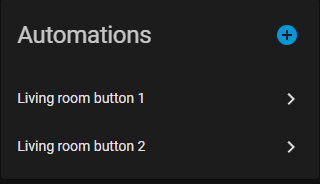
- Tasmota Lights 将作为家庭助理“灯”实体添加。支持单通道调光器、RGB 灯、带色温控制的 RGB 灯和带白色控制的 RGB 灯。
- 如果“SetOption30 0”,Tasmota 继电器将被添加为 Home Assistant“开关”实体。如果“SetOption30 1”,继电器将被添加为“light”实体。
- Tasmota 传感器将作为家庭助理“传感器”实体添加。
- Tasmota 百叶窗将被添加为家庭助理“封面”实体。目前仅支持快门模式 1 至 4。不支持快门模式5和涂鸦快门。
- Tasmota 开关将添加为 Home Assistant“binary_sensor”实体或“自动化触发器”,具体取决于启用“SetOption114”时使用的“switchmode”。
- 模块配置为“iFan02”或“iFan03”的 Tasmota 设备中的风扇功能将添加为 Home Assistant“风扇”实体。不支持涂鸦粉丝。
- 具有 tasmota32-webcam 固件的 ESP32 Tasmota 设备中的相机功能将添加为 Home Assistant“相机”实体。请注意,仅当 Tasmota 设备和 Home Assistant 服务器位于同一网络时才支持此功能。
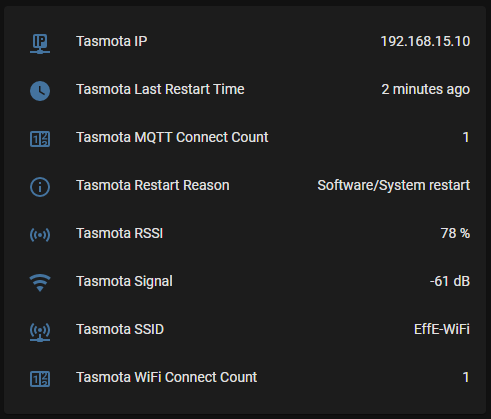
- 该集成还将创建多达八个状态传感器,每个状态传感器都有不同的信息。请注意,默认情况下所有状态传感器均处于禁用状态。
Configuration
To add the Tasmota integration to your Home Assistant instance, use this My button:

Manual configuration steps
- Browse to your Home Assistant instance.
- Go to Settings > Devices & services.
- In the lower-right corner, select Add integration.
- From the list, select Tasmota.
- Follow the instructions on screen to complete the setup.
您还必须配置每个 Tasmota 设备的 MQTT 设置,以便与您正在使用的任何 MQTT 代理进行通信。在主机下输入代理地址,然后输入允许访问代理的用户名/密码组合。
If you are using the Home Assistant Mosquitto Broker app, first create a new Home Assistant user under Settings > People. Then, in Tasmota > Configure MQTT under "Host" enter the address of your Home Assistant instance and under "User" and "Password" enter the Home Assistant user you just created.