

Slide Local
Slide Local 集成允许您通过本地 API,在 Home Assistant 中接入 Slide 设备。
支持的设备
此集成应适用于所有 Slide 窗帘设备(API 版本 1 和 2)。
前提条件
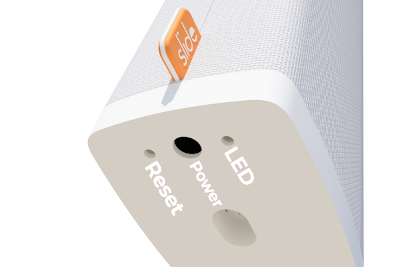
在使用此集成之前,您必须确保 Slide 已配置为使用本地 API。默认情况下,Slide 会连接到云 API,但也可以改用本地 API(两者一次只能启用一个)。要在云 API 与本地 API 之间切换,请执行以下操作:
LED 快闪 5 次:云 API 已禁用,本地 API 已启用 LED 慢闪 2 次:本地 API 已禁用,云 API 已启用
此集成可通过 UI 配置。前往 设置 > 设备与服务 添加。
设置此集成时,您需要以下信息:
Options
To define options for Slide Local, follow these steps:
-
In Home Assistant, go to Settings > Devices & services.
-
If multiple instances of Slide Local are configured, choose the instance you want to configure.
-
On the card, select the cogwheel
. - If the card does not have a cogwheel, the integration does not support options for this device.

-
Edit the options, then select Submit to save the changes.
支持的功能
Cover
您的 Slide 设备会显示为 cover 实体。
Button
您可以按下 Calibration 按钮来启动 Slide 的校准流程。
Switch
您可以使用 TouchGo 开关启用/禁用 Touch&Go 功能(通过轻拉窗帘来打开/关闭)。
数据更新
此集成每 15 秒从设备获取一次数据。
已知限制
此集成仅通过本地 API 与 Slide 设备通信。云 API 已不再可用。
移除此集成
可按以下步骤移除此集成:
To remove an integration instance from Home Assistant
- Go to Settings > Devices & services and select the integration card.
- From the list of devices, select the integration instance you want to remove.
- Next to the entry, select the three-dot
menu. Then, select Delete.