
Seven Segments OCR

The Seven Segments OCR integration allows you to read physical seven segments displays through Home Assistant. ssocr is used to extract the value shown on the display which is observed by a camera.

Configuration

To enable the OCR of a seven segment display in your installation, add the following to your "configuration.yaml" file. :::tip 更改配置后需要重启 Home Assistant。 :::

# Example configuration.yaml entry
image_processing:
  - platform: seven_segments
    source:
      - entity_id: camera.seven_segments
ssocr_bin:
  description: The command line tool `ssocr`. Set it if you use a different name for the executable.
  required: false
  default: ssocr
  type: string
x_position:
  description: X coordinate of the upper left corner of the area to crop.
  required: false
  default: 0
  type: integer
y_position:
  description: Y coordinate of the upper left corner of the area to crop.
  required: false
  default: 0
  type: integer
height:
  description: Height of the area to crop.
  required: false
  default: 0
  type: integer
width:
  description: Width of the area to crop.
  required: false
  default: 0
  type: integer
rotate:
  description: Rotation of the image.
  required: false
  default: 0
  type: integer
threshold:
  description: Threshold for the difference between the digits and the background.
  required: false
  default: 0
  type: integer
digits:
  description: Number of digits in the display.
  required: false
  default: -1
  type: integer
extra_arguments:
  description: Other arguments to use. Like `-D`, `dilation`, `erosion`, `greyscale`, `make_mono`, etc.
  required: false
  type: string
source:
  description: List of image sources.
  required: true
  type: list
  keys:
    entity_id:
      description: A camera entity id to get picture from.
      required: true
      type: string
    name:
      description: This parameter allows you to override the name of your `image_processing` entity.
      required: false
      type: string

Setup process

It's suggested that the first attempt to determine the needed parameters is using ssocr directly. This may require a couple of iterations to get the result

ssocr -D erosion crop 390 250 490 280 -t 20 -d 4 seven-seg.png

This would lead to the following entry for the "configuration.yaml" file:
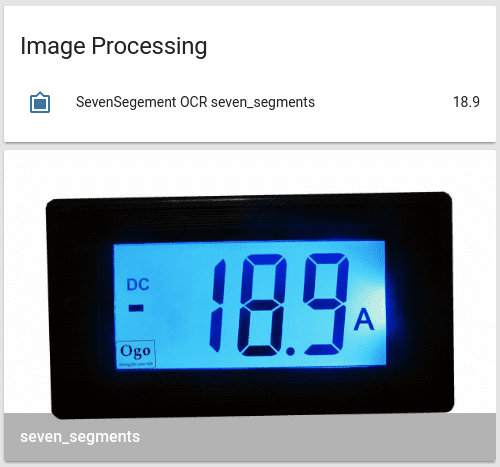
camera:
  - platform: local_file
    file_path: /home/homeassistant/.homeassistant/seven-seg.png
    name: seven_segments
image_processing:
  - platform: seven_segments
    x_position: 390
    y_position: 250
    height: 280
    width: 490
    threshold: 20
    digits: 4
    source:
      - entity_id: camera.seven_segments

With the help of a template sensor, the value can be shown as badge.

sensor:
  - platform: template
    sensors:
      power_meter:
        value_template: "{{ states('image_processing.sevensegment_ocr_seven_segments') }}"
        friendly_name: "Ampere"
        unit_of_measurement: "A"