

Remote Calendar
Remote calendar 集成允许您在 Home Assistant 中读取远程日历,以用于驱动自动化。
已知限制
此集成不支持连接到需要身份验证或特殊请求头的资源。
安装说明
配置
此集成可通过 UI 配置。前往 设置 > 设备与服务 添加。
请在配置流程中提供以下信息。
数据更新
集成启动时,会先从远程来源拉取数据。如果更新失败,集成会再次尝试获取数据。之后,日历的更新间隔为每 24 小时一次。
定义自定义轮询间隔
If you want to define a specific interval at which your device is polled for data, you can disable the default polling interval and create your own polling automation.
- Go to Settings > Devices & services, and select your integration.
- On the integration entry, select
. - Then, select System options and toggle the button to disable polling.
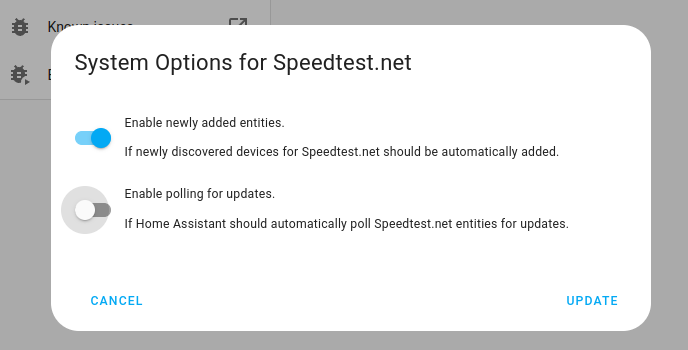
- Then, select System options and toggle the button to disable polling.
- To define your custom polling interval, create an automation.
- Go to Settings > Automations & scenes and create a new automation.
- Define any trigger and condition you like.
- Select Add action, then select Other actions.
- Select Perform action, and from the list, select the
homeassistant.update_entityaction. - Choose your targets by selecting the Choose area, Choose device, Choose entity, or Choose label buttons.
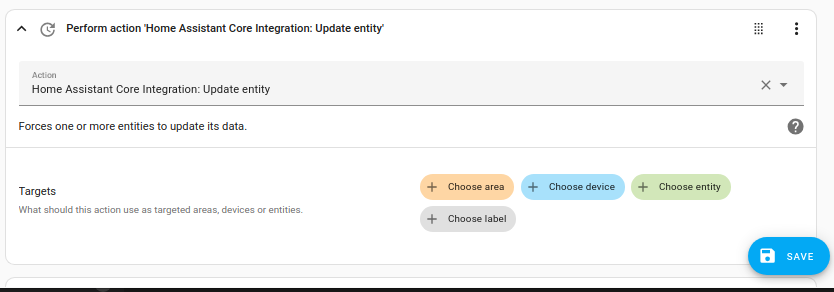
- Save your new automation to poll for data.
支持的功能
此集成仅支持读取日历。日历实体的状态和属性仅表示下一个即将到来的事件。日历中的所有事件都可以显示在 Calendar 仪表板中。
日历事件自动化
单个日历 事件 可用于触发如下自动化:
- 在名为 Garbage collection 的事件 开始前 12 小时 通知我。
概览请参阅 Calendar Automations,可用触发变量请参阅 Calendar Trigger Variables。您可以在条件或操作中使用事件的 summary、description、location 等信息。
删除集成
此集成遵循标准删除流程,无需额外步骤。
To remove an integration instance from Home Assistant
- Go to Settings > Devices & services and select the integration card.
- From the list of devices, select the integration instance you want to remove.
- Next to the entry, select the three-dot
menu. Then, select Delete.