

GoodWe Inverter
GoodWe 集成会通过本地网络轮询 GoodWe 太阳能逆变器,并将其运行时数值以传感器形式显示在 Home Assistant 中。
它适用于 GoodWe 的 ET、EH、BT、BH、ES、EM、DT、MS、D-NS、XS 和 BP 系列逆变器。不同逆变器系列/型号会暴露不同的传感器集合,较新的型号通常支持更全面。
如果您的型号列在上方,但仍无法与逆变器通信,则可能是因为您使用的是较旧的 ARM 固件版本。您应联系制造商支持,升级 ARM 固件(不仅仅是逆变器固件),以便能够通过 UDP 与逆变器通信。
它也可能适用于其他逆变器系列,只要这些设备监听 UDP 8899 端口,并响应某一种受支持的通信协议。通常来说,如果您可以通过官方移动应用(PvMaster、SolarGo)与逆变器通信,那么此集成也很可能可以正常工作。
此集成可通过 UI 配置。前往 设置 > 设备与服务 添加。
能源仪表板
该插件提供了多个适用于能源仪表板的数值。
其中支持最完善的是 ET/EH 系列逆变器,这些设备上的 Meter Total Energy (export)、Meter Total Energy (import)、Total PV Generation、Total Battery Charge 和 Total Battery Discharge 传感器最适合用于仪表板中的测量和统计。
对于其他逆变器系列,如果逆变器本身不能直接提供这些传感器,也可以通过现有传感器计算得到。可以使用 Template Sensor 来拆分购电和售电功率值,再使用 Riemann Sum 将这些瞬时功率值(W)转换为累计能量值(Wh),然后用于能源仪表板。
逆变器轮询间隔
此集成默认每 10 秒轮询一次逆变器以获取新数据。如果您希望更少(或更频繁)地获取最新逆变器数据,可以在集成的系统选项中禁用自动刷新(Enable polling for updates),然后创建您自己的自动化来设置所需的轮询频率。
在一些少见情况下,频繁轮询可能会与 Goodwe SEMS 云门户的更新发生冲突,导致之后收不到任何更新。在这种情况下,将轮询频率降低到 30 秒或 1 分钟通常会有所帮助。
有关如何定义自定义轮询间隔的更详细步骤,请按照以下流程操作。
定义自定义轮询间隔
If you want to define a specific interval at which your device is polled for data, you can disable the default polling interval and create your own polling automation.
- Go to Settings > Devices & services, and select your integration.
- On the integration entry, select
. - Then, select System options and toggle the button to disable polling.
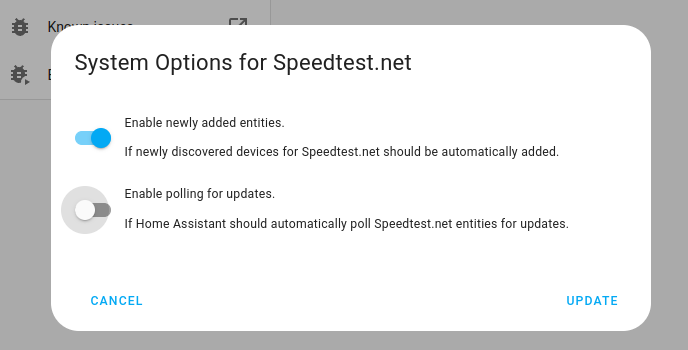
- Then, select System options and toggle the button to disable polling.
- To define your custom polling interval, create an automation.
- Go to Settings > Automations & scenes and create a new automation.
- Define any trigger and condition you like.
- Select Add action, then select Other actions.
- Select Perform action, and from the list, select the
homeassistant.update_entityaction. - Choose your targets by selecting the Choose area, Choose device, Choose entity, or Choose label buttons.
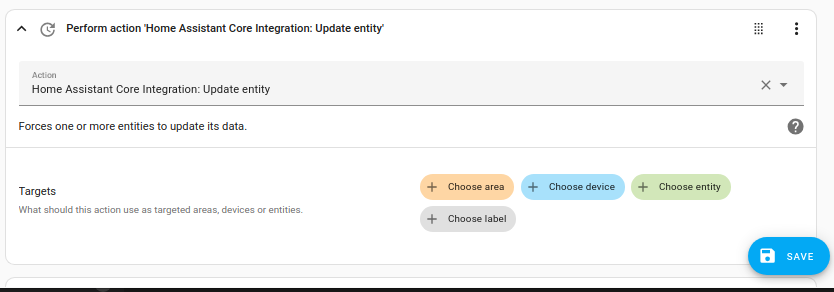
- Save your new automation to poll for data.