Foscam

Foscam 集成允许您在 Home Assistant 中观看 Foscam IP 摄像头的实时流。

配置

此集成可通过 UI 配置。前往 设置 > 设备与服务 添加。

Note

Foscam 似乎存在一些关于长密码和包含某些符号的密码的问题。请务必检查您摄像头的文档。

支持的功能

实体

Foscam 集成提供以下实体。

摄像头

    • 描述:大多数 Foscam IP 摄像头支持两个视频流,默认情况下,Main 流是高质量流,而 Sub 流是较低质量流。这些流可以在您的摄像头偏好设置中配置。
    • 适用机型:所有。

开关

  • 红外

    • 描述:控制摄像头的红外照明灯。
    • 适用机型:所有。
  • 设备指示灯

    • 描述:控制摄像头的状态指示灯。
    • 适用机型:所有。
  • 白光

    • 描述:控制摄像头的白光照明灯。
    • 适用机型:配备白光照明的摄像头。
    • 备注:由于目前没有机制来确定设备能力以有条件地显示白光开关,不支持的型号仍会显示该开关——但处于禁用状态。这将在未来的更新中进行优化。
  • 警报器

    • 描述:控制设备的警报器。
    • 适用机型:所有。
  • 图像翻转/镜像

    • 描述:切换设备上的图像翻转/镜像。
    • 适用机型:所有。
  • 睡眠

    • 描述:切换睡眠模式,启用时,设备进入睡眠状态。
    • 适用机型:所有。
  • HDR

    • 描述:切换摄像头的 HDR,启用时,图像将在阴影和高光中显示更多细节。
    • 适用机型:所有。
  • WDR

    • 描述:切换摄像头的 WDR,启用时,图像将在阴影和高光中显示更多细节。
    • 适用机型:所有。

数字

  • 设备音量

    • 描述:调整设备警报声音的音量,如警报和开机/关机提示音。
    • 适用机型:所有。
  • 通话音量

    • 描述:调整设备的对讲音量。
    • 适用机型:所有。

动作 foscam.ptz

  • 控制设备的 PTZ 功能
    • 描述:如果您的 Foscam 摄像头支持 PTZ(平移、倾斜和变焦),您将能够平移或倾斜您的摄像头。
数据属性描述
entity_id指向摄像头 entity_id 的字符串或字符串列表。使用 entity_id: all 来定位所有。
movement移动方向。允许的值:updownleftrighttop_lefttop_rightbottom_leftbottom_right
travel_time(可选)移动时间(秒)。允许的值:0 到 1 之间的浮点数。默认值:0.125
  • 适用机型:具有 PTZ 功能的设备。

动作 foscam.ptz_preset

  • 将设备指向指定的预设位置。
    • 描述:如果您的 Foscam 摄像头支持 PTZ 预设,您将能够使用预设名称将摄像头移动到预定义的预设位置。
数据属性描述
entity_id指向摄像头 entity_id 的字符串或字符串列表。使用 entity_id: all 来定位所有。
preset_name要移动到的预设名称。预设可以从官方 Foscam 应用程序中创建。
  • 适用机型:具有 PTZ 功能的设备。

带有控制功能的示例卡片

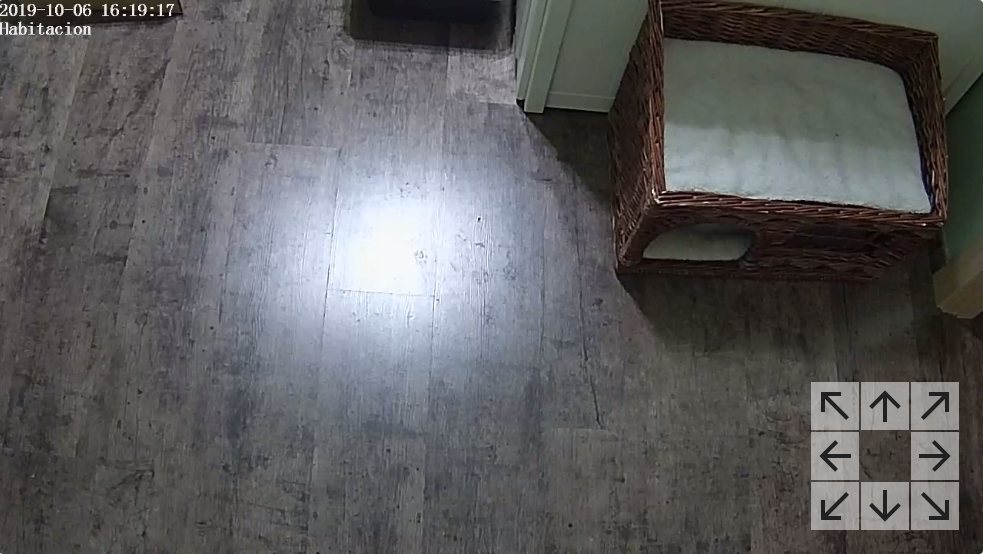
Screenshot showing a foscam camera using a picture-elements with PTZ controls. 显示带有平移和倾斜控制的 Foscam 摄像头的示例。

使用以下卡片代码,您可以实现一个显示 Foscam 摄像头实时视频流的卡片,并在右下角带有移动摄像头的控制按钮。

type: picture-elements
image: camera.bedroom
camera_image: camera.bedroom
camera_view: live
elements:
  - type: icon
    icon: "mdi:arrow-up"
    style:
      background: "rgba(255, 255, 255, 0.5)"
      right: 25px
      bottom: 50px
    tap_action:
      action: perform-action
      perform_action: foscam.ptz
      target:
        entity_id: camera.bedroom
      data:
        movement: up
  - type: icon
    icon: "mdi:arrow-down"
    style:
      background: "rgba(255, 255, 255, 0.5)"
      right: 25px
      bottom: 0px
    tap_action:
      action: perform-action
      perform_action: foscam.ptz
      target:
        entity_id: camera.bedroom
      data:
        movement: down
  - type: icon
    icon: "mdi:arrow-left"
    style:
      background: "rgba(255, 255, 255, 0.5)"
      right: 50px
      bottom: 25px
    tap_action:
      action: perform-action
      perform_action: foscam.ptz
      target:
        entity_id: camera.bedroom
      data:
        movement: left
  - type: icon
    icon: "mdi:arrow-right"
    style:
      background: "rgba(255, 255, 255, 0.5)"
      right: 0px
      bottom: 25px
    tap_action:
      action: perform-action
      perform_action: foscam.ptz
      target:
        entity_id: camera.bedroom
      data:
        movement: right
  - type: icon
    icon: "mdi:arrow-top-left"
    style:
      background: "rgba(255, 255, 255, 0.5)"
      right: 50px
      bottom: 50px
    tap_action:
      action: perform-action
      perform_action: foscam.ptz
      target:
        entity_id: camera.bedroom
      data:
        movement: top_left
  - type: icon
    icon: "mdi:arrow-top-right"
    style:
      background: "rgba(255, 255, 255, 0.5)"
      right: 0px
      bottom: 50px
    tap_action:
      action: perform-action
      perform_action: foscam.ptz
      target:
        entity_id: camera.bedroom
      data:
        movement: top_right
  - type: icon
    icon: "mdi:arrow-bottom-left"
    style:
      background: "rgba(255, 255, 255, 0.5)"
      right: 50px
      bottom: 0px
    tap_action:
      action: perform-action
      perform_action: foscam.ptz
      target:
        entity_id: camera.bedroom
      data:
        movement: bottom_left
  - type: icon
    icon: "mdi:arrow-bottom-right"
    style:
      background: "rgba(255, 255, 255, 0.5)"
      right: 0px
      bottom: 0px
    tap_action:
      action: perform-action
      perform_action: foscam.ptz
      target:
        entity_id: camera.bedroom
      data:
        movement: bottom_right

额外 CGI 命令

支持 CGI 命令的 Foscam 网络摄像头可以由 Home Assistant 控制(来源)。