FireServiceRota

FireServiceRota 是一款功能强大且灵活的消防员可用性、调度和调度系统。 它是荷兰BrandweerRooster的国际品牌,被荷兰200多个消防站使用。

FireServiceRota 集成为您提供有关当地消防局事件(紧急呼叫)的实时信息,并能够根据您的值班安排发送响应。

您将需要 FireServiceRota 或 BrandweerRooster 帐户。

Caution

警告:不要仅仅依赖此集成来拨打紧急电话!

::: 该集成提供了以下平台:

  • 传感器:紧急呼叫传入。元数据除其他数据外,还包含事件位置和文本转语音 URL。该集成使用 WebSocket 客户端与服务连接以确保最小延迟。
  • 二进制传感器:您当前的值班状态(通过 FireServiceRota 移动应用程序和/或网站安排)。
  • 开关:紧急呼叫后启用 30 分钟。 “on”代表已确认的响应。使用它可以自动响应紧急呼叫并节省宝贵的时间。

有关如何使用这些平台编写自动化程序,请阅读下面的“高级配置”部分。

:::注意配置 此集成可通过 UI 配置。前往 设置 > 设备与服务 添加。

实体

创建以下实体类型:

事件传感器

这是集成的主要实体,包含事件消息(其 value),它具有如下所述的多个属性。

属性描述
trigger触发器类型,newupdate
state事件的状况。
created_at创建事件的日期和时间。
message_to_speech_url包含事件语音文本的 mp3 文件的 URL。
prio事件的优先级 a1a2b1b2
type事件类型,例如incident_alert
responder_mode响应模式,例如available_in_schedule_is_acknowledgment
can_respond_until接受回复之前的日期和时间。
latitude事件发生的纬度。
longitude事件发生的经度。
address_type地址类型,例如home
formatted_address字符串格式的地址。
task_ids设备或任务的 ID。

工作二进制传感器

该实体反映您安排的值班,值可以是 on = 值班,off = 无值班。当您没有职责时,响应开关将被禁用,这意味着您无法响应呼叫。

属性描述
start_time值班计划的开始日期和时间。
end_time值班计划的结束日期和时间。
availabletruefalse
activetruefalse
assigned_function_ids函数 ID,例如540
skill_ids技能 ID,例如6, 8
type类型,例如standby_duty
assigned function分配的功能,例如Chauffeur

事件响应开关

使用此开关,您可以通过 GUI 手动控制开关或使用自动化操作来响应事件。 每次收到事件时,它都会重置为 unknown 值。将其切换为 on 意味着您发送响应确认,将其切换回 off 则发送拒绝响应。

以下属性可用:

属性描述
user_name您的用户名。
assigned_skill_ids分配的技能 ID。
responded_at你回应的时间到了。
start_time事件响应开始时间。
status响应状态,例如 pending
reported_status报告状态,例如 shown_up
arrived_at_stationtruefalse
available_at_incident_creationtruefalse
active_duty_function_ids活动功能 ID,例如 540

高级配置

通过自动化,您可以配置以下一项或多项有用的操作:

  1. 收到紧急事件时发出警报和/或开灯。
  2. 在穿衣服时使用文本转语音功能通过媒体播放器播放事件详细信息。
  3. 离开家时使用门传感器或按下按钮进行响应确认,让您的队友知道您正在路上。
  4. 将 FireServiceRota 仪表板投射到 Chromecast 设备。 (这需要 Nabu Casa 订阅)

这些记录如下。

自动化示例

automation:
  - alias: "Switch on a light when incident is received"
    triggers:
      - trigger: state
        entity_id: sensor.incidents
    actions:
      - action: light.turn_on
        target:
          entity_id: light.bedroom

  - alias: "Play TTS incident details when incident is received"
    triggers:
      - trigger: state
        entity_id: sensor.incidents
        attribute: message_to_speech_url
    conditions:
      - condition: not
        conditions:
          - condition: state
            entity_id: sensor.incidents
            attribute: message_to_speech_url
            state: None
    actions:
      - action: media_player.play_media
        data:
          entity_id: media_player.nest_hub_bedroom
          media_content_id: >
              {{ state_attr('sensor.incidents','message_to_speech_url') }}
          media_content_type: "audio/mp4"

  - alias: "Send response acknowledgement when a button is pressed"
    triggers:
      - trigger: state
        entity_id: switch.response_button
    actions:
      - action: homeassistant.turn_on
        target:
          entity_id: switch.incident_response

  - alias: "Cast FireServiceRota dashboard to Nest Hub"
    triggers: 
      - trigger: homeassistant
        event: start
    actions:
      - action: cast.show_lovelace_view
        data: 
          entity_id: media_player.nest_hub_bedroom
          view_path: fsr

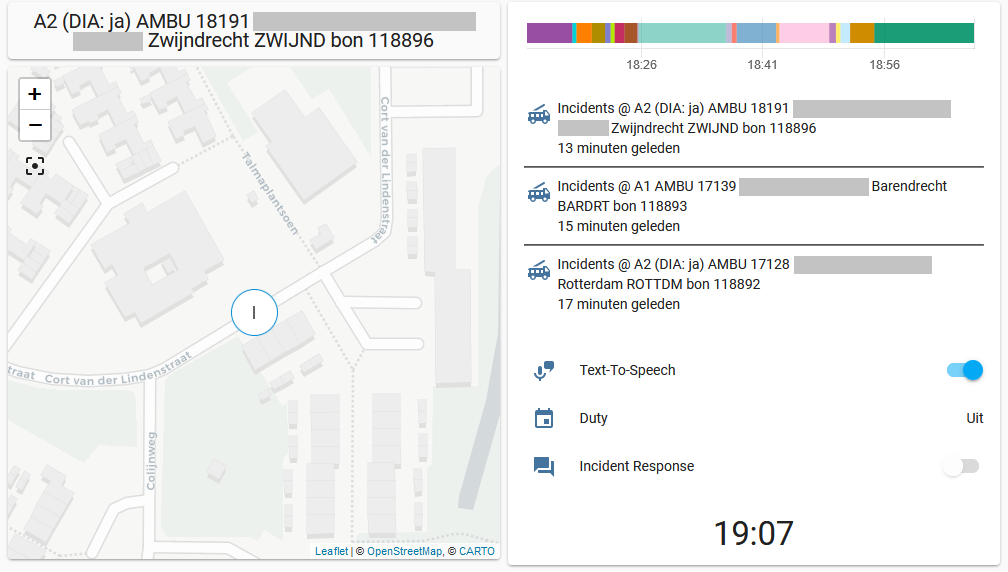
仪表板示例

panel: true
views:
  - badges: []
    cards:
      - entity: sensor.incidents
        type: entity
      - cards:
          - cards:
              - default_zoom: 15
                entities:
                  - entity: sensor.incidents
                hours_to_show: 0
                type: map
            type: vertical-stack
          - cards:
              - entities:
                  - entity: sensor.incidents
                hours_to_show: 1
                refresh_interval: 0
                type: history-graph
            type: vertical-stack
        type: horizontal-stack
      - content: |
          {{ states('sensor.incidents') }}
        title: Incident
        type: markdown
      - entities:
          - entity: binary_sensor.duty
          - entity: switch.incident_response
        type: entities
    path: fsr
    title: FireServiceRota
    type: horizontal-stack

### 截屏

Example of a FireServiceRota dashboard

此屏幕截图显示了 FireServiceRota 仪表板的外观。

调试

当日志级别设置为 debug 时,FireServiceRota 集成将记录有关收到的 WebSocket 事件、收集的响应和值班状态以及其他消息的附加信息。将以下相关行添加到“configuration.yaml”:

logger:
  default: info
  logs:
    homeassistant.components.fireservicerota: debug
    pyfireservicerota: debug