

Cover
Home Assistant 可为您提供一个界面,用于控制卷帘、百叶帘和车库门等 cover 设备。
This cover is a building block integration that cannot be added to Home Assistant directly, but is used and provided by other integrations. A building block integration differs from a typical integration that connects to a device or service. Instead, other integrations use this cover building block to provide entities, actions, and other functionality that you can use in your automations or dashboards. If one of your integrations uses this building block, this page documents the functionality the cover building block offers.
cover 的状态
cover 可以具有以下状态:
- Opening:cover 正在打开,以到达设定位置。
- Open:cover 已到达打开位置。
- Closing:cover 正在关闭,以到达设定位置。
- Closed:cover 已到达关闭位置。
- Unavailable:实体当前不可用。
- Unknown:状态尚未知晓。
cover 在前端中的状态显示方式取决于设备类别。
设备类别
A device class is a measurement categorization in Home Assistant. It influences how the entity is represented in the dashboard. This can be modified in the customize section. For example, different states may be represented by different icons, colors, or text.
下图展示了表示不同 cover 设备类别的图标:
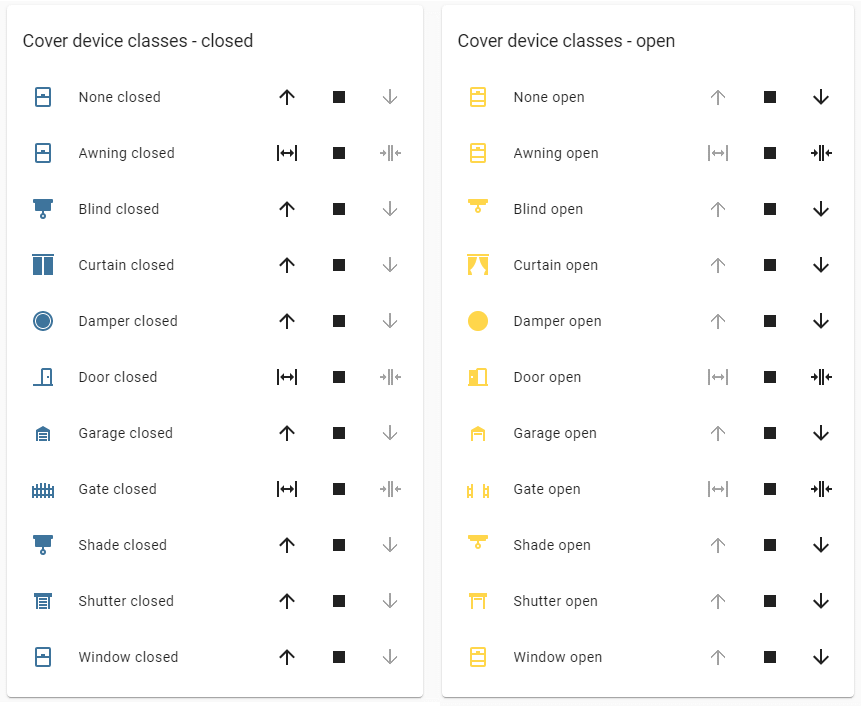 cover 示例列表。
此示例展示了多种设备类别在 open 和 closed 状态下的图标。示例中的打开状态图片在实体卡片配置中设置了 state_color: true,因此会显示图标着色效果。
cover 支持以下设备类别。
- None:通用 cover。这是默认值,无需设置。
- awning:控制遮阳篷,例如室外可伸缩窗篷、门篷或庭院遮篷。
- blind:控制百叶帘。这类设备由相连的叶片组成,可展开或收拢以遮挡开口,也可以倾斜以部分遮挡,例如窗户百叶帘。
- curtain:控制窗帘或帷幔,通常是悬挂在窗户或门上方、可拉开的织物。
- damper:控制机械风门,用于减少气流、声音或光线。
- door:控制通往某一区域的门或门禁。
- garage:控制通往车库的车库门。
- gate:控制大门。大门通常位于建筑物外部,并且通常是围栏的一部分。
- shade:控制卷帘。这类设备通常由连续材料平面或相连单元组成,可在开口处展开或收拢,例如窗用卷帘。
- shutter:控制百叶窗。百叶窗由相连叶片组成,可升起或放下以遮挡开口,例如窗户或门的卷帘。一些百叶窗(如部分室内或室外窗户百叶窗)可以向内或向外摆动来遮挡开口,也可以倾斜以实现部分遮挡。
- window:控制可开合或倾斜的实体窗户。
操作
cover 控制操作
可用操作:cover.open_cover、cover.close_cover、cover.stop_cover、cover.toggle、cover.open_cover_tilt、cover.close_cover_tilt、cover.stop_cover_tilt、cover.toggle_tilt
自动化示例
操作:设置 cover 位置
cover.set_cover_position 操作用于设置一个或多个 cover 的位置。
自动化示例
操作:设置 cover 倾斜位置
cover.set_cover_tilt_position 操作用于设置一个或多个 cover 的倾斜位置。