
Cisco Webex Teams

Cisco Webex Teams 集成允许您从 Home Assistant 向 Cisco Webex(以前称为 Cisco Spark 或 Cisco Webex Teams)发送富文本通知。

要使用此通知平台,您需要一个应用(机器人)令牌。要获取令牌,请访问 Cisco Webex for Developers

您还需要指定要发送消息的 room_id。可以通过以下三种方式之一找到 room_id

  1. 登录 Cisco Webex for Developers 并导航到 Documentation>Webex Messaging>All APIs>Messages,然后选择 List Messages。
  2. 登录网页客户端 web.webex.com
    • 选择房间(或创建新房间),
    • 然后从 URL 复制房间 ID。
  3. 在 Webex 客户端中,按 Control+Shift+K(Windows)或 Command+Shift+K(macOS),这将自动将空间信息复制到剪贴板,您可以粘贴到记事本,其中将包含您的空间 ID。

:::important 您必须将机器人邮箱(格式为 mybot@webex.bot)作为参与者添加到上面指定的房间中。

::: 要在您的系统中启用此平台,请将以下内容添加到您的 "configuration.yaml" 文件中。 :::tip 更改配置后需要重启 Home Assistant。 :::

# 示例 configuration.yaml 条目
notify:
  - name: NOTIFIER_NAME
    platform: cisco_webex_teams
    token: YOUR_BOT_TOKEN
    room_id: CISCO_WEBEX_TEAMS_ROOMID

富文本格式

Webex 客户端可以通过白名单 HTML 标签渲染富文本。

例如,您可以配置自动化以易于阅读的方式显示详细信息:
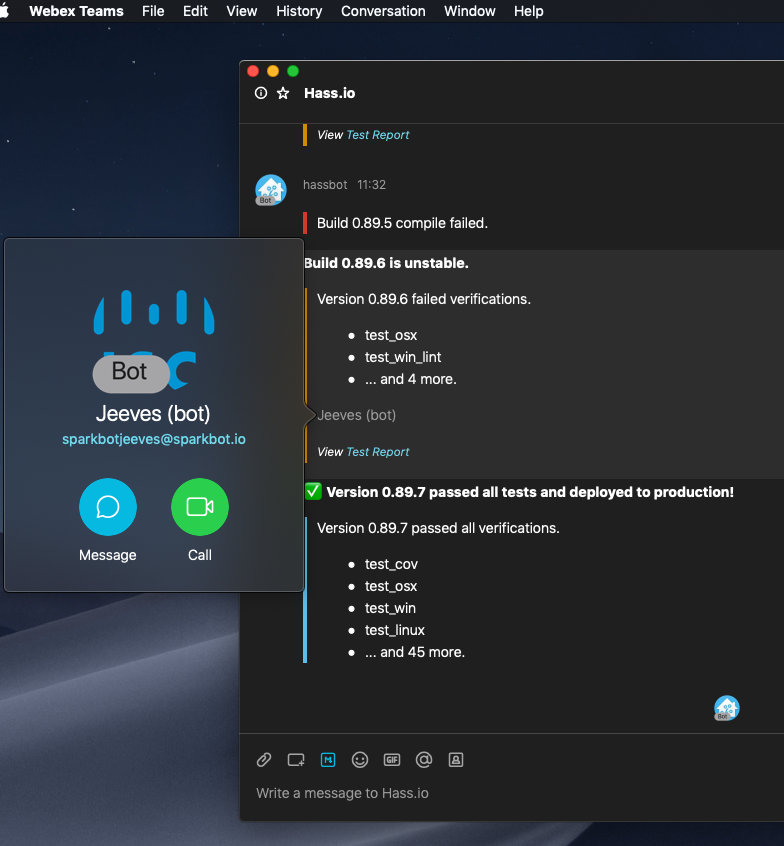
macOS 客户端中显示的富文本。

以下是上述截图的自动化配置:


# 富文本示例 1。
# 显示带有红色横幅的单行消息
- alias: "Notify On Build Failing"
  triggers:
    - trigger: webhook
      webhook_id: build_failed
  actions:
    - action: notify.cisco_webex_teams_notify
      data:
        message: "<blockquote class=danger>Build 0.89.5 compile failed."


# 富文本示例 2。
# 显示带有黄色横幅的标题和多行消息,
# 包含列表、人员提及和链接
- alias: "Notify On Build Unstable"
  triggers:
    - trigger: webhook
      webhook_id: build_unstable
  actions:
    - action: notify.cisco_webex_teams_notify
      data:
        title: "<strong>Build 0.89.6 is unstable.</strong>"
        message: "<blockquote class=warning>Version 0.89.6 failed verifications.
        
        <ul>
          <li> test_osx
          <li> test_win_lint

          <li>... and 4 more.
        </ul>
        <p><@personEmail:sparkbotjeeves@sparkbot.io></p>
        <p><small><i>View <a href='https://demo/testReport/'>Test Report</a></i></small><br></p>
        "

# 富文本示例 3。
# 显示带有蓝色横幅的标题和多行消息,
# 包含列表、人员提及和链接
- alias: "Notify On Build Passing"
  triggers:
    - trigger: webhook
      webhook_id: build_passed
  actions:
    - action: notify.cisco_webex_teams_notify
      data:
        title: "<strong>✅ Version 0.89.7 passed all tests and deployed to production!</strong>"
        message: "<blockquote class=info>Version 0.89.7 passed all verifications.
        
        <ul>
          <li> test_cov
          <li> test_osx
          <li> test_win
          <li> test_linux
          <li>... and 45 more.
        </ul>
        "

以下是允许的 HTML 标签和属性列表:

标签更多信息
<@personEmail:email@examplecompany.com>用于通过电子邮件地址标记其他 Webex Team 用户。
<a>定义超链接。允许属性 href
<blockquote>定义从其他来源引用的部分。允许属性 class,可取值 dangerwarninginfoprimarysecondary
<b>定义粗体文本。
<strong>定义重要文本。
<i>定义斜体文本。
<em>定义强调文本。
<pre>定义预格式化文本。
<code>定义计算机代码片段。
<br>定义单行换行。
<p>定义段落。
<ul>定义无序列表。
<ol>定义有序列表。
<li>定义列表项。
<h1><h3>定义 HTML 标题。
name:
  description: 设置可选参数 `name` 允许创建多个通知器。通知器将绑定到 `notify.NOTIFIER_NAME` 动作。
  required: false
  default: notify
  type: string
token:
  description: 您的应用(机器人)令牌。
  required: true
  type: string
room_id:
  description: 房间 ID。
  required: true
  type: string

要使用通知,请参阅自动化入门页面