

Button
按钮实体是一个可以向设备或服务触发事件/动作但从 Home Assistant 角度看保持无状态的实体。
它可以比作真实的瞬时开关、按钮或其他形式的无状态开关。
This button is a building block integration that cannot be added to Home Assistant directly, but is used and provided by other integrations. A building block integration differs from a typical integration that connects to a device or service. Instead, other integrations use this button building block to provide entities, actions, and other functionality that you can use in your automations or dashboards. If one of your integrations uses this building block, this page documents the functionality the button building block offers.
按钮的状态
按钮实体是无状态的,也就是说,它不能像普通开关实体那样具有 on 或 off 等状态。
按钮的状态是一个时间戳,显示上次在 Home Assistant UI 中或通过动作按下按钮的日期和时间。
 显示开发者工具中按钮实体状态的截图。
此外,实体还可以有以下状态:
- 不可用:实体当前不可用。
- 未知:状态尚未知。
因为 Home Assistant 中按钮实体的状态是时间戳,每次按下按钮时它都会改变。这意味着我们可以在按钮实体的任何状态变化时触发自动化,这实际上捕获了按钮被按下的时间。我们不需要使用实际的时间戳值;我们只关心状态改变了,这表示按钮被按下:
动作
按钮实体公开一个动作:Settings > Developer tools > Actions
可以调用此动作为该实体触发按钮按下。
设备类别
A device class is a measurement categorization in Home Assistant. It influences how the entity is represented in the dashboard. This can be modified in the customize section. For example, different states may be represented by different icons, colors, or text.
截图显示了代表按钮不同设备类别的不同图标:
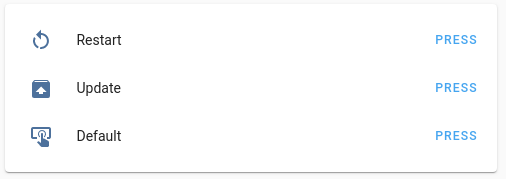 设备类别图标示例。
按钮支持以下设备类别:
- None:通用按钮。这是默认值,不需要设置。
- identify:按钮用于识别设备。
- restart:按钮重启设备。
- update:按钮更新设备的软件。