

垂直堆叠卡片
垂直堆叠卡片允许您将多张卡片分组,使它们始终位于同一列中。
 展示如何编辑仪表盘并自定义垂直堆叠卡片的录屏。
要将垂直堆叠卡片添加到您的用户界面:
- 在屏幕右上角,选择编辑
按钮。 - 如果这是您第一次编辑仪表盘,会出现 编辑仪表盘 对话框。
- 通过编辑仪表盘,您将接管该仪表盘的控制权。
- 这意味着当新的仪表盘元素可用时,它将不再自动更新。
- 一旦您接管了控制权,就无法让这个特定的仪表盘恢复自动更新。不过,您可以创建一个新的默认仪表盘。
- 要继续,请在对话框中选择三个点
菜单,然后选择 接管控制。
- 如果这是您第一次编辑仪表盘,会出现 编辑仪表盘 对话框。
- 向仪表盘添加卡片并自定义动作和功能。
YAML 配置
当您使用 YAML 模式,或只是更喜欢在 UI 的代码编辑器中使用 YAML 时,可以使用以下 YAML 选项。
type:
required: true
description: "vertical-stack"
type: string
title:
required: false
description: 堆叠的标题。
type: string
卡片:
required: true
description: 卡片列表。
type: list
示例
基本示例:
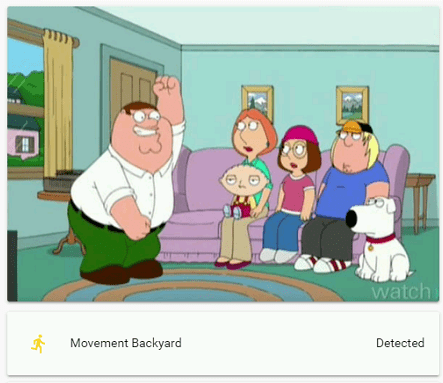 堆叠中的图片卡片和实体卡片。
垂直堆叠卡片与水平堆叠卡片的组合:
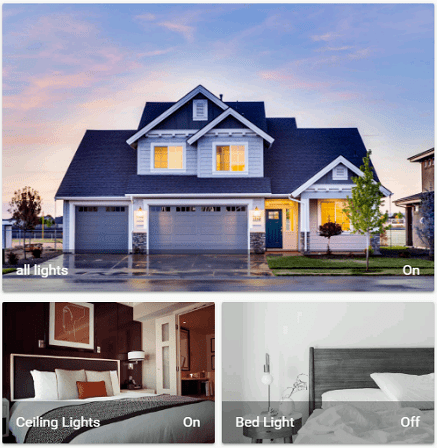 使用垂直堆叠和水平堆叠创建网格布局。