

实体过滤卡片
实体过滤卡片允许您定义一个实体列表,仅在它们处于特定状态时进行跟踪。这非常适合显示您忘记关闭的灯光,或仅在人们在家时显示人员列表。
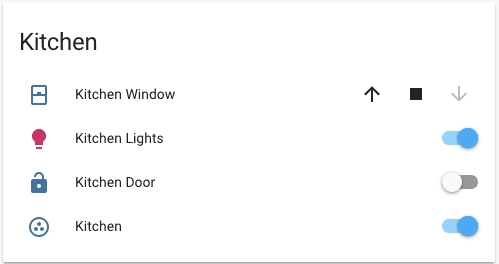 实体过滤卡片截图。
这种卡片还可以与其他支持多个实体的卡片一起使用,例如 glance 或 picture-glance。默认情况下,它使用实体卡片模型。
要将此卡片添加到您的用户界面:
- 在屏幕右上角,选择编辑按钮
。 - 如果这是您第一次编辑仪表盘,会出现 编辑仪表盘 对话框。
- 编辑仪表盘意味着您将接管该仪表盘的控制权。
- 这意味着当新的仪表盘元素可用时,它将不再自动更新。
- 一旦接管,您无法将这个特定仪表盘恢复为自动更新状态。不过,您可以创建一个新的默认仪表盘。
- 若要继续,请在对话框中选择三点菜单
,然后选择 接管控制。
- 如果这是您第一次编辑仪表盘,会出现 编辑仪表盘 对话框。
- 将卡片添加到仪表盘并自定义动作和功能。
YAML 配置
此卡片只能通过 YAML 配置。
type:
required: true
description: "entity-filter"
type: string
entities:
required: true
description: 实体 ID 或 entity 对象的列表,见下文。
type: list
conditions:
required: false
description: 要检查的条件列表。请参阅可用条件。*
type: list
state_filter:
required: false
description: (旧版)表示状态或筛选器的字符串列表。请参阅可用旧版筛选器。*
type: list
card:
required: false
description: 传递给渲染结果卡片的额外选项。
type: map
default: 实体卡片
show_empty:
required: false
description: 当筛选结果没有返回任何实体时,允许隐藏卡片。
type: boolean
default: true
*必须提供其中一项(conditions 或 state_filter)。
实体选项
如果您将实体定义为对象而不是字符串(通过在实体 ID 前添加 entity:),您可以添加更多自定义和配置:
entity:
required: true
description: 实体 ID。
type: string
type:
required: false
description: "设置自定义卡片类型:custom:my-custom-card。"
type: string
name:
required: false
description: 覆盖友好名称。
type: string
icon:
required: false
description: 覆盖图标或实体图片。您可以使用任意 Material Design Icons 图标。图标名称前需添加 mdi: 前缀,例如 mdi:home。
type: string
default: 实体域图标
secondary_info:
required: false
description: "显示附加信息。可选值:entity-id、last-changed。"
type: string
format:
required: false
description: "状态应如何格式化。目前仅用于时间戳传感器。有效值为:relative、total、date、time 和 datetime。"
type: string
conditions:
required: false
description: 要检查的条件列表。请参阅可用条件。*
type: list
state_filter:
required: false
description: (旧版)表示状态或筛选器的字符串列表。请参阅可用旧版筛选器。*
type: list
*只会应用一种筛选器:优先使用 conditions,若未提供则使用 state_filter。
条件选项
您可以指定多个 conditions。在这种情况下,实体只有在匹配所有条件时才会显示。
状态
测试实体是否具有指定状态。
condition:
required: true
description: "state"
type: string
state:
required: false
description: 实体状态或 ID 等于此值。可以包含状态数组。*
type: [list, string]
state_not:
required: false
description: 实体状态或 ID 不等于此值。可以包含状态数组。*
type: [list, string]
entity:
required: false
description: 用于测试状态条件的可选实体 ID。如果未提供,则会测试当前显示实体的状态。
type: string
*必须提供其中一项(state 或 state_not)。
数值状态
测试实体状态是否符合阈值条件。
condition:
required: true
description: "numeric_state"
type: string
above:
required: false
description: 实体状态或 ID 高于此值。*
type: string
below:
required: false
description: 实体状态或 ID 低于此值。*
type: string
entity:
required: false
description: 用于测试数值状态条件的可选实体 ID。如果未提供,则会测试当前显示实体的数值状态。
type: string
*至少需要一项(above 或 below),也可以同时使用以定义一个区间。
屏幕
按屏幕尺寸指定实体的可见性。UI 中提供了一些屏幕尺寸预设,但您也可以在 YAML 中使用任意 CSS 媒体查询。
condition:
required: true
description: "screen"
type: string
media_query:
required: true
description: 用于检查哪些屏幕尺寸允许显示实体的媒体查询。
type: string
用户
按用户指定实体的可见性。
condition:
required: true
description: "user"
type: string
users:
required: true
description: 可查看实体的用户 ID(可在用户配置页面找到的唯一十六进制值)。
type: list
与
指定必须同时满足所有条件。
condition:
required: true
description: "and"
type: string
conditions:
required: false
description: 要检查的条件列表。请参阅可用条件。
type: list
或
指定至少满足其中一个条件。
condition:
required: true
description: "or"
type: string
conditions:
required: false
description: 要检查的条件列表。请参阅可用条件。
type: list
旧版状态筛选器
字符串筛选器
仅显示家中处于活动状态的开关或灯光。
使用 glance 仅显示在家的人:
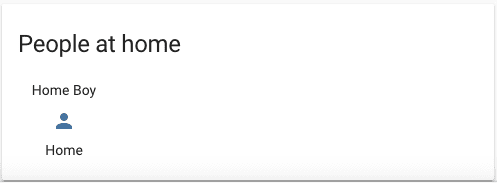 实体过滤卡片与 glance 卡片组合使用的截图。
您也可以指定多个 state_filter 条件。在这种情况下,实体只要匹配任意一个条件就会显示。
如果您将 state_filter 定义为对象而不是字符串,则可以像下文所述那样为筛选器添加更多自定义选项。
运算符筛选器
测试实体状态是否符合所应用的 operator。
value:
required: true
description: 表示状态的字符串。
type: string
operator:
required: true
description: 用于比较的运算符。可以是 ==、<=、<、>=、>、!=、in、not in 或 regex。
type: string
attribute:
required: false
description: 用于替代状态的实体属性。
type: string
示例
显示所有在家或在工作地点的人。
为单个实体指定筛选器。
对实体属性使用正则表达式筛选。下面的正则表达式会查找长度为 1 位、且数字在 0 到 7 之间的值(因此会显示今天或未来 7 天内的节假日),并将这些节假日作为实体显示在实体过滤卡片中。